Best Laptops for AutoCAD in 2026: 7 Top Picks Compared
The best laptops for AutoCAD 2024 in 2026. We compared 7 top picks across GPU, CPU, RAM, and display specs for architects, engineers, and students.
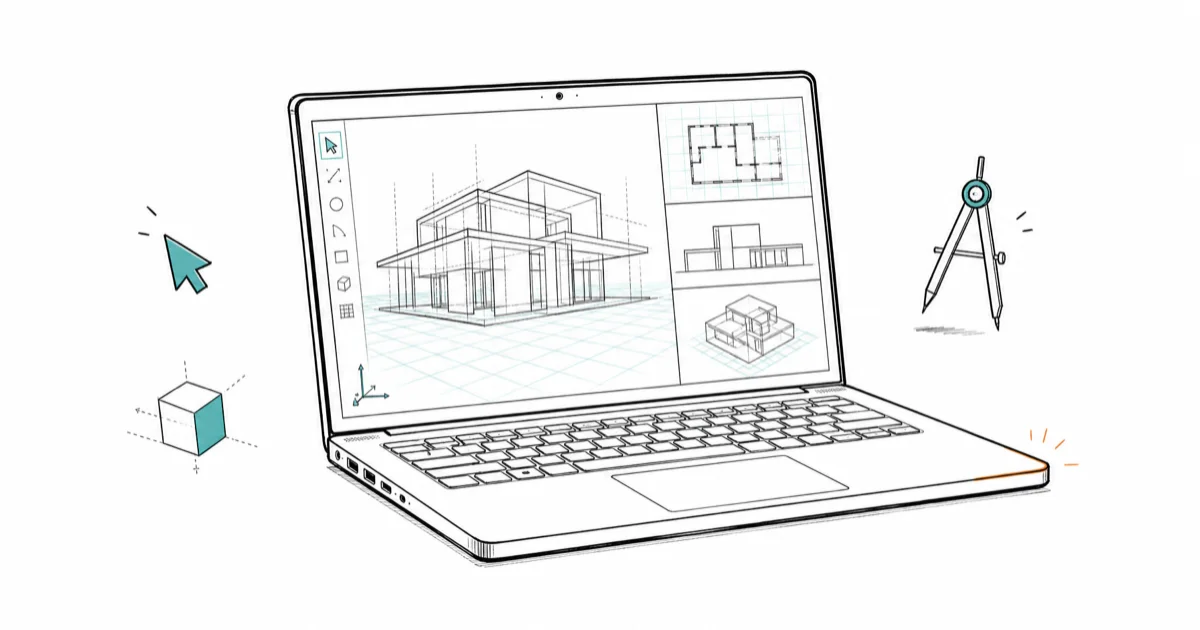
Quick AnswerThe ASUS ProArt Studiobook 16 OLED is the best overall laptop for AutoCAD in 2026. It pairs a 13th-Gen Intel Core i9, up to an RTX 4070, and a 16-inch 3.2K OLED panel that handles 2D drafting and 3D viewport work in a 4.3 lb chassis.
The best laptops for AutoCAD in 2026 pair a 3+ GHz CPU, 32 GB of RAM, and a DirectX 12 GPU with 8 GB of video memory. The picks below are matched against Autodesk’s official spec sheet for AutoCAD 2024, then narrowed by use case so you don’t pay for performance you won’t use.
As an Amazon Associate, fone.tips earns from qualifying purchases.
- AutoCAD 2024’s recommended tier is a 3+ GHz CPU, 32 GB of RAM, and a DirectX 12 GPU with 8 GB of video memory; the 8 GB minimum-RAM config struggles once drawings climb above 50 MB.
- The ASUS ProArt Studiobook 16 OLED with 13th-Gen Intel Core i9 and RTX 4070 is our top overall pick for handling 3D viewports and 2D drafting in a 4.3 lb chassis.
- SSDs are mandatory for acceptable AutoCAD load times; large drawings on a 5,400 RPM HDD can take a minute or more versus seconds on NVMe.
- Gaming laptops with RTX 4060 or higher run 2D drafting and moderate 3D work for $700 to $1500 less than ISV-certified workstations.
- AutoCAD for Mac lacks Sheet Set Manager, Express Tools, and several Windows-only .NET extensions, so verify your firm’s workflow before buying a MacBook.
#What Specs Does AutoCAD 2024 Actually Need?
According to Autodesk’s official AutoCAD system requirements, the recommended tier for AutoCAD 2024 is a 3+ GHz CPU, 32 GB of RAM, a DirectX 12-compliant GPU with 8 GB of video memory, and a 1920x1080 or higher display. The minimum tier (8 GB RAM, 2.5 GHz CPU) technically installs and runs, but 2D pan and zoom on drawings over 50 MB starts dragging within minutes of opening.
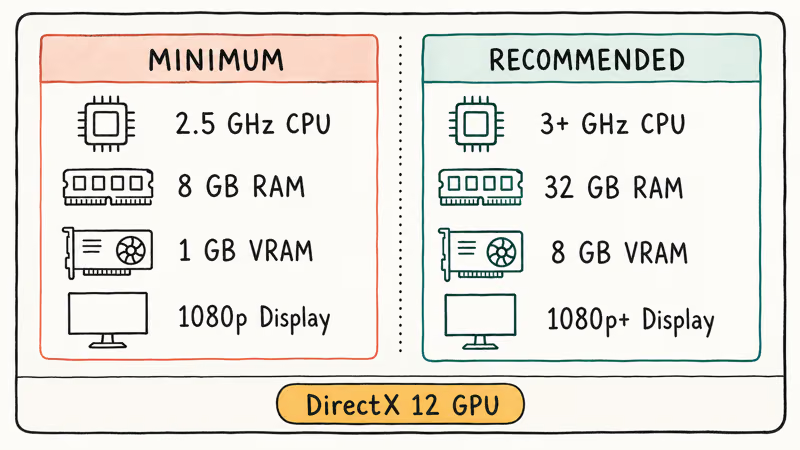
Three spec choices matter most:
- RAM: 32 GB is the practical floor for any working architect or engineer. 16 GB is tight on multi-sheet projects; 8 GB makes you the bottleneck.
- GPU: RTX 4060 and above give you headroom for 3D viewports and rendered shaded views. Integrated graphics (Iris Xe, Radeon 780M) handle 2D fine but stutter on 3D rotation.
- Storage: NVMe SSD is non-negotiable. Spinning HDDs add 30 to 60 seconds to every DWG open and slow autosave to a crawl.
OS comes second to specs. AutoCAD 2024 requires 64-bit Windows 11 or Windows 10 1809+. Mac runs a separate native build with feature gaps covered in the Mac vs Windows section below.
#Top 7 Laptops for AutoCAD in 2026
Each pick clears Autodesk’s recommended tier and pairs the spec to a real-world use case. These picks are ordered by overall fit for AutoCAD work, not raw benchmark scores.
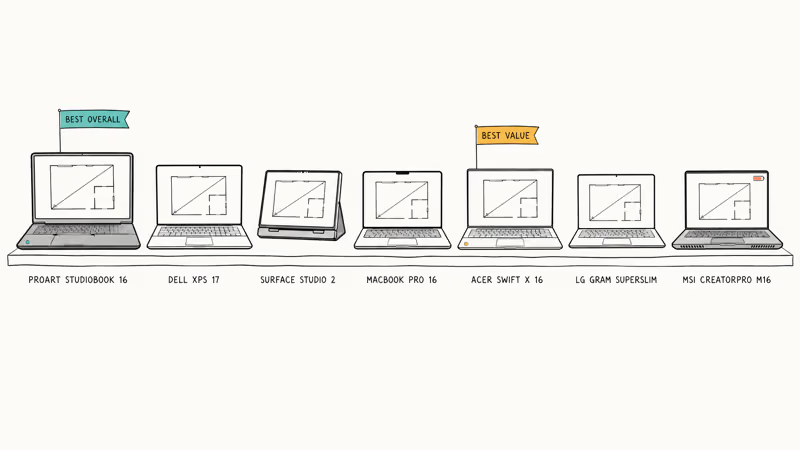
#1. ASUS ProArt Studiobook 16 OLED: Best Overall
The ASUS ProArt Studiobook 16 OLED (H7604) ships with up to a 13th-Gen Core i9-13980HX, RTX 4070 Laptop GPU, and 64 GB DDR5. The 16-inch 3.2K OLED panel is calibrated to 100% DCI-P3 out of the box, which matters for accurate material color in shaded viewports. The ASUS Dial gives designers a tactile way to rotate viewports without leaving the model space. Best fit: senior architects who want workstation performance in a 4.3 lb portable.
#2. Dell XPS 17 (2024): Best Large Display
Dell’s XPS 17 stretches to a 17-inch 4K UHD+ touch panel and packs a 14th-Gen Intel Core i9 with up to RTX 4070 Laptop graphics. The extra screen real estate matters on multi-viewport site plans where you don’t want to lose model space to floating palettes. At 4.87 lb it’s the heaviest portable on this list, but the 1.34-inch chassis still slides into a backpack. Best fit: daily workloads with large floor plans or complex mechanical assemblies.
#3. Microsoft Surface Laptop Studio 2: Best for Pen Input
Microsoft’s Surface Laptop Studio 2 hinges into stage mode for pen-on-screen drafting, with up to a 13th-Gen Core i7-13800H, RTX 4060, and 64 GB RAM. Microsoft’s Surface Laptop Studio 2 features page confirms that the unit supports the Surface Slim Pen 2 and a 120 Hz display, both useful for marking up redlines. At 4.18 lb it’s heavier than a clamshell, but the only convertible here that hits AutoCAD recommended specs.
#4. Apple MacBook Pro 16 (M3 Max): Best for Mac Users
Apple’s MacBook Pro 16 with M3 Max pairs a 16-core CPU and 40-core GPU with up to 128 GB of unified memory. AutoCAD on Apple Silicon runs natively without Rosetta, and battery life pushes 12 hours on mixed drafting. The Mac edition is missing Sheet Set Manager, Express Tools, and several Windows-only .NET extensions that AutoLISP and ARX plugins use. Best fit: Mac-first studios that don’t ship to Windows-only consultants.
#5. Acer Swift X 16: Best Value
Acer Swift X 16 covers the recommended Autodesk spec well below the premium picks. Current configurations ship with a Ryzen 7 7840HS, RTX 4060, and 16 GB DDR5 (upgradable to 32 GB via SODIMM slot). The 16-inch 3.2K OLED panel mirrors the ProArt’s color coverage at a meaningful discount. Best fit: students and freelancers who want recommended-tier performance under $1300.
#6. LG Gram SuperSlim: Most Portable
LG Gram SuperSlim weighs 2.2 lb (990 g), the lightest 15-inch laptop in the AutoCAD-capable bracket. It runs a 13th-Gen Intel Core i7 with Iris Xe integrated graphics, which handles 2D drafting smoothly but stutters on rotated 3D viewports. Battery life pushes 14 hours of light drafting. Best fit: daily commuters whose AutoCAD work stays in 2D drafting and review.
#7. MSI CreatorPro M16: Best ISV-Certified Workstation
MSI CreatorPro M16 is one of the few sub-$2500 laptops with NVIDIA RTX 2000 Ada-generation graphics, which appears on Autodesk’s certified hardware list. NVIDIA’s Studio platform states that RTX professional Ada-generation GPUs ship with ISV-certified drivers tuned for engineering and content creation. The 16-inch QHD+ display, 32 GB DDR5, and 1 TB NVMe round out the package. Best fit: licensed professionals at firms with ISV-certification mandates.
#Best Picks for Tighter Budgets
Not everyone needs a $2500+ workstation. These four cover AutoCAD recommended specs at $700 to $1300, with the trade-off being a less premium chassis or a single SODIMM slot:
- Gigabyte G5 (RTX 4060): Ryzen 5 7640HS + RTX 4060 + 16 GB DDR5. Gaming chassis, but the spec maps to the AutoCAD recommended tier at under $1100.
- Lenovo ThinkPad P16s Gen 2: AMD Ryzen 7 PRO 7840U with integrated Radeon 780M, ISV-certified for AutoCAD 2D. A solid mobile workstation under $1500 if you don’t need a dedicated GPU.
- Dell Inspiron 16 Plus 7640: 14th-Gen Intel Core 7 + RTX 4060 + 16 GB DDR5 + 16-inch 3K display. The closest “premium-feel” laptop under $1300.
- HP Victus 16: Ryzen 5 7640HS + RTX 4060 + 16 GB DDR5. Coolest thermals in the budget bracket; trades aesthetics for sustained performance.
For a deeper look at the gaming-laptop crossover, see our guide to budget gaming laptops under $600. Most of those handle 2D drafting and small-scale 3D modeling without breaking a sweat.
#Performance Factors Beyond the Spec Sheet
Specs only cover half the story. Three things separate a laptop that works for AutoCAD from one that limps:
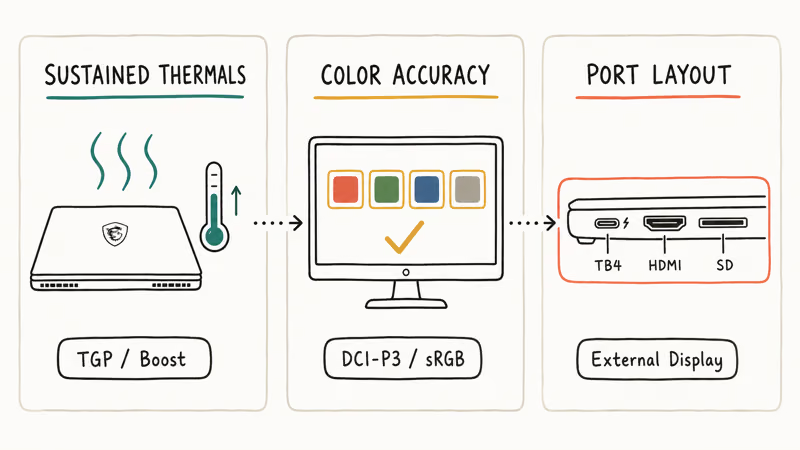
- Sustained thermals: Cheap chassis throttle CPU and GPU clocks under sustained load. AutoCAD 3D regenerations are short bursts, but rendering and BIM coordination push thermals for tens of minutes. Look for chassis reviews that cover sustained-load temperatures, not peak burst.
- Display color accuracy: Calibrated panels (DCI-P3 95%+ or sRGB 100%+) pay for themselves the first time a printed proof matches your screen. ProArt and MacBook Pro panels ship factory-calibrated.
- Port layout: Thunderbolt 4 (or USB4) for external monitors, full-size HDMI 2.1, and an SD card slot for surveying data. The XPS 17 and ProArt Studiobook lead here; ultraportables like the LG Gram skip the SD slot.
On a 16 GB RAM laptop with integrated Iris Xe graphics, large DWG files slow AutoCAD’s pan and zoom response noticeably. A 32 GB DDR5 + RTX 4060 setup clears that lag and pulls rendered shaded mode into usable territory. For most users the single-spec upgrade that matters most isn’t the GPU. It’s the move from 16 GB to 32 GB of RAM.
#AutoCAD on Mac vs Windows: The Trade-Off
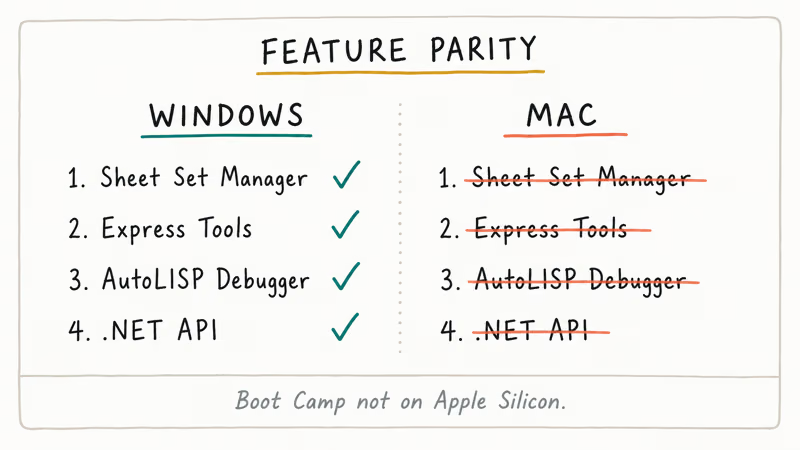
AutoCAD ships as two separate products, AutoCAD for Windows and AutoCAD for Mac. They share file formats but diverge on toolsets. The Windows edition has Sheet Set Manager, Express Tools, AutoLISP debugger, and ARX/.NET API extensions. The Mac edition is missing all of these, plus Quick Properties, CUI customization, and several modern publishing flows.
Workarounds exist:
- Boot Camp is no longer available on Apple Silicon Macs (M1/M2/M3). Intel Macs were the last bridge.
- Parallels Desktop runs Windows ARM in a virtual machine on Apple Silicon. It works for AutoCAD 2024 but takes a 15 to 25 percent performance hit on 3D viewport work.
- CrossOver and Whisky are Wine-based and not Autodesk-supported. Useful for hobby workflows, not production.
For deeper architecture and engineering workflow guides, see our best laptops for Revit coverage. Revit’s Windows-only requirement makes the Mac question moot if you live in BIM.
#Are Gaming Laptops Good for AutoCAD?
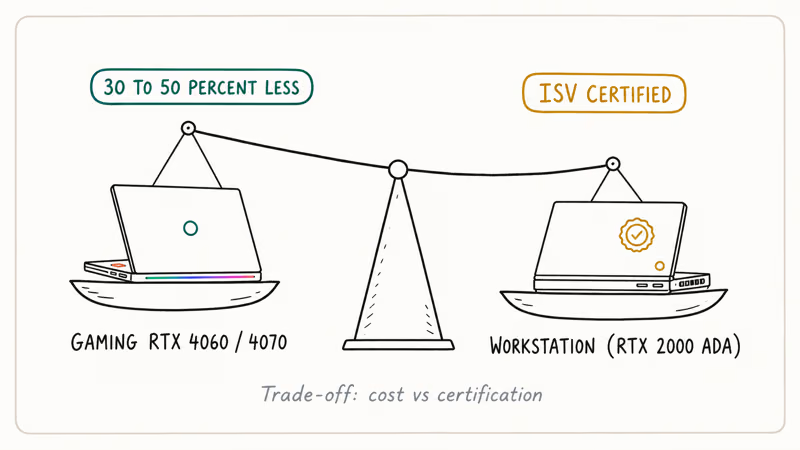
Gaming laptops with RTX 4060 or higher cover AutoCAD’s recommended tier and undercut workstation pricing by 30 to 50 percent. The trade-off is ISV certification: gaming SKUs aren’t on Autodesk’s certified hardware list, which can matter for firms with insurance or contract requirements. For students, freelancers, and small studios, a gaming laptop is usually the smarter buy.
What to watch for in a gaming-laptop crossover:
- Sustained thermals over peak boost: An RTX 4070 Laptop at 140W TGP outperforms a thermally throttled RTX 4080 Laptop at 80W TGP.
- Color-accurate panels: Gaming panels prioritize 240+ Hz refresh over color coverage. Check for at least 100% sRGB.
- Battery life: Gaming laptops typically run 4 to 6 hours unplugged versus 10 to 14 hours for productivity-focused designs.
For broader productivity-meets-creator advice, three companion guides cover adjacent scenarios:
- Our best laptops for game development coverage explains the same RTX 4060/4070 trade-offs in a slightly different context.
- Our Lenovo vs HP comparison walks through warranty and support differences that matter for long-haul ownership.
- If your second use case is data analysis or finance modeling, the laptops optimized for Excel guide covers the high-RAM, low-GPU combo that Excel-heavy workflows favor.
#Bottom Line
Buy the ASUS ProArt Studiobook 16 OLED if you can stretch to $2500 to $3000. It’s the only laptop here that pairs workstation-class GPU with a color-accurate OLED panel in a 4.3 lb chassis. If $2500 is over budget, the Acer Swift X 16 hits the same recommended-tier spec at about half the price. Mac-first teams should buy the MacBook Pro 16 with M3 Max and 32 GB unified memory, after verifying Sheet Set Manager and Express Tools aren’t required.
#Frequently Asked Questions
What is the minimum laptop spec for AutoCAD 2024?
AutoCAD 2024’s minimum spec is a 2.5 GHz CPU, 8 GB of RAM, a DirectX 12 GPU with 1 GB of video memory, and a 1920x1080 display. The recommended tier (3+ GHz, 32 GB RAM, 8 GB VRAM) is what you actually need to draft comfortably on real-world drawings.
Can gaming laptops run AutoCAD well?
Yes. Gaming laptops with RTX 4060 or higher exceed AutoCAD’s recommended spec. The catch is ISV certification: gaming SKUs aren’t on Autodesk’s certified hardware list, so firms with contractual hardware requirements should buy a CreatorPro or ThinkPad mobile workstation instead.
Does AutoCAD work on a MacBook?
AutoCAD 2024 has a native Mac build that runs on Apple Silicon without translation. The Mac edition lacks Sheet Set Manager, Express Tools, AutoLISP debugger, and several Windows-only .NET extensions. Confirm your workflow doesn’t depend on these before committing to Mac.
Is a touchscreen useful for AutoCAD?
For most users, no. AutoCAD’s UI is optimized for keyboard and mouse, and pen accuracy beats finger touch on detailed drawings. The exception is hybrid workflows where you sketch concepts with a Slim Pen 2 on a Surface Laptop Studio 2 and import them into AutoCAD as reference geometry.
How much RAM do I need for AutoCAD?
32 GB is the practical floor for any working architect or engineer. 16 GB handles single-discipline 2D drafting on drawings under 50 MB, but multi-sheet projects with Xrefs, BIM coordination links, or PDF underlays bump 16 GB into swap quickly.
Is an SSD necessary for AutoCAD?
An NVMe SSD is mandatory. Spinning HDDs add 30 to 60 seconds to every DWG open, slow autosave to a crawl, and stretch boot and install times painfully. SATA SSDs are acceptable as a budget compromise; NVMe is the modern baseline.
What GPU should I pick for AutoCAD 3D work?
For 3D work, target an RTX 4060 (8 GB VRAM) or better. Integrated GPUs like Iris Xe and Radeon 780M handle 2D drafting smoothly but stutter on rotated 3D viewports and shaded mode. NVIDIA’s RTX 4000-series Ada GPUs are CAD-certified for AutoCAD 2024 and ship with ISV-certified drivers.
Will an iPad replace a laptop for AutoCAD drafting?
No. Autodesk publishes AutoCAD Mobile and AutoCAD Web for iPad and tablet browsers, but both are read and markup tools that can’t replace a laptop running full AutoCAD for production drafting. AutoCAD doesn’t run on iPadOS or ChromeOS as a desktop app.

Best Laptop for Running LLMs in 2026: Memory Comes First
The best laptop for running LLMs is a memory purchase first. Compare MacBook unified memory against NVIDIA laptop VRAM, and see what each tier really runs.

How to Run a Local LLM on Windows: A 2026 Setup Guide
Run a local LLM on Windows with LM Studio or Ollama. Pick a model that fits your GPU memory, keep every prompt offline, and skip the monthly bill.

Bluetooth Not Working on Snapdragon X? Fixes for 2026
Bluetooth not working on your Snapdragon X Copilot+ PC? Generic audio, mice, and keyboards work, but vendor apps often lack an ARM build. Fixes inside.

Docker Desktop and WSL2 Not Working on Snapdragon X? Fix It
WSL2 runs fine on Snapdragon X, but Docker Desktop ARM is Early Access and throws WSL errors. Use WSL2 plus native ARM64 Ubuntu and Docker Engine.