How to Wear AirPods Pro Correctly for a Secure Fit
Learn how to wear AirPods Pro for a secure fit, choose among current ear tip sizes, and run the correct seal test for AirPods Pro 1, 2, or 3.
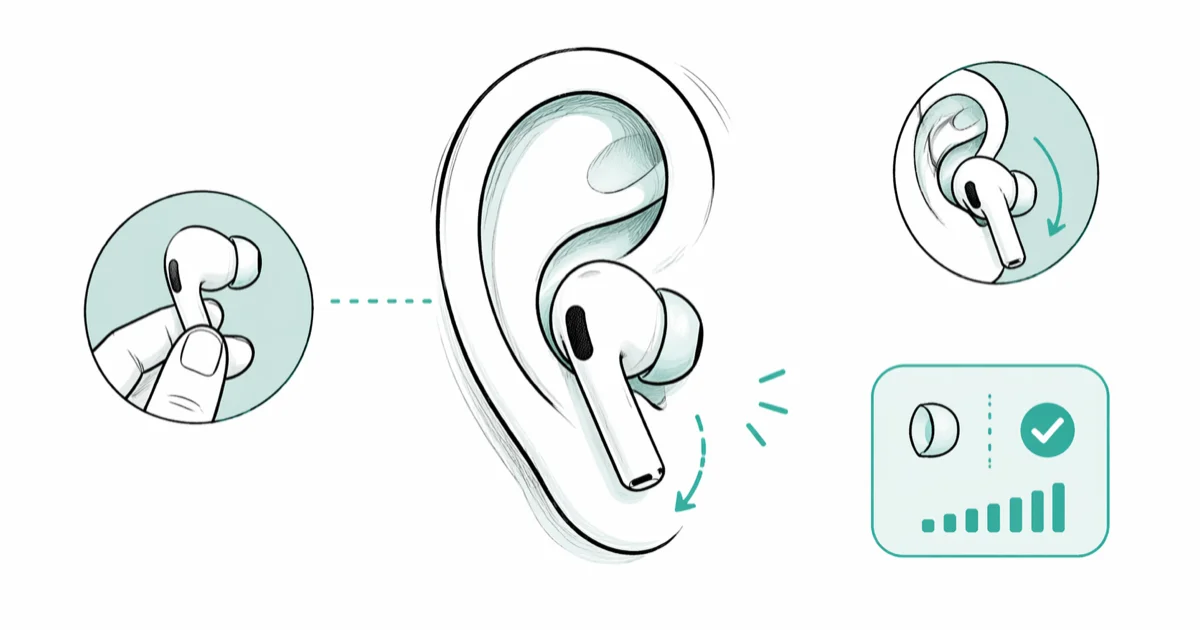
Quick AnswerHold the stem, angle the ear tip into your ear canal, then rotate the AirPod downward until it feels secure. Use Ear Tip Fit Test on AirPods Pro 1 or 2, or Acoustic Seal Test on AirPods Pro 3, to check the seal.
Getting the fit right on AirPods Pro changes everything. The wrong insertion technique is usually why people think they don’t fit, not because of unusual ear anatomy.
- AirPods Pro come with three to five tip sizes depending on the model; medium is installed by default
- Rotating the AirPod downward after insertion (stem toward chin) creates a better seal than pushing straight in
- The model-specific seal test detects sound leakage in about 15 seconds
- It’s normal to use different tip sizes on each ear since canals often differ
- If ANC sounds weak, a poor acoustic seal is almost always the cause
#What’s the Correct Way to Put In AirPods Pro?
Most people insert AirPods Pro like regular earbuds, pushing straight in. That doesn’t work here. The silicone tip needs to form a sealed chamber, and that only happens with the right angle and rotation.
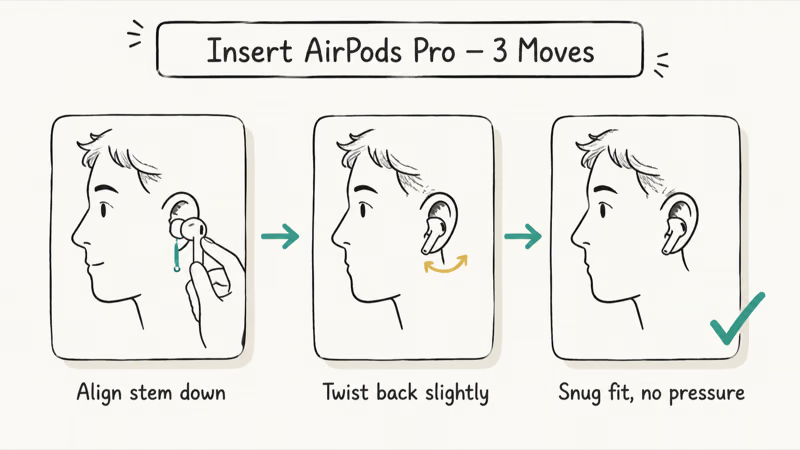
Here’s the method that works on most ear shapes: hold the AirPod by the stem, orient the tip toward your ear canal at a slight inward angle, then press it in gently while angling the stem slightly outward. After that, rotate the AirPod downward until the stem points roughly toward your chin, and give it a small final push to seat the tip fully.
You’ll feel a slight pressure change when the seal locks in. That’s what you want.
The stem should point down along your jawline, not horizontally or forward.
The rotation matters because the silicone tip needs to seat against the canal wall. Pushing straight in often leaves the AirPod loose or angled forward.
#How Do You Know Which Ear Tip Size to Use?
AirPods Pro ship with medium tips installed. Depending on the model, Apple includes three to five sizes. Use the built-in seal test for your model to check your choice.
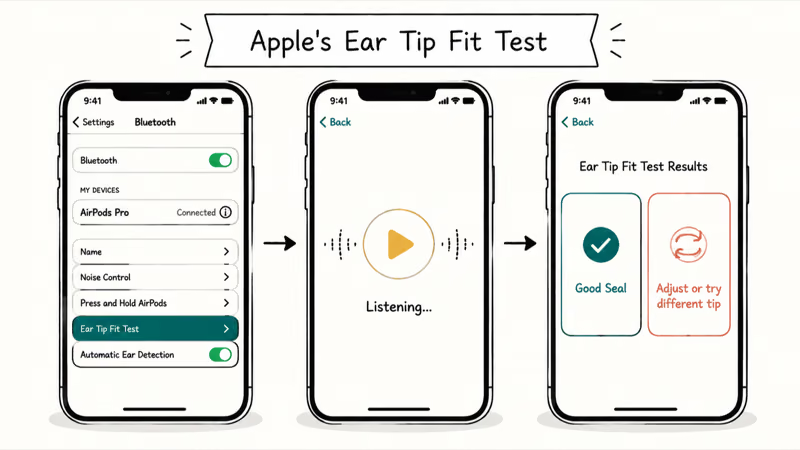
Go to Settings > Bluetooth and tap the “i” icon next to your AirPods Pro. Select Ear Tip Fit Test for AirPods Pro 1 or 2. On AirPods Pro 3 with iOS or iPadOS 26 or later, select Acoustic Seal Test. Insert both AirPods, tap Continue, and play the test tone. Each ear gets its own result in about 15 seconds.
If you see “Try a different ear tip” for either ear, swap sizes and retest. Keep going until both sides show “Good Seal.”
You need a larger tip when: the AirPod wiggles when you move your jaw, bass sounds hollow, or ANC sounds much weaker than expected. You need a smaller tip when you feel discomfort or pressure after just a few minutes of wear.
Using different sizes on each ear is completely normal. A lot of people end up with medium on one side and large on the other.
According to Apple’s current AirPods Pro ear tip guide, the test name changes by model, each model includes three to five tip sizes, and your left and right ears may need different sizes.
#Seal Tests by AirPods Pro Model
AirPods Pro 1 and 2 use Ear Tip Fit Test. AirPods Pro 3 uses Acoustic Seal Test on iOS or iPadOS 26 or later. Both tests live in the Bluetooth details screen and play a short sound to check the seal, but the model-specific names matter when you’re following the menus or helping someone with a different generation.
#Why a Good Seal Makes All the Difference
A poor seal doesn’t just reduce comfort. It disables the core features that make AirPods Pro worth their price.
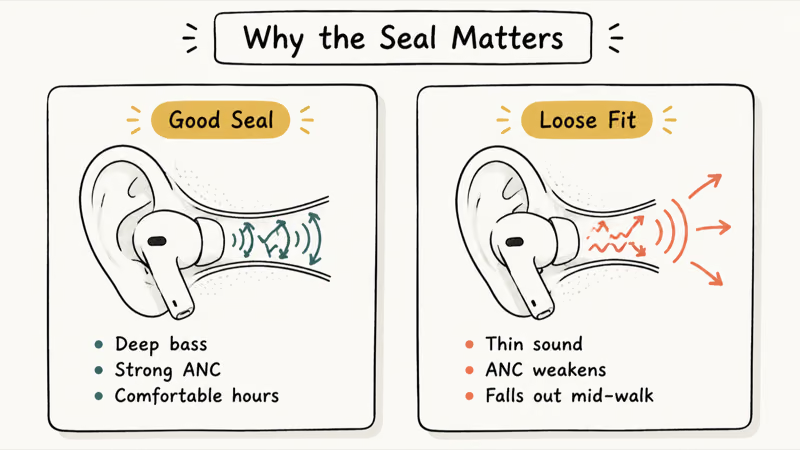
Active noise cancellation works by measuring outside noise with external microphones, then generating an opposite sound wave to cancel it. That system requires a complete acoustic seal to function. Sound leaking around the tip breaks the feedback loop, and you’ll hear far more ambient noise than you should.
Spatial Audio adjusts the sound field based on head movement tracked by the gyroscope and accelerometer. A loose fit shifts the AirPod’s position when you move your head, breaking the spatial cues and making audio sound like it’s inside your skull rather than around you.
If your AirPods sound muffled or are much quieter than expected, run the fit test first. Both symptoms are common results of a bad seal, and fixing the fit takes under a minute.
#Keeping AirPods Pro Secure During Workouts
The stock silicone tips hold for most people during everyday activity. Running and high-impact workouts are a different matter, and three options actually help.
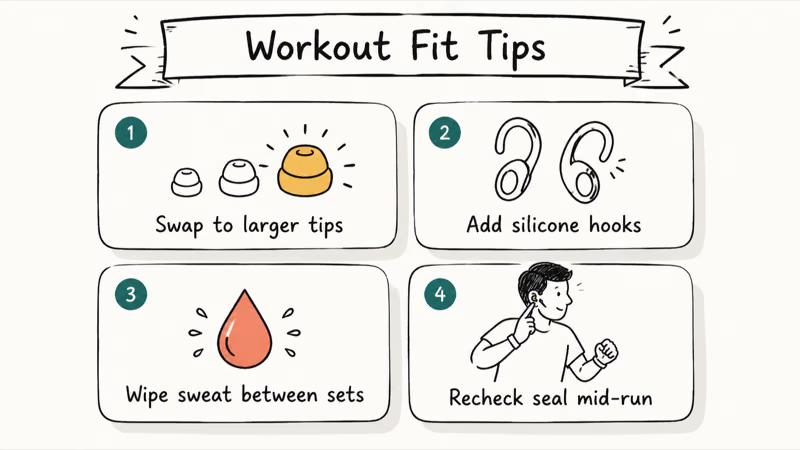
Wear them upside down. Flip the AirPods so the stem points up. The stem rests against your upper ear and the tragus holds it in place. This can add stability during high-impact movement, though it may feel odd at first.
Switch to memory foam tips. Third-party foam tips compress for insertion, then expand inside the canal.
Add ear hooks. These clip onto the AirPod stem and loop over the top of your ear, adding mechanical stability without affecting the seal.
For travel, including using AirPods Pro on a plane, confirming your seal before boarding saves real frustration mid-flight.
#Cleaning AirPods Pro Ear Tips Without Damaging Them
Silicone tips collect earwax fast. Dirty tips affect fit, sound quality, and hygiene.
Remove the tips by gripping the base and pulling straight off. No twisting needed.
Rinse the detached tips with water, wipe them with a lint-free cloth, and make sure they’re completely dry before reattaching them. Don’t run the AirPods themselves under water.
According to Apple’s current AirPods Pro cleaning guide, mesh-cleaning steps differ by model, and you shouldn’t use sharp objects or abrasive materials.
Replace your tips when they lose elasticity, fail the fit test consistently, or show visible cracking. If your AirPods are hurting your ears, worn-out silicone is sometimes the cause since degraded tips change shape and create unexpected pressure points.
#Bottom Line
The AirPods Pro fit is almost always fixable. Use the rotation insertion method, run the correct seal test, and work through the included tip sizes before concluding they don’t fit. Different sizes on each ear is normal. For workouts, try the upside-down orientation or foam tips before buying ear hooks.
A proper seal unlocks the noise cancellation, Spatial Audio, and call quality that justify the price.
If issues persist after fixing the fit, check whether your AirPods are connecting correctly since pairing problems can sometimes look like fit issues. You might also get better sound by adjusting the AirPods Pro equalizer settings once the seal is confirmed.
#Frequently Asked Questions
What direction should the AirPods Pro stem point?
The stem should point toward your chin when properly seated. If it’s sticking out horizontally or angled forward, the AirPod isn’t rotated far enough. Insert the tip first, then rotate downward until the stem runs along your jawline. This is the single best visual indicator of whether the fit is correct.
Can I use different ear tip sizes on each ear?
Yes. It’s more common than people expect. Run the seal test for your model on each ear to find the right combination.
Why does my active noise cancellation sound weak?
Weak ANC is often a seal problem. Run the seal test for your model and try another tip size if either ear needs adjustment. The ANC system relies on precise sound measurement at the ear canal, and leakage reduces its effectiveness.
Can I wear AirPods Pro while sleeping?
It’s not recommended. Most people find extended wear uncomfortable, and lying on your side puts pressure on the AirPod that shifts the seal. Battery drain is also faster since the microphones stay active overnight. Short naps on transit are fine.
How often should I replace the ear tips?
Most silicone tips last 6 to 12 months with daily use. Replace them when the seal test fails consistently, the silicone feels stiff or tacky, or you see visible cracking. Apple currently lists two sets of AirPods Pro 3 ear tips for $9.99; buy the pack made for your AirPods Pro model.
Why do my AirPods Pro keep falling out during workouts?
The two most likely causes are incorrect insertion and the wrong tip size. Work through the rotation method and the seal test for your model first. If they still fall out during high-impact activity, try wearing them upside down with the stem pointing up. That approach costs nothing and works better than ear hooks for most people.
Do AirPods Pro work with Android phones?
Yes, basic Bluetooth audio works on Android. Apple-only features such as the model-specific seal tests, Siri, Spatial Audio personalization, and Apple Account device switching require a compatible iPhone or iPad. The insertion method stays the same regardless.
Is it bad to wear AirPods Pro for several hours straight?
Listening too loudly for too long can damage your hearing. Turn on Headphone Notifications so your Apple device can alert you at the recommended 7-day exposure limit. According to Apple’s Headphone Notifications support page, one example is exposure over 80 dB for 40 hours total within 7 days.
Mac mini M6 vs M5 Pro: Which Model Should You Buy?
Mac mini M6 vs M5 Pro compared on price, memory, ports, displays, and real workloads. Find the better 2026 Mac mini for your desk and budget.
Apple Siri Settlement: Who Qualifies and How to Claim
Apple's $250 million Siri settlement covers iPhone 15 Pro and iPhone 16 models bought June 2024 to March 2025. See who qualifies and how claims work.
iOS 26.6.1 Security Update: What Apple Fixed and Who Gets It
Apple released iOS 26.6.1 on August 17 with 29 security fixes, including an IPSec interception bug. See what it patches, who gets it, and how to update.
iPhone Adaptive Power: How It Works and When to Use It
Learn how iPhone Adaptive Power works, which models support it, what it changes, and when Low Power Mode is still the better battery-saving choice.