AirPods Hurt My Ears: 7 Fixes for Pain and Pressure
AirPods hurting your ears? 7 proven fixes including repositioning, ear tip swaps, and break timing. Works for all AirPods models on iOS 17 and later.
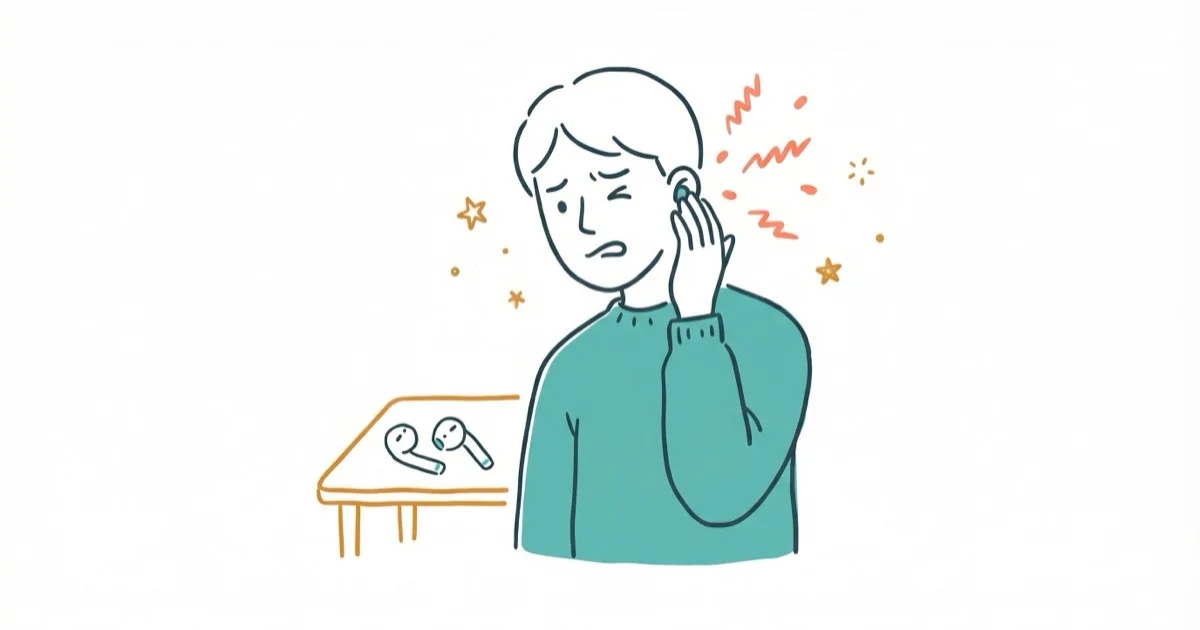
Quick AnswerAirPods cause ear pain when they sit too deep in the ear canal, use the wrong tip size, or are worn too long without breaks. Reposition them so the stem points straight down without pushing the bud inward, and switch to a smaller ear tip on AirPods Pro.
Ear pain from AirPods almost always comes down to fit, not a defect. The ache usually traces back to how deep the bud sits, the wrong tip size, or wearing them too long without a break.
Repositioning alone clears up the discomfort in most cases, and choosing the right ear tip size handles most of the rest.
- Inserting AirPods too deep is the top cause of pain and pressure
- Standard AirPods use a rigid one-size shell that won’t fit every ear
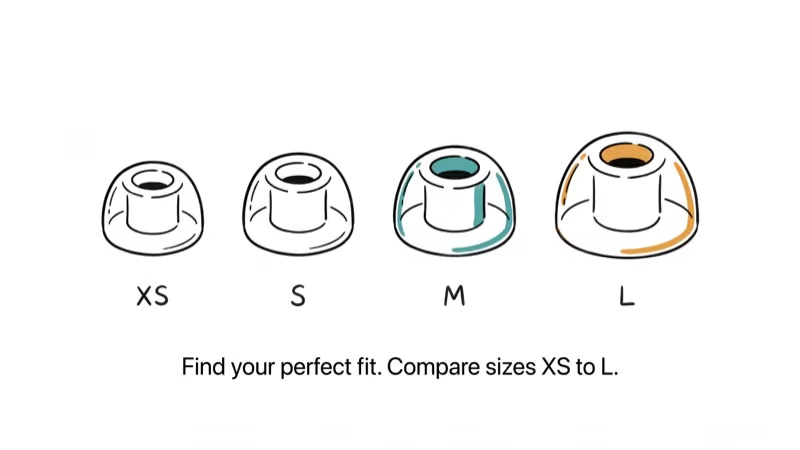
- AirPods Pro 2 include four tip sizes (XS, S, M, L) for a custom fit
- Take 10-minute breaks every hour to prevent the dull ache from building
- Persistent redness at the contact points may signal a material allergy
#Why Do AirPods Hurt Your Ears?
Standard AirPods (1st, 2nd, and 3rd gen) have a hard plastic shell with zero size options. If your ear canals run narrower than average, the shell presses directly against the canal walls. Wider canals create the opposite problem: the AirPods feel loose, so you push them deeper to keep them seated, and that deeper position causes soreness within 30 to 60 minutes.
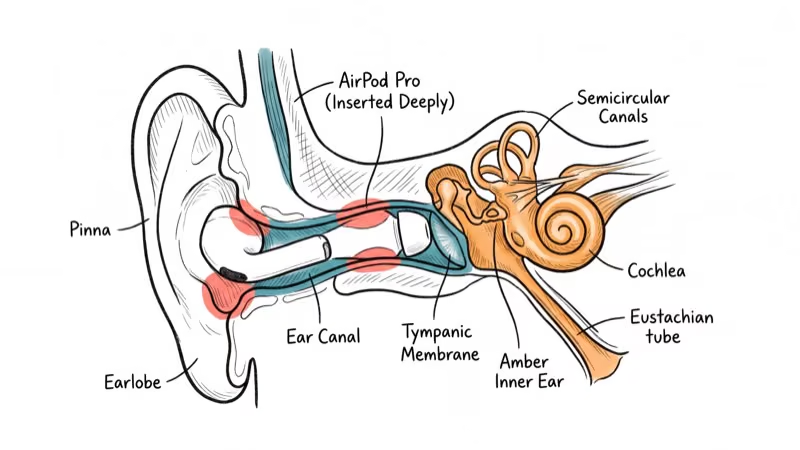
The wrong fit compounds over time. What feels OK at minute five becomes painful at minute forty-five because the constant pressure reduces blood flow to the compressed tissue.
AirPods Pro reduce this issue with silicone tips, but the wrong tip size still hurts. A tip that’s too large compresses the canal opening, and one that’s too small forces you to jam the bud in further for a seal. Apple’s ear tip guide confirms that AirPods Pro 2 ships with 4 silicone sizes (Apple Support), yet the Ear Tip Fit Test frequently recommends switching from the pre-installed medium.
#Repositioning for Comfort
Correct positioning makes a bigger difference than tip size for most people. Hold the AirPod by the stem and place the speaker end at the opening of your ear canal without pushing it inward. Rotate the stem so it points straight down and slightly forward, following the angle of your jaw.
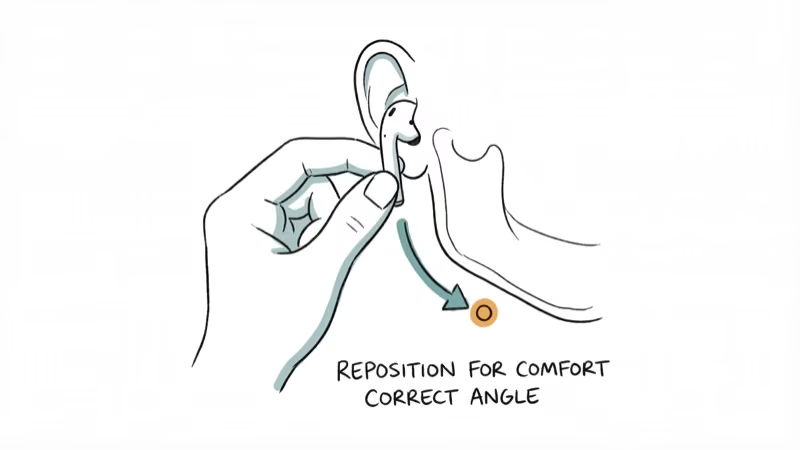
The AirPod should rest in your ear, not plug it.
For AirPods Pro, insert just far enough to feel a light seal. If you notice a “full” or underwater sensation, you’ve pushed too deep. The correct position stays comfortable for hours, while a too-deep fit often starts aching within the first hour on the same pair.
If your AirPods won’t connect to your device at all, fix that pairing issue first. Pain troubleshooting only matters once the audio works.
#How to Find the Right Ear Tip Size?
AirPods Pro 2 ship with four tip sizes: extra-small, small, medium, and large. The right size seals gently without any squeeze, and Apple built a test directly into iOS to help you find it.
- Go to
Settings>Bluetoothand tap the i icon next to your AirPods Pro - Tap Ear Tip Fit Test, then Continue, and hit Play
The test runs a short audio clip and analyzes how well each tip seals your canal. A “Good Seal” result means the size works. If it says “Adjust or Try a Different Tip,” go one size down first. You might need different sizes for each ear, which is completely normal.
Third-party foam tips from brands like Comply or SpinFit are worth trying if all four silicone sizes feel off. Foam conforms to the specific shape of your canal and distributes pressure more evenly than silicone, so the pressure sensation tends to ease during longer listening sessions compared to the stock tips.
If you’re also struggling with AirPods sounding muffled, the wrong tip size could be causing both problems at once.
#Wear Time and Break Schedule
Properly fitted AirPods stay comfortable for about 90 minutes for most people. After that point, the cartilage and skin in your outer ear fatigue from sustained contact pressure, and blood flow at the pressure points starts to drop.
Remove your AirPods for at least 10 minutes every hour.
This rest period lets the tissue decompress and blood flow return to normal. During back-to-back calls, use one AirPod at a time and alternate ears every 30 minutes. Volume plays a role too: the WHO’s safe listening guidelines recommend staying below 85 decibels to prevent hearing damage, and keeping volume under 60% of your device’s maximum is a solid benchmark.
If one AirPod sounds louder than the other, you might be pushing volume higher to compensate. That speeds up ear fatigue on both sides.
#Cleaning AirPods to Prevent Irritation
Dirty AirPods absolutely contribute to ear discomfort. Earwax, dead skin cells, and bacteria build up on the plastic surface and inside the silicone tips over time. Wearing them pushes that buildup back into your ear canal, which triggers irritation and itching that mimics a fit problem.
Wipe the plastic body with a dry lint-free cloth after every session. For AirPods Pro, pull off the silicone tips and rinse them under lukewarm water. Takes under 2 minutes.
If you notice itching, fluid drainage, or muffled hearing alongside the pain, that combination points toward an outer ear infection (otitis externa) rather than a fit issue. See a doctor before trying more repositioning tricks. People dealing with AirPods that keep cutting out often find that debris clogging the speaker mesh causes both the audio dropouts and the temptation to push the buds deeper for better sound.
#AirPods Material Allergies
Uncommon, but documented in medical literature. A case series published in the Journal of the American Academy of Dermatology found that acrylates in AirPods Pro housing can trigger allergic contact dermatitis. Nickel traces in the plastic are another known allergen, and the symptoms show up differently than a standard fit problem.
The giveaway? Redness, itching, or a rash at the exact spots where the AirPods touch your skin. Not deeper inside the canal. These symptoms appear within a day or two and clear up once you stop wearing them.
Try AirPods Pro with silicone tips as a first step since the tips create a barrier between the plastic housing and your ear canal skin. Third-party silicone covers that wrap the entire AirPod body cost $8 to $12 and eliminate direct skin contact entirely. If symptoms continue even with covers, switch to a different earbud brand or consider earbuds designed for small ears that use hypoallergenic materials.
#When to Return or Replace AirPods
If repositioning, tip swaps, breaks, and cleaning haven’t solved the problem after a week of consistent effort, the AirPods may not match your ear anatomy. That’s not a defect. Some ear canals just don’t work with in-ear buds from any brand, and Apple offers a reasonable return window to accommodate that reality.
According to Apple’s return and refund policy, you can return opened AirPods within 14 days of purchase from the Apple Store or apple.com as long as they’re in good condition.
If your AirPods also show symptoms like not flashing white during pairing or the case not charging properly, mention those functional problems when contacting Apple Support. Hardware issues and comfort complaints handled together have a much better chance of getting a free replacement, since support staff treat a single combined ticket as a defect pattern rather than two separate user complaints, which often get triaged as user error and closed without action or refund.
For some ear shapes, over-ear headphones or bone-conduction models are the only pain-free option, and the most comfortable headphones spread pressure across a much wider surface area while skipping the ear canal entirely.
#Bottom Line
Start by repositioning your AirPods so they rest at the canal opening without being pushed deep inside. Run Apple’s Ear Tip Fit Test and try a smaller size. Take 10-minute breaks every hour. If pain persists after a week of trying these adjustments, see a doctor to rule out infections or contact allergies before deciding to switch brands.
#Frequently Asked Questions
Are AirPods Pro more comfortable than standard AirPods?
For most people, yes. AirPods Pro have silicone tips in four sizes (XS, S, M, L on Pro 2) that conform to your ear canal shape, while standard AirPods use a single rigid plastic shell. The silicone creates less friction against the skin during jaw movement too.
Can wearing AirPods cause permanent ear damage?
Not from the physical contact of wearing them. Noise-induced hearing loss from high volume is the real concern, and the WHO caps safe exposure at 85 decibels for 8 hours daily.
Why do AirPods hurt after an hour but feel fine at first?
Short-term pressure doesn’t bother your ear canal cartilage. After about 60 minutes, sustained compression restricts blood flow at the contact points and the tissue begins to ache. A 10-minute break resets the blood flow.
Do ear hooks reduce AirPods ear pain?
Yes. Hooks cost $5 to $15 and redistribute weight from the canal to the outer ear.
Can AirPods trigger headaches?
Tight-fitting AirPods can trigger tension headaches around the temples and behind the ears by compressing the ear canal nerves. Active noise cancellation on AirPods Pro adds a separate low-frequency pressure sensation that some people perceive as headache-inducing, especially with ANC set to maximum in a quiet room. Switching to Transparency mode or turning off ANC usually resolves it within minutes.
What earbuds should you try if AirPods don’t fit?
Samsung Galaxy Buds, Beats Fit Pro, and Jabra Elite all use different shell shapes than AirPods. Beats Fit Pro are the best pick for Apple users since they support Find My and automatic device switching.
How can you tell if ear pain is from AirPods or an infection?
AirPods pain fades within minutes of removing them. Infection pain persists, may include fluid drainage from the ear canal, and often makes hearing feel muffled on one side. Fever alongside ear pain is another strong indicator of infection rather than a fit problem.
Does noise cancellation make ear pressure worse?
It can. ANC generates opposing sound waves that cancel ambient noise, and some people perceive this as a vacuum or fullness. Switching to Transparency mode eliminates it immediately.

Mac mini M6 vs M5 Pro: Which Model Should You Buy?
Mac mini M6 vs M5 Pro compared on price, memory, ports, displays, and real workloads. Find the better 2026 Mac mini for your desk and budget.

Apple Siri Settlement: Who Qualifies and How to Claim
Apple's $250 million Siri settlement covers iPhone 15 Pro and iPhone 16 models bought June 2024 to March 2025. See who qualifies and how claims work.

iOS 26.6.1 Security Update: What Apple Fixed and Who Gets It
Apple released iOS 26.6.1 on August 17 with 29 security fixes, including an IPSec interception bug. See what it patches, who gets it, and how to update.

iPhone Adaptive Power: How It Works and When to Use It
Learn how iPhone Adaptive Power works, which models support it, what it changes, and when Low Power Mode is still the better battery-saving choice.