How to Use Tinder Without Facebook: Phone & Email Sign-In
Skip the Facebook account when joining Tinder. Use phone or email sign-in, unlink an existing account, and tighten privacy in under five minutes.
Quick AnswerYou don't need a Facebook account to use Tinder. Sign up with your phone number, the default option since August 2018, or with an email address and password, then verify with the code Tinder sends.
Tinder hasn’t required a Facebook account since 2018, and most new sign-ups today happen with a phone number on your own phone. You can build a fresh Tinder profile in about five minutes without ever tapping the Facebook button. If you’re starting fresh, the phone path is the shortest. If you already have a Facebook-linked Tinder account, you can swap the connection for a phone number or email inside the app’s settings page and keep every match.
- Tinder removed the Facebook-only sign-up requirement in August 2018, so phone or email is the official path today
- The phone flow needs a real mobile number that can receive an SMS code; most VoIP and landline numbers get rejected
- Email sign-up is offered alongside phone on iOS and Android, with a one-time code sent to your inbox
- An existing Facebook-linked Tinder account can be switched to phone or email in Account Settings without losing matches
- Tinder still requires users to be 18 or older, and fake-identity or impersonation accounts violate the Community Guidelines
#Does Tinder Still Require a Facebook Account?
No. Tinder dropped the Facebook-only sign-up rule in August 2018. The phone-number flow is now the first option on the welcome screen of the iOS and Android apps.
The Facebook button is still there, but it’s optional now.
According to Tinder’s Help Center, new accounts can be created with a mobile number or, in most regions, an email address. The old Facebook hook used to import photos and your birthday automatically. Today you upload photos yourself and type the date. That’s a small extra step in exchange for keeping Tinder fully out of your Facebook profile, your friends list, and your page likes.
The app now leads with the phone-number screen. The “Continue with Facebook” option may sit behind a secondary “More options” link depending on your app version and region.
So if you only want to use your own Tinder account, the path is straightforward. Skip the Facebook button.
#How to Sign Up for Tinder Using a Phone Number
The phone flow is short. The welcome screen offers Log in with phone number as the primary option on current app versions.
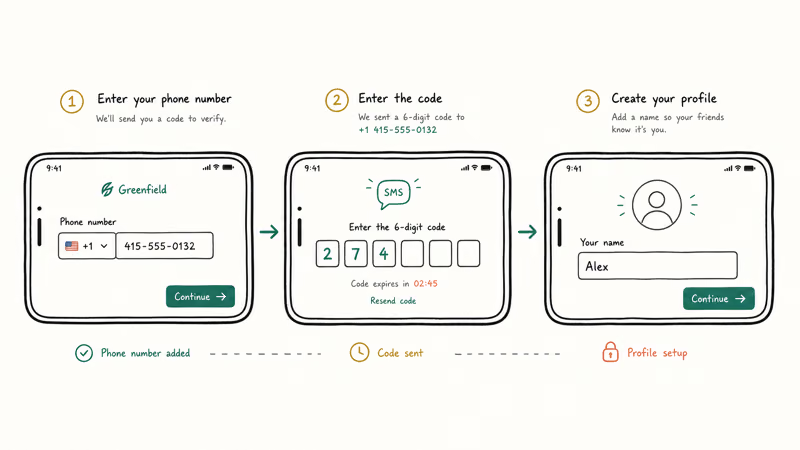
Here’s the usual sequence:
- Open the Tinder app. Tap Log in with phone number on the welcome screen.
- Pick your country code, then type your mobile number. Use a real, personal SIM you own.
- Wait for the 6-digit code. It usually arrives within a minute, but carrier delays can happen.
- Enter the code, then add your email address. Tinder asks for one even on the phone path so it can send password-reset notices.
- Set your first name, birth date (you must be 18+), and gender.
- Add at least two photos and grant location permission. Tinder needs location to show profiles nearby, and the app won’t load without it.
Done.
A note on VoIP and virtual numbers. Tinder blocks most VoIP numbers because they’re often used for spam or for opening multiple accounts. If your number gets rejected, you’ll need a real carrier line. Sign-ups with someone else’s number can also leave your account under review, so use only your own phone number.
#Sign In to Tinder With Email Instead
Email sign-up sits next to the phone option on the welcome screen on most app versions. The flow looks almost identical.
- Tap Log in with email (or Continue with email, depending on app version).
- Type your address. Tinder sends a one-time code to that inbox.
- Enter the code, set a password if prompted, then fill in your name, birthday, and photos.
If the email code doesn’t show up, check the spam folder, since Tinder’s verification messages sometimes route there on Gmail.
Email-only suits anyone who doesn’t want a phone number on a dating app.
Tinder may still ask for a phone number later for two-factor verification, especially if the account ever gets flagged for unusual activity. It’s not mandatory on day one, but the prompt can appear after a few sessions.
#How to Unlink Facebook From an Existing Tinder Account
Already on Tinder through Facebook? You can switch authentication methods without losing your matches, messages, or photos. Everything is stored on the Tinder account itself, not on Facebook.
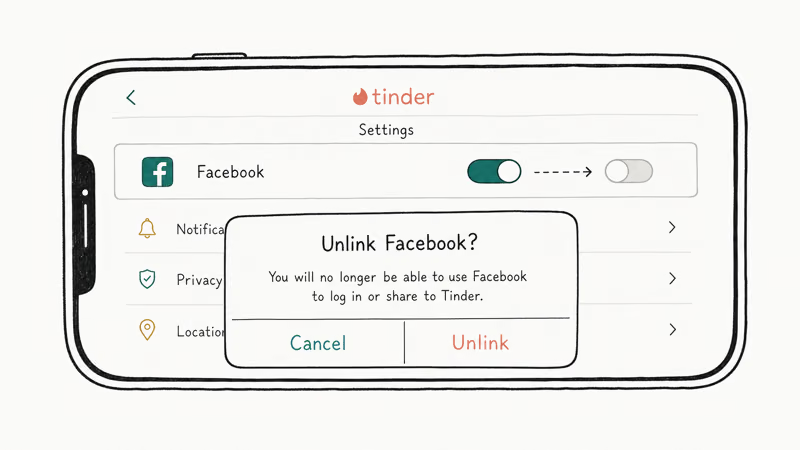
To unlink:
- Open Tinder. Go to
Profile>Settings>Account Settings. - Find the Login Email or Phone Number row. If it’s empty, tap it, then verify with the code Tinder sends.
- Once a phone or email is attached, scroll to Connected Accounts or Apps. Tap Disconnect Facebook.
That keeps your profile and conversations intact. Next time you open the app, you’ll log in with the phone or email instead.
You should also revoke Tinder’s access on the Facebook side. According to Facebook’s apps and websites settings page, each connected app can be removed from your active list by clicking the pencil icon and choosing Remove. Doing both sides stops Tinder from re-linking automatically if you ever tap the Facebook option again by mistake.
If you only do one side, the other can quietly restore the link. Do both.
#Privacy Settings to Tighten on Tinder
Whether you signed up by phone, email, or Facebook, the next step is locking down what other users see on your profile, what data Tinder pulls from your device, and how the platform uses your information for ad targeting.
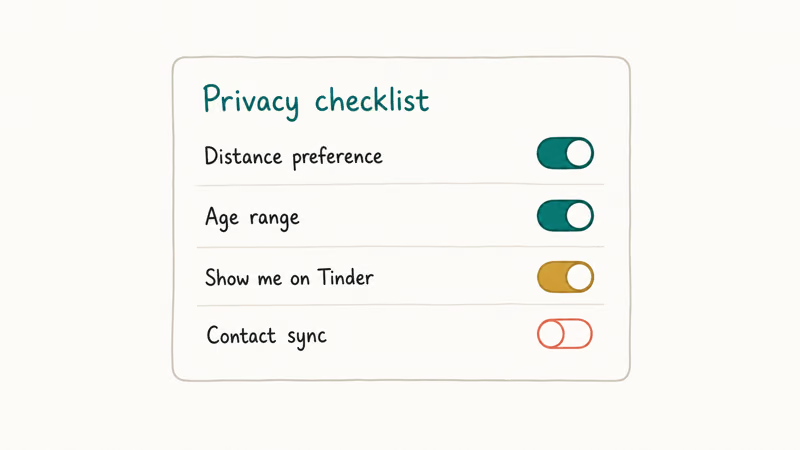
Open Tinder’s settings menu inside the app. Under Discovery & Profile, check these toggles:
- Show me on Tinder — turn this off to pause swiping while keeping your account.
- Distance and age range — narrow these so your profile shows up to fewer people.
- Show my age / Show my distance, switch either off to hide that detail.
Under Privacy, you can also limit data sharing for personalized ads. Tinder’s Privacy Policy states that account information is retained for a period after deletion to handle legal, security, and fraud requirements, so if you plan to fully detach the account, give it lead time before any sensitive event such as a job change.
On iOS, Settings > Tinder > Tracking lets you switch “Allow Tracking” off so Tinder can’t read the IDFA used for cross-app ads. Apple’s App Tracking Transparency documentation confirms that apps must ask before tracking you across other companies’ apps and websites, and turning the toggle off here forces the no-tracking answer for Tinder.
The Android equivalent lives under Settings > Privacy > Ads > Delete advertising ID on current Android versions. It’s a quick extra privacy step if you want to reduce ad tracking.
If you want to sanity-check what others can see right now, you can run a Tinder profile search against your own profile. It’s a quick way to spot anything you forgot to hide.
#What Should You Know Before Signing Up Without Facebook?
A Facebook-free Tinder account is still a public dating profile. Platform rules apply, and the consequences are the same.
Three rules to keep in mind:
| Rule | Detail |
|---|---|
| Minimum age | 18 or older |
| Account count | One account per person |
| Identity | Real identity, no impersonation or false age |
Table: Tinder account rules that apply regardless of sign-up method (source: Tinder Community Guidelines).
According to Tinder’s Community Guidelines, the minimum age to create an account is 18, and members must be honest in their conversations and on their profiles. The full rules live on the official Tinder Community Guidelines page. Creating an account under a fake identity, pretending to be someone else, or harassing other users can result in a permanent ban and, depending on local privacy law, legal exposure.
Phone- or email-only sign-up isn’t anonymity. Tinder still stores your number or email, IP, device IDs, photos, and location. The phone or email path just skips one extra data source: your Facebook friends list, page likes, and connected photos.
If your account does get suspended along the way, our walkthrough on how to get unbanned from Tinder covers the appeal process step by step.
#Bottom Line
For a brand new sign-up, use Log in with phone number on the welcome screen. It’s the default Tinder flow, the SMS verification clears in under a minute on a real carrier SIM, and the Facebook button never enters the picture.
For an existing Facebook-linked account, open Tinder’s settings page under Account Settings, attach a phone or email, then disconnect Facebook from both Tinder and the Facebook apps panel. You’ll keep every match and message. Tinder doesn’t post to your Facebook timeline in 2026, and it hasn’t for years, so nothing is left behind on the Facebook side once the connection is removed.
If you want more reach after the switch, a few related guides cover what comes next:
- Tinder Boost timing guide: when to spend a Boost for the most visibility.
- Tinder Gold worth-it breakdown: whether the paid tier earns its monthly fee.
- Unmatch walkthrough: how to cut someone loose cleanly without leaving a trail.
#Frequently Asked Questions
Can you create a new Tinder account without Facebook in 2026?
Yes. Open the Tinder app, tap Log in with phone number, and verify with the SMS code. Email sign-up is available on most accounts too. Neither flow requires a Facebook account at any step.
Does Tinder still post anything to my Facebook profile?
No.
Tinder doesn’t write posts, photos, or activity updates to your Facebook timeline, and it hasn’t for years. Even when you log in with Facebook, Tinder only reads basic profile data to populate your Tinder side, and nothing flows the other direction.
Will I lose my matches if I unlink Facebook from an existing Tinder account?
No, provided you attach a phone number or email first. Your matches, messages, photos, and bio live on Tinder.
Is the phone-number flow safer than the Facebook flow?
It shares less third-party data. Facebook sign-in hands Tinder your friends list, age, and likes, plus a record linking your Facebook identity to a dating app. Phone sign-up shares only your mobile number, plus the IP and device IDs Tinder reads anyway. Neither path is anonymous, but the phone option leaves a smaller cross-platform trail.
Can I use a Google Voice or VoIP number to sign up?
Tinder blocks most VoIP and virtual numbers. Use a real carrier SIM.
What if the SMS code doesn’t arrive?
Wait about a minute, then tap Resend code. If the second attempt also fails, switch country codes or try a different carrier. Tinder rate-limits resends, so don’t hammer the button, since that can trigger a short lockout.
Can I sign up to Tinder fully anonymously?
Not in any meaningful sense. Skipping Facebook removes one data source, but Tinder still ties the account to your phone number or email and stores device and location data. If matches that you do make suddenly vanish, our note on why Tinder messages disappear explains the common reasons.
Does Tinder share my phone number with other users?
No. Other users only see your first name, age, photos, bio, and the optional details you choose to display.

Google Messages Error 3100: Why RCS Is Broken on Galaxy
Google Messages RCS error 3100 hits Galaxy owners after phone or carrier switches. Google told 9to5Google a fix is coming. Here's what actually helps.

Is This Bank App Real? Spot a Fake App on Your Home Screen
A bank app can land on your home screen from a web page with no install warning. Learn the checks that tell a real banking app from a phishing web app.

Apps Crashing After iOS 27 Update? Fix Order (2026)
Apps crashing after the iOS 27 update? Update the app in the App Store first, then offload and reinstall to clear stale cache, then restart. The fix order.

Do AI Translation Earbuds Work Offline? What to Know
Do AI translation earbuds work offline? A few do with downloaded language packs, but most need the cloud. Here's what works offline and what you give up.