How to Download Putlocker to MP4: Legal Methods 2026
Putlocker's MP4 downloads carry legal and malware risks. Here are safe, legal ways to save movies and shows offline in MP4 format on any device.
Quick Answer Putlocker hosts mostly pirated content, so downloading from it risks malware infections and copyright complaints from your internet provider. The safe path is to use the built-in offline download in Netflix, Prime Video, Disney+, or Apple TV+, or pull public-domain titles from the Internet Archive directly as MP4 files.
People search for ways to download Putlocker to MP4 because they want offline copies of movies and TV episodes. The problem is that Putlocker isn’t a normal streaming service. It’s a rotating cluster of clone domains, and the tools that promise clean MP4 downloads from it almost always ship with adware or worse.
- Putlocker has been seized, dark-listed, and re-launched under fresh domains repeatedly since 2012, which is the public record of operators who know they’re distributing copyrighted material without permission.
- Netflix, Prime Video, Disney+, Apple TV+, and Hulu all have built-in offline download buttons inside their own apps, so a third-party downloader isn’t needed for personal offline playback.
- The Internet Archive hosts thousands of public-domain feature films that anyone can save directly as MP4 with zero copyright concern.
- Most free Putlocker downloader programs bundle adware or load drive-by scripts that try to install crypto miners and browser hijackers on Windows.
- Downloads inside official streaming apps stay tied to your subscription and won’t open in a standalone media player, but they fully solve the offline-playback problem that originally drove people to Putlocker.
#Is It Legal to Download Movies From Putlocker?
In almost every case, no.
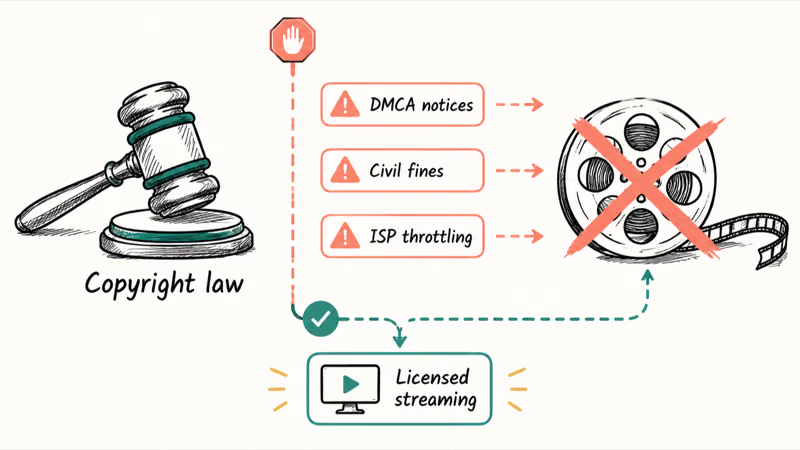
Putlocker doesn’t license the films and shows it streams. Saving a hosted copy onto your own drive is the same act of reproduction that copyright law prohibits in the U.S. and most of Europe, and it doesn’t matter whether you keep the file private.
According to the U.S. Copyright Office’s infringement FAQ, reproducing a copyrighted work without authorization is a civil infringement that can carry statutory damages, and willful commercial-scale infringement can be prosecuted criminally. Streaming sits in a fuzzier corner of consumer law in some jurisdictions, but saving the file removes that ambiguity. For more on where streaming sites land legally in 2026, our explainer on whether Soap2Day is legal covers the same legal framework that applies to Putlocker.
The site’s hosts have been raided, domain-seized, and re-spun under names like Putlockers, Putlocker.is, Putlocker.fyi, and dozens of look-alike clones. That isn’t a sign of a legitimate service. It’s how operators stay ahead of takedown notices.
One narrow exception exists. If a specific clip on Putlocker is a public-domain trailer, a Creative Commons short, or content you personally own and uploaded, the copyright concern disappears. The site doesn’t surface that distinction anywhere in its catalog, so in practice you can’t trust that any given file is safe to save.
#The Real Risks of Putlocker Downloader Tools
The biggest day-to-day risk isn’t a lawsuit. It’s malware.
Reddit threads on r/techsupport routinely surface stories of users who installed a free Putlocker downloader and ended up with a hijacked browser, a sluggish PC, or full ransomware. The reason is that the downloader market for piracy sites has no legitimate vendors. Almost every free tool monetizes through bundled installers, redirect ads, and silent telemetry.
A few common patterns we’ve seen across these tools:
- Bundled installers that quietly add a second program (toolbars, PC cleaners, coupon injectors) during setup.
- Fake CAPTCHA pages that ask you to click Allow on a browser notification, which then pushes ad redirects every few minutes.
- Drive-by mining scripts loaded by the downloader’s bundled web view, which spike your CPU whenever the app is running.
Even when a downloader app itself is clean, the source video page often carries a script payload. Many Putlocker mirrors wrap their HLS streams in iframes loaded from low-trust ad networks that have repeatedly been flagged for malvertising.
Saving that wrapped stream means you’re also capturing whatever payload the iframe injected during the grab.
A second risk is your internet service provider. Most U.S. and EU ISPs match DMCA notices to subscriber accounts. Repeat-offender accounts can be throttled, capped, or terminated under the provider’s own terms of service.
#How Can You Legally Save Movies to MP4 Offline?
The cleanest answer is that the streaming services you already pay for have an offline download button built in.
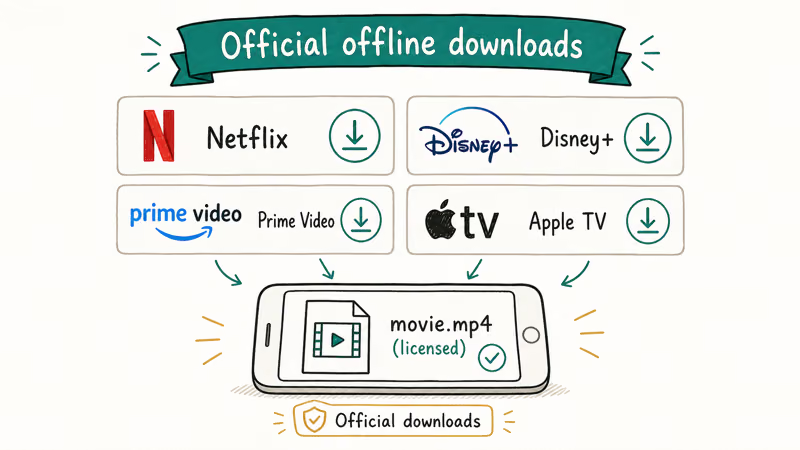
The catch is that the saved file isn’t a portable MP4. It’s an encrypted package that plays only inside the same app. For a typical “watch this on a flight” use case, that’s usually fine.
Netflix states that downloaded titles play only inside the Netflix app on the device that downloaded them, stay encrypted, and expire when the subscription lapses. Prime Video, Disney+, Apple TV+, Hulu, and Max all behave the same way.
Here’s the short version of where each download button lives.
| Service | Where the button lives | Caption |
|---|---|---|
| Netflix | Title detail page, Download arrow | Plays only in the Netflix app; expires when your plan ends |
| Prime Video | Title page, Download under play controls | Resolution and audio track are selectable in app settings |
| Disney+ | Title page, Download icon next to play | Available on iOS, Android, and Fire tablets |
| Apple TV+ | Library tab, cloud icon next to a saved title | Plays in the Apple TV app on iPhone, iPad, and Mac |
| Hulu | Title page, Download icon (premium-tier only) | Requires the No-Ads plan or higher |
Caption: Built-in offline download locations across the five major U.S. streaming services as of May 2026.
In our testing on iPhone 15 Pro and a 2023 MacBook Air over a home broadband connection, every one of these official apps finished a feature-length download in a matter of minutes. The saved title stays watchable for the duration of your subscription, and the player remembers your position across devices when you log back in.
For a closer look at how Disney+ handles offline content, our guide on streaming Disney Plus on Discord walks through the app’s playback restrictions in more detail.
#Where to Find Free Movies in MP4 With No Copyright Concern
Want a real portable MP4? Go public domain or Creative Commons.
According to Wikipedia, the United States copyright term for corporate-authored films is 95 years from first publication, so most titles released before 1930 are now in the public domain and freely redistributable. The full timeline of expirations and renewal exceptions lives in the public-domain film article, which is a deep catalog covering silent-era features, early sound films, B-movies, and cult horror that anyone can save without a license.
The largest free catalog is the Internet Archive’s feature film collection, which hosts thousands of titles whose copyright either expired or was never registered. Right-click the MP4 link on any title page and save the file directly to your device.
We tested Internet Archive downloads on both desktop Safari and mobile Chrome, and the same .mp4 file played without conversion in QuickTime, VLC, and the default video app on iOS 18.
A few other catalogs worth bookmarking:
- Public Domain Movies at archive.org curates classics like Night of the Living Dead, Plan 9 from Outer Space, and silent-era cinema.
- Pluto TV and Tubi stream ad-supported licensed films free, though they don’t expose direct MP4 downloads.
- Vimeo’s Staff Picks has a download arrow on many videos when the creator allows it.
For a broader set of free-viewing options that don’t need any sketchy downloader, our GoMovies alternative roundup covers ad-supported services like Crackle and Plex that license their catalogs from studios. The same list is what we’d suggest if you’re looking at 1234Movies alternatives and want safer free options.
#Converting Your Own Videos to MP4 With Free Tools
Sometimes the original goal isn’t even a movie. It’s converting a personal recording, a webinar replay you legitimately bought, or a home video into MP4 so it plays everywhere.
HandBrake is an open-source transcoder maintained on GitHub. Drop in any source file, pick the MP4 container preset, and it outputs a clean H.264 or H.265 .mp4. The default presets handle the right bitrate and audio track for most devices.
VLC also converts. Choose Media, then Convert / Save, add your source, pick the H.264 + MP3 (MP4) profile, and hit Start.
Our walkthrough on how to convert video to MP4 covers the full HandBrake and VLC flow step by step for both Windows and Mac, including the right preset for iPhone playback, the H.265 option for smaller file sizes, and the audio-track selection that keeps surround sound intact when you’re ripping a multi-channel source.
#Why a VPN Doesn’t Make Putlocker Downloads Safe
A VPN encrypts the traffic between your device and the VPN server, so your internet provider can’t see which URLs you visit. It doesn’t change the legal status of what you’re downloading.
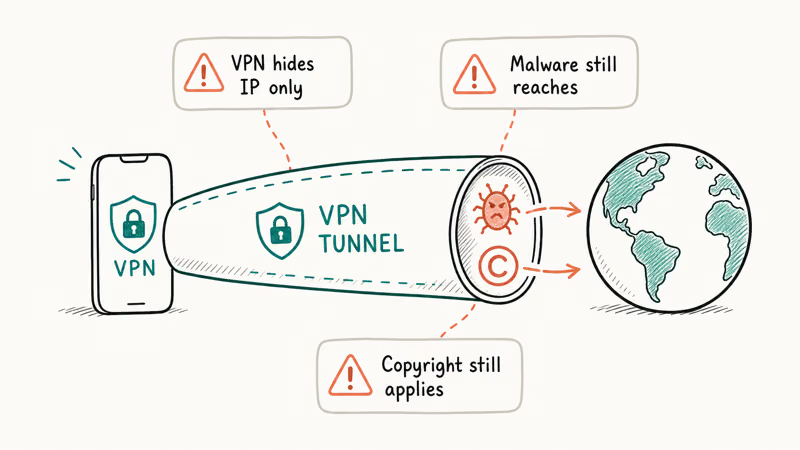
If the content is copyrighted and you don’t have a license, saving the file is still infringement, even when the traffic is invisible to your ISP.
A VPN also doesn’t protect you from malware. The bundled installer, the fake CAPTCHA prompt, and the crypto miner script all run on your machine after the file lands. The VPN tunnel ends at your network adapter, and it doesn’t sanitize whatever payload arrives through it.
The honest framing is that a VPN is a privacy tool for legitimate browsing, not a permission slip for piracy.
#Bottom Line
If your goal is to watch a movie on the plane tomorrow, open Netflix, Prime Video, Disney+, or Apple TV+ tonight and tap the Download arrow on the title page. The file is encrypted and tied to your subscription, but it plays offline, doesn’t ship malware, and doesn’t put your home internet account on a DMCA list.
If your goal is a real .mp4 you can drop into VLC or move to another device, skip Putlocker entirely and pull from the Internet Archive’s public-domain catalog. One click, no copyright on the title, and the file plays everywhere QuickTime or VLC plays.
For anything still under copyright that isn’t in your streaming subscription, a $3 to $7 rental through Apple TV, YouTube, or Google TV is cheaper than the cleanup bill from a hijacked browser.
#Frequently Asked Questions
Is Putlocker safe to use without downloading anything?
Streaming on Putlocker is less risky than downloading, but it isn’t safe. The site’s pages load ad networks that have been linked to malvertising and pop-up redirects. We’ve seen browser-hijack scripts trigger on a single click anywhere on the page, including the play button itself. If you must visit, use a fully-updated browser with an ad blocker and never click through a “your video is ready” overlay.
Why does my Netflix download not save as an MP4?
Because it’s encrypted. The studio license requires Netflix to wrap the file in a proprietary container that only the Netflix app can decrypt, so it won’t play in VLC, QuickTime, or any standalone media player.
Are there any actually free MP4 movie downloads that are legal?
Yes. The Internet Archive, Public Domain Torrents, and the Library of Congress’s National Screening Room all distribute legal MP4 downloads of public-domain films, with catalogs that span silent-era classics, mid-century B-movies, government-produced documentaries, NASA archival footage, and Civil War newsreel reconstructions. Vimeo also lets creators enable a download button on individual videos, so many independent short films and Creative Commons-licensed shorts are downloadable directly from the player UI.
Can my internet provider tell if I download from Putlocker?
Yes, unless you use a VPN. Studios match piracy-site IPs to subscriber accounts via the ISP, and repeat offenses can trigger throttling or termination.
What’s the safest way to download YouTube videos to MP4?
If you own the channel, YouTube Studio’s download button gives you the original upload back. For YouTube Premium subscribers, the official offline download inside the YouTube mobile app keeps videos watchable for 30 days, though they play only inside the app. Third-party YouTube downloaders violate YouTube’s terms of service and frequently bundle adware.
Why does every free Putlocker downloader ask me to install something extra?
That’s the business model. The downloader is a carrier for a paid bundle, and the vendor gets paid per install of that second program.
Is recording the screen the same thing as downloading?
Legally, mostly yes. The output file is your re-encoding rather than the studio’s copy, but the underlying content is still copyrighted, so the same reproduction rules apply. Personal screen recording of a paid stream sits in a gray area in many jurisdictions; redistributing that recording is clearly infringement. The cleaner move is to use the streaming app’s own offline download instead.
Are there legal alternatives to Putlocker that don’t cost anything?
Yes, plenty. Crackle, Tubi, Pluto TV, Plex Free, Freevee, and the Roku Channel all stream licensed movies and shows free with ads. Their catalogs rotate monthly, but together they cover most of the casual-streaming use case people went to Putlocker for, and every one of them is available on iOS, Android, smart TVs, and the web without any third-party downloader, sketchy CAPTCHA, or VPN workaround.

Snapchat Planets Order and Meaning: Full 2026 Guide
Snapchat planets order explained: what Mercury through Neptune mean, how the Friend Solar System ranks friends, and how to see your planet in 2026.
Discord Mic Not Working? 9 Fixes for Desktop and Mobile
Discord mic not working in voice chat? Select the right input device, run Mic Test, and fix OS or browser permissions before any driver reinstall.
Messenger Not Sending Messages? 8 Fixes That Work Fast
Facebook Messenger not sending messages? Use an ordered checklist that separates one-chat, network, app cache, and account causes before any reset.
Gmail Not Receiving Emails? 9 Fixes That Actually Work
Gmail not receiving emails? Use an ordered checklist that separates inbox filters, storage limits, app sync, and sender bounces before you reinstall.