Android Multi Tools Download: Safe or Malware Risk?
Android Multi Tools v1.02b claims to bypass Android locks, but it carries serious malware risks. Here are safer alternatives that actually work today.
Quick AnswerAndroid Multi Tools v1.02b is an outdated command-line utility for removing Android lock screens. Multiple antivirus tools flag it as malware, and it lacks support for Android 10 or newer. Use Google Find Hub or recovery mode to reset your own locked phone instead.
Android Multi Tools v1.02b still circulates on third-party download sites, but the tool hasn’t been updated in years. Antivirus programs flag the executable as a Trojan.Agent threat, and it no longer works on modern Android phones. If you’re locked out of your own Android phone, there are official methods that actually work.
- Android Multi Tools v1.02b has no official website and antivirus tools flag it as malware
- The tool only works on Android 4.x devices, not phones running Android 10+
- Google Find Hub lets you remotely erase your own locked phone for free
- Recovery mode factory reset works on every Android phone without third-party software
- Using bypass tools on a device you don’t own violates computer fraud laws
#What Is Android Multi Tools?
Android Multi Tools v1.02b is a Windows command-line program that connects to an Android phone through ADB (Android Debug Bridge). It removes pattern locks, PIN codes, and Face Lock.
The tool opens a command prompt window with numbered options: check device connection, reset face/PIN lock, reset gesture lock, reset Gmail accounts, wipe data, reboot, and enter Fastboot mode. On a modern phone running Android 10 or newer, the ADB connection fails silently because the underlying file-deletion approach no longer works.
Last updated around 2014-2015. Google introduced FRP in Android 5.1, and every version since has added protections that make ADB-based file deletion useless.
Important: Only use lock removal tools on devices you own or have explicit written permission to access. Bypassing security on someone else’s device without authorization is illegal under the Computer Fraud and Abuse Act (US) and similar laws worldwide.
#Is Android Multi Tools Safe to Download?
No. Based on multiple security reports, this tool carries real security risks.
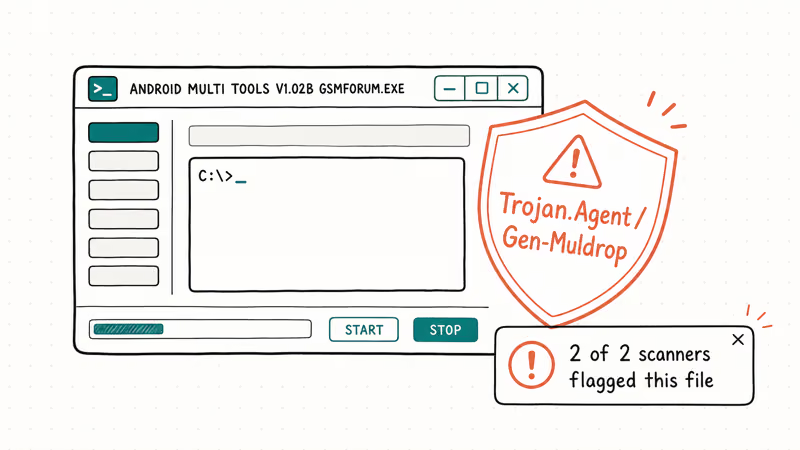
SUPERAntiSpyware’s malware database classifies ANDROID MULTI TOOLS V1.02B GSMFORUM.EXE as Trojan.Agent/Gen-Muldrop, meaning the file can drop additional malware onto your system.
Since there’s no official website, every download link comes from a third-party file hosting site with zero verification. Anyone can upload a modified version packed with spyware or ransomware.
Even a clean copy gives you:
- No security patches in over a decade
- No technical support whatsoever
- Only works on Android 4.x
- Zero safeguards against accidental data wipes
According to Google’s Android security documentation, modern Android versions use hardware-backed encryption and verified boot chains that make ADB-based lock removal ineffective without the device owner’s credentials. On current Android releases, the tool produces no response after connecting via USB.
#How Android Multi Tools Actually Works
The tool needs the Android SDK, a USB cable, and USB Debugging enabled. That last one is the catch: USB Debugging lives in Settings > Developer Options, which you can’t reach if you’re locked out.
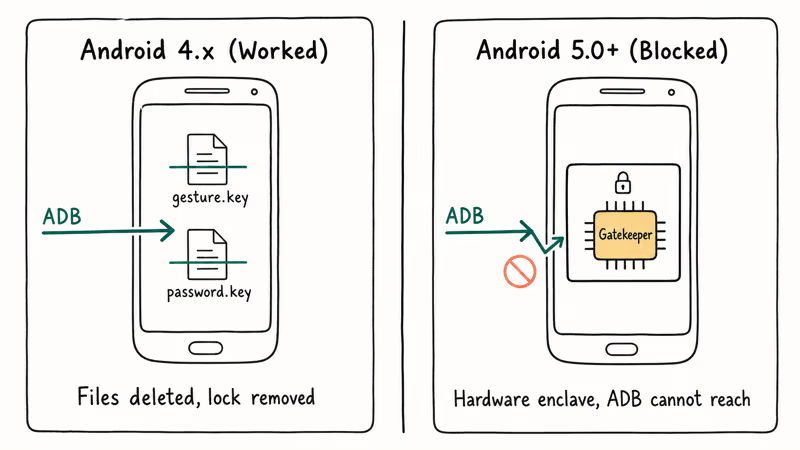
For devices where USB Debugging was already on before the lockout, the tool sends ADB commands to delete lock screen files from the system partition. On Android 4.x, the lock pattern lived in a file called gesture.key and the PIN in password.key. Deleting those two files removed the lock instantly, which is why this tool gained popularity back in 2013-2014 when most phones ran Android 4.0 Ice Cream Sandwich or 4.4 KitKat and had minimal security protections.
That stopped working with Android 5.0. Google switched to Gatekeeper, a hardware-backed authentication system where wiping a file from the partition does absolutely nothing because the credentials live in a secure hardware enclave that ADB can’t touch.
#Official Ways to Unlock Your Own Android Phone
Start here before downloading anything. These free methods come directly from Google and phone manufacturers.
#Google Find Hub (Remote Erase)
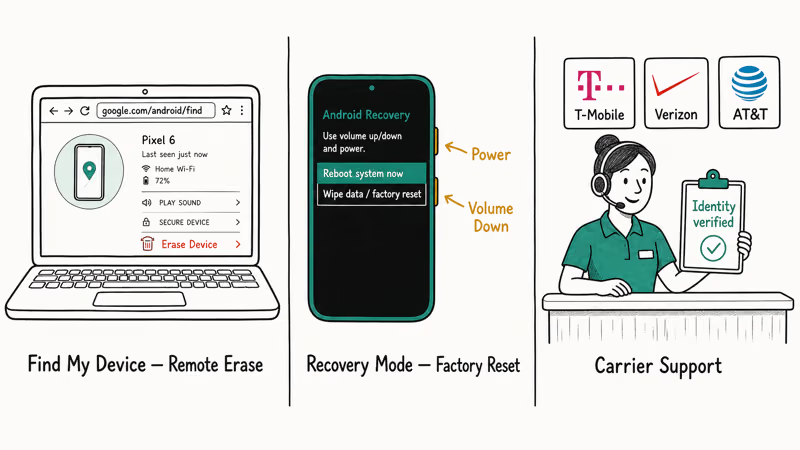
Go to google.com/android/find on any browser, sign in with the Google account linked to your locked phone, and click Erase Device.
Your phone will factory reset remotely. You’ll lose all data. According to Google’s support page, you’ll need your Google credentials afterward to pass FRP.
#Recovery Mode Factory Reset
Works without an internet connection. Charge to at least 70% first. Power off your phone, then hold Power + Volume Down for 10-15 seconds to enter the bootloader. From there, scroll to Recovery Mode, then select Wipe data/factory reset.
Samsung phones use Power + Volume Up + Side button. If you own a Samsung, visiting an authorized Samsung service center with your purchase receipt is another option.
#Contact Your Carrier
Bought the phone from T-Mobile, Verizon, or AT&T? Their support teams can verify your identity through account records and help you regain access to your device. This is the safest route because it creates a documented ownership verification trail, and you won’t need to download any software or risk voiding your warranty.
#Better Alternatives to Android Multi Tools
If official methods don’t work and you need a dedicated Android unlock tool, several maintained options exist with actual support teams behind them.
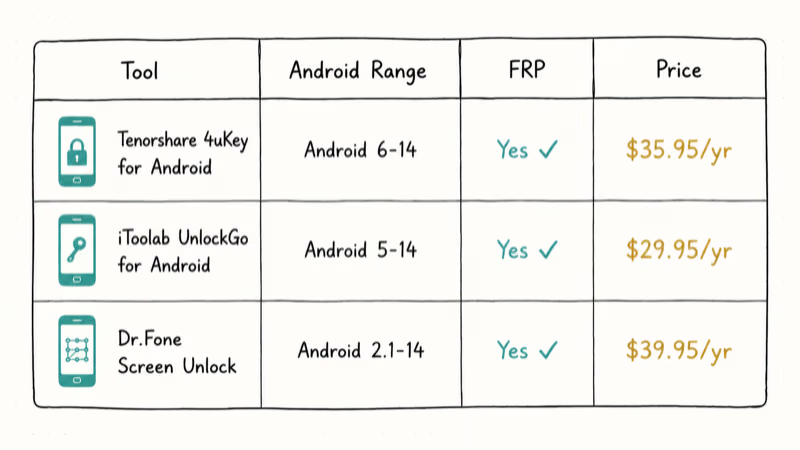
| Tool | Works With | FRP Bypass | Price |
|---|---|---|---|
| Tenorshare 4uKey for Android | Android 6-14 | Yes | $35.95/yr |
| iToolab UnlockGo for Android | Android 5-14 | Yes | $29.95/yr |
| Dr.Fone Screen Unlock | Android 2.1-14 | Yes | $39.95/yr |
These tools get regular updates for new Android security patches. They have graphical interfaces, guided instructions, and customer support you can actually reach.
Any third-party unlock tool will likely trigger a factory reset on your phone. Back up data first if possible. According to Google’s Android backup and restore guide, photos and contacts synced to your Samsung or Google account stay recoverable after a reset.
#The Verdict on Android Multi Tools in 2026
For almost every scenario, skip it. The tool doesn’t work on any phone released in the last six years.
If you have an old Android 4.x device sitting in a drawer and USB Debugging was already enabled, that’s about the only case where Android Multi Tools might still function. Even then, run it in a sandboxed virtual machine to protect your main system from the Trojan.Agent payload that antivirus scanners keep flagging. The risk-reward ratio just doesn’t make sense when free official methods exist.
For locked Samsung phones, use Samsung’s Find My Mobile service. For FRP bypass situations, the paid tools above handle current Android versions.
#Bottom Line
Skip Android Multi Tools. It’s a relic from when Android lock screens were far easier to bypass, and downloading it today puts your PC at risk from malware. Use Google Find Hub or recovery mode instead, and only consider paid tools like 4uKey if those don’t work. All of these options apply only to devices you own.
#Frequently Asked Questions
Does Android Multi Tools work on Android 14?
No. Android Multi Tools v1.02b was designed for Android 4.x and won’t work on anything newer. Android 14 uses hardware-backed Gatekeeper authentication that can’t be bypassed by deleting lock files through ADB.
Can I use Android Multi Tools without USB Debugging enabled?
You can’t. The tool relies on ADB, which requires USB Debugging to be active before the phone gets locked. If you didn’t enable it beforehand, the tool can’t communicate with your device at all. Recovery mode and Google Find Hub don’t need USB Debugging.
Is downloading Android Multi Tools illegal?
Downloading it isn’t illegal. Using it on a device you don’t own violates computer fraud laws like the CFAA in the United States and similar statutes in the EU, UK, Australia, and Canada. Penalties range from fines to prison time depending on jurisdiction and intent. Only use lock removal tools on your own devices.
Will Android Multi Tools erase my data?
The “Wipe Data” option performs a full factory reset. Lock reset options on older Android 4.x versions might preserve data, but there’s no guarantee and no undo button.
What should I do if I forgot my Google account after factory reset?
That’s a Factory Reset Protection (FRP) lock, separate from the screen lock. Recover your account through Google’s account recovery page. Verify your identity with a recovery email or phone number to regain access and finish phone setup.
Are there any free alternatives to Android Multi Tools?
Google Find Hub is free and works on Android 5.0+. Recovery mode factory reset is built into every Android phone at no cost. For FRP bypass specifically, free options are limited because Google actively patches exploits. The paid tools above offer free trials so you can check device compatibility before purchasing.
Can Android Multi Tools bypass FRP lock?
No. The v1.02b version predates FRP entirely since FRP arrived in Android 5.1. For FRP bypass on your own device, you’ll need your original Google credentials or a dedicated FRP bypass tool.
What is the safest way to unlock a locked Android phone you own?
Start with Google Find Hub at google.com/android/find. If your phone has no internet, use recovery mode by holding power and volume buttons during boot. Both are free and Google-recommended. The tradeoff is data loss, so recover what you can from Google account backups first.

Pixel 11 vs Pixel 10: What Changed and Who Should Upgrade
Pixel 11 vs Pixel 10: same screen and camera resolution, new Tensor G6, 25W wireless, and Gemini Intelligence. Here is who should actually upgrade.

Verizon Not Receiving Texts? How to Fix It in 9 Steps
Verizon not receiving texts? Fix it in 9 steps: check Message Blocking in My Verizon, reset network settings, deregister iMessage, and call support.

Pixel Battery Drain: What Google's July Fix Really Covers
Google marked the Pixel idle battery drain bug fixed in July, but only some phones got the patch. Here is who is covered, who is not, and what to try.

iPhone Stuck on EDGE? How to Get 5G or LTE Back (2026)
iPhone stuck on EDGE with crawling data? Here's why the E icon appears, which settings force 5G or LTE back, and when the problem is your carrier.