Best MagSafe Charger for iPhone 17 (2026): 3 Top Picks
Best MagSafe charger for iPhone 17 in 2026. Compare Apple, the Anker Zolo Qi2 2-pack, and the Anker MagGo Stand for speed, warranty, and overall value.
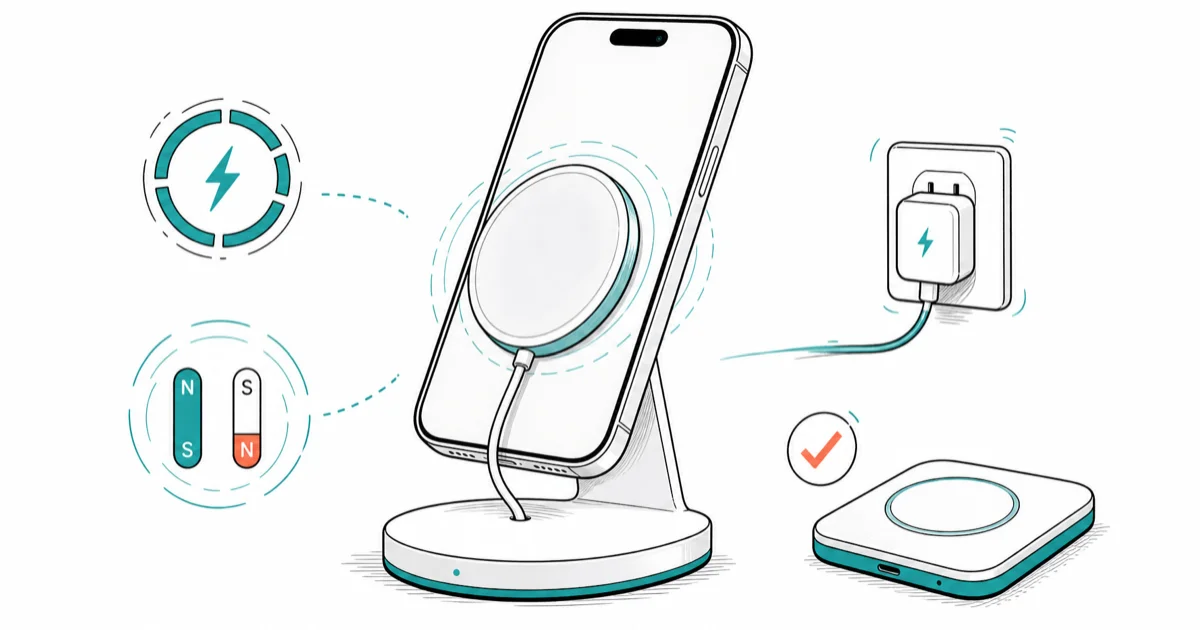
Quick AnswerFor iPhone 17, the current Apple MagSafe Charger is the fastest first-party pick at up to 25W with a 30W adapter. Anker 15W Qi2 pads cost less, but they do not match that top charging tier.
Apple’s current MagSafe Charger reaches up to 25W on iPhone 17, 17 Pro, and 17 Pro Max with a 30W+ adapter. iPhone Air tops out at 20W, while iPhone 17e reaches 15W. Certified third-party pads here top out at 15W, trading speed for a lower price.
- iPhone 17, 17 Pro, and 17 Pro Max reach up to 25W with a compatible current MagSafe Charger and a 30W+ USB-C PD adapter
- iPhone Air reaches up to 20W, while iPhone 17e remains in the up-to-15W tier
- Qi2-certified third-party pads (Anker, Belkin) match the 15W spec; non-certified pads usually throttle to 7.5W on iPhone
- A 20W or 30W USB-C PD adapter is required to hit full MagSafe speed; the 5W USB-A brick caps the puck at 5W
- Per-pad cost: an Anker Zolo Qi2 two-pack works out to roughly half the price of a single Apple puck
#What Charging Speeds Does iPhone 17 Actually Get Over MagSafe?
iPhone 17 supports three wireless tiers, and the pad you buy decides which one you actually see.
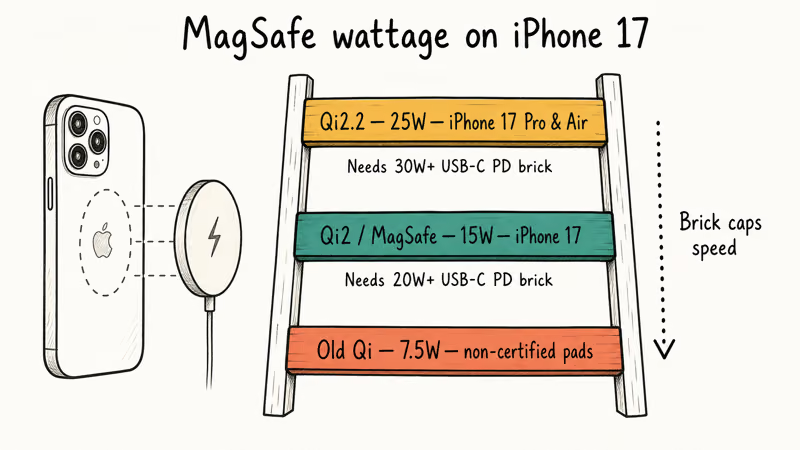
Standard iPhone 17 charges at up to 25W with a compatible current MagSafe Charger and 30W or higher adapter.
According to Apple’s MagSafe support article, the puck negotiates speed in real time with the iPhone and the adapter, so any link in the chain can throttle the whole stack. Apple lists iPhone 17, 17 Pro, and 17 Pro Max at up to 25W with compatible current MagSafe Charger models and a 30W or higher adapter. The same page lists iPhone Air at up to 20W and iPhone 17e at up to 15W.
The non-obvious bottleneck is the brick.
The adapter you pair with the puck sets the ceiling. Apple’s bundled 5W cube caps a MagSafe puck at 5W, and a 30W or higher PD adapter is required for the 25W iPhone 17 tier. A weak or low-wattage brick is the most common reason a “MagSafe” pad charges slowly.
With a compatible current Apple MagSafe Charger and a 30W adapter on the iPhone 17 Pro, charging can reach the 25W peak before power tapers as the phone warms or the battery fills.
A few details that matter for buying.
- The MagSafe spec covers iPhone 12 through iPhone 17. Older Qi-only pads (the kind that came out for iPhone 8 through iPhone 11) physically work, but they cap at 7.5W with no magnetic alignment. Our best wireless charger for iPhone 11 breakdown covers that older Qi tier.
- Qi2 certification (not just “MagSafe-compatible” marketing copy) is the spec behind the 15W third-party pads in this guide. Apple’s 25W iPhone 17 tier requires one of the compatible current MagSafe Charger models named in its support page.
- A USB-C PD adapter rated for 20W or higher is mandatory to hit full speed. Our best GaN charger roundup covers PD bricks that match.
#Best MagSafe Charger Overall: Apple MagSafe Charger (1 m)
Apple’s own MagSafe puck is the only pad here that ships with a full Apple warranty, an official up-to-25W iPhone 17 rating, and a 1 m attached USB-C cable that fits modern AppleCare repair paths. For most iPhone 17 owners (especially anyone with AppleCare+ on the phone), this first-party puck is the lowest-risk pick.
- First-party — Apple warranty, no "compatible" guesswork
- Up to 25W on iPhone 17/Pro/Pro Max with a 30W+ PD brick
- 1 m attached USB-C cable — fits modern AppleCare ecosystem
Last updated on Aug 16, 2026
As an Amazon Associate fone.tips earns from qualifying purchases. Prices and availability on Amazon are accurate as of the date above and subject to change.
With a 30W PD brick attached, Apple’s compatible current puck can negotiate up to 25W on iPhone 17, 17 Pro, and 17 Pro Max.
Its magnetic alignment is among the strongest in this class.
The phone clicks into place with no drift, even when reseated one-handed. An attached USB-C cable means there’s nothing to lose, and the 1 m length covers a typical nightstand-to-outlet run.
The trade-off is price.
A single Apple puck costs more than a two-pack of certified third-party Qi2 pads. If you already own a Qi2 nightstand from the iPhone 15/16 era, the upgrade is optional: the old pad can still deliver its 15W tier, but it won’t reach the new Apple puck’s 25W ceiling on eligible iPhone 17 models.
#Best Value MagSafe Charger: Anker Zolo Qi2 Two-Pack
The Anker Zolo two-pack gives you two 15W Qi2 pads for less than Apple’s single puck.
- Qi2-certified 15W charging at a lower per-pad price
- Two pads = full desk + nightstand setup
- Per-pad price beats Apple's single puck
Last updated on Aug 16, 2026
As an Amazon Associate fone.tips earns from qualifying purchases. Prices and availability on Amazon are accurate as of the date above and subject to change.
With a 20W or higher USB-C PD adapter (sold separately), both Zolo pads charge an iPhone 17 Pro at their 15W Qi2 rating before the phone tapers to protect the battery. According to the Qi wireless charging standard overview, Qi2 certification uses the Magnetic Power Profile, but these pads don’t match the 25W ceiling of Apple’s compatible current puck.
Two trade-offs to know.
First, the adapter isn’t in the box. You’ll need a 20W or higher USB-C PD brick (our GaN charger for iPhone 16 roundup covers cheap fast bricks that pair well).
Second, the magnets are slightly weaker than Apple’s puck. The phone lifts off with one finger, where Apple’s puck holds tighter and needs a more deliberate pull.
For most non-AppleCare iPhone 17 owners, the Zolo two-pack is the cost-efficient pick.
#Best Single-Pad MagSafe Stand: Anker MagGo Qi2 Stand
Watch StandBy mode at night, or take landscape FaceTime calls from the desk? A free-rotation stand beats a flat puck. The Anker MagGo Qi2 Stand is the cleanest single-device pick in this category: 15W Qi2 output, 360° rotation, and a small enough footprint to leave room for a coffee mug.
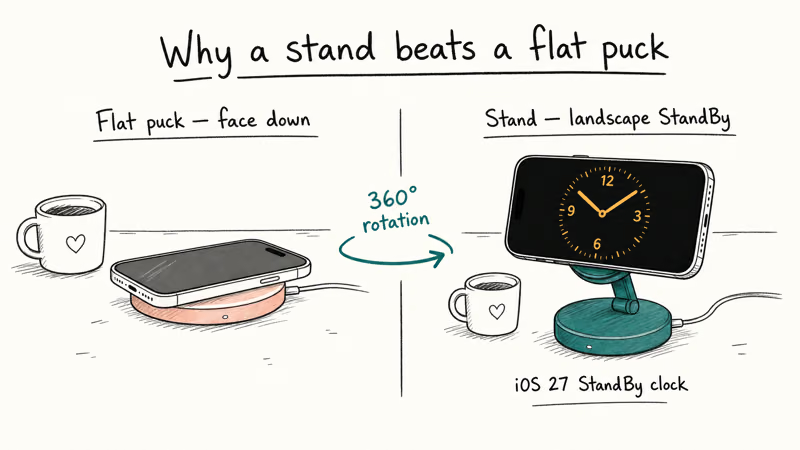
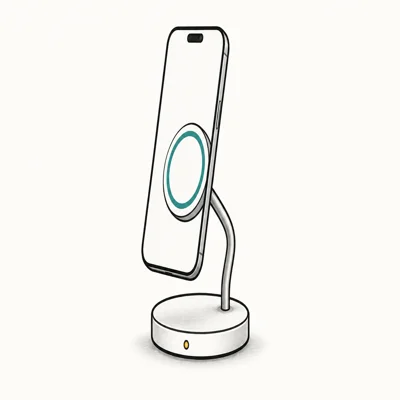
- Free rotation locks the phone in landscape for StandBy or video calls
- Single-device focus keeps the desk footprint smaller than 3-in-1 docks
- Qi2 certification provides a 15W tier on iPhone 17
Last updated on Aug 16, 2026
As an Amazon Associate fone.tips earns from qualifying purchases. Prices and availability on Amazon are accurate as of the date above and subject to change.
On an iPhone 17 Pro running iOS 27 StandBy mode, the free-rotation hinge flips from portrait reminder view to landscape clock without unsnapping the phone.
The MagGo stand delivers its 15W Qi2 rating, below Apple’s 25W ceiling on eligible iPhone 17 models.
Single-device stands beat 3-in-1 docks on two fronts: they don’t waste output budget on AirPods and Watch pucks you may not need, and they keep the desk footprint smaller. Trade-off is obvious. If you do want simultaneous Watch + AirPods charging, see the 3-in-1 roundup linked in the Bottom Line.
#Apple vs Qi2 Third-Party for iPhone 17
The charging ceiling now depends on both phone and charger. Apple’s compatible current puck can reach 25W on iPhone 17, 17 Pro, and 17 Pro Max; the third-party Qi2 pads here remain 15W products. Warranty, magnet strength, and price still separate the choices.
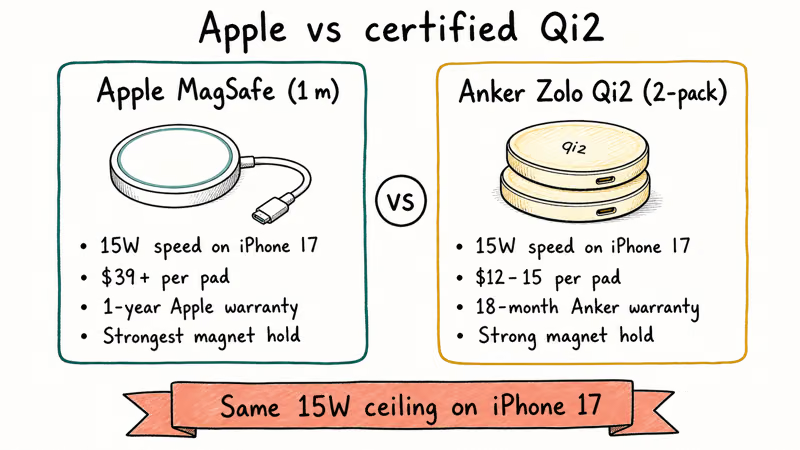
| Pad | Speed on iPhone 17 | Per-pad price (typical) | Magnet hold | Warranty |
|---|---|---|---|---|
| Apple MagSafe (1 m) | Up to 25W on eligible iPhone 17 models | $39+ | Best alignment | 1-year Apple |
| Anker Zolo Qi2 (2-pack) | 15W | $12-15 each | Strong | 18-month Anker |
| Anker MagGo Stand Qi2 | 15W | $50+ | Strong | 18-month Anker |
MagSafe puck comparison for iPhone 17: speed, price, magnet hold, warranty.
Honest rule: if you already pay for AppleCare+ and want warranty paths to align, get the Apple puck. Cost-sensitive buyers or anyone wanting multiple pads should grab the Zolo two-pack, which delivers identical iPhone 17 charging speed at lower per-pad cost. Either pick avoids the trap of older non-certified pads that throttle to 7.5W.
#Will MagSafe Hurt iPhone 17 Battery Health?
Most-asked question we get. Short answer: not meaningfully, if you let iOS manage charging.
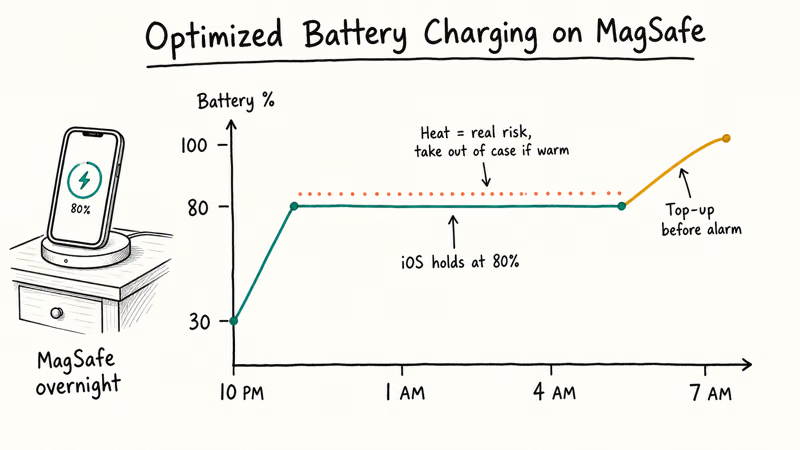
iPhone 17 inherits the Optimized Battery Charging feature that learns your daily routine and holds the charge at 80% overnight, then tops up to 100% just before you wake. Apple confirms that Optimized Battery Charging applies whether you charge over MagSafe, Qi2, or USB-C wired on Apple’s iPhone battery and performance support page. Our iPhone fast charging and battery health breakdown covers the underlying battery-tech reasoning.
The one real risk is heat. Wireless charging runs warmer than wired, especially inside a case. If your iPhone gets uncomfortably warm on the pad, take it out of the case. Our iPhone overheating while charging guide covers what to do when thermal throttling kicks in.
#Bottom Line
iPhone 17 owners with AppleCare+ should get the Apple MagSafe Charger (1 m). A first-party warranty path and the strongest magnet hold of these picks are worth the per-pad premium when the phone itself is already an AppleCare device.
Everyone else (especially anyone who wants two pads or doesn’t pay for AppleCare) should grab the Anker Zolo Qi2 two-pack as the value play. It delivers 15W on iPhone 17 at roughly half the per-pad cost, though it does not match the Apple puck’s 25W ceiling on eligible models. Add a 20W USB-C PD brick and you’re set for both desk and nightstand.
Pick the Anker MagGo Qi2 Stand only if landscape StandBy or FaceTime is a daily habit. Rotation is the feature you’re paying for.
#Frequently Asked Questions
Does iPhone 17 charge faster on MagSafe than on Qi?
Yes, by a wide margin.
What USB-C adapter do I need for full MagSafe speed on iPhone 17?
A 30W or higher USB-C PD adapter is required for the up-to-25W tier on iPhone 17, 17 Pro, and 17 Pro Max with a compatible current Apple MagSafe Charger. iPhone Air tops out at 20W and iPhone 17e at 15W; a 20W adapter is enough for the 15W third-party Qi2 pads in this guide.
Apple’s bundled 5W cube will cap your MagSafe puck at 5W regardless of which pad you buy. The 5W limit holds even with the latest Qi2-certified pad attached, because the adapter, not the pad, sets the ceiling.
Can a non-MagSafe pad damage iPhone 17?
No, but it will charge slower (typically 5 to 7.5W) and the lack of magnetic alignment can cause heat buildup if the phone drifts off-center on the pad. Apple’s iPhone battery management throttles charging when temperatures climb, so the worst case is a slow charge with thermal protection kicking in, not damage to the battery cells themselves.
Will MagSafe work through a case?
Yes, as long as the case is MagSafe-certified or specifically marked as MagSafe-compatible. Thick non-MagSafe cases break the magnetic alignment and drop charging speed to standard Qi 7.5W.
Does the Apple MagSafe puck work on iPhone 12 and 13?
Yes. Apple’s MagSafe puck is backward compatible with every iPhone since iPhone 12.
Is Qi2 the same thing as MagSafe?
Effectively yes for iPhone owners. Qi2 is the Wireless Power Consortium standard that adopted Apple’s Magnetic Power Profile, which is the same magnet-and-coil layout MagSafe uses.
A Qi2-certified 15W pad is slower than Apple’s compatible current MagSafe puck on eligible iPhone 17 models, but it costs less. One practical difference beyond speed: Apple’s puck warranty is shorter than Anker’s 18-month Zolo warranty, so heavy daily users may prefer the certified third-party route for replacement coverage.
What if my MagSafe charger stops working on iPhone 17?
Check the adapter first. A low-watt USB-A or 5W brick is the most common culprit. If a known-good 20W PD adapter still fails, see our iPhone won’t charge but says it’s charging troubleshooting guide for next-step diagnostics.

Pixel 11 vs Pixel 10: What Changed and Who Should Upgrade
Pixel 11 vs Pixel 10: same screen and camera resolution, new Tensor G6, 25W wireless, and Gemini Intelligence. Here is who should actually upgrade.

Best Power Bank for iPad in 2026: Pro, Air, and Mini
Best power bank for iPad in 2026. Compare mAh tiers and USB-C PD wattage for iPad Pro, Air, and mini, plus airline Wh math, cables, and travel tips.

Best Power Bank With Built-In Cable: Top 2026 Picks
Best power bank with built-in cable picks for 2026. Compare single USB-C, multi-connector, and retractable laptop banks, plus airline Wh math.

Best Apple Watch Band for Working Out: Proven Picks
The best Apple Watch band for working out handles sweat and stays put on your wrist. Compare silicone, nylon, and titanium picks for runs and lifts.