The Best Chromebooks of 2026: Top 7 Picks for Every Budget
The best Chromebooks of 2026 across price ranges. The Acer Spin 314 wins for most people, with budget, gaming, and premium picks for students and pros.

Quick AnswerThe Acer Chromebook Spin 314 is the best overall Chromebook for most people, offering a 14-inch Full HD touchscreen, solid keyboard, and all-day battery life under $400.
Chromebooks have gotten really good, and the gap between budget and premium models is wider than most shoppers expect. The Acer Chromebook Spin 314 hits the best balance of screen quality, keyboard feel, and price, while the HP Elite Dragonfly proves that Chromebooks can compete with premium Windows laptops and the Lenovo IdeaPad Flex 3 shows how much a sub-$250 model can still do for a student on a tight budget.
- The Acer Chromebook Spin 314 (2023) is the best overall pick, offering a 14-inch Full HD touchscreen and 2-in-1 design for under $400
- The Lenovo IdeaPad Flex 3 is the best budget option at under $250 with solid build quality and over 10 hours of battery life
- Chrome OS now receives updates for 10 years on newer models, up from the previous 6-8 year window
- Cloud gaming on Chromebooks works well since services like GeForce Now handle the processing on remote servers
- Chromebooks run Android apps from the Google Play Store, which expands software options beyond web-based tools
#Why Consider a Chromebook in 2026?
Chrome OS boots in under 8 seconds, receives automatic security updates, and runs both web apps and Android apps. According to Google’s Chrome OS support page, newer Chromebooks receive updates for up to 10 years from release.

The main limitation is software. If you need full desktop apps like Adobe Premiere Pro, AutoCAD, or advanced Excel macros, a Chromebook won’t work. But for web browsing, email, Google Workspace, streaming, and video calls, it’s faster and cheaper than most Windows laptops.
For users who need more processing power, our guide on best i5 laptops covers Windows options at a similar price point.
#Our Top 7 Chromebook Picks
#Best Overall: Acer Chromebook Spin 314 (2023)
CPU: Intel Pentium N6000 | Screen: 14” Full HD (1920x1080) IPS touchscreen | Storage: 128GB eMMC | Weight: 3.4 lbs
The Spin 314 handles a heavy spread of Chrome tabs, Spotify streaming, and Google Docs editing at once without slowing down. The keyboard is comfortable for long typing sessions with good key travel, and the 2-in-1 hinge lets you use it as a tablet for media consumption.
The 128GB eMMC storage is generous for a Chromebook, and battery life stretches close to a full workday of mixed use.
Best for: Students and anyone who wants a versatile Chromebook under $400.
As an Amazon Associate, fone.tips earns from qualifying purchases. Some links on this page are affiliate links.
#Best Budget: Lenovo IdeaPad Flex 3 Chromebook
CPU: Intel Celeron N4020 | Screen: 11” HD (1366x768) IPS touchscreen | Storage: 64GB eMMC | Weight: 2.6 lbs
At under $250, this is the Chromebook to buy if budget is your primary concern. The build quality is unexpectedly solid for the price. Battery life easily lasts a full workday, which beats many laptops costing twice as much.
The tradeoffs: the 768p screen looks dated, and the Celeron processor struggles with more than 10 heavy Chrome tabs. But for basic tasks, it’s reliable.
Best for: Students on a tight budget who need a durable device for web browsing and Google Workspace.
#Best High-End: HP Elite Dragonfly Chromebook
CPU: Up to 12th-gen Intel Core i7 with vPro | Screen: Up to 13.5” QHD+ (2256x1504) touchscreen | Storage: 128-256GB eMMC | Weight: 2.8 lbs
This is the Chromebook that proves Chrome OS can power a premium experience. The QHD+ display is stunning with accurate colors and bright output. According to HP’s product specifications, it includes enterprise-grade security features like a fingerprint reader and optional 4G LTE.
The Core i7 model handles everything without breaking a sweat. Dozens of tabs, Linux apps, and Android apps run simultaneously.
Best for: Business professionals and power users who want the best Chromebook experience available.
#Best for Gaming: Acer Chromebook 516 GE
CPU: Up to 12th-gen Intel Core i7 | Screen: 16” WQXGA (2560x1600) IPS, 120Hz | Storage: Up to 256GB PCIe SSD | Weight: 3.7 lbs
The first Chromebook designed specifically for cloud gaming. The 120Hz display makes cloud-streamed games feel responsive, and the RGB keyboard adds a gaming aesthetic. According to Acer’s gaming Chromebook page, it’s optimized for NVIDIA GeForce NOW and Xbox Cloud Gaming.
Streaming a demanding title like Cyberpunk 2077 through GeForce NOW stays smooth at 1080p on its 120Hz panel. The built-in Ethernet port helps with connection stability.
Best for: Gamers who want to use cloud gaming services on a Chromebook.
For those who want a dedicated streaming PC that can handle more demanding local gaming, our guide covers desktop options.
#Best for Students: Acer Chromebook Plus 515
CPU: Intel Core i3-1215U | Screen: 15.6” Full HD (1920x1080) IPS | Storage: 128GB | Weight: 3.7 lbs
The larger 15.6-inch screen makes this ideal for students who need more workspace for research papers and split-screen multitasking. The Core i3 processor handles Chrome and Android apps well.
Best for: Students who want a larger screen for schoolwork and content consumption.
For educators, our guide on best laptops for teachers includes Chromebook options with classroom management features.
#Best 2-in-1: Acer Chromebook Spin 714 (2023)
CPU: Intel Core i5-1335U | Screen: 14” WUXGA (1920x1200) IPS touchscreen | Storage: 256GB SSD | Weight: 3.5 lbs
The Spin 714 is the step-up from the Spin 314 for users who need more power. The Core i5 processor and 256GB SSD make it noticeably faster for multitasking, and the 16
aspect ratio gives you more vertical screen space for documents.Best for: Users who want a powerful 2-in-1 that works as both laptop and tablet.
For detachable options, check our guide on the best detachable laptops.
#Most Premium: HP Dragonfly Pro Chromebook
CPU: 12th Gen Intel Core i5-1235U | Screen: 14” 2560x1600 touchscreen | Storage: 256GB NVMe SSD | Weight: 2.9 lbs
The Dragonfly Pro sets a new standard with its haptic touchpad and 24/7 live support. The display is bright enough for outdoor use, and the keyboard is among the best on any Chromebook.
Battery life is the one disappointment at around 7 hours. That’s below average for a Chromebook.
Best for: Tech enthusiasts who want the most advanced Chromebook available.
#How to Choose the Right Chromebook?
Focus on these factors:
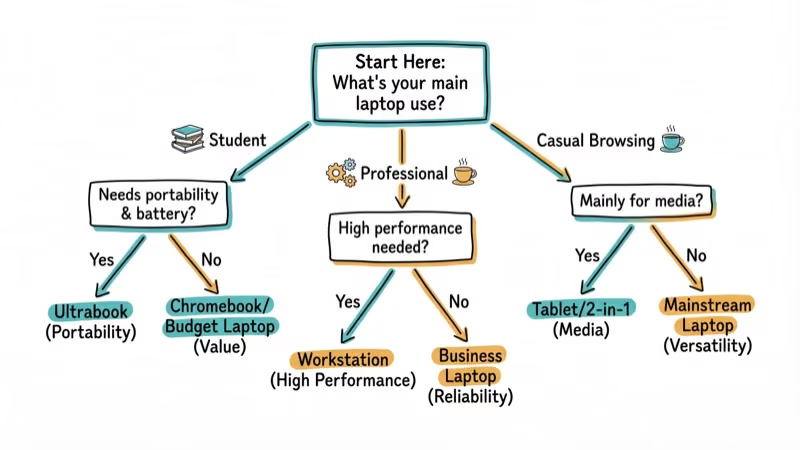
- Processor - Intel Core i3 or higher for multitasking; Celeron/Pentium for basic use
- Display - Full HD (1920x1080) minimum; QHD+ for professional work
- Storage - 64GB is the minimum; 128GB+ is better if you install Android apps
- Battery - look for 8+ hours; Chromebooks excel here compared to Windows laptops
- Weight - under 3 lbs for portability; over 3 lbs if screen size matters more
For choosing accessories, our guide on how to check mouse DPI can help you pair the right mouse with your Chromebook.
#Bottom Line
The Acer Chromebook Spin 314 is the best Chromebook for most people. It hits the sweet spot of price, performance, and versatility. Budget buyers should grab the Lenovo IdeaPad Flex 3 for under $250. If you want a premium experience, the HP Elite Dragonfly Chromebook justifies its price with a stunning display and enterprise features. And for audio on the go, pair your Chromebook with one of the best Bluetooth speakers under $50 for a complete portable setup.
#Frequently Asked Questions
What is a Chromebook and how is it different from a laptop?
A Chromebook runs Google’s Chrome OS instead of Windows or macOS. It’s designed for web-based tasks and runs both web apps and Android apps. Chromebooks are generally more affordable, boot faster, and have longer battery life than traditional laptops.
Can I use Microsoft Office on a Chromebook?
Yes. The web-based versions of Word, Excel, and PowerPoint work in Chrome. You can also install the Android versions from the Google Play Store. Full desktop Office features (like complex macros) aren’t available.
How long do Chromebooks receive software updates?
According to Google’s Auto Update policy, newer Chromebooks receive updates for up to 10 years from their release date. Older models get 6-8 years.
Can Chromebooks run Windows software?
Not natively. You can run Linux apps through Chrome OS’s built-in Linux container, and some users use cloud services like Shadow PC to run Windows remotely. But native Windows .exe programs don’t work.
Are Chromebooks good for students?
Yes. They’re affordable, durable, boot quickly, and integrate with Google Classroom. The Acer Chromebook Plus 515 and Lenovo IdeaPad Flex 3 are both strong choices for students.
Can I game on a Chromebook?
Cloud gaming services like NVIDIA GeForce NOW and Xbox Cloud Gaming work well on Chromebooks with a good internet connection. Local gaming is limited to Android games from the Play Store and some Linux-compatible titles.

Best Laptop for Running LLMs in 2026: Memory Comes First
The best laptop for running LLMs is a memory purchase first. Compare MacBook unified memory against NVIDIA laptop VRAM, and see what each tier really runs.

Pixel 11 vs Pixel 10: What Changed and Who Should Upgrade
Pixel 11 vs Pixel 10: same screen and camera resolution, new Tensor G6, 25W wireless, and Gemini Intelligence. Here is who should actually upgrade.

Best Power Bank for iPad in 2026: Pro, Air, and Mini
Best power bank for iPad in 2026. Compare mAh tiers and USB-C PD wattage for iPad Pro, Air, and mini, plus airline Wh math, cables, and travel tips.

Best Power Bank With Built-In Cable: Top 2026 Picks
Best power bank with built-in cable picks for 2026. Compare single USB-C, multi-connector, and retractable laptop banks, plus airline Wh math.