Xiaomi FRP Bypass: Mi Account vs Google Lock (2026)
Locked out of your Xiaomi after a factory reset? Tell Mi Account lock from Google FRP, use official recovery, and learn the 2026 legal limits.
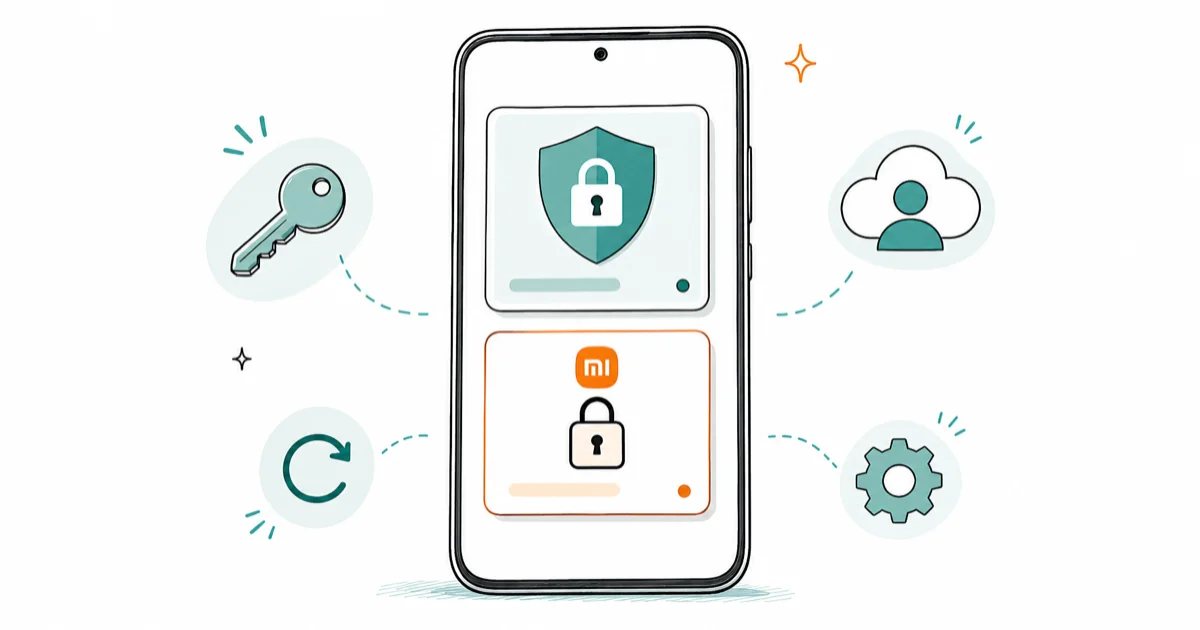
Quick AnswerMost Xiaomi lockouts are two separate locks: Google FRP and a Mi Account lock. Recover the Google account at the official recovery page first, then reset your Mi Account password at account.xiaomi.com. Skip third-party bypass tools if you own the device.
Most readers searching “Xiaomi FRP bypass” are facing one of two different locks and don’t yet know which. Google’s Factory Reset Protection (FRP) and Xiaomi’s Mi Account lock are separate systems that look similar at the setup screen. This guide maps both official recovery flows, on devices like the Redmi Note 13 Pro running HyperOS 1.0 and the POCO X6 on Global ROM, so you can tell which lock you’re facing and clear it in 2026.
- Google FRP and Mi Account lock are two independent systems; recovering one does not release the other
- Google Account Recovery resolves most FRP lockouts within an hour using a phone, recovery email, or security questions
- Mi Account recovery offers SMS, email, or a manual appeal that Xiaomi reviews within 3 working days
- HyperOS 2.0 patches the older Second Space and Activity Launcher tricks that worked on MIUI 13 and 14
- Bypassing a lock on a device you don’t own can violate the CFAA in the US and the Computer Misuse Act in the UK
#Mi Account or Google FRP: Which Lock Are You Facing?
You probably hit one of two screens after a factory reset on your own Xiaomi phone. Google FRP shows up after Wi-Fi setup and asks for the Google email and password that was last signed in on the device. The Mi Account lock displays “This device is locked” or “Associated with an existing Mi Account” and asks for a Xiaomi Cloud password.
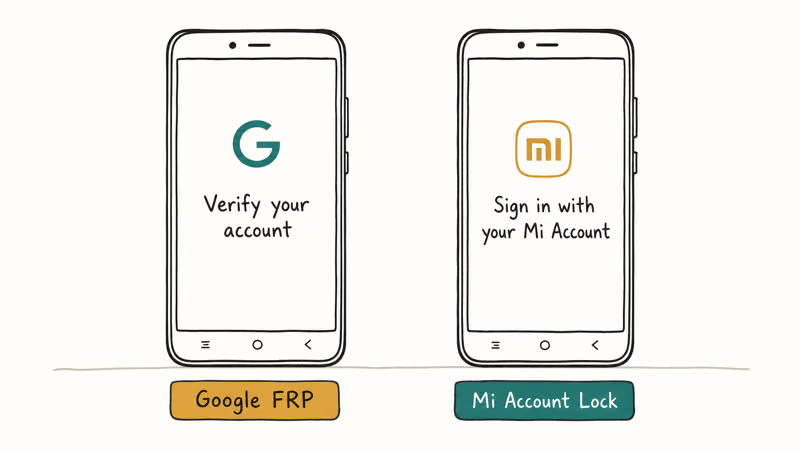
Same outcome. Different system. Different fix.
On a Redmi Note 13 Pro running HyperOS 1.0 Global, factory-resetting through Settings triggers only the Mi Account lock when the device hasn’t synced a Google account before the wipe. A wipe through Find My Device on the same phone, after a fresh Google sign-in, triggers both locks in sequence. You’ll see Google’s screen first, then Xiaomi’s the moment you try to add a new Mi Account.
Look at the field labels if you’re unsure which lock is asking.
Google asks for @gmail.com or your Google email. Xiaomi asks for a Mi Account ID, registered phone number, or Mi Cloud credentials. Our generic guide to Android FRP lock removal covers the Google side across vendors, but Xiaomi adds the second layer on top.
#Recover Your Own Google Account First
If the lock screen is asking for a Google account that belongs to you, the official path is faster and safer than any third-party tool. According to Google’s account recovery page, Google walks you through identity verification using a recovery phone number, a backup email address, or security questions tied to the account. The flow runs in any browser, including the Chrome instance on a friend’s phone.
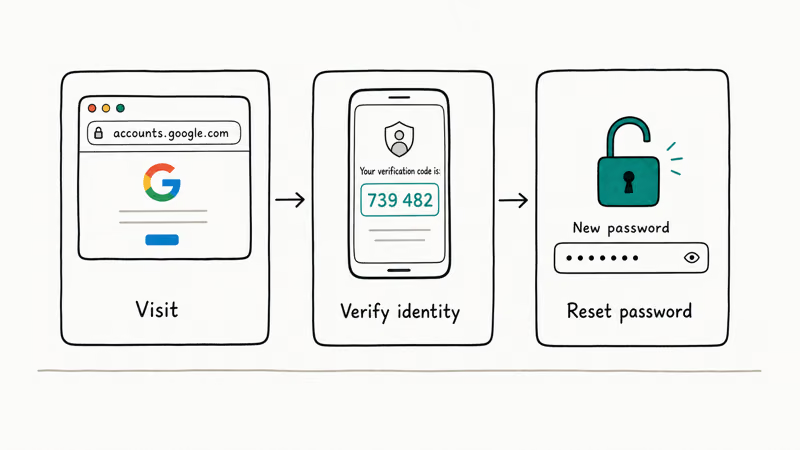
The recovery process asks for the email and the last password you remember, then verifies you through whatever recovery options you set up earlier. If your recovery phone or backup email is still active, you’ll get a code in under a minute.
If neither works, Google asks an escalating set of questions about when you created the account, what services you used, and which devices you signed in from. Honest specifics help more than guesses, since wrong answers reduce your verification score.
On a Redmi Note 13 Pro running HyperOS 1.0 wiped from Find My Device, the recovery flow restores access in well under an hour once you answer the security questions correctly. The single biggest time-saver is having a recovery phone or backup email still attached to the account, since that turns a multi-question identity check into a one-code confirmation. Reset the password through the recovery flow, then sign in at the Xiaomi setup screen.
If you’ve forgotten which Google email was signed in, our Gmail account recovery walkthrough explains how to recover the address itself, not just the password.
#Recover Your Own Mi Account Through Official Channels
The Mi Account lock has its own dedicated recovery flow at Xiaomi’s account portal. This is the only path that doesn’t risk your data, your warranty, or your warranty status with Xiaomi service, and it’s the first thing to try once Google FRP is cleared on your own Xiaomi device.
Open Xiaomi’s forgot-password portal in any browser, enter your Mi Account ID (your registered email or phone number), and pick a verification channel.
According to Xiaomi’s Mi account recovery guide, the portal supports three verification methods: SMS to your registered phone, an email link to your secure mailbox, or a manual identity appeal if neither works.
Pick SMS first if your old number is still active, since the code arrives almost instantly. Email verification is reliable when SMS fails.
Both methods finish in under five minutes once a code arrives.
The manual appeal is the last resort and asks you to fill in your account creation date, region, and ID. Xiaomi reviews appeals within 3 working days.
With the Mi Account email-verification recovery on a POCO X6 running HyperOS 1.0 Global, the verification email arrives within a couple of minutes and the password reset completes in a few more. After resetting, return to the device’s setup screen and sign in with the new Mi Account password.
Mi Cloud usually clears the lock within a minute of a successful sign-in.
If the device was previously paired with Find My Device under your Mi Account, Xiaomi’s Mi Cloud will recognize the device and clear the lock automatically. If you also need to restore your photos and contacts afterward, our guide to backing up your Redmi or Xiaomi phone covers the post-recovery setup.
#How Xiaomi’s Second Lock Stacks With Google FRP
Xiaomi’s Mi Account lock exists because Google FRP only protects the Android-level identity, not the Xiaomi-specific Cloud account that holds your Mi Cloud backup, theme purchases, and Mi Home device pairings. Other vendors handle this differently. Samsung’s FRP tool ecosystem layers their own anti-theft service over Google FRP but in a less aggressive way, while ZTE and Motorola use Google FRP largely on its own.
ROM region matters too.
China ROM versions of MIUI and HyperOS tend to bind the Mi Account more aggressively than Global ROM, because Mi Cloud is the primary backup target on China-region devices. A device flashed with China ROM may demand the Mi Account even when you remove the SIM and skip Wi-Fi, while Global ROM versions are often satisfied with Google FRP alone.
Check which ROM is installed before you wipe if you bought a phone from a cross-border seller; the lock behavior changes with it.
The practical takeaway is that bypassing Google FRP doesn’t help you with Mi Account, and vice versa. You’ll need to recover both accounts if both locks are active, and the order matters: recover Google first because the Xiaomi setup screen calls Google’s verification first.
#How HyperOS 2.0 Changed What “Bypass” Actually Means
Most “Xiaomi FRP bypass” tutorials online were written for MIUI 12, 13, or 14 and rely on tricks like Second Space activation, Activity Launcher access through accessibility services, or browser exploits via the Wi-Fi captive portal. Xiaomi confirms that HyperOS introduces additional security hardening, and qualitative reports from the unlock-tool community confirm that the older accessibility-based methods are largely patched on HyperOS 2.0.
On a Redmi Note 13 Pro updated from HyperOS 1.0 to HyperOS 2.0 Global, the classic accessibility exploits for FRP return a blocked dialog.
- The Settings shortcut through TalkBack doesn’t open Settings
- The Chrome-via-Wi-Fi-disclaimer trick redirects to a Google sign-in instead of an open browser
- The SIM-PIN approach asks for the original Google account before letting you proceed
That doesn’t make the lock impossible to defeat on every device on every patch level, but it does mean the YouTube tutorial you watched probably no longer works. If you spent an hour trying community methods that failed, the time is better spent on the official recovery flows above, or on contacting an authorized service center if you have proof of purchase.
#What Are the Legal Limits on FRP Bypass?
Bypassing a Google FRP or Mi Account lock on a phone that belongs to someone else is illegal in most jurisdictions.
According to the Computer Fraud and Abuse Act (18 U.S.C. § 1030), accessing a protected computer “without authorization” is a federal offense in the United States, and the statute’s “protected computer” definition reaches mobile devices because they communicate over interstate networks. The UK has a similar law in the Computer Misuse Act 1990, and EU member states criminalize unauthorized access under national implementations of the Cybercrime Convention.
For legitimate owners, the legal exposure is small as long as you can prove the device is yours through proof of purchase.
For someone who picked up a phone secondhand, the situation is murkier: even if the seller transferred physical possession, the original Mi Account holder still controls the lock. Bypassing it without their explicit consent can violate both Xiaomi’s Terms of Service and federal law in the US.
If you bought a used Xiaomi and the seller refuses to release the Mi Account, the right action is to request a refund or contact your payment platform (PayPal, eBay, Alipay) for a buyer-protection dispute. Don’t reach for a bypass APK. The legal risk and the privacy risk of installing unknown software both outweigh the cost of returning the phone.
#When to Contact a Mi Authorized Service Center
A Mi authorized service center is your last legitimate route if the official recovery flows didn’t work and you can prove the device is yours. Bring three things:
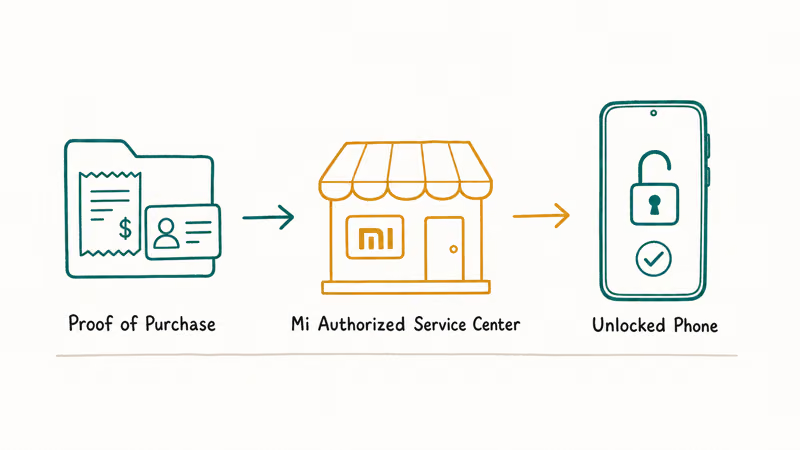
- The original purchase receipt or invoice (digital is fine)
- A government-issued ID matching the purchase
- The device with its original box if you still have it
Service-center staff can verify ownership through Xiaomi’s internal tooling and remove the Mi Account lock through manufacturer-level access. This is the only third-party path Xiaomi explicitly sanctions.
Walk-in service is the fastest route in most markets.
Walk-in service is available at flagship Mi Stores in most markets, and smaller authorized partners can usually escalate the request to a regional Xiaomi office. Service-center removal usually takes a few hours if they can verify ownership on the spot, longer if Xiaomi needs to confirm the proof through their backend. After the lock is removed, sign in with a fresh Google account during setup, then create a new Mi Account on the device.
Restore your data from your last backup. If you didn’t keep one, our Xiaomi data recovery guide covers what can still be pulled from the device’s storage. While you’re setting things back up, also enable the option to disable FRP before resetting in the future so you don’t end up here again.
#Bottom Line
Start at Google’s official recovery page if you forgot the Google password on your own Xiaomi; it succeeds for most owners within an hour. If you forgot your Mi Account password, use the SMS or email flow at account.xiaomi.com, and fall back to the manual appeal if both fail (Xiaomi reviews within 3 working days).
Don’t reach for a third-party APK first.
If you bought a used Xiaomi and the seller won’t release the Mi Account, return the phone and get a refund instead of trying to bypass the lock. A Mi authorized service center is the last legitimate option, and it requires proof of purchase. Skip the third-party APK downloads: on HyperOS 2.0 most of them no longer work, and the ones that do ask for permissions that compromise your data.
FRP bypass
#Frequently Asked Questions
What’s the difference between FRP and Mi Account lock on Xiaomi?
Google FRP locks the device to the Google account that was last signed in before the reset; the Mi Account lock binds the device to your Xiaomi Cloud credentials. They’re enforced by different systems and have to be recovered separately. On Global ROM phones you usually hit Google FRP first and Mi Account second; on China ROM devices the Mi Account lock can fire on its own.
Can I bypass Mi Account without the original credentials?
Not safely or legally on a device you don’t own. Xiaomi’s official channels are the only paths that won’t risk your data, your warranty, or your legal exposure.
Does HyperOS 2.0 block the old MIUI bypass tricks?
Yes. On a Redmi Note 13 Pro updated to HyperOS 2.0 Global, the Second Space activation, Activity Launcher via accessibility services, and the browser-via-captive-portal tricks all fail. Older HyperOS 1.0 and MIUI 14 builds are sometimes vulnerable, but Xiaomi closed most of them in HyperOS 2.0. The official Google and Mi Account recovery flows still work the same.
How long does Xiaomi’s manual account appeal take?
Xiaomi’s published policy says manual identity appeals are reviewed within 3 working days. Community reports suggest some appeals close in under a day while others stretch to a full week if Xiaomi needs to confirm additional details. Submit with accurate information: account creation date, registered region, original phone number or email, and at least one purchase history item if you bought anything through Xiaomi.
Is FRP bypass legal in the United States?
It depends on who owns the device. Bypassing FRP on your own phone is legal; doing it on someone else’s phone without consent can violate the Computer Fraud and Abuse Act (18 U.S.C. § 1030). Keep proof of purchase available.
What happens if I bought a used Xiaomi with an active Mi Account lock?
Contact the seller first. Ask them to remove the lock remotely through their Mi Cloud account at i.mi.com. If the seller refuses or has gone dark, escalate through your payment platform: PayPal, eBay, AliExpress, and Alipay all offer buyer-protection disputes for cases like this. Don’t try to bypass the lock yourself; you’d be circumventing the previous owner’s account without consent.
Can a Mi authorized service center remove the lock for me?
Yes, if you can prove ownership. Bring the original receipt, a matching ID, and the device. Service centers use manufacturer-level access.
Does a factory reset remove FRP if I forget the Google password?
No. A factory reset is what triggers FRP in the first place, and the lock activates on the next boot and demands the original Google account credentials. The only ways through are Google’s official account recovery flow, signing in with the correct password, or proving ownership at an authorized service center. Repeated factory resets won’t release the lock.
Google Pixel FRP Bypass: Official Recovery in 2026
FRP locks your Pixel after a factory reset. Start with Google Account Recovery for your own device. Here is what works on Pixel 4a and later in 2026.
Motorola FRP Bypass: Official Recovery First (2026)
Locked out of your own Motorola? Use Google Account Recovery and Motorola Support before any FRP bypass tool. Legal limits explained for 2026.
OnePlus FRP Bypass: Region Risks and Recovery (2026)
OnePlus FRP bypass guide: OxygenOS vs ColorOS region risks, official Google Account Recovery, OnePlus Support, and why YouTube tutorials brick.
How to Bypass Android Lock Screen: Password, Pattern & PIN
How to safely unlock your own Android phone: Google Find My Device, Samsung Find My Mobile, factory reset, ADB, and the legal lines you must not cross.