Ryzen 7 7800X3D vs 9800X3D: Which Should You Buy in 2026?
Ryzen 7 7800X3D vs 9800X3D compared for gaming, productivity, and price. Which AM5 X3D chip is the smarter buy in 2026, and who should pick each one.
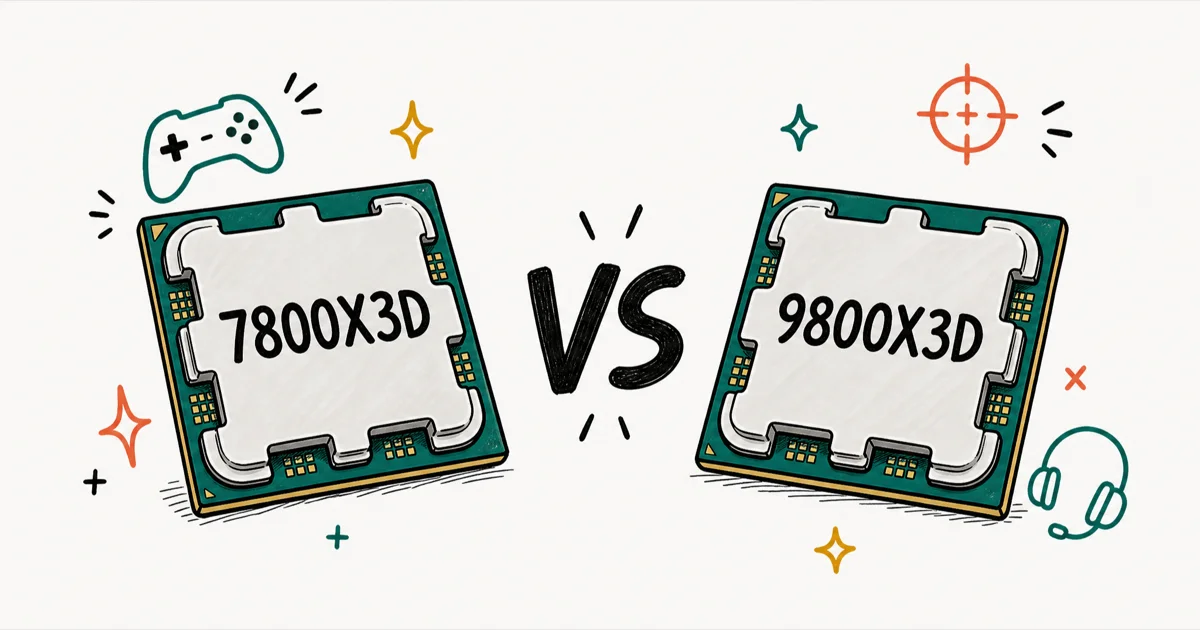
Quick AnswerThe Ryzen 7 9800X3D is the faster gaming CPU and the better all-rounder thanks to its Zen 5 cores, but the 7800X3D is the smarter buy for most gamers because it delivers nearly the same frame rates for noticeably less money.
The Ryzen 7 7800X3D and 9800X3D are two of the strongest gaming CPUs on the AM5 platform, and they’re closer than the spec sheet suggests. The real choice is where the newer chip pulls ahead and where your money is better off staying in your pocket.
- Both are 8-core, 16-thread X3D chips on the AM5 socket, so either fits the same boards
- The 9800X3D uses newer Zen 5 cores and wins outright on raw gaming and productivity speed
- The gaming gap is small at 1440p and 4K, where the GPU usually limits frames first
- The 7800X3D runs cooler and is the better value when it’s meaningfully cheaper
- Both will carry a high-end GPU for years, so neither is a wrong choice
If you want the fastest gaming CPU and don't mind paying more.
If you want flagship-class gaming for less.
#Ryzen 7 7800X3D vs 9800X3D: Our Picks and Where to Buy
Here is the short version on each pick and where to get it before the full comparison.
#AMD Ryzen 7 9800X3D
- Fastest gaming CPU in its class (Zen 5 + 3D V-Cache)
- Fully unlocked and overclockable, unlike the 7800X3D
- Cooler-running 2nd-gen V-Cache layout
Last updated on Jun 30, 2026
As an Amazon Associate fone.tips earns from qualifying purchases. Prices and availability on Amazon are accurate as of the date above and subject to change.
#AMD Ryzen 7 7800X3D
- Outstanding gaming performance per dollar
- Runs cool and efficient for an X3D chip
- Drops into any AM5 board for an easy build
Last updated on Jun 30, 2026
As an Amazon Associate fone.tips earns from qualifying purchases. Prices and availability on Amazon are accurate as of the date above and subject to change.
#How the Two X3D Chips Differ on Paper
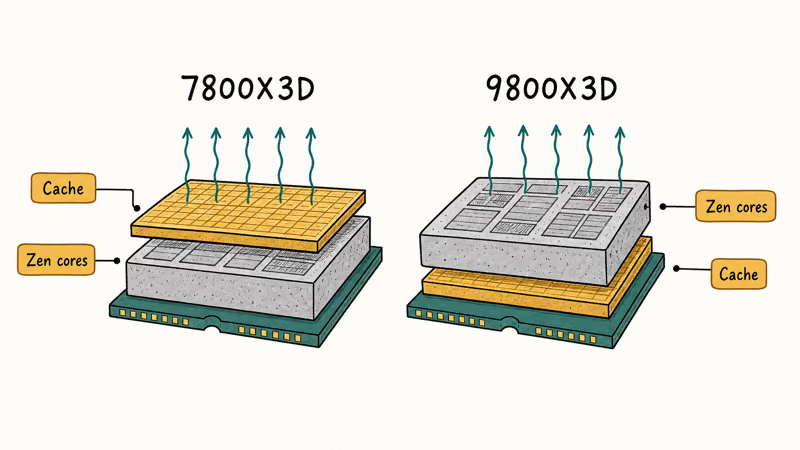
Both chips share the same shape: 8 cores, 16 threads, and a stack of 3D V-Cache that gaming engines love. The difference is what’s underneath. According to AMD’s Ryzen 9800X3D launch brief, the 9800X3D moves the 64MB cache memory below the processor cores to help the Zen 5 cores run cooler.
| Spec | Ryzen 7 7800X3D | Ryzen 7 9800X3D |
|---|---|---|
| Architecture | Zen 4 (5 nm) | Zen 5 (4 nm) |
| Cores / Threads | 8 / 16 | 8 / 16 |
| Memory support | DDR5-5200 | DDR5-5600 |
| Platform | AM5 | AM5 |
| Launch MSRP | $449 | $480 |
AMD’s official specs list the Ryzen 7 7800X3D as a Zen 4 AM5 chip with 8 cores, 16 threads, 96 MB L3 cache, 120W TDP, and DDR5-5200 support. AMD lists the Ryzen 7 9800X3D as the same 8-core/16-thread AM5 shape with Zen 5, 96 MB L3 cache, 120W TDP, and DDR5-5600 support. That is the paper reason the 9800X3D has higher clocks and slightly faster official memory support while keeping platform cost identical.
If you’re new to how memory speed plays into all this, our explainer on RAM versus memory untangles the terms before you shop for a kit. Both chips benefit from a sensible DDR5 kit and a stable AM5 board.
#Which Wins for Gaming?
The 9800X3D wins, but by less than its price gap suggests. The frame-rate lead is real at 1080p and mostly vanishes at 1440p and 4K.
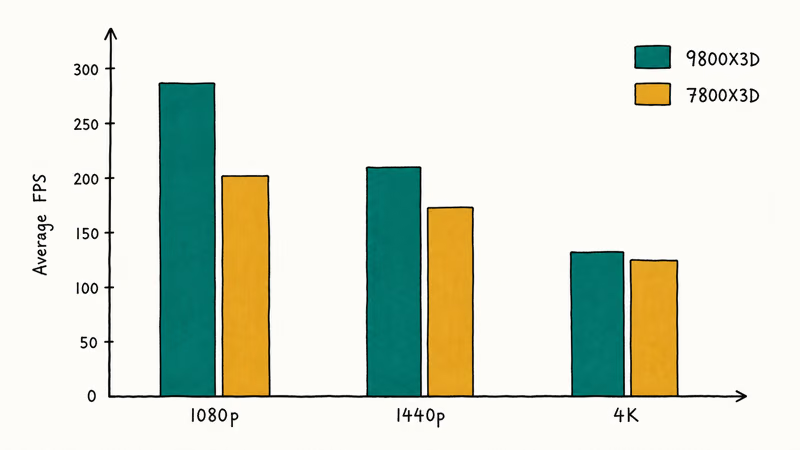
According to TechSpot’s 7800X3D versus 9800X3D review, the 9800X3D was about 8% faster on average across 45 games. That average hides real spread. A handful of CPU-bound titles like Baldur’s Gate 3 showed a 20% lead, while many games landed in single digits.
AMD’s own 9800X3D launch release says the chip uses 2nd Gen AMD 3D V-Cache, relocates the 64 MB cache below the processor, and claims about an 8% generational average FPS uplift in AMD lab testing. Treat that as a vendor claim, not independent review data.
Here’s the catch most buyers miss.
That gap is widest at 1080p, where the CPU does the most work. Push to 1440p or 4K and the GPU becomes the bottleneck first, so the two chips converge. The same pattern applies in the best CPU for the RTX 3080 Ti guide: at higher resolutions, a faster CPU matters less than the graphics card.
The 9800X3D has the clearer edge in CPU-heavy moments like dense city scenes and large strategy maps. At 1440p in GPU-bound AAA titles, the two are much harder to separate.
#Productivity and Power: Where the Gap Widens
For work, the newer chip pulls further ahead. GamersNexus crowned the 9800X3D the new gaming leader at launch, and its Zen 5 cores also help in rendering, compiling, and encoding. The 7800X3D handles those tasks well, just not quite as fast.
If you create content alongside gaming, the 9800X3D is the clearer pick.
#Cooling and Efficiency Favor the Older Chip
The trade-off for that speed is heat. One review found that the 9800X3D reached around 80°C on stock settings while the 7800X3D stayed under 70°C, and the older chip often delivers more frames per watt. It’s the easier of the two to cool quietly.
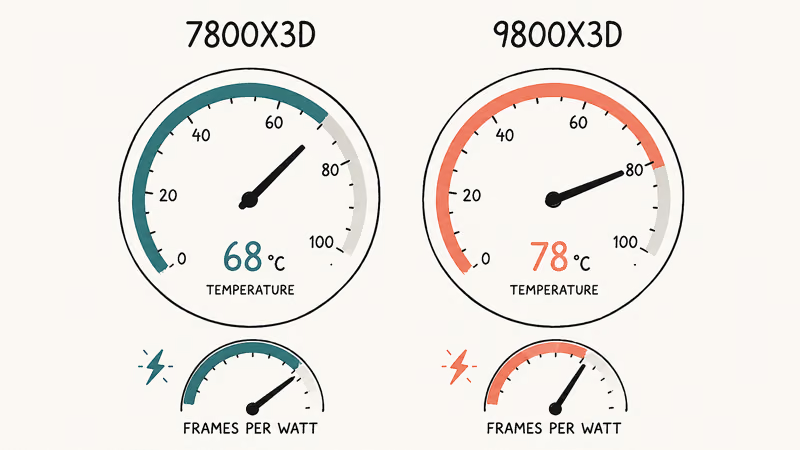
That efficiency matters for build planning. A cooler chip is more forgiving on a mid-range air cooler, which keeps your build cheaper and your case quieter. Pair either with a solid board, and the same VRM logic from our guide to the best motherboards for the Ryzen 7 5800X applies: match the power delivery to the chip and skip features you’ll never use.
#The Price Gap Decides It for Most People
This is where the 7800X3D defends itself. TechSpot’s testing shows that while the 9800X3D pulls a sizable lead in a few CPU-bound titles, the typical game-to-game uplift is modest, which makes its higher price hard to justify for most gamers.
The 9800X3D launched at $480 and the 7800X3D at $449, but street prices move. When the 7800X3D is meaningfully cheaper, that saving can buy a step up in GPU or storage. A faster GPU does more for your frame rate than the CPU upgrade would at 1440p.
Both share the same AM5 upgrade path, so neither traps you.
A 32 GB DDR5-6000 CL30 kit suits both, and our guide to the best RAM for the Ryzen 5 5600X covers the EXPO basics that carry over to these newer chips. Get the memory right and either CPU performs as intended.
#Platform Longevity and Upgrade Path
Both chips sit on the same AM5 socket, and AMD has committed to supporting it for years. That changes how you should think about the choice.
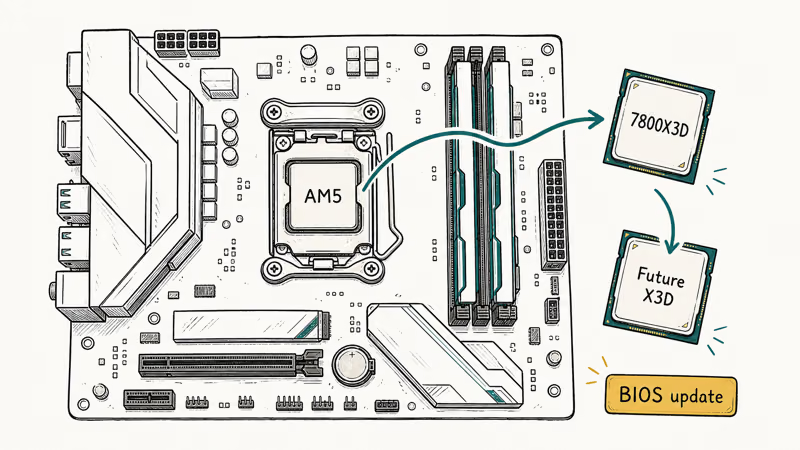
Buying the 7800X3D now doesn’t lock you out of anything. If a future X3D chip tempts you, you can swap it in on the same board with a BIOS update, no new motherboard or memory required.
That’s a real safety net, and it tilts the math toward starting with the cheaper chip. The same boards we cover in the best motherboard for the Ryzen 5 5600X lineage showed how long a single AM4 socket lasted, and AM5 is built to repeat that.
If you settle on the 7800X3D, our B650 board picks for the 7800X3D show which VRM and feature sets actually matter for that chip.
The 9800X3D’s case is simpler. You start at the top, so there’s little reason to touch the CPU again for the life of the platform.
#Which Should You Pick for Your Build?
Match the chip to how you actually play.
If you game at 1080p on a 240 Hz monitor and chase every frame, the 9800X3D’s extra clock speed shows up where you’ll feel it. If you game at 1440p or 4K, the GPU sets your frame rate, so the 7800X3D gives you the same experience for less. The 7800X3D also pairs cleanly with mid-range cards, the way we describe in the best CPU for the RTX 3070 guide, where the CPU rarely limits the GPU at higher resolutions.
#Bottom Line
Buy the 9800X3D if you want the fastest gaming chip available, play at 1080p on a high-refresh monitor, or create content where Zen 5’s extra muscle pays off daily. Buy the 7800X3D if value matters and you game at 1440p or 4K, since you’ll land within a few percent of the flagship for less and run cooler.
Building around a fresh GPU? Our pick in the best CPU for the RTX 5070 guide explains why the 7800X3D is often the smarter half of that pairing.
#Frequently Asked Questions
Is the 9800X3D worth the extra money over the 7800X3D?
For most gamers, no. The typical gaming uplift sits under 10%, and it shrinks further at 1440p and 4K, where the GPU limits frames. The upgrade earns its keep mainly if you game at 1080p on a high-refresh display or do heavy creative work where Zen 5’s extra speed compounds across long renders and encodes.
Do the 7800X3D and 9800X3D use the same motherboard?
Yes. Both are AM5 chips and fit the same B650, B850, X670E, and X870E boards. You may need a BIOS update on older boards, so check the supported-CPU list first.
Which Ryzen X3D chip runs cooler?
The 7800X3D. One review measured it under 70°C on stock settings while the 9800X3D reached around 80°C, and the older chip often delivers more frames per watt, which makes it the easier of the two to keep quiet on a modest air cooler.
How much faster is the 9800X3D in real games?
About 8% on average across TechSpot’s 45-game suite, but the spread is wide.
Should I pick the 9800X3D for streaming and content creation?
Yes, if those are real parts of your day. The Zen 5 cores help in rendering, encoding, and compiling, so the 9800X3D is the better all-rounder for a machine that works as hard as it plays. If you only game, the saving on the 7800X3D is hard to argue with.
Does either chip bottleneck a high-end GPU?
Not at 1440p or 4K. Both are among the fastest gaming CPUs you can buy, so the GPU sets the frame rate in nearly every modern game at those resolutions.
Can I upgrade from a 7800X3D to a 9800X3D later?
Yes, since both use the AM5 socket. A BIOS update may be needed, but you won’t replace the board or memory. That shared platform is one reason starting with the cheaper 7800X3D is a low-risk move you can build on.

Pixel 11 vs Pixel 10: What Changed and Who Should Upgrade
Pixel 11 vs Pixel 10: same screen and camera resolution, new Tensor G6, 25W wireless, and Gemini Intelligence. Here is who should actually upgrade.

Best Power Bank for iPad in 2026: Pro, Air, and Mini
Best power bank for iPad in 2026. Compare mAh tiers and USB-C PD wattage for iPad Pro, Air, and mini, plus airline Wh math, cables, and travel tips.

Best Power Bank With Built-In Cable: Top 2026 Picks
Best power bank with built-in cable picks for 2026. Compare single USB-C, multi-connector, and retractable laptop banks, plus airline Wh math.

Best Apple Watch Band for Working Out: Proven Picks
The best Apple Watch band for working out handles sweat and stays put on your wrist. Compare silicone, nylon, and titanium picks for runs and lifts.