Recover Deleted Facebook Messenger Messages on iPhone
Recover your deleted Facebook Messenger chats on iPhone using Archived Chats, Secure Storage, iCloud restore, and trusted iOS recovery tools.
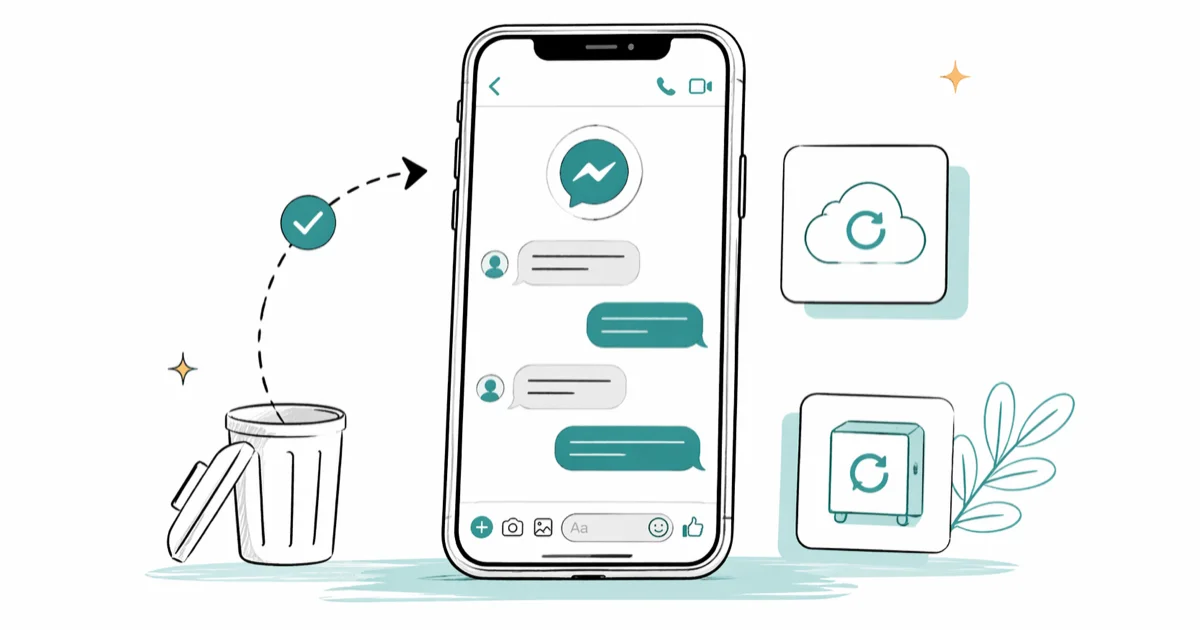
Quick AnswerOn your own iPhone and your own Facebook account, check Archived Chats first, then iCloud or Finder backups taken before the deletion. End-to-end encrypted Messenger chats are only recoverable from Secure Storage if you turned it on before deleting.
You deleted a Messenger chat. Now you need it back.
The honest answer is messier than it was a few years ago. Meta finished rolling out end-to-end encryption (E2EE) by default for Messenger one-to-one chats and calls in 2024, which changed what’s technically recoverable. The methods below assume you’re recovering your own conversations on your own iPhone, signed into your own Facebook account.
- Check Archived Chats first; archive is reversible, delete usually is not
- Encrypted Messenger chats are only recoverable from Secure Storage if you set the PIN before deleting
- An iCloud or Finder backup taken before the deletion can restore Messenger app data when you erase and restore the iPhone
- Reputable iOS recovery tools work mostly on existing iCloud or iTunes backups, not on encrypted chats that were never backed up
- Permanently deleted, never-backed-up E2EE chats can’t be restored, and any tool that promises otherwise is a scam
#Archive vs Delete: Why This Distinction Saves You First
Most people who think they deleted a Messenger chat actually archived it. Archive hides the conversation from your inbox; delete removes it. Archive is reversible in one tap. Delete, especially in the E2EE world, often is not.
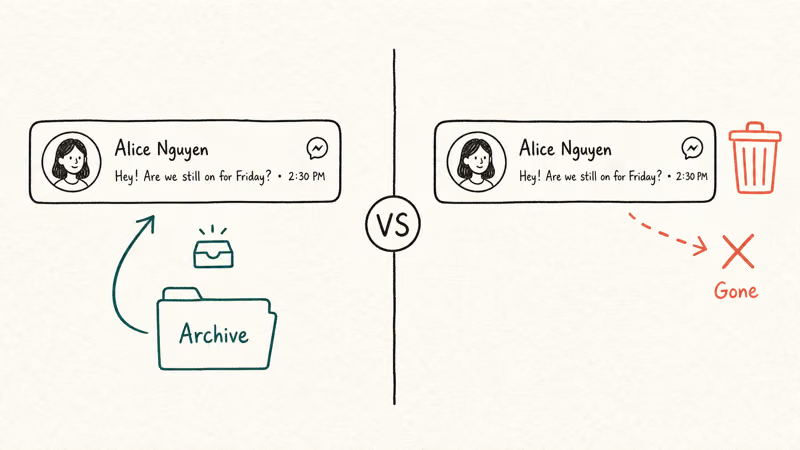
Open Messenger, tap the search bar at the top, and type “Archived.” Tap Archived chats. If the conversation is sitting there, long-press it and pick Unarchive. You are done.
If Archived chats is empty or the conversation isn’t there, the chat was actually deleted, and you move on to the methods below.
This is also the right place to mention scope. Everything in this guide assumes you are recovering messages tied to your Facebook account on your iPhone. Recovering, intercepting, or extracting messages from someone else’s account or device is illegal in most jurisdictions under laws like the Stored Communications Act and the federal Wiretap Act in the U.S. We are not covering that and won’t.
#Method 1: Restore From Messenger Secure Storage
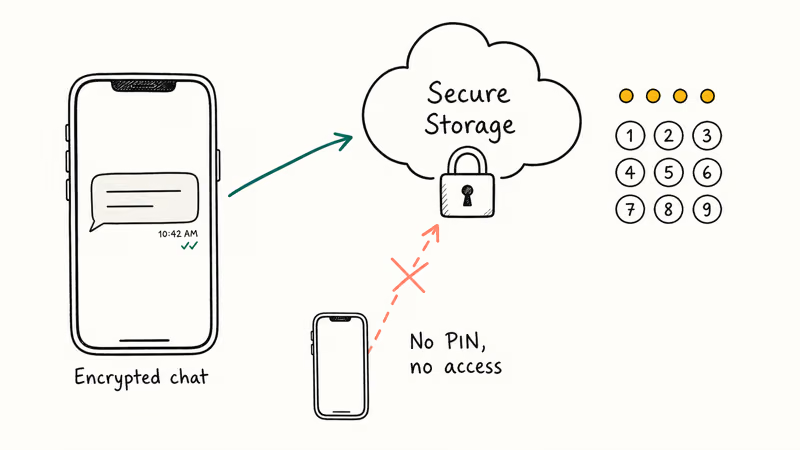
Messenger Secure Storage is Meta’s E2EE backup feature. When you turn it on, your encrypted chats sync to a Meta-controlled server in a form only your PIN or recovery code can decrypt. Without Secure Storage enabled before the delete, this method does nothing for you, so the order matters.
To check or set it up:
- Open Messenger and tap your profile photo in the top-left.
- Tap Privacy & safety, then End-to-end encrypted chats.
- Tap Secure storage and confirm a PIN or save the recovery code.
If Secure Storage was on before the delete, sign out of Messenger and sign back in. Messenger prompts for the PIN, then pulls the encrypted chats back, usually within a few minutes. According to Meta’s Secure Storage help article, without the PIN or recovery code Meta can’t decrypt your data.
That’s the catch: only chats that synced after you set the PIN are restorable. Older threads live only in device backups.
#Method 2: Restore From an iCloud Backup Taken Before Deletion
If your iPhone was backing up to iCloud daily, and the deletion happened recently, you may have a backup that still contains the Messenger app data with the chats intact. The trade-off is that this is a full-device restore, not a surgical recovery, so anything you’ve added since the backup date disappears.
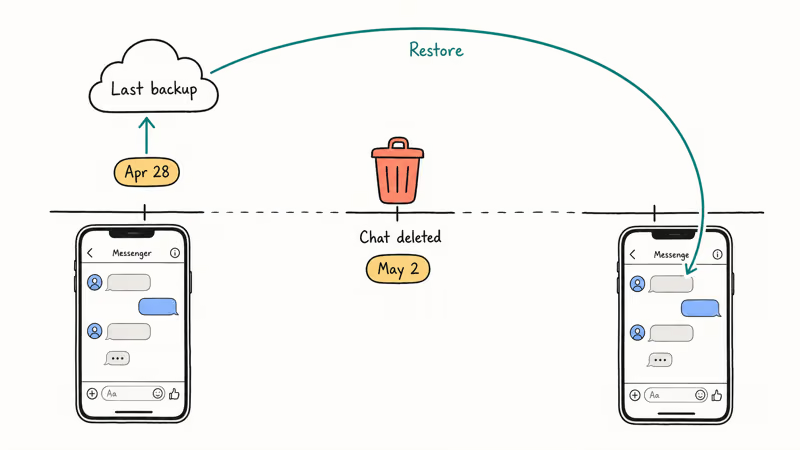
First, confirm a usable backup exists. Open Settings, tap your name at the top, then iCloud, then iCloud Backup. The “Last successful backup” line tells you when the last backup ran.
If that timestamp is from before you deleted the chat, you have a workable starting point. Apple’s iCloud backup support page confirms that iCloud Backup includes most app data and notes Apple gives every account 5 GB of free iCloud storage to start with, which is where Messenger’s local chat database lives in a backup.
To restore:
- Back up your current iPhone state to iCloud or to a Mac with Finder, since the restore will overwrite it.
- Go to
Settings>General>Transferor Reset iPhone>Erase All Content and Settings. - Walk through the iOS setup wizard. When prompted, choose Restore from iCloud Backup.
- Sign in to iCloud, pick the backup from before the deletion, and let it run.
A full iCloud restore can take a while depending on backup size and connection speed. Messenger asks for re-login afterward, and a thread deleted after the backup date reappears in the chat list. Encrypted chats that had synced to Secure Storage come back through the same Secure Storage PIN flow.
#Method 3: Restore From a Finder or iTunes Local Backup
Finder backups (or iTunes on Windows and older macOS) are local copies stored on your Mac or PC. They’re usually fresher than people think and don’t depend on iCloud quota.
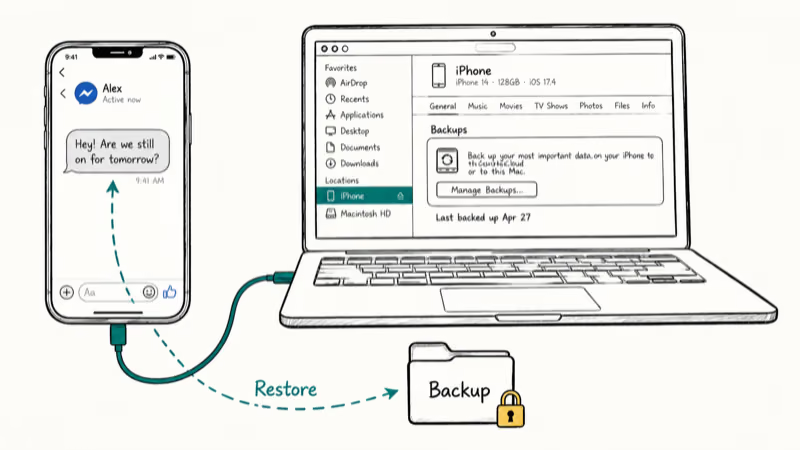
Plug the iPhone into your Mac, open Finder, click the iPhone in the sidebar, scroll to Backups, and check the date next to “Last backed up to this Mac.” If a Mac backup pre-dates the deletion, you can restore the entire device from it the same way as iCloud: erase, then choose Restore from this backup in Finder.
If the Finder backup is encrypted (recommended for Messenger and Health data), you’ll need the backup password. Without it, the restore won’t run, and there is no Apple-blessed way to bypass that. According to Apple’s encrypted backup support page, an encrypted iTunes or Finder backup is the only kind that includes saved passwords and Messenger E2EE-related material.
#Does Tenorshare UltData or Wondershare Dr.Fone Recover Encrypted Messenger Chats?
Mostly no, with one important caveat. Reputable iOS recovery tools like Wondershare Dr.Fone and Tenorshare UltData for iPhone scan two surfaces:
Some links on this page are affiliate links, which means fone.tips may earn a commission at no extra cost to you.
- The iPhone’s local storage (when you connect it by USB)
- An existing iCloud or iTunes backup file that you give them access to
Where they help: extracting Messenger fragments from a backup you already have, surfacing chats and media you can’t otherwise reach in Finder. Where they don’t: pulling decrypted E2EE chats off Meta’s servers. Meta doesn’t have plaintext to give to anyone, including these tools, your iPhone, or Meta itself.
After Meta Secure Storage and Apple’s restore paths, PhoneRescue can inspect your own existing iPhone backup for Messenger data, but it can’t decrypt chats that are absent from that backup.
For a non-encrypted, legacy chat deleted from a community group, a deep scan of the live device often finds only a partial set of the text fragments and none of the attached photos, extracted into a viewable HTML report. Scanning an encrypted iTunes backup is far more reliable: it can recover the full pre-deletion thread, because the source data is the backup, not the deleted state of the live device.
If you go this route, only run the scan on your own iPhone and your own backup file. Running these tools against a device or backup you don’t own can violate the Computer Fraud and Abuse Act in the U.S., and similar laws elsewhere. Both vendors require you to confirm ownership during install.
#When the Full Account Archive Helps More Than Recovery
Facebook’s Download Your Information tool gives you a JSON or HTML archive of your account data, but with a sharp E2EE caveat. According to Meta’s downloading-your-information help page, the archive includes non-encrypted messages (older threads pre-E2EE rollout, community chats, marketplace messages) but does NOT include the contents of E2EE one-to-one or group chats, because Meta can’t read them.
To request the archive:
- Open Messenger, tap your profile photo, then Settings.
- Scroll to
Account Center>Yourinformation and permissions. - Tap Download your information, set a date range, and pick Messages as the data category.
- Submit and wait. Meta typically delivers the archive in 30 minutes to 24 hours.
For non-encrypted threads or chats from before E2EE was the default for your account, this archive can show pre-deletion content if Meta hasn’t yet finished its retention purge. It’s an account-side fallback, not a guaranteed recovery.
#Why Most Tools Promising Magic Recovery Are Scams
Skip them. Since 2024, when E2EE became the Messenger default, any tool advertising “recover any deleted Messenger message” or “extract messages without backup” is selling a fantasy. The math doesn’t work. If Meta itself can’t decrypt your chats without your PIN, a third-party app with no access to your device or your Secure Storage credentials definitely can’t.
The realistic universe of tools is the one covered above: Secure Storage restore, iCloud restore, Finder restore, and forensic tools that work against backups you already have. Anything outside that is either a scam or quietly relying on stolen credentials, which puts your account at risk and may violate the Stored Communications Act. If you suspect spyware on your iPhone, our walk-through on how to detect spyware on iPhone covers the detection and removal steps.
#How Long Do You Have Before Recovery Becomes Impossible?
Time matters more than people expect. Here is roughly how the window behaves.
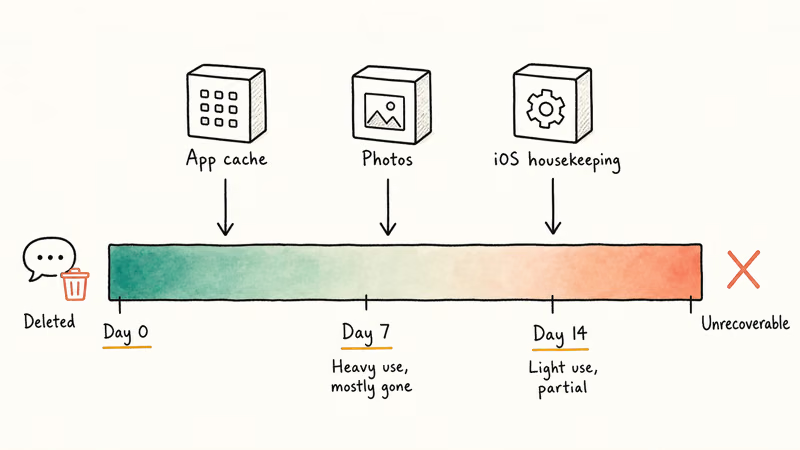
For local-only recovery (no backup, no Secure Storage), the window is short. App caches, photo saves, and iOS housekeeping start writing over the freed storage blocks the moment you keep using the phone.
Deleted-chat fragments are typically gone within about a week of heavy use, and may stay partially recoverable on a lightly-used iPhone for a while longer. The underlying reason is iOS security design: it aggressively reclaims and overwrites freed storage, which is great for privacy and bad for hopeful recovery.
For backup-based recovery, the limit is your backup retention. iCloud Backup keeps the most recent successful backup and overwrites older ones; a Finder backup persists until you delete it. Turn on Secure Storage today and check your iPhone is finishing its iCloud backups overnight. Our piece on iPhone backup failed errors walks through what to fix when overnight backups stall.
Want to keep specific conversations long-term? Our guide on saving Facebook Messenger messages on iOS covers screenshot stitching and the screen-record workaround. The Android flow uses Google Drive instead of iCloud; we cover it in retrieving deleted Messenger messages on Android.
#Bottom Line
Start with Archived Chats. You may already be done.
If the chat is truly deleted and your conversation was encrypted, only a Secure Storage restore brings it back, and only if you set the PIN before the delete. Without that, your best paths are an iCloud or Finder backup taken before the deletion, restored as a full-device wipe-and-restore. Recovery tools earn their place when you have a backup to scan but no clean way to extract from it.
They don’t magically unscramble end-to-end-encrypted threads. If Messenger itself is acting up before any of this, our walk-through of Facebook Messenger not working covers the common app-side fixes worth ruling out first.
One decision worth making today: turn on Secure Storage and verify your iPhone is finishing nightly iCloud backups, so this guide is academic for you the next time.
#Frequently Asked Questions
Can Meta restore an encrypted Messenger chat I deleted from my account?
No. Once a chat is end-to-end encrypted, Meta’s servers don’t hold a readable copy. Without your Secure Storage PIN, even Meta’s own engineers can’t decrypt the message contents. That’s the design, not a limitation Meta can override on request, and it applies equally to law-enforcement subpoenas for the chat content itself.
How recent does my iCloud backup need to be?
It must pre-date the deletion. iCloud Backup keeps the most recent successful backup and overwrites older ones.
Will I lose other data if I restore my iPhone from a backup?
Yes. A full-device restore reverts the iPhone to the exact state captured in that backup, so photos, contacts, app data, settings changes, and new apps added since then disappear unless you separately back them up first.
Are recovery tools like Dr.Fone or UltData safe to install on my iPhone?
The reputable ones don’t install anything on iOS. They run as desktop apps on your Mac or PC and connect over USB.
Can the other person in the chat help me recover what I deleted?
If they still have the conversation on their device, they can screenshot or forward it to you. They can’t push their copy back into your encrypted Messenger account; E2EE chats sync from each end’s local device, so once you delete locally, the only way back is your own backup or Secure Storage.
Is the Download Your Information archive enough on its own?
For E2EE chats, no.
What if I deleted the entire Messenger app, not just a chat?
Reinstalling Messenger starts with an empty local database. The chats only come back through Secure Storage (if it was enabled) or a full-device restore from a backup taken before the deletion. There’s no in-app “undo reinstall” path.
Is it ever legal to recover messages from someone else’s Facebook account?
Almost never. U.S. federal law treats unauthorized access to someone else’s electronic communications as a criminal offense under the Wiretap Act, the Stored Communications Act, and the Computer Fraud and Abuse Act, with similar laws in most other countries. Stay on your own account, your own device, and your own backups.

Pixel 11 vs Pixel 10: What Changed and Who Should Upgrade
Pixel 11 vs Pixel 10: same screen and camera resolution, new Tensor G6, 25W wireless, and Gemini Intelligence. Here is who should actually upgrade.

Verizon Not Receiving Texts? How to Fix It in 9 Steps
Verizon not receiving texts? Fix it in 9 steps: check Message Blocking in My Verizon, reset network settings, deregister iMessage, and call support.

Pixel Battery Drain: What Google's July Fix Really Covers
Google marked the Pixel idle battery drain bug fixed in July, but only some phones got the patch. Here is who is covered, who is not, and what to try.

iPhone Stuck on EDGE? How to Get 5G or LTE Back (2026)
iPhone stuck on EDGE with crawling data? Here's why the E icon appears, which settings force 5G or LTE back, and when the problem is your carrier.