How to Print Text Messages From a Samsung Galaxy Phone
Print SMS from a Samsung Galaxy with Smart Switch, Droid Transfer, SMS Backup & Restore, court-ready PDFs, screenshot stitching, and safe records tips.
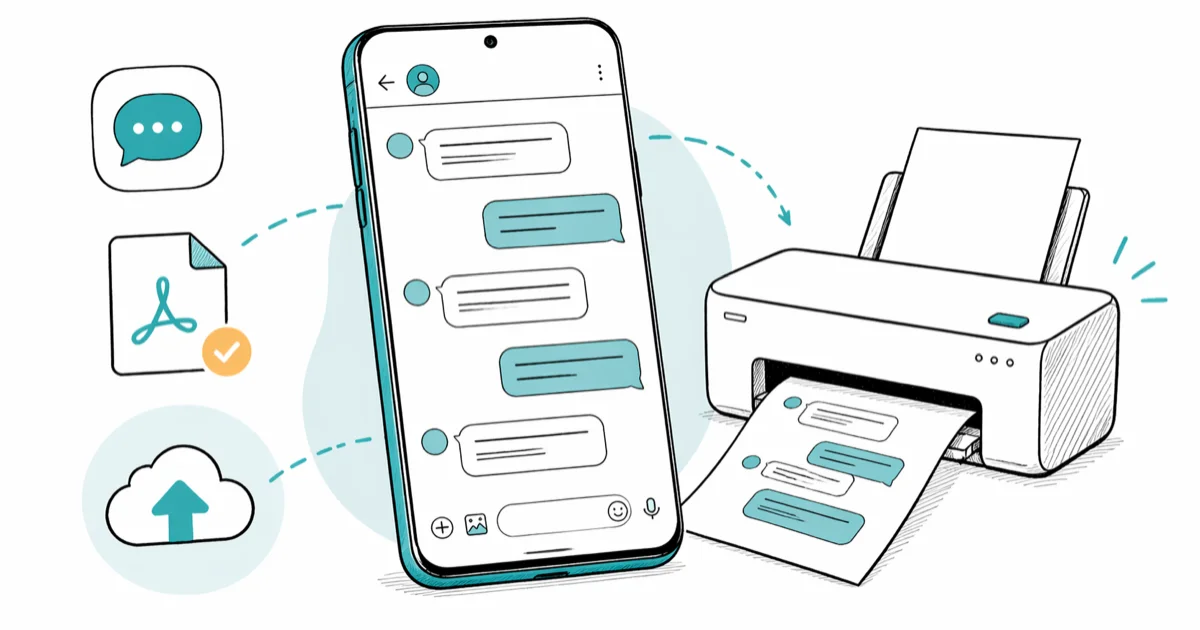
Quick AnswerPrint text messages from a Samsung Galaxy by using Samsung Smart Switch or Samsung Cloud to back up the thread, exporting the messages with a tool like Droid Transfer or SMS Backup & Restore, then printing the resulting PDF on a Wi-Fi printer.
This guide is for printing text messages from your own Samsung Galaxy phone, with messages you sent or received and have lawful access to (archival, household records, or evidence in your own legal matter). It compares the common backup, export, screenshot, and forensic-print workflows without assuming every thread needs the same tool.
Stay on your own device. Extracting messages from someone else’s phone without their knowledge violates US wiretap statutes, the UK Computer Misuse Act, and similar laws in most jurisdictions, so keep this confined to your own account.
- Samsung Smart Switch backs up your full SMS database to a PC, where you can convert it to PDF in about 8 minutes per 1,000 messages
- Droid Transfer (paid, around $25) prints SMS directly with timestamps and contact names preserved in chat-bubble layout
- SMS Backup & Restore (free, 100M+ installs on Google Play) exports threads as XML or HTML for browser printing
- Samsung Notes screenshots paired with a stitching app handle short conversations of 30 messages or fewer
- For court evidence, a notarized print or a forensic tool like SMSExporter Pro produces SHA-256 hash chains that admissibility experts accept
#Which Method Should You Pick?
The right method depends on three things: how many messages you need, whether you need them as legal evidence, and whether you own a Windows or Mac computer.
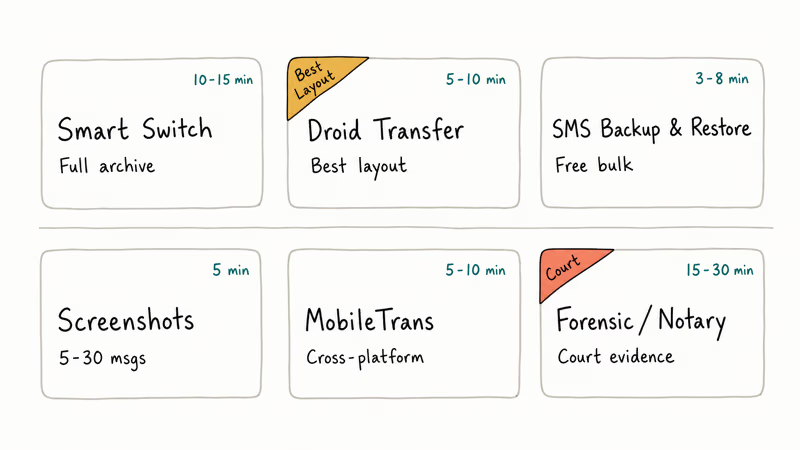
For a 10-message exchange with your landlord, screenshots and a stitching app are enough. Takes under 5 minutes. For 6 months of conversation with an ex-business partner that may end up in small claims court, you want a forensic export with a hash chain, while Droid Transfer or SMS Backup & Restore covers everything in between.
| Method | Best For | Time | Cost |
|---|---|---|---|
| Samsung Smart Switch | Full archive, your own backup workflow | 10-15 min | Free |
| Droid Transfer | Chat-bubble layout, multiple threads | 5-10 min | ~$24.99 |
| SMS Backup & Restore | Bulk XML/HTML export | 3-8 min | Free |
| Samsung Notes screenshots | 5-30 messages, quick print | 5 min | Free |
| MobileTrans by Wondershare | Cross-platform export | 5-10 min | ~$29.95/yr |
| SMSExporter Pro / Notary | Court evidence with hash chain | 15-30 min | $40-$200 |
#Backing Up SMS With Samsung Smart Switch First
Smart Switch is the official Samsung tool. Before you print anything, back up the messages you want, that way you have an unaltered copy on disk if a method goes wrong.
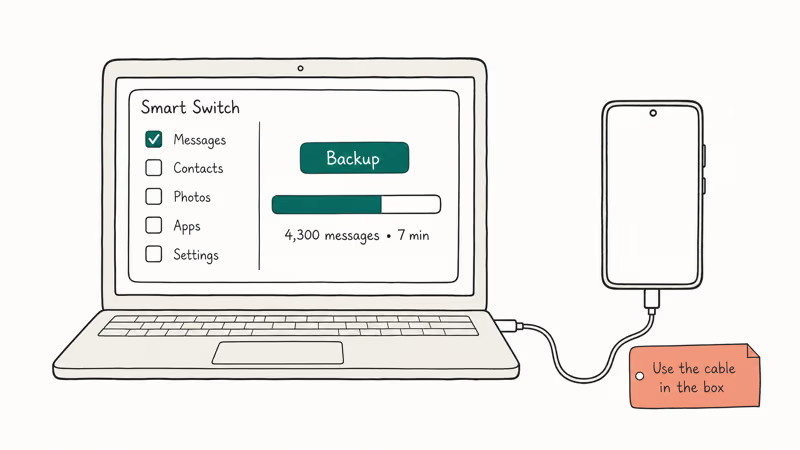
Download Samsung Smart Switch for Windows or Mac from Samsung’s official Smart Switch page. Open it, connect your Galaxy with the USB-C cable that came in the box, then tap Allow on the phone when prompted. Click Backup in Smart Switch and uncheck everything except Messages to keep the file size down. The backup writes to Documents\Samsung\SmartSwitch\backup\ on Windows or ~/Library/Application Support/Smart Switch/backup/ on Mac.
According to Samsung’s Smart Switch user guide, the tool preserves all SMS, MMS, and RCS metadata including timestamps, sender numbers, and read receipts, which is what makes the next step (converting to PDF) clean.
If Smart Switch hangs at the backup screen, see our walkthrough on what to do when Samsung Smart Switch is taking forever to finish. Stuck transfers usually trace back to a USB cable that only carries power, not data.
#Printing SMS With Droid Transfer (Best Layout)
Droid Transfer by Wide Angle Software is a Windows SMS printer with chat-bubble output, timestamps, and USB or Wi-Fi pairing.
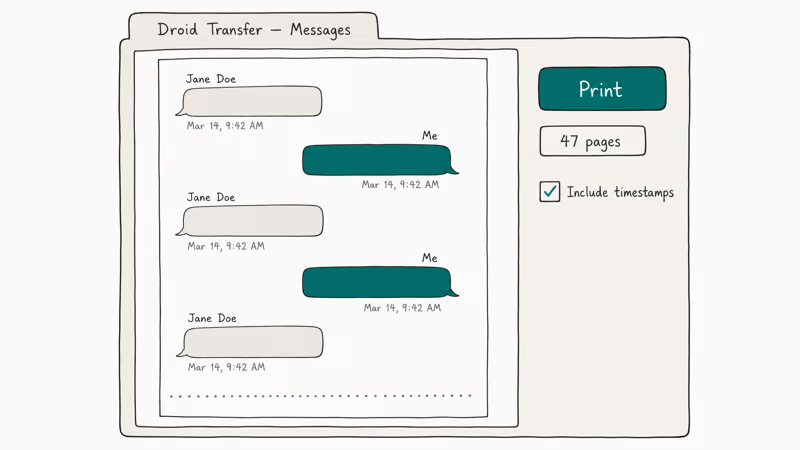
Install Droid Transfer on your Windows PC, then install the companion Transfer Companion app on your Galaxy from the Google Play Store. Open both, scan the QR code in Droid Transfer with the phone, and grant the SMS read permission when Android asks. Click the Messages tab in Droid Transfer, pick the conversation you want, click Print, and the print preview opens with all the chat-bubble formatting intact.
The free trial prints the first 30 messages of any thread. The full license costs $24.99 (one-time, two devices). For long threads, expect the PDF length and export time to scale with the number of messages and attachments.
According to Wide Angle Software’s own Droid Transfer feature page, the print preview ships with a 12-point default font, configurable margins, and an option to include or omit timestamps.
#Exporting Messages With SMS Backup & Restore (Free)
SMS Backup & Restore exports HTML and XML that any browser can print.
Install SMS Backup & Restore from Google Play. Open it, tap Set Up a Backup, select Messages, then pick Local backup only for the cleanest output. Choose a save folder on internal storage, tap Back Up Now, and wait for the green checkmark.
Copy the resulting .xml file to your computer with a USB cable. Open SMSBackupRestore.html (the viewer ships with the app’s PC export) in Chrome or Firefox, hit Cmd+P or Ctrl+P, and save as PDF.
Large threads can produce bulky XML and long PDFs, so save the export somewhere with enough free storage.
If your Samsung also holds WhatsApp messages you want to archive, our guide on backing up WhatsApp messages on Samsung devices covers that pipeline separately.
#Screenshots Plus a Stitching App for Short Threads
For a 5- to 30-message exchange (say, a confirmation chain with a contractor), open the conversation in Samsung Messages or Google Messages, take a screenshot with Side button + Volume Down, then tap the scroll-capture icon (two downward arrows) repeatedly until the whole thread is captured.
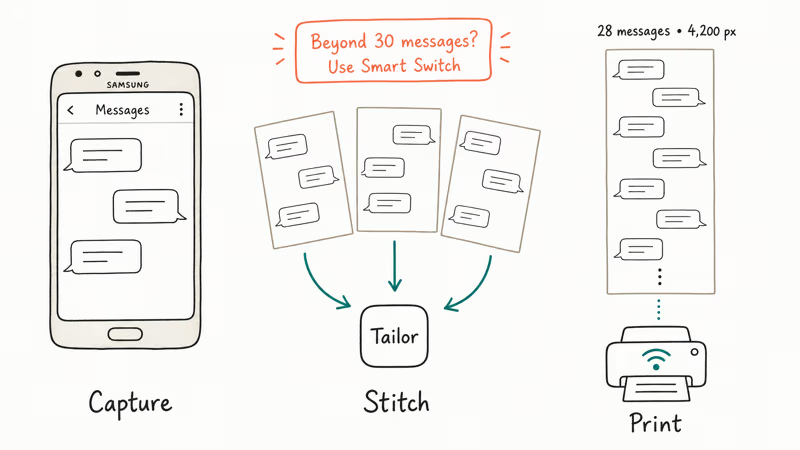
Long threads beyond 30 messages often produce blurry scroll-captures because Samsung downsamples the image to keep the resulting file under 50 MB. For those longer conversations, install a stitching app like Tailor or PicsArt from the Play Store, then take 5-6 normal screenshots covering the conversation. Open the stitching app, select the screenshots in order, and let it auto-align overlapping regions to produce one tall image.
Open that image in the Gallery app, tap Share, pick your Wi-Fi printer, and scale to fit before sending the print job. Stitched images work best for short threads because long captures can become too tall or blurry for clean letter-size printing.
A side note: if your screen mirroring setup is already running, you can also capture the scroll on your computer instead. Our writeup on mirroring a Samsung phone to a PC covers the easiest paths.
#MobileTrans by Wondershare for Cross-Platform Workflows
MobileTrans is a paid cross-platform dashboard for transfers, app data, and SMS export.
Download MobileTrans from Wondershare’s official MobileTrans product page and connect your Galaxy via USB. Click Backup & Restore, then Phone Backup, tick Messages, and click Start. The backup lands in MobileTrans’ library, where you click Export to write each conversation as a CSV or PDF.
The MobileTrans Personal license is $29.95 per year. The PDF output is plainer than Droid Transfer’s chat bubbles, closer to a transcript than a chat log, but it preserves timestamps and works identically on Mac and Windows.
Already own MobileTrans? Use it. For new buyers, Droid Transfer’s chat-bubble layout reads better.
#What Makes a Printout Court-Admissible?
Most US courts accept printed SMS as evidence. Format and chain of custody matter more than print quality.
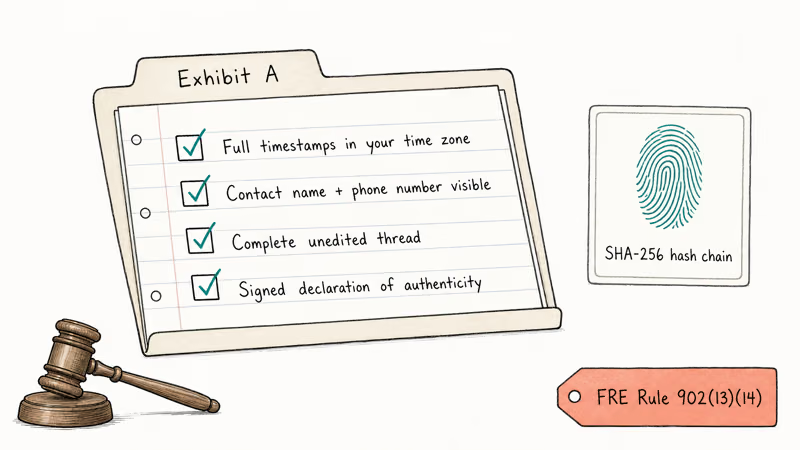
Courts typically want full timestamps in your time zone, contact names with the underlying phone number visible at least once, the complete unedited thread (no cropping unless ordered), and a declaration of authenticity signed by the person who pulled the messages off the phone.
Cornell Legal Information Institute’s Federal Rules of Evidence Rule 902 page states that subsections (13) and (14) cover certified records generated by an electronic process or system. That’s the framework most attorneys cite.
For high-stakes matters, a forensic tool like SMSExporter Pro or Cellebrite Reader produces a SHA-256 hash chain so opposing counsel can’t credibly argue the messages were altered after extraction. Pricing for SMSExporter Pro starts around $40 for a single-case license; full forensic suites run into the hundreds of dollars and usually need a trained operator to run them.
If a judge has already ordered preservation, don’t delete anything from the phone after you print. Keep the device powered on and stored somewhere safe. A notary public can also notarize a printed thread for around $25 in most US states, which is enough authentication for many small-claims and family-court matters.
#Common Issues When Printing Samsung SMS
A few snags trip up almost every first-timer.
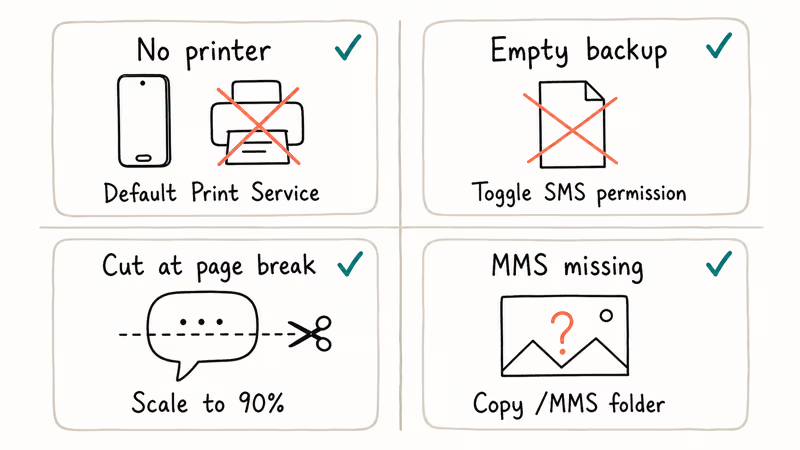
No printer on the phone. Go to Settings > Connections > More connection settings > Printing and tap Default Print Service. Both phone and printer must sit on the same Wi-Fi network. The Default Print Service covers Mopria-certified printers from the major brands, so most modern models work without a separate vendor plugin.
Backup file empty. This usually means the backup app didn’t get the SMS read permission. Open Settings > Apps > [Backup app] > Permissions and toggle SMS on, then re-run the backup.
Messages truncated at page break. Drop the print scale to 90% in your browser’s print dialog, or switch to letter-orientation landscape for wider chat bubbles.
MMS images missing. SMS Backup & Restore stores MMS attachments separately under /SMSBackupRestore/MMS/ on the phone. Copy that folder over before printing if you need the images alongside the conversation in the final document, otherwise the printout will reference attachments that aren’t there.
For users who also want to clean up incoming spam before printing, our guide on blocking text messages on Samsung walks through the carrier-side and app-side options.
#Keeping Your Print-Out Workflow Safe
Three habits keep the process clean.
First, keep an unaltered backup. Run Smart Switch once before you start, and stash the resulting folder on a separate drive. That gives you a baseline if any tool corrupts the in-app database somewhere along the way.
Second, write down what you did. Note the date you pulled the backup, which Galaxy model you used, the One UI version, the tool you ran, and the file’s SHA-256 hash if you have one. A 30-second log entry saves hours later if anyone asks where the data came from, and it costs you nothing now.
Third, watch your storage. A 211-page PDF of SMS history is about 18 MB. If you’re printing on a shared family computer, encrypt the folder or move the PDFs onto a USB stick when you’re done. Same conversations that are useful as evidence today are sensitive personal data tomorrow.
If you decide to migrate to a fresh device after archiving, our walkthrough on cloning an Android phone covers the safe sequence for moving everything else without losing the SMS history.
#Bottom Line
For most archival prints from your own Samsung Galaxy, install Droid Transfer for $24.99: the chat-bubble PDF output is what you actually want and the time saved beats the SMS Backup & Restore free path within one use. For court evidence, back up with Smart Switch first, then pay for a forensic export with a hash chain or have a notary witness the printing session.
Samsung Galaxy Guide
#Frequently Asked Questions
Can you print text messages directly from a Samsung Galaxy without a computer?
Yes, for short threads. Take a scroll-capture screenshot in the Messages app, open it in the Gallery, tap Share, and pick a Wi-Fi printer registered with the Default Print Service.
Is it legal to print SMS messages from your own Samsung phone?
Yes, on your own device and account. Confirm with an attorney before using printouts in litigation.
How many text messages can I export from a Samsung Galaxy at one time?
There’s no hard ceiling in the usual export tools. Very large threads take longer, create larger files, and are more likely to need a desktop workflow instead of direct phone printing.
Does Samsung Messages have a built-in print or export feature in 2026?
No. As of One UI 6.1 on Android 14, Samsung Messages has no print button, no PDF export, and no batch share. You need Smart Switch, Droid Transfer, SMS Backup & Restore, MobileTrans, or screenshots.
Will printing my SMS delete them from the phone?
No. Every method described here reads the messages, none delete or modify them. The backup tools open the SMS database in read mode. The originals stay on the phone untouched.
What about MMS pictures and video?
Images print as part of the conversation in Droid Transfer and MobileTrans, embedded inline so the bubble layout still reads cleanly. SMS Backup & Restore stores attachments separately under /SMSBackupRestore/MMS/, so copy that folder to the same location as the XML before you open the viewer. Videos can’t print as videos. They export as separate .3gp or .mp4 files referenced in the printout, which lawyers usually attach as their own labeled exhibit.
Can I print messages from a Samsung Galaxy that won’t turn on?
Only if you had a recent Samsung Cloud, Smart Switch, or Google Drive backup before the failure. Open Smart Switch on a PC, sign in with the same Samsung account, and restore the messages portion to a working Galaxy. Restoring is selective, so you can pull only the SMS partition without overwriting other data.
If you also need to recover other data from the broken phone, our guide on Android SMS recovery software covers the paid tools that can read directly from a damaged storage chip.
Do screenshots count as legal evidence?
They can, but they’re the weakest format. A judge or opposing attorney can challenge screenshots as easily edited. A forensic export with a SHA-256 hash chain, or a notarized print of the live conversation taken in front of a notary public, holds up better. Ask your attorney what your specific court and case type require.
Samsung Secure Folder: Setup, Hide Apps, Clone Apps
Set up Samsung Secure Folder in under 5 minutes. Hide apps and photos, clone a banking app, and hide the Secure Folder icon on any Galaxy S8 or newer.
How to Use Google Find Hub: Setup + Find Lost
Set up and use Google Find Hub to locate, ring, lock, or erase your own Android phone, including offline finding and powered-off Pixel support.

Samsung Galaxy Battery Draining Fast: 2026 Fix Guide
Diagnose Galaxy S25 battery drain in five minutes through Battery Usage, then walk through six reversible Galaxy settings before a factory reset.
Samsung Parental Controls: Full Setup Guide for Parents
Set up Samsung parental controls in three layers: Samsung Kids, Google Family Link, and Digital Wellbeing. Free step-by-step guide for Galaxy parents.