Best Wireless Pen Mouse: Top 5 Picks and Buying Guide
The EIGIIS is the best wireless pen mouse for most people. Compare 5 picks across DPI, ergonomics, and battery life to find the right fit for you.
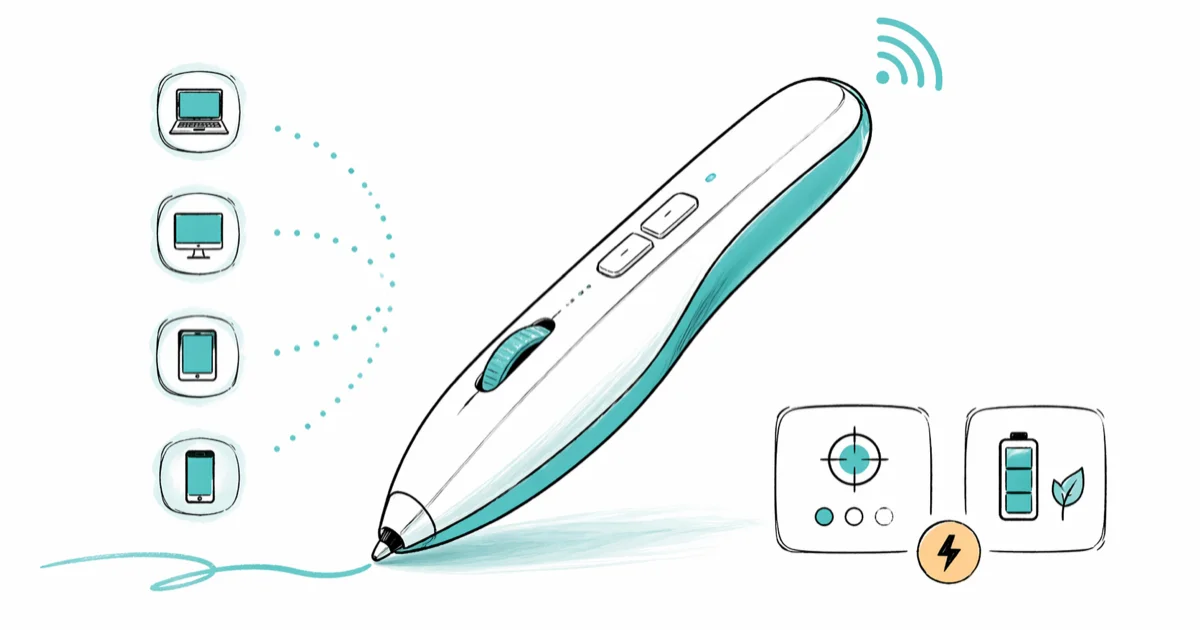
Quick AnswerThe EIGIIS Wireless Optical Pen Mouse is our top pick. It has a 10-meter range, three DPI levels, and works on Windows, Mac, Android, and Linux without drivers.
A wireless pen mouse looks like a thick ballpoint pen but works as a regular mouse. The pen grip rotates your wrist toward neutral, which is why ergonomists often recommend the form factor for early-stage repetitive strain symptoms.
The five popular models below are weighed on how they hold up in day-to-day use across Windows and macOS, not just on spec sheets.
- Pen mice rotate your wrist out of the pronated grip a flat mouse forces
- DPI typically tops at 1600; 1200 fits most single-monitor setups
- Bluetooth models skip the USB receiver but require recharging every 2-3 days
- All five models in this guide are plug-and-play on Windows and macOS
- Budget picks start around $10; the SANWA ring design costs around $30
#What Is a Wireless Pen Mouse?
A wireless pen mouse is a pointing device shaped like a thick pen. You hold it between your fingers the way you grip a ballpoint, and it replaces a flat desk mouse entirely.
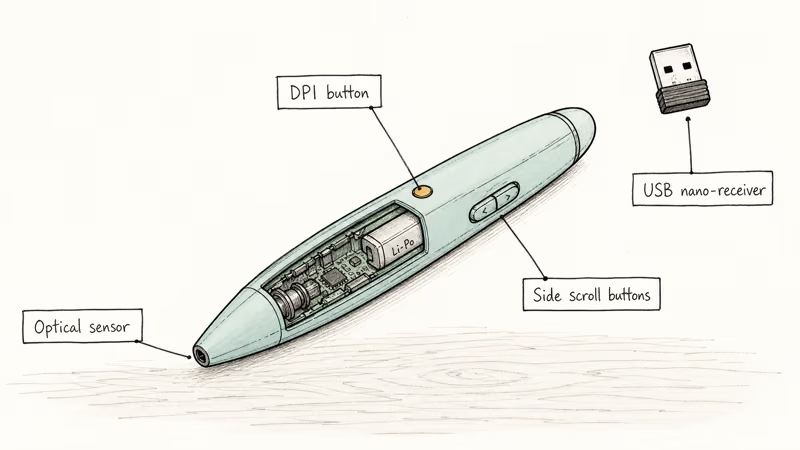
Most models use an optical or laser sensor at the tip. They connect over a 2.4 GHz USB nano-receiver or Bluetooth, then translate hand movement into cursor motion the same way any HID mouse does. No special surface required.
According to a Cornell University ergonomics paper, wrist pronation greater than 45 degrees during prolonged mouse use is one factor in upper-limb discomfort among desk workers. A flat mouse holds your palm at roughly 90 degrees of pronation. A pen grip drops that closer to 30 degrees.
This isn’t a graphics tablet. Pen mice send no pressure or tilt data. For drawing work, a cheap drawing tablet with a screen is the right tool.
#Top 5 Wireless Pen Mice Compared
Here is how the five models compare at a glance:

| Model | Connection | DPI | Battery | Best For |
|---|---|---|---|---|
| EIGIIS | 2.4 GHz | 800-1600 | AA | Overall pick |
| Lychee | 2.4 GHz | 800-1600 | AA | Budget |
| SANWA Ring | Bluetooth | 1200 | Rechargeable | Presenting |
| Jhua | 2.4 GHz | 800-1600 | Rechargeable | Travel |
| BicycleStore | 2.4 GHz | 800-1600 | AA | Lightweight |
#1. EIGIIS Wireless Optical Pen Mouse (Best Overall)
The EIGIIS sits around $12 and is the most consistent of the five in everyday use. Cursor tracking stays steady at all three DPI levels on a bare wood desk and a basic cloth mat.
Key specs:
- 10-meter effective range
- Three DPI levels: 800, 1200, 1600
- Compatible with Windows, macOS, Android, and Linux
- Single AA battery
The 10-meter range matters in practice. It comfortably covers a mid-sized conference room, so the cursor stays responsive from the back of the room during a slide rehearsal.
Build quality outperforms the price. The casing is plastic but rigid, with no flex when squeezed, and it shrugs off the occasional drop onto a hard floor without needing recalibration.
One honest limitation: scrolling uses two side buttons rather than a wheel. Expect about a day to retrain the reflex of reaching for a wheel that isn’t there.
#2. Lychee Wireless Optical Pocket Pen Mouse (Budget Pick)
At about $10, the Lychee is the cheapest pick worth trusting. Its spec sheet matches the EIGIIS almost line for line: same 2.4 GHz connection, same three DPI levels, same range. The barrel is slightly slimmer, which tends to suit smaller hands.
Key specs:
- 33 ft (about 10 m) effective range
- Three DPI levels: 800, 1200, 1600
- Auto-sleep after roughly 8 minutes idle
- Compatible with Windows, Android, and macOS
Wake delay is the practical drawback. Auto-sleep kicks in reliably and saves battery. Resuming takes about 1 second on average, which becomes noticeable mid-presentation when you click and nothing happens for a beat.
#3. SANWA Bluetooth Finger Ring Mouse (Best for Presentations)
The SANWA takes a different shape entirely. It’s a ring that fits around one or two fingers. You wear it instead of holding it and steer the cursor with small hand motions.
Key specs:
- Bluetooth 5.0, 10-meter range
- 1200 DPI fixed optical sensor
- Five buttons plus a small touch pad
- Rechargeable battery, up to 15 hours per charge
- Works on Windows, macOS, iOS, and Android
This one shines during standing demos. A pen-style mouse turns into a prop you fidget with when you are on your feet. The ring stays on your finger while your hands gesture normally, and the buttons advance slides without breaking eye contact.
Precise cursor work suffers. The SANWA is a poor fit for daily spreadsheet editing.
#4. Jhua Wireless Optical Pocket Pen Mouse (Best for Travel)
The Jhua puts a capacitive stylus tip on the end opposite the optical sensor. One device, two jobs: cursor on a laptop, stylus on a phone or tablet.
Key specs:
- Built-in rechargeable battery, USB charging
- Capacitive stylus tip
- Three DPI levels and 10-meter range
- Compatible with Windows, macOS, Android, iOS, and Linux
If your bag swaps between laptop and tablet during a workday, the Jhua removes one item from the pile. The rechargeable cell also helps on the road, since you’re never hunting for an AA at a hotel front desk.
#5. BicycleStore Wireless Optical Mouse Pen (Lightweight Pick)
Lightest of the five at roughly 18 grams. It uses a standard 2.4 GHz nano-receiver and the same 800-1200-1600 DPI cycle as the rest.
Key specs:
- 2.4 GHz wireless connection
- Three DPI levels: 800, 1200, 1600
- Compatible with Windows, macOS, Linux, and Android
- Around $10-$12
Build quality feels hollow. The shell flexes slightly under a strong pinch grip. It works fine as a low-cost trial of the form factor before you commit, but don’t expect the same solid feel as the EIGIIS.
#Key Features to Evaluate Before Buying
Not every spec on a pen-mouse product page matters in practice. Here is what actually changes the day-to-day experience.
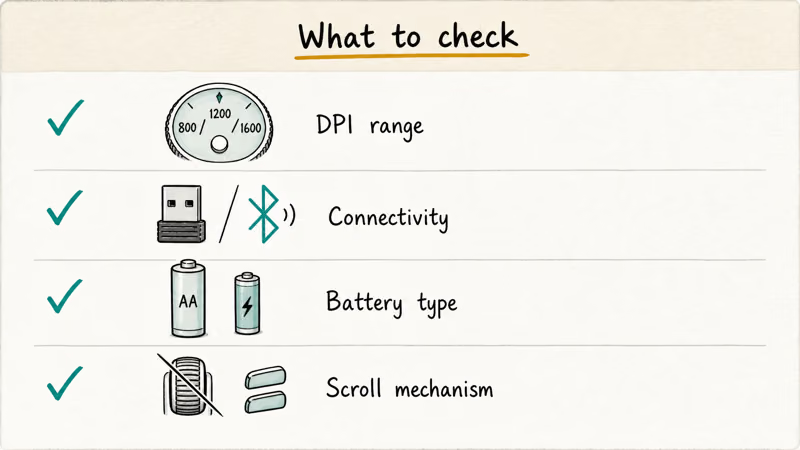
DPI range: Most pen mice top out at 1600 DPI. That’s enough for one 1080p or 4K display. For two or more large monitors, you’ll want higher. The guide on how to check mouse DPI shows how to confirm what your current mouse delivers before switching.
Connectivity: A 2.4 GHz nano-receiver is typically a few milliseconds faster than Bluetooth, which only matters for fast-twitch work. Bluetooth is fine for office tasks and saves a USB port on a thin laptop.
Battery type: Rechargeable cells save money over a year but add a charging routine every 2-3 days. AA models are ready after a swap, which is the right tradeoff when you travel and forget your cable. Rechargeable suits the desk; AA suits the road.
The rechargeable SANWA needs frequent top-ups under daily use, while the AA-powered EIGIIS runs for weeks on a single fresh alkaline before the cursor starts skipping. PCMag’s best mice roundup recommends rechargeable models for desk-bound users and AA models for travel, which matches that pattern.
Scroll mechanism: Most budget pen mice replace the scroll wheel with two side buttons. The adjustment takes a few days. Higher-end models add a small scroll ring around the barrel, which feels more natural once you find it without looking.
OSHA’s computer workstation guidance recommends keeping the wrist within about 10 degrees of neutral during pointing tasks. A pen grip gets closer to that target than a flat mouse for most users. Try one for a full week before deciding, since individual hand geometry varies more than people expect.
#Pen Mouse vs. Vertical Mouse
Both shapes target the same problem: too much forearm pronation. A vertical mouse stands your forearm upright in a handshake position. A pen mouse rotates your wrist into a writing angle. Neither is universally better.
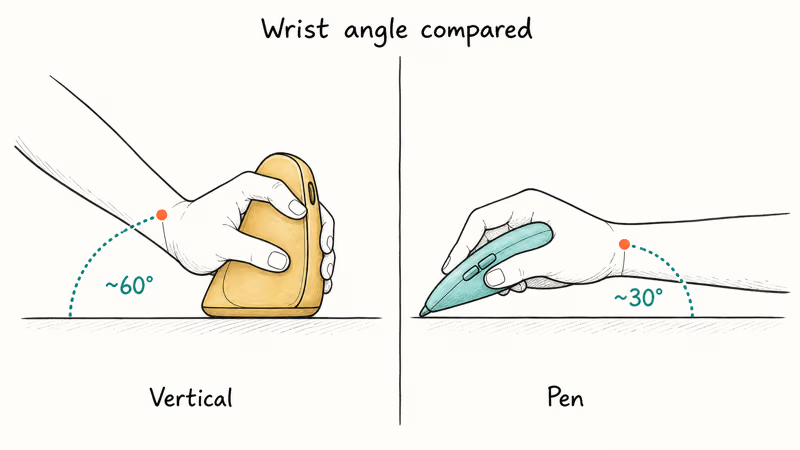
Held back-to-back, the vertical mouse sits at a steep handshake angle, while the pen mouse rests noticeably flatter.
Vertical mice are easier to adopt. The button layout looks familiar, the scroll wheel sits where you expect it, and there’s no real learning curve for clicking. Pen mice need more retraining, particularly for scrolling, but they’re lighter and far more portable once you adapt. Our roundup of the best vertical gaming mouse covers the upright-handshake option in detail.
The portability gap is real. A pen mouse fits in a shirt pocket. A vertical mouse barely fits in a jacket pocket and consumes meaningful bag space. If you commute or travel weekly with a laptop and want ergonomic input that does not add bulk, the pen wins on practicality.
#Is a Pen Mouse Worth Switching To?
Three situations where the pen form makes sense:
Wrist pain. If your wrist or forearm aches after long sessions, the pen grip is worth a real try. Ergonomists point to forearm pronation as a common culprit, and a pen grip cuts that load significantly. The best mouse for programming roundup includes pen mice alongside vertical mice for the same reason.
Frequent presenting. The pen shape is natural to hold while standing.
Travel. Pen mice slip into a jacket pocket and need no mousepad.
Bad fits: photo editing, competitive gaming, and precision graphic design. For illustration work, Inkscape paired with a real graphics tablet gives you pressure sensitivity and a purpose-built surface. For serious animation rigs, the hardware in best computers for animation pairs with dedicated input devices, not a pen mouse.
Across both Windows and macOS, all five pen mice track at 1600 DPI without dropouts on cloth, wood, and paper, but every one of them stutters on glossy desk laminate.
#How to Set Up a Wireless Pen Mouse
Setup runs about 2 minutes for either connection type.
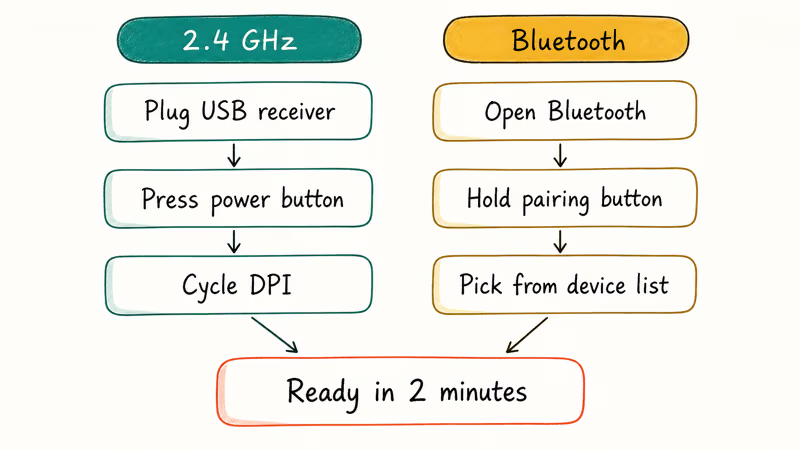
For 2.4 GHz models, plug the USB nano-receiver into any port and press the power button on the barrel. Windows or macOS recognizes it as a standard HID mouse with no driver install. Press the DPI button on the barrel to cycle between 800, 1200, and 1600.
For the SANWA Bluetooth model, open Bluetooth on your computer, then press and hold the pairing button until the LED flashes. Pick it from the device list. Pairing finishes in roughly 15 seconds.
No drivers needed. All five models speak standard HID.
One Windows-specific gotcha: when a pen-shaped device connects, Windows sometimes activates Windows Ink automatically. Windows Ink intercepts pointer events for stylus input, which can scramble basic clicks for a non-stylus device. If that happens, see our guide on how to disable Windows Ink to turn it off and restore normal mouse behavior.
If acceleration feels off after install, the enhance pointer precision explainer covers the Windows toggle that pen-mouse users often want disabled for cleaner tracking.
#Bottom Line
For most people, the EIGIIS is the right pick at around $12. It has the best mix of tracking accuracy, build quality, and price in this group. The SANWA ring is worth the extra $20 if you present often and want hands-free cursor control during a talk.
Pen mice take about a week to feel natural. If you commit to the adjustment and the ergonomics still don’t click, a vertical mouse covers the same anatomical goal. That’s a different article.
#Frequently Asked Questions
Are wireless pen mice good for everyday office work?
Yes for most office tasks. Email, browsing, spreadsheets, and document editing all work fine with a pen mouse.
The only real adjustment is scrolling. Budget models use side buttons in place of a wheel. Most people adapt within 2-3 days, though some never love it. If scrolling is heavy in your workflow, look for a model with a scroll ring on the barrel.
Do pen mice work without installing drivers?
All five models in this guide are plug-and-play. No download required.
How long does the battery last in a wireless pen mouse?
For AA models, expect 1-3 months of typical office use before a swap. The SANWA’s rechargeable cell lasts up to 15 hours per charge, and the Jhua’s built-in battery is similar. If you log 6-8 hours of mouse time per day, plan on charging the SANWA every 2 days. AA models still beat rechargeable for travel, since you can grab fresh batteries from any convenience store.
Can I use a pen mouse on any surface?
Most optical pen mice track on wood, plastic, fabric, and paper. They struggle on glossy or reflective surfaces like glass and polished metal. A standard mousepad gives the most consistent results. The Lychee and EIGIIS both track fine on a bare wood desk.
Is a pen mouse suitable for gaming?
No, not for anything competitive. The 1600 DPI ceiling and the pen form factor both work against you in fast-paced shooters and MOBAs.
Can I use a wireless pen mouse with a tablet?
Most pen mice work with Windows tablets. The Jhua adds a capacitive stylus tip that also works on iOS and Android touchscreens. For cursor support on iPads running iPadOS 14 or later, Bluetooth pen mice pair correctly and show a dot cursor on screen.
What is the difference between a pen mouse and a graphics tablet stylus?
A pen mouse is a regular mouse with a pen-shaped body. It tracks position on any flat surface using an optical sensor and connects as a standard HID device.
A graphics tablet stylus works in a completely different way. It pairs with an electromagnetic surface built into the tablet, and reports pressure, tilt, and barrel rotation to drawing software. Pen mice send none of that. They’re for cursor control only, not for varying line weight in art.
Do pen mice cause less wrist strain than regular mice?
For many users yes. According to a Wikipedia summary of repetitive strain research, reducing forearm pronation lowers strain on wrist and elbow tendons during sustained mouse use. A pen grip accomplishes that.
Results vary by hand anatomy. Some people adapt within a week and never go back, while others find the grip uncomfortable and return to a flat mouse. Try one for a full week before deciding.

Best Laptop for Running LLMs in 2026: Memory Comes First
The best laptop for running LLMs is a memory purchase first. Compare MacBook unified memory against NVIDIA laptop VRAM, and see what each tier really runs.

Pixel 11 vs Pixel 10: What Changed and Who Should Upgrade
Pixel 11 vs Pixel 10: same screen and camera resolution, new Tensor G6, 25W wireless, and Gemini Intelligence. Here is who should actually upgrade.

Best Power Bank for iPad in 2026: Pro, Air, and Mini
Best power bank for iPad in 2026. Compare mAh tiers and USB-C PD wattage for iPad Pro, Air, and mini, plus airline Wh math, cables, and travel tips.

Best Power Bank With Built-In Cable: Top 2026 Picks
Best power bank with built-in cable picks for 2026. Compare single USB-C, multi-connector, and retractable laptop banks, plus airline Wh math.