One UI 8 Problems: 2026 Fix Guide for Galaxy Owners
One UI 8 is breaking Bluetooth in cars, draining batteries, and dropping keyboard taps on Galaxy phones. Here are the per-issue fixes that work in 2026.
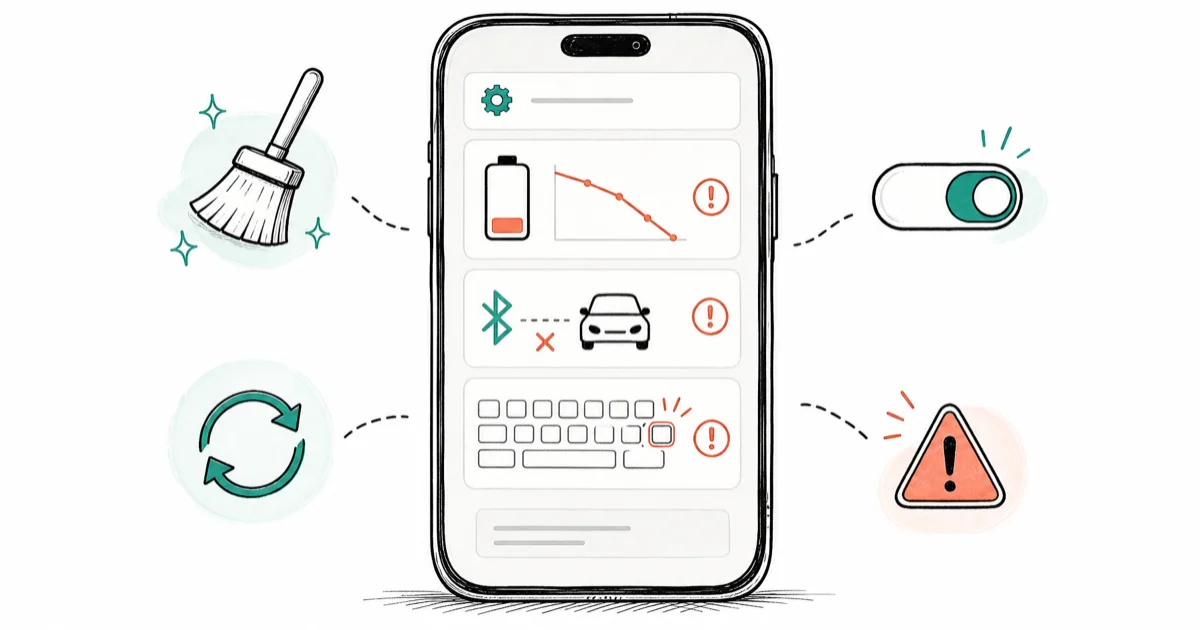
Quick AnswerMost One UI 8 problems on Galaxy phones clear after clearing the affected app's cache and installing the latest One UI 8.x patch. Rollback to One UI 7 wipes the phone.
One UI 8 shipped to most Galaxy S24, S25, and S26 phones in Q1 and Q2 2026, and a small cluster of post-update issues keeps showing up in Samsung Members threads. The fix is usually two steps. This guide assumes the Galaxy is a device you own.
- Most One UI 8 issues are app-level (Bluetooth, keyboard, Messages), not OS-level, and clear after a cache wipe plus reset app preferences
- Bluetooth-to-car dropouts after One UI 8 usually need the old pairing profile deleted on both phone and head unit, then a fresh re-pair from Bluetooth discovery mode
- Samsung Keyboard dropped-letter complaints often clear by clearing the keyboard cache through Settings and disabling Smart Typing predictions for a 48-hour test
- Battery drain after One UI 8 typically traces to one runaway background app visible through
Settings>Battery>Batteryusage, not to the OS itself - Rollback from One UI 8 to One UI 7 requires Samsung Smart Switch or Odin, wipes the phone, and is rarely worth waiting through one more One UI 8.x patch cycle
#What Is Breaking in One UI 8 Right Now?
According to the Samsung Members forum, a recurring cluster of post-One UI 8 issues spans Galaxy S24, S25, and S26 phones, plus the A-series. The same five names keep coming back: Bluetooth audio dropping in cars, the Samsung Keyboard skipping letters, Messages not delivering inbound SMS for hours, the device running hot under normal use, and noticeable battery drain.
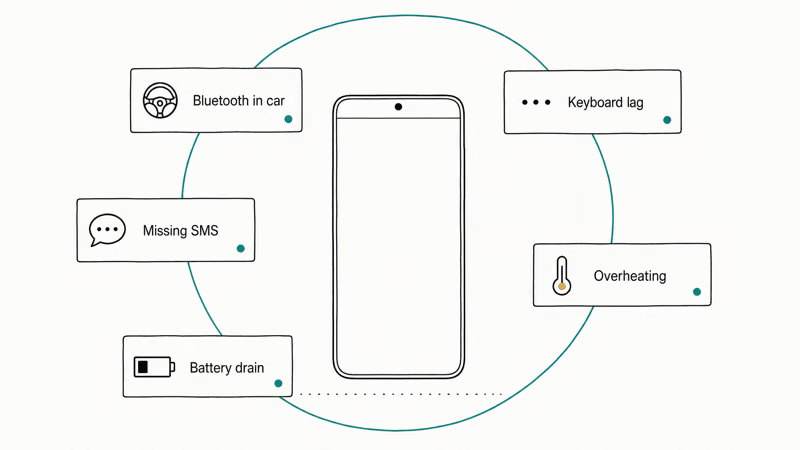
Android Authority’s One UI 8 rollout coverage confirms that the same pattern is showing up across major Galaxy lines, with Samsung pausing rollouts across the S22, S23, and S24 series at various points.
None of this is rare or per-unit. It’s the early-rollout shape Samsung usually settles within two or three patch cycles.
Before you start fixing, pick the one that’s actually hurting you. Most owners only need one fix.
#One UI 8 Overheating After the Update
A phone that runs warm for the first 24 to 48 hours after a major update is normal. Samsung’s media indexer, Google Photos re-scan, and Play Services all run hard during that window. If your Galaxy is still hot 72 hours in, something specific is running away.
Open Settings > Battery > Battery usage. Look for one app eating 15 percent or more on a phone that’s barely being touched.
Common culprits in mid-2026: a banking or insurance app with a broken background sync, a fitness tracker companion app stuck in a connect loop, or a recently sideloaded APK that never sleeps.
Force stop the suspect app, clear its cache (Settings > Apps > [app] > Storage > Clear cache), and reboot. If the heat returns within an hour, uninstall and check the Play Store for an update before reinstalling. The same generic Android cache clearing flow works here.
If your Galaxy has been collecting screenshots and offline videos for months, clearing the “Other” storage bucket on Samsung often drops temperatures by reducing how much the indexer has to chew through after each update.
#Bluetooth in the Car Keeps Disconnecting
This is the loudest One UI 8 complaint of the 2026 cycle, and it traces to a Bluetooth profile change. One UI 8 leans harder on the newer LE Audio stack and the AOSP Bluetooth controller revisions in Android 16. Older head units, especially 2019 to 2022 model-year vehicles, sometimes refuse to renegotiate the codec on the first reconnect after the update.
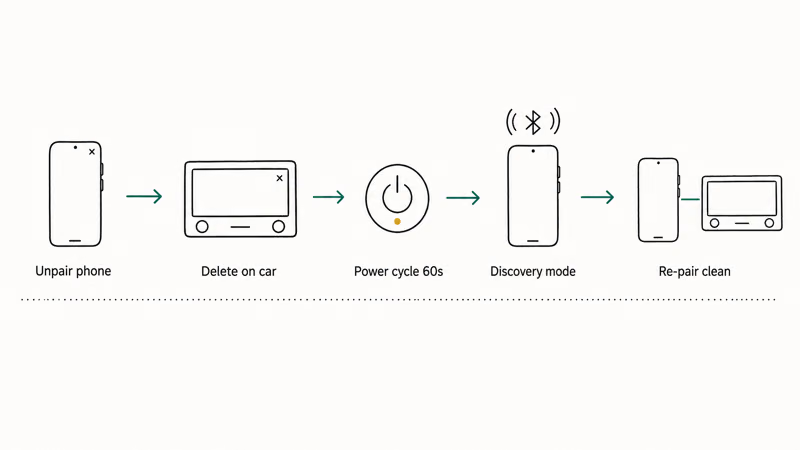
The reliable fix is a clean re-pair on both ends. On a Galaxy running One UI 8 paired with a car head unit, the connection usually holds only after you delete the old pairing on the phone, delete the old pairing on the head unit, then re-pair from Bluetooth discovery mode with the engine running.
Sequence to try:
- On the phone, go to
Settings>Connections>Bluetooth, tap the gear next to the car, and choose Unpair. - On the head unit, open the Bluetooth menu and delete the phone entry.
- Power-cycle both: turn the engine off, wait 60 seconds, restart.
- Put the phone into Bluetooth discovery mode (the Bluetooth menu, with the car turned off) and start a fresh pairing from the car.
- Allow contacts and message access when the prompt appears.
If that still drops, clear the system Bluetooth cache. Settings > Apps, tap the three-dot menu, choose “Show system apps”, find “Bluetooth”, then Storage > Clear cache. Reboot once more.
Our general Android Bluetooth troubleshooting guide covers the broader cache-clear step. The re-pair-on-both-sides part is what’s new with One UI 8.
Also worth checking: Settings > Apps > Android Auto > Battery > Allow background activity. One UI 8 is more aggressive about killing background services on devices it considers idle, which can drop Android Auto sessions mid-trip.
#Samsung Keyboard Lag and Dropped Letters
The Samsung Keyboard dropped-letter complaint is the second-most posted One UI 8 issue on the Samsung Members forum. Typing feels fine for a sentence. Then a tap registers as nothing. Then a burst of three queued keys arrives at once.
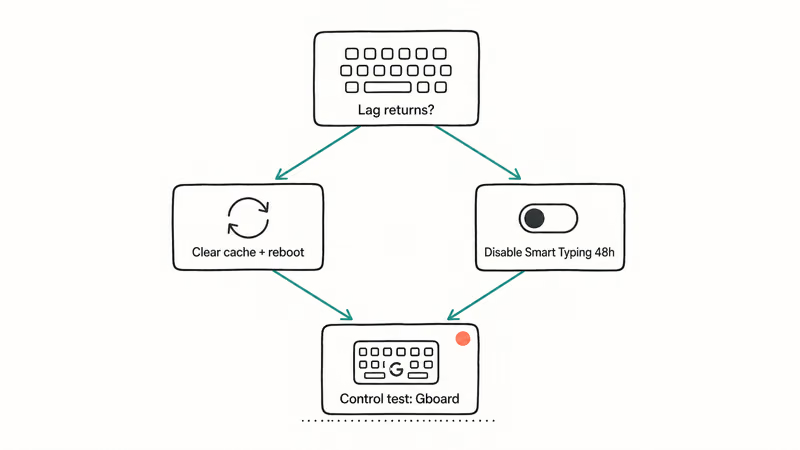
Clearing the Samsung Keyboard app cache through Settings > Apps > Samsung Keyboard > Storage > Clear cache resolves the burst-typing pattern on many Galaxy phones within a single reboot cycle. If it persists, the next fix is Settings > General management > Samsung Keyboard settings > Reset to default settings, then re-enabling SwiftKey prediction one feature at a time.
Quick triage path:
- Clear Samsung Keyboard cache and reboot.
- If the lag returns, open Samsung Keyboard settings and turn off Smart Typing predictions for 48 hours. Watch whether the lag clears.
- As a control test, install Gboard from the Play Store, set it as default in
Settings>Generalmanagement > Keyboard list and default, and type for an hour. If Gboard is smooth, the bug is in the current Samsung Keyboard build and the next patch should fix it.
If even Gboard lags, the cause is system-wide and not the keyboard. That usually points to the same overheating-app culprit from the section above. Our standalone walkthrough for Samsung Keyboard has stopped errors covers the deeper repair steps if the cache wipe and prediction toggle don’t hold.
Worth knowing: Samsung Keyboard auto-updates outside the main One UI cycle. Check Settings > Apps > Samsung Keyboard > App info > Version. The fix may already be one Galaxy Store refresh away.
#One UI 8 Not Receiving Text Messages
Inbound SMS going missing or arriving in batches hours late is the third pattern. Outbound usually works fine, which is what makes the bug confusing.
Two likely causes after a One UI 8 update. The network registration didn’t refresh cleanly and the device is still attached to older voice-channel routing. Or the RCS (chat features) handshake got stuck and is blocking standard SMS fallback.
Try this order:
- Toggle airplane mode on for 30 seconds, then off. This forces a fresh network registration.
- Open Messages, tap your profile picture, go to Messages settings > Chat features (or RCS chats), and toggle it off. Wait one minute. Toggle it back on.
- Restart the phone.
- If still no SMS, check
Settings>Connections>Mobilenetworks > Access Point Names and confirm the carrier APN looks correct. A carrier APN reset is the safest move if you see an unfamiliar entry. - Pull the SIM out, blow on the contacts, reseat it. Roughly one in ten “no SMS after update” reports on the Samsung Members forum is a reseated-SIM fix.
If you use a physical SIM in slot 1 and an eSIM in slot 2, swap which one is set as default for calls and messages in Settings > Connections > SIM manager. One UI 8 has been observed defaulting the wrong line for messages after the update.
Samsung’s official support page recommends opening a ticket if SMS continues to fail past a full One UI 8.x patch cycle, with your IMEI and current build number ready. That’s the canonical escalation path.
#Battery Drain on Galaxy Phones After One UI 8
Some battery drain is expected for the first two to three days while indexing and re-optimisation finish. Beyond that, the cause is almost always a single app, not the OS itself.
Skip ahead if your phone is over 72 hours past the update and still draining.
The starting screen is Settings > Battery and device care > Battery > Battery usage. Anything over 20 percent on a phone you’ve barely touched is your suspect. Two specific One UI 8 behaviours to also check:
- Always-On Display is more aggressive in One UI 8.
Settings>Lockscreen > Always On Display. If set to “Show always”, change to “Tap to show” and watch a full day. - 5G Standalone (5G SA) mode can cause repeated wake locks in marginal-signal areas.
Settings>Connections>Mobilenetworks > Network mode. Try LTE/3G/2G (auto connect) for a day if you live in a weak-coverage zone.
Two deeper guides cover the rest: Samsung Galaxy battery draining fast and Android system battery drain.
The battery drain section above is short on purpose. The drain almost never traces to One UI 8 itself. It traces to whichever third-party app is running away on the new OS, and the fix is at that app, not in Settings.
#Did One UI 8.5 Fix the Bugs?
One UI 8.5 is the next minor release Samsung is shipping. According to SamMobile’s per-region rollout tracker, the staggered firmware drops typically reach Galaxy S25 and Tab S10 first, then the S24 generation, then A-series. Knowing where you sit in that queue is half the battle.
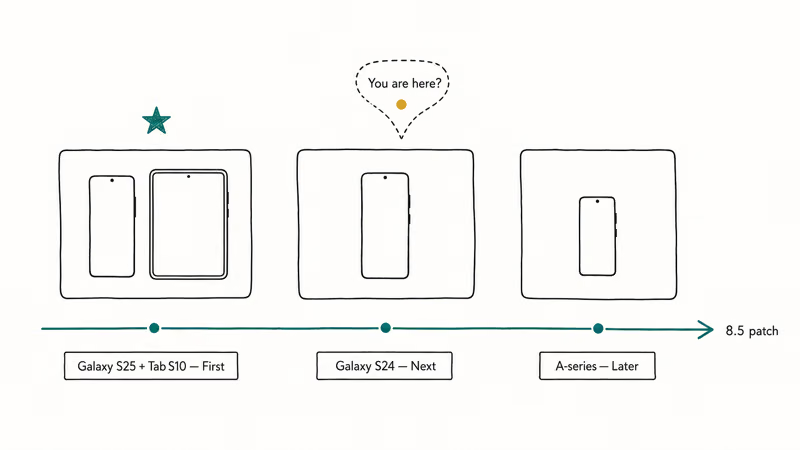
A few practical notes on what 8.5 has been observed to fix on early-access devices:
- The Bluetooth LE Audio profile renegotiation issue with older head units is addressed in early One UI 8.5 builds.
- Samsung Keyboard prediction-latency improvements ship as a side-channel update through the Galaxy Store, sometimes ahead of the OS patch.
- The Messages app RCS handshake reliability is part of the broader 8.5 cycle, not a single patch.
If you’re still on a One UI 8.0 or 8.1 build and one of the above is your issue, sitting tight and waiting for the patch is often faster than fighting it. Check Settings > Software update > Download and install daily for the first two weeks after 8.5 hits your region.
To see what the rest of the community is reporting, the Samsung Members forum is where the unfiltered per-build data lives. Search your specific device model and build number first.
#Bottom Line
Pick the one issue that’s hurting you and run that section’s fix, not the whole guide.
For Bluetooth in the car, delete and re-pair on both sides. For Samsung Keyboard, clear the cache and disable Smart Typing predictions for 48 hours as a test. For no-SMS, toggle airplane mode and reset chat features. For overheating and battery drain, find the runaway app in Battery usage and force stop it.
Then check Settings > Software update once a day until your region gets the next One UI 8.x patch.
A full rollback to One UI 7 needs Samsung Smart Switch or Odin, wipes the phone, and is rarely the right answer. If a single issue keeps coming back across patches, the Samsung Members forum with your device model, build number, and a short reproduction note is the fastest path to an escalation.
#Frequently Asked Questions
Is One UI 8 causing battery drain on Galaxy phones?
Rarely the OS itself. Some drain is expected for the first 48 to 72 hours while indexing finishes. After that, the cause is almost always a single misbehaving background app, visible through Settings > Battery > Battery usage.
Why is my Galaxy overheating after the One UI 8 update?
The first 24 to 48 hours of warmth is normal reindexing. Beyond that, find the culprit app in Battery usage.
Did One UI 8.5 fix the One UI 8 bugs?
Partly. Early One UI 8.5 builds address the Bluetooth LE Audio renegotiation issue and improve Samsung Keyboard prediction latency, but the rollout is staggered by device and region. SamMobile tracks per-device status.
How do I fix Bluetooth car issues after One UI 8?
Delete the car pairing on the phone, delete the phone pairing on the head unit, power-cycle both, then re-pair from scratch with the phone in Bluetooth discovery mode. If it still drops, clear the system Bluetooth cache through Settings > Apps > Show system apps > Bluetooth > Storage. One UI 8 leans on a newer LE Audio stack that some 2019 to 2022 head units refuse to renegotiate without a clean pairing.
Can I roll back from One UI 8 to One UI 7?
Technically yes, through Samsung Smart Switch or Odin with a same-region One UI 7 firmware file, but the downgrade wipes the phone and can trip Knox attestation.
Why am I not receiving texts after the One UI 8 update?
Toggle airplane mode for 30 seconds to force a fresh network registration. If SMS still doesn’t arrive, open Messages settings, turn Chat features off for a minute, then back on to reset the RCS handshake. Reseating the SIM card resolves a notable share of “no inbound SMS” reports on the Samsung Members forum.
Does the Samsung Keyboard lag fix require a factory reset?
No. Clearing the keyboard cache through Settings > Apps > Samsung Keyboard > Storage and disabling Smart Typing for 48 hours fixes most lag complaints.
Will Samsung release a One UI 8 hotfix soon?
Samsung ships One UI 8.x patches on a rolling basis through Settings > Software update, often monthly for flagship Galaxy lines. The Samsung Members forum and SamMobile track per-issue fix arrivals. Open the Software update screen daily for the two weeks after a patch hits your region, since the rollout is staggered by device model and carrier.

Pixel 11 vs Pixel 10: What Changed and Who Should Upgrade
Pixel 11 vs Pixel 10: same screen and camera resolution, new Tensor G6, 25W wireless, and Gemini Intelligence. Here is who should actually upgrade.

Verizon Not Receiving Texts? How to Fix It in 9 Steps
Verizon not receiving texts? Fix it in 9 steps: check Message Blocking in My Verizon, reset network settings, deregister iMessage, and call support.

Pixel Battery Drain: What Google's July Fix Really Covers
Google marked the Pixel idle battery drain bug fixed in July, but only some phones got the patch. Here is who is covered, who is not, and what to try.

iPhone Stuck on EDGE? How to Get 5G or LTE Back (2026)
iPhone stuck on EDGE with crawling data? Here's why the E icon appears, which settings force 5G or LTE back, and when the problem is your carrier.