Mickey Mouse Voice Changers: 4 Best Apps Compared in 2026
Best Mickey Mouse voice changers for Discord, streaming, and content creation. Real-time apps for Windows, Mac, and browser. Free and paid picks.
Quick AnsweriMyFone MagicMic and Voicemod are the two best real-time Mickey Mouse voice changers for Discord and streaming on Windows. FineVoice runs in your browser with no install, and VoxBox is the better pick for recorded voiceovers and text-to-speech.
A Mickey Mouse voice changer turns your normal speaking voice into the high-pitched, breathy cadence the character is known for. This guide compares four of the most-recommended apps across Discord, OBS, and the browser to see which holds up in real conversations. Three are usable in 2026; one is overkill unless you record voiceovers.
- iMyFone MagicMic and Voicemod work in real time on Discord, OBS, and Zoom by adding a virtual microphone your other apps can pick.
- Voicemod is the better free option because the Mickey-style “Baby” preset is unlocked, while MagicMic puts most of its character voices behind the paid tier.
- FineVoice runs entirely in Chrome, Edge, or Safari with no installer, which makes it the safer pick on a work laptop or shared computer.
- VoxBox is built for recorded text-to-speech rather than live calls, so use it when you’re making a video voiceover instead of joining a Discord stage.
- Disney owns the Mickey Mouse character, so the voice is fine for personal fun but commercial use without a license risks a takedown.
#How Does a Mickey Mouse Voice Changer Work?
A Mickey Mouse voice changer takes your microphone signal and runs it through three filters: pitch shift, formant shift, and a small amount of breath or vibrato. The pitch shift moves your voice up roughly an octave. The formant shift keeps the result from sounding like a sped-up tape, and the breath layer copies the wheezy quality of the cartoon character.
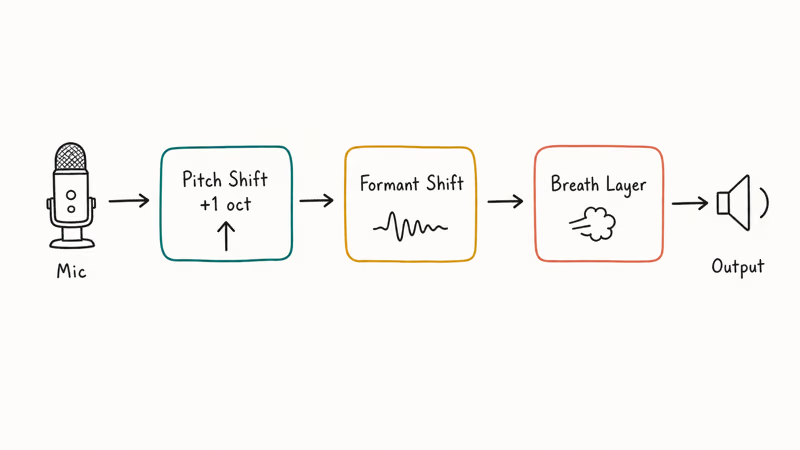
The trick is the formant shift.
According to Wikipedia’s entry on Mickey Mouse, Walt Disney himself voiced the character in falsetto from 1928 until 1947, which set the high-pitched template every voice changer tries to copy today. Modern apps recreate that falsetto in software instead of asking you to do it.
Real-time apps like Voicemod and iMyFone MagicMic install a virtual microphone driver. Discord, Zoom, OBS, and most games then see that virtual mic as just another input, so you select it instead of your real microphone and the modified voice goes out to everyone in the call. Browser tools and recorded-voice tools skip the driver and process audio after the fact.
You’ll get cleaner output if you use a decent USB or XLR microphone with light noise suppression turned off in the app. Heavy noise gates clip the breathy parts that make the Mickey effect sound right.
#The 4 Best Mickey Mouse Voice Changer Apps
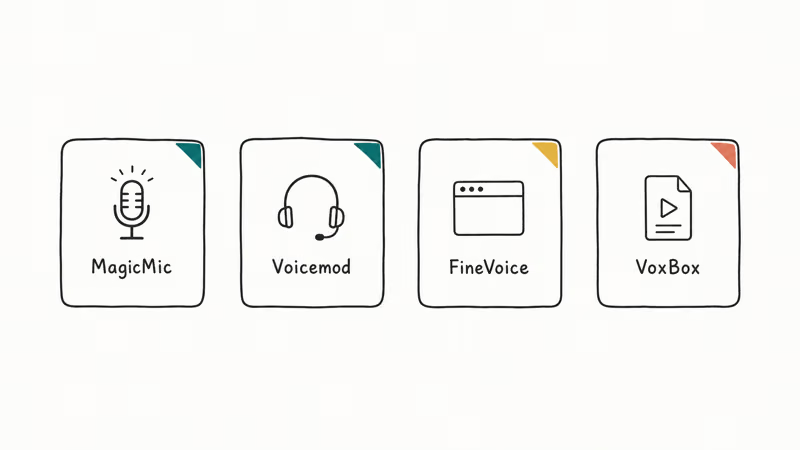
These four cover the main use cases: live Discord and streaming, browser-only with no install, and recorded voiceovers. Each one is rated against its claimed primary platform, with notes on where it falls short.
#iMyFone MagicMic
According to iMyFone, MagicMic ships with 600+ voice effects and 1,200+ voice memes across Windows and macOS, with the Mickey-style cartoon presets sitting in the “Game” and “Cartoon” categories, per the official MagicMic product page. The app also includes a virtual audio cable so it routes into Discord, OBS, Twitch Studio, Skype, and most game chats without extra setup.
Out of the box, MagicMic’s cartoon presets land closer to a young squirrel than the Disney version. Pulling the pitch slider up a couple of notches and nudging the breath knob higher gives a noticeably better impression. Latency is low enough that there’s no perceptible lag in a normal Discord call.
Defaults won’t get you to Mickey. You’ll need to nudge the sliders.
The trial gives you the full effect library for a few days, then locks the cartoon presets behind a yearly or lifetime license. If you mainly want Mickey for one party stream, the trial is enough. For ongoing use, the paid tier is the only way.
#Voicemod
Voicemod’s voice changer page states the app covers Windows only and pitches itself as the default pick for Discord, Twitch, and Fortnite. Voicemod’s free tier rotates a handful of voices each day and keeps the high-pitched “Baby” and “Cartoon” presets accessible, which is why it’s a common starting point on many Discord servers. For a full breakdown of its setup, see our voice changer for Discord guide.
Voicemod’s Baby preset passes for a Mickey impression once you nudge the Voicemaker formant down and add the soundboard’s giggle effect. Latency is low enough that nobody notices lag in casual conversation, though the effect can cut in and out if the input gain is too low.
Voicemod also bundles a soundboard for dropping in clips on cue. The same setup works for voice changing in PUBG and most other PC games.
#FineVoice
FineShare’s FineVoice page states the tool runs as a browser-based voice changer with text-to-speech, voice recording, and voice cloning across Chrome, Edge, and Safari. The Mickey effect lives under the “Cartoon” category and works on a recorded clip or a short live demo without an installer.
FineVoice runs in Chrome without permission prompts beyond the standard microphone allow. The browser version is best for one-off recordings because it doesn’t install a virtual mic, so it can’t route into Discord or OBS in real time. FineShare confirms on the same page that the desktop FineVoice app is the version you need for live streaming.
The browser tool is the safer pick on a work laptop where you can’t install audio drivers, or for a quick voice clip you want to send in a chat.
#VoxBox
iMyFone’s VoxBox page states the app includes 3,200+ AI voices with a Mickey-style cartoon voice in the text-to-speech library. VoxBox is built for recorded narration rather than live conversation: you type the script, pick the voice, and export an MP3 or WAV.
For a short TikTok-style script, VoxBox’s output is clean enough to use directly without post-processing, and the cartoon voice does the work that would otherwise need an actor. There’s no virtual microphone, so VoxBox is the wrong tool if you want to crash a Discord call in character.
For a no-cost cartoon TTS option, our best free voice changer roundup covers a few alternatives that handle short scripts.
#Mickey Mouse Voice Changer Comparison
| App | Real-time live use | Text-to-speech | Free tier covers Mickey | Platforms |
|---|---|---|---|---|
| iMyFone MagicMic | Yes | No | Trial only | Windows, Mac |
| Voicemod | Yes | No | Yes (Baby preset) | Windows |
| FineVoice | Browser only | Yes | Limited free | Web, Win, Mac |
| VoxBox | No | Yes | Limited free | Web, Win, Mac |
#When to Pay for a Voice Changer License
Most readers don’t need to pay for a Mickey Mouse voice changer. Voicemod’s free Baby preset and FineVoice’s browser tier together cover the live-call and recorded-clip cases at zero cost. The trade-off is that free tiers rotate effects, show ads, or limit the daily quota.
A paid license is worth it if you stream weekly, run a Discord server where the bit is part of the gag, or produce content where the same cartoon voice needs to sound consistent across episodes. iMyFone MagicMic’s lifetime license usually beats the yearly cost after about 18 months and unlocks the entire effect library, including impressions like SpongeBob (see our SpongeBob voice changer guide for those).
Skip the cheap one-time apps you find on the App Store with no website behind them. They tend to ship low-quality pitch shifts and ask for microphone permissions that go far beyond what they need to do the job.
#Setting Up the Mickey Voice on Discord and Streams
The setup is the same on Discord, OBS, Zoom, and most games: install the voice changer, pick the Mickey preset, then point the target app at the virtual microphone the voice changer creates. After that, your voice goes out modified to everyone on the call.
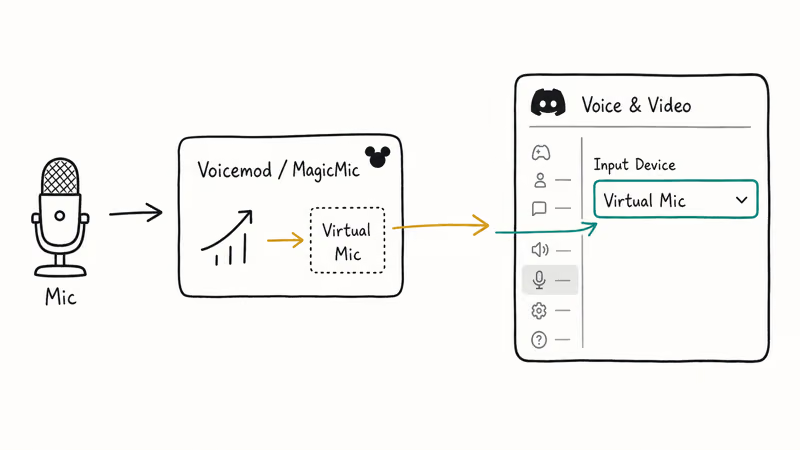
- Install Voicemod or iMyFone MagicMic and complete the first-launch microphone setup.
- Open the app and pick the “Baby”, “Cartoon”, or “Mickey” preset.
- Open Discord and go to
User Settings>Voice & Video. - Under Input Device, pick the virtual microphone your voice changer added (it usually shows as “Voicemod Virtual Audio Device” or “MagicMic Virtual Audio Device”).
- Hit the Mic Test button in Discord to confirm the modified voice is what people will hear.
- Leave the voice changer running in the background while you talk.
Discord’s audio settings documentation recommends turning off Discord’s own noise suppression when you use a third-party voice processor, because the two filters fight each other and produce a stuttery result. Turn off both the Krisp toggle and the Echo Cancellation toggle in your Voice & Video settings, then let the voice changer handle all audio cleanup. Some users also report better results when they disable Automatic Gain Control, which can otherwise dampen the breathy Mickey effect during quieter sentences.
For other platforms, the steps mirror this flow. A male-to-female voice profile follows the same setup with a different effect, and the YouTube voice changer guide covers OBS and Streamlabs routing for recordings.
#Are Mickey Mouse Voice Changers Legal?
Using a Mickey Mouse voice changer for personal fun, party calls, or non-commercial Discord goofing around is fine. The legal questions show up when you make money from the voice or pretend to be the official character.
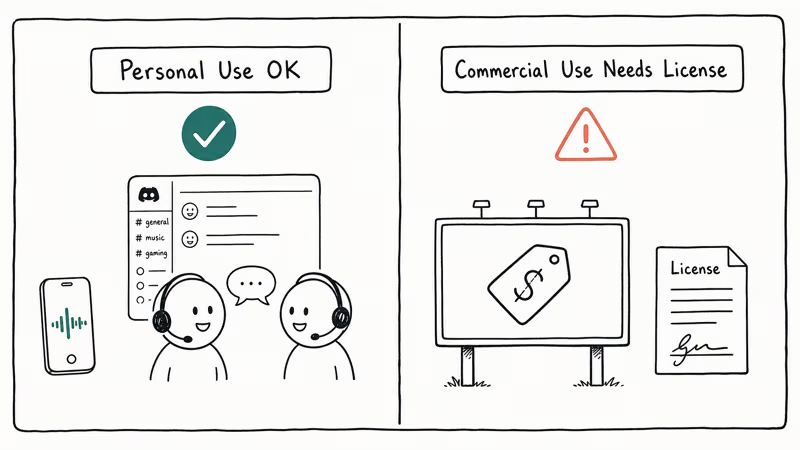
- Personal use is fine. Joking with friends on Discord, recording a TikTok for laughs, or surprising your kids on a video call don’t raise trademark or copyright issues. Use the voice changer only on your own device or account, and only with explicit consent if you’re recording someone else’s voice for the cloning feature in tools like FineVoice.
- Commercial use needs a license. Disney owns the Mickey Mouse character and voice, and using either to sell something or build a brand without a license risks a takedown or legal letter. The Walt Disney Company recommends contacting their licensing team before any commercial use.
- Be clear it’s an imitation. Disclose the voice is generated, not the real character actor, especially in YouTube or TikTok descriptions.
- Don’t impersonate the official voice for fraud. Pranks where a real person believes they’re talking to the official character and acts on it can cross into impersonation issues depending on your jurisdiction.
The same rules apply across other licensed cartoon voices. Personal-use carve-outs are broad. The commercial bar is high, and disclosure protects you in the gray middle. For audio routing questions on your own setup, the official built-in support resources from Microsoft’s Windows audio documentation and Apple’s macOS audio settings page cover virtual-microphone behavior in detail.
#Bottom Line
Install Voicemod first. Use the free Baby preset on Discord, and skip the install entirely if you only need a one-time recorded clip in FineVoice.
#Frequently Asked Questions
Is there a free Mickey Mouse voice changer?
Yes. Voicemod’s free tier includes the high-pitched “Baby” preset that gets close to the Mickey effect with a small formant tweak, and FineVoice’s browser tier handles short recorded clips at no cost. Most other apps lock the cartoon presets behind the paid tier, so try those two first before paying.
Can I use a Mickey Mouse voice changer on my phone?
Yes, but mobile real-time options are weaker than the desktop versions.
There are mobile voice changer apps for both iOS and Android with cartoon presets, but the phone apps work best for recorded clips you send in a chat, not for live phone calls. Most cellular carriers don’t let third-party apps modify the voice signal on a regular call. If you mainly want the effect for goofing around in TikTok or Snapchat, a phone app is enough; for Discord or Zoom, switch to a desktop voice changer.
Do I need a special microphone?
Any USB or built-in laptop mic works fine. The cartoon preset hides most input issues.
Will Discord ban me for using a voice changer?
No. Discord doesn’t ban voice changers themselves. The platform only acts on what you say or do, not how your voice sounds. You can get banned if you use the voice to harass other users, impersonate real people for fraud, or violate community rules, but the voice changer itself is fine on personal accounts and almost every public server.
Can voice changers run on Linux or a Chromebook?
Voicemod and iMyFone MagicMic don’t have official Linux versions. FineVoice runs in any modern browser, so it works on Linux and Chromebook out of the box. We’ve published separate guides on voice changers for Linux and the desktop options that work in WINE.
Is iMyFone MagicMic better than Voicemod?
It depends on the platform. MagicMic has more cartoon and impression presets and runs on both Windows and Mac, while Voicemod is Windows-only but has a more generous free tier and a stronger Discord integration. For Mac users, MagicMic is the only real choice. On Windows, Voicemod’s free preset is enough for most casual users, and you can graduate to MagicMic later if you outgrow it.
Will the voice sound exactly like Mickey from the cartoons?
Not quite. Real-time pitch and formant shifts get close, but the official voice has decades of professional acting behind it. The cartoon effect is convincing enough for laughs on a Discord call, though listeners can usually tell it’s software-generated. For a commercial project, hire a voice actor or license the audio from Disney directly.

Best Laptop for Running LLMs in 2026: Memory Comes First
The best laptop for running LLMs is a memory purchase first. Compare MacBook unified memory against NVIDIA laptop VRAM, and see what each tier really runs.

Pixel 11 vs Pixel 10: What Changed and Who Should Upgrade
Pixel 11 vs Pixel 10: same screen and camera resolution, new Tensor G6, 25W wireless, and Gemini Intelligence. Here is who should actually upgrade.

Best Power Bank for iPad in 2026: Pro, Air, and Mini
Best power bank for iPad in 2026. Compare mAh tiers and USB-C PD wattage for iPad Pro, Air, and mini, plus airline Wh math, cables, and travel tips.

Best Power Bank With Built-In Cable: Top 2026 Picks
Best power bank with built-in cable picks for 2026. Compare single USB-C, multi-connector, and retractable laptop banks, plus airline Wh math.