iPhone RCS Not Working: A Practical 2026 Fix Guide
iPhone RCS not working? Fix it with a carrier and iOS toggle matrix, plus why RCS falls back to SMS even when your Android contacts support it.
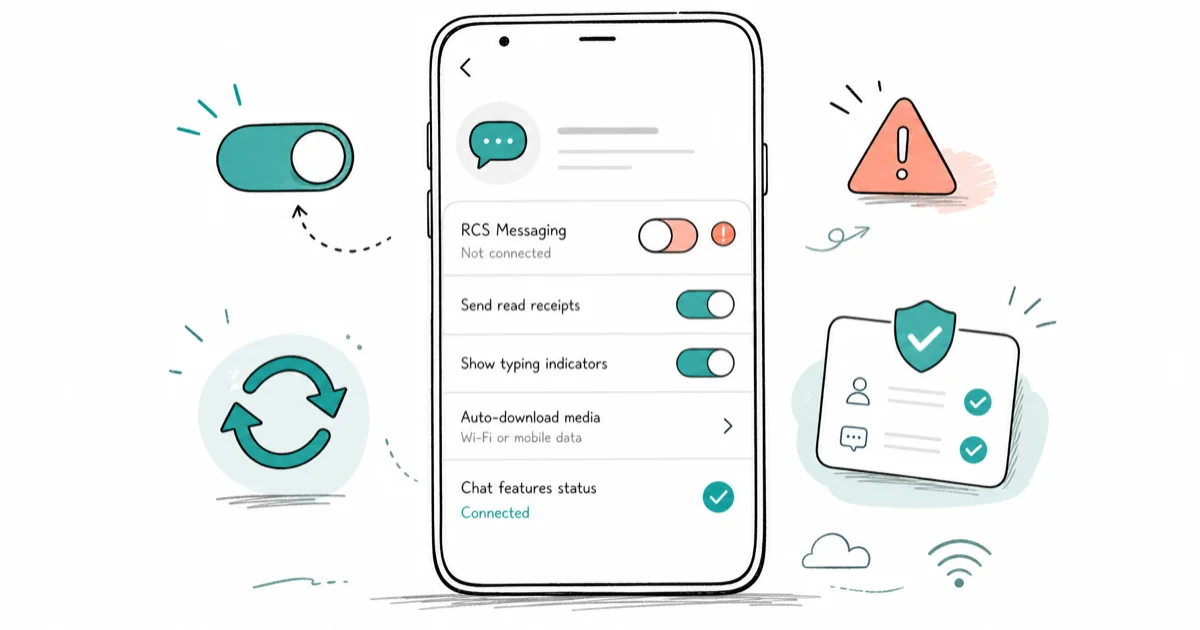
Quick AnsweriPhone RCS not working usually means your carrier has not provisioned the feature, RCS is toggled off, or the contact is on plain SMS. Confirm carrier support, turn on RCS in Settings > Apps > Messages, then check cellular data before resetting anything.
iPhone RCS not working almost always comes down to one of three things: your carrier hasn’t turned it on, the RCS switch is off, or the person you’re texting isn’t on RCS. Messages quietly drops back to green-bubble SMS, so read receipts and high-quality photos disappear with no error. The checks below run fastest first.
- RCS on iPhone needs three things at once: a supported iOS version, carrier provisioning, and an RCS-capable contact
- The RCS toggle lives in
Settings>Apps>Messagesand can switch off after a carrier or eSIM change - Messages to a contact without RCS fall back to SMS with no warning, which looks identical to a “broken” RCS
- Carrier settings updates ship separately from iOS and are the most common silent break point
- Resetting network settings is a last resort that wipes saved Wi-Fi passwords and VPN profiles
#Why Is RCS Not Working on iPhone?
RCS replaces the old SMS and MMS standard with read receipts, typing indicators, and full-resolution media when you text Android users. On iPhone it works only when three conditions line up: a recent enough iOS version, a carrier that has provisioned RCS on your line, and a recipient whose phone also supports it. Miss one and Messages silently reverts to SMS.
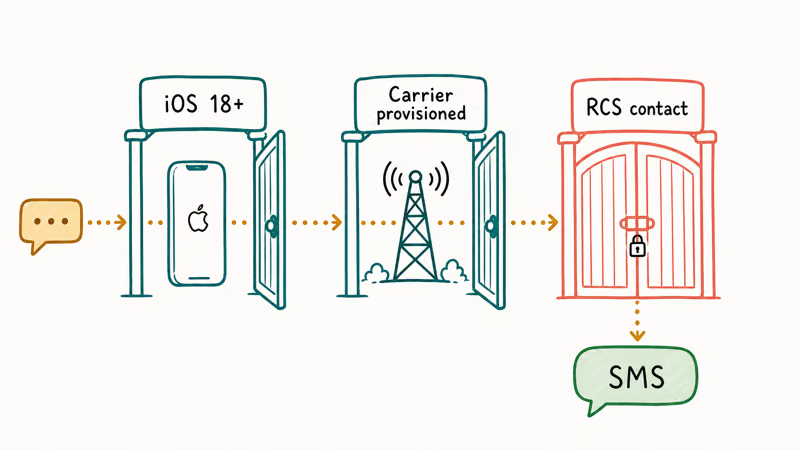
That silent fallback is what trips people up. There’s no popup that says “RCS unavailable.” Your bubble just turns green.
So the first job isn’t fixing anything. It’s figuring out which of the three conditions failed. According to Apple’s RCS support documentation, RCS messaging on iPhone requires iOS 18 or later plus carrier support, and it’s enabled in Messages settings once your carrier offers it. A missing toggle is usually a provisioning gap, not a bug.
Start by ruling out the recipient. If RCS works with one Android friend but not another, the problem is on their end. When it fails with everyone, the issue is your line or your settings.
#Check Whether Your Carrier Supports RCS
Carrier provisioning is the single biggest reason RCS won’t turn on. Even on the latest iPhone, if your carrier hasn’t pushed RCS to your specific line, the toggle either won’t appear or won’t activate. Smaller MVNOs (prepaid or budget carriers that lease network access) often lag the major networks by months.
Here’s how the common causes sort out.
| Symptom | Likely cause | First action |
|---|---|---|
| RCS toggle missing entirely | Carrier hasn’t provisioned your line | Update carrier settings, contact carrier |
| Toggle present but greyed out | Activating or no data connection | Enable cellular data, wait, reboot |
| Works for some contacts only | Recipient not on RCS | No fix needed, it’s their device |
| Stopped after SIM or eSIM swap | New line not reprovisioned | Toggle RCS off and on, update carrier settings |
| Green bubbles, no read receipts | Fell back to SMS | Confirm both sides have RCS |
Diagnostic table separating common iPhone RCS causes from edge cases
To check for a carrier settings update, go to Settings > General > About and wait about 15 seconds. If an update is available, a prompt appears. These updates ship separately from iOS, and a stale carrier profile is a common silent break point. Carrier updates plus a reboot can restore a missing RCS toggle after SIM or eSIM changes.
If you switched carriers recently, the new line often needs a fresh provisioning cycle. If the toggle still never appears after a day, that’s your cue to call the carrier. This is the same class of provisioning issue we cover in Fix iPhone Not Receiving Texts, where the fix is carrier-side rather than a setting you control.
#Fix the RCS Toggle and Cellular Data Settings
Once you’ve confirmed your carrier supports RCS, the on-device checks are quick. Open Settings > Apps > Messages and look for the RCS Messaging switch. On older iOS builds it sits under Settings > Messages instead. Turn it on if it’s off.
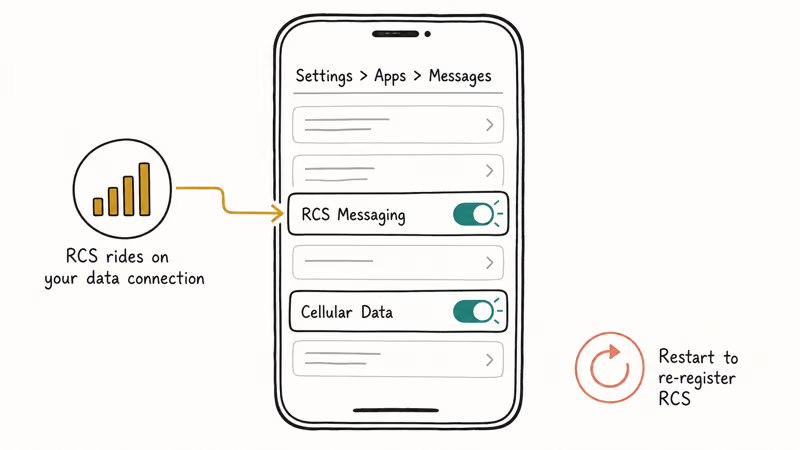
RCS rides on a data connection, so it needs cellular data or Wi-Fi to register. Make sure cellular data is enabled at Settings > Cellular. On a weak signal, the RCS handshake can stall, which looks exactly like a broken toggle.
A few targeted steps, in order:
- Toggle RCS Messaging off, wait 10 seconds, turn it back on
- Confirm cellular data is on and you have signal or Wi-Fi
- Restart the iPhone to force re-registration
Check Settings>General>About fora pending carrier update
If RCS still won’t activate after a reboot, your line probably isn’t provisioned yet. Avoid jumping straight to a network reset, since it wipes saved Wi-Fi and VPN data for a problem the carrier has to solve anyway. If you’d rather stop using RCS entirely for privacy reasons, our guide on How To Turn Off RCS walks through deregistering cleanly.
RCS and iMessage are separate systems, so a failing RCS link doesn’t mean iMessage is broken too. If blue-bubble messages to other iPhone users also stop, that’s a different issue covered in iMessage Not Working.
#Check Your iOS Version and Software Updates
RCS on iPhone shipped with iOS 18, so an older build won’t show the toggle at all. Go to Settings > General > Software Update and install whatever’s pending. A device stuck on iOS 17 or earlier simply can’t run RCS, no matter what your carrier supports.
Apple’s support documentation states that RCS requires iOS 18 or later plus a carrier that has enabled it. Both boxes have to be checked together, which you can confirm on Apple’s RCS support page.
After an update, give the phone a minute to re-register. The toggle may not reappear until after the reboot finishes. If RCS depends on a stable Wi-Fi link in your setup, our notes on iPhone Wi-Fi Calling Not Working cover the same connectivity provisioning that can block a clean registration after a software change or a carrier-side profile refresh.
#Fix Contact-Specific and Group-Chat Problems
When RCS breaks with one contact or group, the cause shifts from your line to the conversation. RCS needs both sides to support it. One person on plain SMS downgrades the whole group to a regular MMS thread.
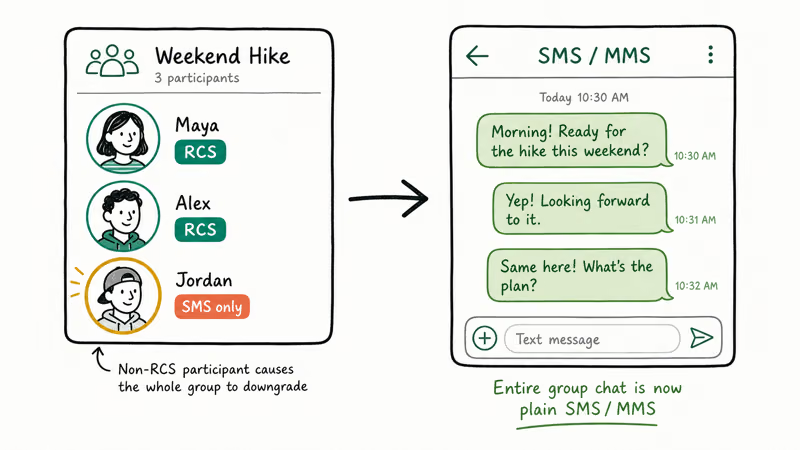
Delete the affected thread and start fresh. A stale conversation sometimes caches an old SMS fallback state even after RCS becomes available, and a clean thread forces a fresh negotiation between the two devices. If messages still arrive out of order in that chat, that’s a separate timing symptom we cover in Fix iPhone Text Messages Out Of Order, which has its own root causes.
For the Android side of a cross-platform chat, the recipient may need to enable RCS themselves. According to Google’s Messages RCS help page, RCS chats must be turned on inside the Google Messages app and require an active data connection. If your friend hasn’t done that, your iPhone has nothing to connect to.
#When Should You Fall Back to SMS?
Sometimes SMS is the right answer, not a failure. If your carrier hasn’t provisioned RCS, or you’re texting someone whose device doesn’t support it, plain SMS still delivers reliably. It just loses the rich features like read receipts and full-resolution photos.
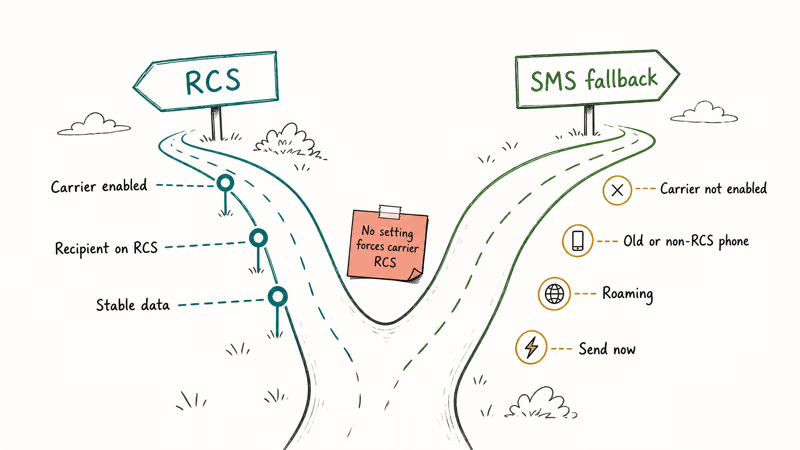
Fall back to SMS when any of these are true:
- Your carrier hasn’t enabled RCS and won’t give a timeline
- The recipient is on an older phone or non-RCS carrier
- You’re roaming internationally, where RCS provisioning often drops
- You need a message to send right now and the handshake keeps stalling
The honest limit: no setting on your iPhone can force a carrier to provision RCS.
#Bottom Line
Work the three gates in order. Confirm carrier support at Settings > General > About, turn on RCS Messaging in Settings > Apps > Messages, then verify the contact is on RCS. If the toggle never appears after a carrier update and a reboot, only the carrier’s support team can provision your line. Skip the network reset unless every other check passes.
#Frequently Asked Questions
iPhone RCS not working, what is the first thing to check?
Check whether the RCS Messaging toggle exists in Settings > Apps > Messages. If it’s there, turn it on and reboot. If it’s missing entirely, your carrier hasn’t provisioned RCS on your line yet, which is a carrier-side fix.
Why did RCS stop working after I switched carriers or eSIMs?
A new line or eSIM needs a fresh provisioning cycle before RCS activates. Run a carrier settings update at Settings > General > About, toggle RCS off and on, then restart. If the toggle is still missing after a day, your new carrier may not support iPhone RCS or hasn’t reprovisioned the line.
Does fixing RCS require a reset or reinstall?
No. RCS issues are almost always provisioning or toggle problems, not corrupted software, so a reinstall fixes nothing here. A network reset is a last resort that wipes saved Wi-Fi passwords and VPN profiles, and it won’t help if the real problem is that your carrier simply hasn’t enabled RCS on your line yet. Try the toggle and a carrier update first, then a reboot, and leave the reset for genuine network corruption.
What official support page should I check first?
Apple’s RCS support article documents the iOS 18 and carrier requirements, and Google’s Messages help page covers the Android side of cross-platform chats. Between the two, you can confirm whether the gap is on your line or the recipient’s device.
What should I avoid doing?
Don’t reset network settings first, and skip any third-party “RCS enabler” tool. RCS depends on carrier provisioning that no on-device hack can grant.
Why are my messages green even though RCS is on?
A green bubble means the message went out as SMS. That happens when the recipient isn’t on RCS, has it turned off, or there’s no data connection to complete the handshake. RCS being enabled on your side doesn’t help if the other side can’t receive it.
When should I contact my carrier or Apple support?
Contact your carrier if the RCS toggle never appears after a carrier settings update and a reboot, since provisioning is carrier-controlled. Contact Apple support only if the toggle is present and on but RCS still fails across every contact on a confirmed-supported carrier, which points to a device-level issue.
iOS 26.6.1 Security Update: What Apple Fixed and Who Gets It
Apple released iOS 26.6.1 on August 17 with 29 security fixes, including an IPSec interception bug. See what it patches, who gets it, and how to update.
iPhone Adaptive Power: How It Works and When to Use It
Learn how iPhone Adaptive Power works, which models support it, what it changes, and when Low Power Mode is still the better battery-saving choice.
How to Transfer Data to a New iPhone Without iCloud
Move everything to your new iPhone without iCloud: Quick Start device-to-device transfer, wired migration, and encrypted Finder or iTunes backups.

Group Text Not Working on iPhone? 8 Fixes That Work
Group text not working on iPhone? Turn on MMS Messaging and Group Messaging, check iMessage vs SMS routing, and fix mixed Android group chats fast.