How to Use Gemini in Google Sheets: Side Panel and Formulas
Use Gemini in Google Sheets to summarize data, draft formulas, build template tabs, check plan access, and fix a missing sparkle icon without guesswork.
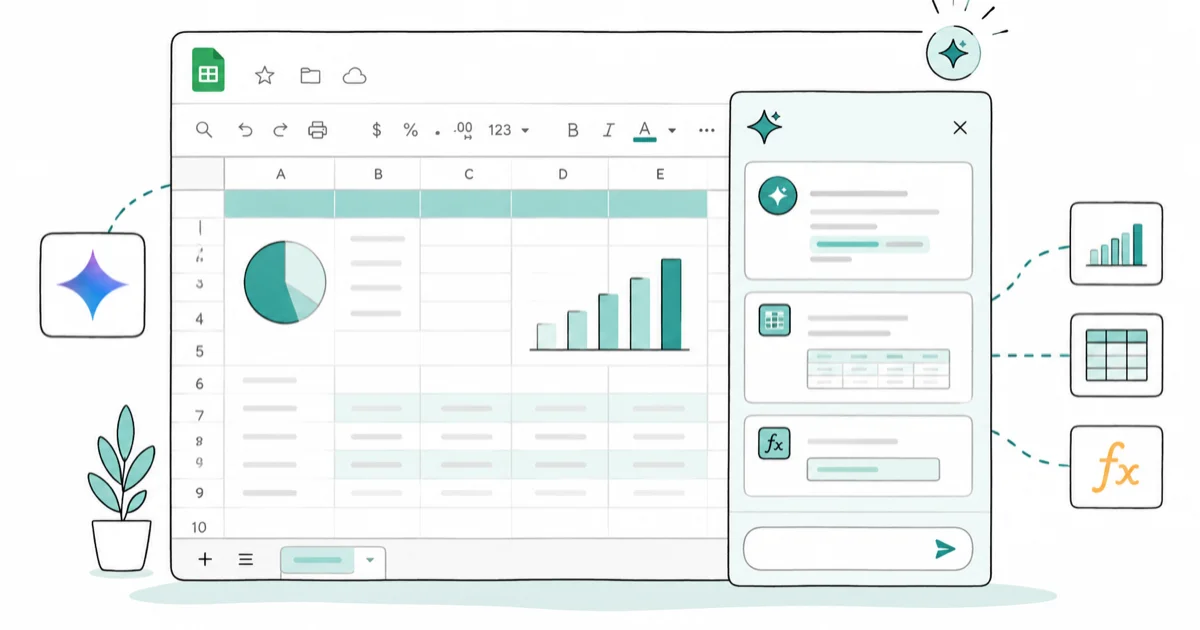
Quick AnswerOpen a spreadsheet, then click the Ask Gemini sparkle at the top right to open the side panel. Type a prompt to summarize a sheet, suggest a formula, or build a tracker template, then accept or refine the result.
Gemini in Google Sheets shows up in two places, and most of the value hides behind the side panel rather than the formula bar. The Ask Gemini panel summarizes data, suggests formulas, and builds template tabs from one prompt on eligible accounts.
This guide walks through how to open Gemini in a sheet, the prompts that work for formula help and analysis, what plan unlocks the feature, and what to check when the sparkle is missing. It assumes a Google account you own, on the desktop web version of Sheets.
- Gemini lives in two places in Sheets: the Ask Gemini side panel at the top right and the inline Help me organize prompt on a blank sheet
- The side panel can summarize a range, explain or suggest a formula, and reference other Drive files for context
- Help me organize creates a styled table or template tab from a short description of what you want to track
- Access needs an eligible Google Workspace plan or a personal Google AI plan, on desktop and in English
- If the sparkle icon is missing, plan eligibility is the most common cause, followed by an admin toggle on managed accounts
#Where Gemini Lives Inside Google Sheets
Two surfaces, in two different spots on screen. The Ask Gemini side panel is a sparkle or star icon in the top right corner of any spreadsheet; clicking it slides a chat panel in from the right. The Help me organize prompt appears inside an empty sheet tab, offering to build a starter table from a short description. Both call the same model, but they pull from different context and are built for different jobs.
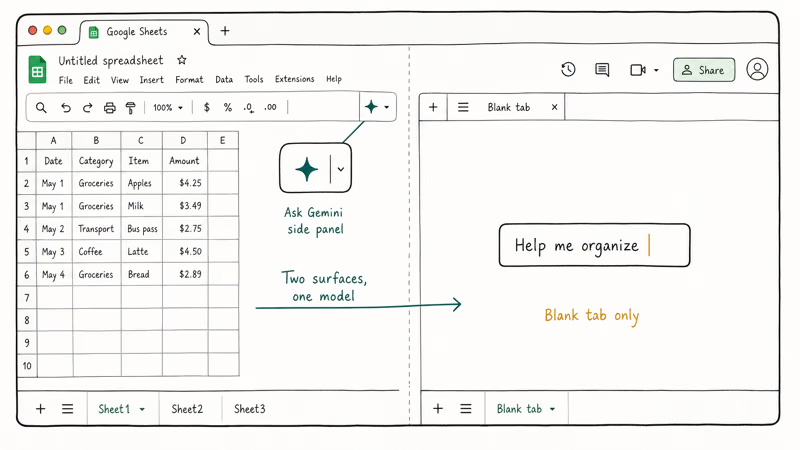
The split matters in practice.
According to Google’s guide on collaborating with Gemini in Sheets, the side panel can summarize selected ranges, write formulas, generate sample data, and use other Workspace files you reference. The inline tool is narrower. It produces one styled tab and stops there, which is exactly what you want for a fresh tracker but not for analyzing data that already exists.
For an existing sales export, the side panel is the right surface for prompts like “summarize total revenue by region and flag any region under $10,000.” Help me organize wouldn’t do that job. It leans toward generating new structures rather than reading existing ones.
#How to Open Gemini in a Spreadsheet
There is nothing to install. If your account is eligible, the icon is already in the toolbar.
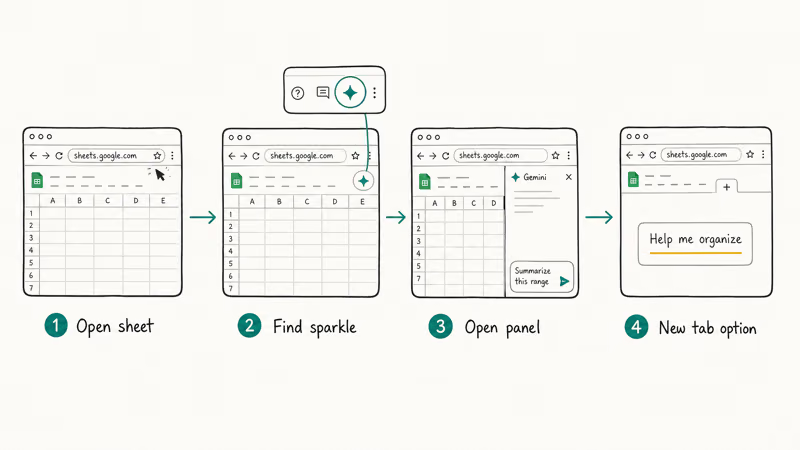
- Open any spreadsheet at sheets.google.com on a desktop browser.
- Look at the top right corner of the sheet for the Ask Gemini sparkle or star icon.
- Click it to open the side panel, then type a prompt or pick a suggested one.
- To start a brand-new tracker, add a new sheet tab and look for the Help me organize prompt that appears on the empty tab.
Eligibility is the gate here. Google’s Workspace help page on writing with Gemini states that access requires an eligible Workspace plan or a personal Google AI plan, and that the writing features are available on desktop and in English. So on a free consumer Gmail account with no AI plan attached, you’ll likely see nothing in the toolbar.
A Workspace account needs a Gemini license assigned, while a personal account needs an active Google AI plan. That difference is the single most common reason people assume the feature is broken when it has simply never been turned on for their account.
#Can Gemini Write Formulas for You?
Yes, and this is where most spreadsheet users get the fastest payoff. Open the side panel, then describe what you want in plain English. Gemini drafts a formula, names the function, and offers to drop it into the active cell.
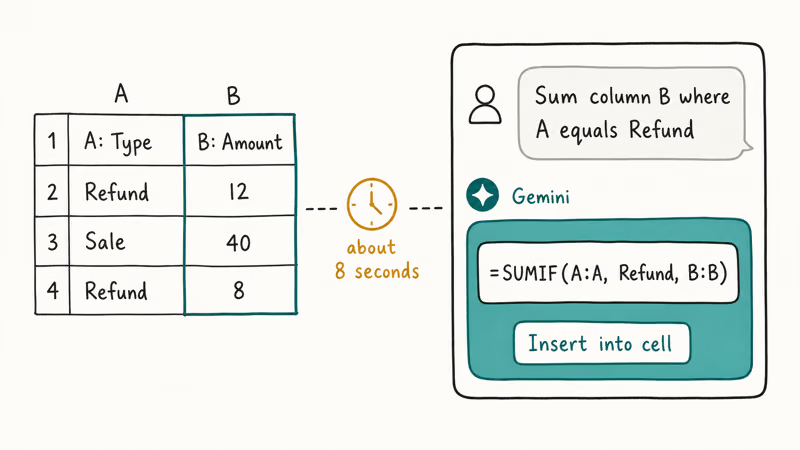
A few useful prompts:
- “Sum column B where column A equals ‘Refund’” returned a clean SUMIF.
- “Count unique values in column D that contain the word ‘enterprise’” returned a COUNTUNIQUEIFS variant.
- “Explain what =ARRAYFORMULA(IF(A2="", "", VLOOKUP(…))) does” returned a one-paragraph plain-language explanation, useful when you inherit someone else’s sheet.
For a multi-tab budget workbook, include the tab names and target columns in the SUMIF prompt so Gemini has enough context to draft the correct range.
A small habit makes a big difference here.
Google recommends selecting the relevant range before opening the side panel, because the selection becomes part of the context. Select columns B and C before asking “What is the correlation between these two?” — it’s more reliable than describing the columns from scratch.
If you have used other assistants, the rhythm is familiar. Our walkthroughs of how to use Claude AI and how to use ChatGPT custom instructions cover similar prompt-and-refine loops in those tools, though the formula-writing context is unique to Sheets.
#Building Templates and Tables From a Prompt
The other Sheets-specific trick is Help me organize, which lives on empty sheet tabs.
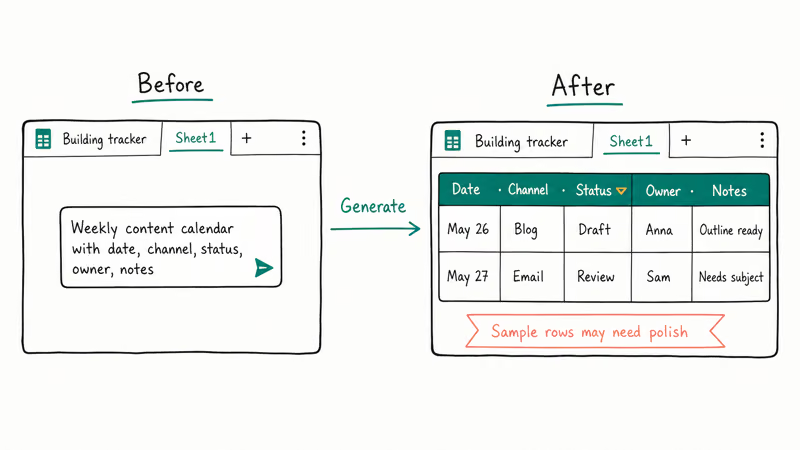
Add a new tab in any workbook. On the blank canvas, you should see a prompt asking what you want to build. Type something like “Weekly content calendar with date, channel, status, owner, and notes” and Gemini generates a styled table with headers, formatting, and sample rows in place. Examples to try:
- “Personal expense tracker with category, date, amount, and running total”
- “Project task list with priority, due date, assignee, and status dropdown”
- “Inventory log for a small shop, with SKU, item name, quantity, unit price, and reorder flag”
Two caveats: Gemini doesn’t always populate realistic sample rows; sometimes the values are obvious placeholders. The styles also lean toward Google’s default palette, so brand-aligned templates still need a manual pass.
Once you have a starting tab, the side panel can extend it. Ask it to “add a chart that shows total spend by month” and it suggests the chart type plus the range. This is the part of the workflow that benefits most from a saved prompt persona; see our guide on how to use Gemini Gems if you find yourself repeating the same instructions across spreadsheets.
#Plans, Pricing, and Availability for Gemini in Sheets
Short answer: a bare consumer Google account won’t show Gemini in Sheets.
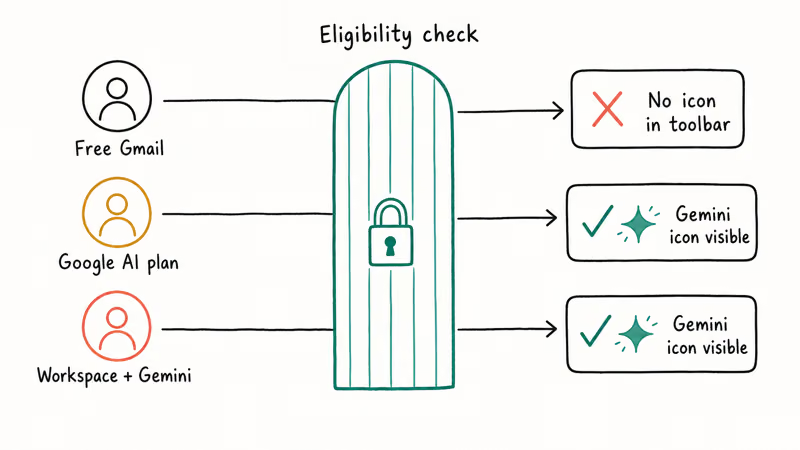
Gemini in Sheets is tied to a paid plan. The two paths are an eligible Google Workspace plan that includes Gemini features and a personal Google AI subscription tied to your account. The exact tier names and prices change often, so check your account’s plan page rather than trusting a number you read in an old article. What stays consistent is the gate itself: no eligible plan, no Gemini icon in Sheets.
There is one edge case worth knowing. Some accounts get early access through Google Workspace experiments, which surface the feature ahead of a formal rollout. That flag is why two accounts of the same type can behave differently on the same day.
If your workflow leans heavily on documents too, the sibling article on how to use Gemini in Google Docs covers the same plan gate from the document side, plus the Help me write tool that doesn’t exist in Sheets. For data-cleanup tasks the assistant won’t touch, our walkthrough on how to highlight duplicates in Google Sheets pairs nicely with these prompts.
#Why Don’t I See Gemini in My Sheets?
If the sparkle icon is missing, work through these in order before assuming a bug.
- Account eligibility. Top cause. Confirm your account has a Workspace plan with Gemini or a personal Google AI plan active.
- Admin toggle. On a managed Workspace account, an admin can switch Gemini features off; ask whether it’s enabled, and request a license assignment from your administrator if it isn’t.
- Region and language. English-only.
- Device. Use the desktop web version, not the mobile Sheets app, since support is centered on desktop and most analysis and template tools won’t appear on mobile at all.
- Refresh. A hard refresh or a fresh sign-in clears stale sessions after any plan or license change goes through on the admin side.
| Check | What to confirm | Likely fix |
|---|---|---|
| Plan | Workspace Gemini or Google AI plan active | Activate or assign the plan |
| Admin | Org allows Gemini in Sheets | Ask admin to enable it |
| Region | Supported region and English interface | Switch interface language to English |
| Device | Desktop browser, not mobile | Open Sheets on desktop |
If a license was just assigned, reload the page before troubleshooting deeper. If you still see nothing after a license is active, the admin toggle is the next thing to check, and a single hard refresh usually settles it.
#Bottom Line
Reach for the Ask Gemini side panel when you need to summarize data, explain or write a formula, or chart a range you already have. Use Help me organize when you want to spin up a fresh tracker tab from scratch. If the sparkle is missing, check plan eligibility first, then the admin toggle. Both surfaces sit behind a paid Workspace or Google AI plan on desktop, so confirm that before troubleshooting.
AI Tools Guide
#Frequently Asked Questions
How do I open Gemini in Google Sheets?
Open a spreadsheet at sheets.google.com on a desktop browser and look at the top right for the Ask Gemini sparkle or star icon. Click it to open the side panel. There is no separate install step.
Is Gemini in Google Sheets free?
No. A bare consumer account with no AI plan won’t show it. You need either a Workspace plan that includes Gemini or a personal Google AI subscription. Tier names and prices shift often, so check your own account’s plan page for the current figures rather than trusting an old article, and remember that the exact bundle Gemini ships in has changed names more than once since launch.
Can Gemini write formulas in Sheets?
Yes. Describe what you want in plain English in the side panel, and Gemini drafts the formula.
Why don’t I see Gemini in my Google Sheets?
The most common reason is that your account has no eligible plan attached. Other causes include an admin who disabled Gemini for a managed Workspace, an unsupported region or non-English interface, or using the mobile app instead of desktop. Work through plan, admin, region, and device in that order.
Can Gemini analyze a whole spreadsheet?
Mostly yes, with caveats. Highlight the section you care about first when accuracy matters.
What is the difference between Gemini in Sheets and Gemini in Docs?
Sheets gets the Ask Gemini side panel plus a Help me organize prompt for building tracker tabs, but no Help me write box. Docs gets the side panel plus Help me write inside the page for drafting and editing prose. The side panel is the consistent surface across both apps.
Does Gemini in Sheets work on mobile?
Mostly no. Support is centered on the desktop web version, so the full set of analysis and template tools may not appear in the Sheets mobile app. Open your spreadsheet in a desktop browser for the reliable experience.
ChatGPT Conversation History Missing? How to Get It Back
ChatGPT conversation history missing? Fix it fast with these proven steps: check archived chats, re-enable data controls, verify your account, and more.

ChatGPT Voice Mode Not Working? 7 Fixes That Actually Work
Fix ChatGPT Voice Mode fast. Covers mic permissions, app updates, network fixes, account tier checks, and reinstall steps for iOS and Android.
ChatGPT vs Claude vs Gemini: Which AI to Use in 2026
ChatGPT vs Claude vs Gemini compared side-by-side for writing, coding, research, and everyday tasks. Find out which AI to use and when in 2026.

Claude vs ChatGPT for Writing: Which AI Is Better?
Claude wins on tone and long-form coherence. ChatGPT is faster for brainstorming and short copy. A side-by-side comparison for writers in 2026.