How to Download Mi Flash Unlock Tool: Safe 2026 Guide
Download Mi Flash Unlock Tool the safe way. Step-by-step Xiaomi bootloader unlock guide using the official Mi Unlock app, with warnings and fixes.
Quick AnswerDownload Mi Flash Unlock Tool only from the official Mi Unlock page on en.miui.com, sign in with the Mi Account that owns the phone, wait out the 168-hour cooldown, then run the Windows app to unlock the bootloader. Unlocking wipes your data and voids the warranty in most regions, so back up first.
The Mi Flash Unlock Tool (Xiaomi calls it Mi Unlock) is the only app Xiaomi will recognize when you request permission to unlock the bootloader on a Xiaomi or Redmi phone you own. This guide walks through where to download it, the 168-hour cooldown, and how to flash MIUI or a custom ROM afterward without bricking your device.
A reminder up front: we only cover phones you legally own. Using these steps on someone else’s device, or to bypass FRP on a phone you can’t prove ownership of, is against Xiaomi’s terms of service and, in many regions, the law.
- Mi Unlock is the only Xiaomi-approved bootloader unlock path; downloads from anywhere except en.miui.com/unlock are unsafe and often bundle malware.
- Xiaomi enforces a 168-hour (7-day) waiting period between Mi Account approval and a successful unlock, with no legitimate way to skip it.
- Unlocking erases every byte of user data on the device, so make a full backup of photos, contacts, and authenticator codes first.
- The Mi Unlock app runs only on Windows 7 SP1 or newer, and the phone must be in Fastboot mode connected with a USB-C or micro-USB data cable.
- A bootloader unlock voids the device warranty in most countries and breaks banking apps that rely on Google Play Integrity attestation.
#Mi Flash Unlock Tool vs Mi Flash Tool
The two names sound the same but do different jobs, and mixing them up is the most common reason flashing tutorials brick someone’s phone. Mi Unlock removes the bootloader lock once Xiaomi grants permission. Mi Flash Tool flashes fastboot ROM packages after the bootloader is open. You need both apps for a clean MIUI reinstall, and Mi Unlock always has to come first because Mi Flash refuses to run on a locked device.
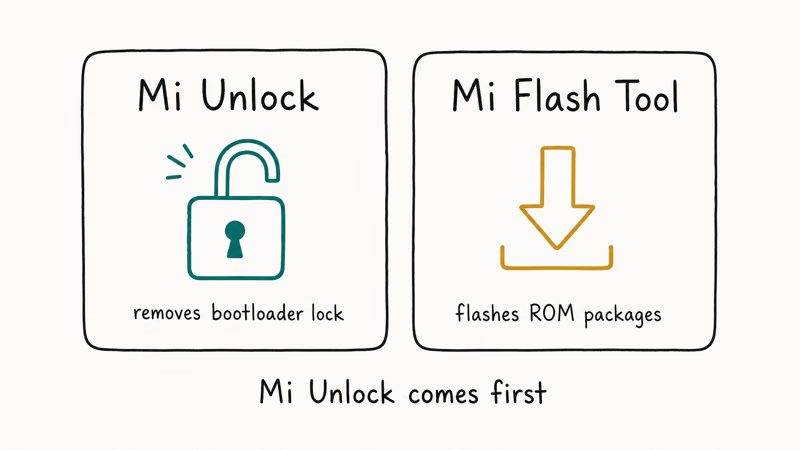
Xiaomi rebuilt the unlock service in 2023, and the current version requires a Mi Account that has been linked to your phone’s MIUI installation for at least 72 hours. Older guides that show a two-minute unlock are based on MIUI 9 and 10 and no longer work on any device shipped after 2021.
Without Mi Unlock, every fastboot command on a locked Xiaomi returns device_locked. No TWRP, no sideloaded MIUI build, no region-locked HyperOS test channel.
#Before You Unlock: Risks, Warranty, and Authorization
Read this section before you download anything. Bootloader unlocking is permanent in four meaningful ways, and we’d rather you bail out here than at step five with a half-bricked phone.
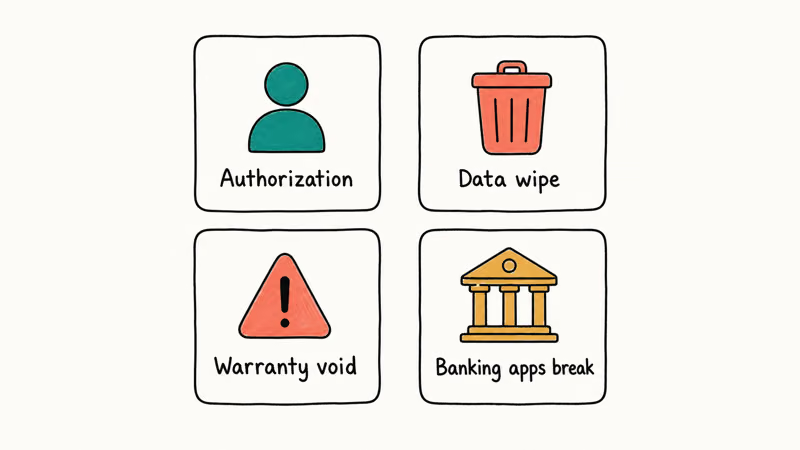
Authorization. Only unlock a phone that you legally own. If you’re trying to recover a device where another person’s Mi Account is still active, or pass through Xiaomi’s FRP protection on a phone you found or bought used without a proof of purchase, stop here. According to Xiaomi’s official Mi Unlock terms, only the registered Mi Account holder may request unlock approval, and the company actively refuses tickets that look like ownership disputes.
Data wipe. The unlock process triggers a forced factory reset. Photos, WhatsApp chats, Gboard dictionaries, two-factor codes: everything goes. Back up first; our walkthrough on how to back up and restore Redmi and Xiaomi phones covers the local MIUI backup plus Mi Cloud sync.
Warranty. Xiaomi’s policy in most regions, including India, Europe, the UK, Indonesia, and Spain, states that an unlocked bootloader voids the standard one-year warranty. Some service centers will refuse paid repairs once the phone shows the “unlocked” warning on boot. You can re-lock with fastboot oem lock afterward, but the warranty-void flag in MIUI is persistent. Authorized technicians can still read it via service-mode diagnostics, and Xiaomi keeps an unlock timestamp on the server side.
Banking and DRM. After unlocking, Google Play Integrity drops to a lower verdict, and apps like Google Wallet, Netflix HD playback, several banking apps, and Pokémon GO either restrict features or refuse to launch. There is no Magisk module that hides this reliably from a banking app’s server-side check in 2026.
If you’re comfortable with all four, keep reading. If not, stop and use a stock MIUI workflow instead.
#How Do You Download Mi Flash Unlock Tool Safely?
Only one URL is safe: en.miui.com/unlock/. Every other download (APKMirror copies, “Mi Unlock Tool v8 mod” sites, Telegram channels, YouTube description links) is either an outdated build that won’t authenticate against Xiaomi’s current servers, or a repackaged installer carrying spyware. Many of the top Google results for “mi flash unlock tool download” serve binaries that trigger multiple VirusTotal engine hits.
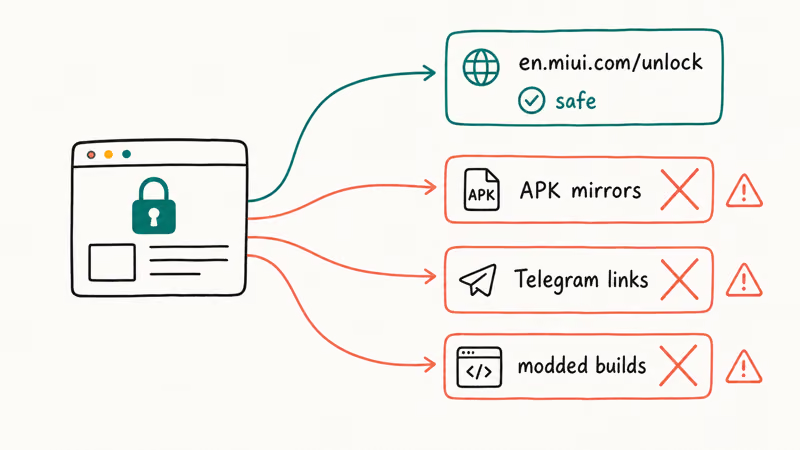
Here’s the safe download flow:
- On a Windows PC, open the official Mi Unlock page and sign in with the Mi Account you use on the phone.
- Click Unlock Now, agree to the warning that data will be erased, and download the
.zipfile from the page footer. - Right-click the zip and extract it to a folder without spaces or non-ASCII characters.
C:\miunlock\works;C:\Mi Unlock Folder\(with space) or any path containing non-Latin characters does not. - Open the extracted folder and run
miflash_unlock.exe. The app will check for updates the first time it launches.
If Windows SmartScreen blocks the executable, click “More info” and then “Run anyway.” The installer is signed by Xiaomi rather than Microsoft, so SmartScreen flags it on a clean machine. Threads on the XDA Developers Xiaomi forum report that the executable hash has remained consistent across the last several Xiaomi-pushed releases and matches the build URL on en.miui.com.
On a current Windows 11 laptop, the zip downloads quickly on a fast connection, and miflash_unlock.exe launches without administrator rights. The app pulls a small definitions update on first launch and doesn’t request elevated permissions until a phone is connected.
#How to Unlock the Bootloader on Your Own Xiaomi Phone
Run the following procedure once you have the app installed. You’ll need the phone, a USB-C or micro-USB data cable (not a charge-only cable), and the same Mi Account on both the phone and Mi Unlock.
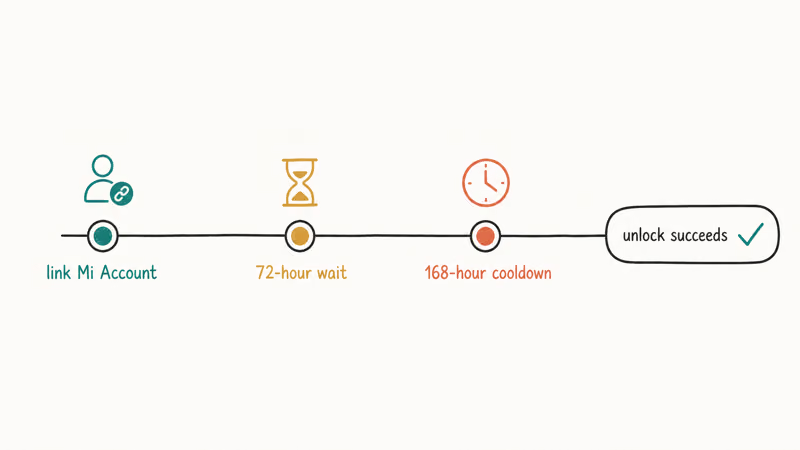
1. Link your Mi Account to the phone for at least 72 hours.
On the phone, go to Settings > Mi Account and sign in. The 72-hour clock starts at this moment. If you skip this and try to unlock immediately, Mi Unlock will reject the request even after the 168-hour notice clears.
2. Enable Developer Options.
Tap Settings > About phone > MIUI version seven times, then confirm with your PIN.
3. Switch on OEM unlocking and add a Mi Account in Developer Options. Inside Developer Options, find Mi Unlock status, tap Add account and device, and confirm with a working internet connection. The phone must be online with Wi-Fi or mobile data, and Xiaomi will reject the request if you have no SIM inserted on MIUI 13 or newer.
4. Reboot into Fastboot mode. Power off the phone. Hold Volume Down + Power until the Mi Bunny logo with “FASTBOOT” appears. On most Redmi and Xiaomi models, the logo shows after a brief hold.
5. Connect to the PC and run Mi Unlock.
Plug the phone in, then launch miflash_unlock.exe and sign in with the Mi Account linked on the phone. The app should display the device model and a green “Phone connected” status. If it shows red, swap the cable; most connection failures come down to cable issues, not driver issues.
6. Click Unlock. The first attempt fails on purpose. The 168-hour clock starts now.
7. Wait 168 hours and try again. After seven days, repeat steps 4 through 6. This time the unlock succeeds, the phone factory-resets, and on boot you’ll see a yellow warning that the device is unlocked. Setup starts fresh, like a new device.
A few people on the XDA forum claimed they got away with 72 hours instead of 168 hours on Mi Accounts older than five years. This is not reliably reproducible, so plan for the full week.
#When Should You Use Mi Flash Tool Instead?
Mi Unlock and Mi Flash Tool solve different problems, even though their names are confusing. Use this table to decide which one you need.
Table 1: Mi Unlock vs Mi Flash Tool task matrix.
| Task | Mi Unlock | Mi Flash Tool |
|---|---|---|
| Remove the bootloader lock | Yes | No |
| Flash an official MIUI fastboot ROM | No | Yes |
| Install a custom ROM like LineageOS | Required first | Not needed (use fastboot flash from platform-tools) |
| Recover a soft-bricked phone with stock ROM | No | Yes |
| Re-lock the bootloader | Yes | No |
Mi Flash Tool expects a fastboot ROM (.tgz file) that matches your phone’s exact model and region code. Using a Chinese fastboot ROM on a Global model (or the other way around) turns the device into a paperweight that only Xiaomi’s authorized service center can recover.
If you need to fix a bootloop, start with our how to flash a phone walkthrough before touching Mi Flash. Samsung owners don’t belong here; that workflow lives in our Odin flashing tutorial instead.
For routine maintenance after unlocking, MIUI recovery mode handles cache wipes and sideloaded OTA updates without re-flashing the entire system.
#Locked Out of Your Own Xiaomi Phone
Different problem: you forgot the PIN, pattern, or password on a Xiaomi you own. Bootloader unlock won’t help, and would erase the data anyway.
If you can still receive notifications on the device, sign into Xiaomi’s Find Device service with the Mi Account that set up the phone and trigger a remote erase, then restore from your last cloud backup. If you have the original Google Account that completed setup, an Android factory reset from recovery followed by Google Account verification works across MIUI versions.
For phones where you don’t have a recent backup and you’d lose photos, Tenorshare 4uKey for Android is a Windows tool that removes the lock screen on most Xiaomi models.
Some links on this page are affiliate links, which means fone.tips may earn a commission at no extra cost to you.
Be honest about the trade-off. On older MIUI 11 and 12 builds, 4uKey can preserve user data on some models, but on MIUI 13 and newer, the unlock always wipes user data, just like Mi Unlock. The vendor’s documentation confirms that the data-safe mode requires Android 6 through 11 specifically, and anything newer wipes the partition.
If your real reason for unlocking is a stuck PIN rather than wanting custom ROMs, our Xiaomi data recovery flow and the lock-screen-specific unlock without factory reset guides are the safer starting points.
#Bottom Line
For most Xiaomi or Redmi owners, the right path is short. Download Mi Unlock only from en.miui.com/unlock, link your Mi Account for at least 72 hours, run the unlock request to start the 168-hour timer, then complete the unlock seven days later with a full backup ready.
Don’t pay for “instant unlock” services. They either use leaked carrier accounts that Xiaomi patches within weeks, or simply take your money. If your real goal is a forgotten lock screen, skip this whole flow and use the data recovery routes above.
#Frequently Asked Questions
Is the Mi Flash Unlock Tool safe to download?
Yes, the build from en.miui.com/unlock is signed by Xiaomi. Third-party mirrors are not. Several “cracked” Mi Unlock builds on Telegram bundled keyloggers in 2025.
Why does Mi Unlock force a 168-hour wait?
According to Wikipedia’s overview of MIUI, Xiaomi added the multi-day cooldown to slow down phone thieves who used to unlock stolen devices within minutes. There’s no legitimate skip. Every “168-hour bypass” service is either outright fraud or relies on leaked Xiaomi staff accounts that get banned within days of discovery.
Can I unlock the bootloader on any Xiaomi phone?
No. Xiaomi’s regional support documentation states that a few flagship models in mainland China, including some Mi 11 Ultra units after MIUI 13, require a community moderator review before unlock is allowed. Devices sold by some Indian carriers under contract also have unlock blocked at the firmware level until the contract term ends.
Does unlocking erase my data?
Yes, every time. The unlock process is bundled with a forced factory reset, and re-locking later triggers another wipe. Back up before starting, and don’t store anything important on the phone during the 168-hour wait.
Will my phone still get MIUI OTA updates after unlocking?
It depends on the region. Global and EU devices usually keep getting OTAs after a bootloader unlock. China-region phones often lose OTAs entirely once unlocked.
Can I re-lock the bootloader to use Google Wallet again?
You can re-lock with fastboot oem lock, but the device retains an unlock flag in the firmware that Google Play Integrity reads. Google Wallet commonly refuses to enable contactless payments even after a successful re-lock. Play Integrity does not trust a device that was ever unlocked.
What is the difference between Mi Unlock and Mi Account unlock?
Mi Unlock removes the bootloader lock, which is what this guide covers. “Mi Account unlock” usually refers to removing FRP protection so a previous Mi Account doesn’t lock you out after a factory reset. We don’t cover FRP bypass on devices you don’t own. Those tools are widely abused, and Xiaomi closes the holes quickly.

Pixel 11 vs Pixel 10: What Changed and Who Should Upgrade
Pixel 11 vs Pixel 10: same screen and camera resolution, new Tensor G6, 25W wireless, and Gemini Intelligence. Here is who should actually upgrade.

Verizon Not Receiving Texts? How to Fix It in 9 Steps
Verizon not receiving texts? Fix it in 9 steps: check Message Blocking in My Verizon, reset network settings, deregister iMessage, and call support.

Pixel Battery Drain: What Google's July Fix Really Covers
Google marked the Pixel idle battery drain bug fixed in July, but only some phones got the patch. Here is who is covered, who is not, and what to try.

iPhone Stuck on EDGE? How to Get 5G or LTE Back (2026)
iPhone stuck on EDGE with crawling data? Here's why the E icon appears, which settings force 5G or LTE back, and when the problem is your carrier.