How to Check History on iPhone: Safari, Calls, Apps (2026)
Check Safari, call, message, and app history on iPhone using built-in iOS 17 and 18 tools, plus how to recover traces after a Safari deletion.
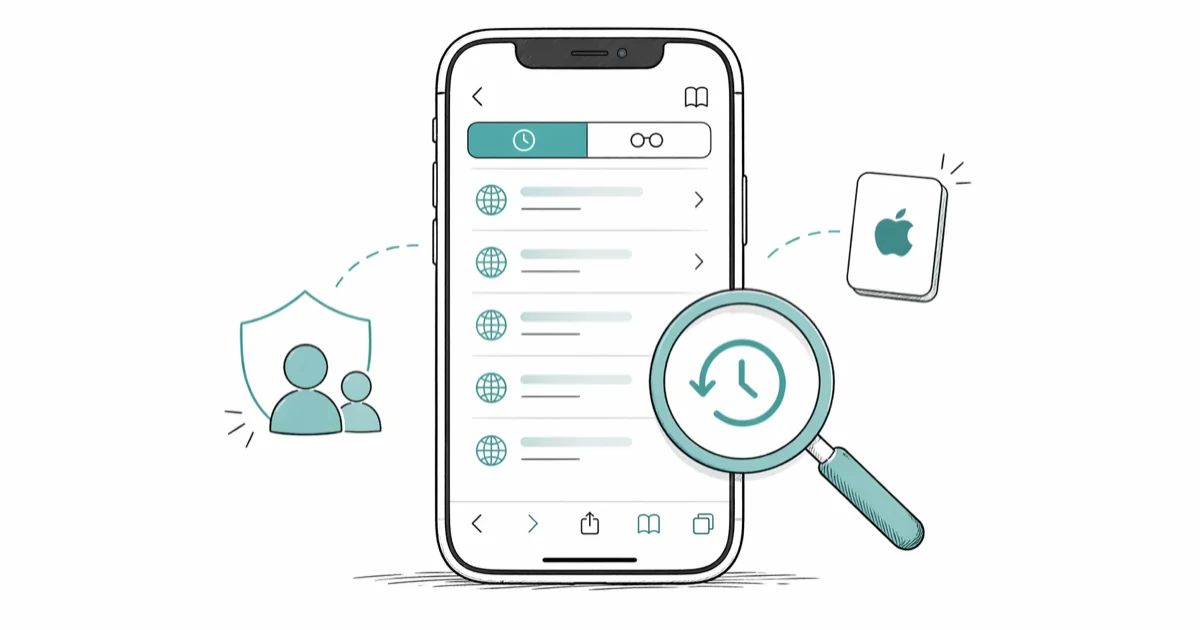
Quick AnswerOpen Safari, tap the bookmarks icon (open book), then tap the clock tab to see your full browsing history. Calls live in Phone > Recents, Messages stay inside the Messages app, and app activity sits under Settings > Screen Time > See All App & Website Activity.
If you want to check history on iPhone, you actually have five separate logs to look at: Safari browsing, call records, Messages threads, app usage tracked by Screen Time, and per-site data stored under Settings.
Menu locations shift slightly between iOS versions, so this guide notes where each surface lives on current iOS. It walks through every surface with exact taps, flags what survives a deletion, and notes the privacy boundaries that apply to your own device or a family member’s iPhone.
- Safari history lives behind the bookmarks icon, then the clock tab; iOS 18 added a search field at the top
- Phone app > Recents shows the last 100 calls, with timestamps revealed by tapping the (i) icon
- Messages keeps every thread until you delete it; there’s no separate “history” log
Screen Time>See All App & WebsiteActivity is the only built-in surface for app usage and per-app time- Deleted Safari history can sometimes be reconstructed from
Settings>Safari>Advanced>Website Data
#How Do You Check Safari Browsing History on iPhone?
The fastest way to view Safari browsing history is from inside the app itself. Open Safari, tap the bookmarks icon at the bottom (it looks like an open book), then tap the clock tab. You’ll see entries grouped by day, rolling back as far as the device has kept records.
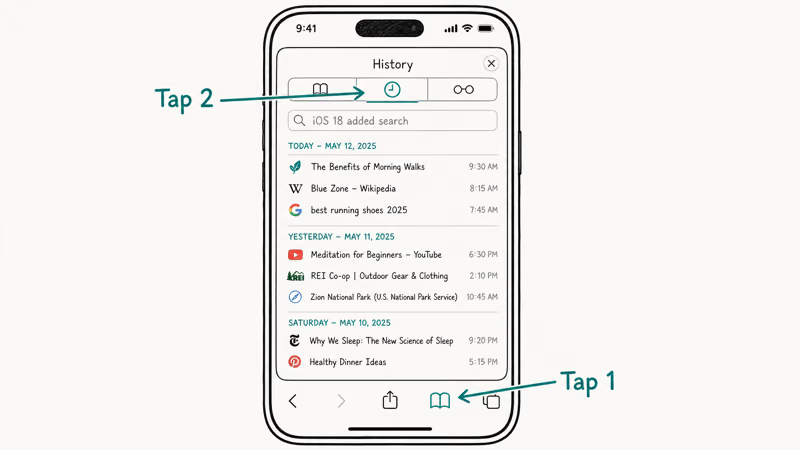
Three buttons matter here: search, swipe-delete, and Clear.
Safari does not expose a fixed retention window, and the cutoff has varied across iOS versions. Apple does not publish an exact number, but the Safari user guide for iPhone confirms that history is kept locally and synced across iCloud devices that share the same Apple ID.
iOS 18 added a search field at the top of the history panel. That helps when you remember a domain but not the day.
If only one iPhone uses Safari, that’s the whole story. With a Mac or iPad signed into the same Apple ID and iCloud Safari sync on, clearing here also wipes those devices. Apple’s iCloud privacy overview states that iCloud syncs Safari history through end-to-end encryption, so the entries are not browsable by Apple itself.
#Recovering Deleted Safari History Without an App
A partial trail survives after a Safari clear, and it lives under Settings > Safari > Advanced > Website Data.
Clearing history through the Bookmarks menu does not wipe this list, so most recently visited domains stay listed because their cookies and local storage have not been cleared.
This is not a full URL history. You see domain names (apple.com, nytimes.com) but not specific articles, search terms, or timestamps. According to Apple’s privacy documentation, Safari treats history and per-site storage as separate stores, which is why Clear History and Website Data must both be selected to wipe everything.
To capture the trail before it disappears, screenshot the Website Data list as soon as you suspect history has been cleared.
On a parent-controlled device, you can also enable Screen Time > Content & Privacy Restrictions > Web Content to block certain categories, which prevents the deletion problem rather than solving it after the fact. For deeper category-by-category blocking, our private browsing trace guide explains what Private Mode does and doesn’t leave behind. If Safari itself is acting up before you can finish this check, work through our Safari not working on iPhone fixes first.
#Where iPhone Stores Call History
Call history on iPhone lives inside the Phone app. Open Phone, then tap Recents at the bottom. The list shows incoming, outgoing, and missed calls in reverse chronological order. By default iOS keeps the most recent 100 calls; older records drop off as new ones come in.
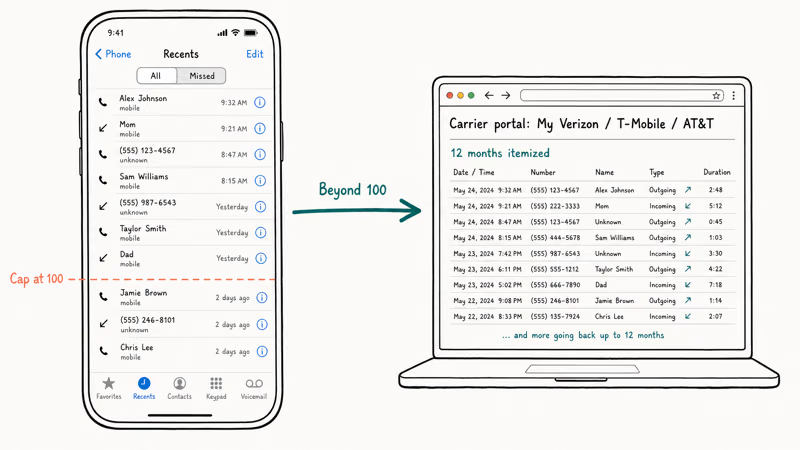
Tap the small (i) icon next to any name or number to see the exact time, duration, and call type: Wi-Fi calling, FaceTime audio, or a regular cellular call.
For records beyond the 100-call window, your carrier’s online portal is the only built-in option. According to Verizon’s call history support page, itemized call logs are available for 12 months in My Verizon. AT&T, T-Mobile, and most prepaid carriers offer similar windows. Apple itself does not back up the full call log to iCloud, only the Recents list that the device can already show.
Looking up an unknown caller? Our phone number history lookup walkthrough covers carrier and reverse-lookup options worth trying.
#Checking Message History on iPhone
Messages does not have a “history” view the way Safari does. Every conversation thread is the history. Open Messages, tap a contact, and scroll up to load older messages. iMessage by default retains messages forever; SMS and MMS follow the same rule unless automatic deletion is turned on.
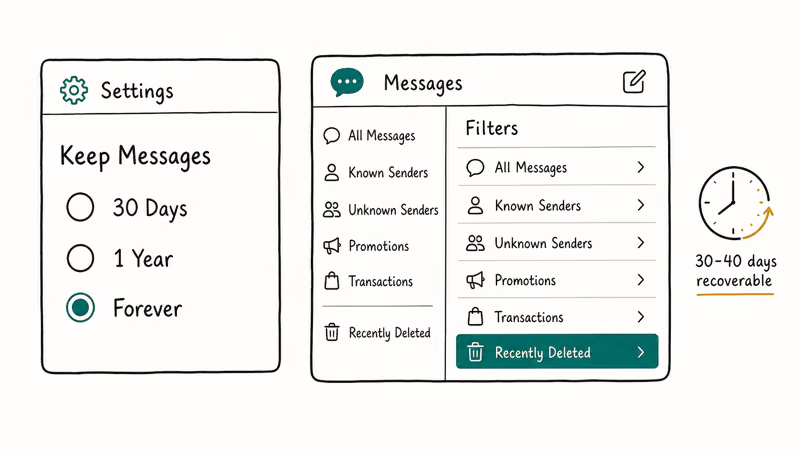
To check the retention setting, go to Settings > Messages > Keep Messages. The options are 30 Days, 1 Year, or Forever. With the Forever default, nothing ages out. Set to 30 Days, older threads drop off each month with no notification.
Check the toggle before you assume the thread is missing.
iOS 16 introduced the Recently Deleted folder for Messages, and it remains in iOS 17 and 18. Open Messages, tap the back arrow or Filters in the top-left until you see Edit, then tap Show Recently Deleted. Threads deleted in the last 30 to 40 days can be restored from there. Apple’s iMessage support article confirms that Recently Deleted retains messages for 30 to 40 days before permanent deletion.
Need a copy for legal or record-keeping use? Our iMessage to PDF export guide covers three methods that produce timestamps and contact names without screenshots.
#Seeing App Usage History With Screen Time
App usage history is exposed through Screen Time. Open Settings > Screen Time > See All App & Website Activity (or “See All Activity” on older iOS versions). The default view shows today’s total time across all apps; tap Week at the top for a seven-day rollup with a per-app breakdown sorted by minutes used.
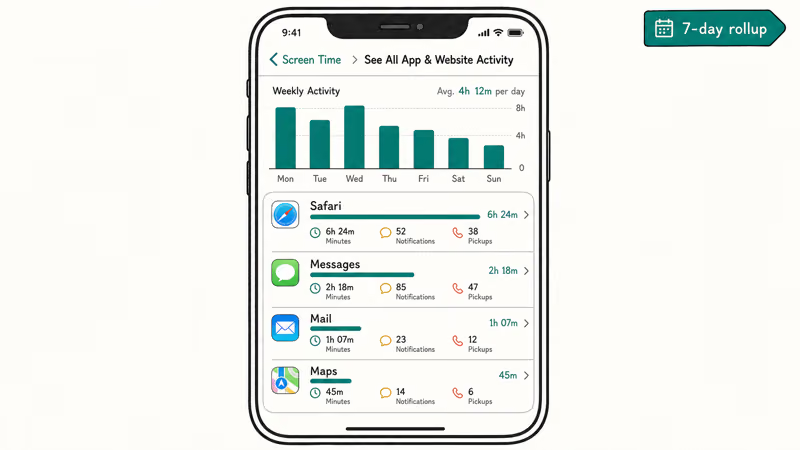
Each app entry expands to show daily session counts, total time, notification counts, and pickup-after counts for the previous full week and the current partial week.
For longer trails, screenshot the weekly summary every Sunday or use a parental-control suite that exports the raw numbers.
Screen Time also tracks first pickup, total pickups, and average notifications per hour. According to Apple’s Screen Time privacy guide, this data is stored encrypted on-device and synced through iCloud only when Share Across Devices is enabled. With the toggle off, app usage is local to the iPhone you’re checking.
Forgot the passcode? Our Screen Time passcode recovery walkthrough covers the Apple ID reset method that works on iOS 13.4 and newer without erasing the device.
#What History Can You Legally Check on a Family Member’s iPhone?
When you set up an iPhone for a child under 18 through Family Sharing, you become the Family Organizer, and that role gives you legitimate access to specific history surfaces from your own iPhone. Open Settings > Family > [child’s name] > Screen Time, and you can see weekly activity reports for app and website usage without unlocking their device.
For older teens or other adults, this access is not available, and trying to monitor without consent has consequences.
According to the Electronic Frontier Foundation’s stalking-tech guidance, installing covert tracking software on another adult’s phone may violate federal and state wiretapping laws even when the device is on your family plan. Apple’s Family Sharing terms only authorize Screen Time visibility for accounts marked as a child under the organizer’s family group.
Treat Family Sharing’s child-account flow as the only built-in way to check another person’s iPhone history.
If a partner or roommate asks you to check their iPhone, have them log in themselves and walk through the menus above with you watching, rather than handing you the device. For a deeper look at what’s safe to audit on your own iPhone after a suspected stalkerware install, our find my iPhone checker overview explains the location-sharing toggles to start with.
#Bottom Line
Walk through all five surfaces in order: Safari (Bookmarks > Clock), Settings > Safari > Advanced > Website Data for post-deletion remnants, Phone > Recents for the last 100 calls, Messages threads with the Recently Deleted folder, and Settings > Screen Time > See All App & Website Activity for the past week of app usage.
Every check runs on-device.
On iOS 17 and 18, no extra software, jailbreak, or separate account is required. Screenshot as you go if you need records to share; Safari Website Data and Phone Recents both age out within weeks. Stick to your own iPhone or a child’s account under your Family Sharing organizer role.
iPhone tips & tricks
#Frequently Asked Questions
Can I recover deleted Safari history on iPhone?
Partially. Settings > Safari > Advanced > Website Data keeps domains and cookies after a clear, but the URL list and timestamps are gone.
How far back does iPhone keep call history?
The Phone app shows the most recent 100 calls in Recents. Older calls are not stored on the device itself; for a longer record you’ll need your carrier’s online account portal, which usually keeps 12 months of itemized logs.
Does clearing Safari history on iPhone clear it on my Mac?
Yes, if iCloud Safari sync is on. The wipe propagates within a few minutes.
Where is the Recently Deleted folder in Messages?
Open Messages, tap Filters or the back arrow at the top-left, and select Show Recently Deleted. Messages stay there for 30 to 40 days before they’re removed permanently, giving you a small window to recover threads.
Can Screen Time show history older than one week?
No. Screen Time’s built-in reports only cover the current and previous week. To track longer trends, screenshot the weekly summary every Sunday, or use a third-party family-control app that exports raw daily values to a spreadsheet, which is the only way to build a multi-month trend line. Apple deliberately limits the window so on-device storage stays small, and even the iCloud-synced version of Screen Time only carries the same two-week buffer across your other Apple devices.
Is it legal to check someone else’s iPhone history?
Only with explicit consent or as Family Sharing organizer for a child under 18.
How do I check what websites someone visited in private browsing?
Private Browsing in Safari is designed not to leave a record on the device. Even Settings > Safari > Advanced > Website Data is not updated during a Private session, which is the entire point of the feature, so there’s no built-in way to retrieve those URLs.
Why is my Safari history empty when I open it?
iCloud Safari sync probably cleared it from another signed-in device.

How to Transfer Data to a New iPhone Without iCloud
Move everything to your new iPhone without iCloud: Quick Start device-to-device transfer, wired migration, and encrypted Finder or iTunes backups.
Best Wireless Earbuds for iPhone in 2026: USB-C Era Picks
Best wireless earbuds for iPhone in 2026, comparing AirPods Pro 3, Sony WF-1000XM6, Bose QC Ultra, and Anker Liberty 4 NC on the USB-C iPhone lineup.
iPhone Keyboard Lag? 7 Proven Fixes for iOS 26 (2026)
Fix iPhone keyboard lag with 7 proven fixes for iOS 26. Covers restart, storage, predictive text, third-party keyboards, and dictionary reset.
How to Block Porn on an iPhone: A Guide for Parents
Learn how to block porn on iPhone using Screen Time, DNS filtering, and safe browsers. Step-by-step guide for parents to protect kids' devices.