Best Wi-Fi Extender 2026: Fix Dead Zones for Less Money
The best Wi-Fi extender 2026 for dead zones. We compare TP-Link and Netgear picks, when an extender beats mesh, and the placement rule that makes it work.
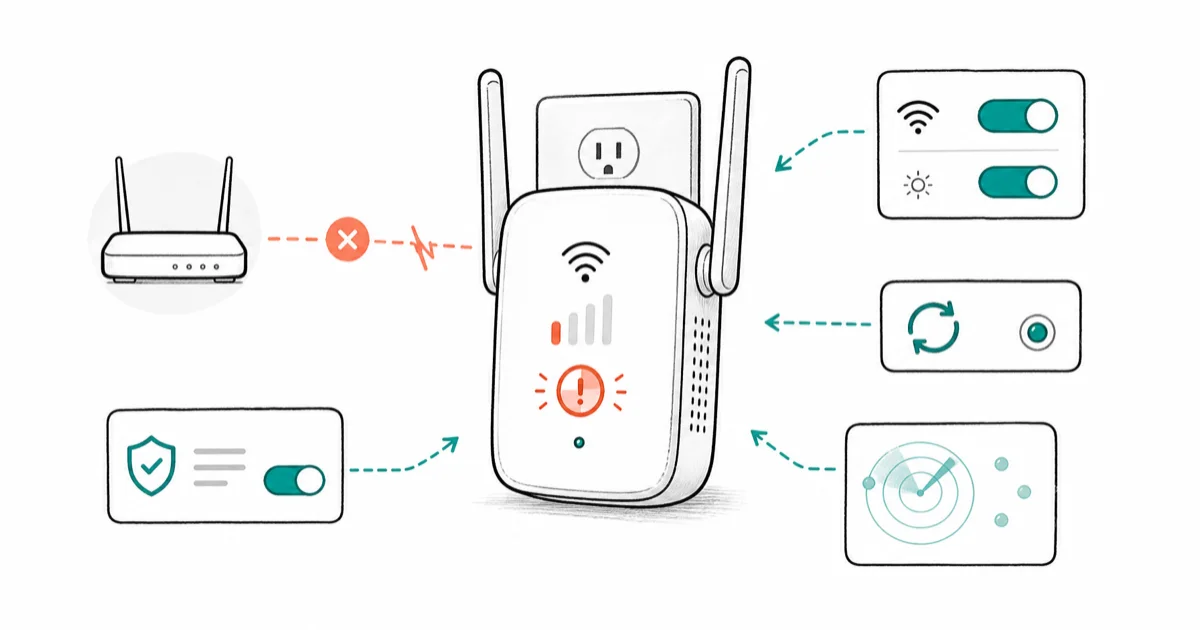
Quick AnswerThe TP-Link RE715X is the best Wi-Fi extender for most people in 2026. It delivers strong dual-band Wi-Fi 6 speed and wide coverage at a fraction of what a mesh system costs.
The best Wi-Fi extender in 2026 is the cheapest way to kill a single dead zone without replacing your whole network. This guide compares current TP-Link and Netgear extenders by Wi-Fi generation, coverage claims, ports, and setup features. Placement decides as much as the hardware here.
- The TP-Link RE715X is our overall pick, with dual-band Wi-Fi 6 speed and wide coverage at a low price.
- An extender makes sense for one stubborn dead zone in a home under about 2,000 square feet, not for whole-home coverage.
- Match the extender’s Wi-Fi standard to your router, since a Wi-Fi 7 extender on a Wi-Fi 5 router gains you nothing.
- Place the extender about halfway between the router and the dead zone, never inside the dead zone itself.
- A basic extender can cut throughput by as much as half, so it suits browsing and email better than 4K streaming or gaming.
#When Is a Wi-Fi Extender the Right Fix?
A Wi-Fi extender rebroadcasts your existing signal further into the home, patching a single weak spot for far less than a new router or mesh kit.
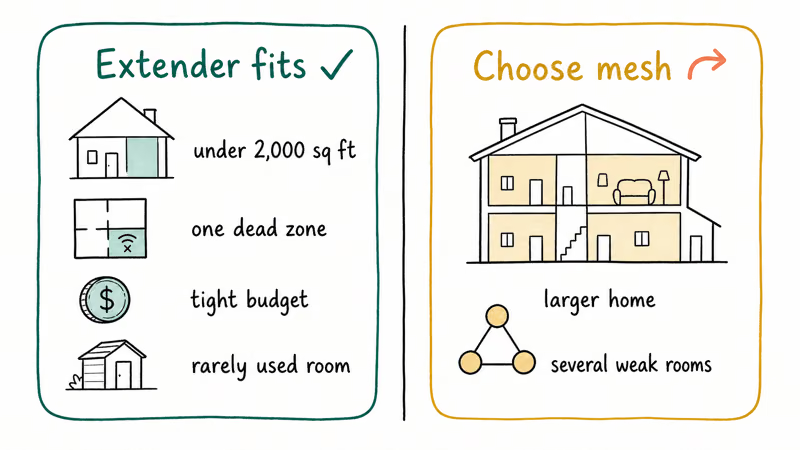
The decision hinges on the shape of your problem. According to NETGEAR, an extender suits a single dead zone while mesh fits homes above 2,000 square feet or with several weak areas. Tom’s Guide’s mesh and extender testing recommends the same split, since an extender that rebroadcasts a weak signal only spreads the shortage thinner.
A few situations favor an extender outright.
It’s the right call for a modest home under roughly 2,000 square feet with one stubborn dead zone, for a tight budget that needs a temporary fix, or for a rarely used space like a guest attic or detached shed. If your phone is the only thing struggling, our slow phone Wi-Fi connection guide covers free repositioning fixes that solve many dead zones with no purchase at all.
Need signal for cameras or a detached garage rather than one indoor room? Our garage-ready Wi-Fi extender picks for cameras and detached spaces narrows the hardware for that layout.
#Best Wi-Fi Extender Overall
For most people, the TP-Link RE715X is the best extender you can buy. It runs dual-band Wi-Fi 6 at AX3000 speeds, covers a wide area, and handles a large number of devices at once, which is more than enough to revive a single dead room.
As an Amazon Associate fone.tips earns from qualifying purchases.
The RE715X is the most balanced pick here because it pairs AX3000 dual-band Wi-Fi 6 with a plug-in design and modern roaming support. Setup runs through the Tether app in minutes, and a signal LED helps you find the placement sweet spot rather than guessing. It also supports EasyMesh, so it can roam under one network name with compatible TP-Link routers.
Want a close, slightly cheaper sibling? The TP-Link RE700X offers similar Wi-Fi 6 coverage with OneMesh support. It’s the value pick when the RE715X is out of your range and you still want a reliable, app-driven setup.
#Best Wi-Fi Extender for Speed and Range
If you need maximum speed and wired ports, the Netgear Nighthawk EAX80 is the step-up pick. It looks like a router rather than a wall plug, supports Wi-Fi 6, and covers a large area while doubling as a small access point.
Its standout feature is smart roaming under your existing network name, so devices switch between router and extender automatically instead of forcing you to pick a second network. Tom’s Guide found that its four Gigabit Ethernet ports and USB 3.0 port make it the most versatile extender for wiring in a desk, console, printer, or the multiple screens in a 6-monitor setup.
The tradeoff is honest.
You pay for that speed and those ports, and the desktop form factor takes up more room than a plug-in unit. If your dead zone is a home office that needs wired connections too, the EAX80 earns its premium. For a simpler single-room fix, the plug-in RE715X is the smarter spend.
#Where Should You Place a Wi-Fi Extender?
Placement is the single biggest factor in whether an extender helps or disappoints. The cardinal rule is simple: don’t put it in the dead zone itself, because then it only has a weak signal to rebroadcast.
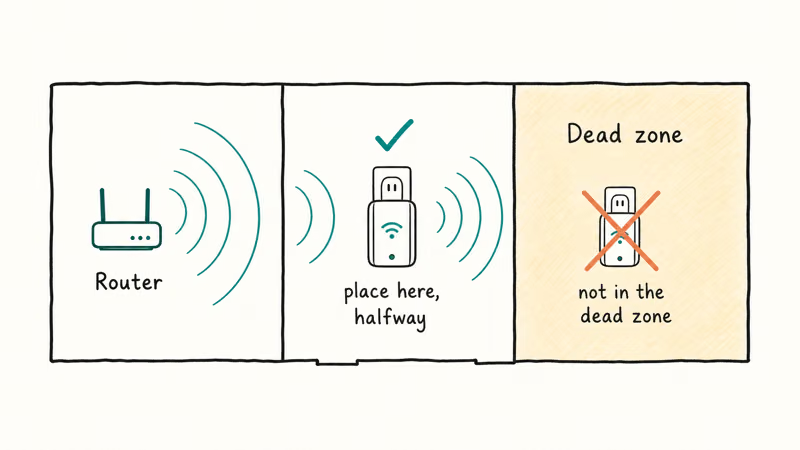
Place the extender about halfway between your router and the dead zone, where it still receives a strong upstream signal. A useful refinement is to keep it just within solid range of the router rather than pushing it all the way out, since the quality of what it receives caps the quality of what it sends.
Daisy-chaining is the trap to avoid.
Each extra extender adds a hop, and each hop degrades performance, so two extenders rarely beat one placed well. If you find yourself wanting a second unit, that’s the signal you’ve outgrown extenders entirely. The signal LED on better extenders takes the guesswork out of finding the right spot.
#An Extender or a New Router: Which Makes Sense
Sometimes the dead zone isn’t the extender’s job at all. If your router is old or underpowered, a stronger one can cover the whole home on its own and skip the extender entirely. Our best wifi router guide and the budget-focused best routers under $50 roundup both cover upgrades that often solve range problems outright.
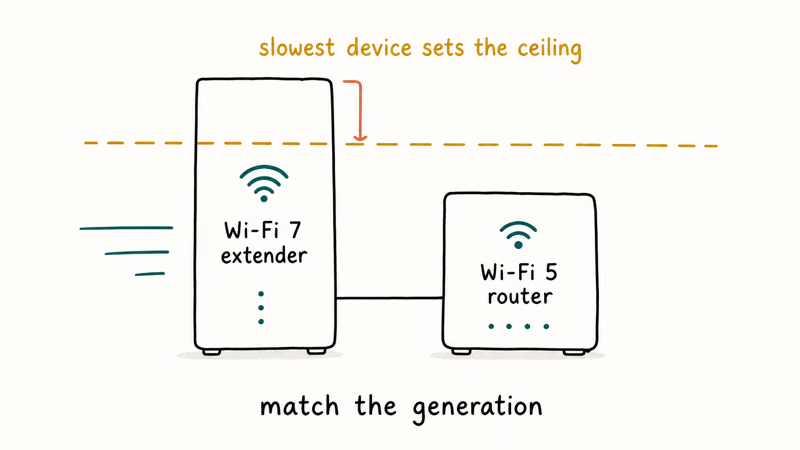
Match the generation when you do add an extender. A Wi-Fi 7 extender paired with a Wi-Fi 5 router performs no better than a Wi-Fi 5 extender, so buying ahead of your router wastes money.
The math comes down to scope.
For one weak spot, an extender is the fastest and cheapest fix. For stronger Wi-Fi throughout the house, a mesh system or a better router wins. Buy the smallest fix that solves your actual problem, not the most capable box on the shelf.
#An Extender Compared to a Mesh System
An extender and a mesh system both fight dead zones, but they work differently. An extender bolts onto your existing router as one add-on device, while mesh replaces the router with a set of nodes sharing one network name.
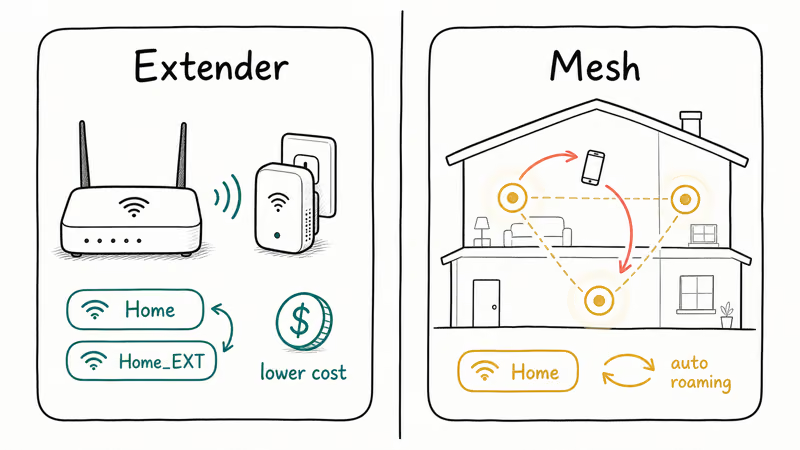
That difference shows up in daily use. An extender creates a separate network you sometimes have to switch to by hand, whereas a mesh kit hands your devices between nodes automatically as you move through the home without ever dropping the connection. Mesh also costs more, since you buy a multi-node kit instead of one inexpensive plug, but it buys you coverage that an extender simply can’t match across a larger floor plan.
Pick by how many rooms are weak.
For a single dead zone on a budget, the extender wins on price and speed of setup. For several weak rooms or a layout an extender can’t reach, our best mesh wifi system guide covers the kits that handle whole-home coverage.
#Bottom Line
Buy the TP-Link RE715X if you want the best balance of speed, coverage, and price for a single dead zone.
Choose the Netgear Nighthawk EAX80 if you need maximum speed and wired Ethernet ports in the room you’re covering. Skip extenders for a mesh system once more than one room is weak, since chaining hardware to fight a layout problem rarely ends well.
#Frequently Asked Questions
Where should I place a Wi-Fi extender?
Place it about halfway between your router and the dead zone, never inside the dead zone itself. An extender can only rebroadcast the signal it receives, so it needs a strong upstream connection from the router to perform well, and many models include a signal LED that helps you pin down the exact spot where the router’s signal is still strong enough to relay cleanly.
Will a Wi-Fi extender slow down my internet?
It can. A basic extender may cut throughput by as much as half on the extended network, which is fine for browsing and email but noticeable for 4K streaming or gaming.
Should I get a Wi-Fi extender or a mesh system?
Get an extender for a single dead zone in a smaller home on a tight budget. Get a mesh system when multiple rooms are weak or you want unified roaming under one network name. Extenders are cheaper and quicker to set up, but they create a separate connection you may have to switch to by hand, while a mesh kit keeps your whole home on one network that devices roam across on their own.
Does an extender need to match my router’s Wi-Fi standard?
Yes. A Wi-Fi 7 extender paired with a Wi-Fi 5 router performs no better than a Wi-Fi 5 extender, since the slower device sets the ceiling. Buy the generation that matches your router.
Can I use more than one Wi-Fi extender?
You can, but it rarely helps, because each extender adds a hop that degrades performance and daisy-chaining two units often confuses devices into the bargain. If one well-placed extender isn’t enough, that’s a clear sign your home has outgrown extenders and needs a mesh system instead, which is built from the ground up to hand traffic between several nodes without the speed penalty of repeated hops.
How big a home can a Wi-Fi extender cover?
A single extender works best in homes under roughly 2,000 square feet with one dead zone. For multi-room or multi-story coverage, a mesh system handles the job far better.

Best Laptop for Running LLMs in 2026: Memory Comes First
The best laptop for running LLMs is a memory purchase first. Compare MacBook unified memory against NVIDIA laptop VRAM, and see what each tier really runs.

Pixel 11 vs Pixel 10: What Changed and Who Should Upgrade
Pixel 11 vs Pixel 10: same screen and camera resolution, new Tensor G6, 25W wireless, and Gemini Intelligence. Here is who should actually upgrade.

Best Power Bank for iPad in 2026: Pro, Air, and Mini
Best power bank for iPad in 2026. Compare mAh tiers and USB-C PD wattage for iPad Pro, Air, and mini, plus airline Wh math, cables, and travel tips.

Best Power Bank With Built-In Cable: Top 2026 Picks
Best power bank with built-in cable picks for 2026. Compare single USB-C, multi-connector, and retractable laptop banks, plus airline Wh math.