Best Wi-Fi Router 2026: Top Picks by Home Size & Use
The best Wi-Fi router 2026 by home size and use case, with Wi-Fi 7 and 6E picks, band trade-offs, coverage limits, ports, and clear mesh advice.
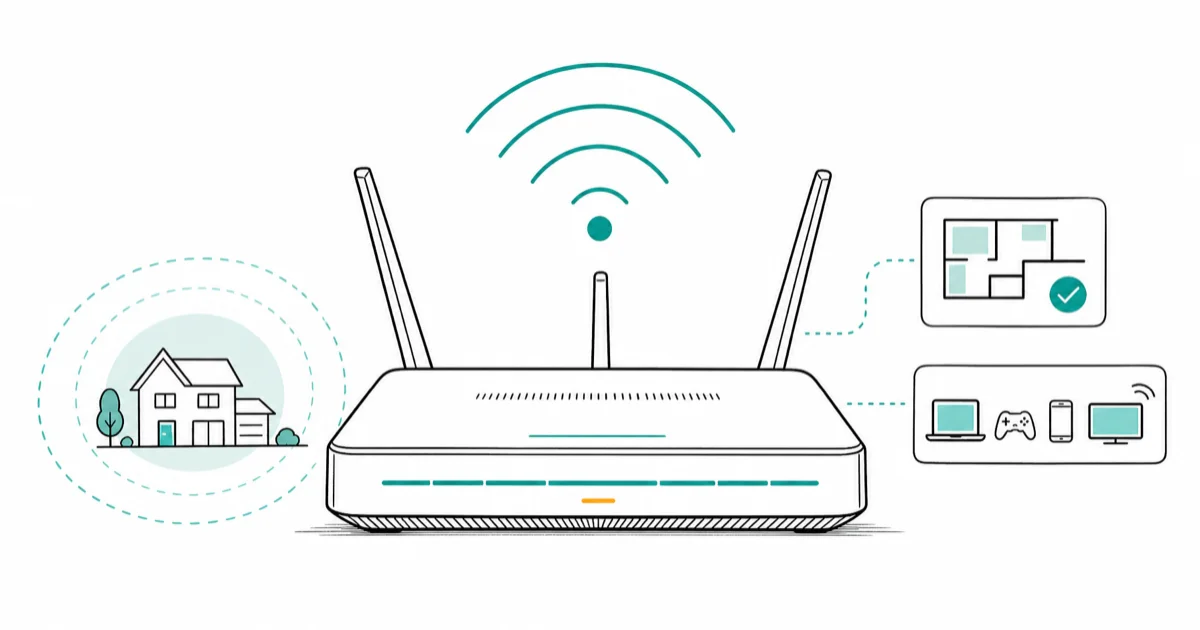
Quick AnswerThe ASUS RT-BE96U is the best Wi-Fi router for most people in 2026. It pairs Wi-Fi 7 tri-band speed with the coverage to blanket a typical single-floor home from one unit.
The best Wi-Fi router in 2026 depends on your home’s size and how your devices actually use the network. Current Wi-Fi 7 and Wi-Fi 6E routers can be genuine upgrades, but only when their bands, ports, and coverage fit the home. A flagship router in the wrong-sized home wastes most of what you paid for.
- The ASUS RT-BE96U is our overall pick, balancing Wi-Fi 7 tri-band speed with coverage that suits most single-floor homes from one unit.
- Wi-Fi 7 only pays off if your phones and laptops support it. Recent flagship Apple and Samsung devices do, but a Wi-Fi 6 device sees little gain from a router upgrade alone.
- A single strong router covers a typical home end to end, so you avoid the added latency and setup complexity that mesh introduces.
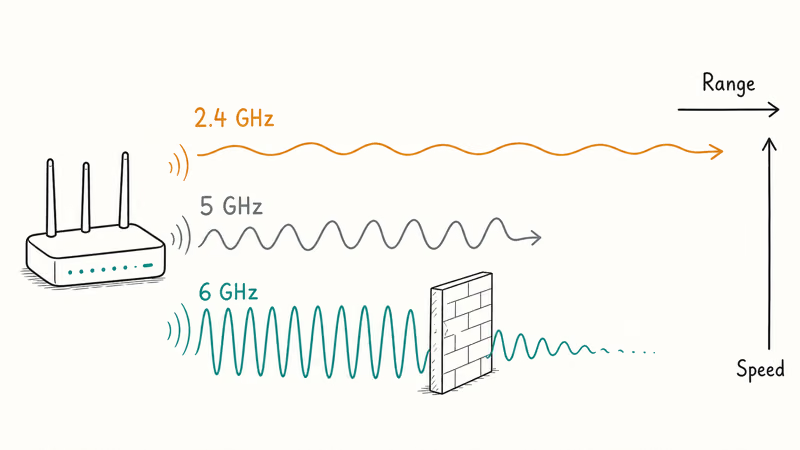
- The 6 GHz band carries the most bandwidth but the shortest range, which is why band choice matters more than peak speed numbers.
- Buy a router with at least one 2.5 GbE port if your internet plan is faster than gigabit, or the wired side becomes the bottleneck.
#What Makes a Wi-Fi Router Worth Buying in 2026
A router’s real-world value comes down to three things: the Wi-Fi standard it speaks, the bands it broadcasts, and whether its coverage matches your floor plan. Peak speed on the box is the least useful number printed there.
Wi-Fi 7 is the current standard, and it has matured since the spec was finalized. According to Tom’s Guide’s Wi-Fi 7 router coverage, Wi-Fi 7 is now a realistic choice for households with fast plans or many devices, not just enthusiasts.
Here’s the catch most buyers miss.
A Wi-Fi 7 router only delivers Wi-Fi 7 speeds to Wi-Fi 7 devices. If your laptop and phone are built for Wi-Fi 6, a new router alone won’t transform them, though the upgrade still helps with congestion and range.
Bands are the second factor. A tri-band router adds a 6 GHz band on top of 2.4 GHz and 5 GHz. The 6 GHz band is fast and clean but fades quickly through walls, so it serves nearby devices best while 2.4 GHz reaches the far corners. If your phone struggles in one room, our guide to a slow phone Wi-Fi connection covers the placement fixes worth trying before you blame the router.
#Best Overall Wi-Fi Router
For most homes, the ASUS RT-BE96U hits the right balance of speed, coverage, and price. It’s a Wi-Fi 7 tri-band router with the radio strength to cover a single-floor home from one spot.
As an Amazon Associate fone.tips earns from qualifying purchases.
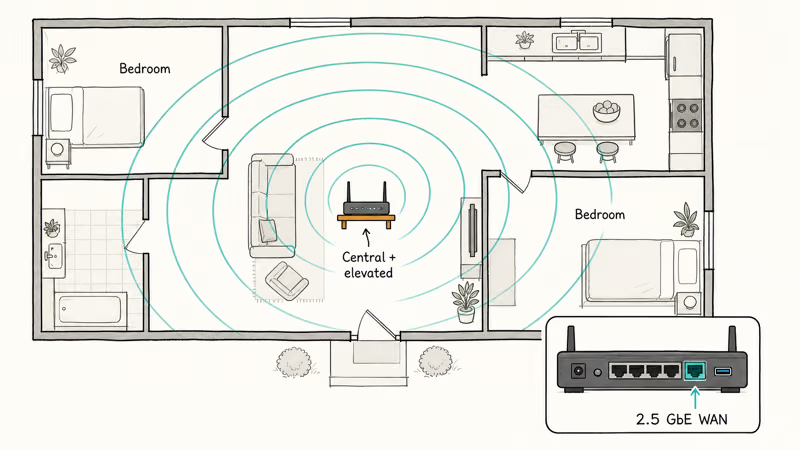
The ASUS RT-BE96U makes the most sense when you need a strong nearby 6 GHz connection plus wider 2.4 GHz reach for distant rooms. The multi-gig ports matter here too, since a 2.5 GbE WAN port keeps pace with internet plans above gigabit rather than capping them at the router.
Want a more mainstream alternative? The Netgear Nighthawk RS700S is the easier pick for non-technical users. Tom’s Guide found that Netgear’s app is the simplest of the major flagship vendors to set up for a first-time buyer, and the chassis is far more livable than the gamer-styled rivals. If low-latency online play is your priority, our best gaming router guide covers models tuned specifically for it.
Set it central and elevated. Then test.
#Best Value Wi-Fi Router
The TP-Link Archer BE800 is the price-performance benchmark of Wi-Fi 7 in 2026. It pairs a competent 6 GHz radio with dual multi-gig ports, and TP-Link’s HomeShield security suite is included for the first year.
For roughly 90 percent of people upgrading from a Wi-Fi 6 router, this is the right answer. It delivers most of the real-world benefit of the top-tier units at a meaningfully lower price, and the gap only shows up in synthetic benchmarks most homes never actually hit in daily streaming, calls, and gaming.
If your network drops devices when the family is all streaming at once, the Archer BE800 handles a crowded house well. Parents who want age filters and schedules should pair that with a router built for it, covered in our best parental control router guide. Set those filters up through the router’s official built-in parental-control feature, and keep your household informed, since monitoring a shared network raises legal and privacy questions worth respecting even at home.
One honest caveat applies.
The value here assumes you have devices that can use Wi-Fi 7. On an all-Wi-Fi-6 home, the cheaper TP-Link Archer BE3600 gives you a future-ready router for far less, and you upgrade your devices later.
#Best Wi-Fi Router for a Tight Budget
Not every home needs a Wi-Fi 7 router. If your plan is 300 to 500 Mbps and your devices are a few years old, a budget Wi-Fi 6 router clears that bar comfortably.
The TP-Link Archer BE3600 is the entry point into Wi-Fi 7 itself, often landing under most mainstream picks while still future-proofing your network. It fits apartments and small homes where a single dual-band router does the whole job, and it gives you a clear upgrade path the day your phones and laptops catch up to the newer standard.
If you want to spend even less, our best routers under $50 roundup covers solid Wi-Fi 5 and Wi-Fi 6 options that handle everyday browsing and HD streaming without strain. Match the router to your internet plan, not to the most expensive box on the shelf.
A cheaper router placed well beats a pricey one stuffed in a closet.
#Do You Need Wi-Fi 7 or Is Wi-Fi 6E Enough?
Wi-Fi 6E and Wi-Fi 7 both add the 6 GHz band, so both clear the congestion that plagues older 2.4 GHz and 5 GHz networks. The practical difference for most homes is smaller than the marketing suggests.
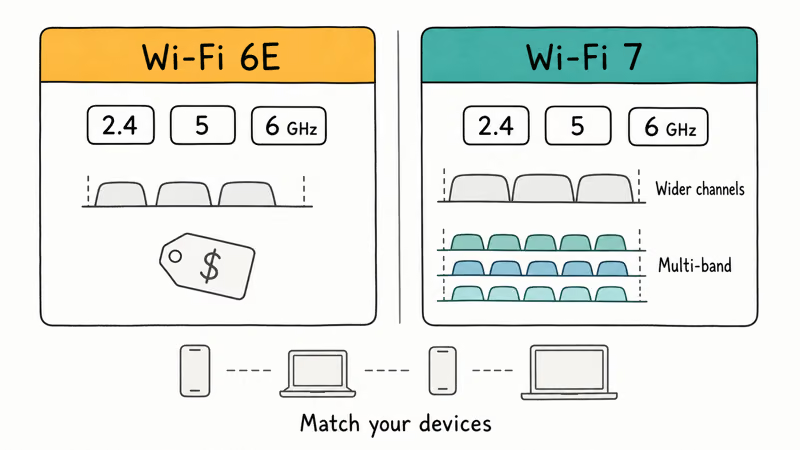
Wi-Fi 7 adds wider channels and the ability to use multiple bands at once, which helps in dense, device-heavy homes and on multi-gig plans. Wi-Fi 6E gives you most of the congestion relief at a lower price, and it’s a fine landing spot if your internet tops out near gigabit.
The deciding question is your device fleet, not the router.
If your phones and laptops are Wi-Fi 7 capable, buy Wi-Fi 7 and let the network grow into them. If they’re Wi-Fi 6 or 6E, a 6E router captures the bands they can actually use today. Either way, check your devices first so you don’t pay for a tier nothing in your house can reach.
#When Does a Single Router Beat a Mesh System?
A single Wi-Fi 7 router covers a meaningful footprint, roughly the size of a typical single-floor home. Below that ceiling, one router beats mesh on cost, latency, and simplicity.
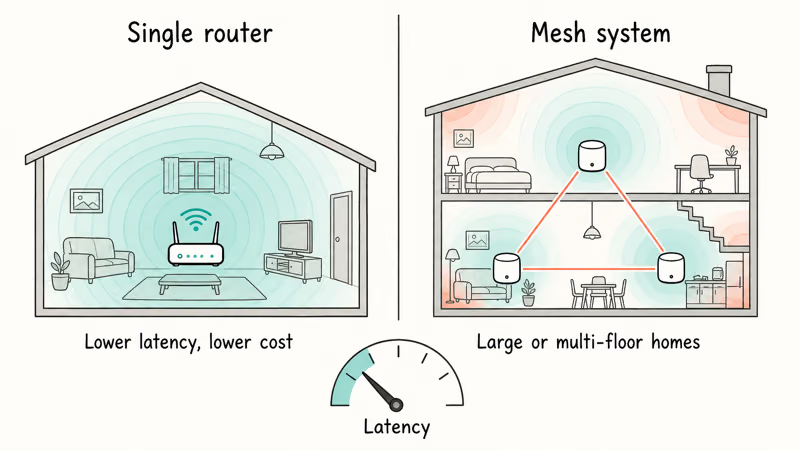
Mesh earns its place above that footprint or in homes with thick interior walls and multiple floors. It adds nodes to fill dead zones, but it also adds latency and complicates advanced setups. If your problem is whole-home coverage, our best mesh wifi system guide breaks down node count by square footage.
Gamers have a different priority entirely.
Low, stable latency matters more than raw coverage for competitive play, and a single router on a wired connection is often the better tool. For most other homes, a strong standalone router is the cheaper, faster path than splitting your budget across mesh nodes you may not need.
#Bottom Line
Buy the ASUS RT-BE96U if you want one router that covers a typical home and keeps pace with a fast internet plan.
Choose the TP-Link Archer BE800 for the best value upgrade from Wi-Fi 6, or the TP-Link Archer BE3600 if your home is small or your budget is tight. Skip Wi-Fi 7 entirely until you own at least one device that can actually use it, because the standard alone changes nothing without matching hardware on your phones and laptops.
#Frequently Asked Questions
Do I need a Wi-Fi 7 router in 2026?
Only if you own devices that support Wi-Fi 7, such as recent flagship phones and laptops from Apple and Samsung. According to Tom’s Guide, a Wi-Fi 6 device sees little benefit from a Wi-Fi 7 router on its own. If your plan tops out near gigabit and your devices are older, a Wi-Fi 6E router captures every band you can actually use for far less. Buy the tier your house can reach today.
How much area does a single Wi-Fi router cover?
A modern Wi-Fi 7 router covers roughly a typical single-floor home or apartment. Thick walls, metal, and extra floors shrink that figure.
What is the difference between Wi-Fi 6E and Wi-Fi 7?
Both add a clean 6 GHz band on top of 2.4 GHz and 5 GHz, which relieves the congestion that slows older networks. Wi-Fi 7 goes further with wider channels and the ability to use multiple bands at once, helping busy, device-heavy homes and multi-gig plans, while Wi-Fi 6E delivers most of that practical benefit for less. For most households near gigabit speeds, the cheaper 6E tier is plenty, and you bank the savings.
Will a new router fix my slow Wi-Fi?
Sometimes, but not always. A new router helps when yours is old or can’t reach a far room, yet it won’t touch a slowdown that comes from your internet plan, interference, or one misconfigured device. Reposition the router centrally first.
Do I need multi-gig Ethernet ports on my router?
You need them if your internet plan is faster than gigabit, otherwise the wired side quietly caps your speed at the router. A single 2.5 GbE port is usually enough to keep a fast plan flowing. On a gigabit or slower plan, standard Gigabit ports handle everything and you can put the savings toward better coverage instead.
Is a single router better than a mesh system?
For a typical single-floor home, yes. A single router avoids the latency and setup complexity mesh adds, and it usually costs less, so it’s the right starting point for most buyers. Mesh becomes the better choice only in large homes, multi-story layouts, or houses with thick walls where one router physically can’t reach every room, and even then a wired backhaul makes a real difference.

Best Laptop for Running LLMs in 2026: Memory Comes First
The best laptop for running LLMs is a memory purchase first. Compare MacBook unified memory against NVIDIA laptop VRAM, and see what each tier really runs.

Pixel 11 vs Pixel 10: What Changed and Who Should Upgrade
Pixel 11 vs Pixel 10: same screen and camera resolution, new Tensor G6, 25W wireless, and Gemini Intelligence. Here is who should actually upgrade.

Best Power Bank for iPad in 2026: Pro, Air, and Mini
Best power bank for iPad in 2026. Compare mAh tiers and USB-C PD wattage for iPad Pro, Air, and mini, plus airline Wh math, cables, and travel tips.

Best Power Bank With Built-In Cable: Top 2026 Picks
Best power bank with built-in cable picks for 2026. Compare single USB-C, multi-connector, and retractable laptop banks, plus airline Wh math.