Best Mesh Wi-Fi System 2026: Whole-Home Coverage Picks
Find the best mesh Wi-Fi system for whole-home coverage in 2026, comparing eero, TP-Link Deco, Netgear Orbi, node count, backhaul, and home size.

Quick AnswerThe eero Pro 7 is the best mesh Wi-Fi system for most homes in 2026. It pairs the easiest setup with strong whole-home coverage, scaling node count to your square footage.
The best mesh Wi-Fi system in 2026 depends on your home’s size, layout, and how many nodes it actually needs. Current eero, TP-Link Deco, and Netgear Orbi kits target different home sizes, budgets, and backhaul needs. The wrong node count wastes money in both directions.
- The eero Pro 7 is our overall pick, combining the simplest setup with balanced whole-home coverage for most households.
- A two-node kit suits medium homes up to roughly 4,000 square feet, while a three-node kit covers large or multi-story homes.
- Mesh earns its price in homes with thick walls, multiple floors, or awkward layouts where a single router physically can’t reach every room.
- Wired Ethernet backhaul between nodes improves throughput noticeably and removes the need for a dedicated wireless backhaul band.
- TP-Link Deco kits skip subscription fees for security, while Netgear Orbi reserves some features behind a paid Armor plan.
#When Does a Mesh System Make Sense?
A mesh system replaces your router with multiple nodes that share one network name, so your devices roam between them without dropping. That unified handoff is the whole point, and it matters most when a single router can’t physically cover your space.
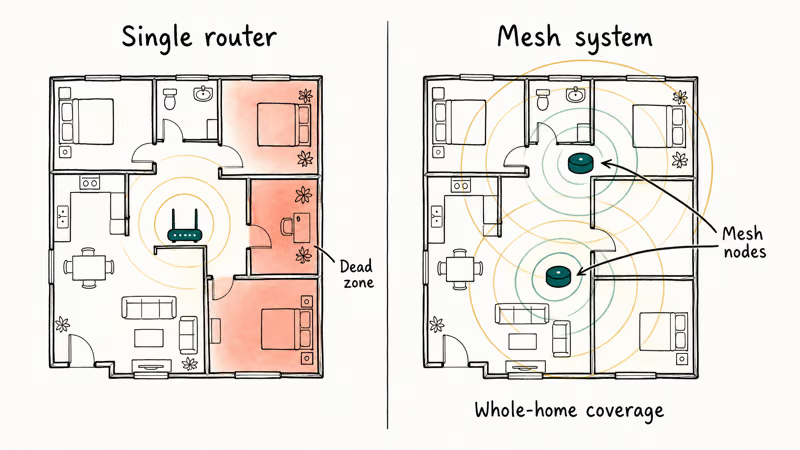
Mesh is not automatically better than a good standalone router. According to Tom’s Guide’s mesh router testing, one strong router often beats a cheap mesh kit in a small open-layout home for less money. The added nodes only pay off when distance, walls, or floors defeat a single broadcast point, so a quality Wi-Fi router is the cheaper first move for compact homes.
Here’s the practical test.
If you have one stubborn dead zone in an otherwise strong network, you may not need mesh at all. A single Wi-Fi extender placed correctly can patch that gap for far less. Mesh is the answer when several rooms are weak, not one. Before buying anything, our guide to a slow phone Wi-Fi connection covers the free placement fixes worth trying first.
#How Many Mesh Nodes Do You Need?
Node count tracks your square footage and layout more than any speed number. Each node covers a footprint, and walls and floors shrink it, so plan around your real floor plan rather than the box’s coverage claim.
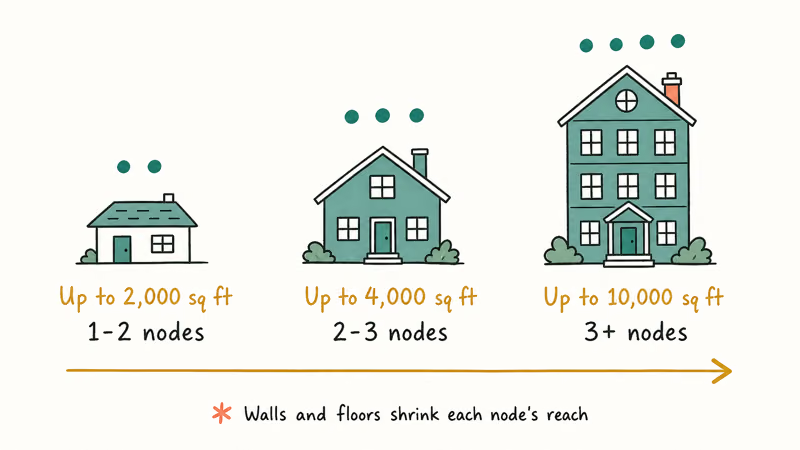
A one-to-two node setup handles homes up to roughly 2,000 square feet. Properties up to about 4,000 square feet usually need two to three nodes, and larger or multi-story homes benefit from three or more. Tom’s Guide found that a flagship three-pack can blanket close to 10,000 square feet, enough for the largest residential properties.
Adding nodes is not free of tradeoffs.
Each wireless hop between nodes adds a little latency, which is why placement matters. Nodes work best as stepping stones, each within strong signal range of the last, not scattered into the dead zones themselves. If you run a workstation with a lot of screens, our 6-monitor setup guide explains why a wired connection to the main node beats relying on a distant satellite.
#Best Mesh System for Most Homes
For most households, the eero Pro 7 is the safest default. It pairs the easiest setup in the category with strong real-world speeds and a clean app, so you go from box to stable coverage in minutes rather than an afternoon of troubleshooting.
As an Amazon Associate fone.tips earns from qualifying purchases.
The eero case is ease of setup and clean scaling. Start with a two-pack and add a node later if a room stays weak, since the app walks you through expansion without resetting the network.
Want the most equipped version? The eero Max 7 steps up to multiple 10 GbE ports per node and doubles as a smart home hub with Thread, Zigbee, and Matter support built in. Tom’s Guide reported that it carries the most ports of any consumer mesh kit, so it’s the pick if you have a multi-gig plan and a house full of connected devices.
#Best Value Mesh System
The TP-Link Deco BE63 is the value leader for 2026. It delivers Wi-Fi 7 tri-band performance and wide coverage at a price well below the premium kits, and crucially, TP-Link includes security features without a recurring subscription.
For apartments and medium homes, the Deco gives you most of what the flagships offer for a meaningful saving. It won’t top Orbi or eero on raw throughput, but few homes ever push a mesh system to that ceiling, so the gap rarely shows in daily use.
The subscription point is easy to overlook.
Netgear’s flagship reserves some security features behind a paid Armor plan, which adds annual cost. The Deco’s no-subscription model means the price you pay is the price you keep.
Need more reach? The TP-Link Deco BE85 covers more square footage and runs faster at the second node, making it the step-up pick when the BE63 leaves a far room slightly weak in a larger home.
#Best Mesh System for Large Homes
For the largest properties and homes with thick walls, the Netgear Orbi 970 is the maximum-coverage pick. Each unit covers a large footprint on its own, and a router-plus-two-satellite kit blankets a very large home that would defeat lighter systems entirely, which is why it remains the go-to choice for big multi-story houses where lesser kits leave whole rooms dark.
For a deeper buyer’s framework by floor plan and node count, see our roundup of mesh kits sized for large multi-story homes.
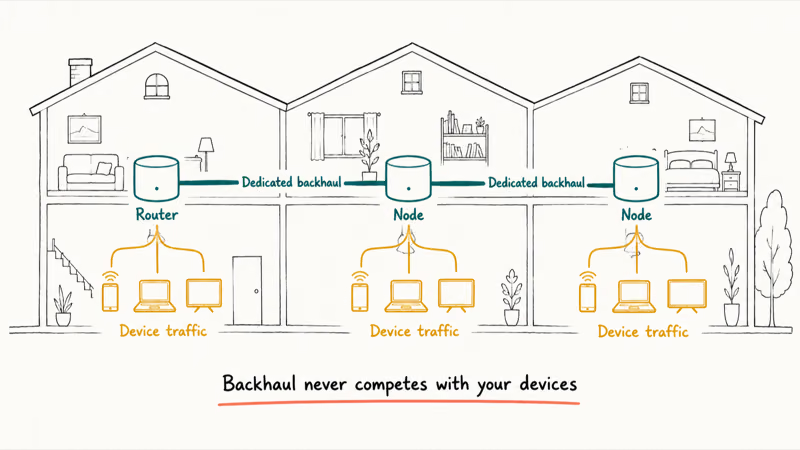
Its advantage is a dedicated backhaul band that keeps node-to-node traffic separate from your devices, which holds speeds up across long distances. That separation is what large multi-story homes need most, since the backhaul never competes with the streaming and calls happening on your phones.
The price is the honest catch.
The Orbi 970 costs significantly more than competitors, and the optional Armor subscription adds ongoing expense. If you want most of that coverage for less, the Netgear Orbi 770 sits well below the flagship while still delivering strong whole-home performance.
Match the system to your square footage, not the top of the lineup.
Parents who want age filters and schedules for their children should weigh the options in our best parental control router guide and set them up through the official built-in parental-control feature on devices you own. Apply those controls only on your own home network and with your household’s consent, since monitoring a shared connection raises legal and privacy questions worth respecting even at home.
#Mesh, Extender, or a Single Router
These three fixes solve different problems, and buying the wrong one wastes money. A single router is the cheapest fix for a compact home, an extender patches one isolated dead zone, and mesh is the tool for whole-home coverage across several weak rooms.
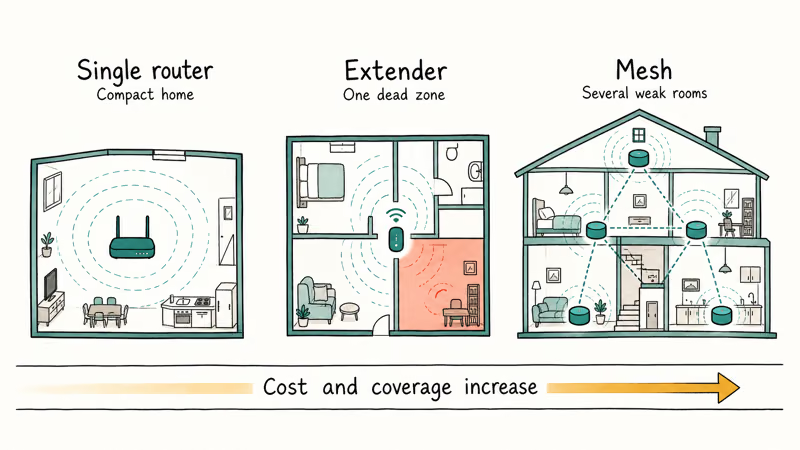
Cost scales with scope. An extender is a single inexpensive device, while mesh replaces your router with a multi-node kit, so you pay more up front for coverage that grows with your home. NETGEAR recommends mesh over chained extenders for larger spaces, since each extender hop degrades the signal it passes along.
The deciding factor is how many rooms are weak.
One weak room points to an extender or better router placement. Several weak rooms, thick walls, or multiple floors point to mesh. Buy the smallest fix that truly solves your layout, then add nodes later if a room stays stubborn.
#Bottom Line
Buy the eero Pro 7 if you want the simplest setup and reliable coverage for a typical home.
Choose the TP-Link Deco BE63 for the best value with no subscription, or the Netgear Orbi 970 for maximum range in a very large or thick-walled home. Skip mesh entirely if a single router or one well-placed extender already covers your space.
#Frequently Asked Questions
How many mesh nodes do I need for my home?
It depends on square footage and layout. A one-to-two node kit handles homes up to about 2,000 square feet, while two to three nodes cover up to roughly 4,000 square feet, and three or more suit large or multi-story homes. Walls, floors, and metal all shrink a node’s reach, so plan around your real layout rather than the box’s coverage claim, and remember you can always add a node later if one room stays stubborn after the initial setup.
Is mesh Wi-Fi better than a single router?
For large or multi-story homes, yes, because one router can’t physically reach every room. For small open-layout homes, a single strong router often performs better for less.
Should I use a mesh system or a Wi-Fi extender?
Use mesh when multiple areas need coverage and you want unified roaming under one network name. Use an extender for a single stubborn dead zone on a tight budget. An extender is cheaper and quicker to set up, but it creates a separate network and can cut speed, while mesh keeps your whole home on one connection that devices roam across automatically as you move room to room.
Does mesh Wi-Fi need a subscription?
It depends on the brand. TP-Link Deco includes security features at no recurring cost, while Netgear Orbi reserves some protections behind a paid Armor plan. Factor any subscription into the total before comparing prices.
What is mesh backhaul and why does it matter?
Backhaul is the connection between mesh nodes. A wired Ethernet backhaul, or a dedicated wireless band on systems that include one, keeps node-to-node traffic separate from your devices so speeds hold up across distance. That separation is exactly why dedicated-backhaul systems stay fast at the far node, and it’s the single biggest reason flagship kits suit large homes where the link between units has to travel the furthest.
Can I add more nodes to my mesh system later?
Yes. The app walks you through pairing a new unit without resetting the network, and you place each new node within strong signal range of an existing one.

Best Laptop for Running LLMs in 2026: Memory Comes First
The best laptop for running LLMs is a memory purchase first. Compare MacBook unified memory against NVIDIA laptop VRAM, and see what each tier really runs.

Pixel 11 vs Pixel 10: What Changed and Who Should Upgrade
Pixel 11 vs Pixel 10: same screen and camera resolution, new Tensor G6, 25W wireless, and Gemini Intelligence. Here is who should actually upgrade.

Best Power Bank for iPad in 2026: Pro, Air, and Mini
Best power bank for iPad in 2026. Compare mAh tiers and USB-C PD wattage for iPad Pro, Air, and mini, plus airline Wh math, cables, and travel tips.

Best Power Bank With Built-In Cable: Top 2026 Picks
Best power bank with built-in cable picks for 2026. Compare single USB-C, multi-connector, and retractable laptop banks, plus airline Wh math.