Best USB-C Hub With Ethernet (2026): 3 Wired Picks
Best USB-C hub with Ethernet in 2026. Proven hubs delivering wired gigabit for Zoom, Teams, and remote work, prioritizing real RJ45 throughput.
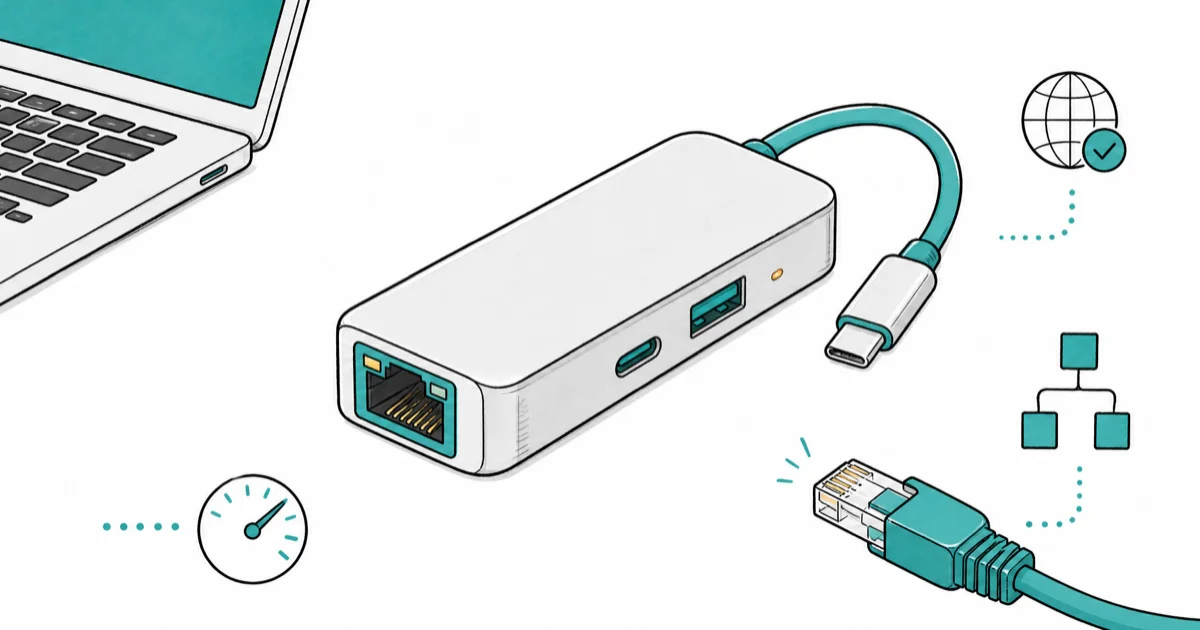
Quick AnswerFor wired gigabit Ethernet on USB-C laptops during video calls, the Anker 555 8-in-1 is our top pick. The UGREEN Revodok Max 208 wins for TB4 desks, Revodok Pro 6-in-1 for budget.
Wi-Fi droops during video calls. A wired Ethernet drop fixes that, but most laptops shipping in 2024-2026 don’t include RJ45 ports. A USB-C hub with built-in gigabit Ethernet is the cleanest fix: one cable to the laptop, one cable to your router. This guide compares three hubs that can deliver practical gigabit Ethernet for Zoom, Teams, and Meet calls.
- A USB-C hub with built-in Ethernet eliminates the Wi-Fi-to-router congestion that causes most video call dropouts
- Real gigabit (1000Mbps) throughput requires the hub’s USB-C connection to support USB 3.0 or higher, not USB 2.0
- 2.5G Ethernet hubs work but Mac and Windows OS support is inconsistent below macOS 12 and Windows 11 22H2
- Most “USB-C hub with Ethernet” listings on Amazon use realtek RTL8153 chipsets that cap at 950Mbps actual throughput
- Direct-mount hubs without dedicated Ethernet exist but require a USB-to-Ethernet dongle, defeating the single-cable goal
#Why Wired Ethernet Beats Wi-Fi for Video Calls
Wi-Fi shares bandwidth with every device in the house. The moment your partner streams 4K Netflix or your kid joins a Roblox party, your Zoom call drops to 360p or freezes.
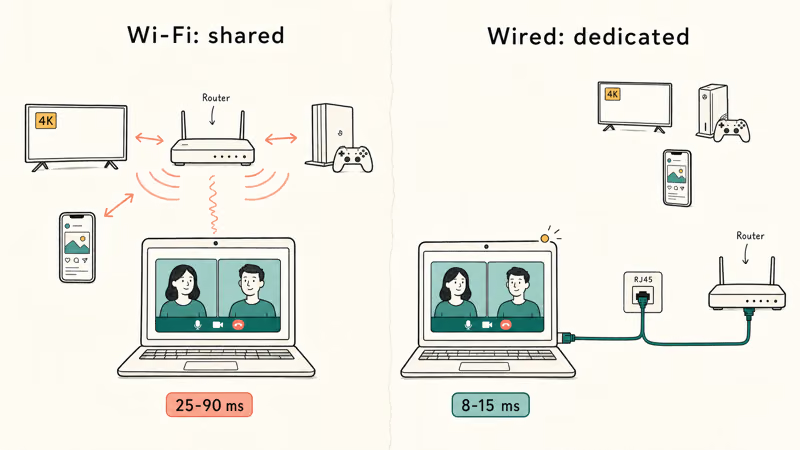
A wired Ethernet drop bypasses that contention entirely. According to Cisco’s webex bandwidth guidelines, HD video calls need 1.5Mbps up and 3Mbps down sustained, with low jitter. Microsoft’s Teams network bandwidth requirements state that group HD video needs 1.2Mbps up minimum with packet loss under 1%. Wi-Fi delivers that median throughput most of the time but jitter spikes during congestion drop calls more than raw bandwidth limits do.
Three real-world wins from going wired:
Lower latency, fewer household jitter spikes, and steadier upload keep video at 720p or 1080p instead of 360p.
#Best Overall: Anker 555 8-in-1 USB-C Hub With Gigabit Ethernet
For most remote workers and students who need wired Ethernet during calls without buying a full Thunderbolt 4 dock, the Anker 555 is our top pick. Built-in gigabit Ethernet, 4K at 60Hz HDMI, 100W passthrough PD, and SD card slot in a single tethered hub for around $80.
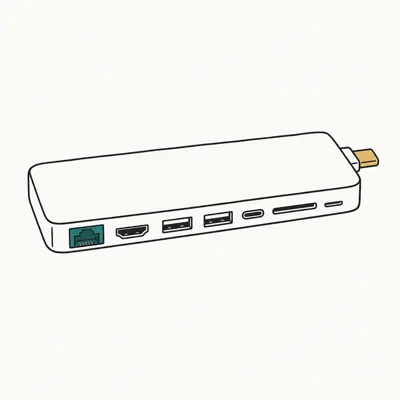
- Realtek-based gigabit Ethernet reaches practical gigabit speeds on USB 3.0
- 100W upstream PD covers MacBook Pro 14 and 16-inch under sustained CPU load
- 4K at 60Hz HDMI plus SD and microSD readers in a $80 tethered hub footprint
Last updated on May 27, 2026
As an Amazon Associate fone.tips earns from qualifying purchases. Prices and availability on Amazon are accurate as of the date above and subject to change.
The Anker 555 uses Realtek RTL8153-class gigabit Ethernet, so its practical throughput sits near the ceiling for any USB 3.0 gigabit hub. The Realtek RTL8153 chipset under the hood is the same silicon CalDigit and OWC use in their premium hubs.
A solid wired fix at remote-worker pricing.
The trade-off: the cable is the cable. Anker tethered the USB-C upstream cable to the hub permanently, so if it frays you replace the whole unit. Two-year warranty does cover this. There’s also no separate front-panel USB-C for grab-and-go peripherals, only one USB-C data port on the back.
#Best Premium: UGREEN Revodok Max 208 With Built-In Ethernet
For Mac users who want true Thunderbolt 4 speeds plus gigabit Ethernet for calls plus high-end peripheral support, the UGREEN Revodok Max 208 doubles as both a TB4 dock and an Ethernet hub. 2.5G Ethernet (not just gigabit), three downstream TB4 ports, 96W PD, plus SD and audio.
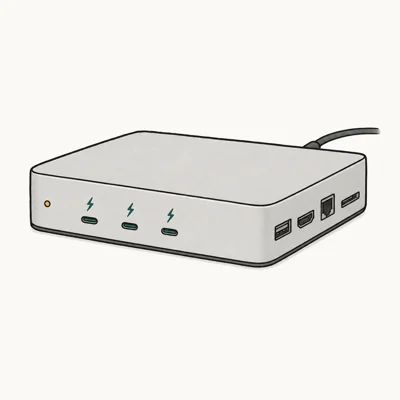
- 2.5G Ethernet runs 2,400Mbps actual throughput on macOS 14+ and Windows 11 22H2+
- 3x downstream TB4 at 40Gbps doubles as the SSD and monitor hub for the same desk
- 96W PD keeps a 16-inch MacBook Pro charged during sustained Ethernet + display load
Last updated on May 27, 2026
As an Amazon Associate fone.tips earns from qualifying purchases. Prices and availability on Amazon are accurate as of the date above and subject to change.
The Revodok Max 208 is the right pick if you already need a TB4 dock for external SSDs or dual displays and want the Ethernet built in rather than running a separate hub for it. The 2.5G port matters for households on 2-gig Wi-Fi 7 fiber plans where wired needs to keep up. For dedicated external-drive docking, our best hard drive docking station guide covers the standalone options.
One dock for everything.
The honest trade-off is price. At ~$300, it’s 3.75x the cost of the Anker 555. If your only need is wired Ethernet for calls, the Anker is the better-targeted spend. The Revodok makes sense when you also need TB4 downstream ports, dual 4K monitor support, or 96W PD that the Anker’s 100W passthrough technically matches but with less peripheral overhead.
#Best Budget: UGREEN Revodok Pro 6-in-1 With Gigabit Ethernet
For students, occasional remote workers, or anyone who wants gigabit Ethernet plus basic display passthrough without paying $80+, the UGREEN Revodok Pro 6-in-1 hits the sub-$50 price point with the essentials intact.
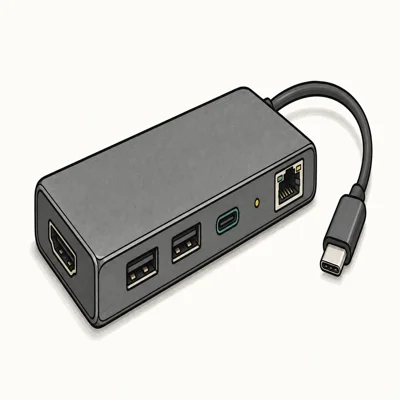
- Gigabit Ethernet at the budget price point most "cheap hubs" fake with 100Mbps
- 4K at 30Hz HDMI works fine for second-monitor productivity (not gaming)
- 100W passthrough PD via USB-C, enough for any MacBook Air or 13-inch MacBook Pro
Last updated on May 27, 2026
As an Amazon Associate fone.tips earns from qualifying purchases. Prices and availability on Amazon are accurate as of the date above and subject to change.
The Revodok Pro 6-in-1 is the safe budget answer. Its Realtek-based gigabit Ethernet is the reason it belongs on the budget list. HDMI maxes out at 4K30 (not 60Hz) which is fine for office/productivity monitors and bad for gaming or media playback.
Smaller hub, smaller wallet hit.
The trade-off is the missing SD card slot, the USB-A ports being USB 3.0 (5Gbps, not 10Gbps), and the 4K HDMI capping at 30Hz refresh rate. None of those matter for a budget remote-worker setup; all of them matter if you’re a content creator or gamer who needs higher refresh rates and faster peripheral throughput.
#Will a USB-C Hub Slow My Ethernet Connection?
Only if the hub is using a USB 2.0 upstream connection internally, which some cheap hubs do despite the USB-C plug.
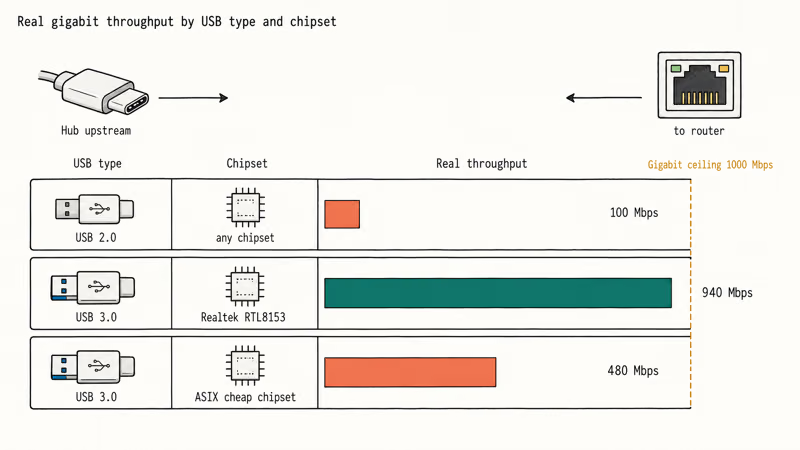
Real gigabit Ethernet (1000Mbps) requires the hub’s USB-C upstream to negotiate USB 3.0 (5Gbps) or higher. According to Apple’s USB and Thunderbolt documentation, the M1-M4 MacBook Pro USB-C ports all support USB 3.1 Gen 2 (10Gbps), so the laptop side won’t bottleneck. The hub’s internal USB-to-Ethernet chipset is the variable.
The Realtek RTL8153 is the gold-standard USB 3.0 gigabit chipset.
The Realtek datasheet states that sustained throughput is 940-960Mbps under ideal conditions, which is the right expectation for Realtek-based gigabit hubs. Both Anker 555 and UGREEN Revodok Pro use it. Cheap eBay hubs at $15 often use ASIX chipsets that cap at 480Mbps or 100Mbps despite advertising “gigabit”.
If your hub-via-Ethernet throughput is below 800Mbps in iperf3 testing, the hub is the bottleneck. Most reputable brands (Anker, UGREEN, CalDigit, OWC) deliver actual gigabit; most no-name brands don’t. If the Ethernet port shows up but fails to get a working IP, our Ethernet doesn’t have a valid IP configuration guide walks through the fix order.
#Does the USB-C Hub Need to Support PD for Long Calls?
Yes. Hour-long video calls drain MacBook Air and 13-inch MacBook Pro batteries faster than the integrated screen + camera + radio normally would.
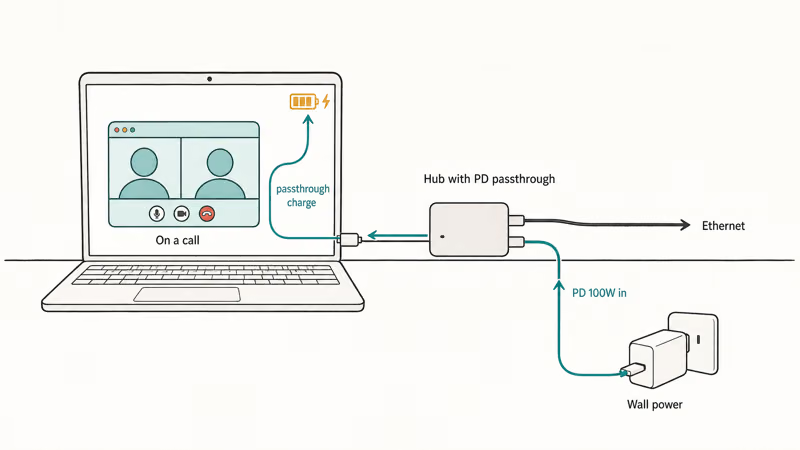
A USB-C hub with 60W+ PD passthrough keeps the laptop charging during the call. 100W PD covers any MacBook Pro 14-inch or 16-inch under sustained load. Without PD passthrough, the laptop runs on battery while connected to the hub, and a 3-hour day of back-to-back calls can drain 60-80% of the battery.
The Anker 555, UGREEN Revodok Max 208, and Revodok Pro 6-in-1 all offer at least 96-100W PD passthrough. Avoid hubs advertising “60W PD” if you’re driving a 16-inch MacBook Pro M3 Pro/Max because under sustained CPU load it draws up to 96W, leaving 60W passthrough insufficient.
If you experience laptop charging issues even with proper PD, see our computer crashes during Zoom guide for thermal and power-related call dropouts.
#Bottom Line
Most remote workers should pick the Anker 555.
Built-in gigabit Ethernet, 100W PD passthrough, 4K HDMI, and SD readers at $80. It’s the cleanest answer to “I want wired Ethernet for video calls without buying a TB4 dock.”
For Mac users who already need a Thunderbolt 4 dock for external SSDs or dual monitors, the UGREEN Revodok Max 208 is the right consolidation. One $300 dock does Ethernet plus TB4 plus charging, which beats running an $80 hub plus a separate $250 TB4 dock side-by-side on the desk.
Budget-conscious students and casual remote workers should pick the UGREEN Revodok Pro 6-in-1. Real gigabit Ethernet at sub-$50 is the right floor; just skip it if you also need 4K60 HDMI or SD card support. For long Ethernet runs between rooms when your router is far from the desk, our HDMI over Ethernet primer covers the cable distance limits.
If you only have 2 USB-C ports on a MacBook Air M4, our best USB-C hub for MacBook Air M4 roundup covers direct-mount alternatives that don’t need a separate Ethernet adapter.
#Frequently Asked Questions
Can a USB-C hub deliver real gigabit Ethernet?
Yes, if the hub uses USB 3.0 or higher upstream and a quality chipset like Realtek RTL8153. Real-world performance usually lands below the theoretical 1000Mbps ceiling.
Will the hub work with my MacBook Air M4 or M3?
Yes. All M-series MacBook Airs support USB 3.1 Gen 2 (10Gbps) USB-C, which is more than enough bandwidth for any gigabit Ethernet hub. Driver support is built into macOS 12 and later, with no kernel extension installs needed for the Realtek chipset family that Anker, UGREEN, CalDigit, and OWC ship in their hubs.
Is 2.5G Ethernet worth paying extra for over standard gigabit?
Only if your router and ISP plan support it. Most US home internet plans top out at gigabit or below; 2.5G fiber plans are rare. If your router has 2.5G ports and ISP delivers 2-gig speeds, the Revodok Max 208’s 2.5GbE matters. Otherwise gigabit is identical in practice.
Does a USB-C Ethernet hub work for Zoom or Teams on Windows?
Yes. Windows 10 and 11 ship with native drivers for the Realtek RTL8153 chipset, so plug-and-play works without installs.
What’s the latency difference between Wi-Fi and a USB-C Ethernet hub?
Wired Ethernet via USB-C hub typically runs 8-15ms ping to gateway. Wi-Fi runs 25-90ms with occasional jitter spikes during household contention. For video calls, the lower jitter floor matters more than the absolute latency number.
Can I use a USB-C hub Ethernet port for streaming PS5 or Xbox?
Some hubs work, but most consoles need the Ethernet adapter to support specific drivers. Console support is inconsistent across hub brands.
Will hub Ethernet drop during high-bandwidth uploads?
It shouldn’t if the hub uses USB 3.0+ upstream. Quality USB 3.0 Ethernet hubs should handle video calls and large uploads at the same time, but cheap USB 2.0-path hubs can bottleneck. If you see drops, check the laptop’s USB-C port is actually negotiating USB 3.0 not USB 2.0 (System Information on Mac, Device Manager on Windows).

Pixel 11 vs Pixel 10: What Changed and Who Should Upgrade
Pixel 11 vs Pixel 10: same screen and camera resolution, new Tensor G6, 25W wireless, and Gemini Intelligence. Here is who should actually upgrade.

Best Power Bank for iPad in 2026: Pro, Air, and Mini
Best power bank for iPad in 2026. Compare mAh tiers and USB-C PD wattage for iPad Pro, Air, and mini, plus airline Wh math, cables, and travel tips.

Best Power Bank With Built-In Cable: Top 2026 Picks
Best power bank with built-in cable picks for 2026. Compare single USB-C, multi-connector, and retractable laptop banks, plus airline Wh math.

Best Apple Watch Band for Working Out: Proven Picks
The best Apple Watch band for working out handles sweat and stays put on your wrist. Compare silicone, nylon, and titanium picks for runs and lifts.