Best Thunderbolt 4 Dock for Mac (2026): 4 Real TB4 Picks
Best Thunderbolt 4 dock for Mac in 2026. Compare true TB4 docks with 40Gbps downstream ports, separating real TB4 from TB-compatible USB-C hubs.
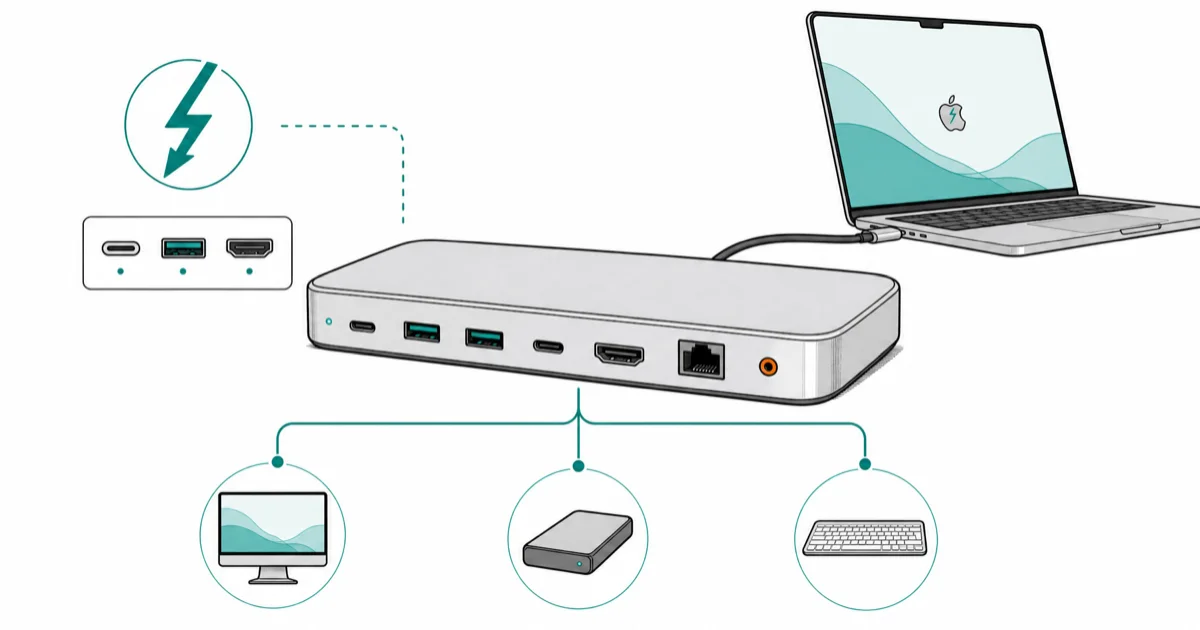
Quick AnswerFor real Thunderbolt 4 on Mac with 3x 40Gbps downstream ports, the UGREEN Revodok Max 208 is the top pick. CalDigit TS4 wins for 18-port workstations, OWC Thunderbolt Hub for compact desks.
Real Thunderbolt 4 docks are rare. Most products marketed as “Thunderbolt-compatible” are actually USB-C hubs that downgrade to USB 3 speeds the moment you plug them into a Mac. A true Thunderbolt 4 dock gives you three 40Gbps downstream Thunderbolt ports plus 90W charging upstream. This guide compares real TB4 docks by downstream port count, upstream charging, display support, and the features that separate certified docks from lookalike USB-C hubs.
- True Thunderbolt 4 docks must include 3x 40Gbps downstream TB4 ports, not 1 TB4 plus several USB-C ports
- TB4 docks deliver 90W or more upstream PD charging, enough for any 14-inch or 16-inch MacBook Pro
- Dual 4K at 60Hz external displays work on every TB4 dock with M-series Macs that support multiple displays
- TB4 cables matter: the supplied cable is the only one guaranteed to run full 40Gbps; many aftermarket cables drop to 20Gbps
- Genuine TB4 docks cost $250 to $400; anything under $150 marketed as TB4 is almost certainly a TB3 dock or USB-C hub in disguise
#What Defines a Real Thunderbolt 4 Dock
The Thunderbolt 4 spec sets hard requirements that USB-C hubs marketed as “TB-compatible” can’t meet.
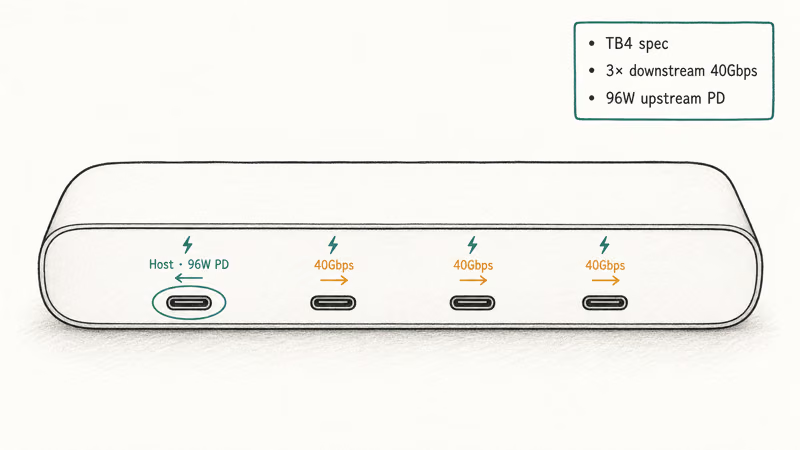
A real TB4 dock has at least three downstream Thunderbolt 4 ports running 40Gbps each. According to Intel’s Thunderbolt 4 brand requirements, every certified TB4 product must support 40Gbps PCIe, 32Gbps DisplayPort, and minimum 96W upstream PD. USB-C hubs marketed as “Thunderbolt compatible” almost always lack the 32Gbps PCIe tunneling, which is what lets external GPUs and 8TB+ SSD arrays hit real speeds. The gap matters most for fast SSD workflows.
A real TB4 dock can support dual 4K at 60Hz and full Thunderbolt storage speeds on Macs that support those display counts. USB-C hubs are dramatically more limited with fast external SSDs. If your workflow includes external storage, the dock-vs-hub gap is real.
Count the downstream Thunderbolt ports.
A real TB4 dock advertises three TB4 downstream plus the upstream port to the host. A fake TB4 dock advertises one TB4 plus a bunch of USB-C ports, which is the silicon giveaway. For charging concerns on the host side, our MacBook Pro not charging guide covers PD wattage and cable issues that affect dock power delivery.
#Best Overall: UGREEN Revodok Max 208 Thunderbolt 4 Dock
The UGREEN Revodok Max 208 is our top pick for most Mac users.
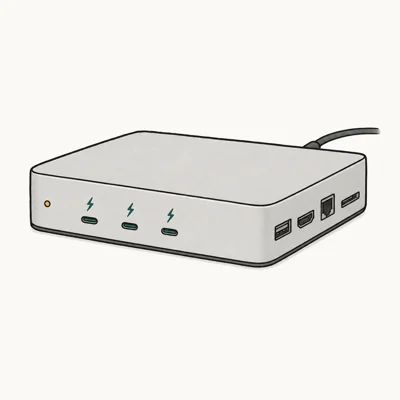
- 3x downstream Thunderbolt 4 ports at full 40Gbps, certified by Intel for M-series Macs
- 96W upstream PD charges a 16-inch MacBook Pro without slowing CPU performance
- Includes 2.5G Ethernet, SD card slot, plus 2x USB-A 10Gbps for legacy peripherals
Last updated on May 27, 2026
As an Amazon Associate fone.tips earns from qualifying purchases. Prices and availability on Amazon are accurate as of the date above and subject to change.
The Revodok Max 208’s spec sheet covers the key Mac dock needs: dual 4K at 60Hz support, full-speed downstream TB4 ports, and 96W upstream charging. The aluminum case and active cooling are there to manage sustained transfer loads.
A true TB4 dock at sub-Caldigit pricing.
Trade-offs versus the more expensive CalDigit TS4: only one HDMI passthrough (you’d typically run displays off TB4 ports anyway), no front-USB-C, and a fan-cooled design that quiet-desk buyers may want to factor in.
#Best Workstation Dock: CalDigit TS4
For studio engineers, video editors, and developers running 5+ peripherals from a single dock, the CalDigit TS4 is the workstation answer. It has 18 ports including 3 TB4 downstream, 2.5G Ethernet, dual UHS-II SD readers, optical S/PDIF, and front-panel USB-C plus USB-A for grab-and-go peripherals.
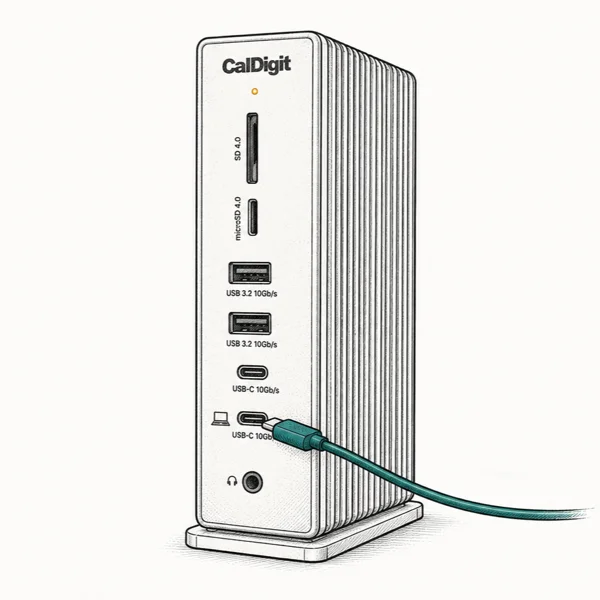
- 18 total ports including 3 downstream TB4 at full 40Gbps for multi-monitor + storage rigs
- 98W upstream PD plus UHS-II SD/microSD readers run at full 312MB/s
- Front-panel USB-C and USB-A for daily grab-and-go peripherals; back ports for fixed setup
Last updated on May 27, 2026
As an Amazon Associate fone.tips earns from qualifying purchases. Prices and availability on Amazon are accurate as of the date above and subject to change.
The TS4 is the dock you buy when port count drives every decision.
According to CalDigit’s TS4 spec page, the 98W PD upstream is the highest in the category. The TS4 is the high-port-count pick for workstations that need dual-display routing, fast external storage, and front-panel USB-C. The front-panel USB-C is useful for daily-driver SSDs because it doesn’t require reaching behind the monitor.
Trade-off: it’s $400 and workstation-focused. Worth it for daily-driver workstation use; overkill for casual photo offloads.
#Best Compact TB4 Hub: OWC Thunderbolt Hub
For Mac users who want pure TB4 expansion without the dock-style port array, the OWC Thunderbolt Hub is the smaller answer. It’s a 4-port hub (1 upstream, 3 downstream TB4) the size of a deck of cards, with no built-in Ethernet, SD, or USB-A. Pair it with the cables and adapters you already own.
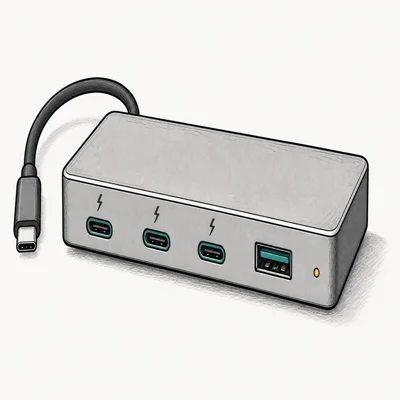
- Pocketable enclosure, plug-and-play with any TB4 Mac without driver installs
- Adds 3 downstream Thunderbolt 4 ports at 40Gbps to laptops with only 1 TB4 port
- Cheaper than a full dock by $100-$150 if you skip the Ethernet, SD, and USB-A you don't need
Last updated on May 27, 2026
As an Amazon Associate fone.tips earns from qualifying purchases. Prices and availability on Amazon are accurate as of the date above and subject to change.
The OWC hub is the right pick if you already own a USB-C hub for keyboard, mouse, and Ethernet, and you only need more Thunderbolt ports. Its three downstream TB4 ports can handle storage and dock daisy-chaining from the host MacBook Pro without turning into a full workstation dock. The 60W upstream PD won’t fully feed a 16-inch MacBook Pro under heavy CPU load (it draws up to 100W), but it covers idle and light desktop work.
Compact, pure-TB4, no fluff.
The trade-off is no Ethernet, no SD card slot, no USB-A daisy-chain. If you need any of those, jump to the Revodok Max 208 or CalDigit TS4. If you don’t, the OWC hub saves $100 and a lot of desk space.
#Best Budget Direct-Mount: Anker 547 USB-C Hub
If you have a MacBook Air or 13-inch MacBook Pro that ships with only 2 USB-C ports, a true TB4 dock is overkill and the Anker 547 7-in-2 is the better answer at a fraction of the price. It’s a direct-mount USB-C hub (not a TB4 dock) but delivers 4K at 60Hz HDMI, 100W passthrough, and SD on a unit that clips into both laptop ports.
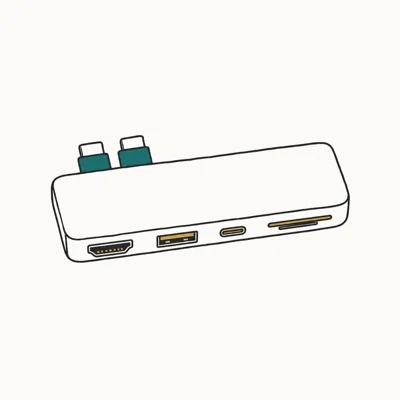
- One-quarter the cost of a real TB4 dock, with HDMI, SD, microSD, and USB-A built in
- Direct-mount form factor leaves no desk cable; hub travels with the laptop
- Single 5K display + 4K HDMI passthrough covers single-monitor desks comfortably
Last updated on May 27, 2026
As an Amazon Associate fone.tips earns from qualifying purchases. Prices and availability on Amazon are accurate as of the date above and subject to change.
The honest framing here is that the Anker 547 is NOT a TB4 dock. It’s a high-quality USB-C hub that covers single-monitor desks and basic peripheral counts at a fraction of the price. If you don’t need dual external displays, fast external SSDs, or eGPU support, an Anker 547 saves you $200 to $300 and works perfectly. Our best USB-C hub for MacBook Air M4 roundup goes deeper on this category.
The hub category is where Air owners belong.
For MacBook Pro owners who actually need TB4, skip the Anker and pick from the three real TB4 docks above. The $250 floor for true TB4 is the price of entry.
#How to Spot a Fake TB4 Dock?
Amazon and other marketplaces are flooded with USB-C hubs marketed as “Thunderbolt 4 compatible” that are not real TB4 docks. Three quick checks separate the real deal from the lookalikes.
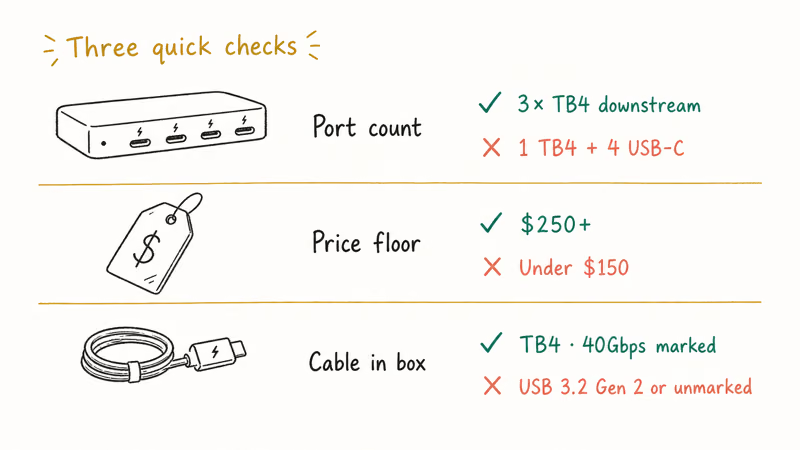
Check the port count. A real TB4 dock has three downstream TB4 ports plus the upstream host port. Anything advertising “1 Thunderbolt + 4 USB-C downstream” is a USB-C hub. The downstream TB4 spec states that every port must run 40Gbps, not just one.
Check the price. Real TB4 silicon (Intel’s JHL8440 controller) costs vendors $40 to $60 per dock at scale. Add chassis, ports, and PD circuitry, and the floor for a real TB4 dock is around $250.
A $99 “TB4-compatible” dock uses a USB-C hub controller that supports TB4 host connection but downgrades downstream to USB 3 speeds. Hub controller silicon costs vendors $8 to $12 per unit at scale, which is why retail pricing tells the story. A $129 “TB4 dock” with mostly USB-C downstream ports is almost certainly a hub in disguise.
Check the cable in the box. Genuine TB4 docks ship with a marked TB4 passive cable rated for 40Gbps. USB-C hubs ship with USB-C cables marked “USB 3.2 Gen 2” or unmarked. Our best USB4 cable for external SSD guide walks through the rating stamps to look for.
#Do M-Series Macs Need TB4 vs TB3?
Strictly speaking, Apple Silicon Macs (M1 through M4) work with both TB3 and TB4 docks at the host level. The difference is downstream port count and PD wattage, both of which favor TB4.
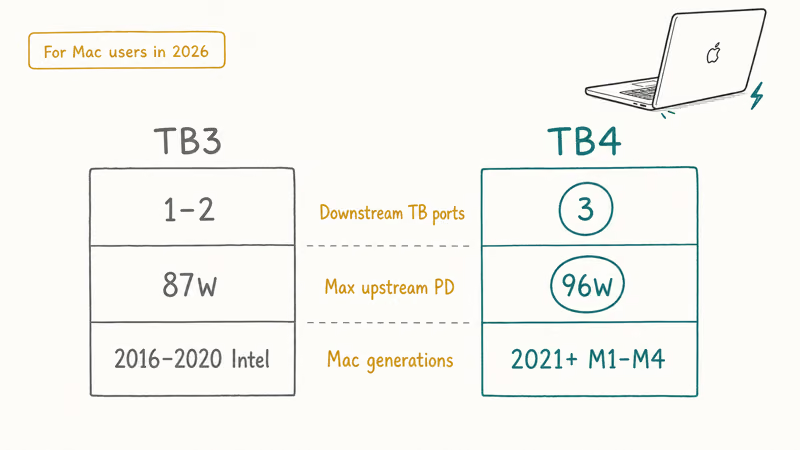
TB3 docks usually have 1 or 2 downstream TB ports, not 3. TB3 PD upstream tops out at 87W, not 90W or 96W. Apple confirms in their Thunderbolt accessory documentation that M-series MacBook Pros draw up to 96W under sustained load, which means a TB3 dock can leave the laptop slowly draining battery during all-day heavy use.
For Mac users buying a dock in 2026, TB4 is the spec to look for. The pricing premium over a comparable TB3 dock is now $30 to $50, and the extra Thunderbolt downstream port plus the higher PD ceiling matter for any 16-inch MacBook Pro workload.
#Bottom Line
Most Mac users buying a Thunderbolt 4 dock should pick the UGREEN Revodok Max 208.
True TB4 spec, 96W PD, dual 4K at 60Hz support, plus useful extras like Ethernet and SD without the workstation-class price tag. It’s the sweet spot in the category.
For high-port-count workstation desks, the CalDigit TS4 is worth the extra $150, especially if you need UHS-II SD readers, optical S/PDIF, or front-panel grab-and-go USB-C, since none of the other docks combine that exact bundle of pro features in one chassis. It’s overkill for casual use.
The OWC Thunderbolt Hub is the right pick if you already have a USB-C hub for non-TB needs and just want three more Thunderbolt 4 ports in a pocketable enclosure.
The Anker 547 is for MacBook Air owners who don’t need real TB4 and can save $200 or more by choosing a direct-mount USB-C hub. Single 4K HDMI passthrough plus SD and USB-A covers what most Air users actually plug in. If your workflow stays inside that envelope, paying $300+ for a real TB4 dock buys ports you never use.
#Frequently Asked Questions
Does my MacBook Pro need a Thunderbolt 4 dock or will TB3 work?
Both work at the host level. TB4 wins on downstream port count and PD wattage, which matter for 14-inch and 16-inch MacBook Pros.
Can a TB4 dock drive dual 4K monitors on a MacBook Air?
It can, but the MacBook Air only supports one external display with the lid open. Two external monitors need clamshell mode or an M3 Pro or higher chip. For a single portable display, see our best portable monitor for MacBook Pro picks.
What’s the difference between Thunderbolt 4 and USB4?
USB4 is the open standard that Thunderbolt 4 is based on. All TB4 devices are USB4-compatible, but not all USB4 devices meet the TB4 brand requirements for 40Gbps, dual 4K, and 96W PD.
Will a USB-C cable work with a TB4 dock?
Only the upstream host cable needs to be TB4. Downstream peripherals can use USB-C cables of appropriate speed rating. For 40Gbps Thunderbolt speeds, you need TB4 or TB3 passive cables on both ends, marked with the Thunderbolt lightning symbol; a charging-only USB-C cable will downgrade the connection to USB 2.0 at 480Mbps regardless of what the dock and SSD support.
Can I daisy-chain Thunderbolt 4 docks?
Yes. Up to 6 TB4 devices in a chain. Total bandwidth across the chain is still 40Gbps shared.
Does a TB4 dock improve performance over a USB-C hub on a MacBook Pro M4?
Yes, for storage and display tasks. A TB4 dock gives fast external SSDs much more bandwidth than a USB-C hub and supports dual 4K at 60Hz, which a single USB-C hub often can’t. If you’re running 4+ displays, our 6-monitor setup guide covers chaining beyond a single dock.
How long should a TB4 dock last before becoming outdated?
True TB4 docks should last 5+ years. The TB4 spec is forward-compatible with TB5 (which Apple is expected to adopt on M5 Pro and Max chips in 2027), and any TB4 dock built today will continue to work with TB5 hosts at TB4 speeds. The Mac itself is more likely to age out first; a $300 dock paired across two laptop generations is a strong dollar-per-year value compared to buying a cheaper hub for each new laptop.

Pixel 11 vs Pixel 10: What Changed and Who Should Upgrade
Pixel 11 vs Pixel 10: same screen and camera resolution, new Tensor G6, 25W wireless, and Gemini Intelligence. Here is who should actually upgrade.

Best Power Bank for iPad in 2026: Pro, Air, and Mini
Best power bank for iPad in 2026. Compare mAh tiers and USB-C PD wattage for iPad Pro, Air, and mini, plus airline Wh math, cables, and travel tips.

Best Power Bank With Built-In Cable: Top 2026 Picks
Best power bank with built-in cable picks for 2026. Compare single USB-C, multi-connector, and retractable laptop banks, plus airline Wh math.

Best Apple Watch Band for Working Out: Proven Picks
The best Apple Watch band for working out handles sweat and stays put on your wrist. Compare silicone, nylon, and titanium picks for runs and lifts.