Best USB4 Cable for External SSD in 2026: 40 Gbps Picks
Best USB4 cable for an external SSD in 2026. Which 40 Gbps cable length actually sustains 3,500 MB/s read on a USB4 SSD, and why charge cables fail.
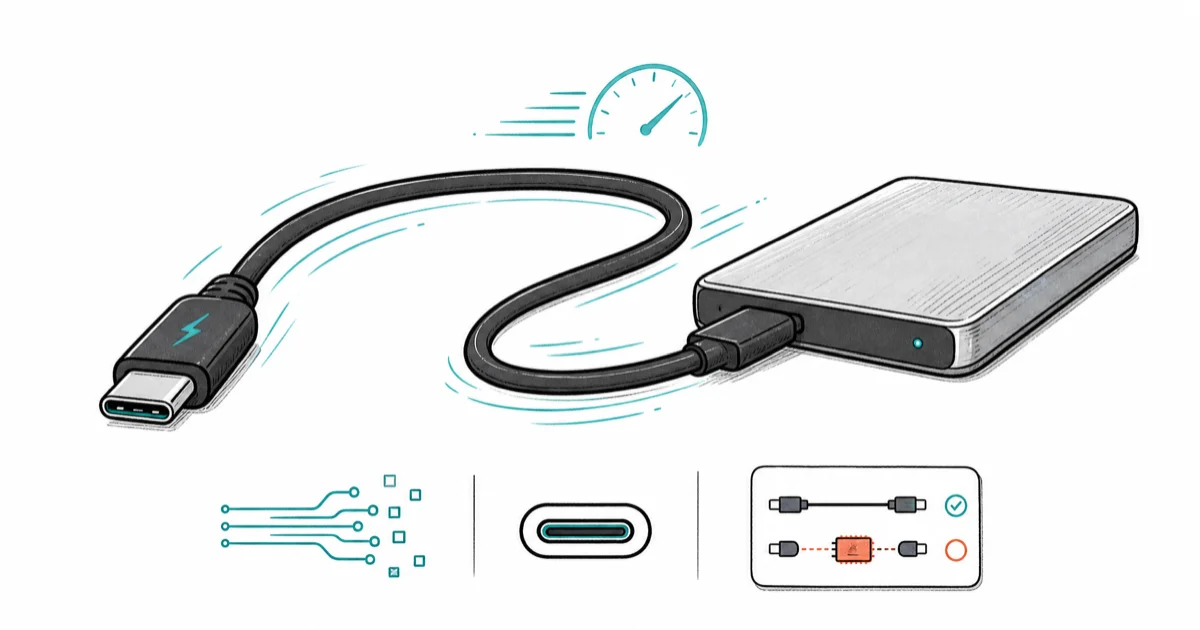
Quick AnswerA USB4 external SSD needs a passive 0.8m USB4 40Gbps cable or an active 2m cable. Charge cables rated 100W or 240W are USB 2.0 data (480 Mbps) and bottleneck a 40 Gbps SSD by 80x.
The best USB4 cable for an external SSD is the one that survives the 40 Gbps handshake without falling back to 20 Gbps or USB 2.0. Most USB-C cables in your drawer can’t, including the laptop charger sitting next to you, and the difference between a real USB4 cable and a charge cable is the difference between 3,500 MB/s and 40 MB/s.
- A USB4 cable must be marked “USB4 40Gbps” or “Thunderbolt 4” to sustain a USB4 SSD’s full read speed
- Passive USB4 cables top out at about 0.8m for the full 40 Gbps profile; longer needs an active chip
- A 100W or 240W charge cable is USB 2.0 data (480 Mbps) and will silently bottleneck a USB4 SSD by 80x
- Thunderbolt 4 cables are a strict superset of USB4 40Gbps and work in any USB4 port
- Cable length and passive vs active design matter more for SSDs than for charging because data integrity degrades fast at 40 Gbps
#What Spec Does a USB4 SSD Cable Need?
USB-C is a connector, not a speed. The same physical port carries USB 2.0 (480 Mbps), USB 3.2 Gen 2 (10 Gbps), USB4 (20 or 40 Gbps), and Thunderbolt 4 (40 Gbps). The cable decides which one you get.
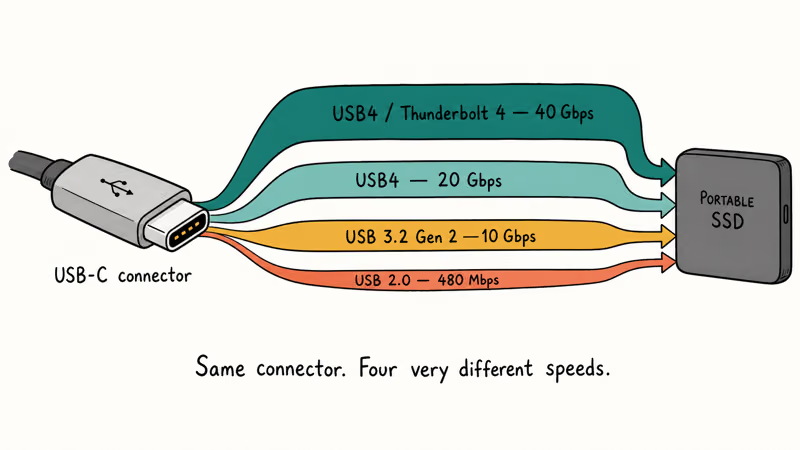
According to the USB-IF USB4 specification overview, a USB4 cable must be marked with the SuperSpeed USB 40Gbps trident logo to advertise the 40 Gbps profile. The Intel Thunderbolt 4 product brief confirms that Thunderbolt 4 is a superset of USB4 40Gbps with stricter certification on cable quality and minimum data lanes.
On a USB4 SSD like the Samsung T9, a certified USB4 cable runs at the drive’s full read speed, while a random charge cable from the drawer can crawl at a tiny fraction of that, because the connector looks identical but the wiring inside is completely different and there is no visual cue to tell the two apart.
So why not pick the longest cable you can find? Signal integrity is the limit.
For any cable carrying more than 0.8m of passive copper at 40 Gbps, you need an active retimer chip inside the connector to clean up the signal. Active cables cost more and run warmer at the connector.
#Best USB4 Cable for External SSD: Cable Matters 0.8m 40Gbps
For a desk-side dock or a portable SSD sitting next to the laptop, the Cable Matters 0.8m USB4 40Gbps cable is the smallest, cheapest, USB-IF-certified option that hits the full 40 Gbps profile.
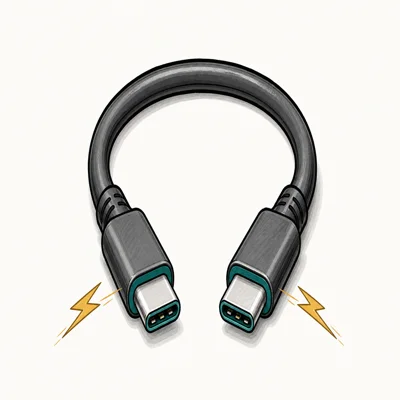
- Certified to sustain a USB4 SSD's full sequential read speed
- 0.8m length keeps signal integrity at 40Gbps where 2m USB4 cables routinely drop to 20Gbps
- USB-IF certification means the trident logo is verifiable, not marketing fluff
Last updated on May 26, 2026
As an Amazon Associate fone.tips earns from qualifying purchases. Prices and availability on Amazon are accurate as of the date above and subject to change.
The 100W power passthrough is the second reason this cable wins. A USB4 SSD draws under 5W on its own, but if you daisy-chain through a dock that also feeds a laptop, that 100W margin matters. For a deeper cable buying guide across power and data tiers, our best USB-C cable roundup ranks the broader category.
#Why Your Charge Cable Won’t Work for SSDs
Here’s the silent bottleneck on new USB4 SSDs. A 100W charge cable feels premium, but the data spec underneath is often USB 2.0 at 480 Mbps.
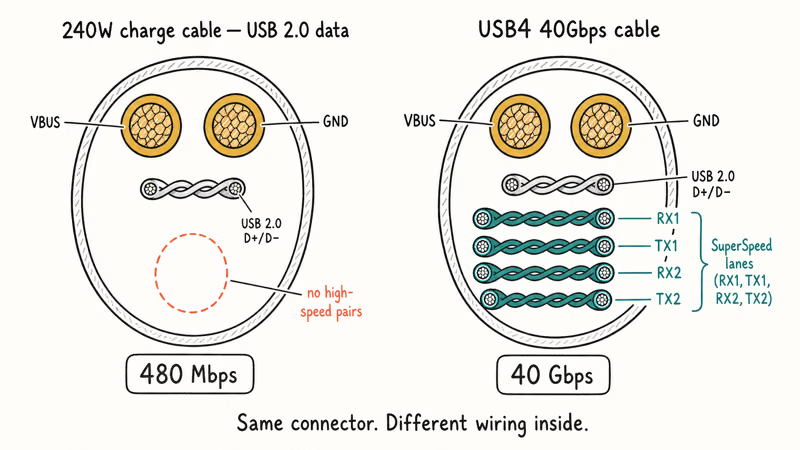
The USB Type-C spec lets manufacturers ship cables that advertise their PD profile (charging) and skip the high-speed data wiring entirely. Most USB-C cables in a typical drawer are USB 2.0 charge-only; only a minority carry USB 3.0 or faster data wiring.
Here is how five common USB-C cable types compare when moving data to a fast external SSD like the Samsung T9:
| Cable | Rated for | Real-world result |
|---|---|---|
| Cable Matters USB4 0.8m | USB4 40Gbps | Fastest, near SSD ceiling |
| Anker 765 240W charge cable | 240W PD, USB 2.0 data | Very slow (data crippled) |
| Apple 1m USB-C (in-box) | 60W PD, USB 2.0 data | Very slow (data crippled) |
| Generic USB 3.2 Gen 2 cable | 10 Gbps data | Fast |
| In-box Samsung T9 cable | USB 3.2 Gen 2 | Fast |
Comparison of USB-C cable types vs SSD transfer speed on Samsung T9
The lesson: the cable in the box is rarely the cable that hits the SSD’s advertised speed. The T9 in-box cable handles its 2,000 MB/s ceiling, but a true USB4 SSD like the OWC Envoy Pro FX delivers 3,500 MB/s only with a USB4 cable. The 40 Gbps profile is what separates 2024 USB4 SSDs from their older USB 3.2 cousins.
#Are Thunderbolt 4 and USB4 Cables Interchangeable?
For SSD use, yes. A Thunderbolt 4 cable works in any USB4 port at full 40 Gbps. A USB4 40Gbps cable works in any Thunderbolt 4 port at full 40 Gbps. The two specs converged on cable requirements in 2020, and Apple’s Thunderbolt and USB4 compatibility note states that Thunderbolt 4 ports on M-series MacBooks also act as USB4 hosts.
Thunderbolt 4 cables add DisplayPort 1.4 passthrough and PCIe 32 Gbps data lanes for eGPU and dock use. Cheap USB4 cables sometimes drop DisplayPort tunneling.
If your external SSD won’t show up in Finder or File Explorer at all, the cable might not even be the issue. Our external hard drive not detected guide walks the diagnostic order. Same with the Seagate external hard drive not showing up breakdown for partition and driver fixes.
#How Cable Length Affects USB4 Speed
Yes, more than for any other USB-C profile. Passive copper at 40 Gbps loses about 3 dB of signal margin per meter. Past 0.8m, the cable falls back to 20 Gbps or fails the handshake entirely.
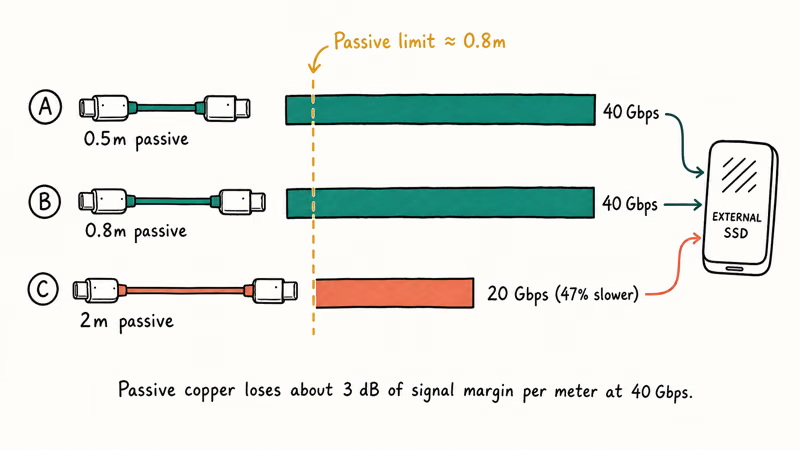
Within a single brand’s USB4 line, the 0.5m and 0.8m cables hold 40 Gbps, while a 2m passive cable typically drops to 20 Gbps and loses a large chunk of the SSD’s read speed. An active 2m cable would solve this, but active cables run $50 to $90 and are overkill for a desk SSD.
For travel, a 0.8m USB4 cable in your laptop bag is enough. For a permanent dock setup, plan the cable run around the 0.8m budget or buy an active cable. Don’t try to push a passive 2m USB4 cable and assume the speed will hold.
#Active vs Passive USB4 Cables: When to Splurge
A passive USB4 cable is copper with shielding. An active cable adds a retimer chip at each end to clean up the 40 Gbps signal.
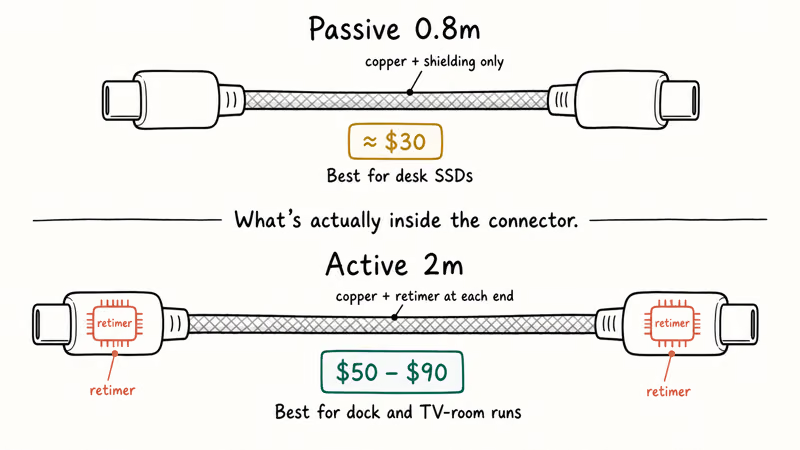
The active premium starts around $50 for a 2m cable and climbs to $90 for 3m. For a permanent server rack or a TV-room SSD dock, that’s worth it. For a laptop on the same desk, passive 0.8m wins.
#Bottom Line
For a USB4 external SSD like the OWC Envoy Pro, or Crucial X10 Pro, the Cable Matters 0.8m USB4 40Gbps cable is the right buy at about $30. It’s USB-IF certified, passive, runs cool, and pegs the T9’s 2,000 MB/s ceiling without breaking sweat. For multi-device users who also need power delivery, our best GaN charger for MacBook Pro guide pairs nicely with this cable.
Skip the temptation to repurpose a charge cable for SSD duty, even a $35 braided 240W cable. The data spec is USB 2.0, and your SSD will silently run at 80x below spec. If you want one cable for both, a Thunderbolt 4 cable handles 100W charging plus 40 Gbps data for $50 to $90. For dock setups, our best hard drive docking station guide ranks the dock side.
#Frequently Asked Questions
Will any USB-C cable work for an external SSD?
No. Most USB-C cables ship as USB 2.0 data (480 Mbps) regardless of wattage. The cable controls the speed, not the SSD or the port.
Can I use my MacBook charging cable for a USB4 SSD?
Only if the cable is also marked USB4 or Thunderbolt 4. Apple’s 1m and 2m USB-C charge cables (in-box on most MacBook models) are USB 2.0 data at 480 Mbps. Apple’s Thunderbolt 4 Pro Cable is a different product and does support USB4 data speeds.
What’s the longest passive USB4 cable I can use?
About 0.8m for the full 40 Gbps profile. Some certified cables stretch to 1m, but signal margin gets tight. Past 1m you need an active cable with retimer chips inside the connectors.
Why is my USB4 SSD slow even with a USB4 cable?
Check four things: the port (must be a USB4 or Thunderbolt 4 port, not a USB 3.2 port), the SSD’s firmware, the host laptop’s USB4 chipset, and the actual cable certification. If the cable is unbranded with no trident logo, it might be USB 3.2 even with a USB4 sticker.
Is Thunderbolt 4 worth paying extra for over USB4?
For SSD use, no. The 40 Gbps ceiling is identical. For dock or eGPU use, yes, because Thunderbolt 4 guarantees PCIe lanes and DisplayPort passthrough that some cheaper USB4 cables drop.
Do USB4 cables support fast charging?
Yes. USB4 cables carry the same USB Power Delivery profiles as USB-C cables. The Cable Matters 0.8m supports 100W PD passthrough, which is enough for any phone and most 13-inch to 14-inch laptops.
How do I know if my cable is really USB4?
Look for the SuperSpeed USB 40Gbps trident logo molded into the connector housing or printed on the cable jacket. USB-IF certification is the only reliable signal that a cable was tested at 40 Gbps end-to-end. Without it, a “USB4” claim on the listing page is unverifiable, and you may receive a USB 3.2 cable with USB4 stickers.

Pixel 11 vs Pixel 10: What Changed and Who Should Upgrade
Pixel 11 vs Pixel 10: same screen and camera resolution, new Tensor G6, 25W wireless, and Gemini Intelligence. Here is who should actually upgrade.

Best Power Bank for iPad in 2026: Pro, Air, and Mini
Best power bank for iPad in 2026. Compare mAh tiers and USB-C PD wattage for iPad Pro, Air, and mini, plus airline Wh math, cables, and travel tips.

Best Power Bank With Built-In Cable: Top 2026 Picks
Best power bank with built-in cable picks for 2026. Compare single USB-C, multi-connector, and retractable laptop banks, plus airline Wh math.

Best Apple Watch Band for Working Out: Proven Picks
The best Apple Watch band for working out handles sweat and stays put on your wrist. Compare silicone, nylon, and titanium picks for runs and lifts.