How to Unlock a Motorola Phone: Carrier & SIM Guide (2026)
Unlock your own Motorola phone using carrier-approved steps, covering eligibility, IMEI checks, network unlock codes, and forgotten passcode recovery.
Quick AnswerTo unlock a Motorola phone you own, request a SIM network unlock from the carrier that sold it, using your 15-digit IMEI. Most US carriers unlock postpaid Motorola devices automatically after the installment balance is fully paid and the line meets a minimum service window.
Unlocking a Motorola phone you own frees the device from a single carrier so it accepts SIM cards from any compatible network. The lock itself is a carrier setting on devices sold or financed through a carrier plan, not a Motorola feature. So the unlock request also goes to that carrier, not to Motorola.
This guide covers the official paths at T-Mobile, AT&T, and Verizon. It also explains how to recover access if you’ve forgotten the screen passcode on a Motorola you own.
- The network lock is a carrier setting, not a Motorola feature, so unlock requests start with the carrier that sold or financed the phone.
- T-Mobile, AT&T, and Verizon all unlock postpaid Motorola devices once the installment balance is paid in full and the line meets each carrier’s service-history rule.
- Your IMEI is the 15-digit ID a carrier matches to your account; dial star-pound-zero-six-pound on the keypad to display it without opening the original box.
- A SIM network unlock is separate from a screen-lock recovery: the first removes the network restriction, the second restores access to your own data through Google account verification.
- Unlocking a Motorola you own is legal in the United States under the Unlocking Consumer Choice and Wireless Competition Act of 2014, which does not authorize bypassing locks on devices owned by someone else.
#What Unlocking a Motorola Phone Actually Means
People use the word unlock for three different things, and conflating them is the most common reason an attempt stalls.
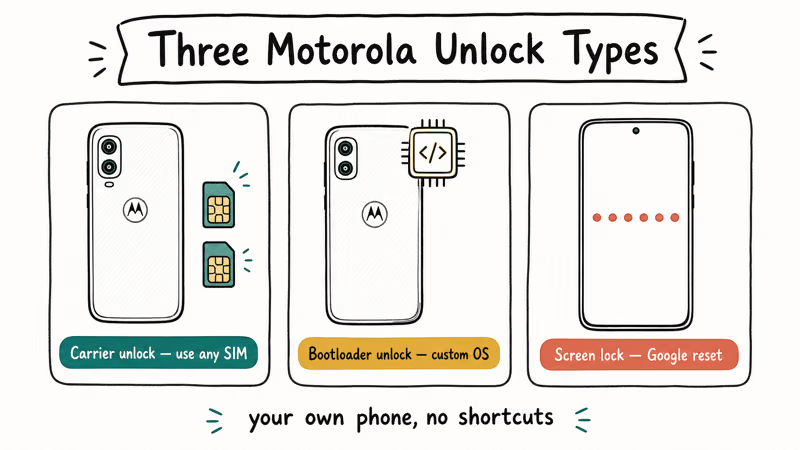
A network unlock removes the carrier restriction that prevents a Motorola phone from registering on a competing carrier’s SIM. A screen unlock means recovering access after a forgotten PIN, pattern, or fingerprint on a device you own. A bootloader unlock is a developer process that lets advanced users flash custom firmware, and it sits outside the scope of switching carriers.
The rest of this article focuses on the first two paths. Motorola does publish an official Bootloader Unlock portal for developers, but using it wipes the device and voids most warranties, so it’s not the path for a reader who simply wants to move a Moto G to a new carrier.
| Lock type | What it restricts | Who removes it |
|---|---|---|
| Network (SIM) lock | SIMs from other carriers | The carrier that sold the phone |
| Screen lock | Access to the device | The owner, through Google account verification |
| Bootloader lock | Flashing custom ROMs | Motorola portal, developers only |
Table: The three lock types a Motorola phone can have and who is authorized to remove each.
#How Do I Check If My Motorola Phone Is Already Unlocked?
The fastest test is to power down the phone, insert a SIM from a different carrier, and reboot. If the device connects to the new network, places a call, and sends a text, it’s already unlocked.
If the screen shows “SIM not allowed,” “Network locked,” or “Insert valid SIM,” the network lock is still active.
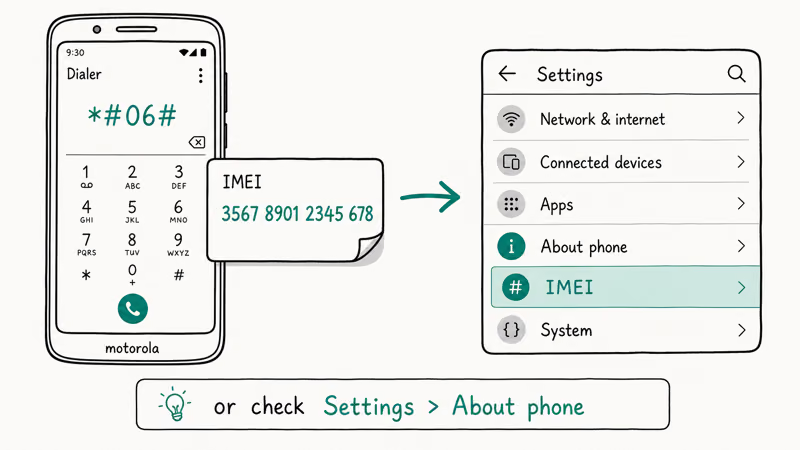
You can also check from the Settings menu without swapping a card. Open Settings → About phone → SIM status on Android 12 and newer, and look for SIM lock status or Network unlock. On a typical Motorola running a recent Android build, the field reads either “Allowed” for an unlocked phone or “Locked” with the carrier name spelled out underneath.
For a record-keeping check, dial *#06# on the keypad. The phone displays its 15-digit IMEI, which is the identifier every carrier matches to your account before processing an unlock.
A deeper background on this 15-digit identifier and how carriers use it sits in our IMEI number tracker explainer, which walks through its role in blocklist checks, warranty verification, and stolen-device databases. Most carrier support apps also confirm the lock state in under a minute once you provide the IMEI, and the same number works as your reference if you escalate to a phone-based support agent for any reason during the request.
#How to Request a Carrier Unlock for Your Motorola
Each US carrier publishes its own unlock rules.
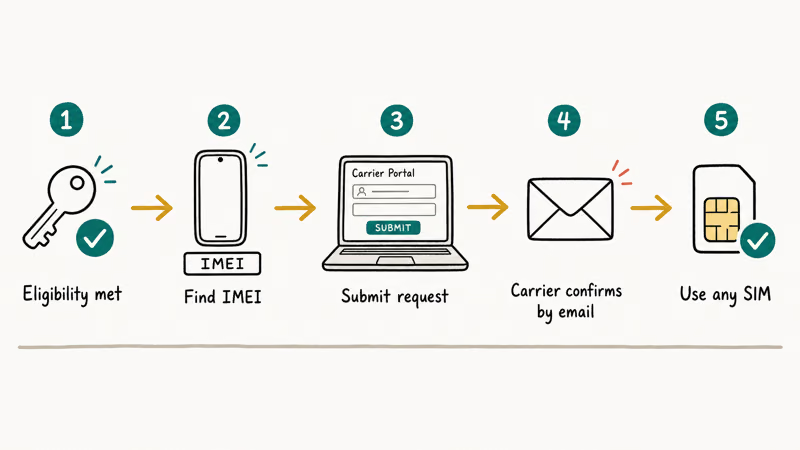
According to T-Mobile, postpaid Motorola devices need at least 40 days of paid service before the company’s Device Unlock app will process a request automatically.
The account must also be in good standing and the device paid off in full. T-Mobile prepaid Motorola phones need 365 days of service before the same app accepts a request.
AT&T’s device unlock portal states that postpaid Motorola phones become eligible after 60 days of active service, and the installment plan must be paid in full. AT&T then emails the unlock confirmation within 2 business days. Prepaid AT&T phones, including the GoPhone and Cricket lines, require 6 months of paid service before the same portal accepts the request.
Verizon recommends a different approach for newer Motorola models. Per the carrier’s device unlocking policy, most 4G LTE and 5G phones sold after February 2022 unlock automatically 60 days after activation. There’s no form to file unless the device was purchased before that date or activated on a prepaid plan.
On a Verizon Motorola phone, the SIM status screen typically flips to “Allowed” shortly after the 60-day mark passes once the line is active.
For prepaid carriers like Boost Mobile, Cricket, or Tracfone, the eligibility window typically runs 6 to 12 months. The unlock request goes through a support call or chat rather than a self-service portal. If you bought your Motorola directly from Motorola.com, Amazon, or Best Buy’s unlocked-phone section, the device shipped without a network lock in the first place, so no carrier request is needed at all.
#Carrier Unlock Eligibility at a Glance
| Carrier | Postpaid eligibility | Prepaid eligibility | Tool used |
|---|---|---|---|
| T-Mobile | Paid off, 40+ days active | 365 days of service | T-Mobile Device Unlock app |
| AT&T | Paid off, 60+ days active | 6 months of service | att.com/deviceunlock |
| Verizon | Auto-unlock 60 days after activation | 60 days after activation | Automatic, no portal needed |
| Boost / Cricket | 12 months of service | 12 months of service | Carrier support call or chat |
Table: Carrier unlock eligibility for major US networks; verify the current terms on each carrier’s official policy page before submitting.
#What If I Forgot My Motorola Screen Passcode?
A forgotten passcode is a screen-lock problem, not a SIM-lock problem. The official recovery path runs through Google rather than your carrier. If your Motorola is signed into a Google account that you can still access, you can erase the device remotely with Find My Device and then sign back in during setup to restore from the latest Google One or Motorola backup.
The process resets the phone to factory defaults, which removes the lock alongside everything else stored locally. That’s the cost of the official path. It’s also the only method that respects Android’s factory reset protection.
If you keep regular backups, a wipe and restore usually takes a single afternoon, including the post-setup app reinstall. Our walkthrough on resetting an Android password covers the same flow on Motorola with screenshots and timing notes.
Some readers prefer not to wipe the device. In that situation, the only safe option is to bring the phone to a Motorola-authorized service center with proof of purchase. Authorized technicians have access to a controlled internal tool that can clear the lock for verified owners without erasing data.
Avoid third-party “unlocker” downloads that promise to bypass the lock without a wipe, since most are either malware or break Android’s anti-theft protection in a way that leaves the device unsellable later.
If the Motorola is on a carrier installment plan, contact the carrier too. Some carriers, including T-Mobile, will help authenticate ownership before walking you through the Find My Device reset. Our forgot Android password guide compares Google Find My Device, Smart Lock with a trusted device, and the authorized service-center option in more depth.
#Network Unlock Codes Explained
A network unlock code is an 8 to 16 digit string the phone prompts for when an out-of-network SIM is inserted. It’s the manual path that carriers used before the device-unlock apps became standard.
Some older Motorola phones still rely on it, including most models released before the Moto G Power (2021). When the carrier emails a code, the phone shows a “SIM Network Unlock PIN” prompt the moment a new SIM is inserted.
Type the code carefully. Most carriers allow only 3 to 5 attempts before the SIM slot locks permanently, and if those attempts have already been used up, the carrier is the only party who can reset the counter for you. The reset usually requires a visit to a corporate service center with photo ID, since over-the-phone support can authenticate ownership but isn’t authorized to clear a hardware-level lockout flag on its own.
Some online services advertise paid network unlock codes for Motorola devices. Our review of phone unlocking software explains how to evaluate these vendors honestly, and our piece on Android SIM unlock code generators covers the warning signs of scam services that take payment without delivering a working code.
Before paying any third party, verify that the carrier supports third-party codes; T-Mobile and Verizon, for example, don’t.
#Common Pitfalls That Block Unlock Requests
Most unlock requests stall on the same handful of issues. Carrier policies don’t always publish these blockers up front, so reading the rejection email carefully saves a lot of guesswork on the second attempt.
The single biggest blocker is an unpaid balance. Even a small leftover charge on an installment plan triggers an automatic decline at every major carrier. Pay the balance down to zero before submitting, and wait one full billing cycle before retrying so the payment posts to the unlock-eligibility system on the carrier’s side.
Another common issue is a phone reported lost or stolen on a previous owner’s account. Carriers cross-check requests against their blocked-IMEI database, and any device on that list is barred from unlocking until the carrier removes the flag. Our guide on unlocking a blacklisted phone walks through the dispute process if you bought the Motorola secondhand and didn’t know its history.
Prepaid phones bought during promotions sometimes carry a longer unlock window than the carrier’s standard prepaid policy. Cricket and Tracfone occasionally extend their 6-month minimum to a full year for discounted devices.
Confirm the exact window through carrier chat before assuming the default applies. Our Cellunlocker review covers what a paid third-party unlock service typically charges if waiting isn’t an option for you.
#Bottom Line
For nearly every reader, the right move is to request the unlock directly from the carrier that sold or financed the Motorola, because the carrier path is free, official, and keeps the manufacturer warranty intact. T-Mobile customers should open the T-Mobile Device Unlock app and submit the request once the device shows paid-in-full status. AT&T customers go through att.com/deviceunlock. Verizon customers usually need no action at all because the 60-day auto-unlock handles modern Moto phones quietly in the background.
If the lockout is on the screen rather than the SIM, use Google’s Find My Device to wipe and restore. It’s the only method that respects Android’s factory reset protection and keeps the phone resellable. For older Motorola models that still ask for a network unlock PIN, ask the carrier to email the code rather than buying one from a third-party site, and don’t waste attempts guessing.
#Frequently Asked Questions
Is unlocking my Motorola phone legal?
Yes, in the United States. The Unlocking Consumer Choice and Wireless Competition Act of 2014 restored a permanent DMCA exemption for SIM-network unlocks on a phone you own.
Will unlocking void my Motorola warranty?
A SIM-network unlock has no impact on the manufacturer warranty because it changes a carrier-side database entry, not the device hardware or firmware. A bootloader unlock is the exception, and the carrier procedures in this guide are completely separate from that process.
How long does a carrier unlock take?
T-Mobile and AT&T usually complete an approved postpaid unlock within 2 business days. Verizon’s automatic 60-day unlock happens silently in the background.
Can I unlock a Motorola without the IMEI?
Almost never. The IMEI is the identifier every carrier matches to your account before processing an unlock. Dial star-pound-zero-six-pound to retrieve it, or check the original phone box where the IMEI is printed on a sticker near the barcode.
What is the difference between an unlocked Motorola and a factory-unlocked Motorola?
A factory-unlocked Motorola is sold without any carrier restriction in the first place. A carrier-unlocked Motorola was originally locked but has since been freed by the carrier through the unlock process. Both behave identically once the lock is cleared.
Can I unlock a Motorola I bought secondhand?
Yes, but only if the original owner cleared their account first and the device isn’t on a carrier blocklist. The carrier can’t process an unlock for a phone still tied to someone else’s installment plan or with an unpaid balance. Ask the seller for a paid-in-full receipt before purchasing, and verify the IMEI is clean using a free service like Swappa’s IMEI checker before any money changes hands.
Do I need to root my Motorola to unlock the carrier?
No. A SIM-network unlock works on a stock, non-rooted Motorola, and rooting usually causes the carrier to reject the unlock request.

Pixel 11 vs Pixel 10: What Changed and Who Should Upgrade
Pixel 11 vs Pixel 10: same screen and camera resolution, new Tensor G6, 25W wireless, and Gemini Intelligence. Here is who should actually upgrade.

Verizon Not Receiving Texts? How to Fix It in 9 Steps
Verizon not receiving texts? Fix it in 9 steps: check Message Blocking in My Verizon, reset network settings, deregister iMessage, and call support.

Pixel Battery Drain: What Google's July Fix Really Covers
Google marked the Pixel idle battery drain bug fixed in July, but only some phones got the patch. Here is who is covered, who is not, and what to try.

iPhone Stuck on EDGE? How to Get 5G or LTE Back (2026)
iPhone stuck on EDGE with crawling data? Here's why the E icon appears, which settings force 5G or LTE back, and when the problem is your carrier.