Smallest ATX Cases: Build Full-Size PCs in Compact Spaces
Find the best compact ATX case for your PC build. Compare top models with cooling specs, component compatibility, and real-world building tips.
Quick AnswerThe SFF Time P-ATX V3 is the smallest ATX case at 10.4 liters, but the Lian Li O11 Air Mini at 25 liters fits full ATX components with standard PSU support, mid-tower cooler clearance, and full-length GPU room without the SFX compromises.
The smallest ATX case packs a 305mm motherboard into 10 to 25 liters, small enough to slot onto a desk where a typical mid-tower won’t go. The catch: you trade space for cooling headroom, PSU options, and breathing room during assembly. Picking the right case means matching your components to its limits before you buy.
- The SFF Time P-ATX V3 shrinks ATX to 10.4 liters but caps CPU coolers at 59mm and forces SFX power supplies
- The Lian Li O11 Air Mini balances 25 liters with standard ATX PSU support, 158mm cooler clearance, and full-length GPU room
- Budget builders can use the Corsair 220T at $60 to $75 if they add intake and exhaust fans separately
- Fan placement and cable routing matter more than case volume; messy cable layout can block the airflow a compact case depends on
- Plan upgrade headroom because compact cases lock in maximum GPU length, cooler height, and PSU wattage
#What Counts as a Small ATX Case Today?
ATX hasn’t changed since 1995. According to Wikipedia’s ATX form factor entry, the standard board is 305mm wide and up to 244mm tall, with mounting holes that haven’t moved in 30 years. Everything else is the case shrinking around fixed silicon.
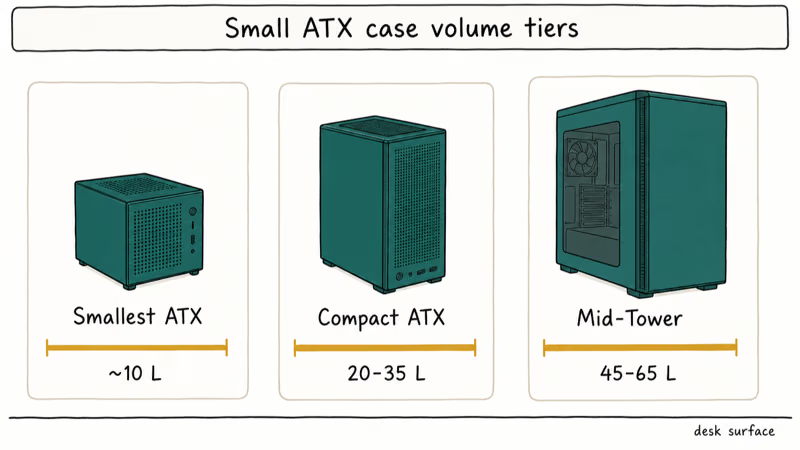
The smallest ATX cases drop below 15 liters. Most “compact” ATX cases sit between 20 and 35 liters, while a standard mid-tower runs 45 to 65 liters.
Volume isn’t the whole story.
Two cases with similar volume can occupy radically different desk footprints. A 200mm by 300mm by 400mm case measures 24 liters but sprawls across the desk, while a 300mm by 300mm by 250mm case at 22.5 liters stands taller and takes less width. Spec-sheet liters tell you about cubic volume, not desk footprint, and that distinction kills more builds than the cubic limit ever does.
If you’re new to motherboard form factors, our guide to motherboard types explains the differences between ATX, micro-ATX, and mini-ITX before you commit.
#SFF Time P-ATX V3: The 10.4-Liter Extreme
The SFF Time P-ATX V3 is 10.4 liters. Smaller than a shoebox.
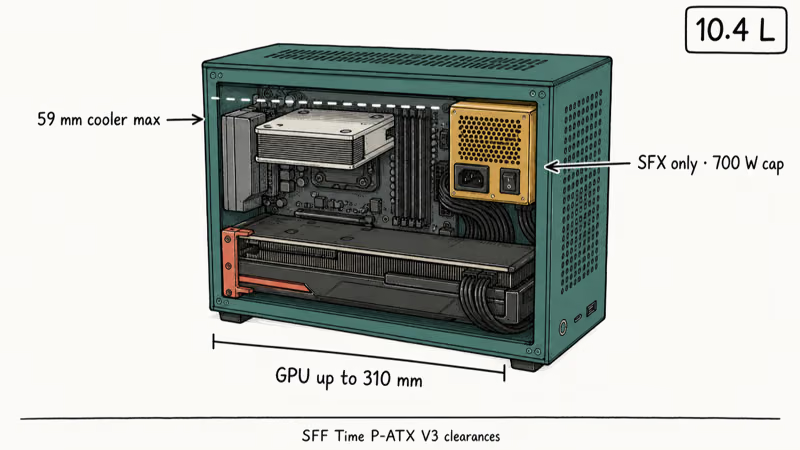
The case fits a full ATX motherboard, GPUs up to 310mm, and SFX-rated power supplies. CPU coolers max out at 59mm height, which means tower air coolers don’t fit and you’re limited to low-profile heatsinks like the Noctua NH-L9x65 or Thermalright AXP-90. Single-fan 120mm AIOs also work in this footprint.
SFX power supplies cost more than equivalent ATX units and cap at 700W on most lineups. High-end GPUs like the RTX 4090 push the upper limit of what’s safe on that wattage budget, and you’ll burn an hour reading PSU spec sheets before checkout.
Skip it if you’ve never built before.
This case is for builders who measure every component twice and accept tradeoffs as the cost of miniaturization. If that’s you, it delivers. For most people, the compromises aren’t worth the savings.
#Lian Li O11 Air Mini: The Practical Pick
The Lian Li O11 Air Mini is roughly 25 liters. It trades 14.6 liters to the P-ATX V3 and gains massive component compatibility in return.
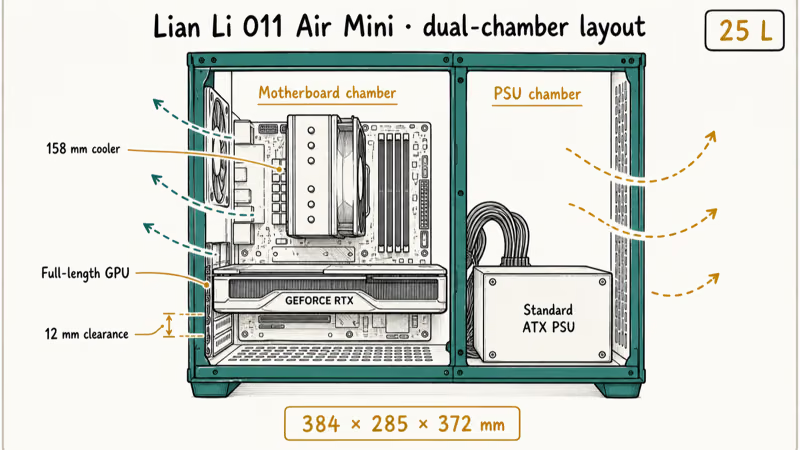
According to Lian Li’s product page, the case measures 384mm by 285mm by 372mm and supports a dual-chamber layout that puts the PSU in one compartment and the motherboard in the other, which improves airflow without extra fans or duct work.
The O11 Air Mini’s published clearances make it friendlier to standard parts than most compact ATX cases. Its cooler and GPU room leave more margin for full-size builds without forcing angled installs.
The aluminum frame held up under transport.
It costs $150 to $170, more than budget cases but fair for what it delivers. CPU cooler height matters most in compact builds, and our comparison of the Dark Rock Pro 4 vs Noctua NH-D15 breaks down how the largest tower coolers stack up against case clearance limits before you commit to a chassis.
#Budget Compact Cases Under $100
The Corsair 220T is the entry point at $60 to $75. It accepts standard ATX power supplies, coolers up to 155mm, and GPUs under 300mm.
Thermals don’t happen by accident in this case.
You add intake fans at the front and exhaust fans at the back, or you cook your CPU. The 220T’s stock airflow is limited for compact ATX builds, so plan at least one strong front intake and one rear exhaust before loading it with hotter parts.
If you’re building budget compact, our roundup of the best 140mm case fans covers what to add and what to skip.
The JONSBO D41 MESH costs the same as the Corsair 220T but uses a mesh front and a taller frame for vertical desk placements. Neither case ships with enough fans for the chassis, so budget an extra $30 to $50 for two decent case fans before you build, plus a small bag of cable ties for routing.
If you prefer cube-style chassis with more room for big coolers and full-length cards, our cube case roundup compares the leading options.
#Premium Compact Cases Above $150
The Fractal Design Define 7 Compact runs around $180. It’s larger than minimalist cases at 36.5 liters but still 30% smaller than a standard mid-tower. According to Fractal Design’s product page, the case ships with 2 dynamic X2 GP-14 fans, sound-dampening panels, and modular drive bays that swap between 3.5-inch and 2.5-inch mounts.
Worth it for soundproofing.
The NZXT H510 Elite spans $130 to $150. NZXT’s H510 Elite product page confirms that the case ships with 2 AER RGB fans, dual tempered-glass panels, and a built-in USB-C 3.2 Gen 2 front header. None of those features improve performance directly, but they cut frustration during assembly and maintenance, which is what you’re paying the premium for.
For builders keeping systems three years or upgrading often, premium cases repay the cost in time saved during teardowns and parts swaps.
#Will Your Components Fit a Compact ATX Case?
Most compact-case mistakes come from skipping the measurement step. Four questions catch about 90% of compatibility issues before checkout.
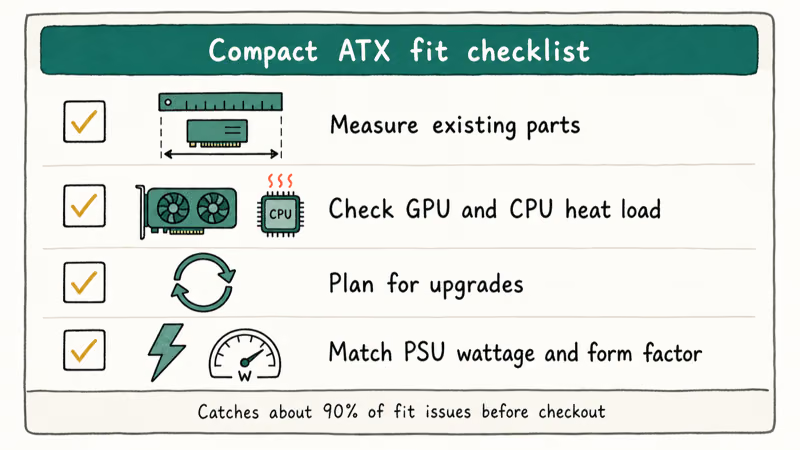
Do your components already exist? Measure them first. If your GPU is 340mm and the case maxes at 310mm, you’re buying new hardware too, which defeats the cost savings.
What GPU and CPU are you running? High-end systems with an RTX 4080, RTX 4090, or Ryzen 9 7950X generate serious heat. The O11 Air Mini handles that load with the right fan setup, but budget cases work with the same parts only if you add quality fans and route cables carefully. Pair your build with the right board too: our guide to motherboards for the Ryzen 7 5800X covers ATX-format options that fit standard compact cases without surprises.
Do you upgrade parts often? Compact cases lock you in. If 310mm of GPU clearance is tight today, a new card in two years might exceed the limit.
How much power do you need? Standard ATX PSUs reach 1000W and cost less per watt than SFX equivalents. SFX-only cases cap most builds at 700W, fine until a GPU upgrade pushes the system past that line.
#Building Inside a Tight Case: What Actually Works
Improvisation fails in a compact case. Planning works.
Lay your motherboard, CPU cooler, GPU, and PSU on cardboard at actual dimensions and trace their footprints with a marker. The exercise takes 15 minutes and reveals incompatibilities before you’ve spent a dollar on shipping.
Pre-route cables before the motherboard goes into the case. Use custom-length cables or cable combs to prevent fraying in confined spaces. Install the PSU first because it consumes about 30% of usable volume.
Mount the CPU and RAM onto the motherboard outside the case, then slide it in last.
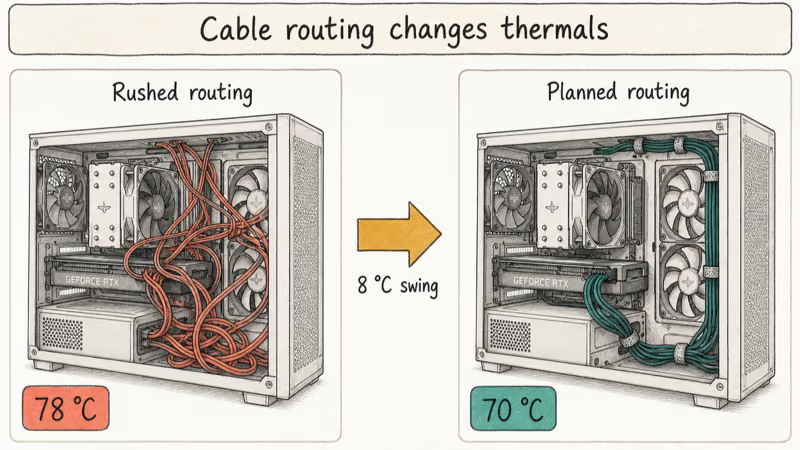
Don’t rush cable routing.
Cables draped across the front intake make compact builds run hotter and louder because the fans have to pull air through clutter. Route every cable along the back panel where possible, tie loose runs with Velcro, and keep the direct path from intake to exhaust clear.
A compact case with one front intake and one rear exhaust outperforms a case with three random fans pointed in conflicting directions. Picking the right cooler for your CPU starts with measuring the case’s clearance limit and working backwards.
#Bottom Line
Pick the Lian Li O11 Air Mini. It fits standard ATX parts, costs $150 to $170, and lasts through several upgrade cycles. The Corsair 220T works for first builds on a budget if you add fans and route cables thoughtfully, while the SFF Time P-ATX V3 delivers absolute miniaturization for builders who measure every component beforehand. Measure your parts and pick based on what you own, not just liters on a spec sheet.
#Frequently Asked Questions
Can you fit a standard ATX power supply in compact cases?
Yes, in most. The O11 Air Mini, Corsair 220T, and Fractal Design Define 7 Compact all accept standard 160mm ATX PSUs. The SFF Time P-ATX V3 does not; it requires SFX only. Check the PSU compartment depth in the case specs before ordering, especially if your unit runs longer than 160mm and pulls more than 850W under load.
Do compact ATX cases need special CPU coolers?
Not special, just intentional. Most 120mm or 140mm tower air coolers fit in cases that allow 155 to 160mm of clearance, and single-fan 240mm AIOs also save vertical space.
Will my GPU fit a compact ATX case?
Most compact cases support 310 to 330mm GPUs. Look up your card’s actual length on the manufacturer’s spec sheet, then compare against the case’s maximum GPU clearance. Measure twice, buy once.
How long does building in a compact ATX case take?
Plan one to two extra hours over a standard mid-tower build. It’s patience, not skill. Route cables in stages and don’t force parts. First-timers adapt within the first 30 minutes once the layout clicks, and the second build always goes faster than the first.
Are compact ATX cases noisier or hotter than mid-towers?
No, when the airflow is set up correctly. Heat and noise come from poor fan setup, not case size itself.
Can I upgrade parts later in a compact ATX build?
Yes, within limits. Your case choice locks in the maximum GPU length, CPU cooler height, and supported PSU form factor. A new GPU might exceed length limits or a new CPU might want taller cooling, so plan headroom in your original case choice and avoid chasing absolute minimum size.
What if I run out of room for storage?
Compact cases offer fewer drive bays than mid-towers. Most fit two 2.5-inch drives plus an M.2 NVMe stick on the motherboard. If you might add bulk storage later, pick a case with at least three usable drive mounts or budget for an external USB enclosure.