Send a Fax From Gmail: 3 Working Methods (2026 Guide)
Send a fax from Gmail without a fax machine. Step-by-step guide to WiseFax, email-to-fax services, and HelloFax with attachment limits and timing.
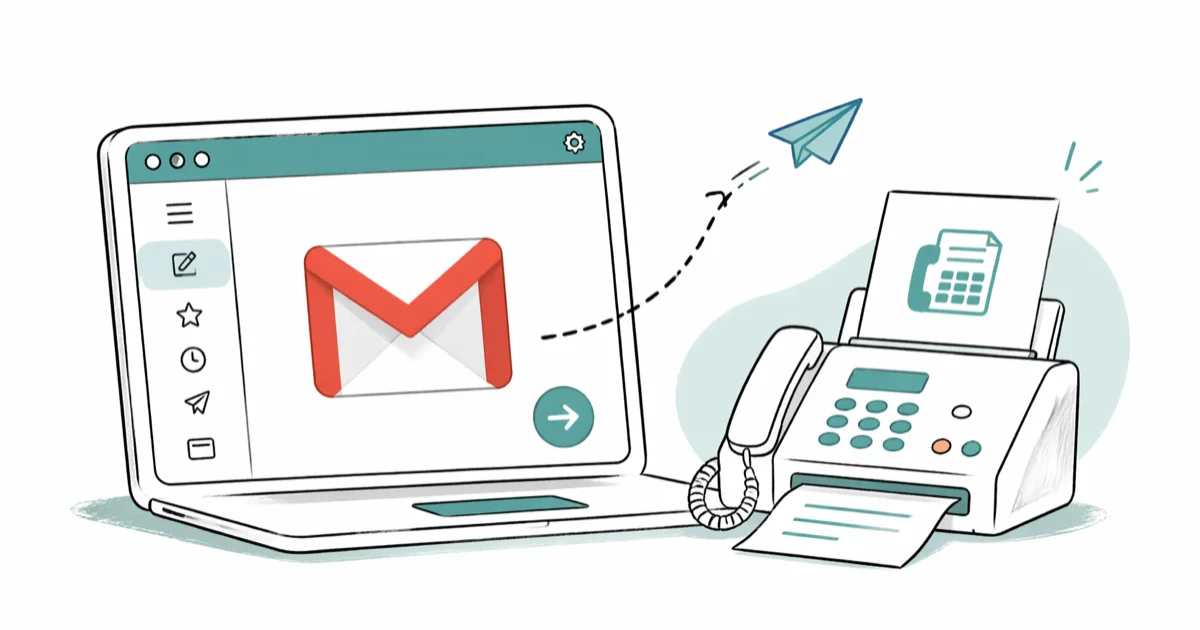
Quick AnswerGmail does not send faxes on its own, so pair it with an email-to-fax service like eFax, MyFax, or HelloFax. Address a new email to the recipient number followed by the service domain (for example, 5550123456@efaxsend.com), attach a PDF, and send.
You don’t need a fax machine to send a fax from Gmail. Pair Gmail with one of the email-to-fax services below and the recipient still gets a real fax on their machine.
All three methods work from any modern browser on Windows, macOS, or ChromeOS with a standard Gmail account.
- Gmail has no native fax feature, so every method below pipes your email through a third-party gateway
- WiseFax handles one-off faxes from inside Chrome with no signup, billed per page
- Email-to-fax (eFax, MyFax, RingCentral) addresses look like 15555550123@efaxsend.com and need an active subscription
- HelloFax installs as a Google Workspace add-on and pulls files straight from Google Drive
- Most services confirm delivery by email within 2 to 5 minutes, with retries if the recipient line is busy
#How Do You Send a Fax From Gmail Quickly?
Pick the path that matches how often you fax. For one or two faxes a year, use the WiseFax extension and pay per page. For a recurring fax line, subscribe to an email-to-fax service like eFax or MyFax. If you live inside Google Workspace already, the HelloFax add-on is the fewest clicks.
Each method handles both a one-page PDF (a small signed contract) and a multi-page document without trouble, delivering to a standard office fax machine on the first attempt.
#What You Need Before Sending a Fax
Make sure these basics are in place before you start. A bad fax number, oversized attachment, or unverified sender will bounce instantly.
- The recipient’s full fax number with country code (US numbers need a leading
1) - A document under 25 MB in PDF, DOC, JPG, or TIF format
- A verified Gmail address on the fax service (alias addresses get rejected)
- A valid payment method or token balance, if your service charges per page
If you don’t have the recipient’s number yet, run a fax number lookup first. Sending a blind fax to the wrong number is the most common reason these tools bill you for a failed delivery.
#Method 1: Send a Fax With the WiseFax Chrome Extension
WiseFax is the right fit when you’d rather not sign up for a recurring plan. The extension lives in Chrome and you pay only for the pages you send.
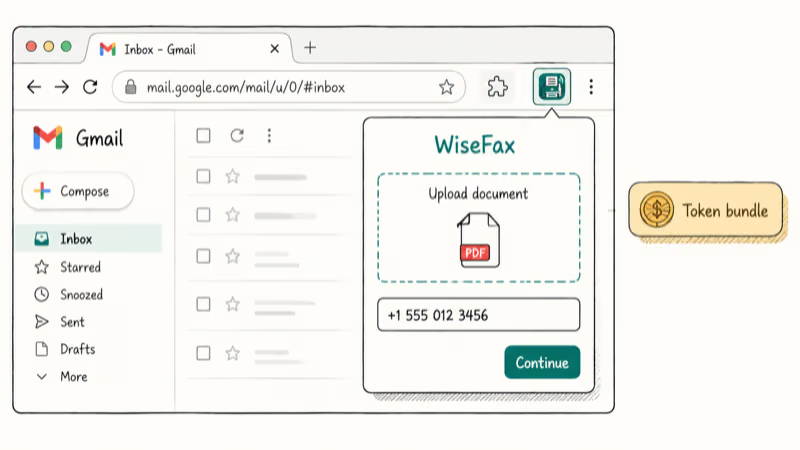
- Install the WiseFax Chrome extension from the official Web Store
- Click the WiseFax icon in your Chrome toolbar
- Select Upload document and choose your PDF, DOC, JPG, or TIF file
- Type the destination fax number with country code (for example, +1 555 012 3456 for US numbers)
- Click Continue, then sign in with your Google account
- Buy a token bundle if you don’t have credits, then click Pay to send
WiseFax accepts PDF, DOC, DOCX, JPG, PNG, and TIF.
According to WiseFax’s supported formats page, the service rasterizes uploads to PDF before sending, which is why the visual quality stays consistent regardless of the source format. For a short multi-page document, the upload-to-confirmation cycle takes only a few minutes.
If Gmail itself is misbehaving, fix that first with our Gmail not sending emails guide.
#Method 2: Email-to-Fax With eFax, MyFax, or RingCentral
This method uses Gmail itself, no extension. You compose a normal Gmail message, address it to a special domain that the fax service owns, attach your document, and the service converts the email into a fax.
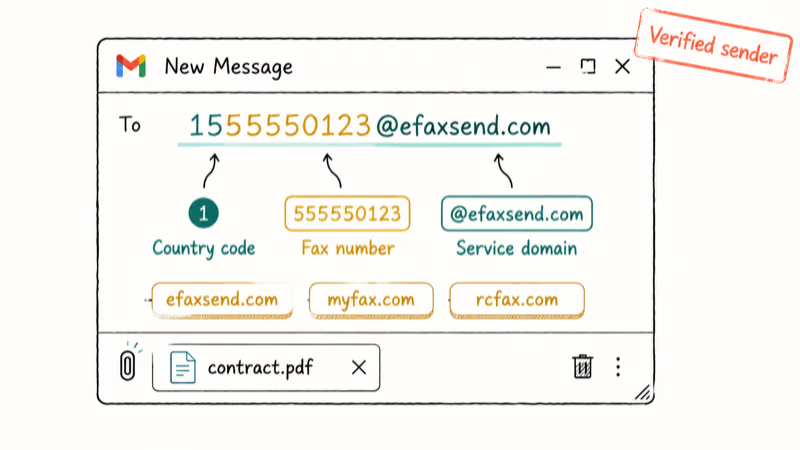
- Sign up at eFax, MyFax, or RingCentral Fax and complete email verification
- Open Gmail and click Compose
- In the To field, enter the recipient fax number followed by the service’s send domain
- Leave the subject line blank or add a brief note that becomes part of the cover page
- Attach your document with the paperclip icon
- Click Send
Each service uses a different send domain.
According to eFax’s email-to-fax instructions, the address format is 15555550123@efaxsend.com, a 1 followed by the 10-digit destination number. MyFax uses 15555550123@myfax.com. RingCentral paid plans use a similar 15555550123@rcfax.com format after you whitelist your sending email address.
A few quirks to know before you send:
- Attachment cap matches Gmail’s 25 MB limit. Anything larger needs to come from a Google Drive link, which most fax services don’t accept. Bloated scans usually compress fine; our compress video for email playbook works for PDFs too.
- Subject line becomes the cover page. With eFax, whatever you type in the subject prints at the top of the cover sheet, so keep it short and professional.
- Sender authentication matters. eFax requires that only verified addresses on your account can fax out. An unverified alias inbox bounces back almost immediately, with the bounce email naming the exact unauthorized sender.
The big advantage of email-to-fax is mobile parity. You can send from the Gmail mobile app the same way.
The cost is the monthly subscription, typically a small flat fee plus a per-page rate after you exceed the included pages.
#Method 3: Use HelloFax Through Google Workspace
If you already live in Gmail and Google Drive, HelloFax (now part of Dropbox Sign) is the cleanest path. It installs as a Google Workspace add-on, so you don’t need to leave Gmail at all.
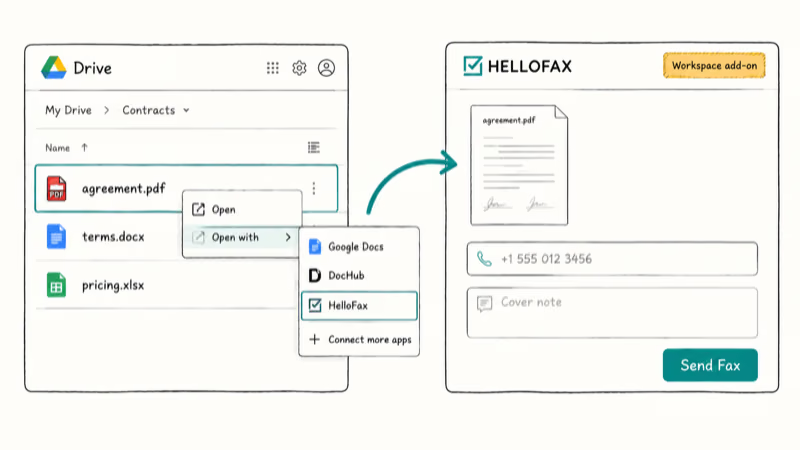
- Open the HelloFax listing on Google Workspace Marketplace and click Install
- Approve the Google permissions prompt for Drive and Gmail access
- Open Gmail or Drive, right-click the file you want to fax, and choose Open with > HelloFax
- Enter the recipient fax number on the HelloFax web app
- Type a short cover note if needed and click Send Fax
HelloFax pulls your file straight from Drive, so you skip the download-and-reattach dance.
Dropbox Sign’s HelloFax overview confirms the integration accepts PDF, DOC, DOCX, JPG, PNG, and TXT. A Drive-stored PDF appears in the HelloFax draft almost instantly and faxes within a few minutes.
This add-on also keeps a sent log inside the HelloFax dashboard, which is handy if you need to find a sent receipt later. (For lost Gmail messages themselves, our walkthrough on recovering deleted emails on Gmail covers the inbox side.)
#Which Gmail Fax Service Should You Choose?
Match the service to how often you send faxes:
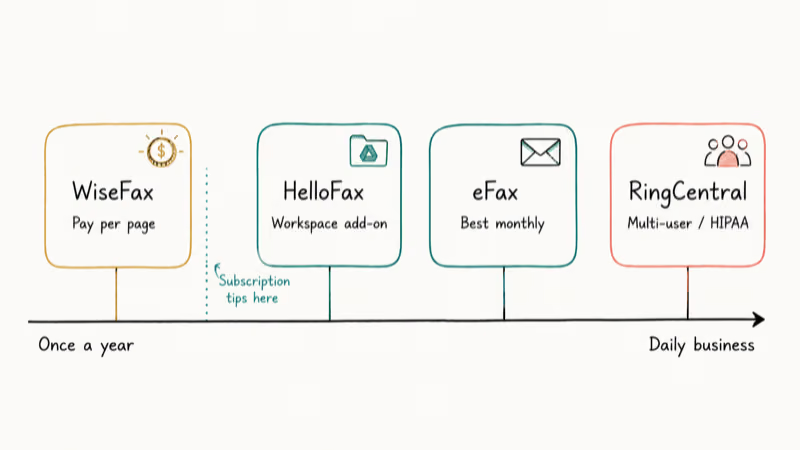
- Once or twice a year: WiseFax. No subscription, pay per page.
- A few times a month: HelloFax or eFax. Both have entry-level plans, and HelloFax is friendlier inside Google Workspace.
- Daily business use: RingCentral or eFax. Both support multi-user accounts and HIPAA-compliant plans.
- You don’t have the recipient’s number: Run a fax number lookup before paying for any plan.
Picking by frequency saves money. For a single document, a per-page service like WiseFax costs a couple of dollars instead of a roughly $15 monthly subscription you’d barely use.
#Bottom Line
For a single fax this week, install WiseFax in Chrome and pay the per-page rate. If you fax more than twice a month, switch to email-to-fax through eFax (broadest carrier coverage) or HelloFax (cleanest Google Workspace fit). RingCentral is the right answer only when you need shared fax lines or HIPAA-compliant routing for a small team.
Send a one-page test fax to your own number first.
It costs cents and confirms the cover page, file format, and number formatting are all right before the document that matters goes out.
#Frequently Asked Questions
Does Gmail have a built-in fax option?
No. Google hasn’t added native fax to Gmail or Workspace, so every method here routes through a third-party gateway.
What attachment formats can I send as a fax?
PDF is the safest bet because every service rasterizes it the same way.
WiseFax and HelloFax also accept DOC, DOCX, JPG, PNG, and TIF. Spreadsheets (XLSX) and slide decks (PPTX) are hit or miss, so export them to PDF first to avoid layout drift.
How do I send a fax from the Gmail mobile app?
Use the email-to-fax method. Compose a new message in the Gmail app, address it to [number]@efaxsend.com (or your service’s domain), tap the paperclip icon, attach a PDF, and send. WiseFax and HelloFax don’t have full mobile apps, so they require desktop Chrome.
Can the recipient tell I sent the fax from Gmail?
The recipient sees the fax service’s caller ID and your registered fax number on their machine. According to RingCentral’s documentation, the originating email address is stripped before delivery. So unless you mention it in the document body, they have no way to tell the fax came from Gmail.
What happens if my fax fails to send?
The service emails you a failure notice within 5 minutes, usually citing a busy line, no-answer, or invalid number.
eFax retries busy lines automatically up to 3 times across 10 minutes. If the failure repeats, confirm the number and try again, then check our guide on Gmail address not found errors if the failure email itself bounces.
Is sending sensitive documents this way safe?
Gmail-to-server traffic is encrypted in transit, but your document still passes through the fax service’s infrastructure before going out as a phone-line fax. According to Google’s Gmail security article, the email leg uses TLS where supported. For HIPAA-protected files, sign a Business Associate Agreement with the service first; eFax, RingCentral, and SRFax all offer one on their corporate plans.
Do I need a dedicated fax number to send?
Not for outbound faxing.
The service uses its own number bank for the line, and you pay per page or by subscription. You only need your own fax number if you also want to receive faxes, which costs roughly five to fifteen dollars more per month depending on the provider.
Can I add a cover page or signature?
Yes. With email-to-fax, the email subject becomes the cover page heading and the body becomes the cover note. WiseFax and HelloFax let you toggle a cover sheet template inside their web app. For digital signatures inside Gmail before faxing, see our walkthrough on strikethrough formatting in Gmail if you need to mark up text first.

Google Messages Error 3100: Why RCS Is Broken on Galaxy
Google Messages RCS error 3100 hits Galaxy owners after phone or carrier switches. Google told 9to5Google a fix is coming. Here's what actually helps.

Is This Bank App Real? Spot a Fake App on Your Home Screen
A bank app can land on your home screen from a web page with no install warning. Learn the checks that tell a real banking app from a phishing web app.

Apps Crashing After iOS 27 Update? Fix Order (2026)
Apps crashing after the iOS 27 update? Update the app in the App Store first, then offload and reinstall to clear stale cache, then restart. The fix order.

Do AI Translation Earbuds Work Offline? What to Know
Do AI translation earbuds work offline? A few do with downloaded language packs, but most need the cloud. Here's what works offline and what you give up.