The Lightest Gaming Mice in 2026: Top Picks Under 60g
Compare the lightest gaming mice in 2026 by listed weight, sensor, polling rate, wireless battery claims, grip fit, and budget picks under 60g.
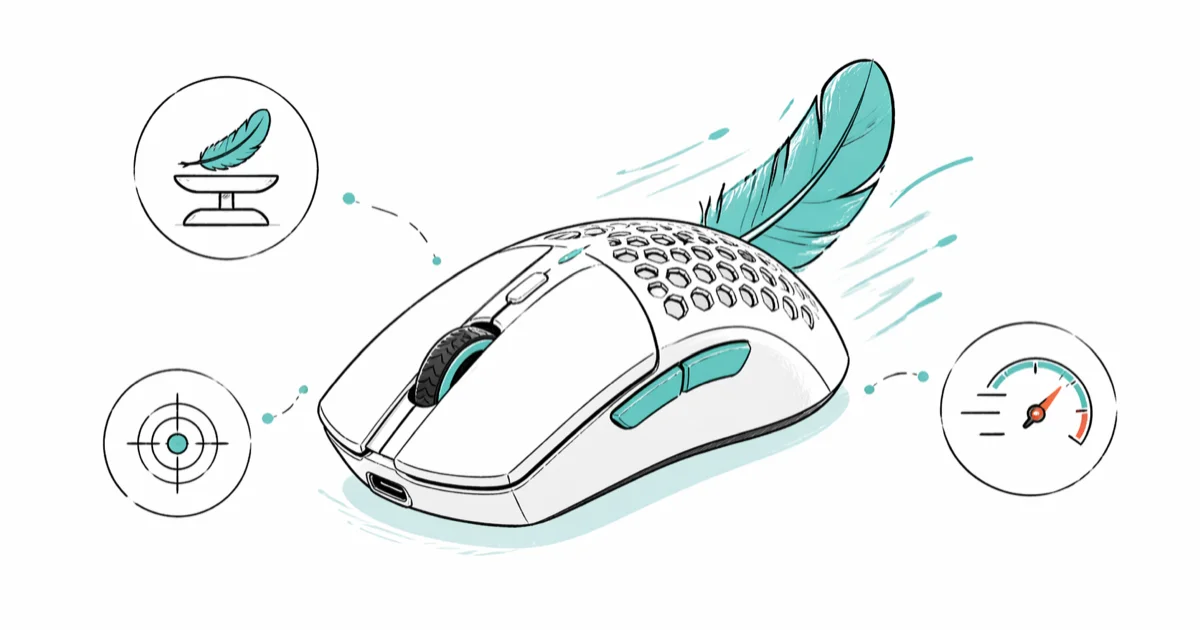
Quick AnswerThe Turtle Beach Burst II Air is the lightest gaming mouse in 2026 at 47 grams. For competitive FPS, the Razer Viper V3 Pro at 54 grams pairs a 35K sensor with 8000Hz polling and stays under $160.
The lightest gaming mice on sale in 2026 weigh under 60 grams, and the lightest of all sits at 47 grams. Cutting weight reduces hand fatigue during long sessions and lets your wrist whip the cursor across a wide mat without burning forearm muscle.
The headline picks: a featherweight 47-gram option from Turtle Beach, a balanced 54-gram performance king from Razer, a $30 budget honeycomb from Cooler Master, and a 57-gram wireless value pick from Keychron. Below is the full comparison, how the specs differ, and how to choose by grip style.
- The Turtle Beach Burst II Air weighs 47 grams, the lightest gaming mouse on sale in 2026.
- The Razer Viper V3 Pro at 54 grams pairs the Focus Pro 35K sensor with 8000Hz polling for $160.
- Budget pick: the Cooler Master MM710 weighs 52.5 grams and sells for $30 with a PMW 3389 sensor.
- The 50-60 gram range is the safest middle for most players; sub-50g bodies can feel unstable for slow tracking.
- Fingertip grip benefits most from sub-50g mice; palm grip players usually prefer 60-80 gram bodies for control.
#Top Lightweight Gaming Mice in 2026
Turtle Beach Burst II Air (47g) is the lightest mouse currently shipping. According to Turtle Beach’s product specifications, it has a 26,000 DPI Owl-Eye sensor, TITAN optical switches rated for 100 million clicks, and dual-mode wireless that runs over 2.4GHz or Bluetooth. Battery rating is over 100 hours on the slow polling profile.
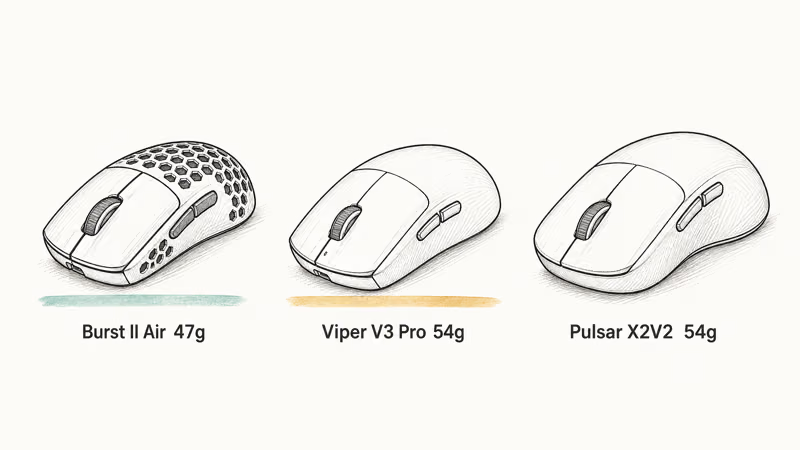
Razer Viper V3 Pro (54g) is the performance pick.
Razer’s Viper V3 Pro product documentation states that the Focus Pro 35K sensor supports up to 8000Hz polling and that the Gen-3 optical mouse switches are rated for 90 million clicks. The shape is symmetrical, leans toward claw and fingertip grips, and battery life lands around 95 hours at 1000Hz.
Pulsar X2V2 (54g) is the value-performance crossover. According to Pulsar’s X2V2 product page, the mouse uses the PixArt PAW 3395 sensor and supports 4000Hz polling with the optional 4K dongle sold separately. Pulsar lists 70 hours of wireless battery life at 1000Hz.
Advertised weights put the Burst II Air, Viper V3 Pro, and Pulsar X2V2 inside the core lightweight range. For a deeper look at how peripheral choices affect competitive aim, see our companion guide on the best mouse for Fortnite.
#How to Compare Lightweight Gaming Mice
Start with listed weight, sensor, polling rate, wireless mode, and shell shape before chasing the lowest gram count.
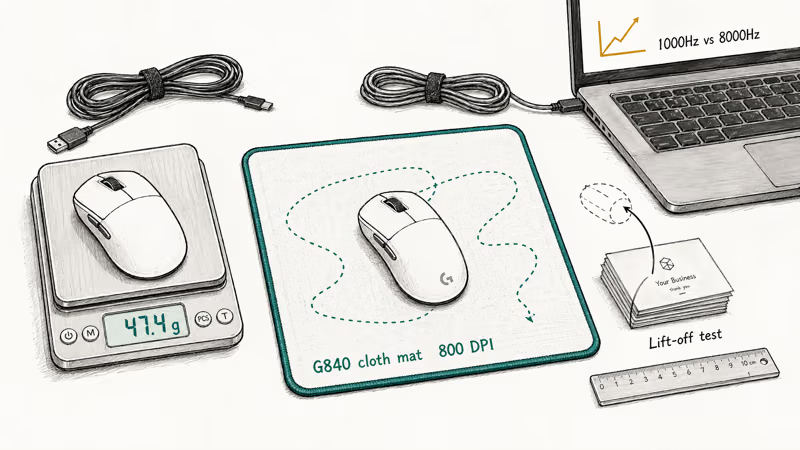
For FPS games, compare how the mouse handles three repeated actions: long flicks, slow tracking, and frequent lift-and-reset movement. Those actions expose shape and weight issues faster than browsing a spec sheet.
For weight verification, use a 0.1g jewelry scale if you already own one, then compare the result with the manufacturer’s listed weight. Lift-off distance matters too, especially if you play at low sensitivity and reset the mouse often.
Battery claims depend heavily on polling rate. Treat 1000Hz ratings as the practical baseline and expect 4000Hz or 8000Hz modes to trade battery life for responsiveness.
According to Wikipedia’s article on the computer mouse, polling rate measures how often the device reports its position to the host. Comfort depends on grip style, shape preference, button click weight, scroll detents, and whether the shell creates pressure points during long sessions.
#Lightweight Gaming Mouse Comparison
| Mouse | Weight | Sensor | Polling Rate | Price | Best For |
|---|---|---|---|---|---|
| Turtle Beach Burst II Air | 47g | 26K DPI | 1000Hz | $100 | Lightest option |
| Cooler Master MM710 | 52g | PMW 3389 | 1000Hz | $30 | Budget pick |
| Razer Viper V3 Pro | 54g | 35K DPI | 8000Hz | $160 | Best performance |
| Pulsar X2V2 | 54g | PAW 3395 | 4000Hz | $130 | Ergonomic shape |
| Keychron M3 Mini | 57g | PAW 3395 | 1000Hz | $60 | Best value |
| Glorious Model O 2 Pro | 59g | BAMF 2.0 | 8000Hz | $130 | Customizable |
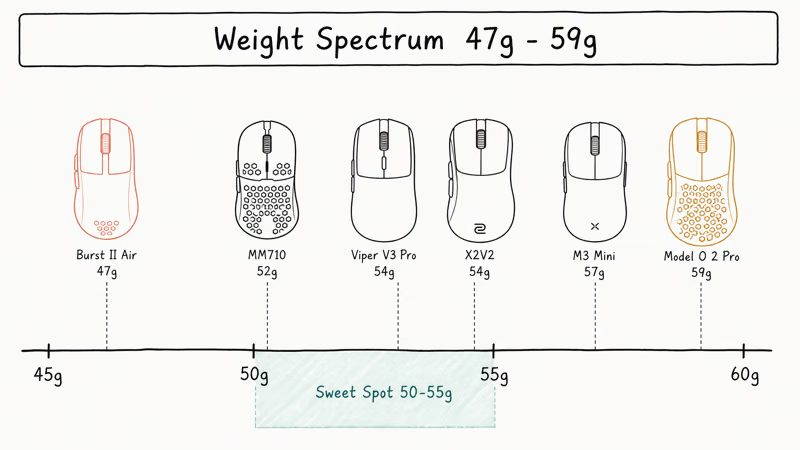
The spread between 47g and 59g produces surprisingly different feel on the desk. The Burst II Air glides so easily that small flick errors compound; the Glorious Model O 2 Pro feels planted but slower on long tracks.
The 52-54g cluster is the safest middle ground. It keeps flicks fast without making the mouse feel as twitchy as the sub-50g class.
FPS games reward consistency more than absolute lightness; pick the weight you can repeat shots with, not the lowest number on the spec sheet.
#Why Choose a Lightweight Gaming Mouse?
Faster long flicks. A lighter shell takes less force to start and stop, which helps in sub-30cm/360 setups where every flick covers a lot of mousepad. Players who keep their elbow stationary and arm-aim notice the difference more than wrist-aim players, because their hand is doing more of the work to move a heavier object.
Reduced fatigue on long sessions. Cutting 30 grams off your daily driver removes a lot of accumulated load over a six-hour session. The biggest difference shows up when you move from a 90g-plus mouse to a mid-50g shell.
Quicker resets matter too.
Players who use low sensitivity have to lift the mouse often. Lighter bodies let you peel up and replant without the small wrist torque a heavier mouse adds, which keeps your aim level on the reset.
Modern sensors travel well. The PixArt PAW 3395 and Razer Focus Pro 35K both ship in lightweight bodies and track perfectly on cloth, hard, and even glass mats with the right pad. Lightweight no longer means budget-sensor compromise. If your cursor is jittering instead, that is usually a Windows setting; check our guide on enhance pointer precision before swapping mice.
#Best Budget Lightweight Gaming Mice
Cooler Master MM710 (52g, $30) is the value champion. Cooler Master’s MM710 product specifications confirms that the honeycomb shell brings total weight to 52.5 grams while keeping the PMW 3389 sensor and Omron switches rated at 20 million clicks.
The build can creak slightly when squeezed, but the PMW 3389 sensor is still capable and the cable is light enough that bungee use feels close to wireless.
Keychron M3 Mini (57g, $60) is one of the strongest wireless mice under $75. The PAW 3395 sensor, 1000Hz polling, and dual receiver setup (USB-A and USB-C) make it a flexible work-and-play option. The M3 Mini also moonlights well for productivity tasks; if you switch between play and code, our roundup of the best mouse for programming ranks it among the wireless picks worth carrying.
Glorious Model O 2 Pro (59g, $130) is the heavy end of the lightweight class. The BAMF 2.0 sensor supports 8000Hz polling and the company’s Ascended Cord III is one of the lightest braided cables on the market.
#How Light Is Too Light?
Below 50 grams, control becomes the trade-off.
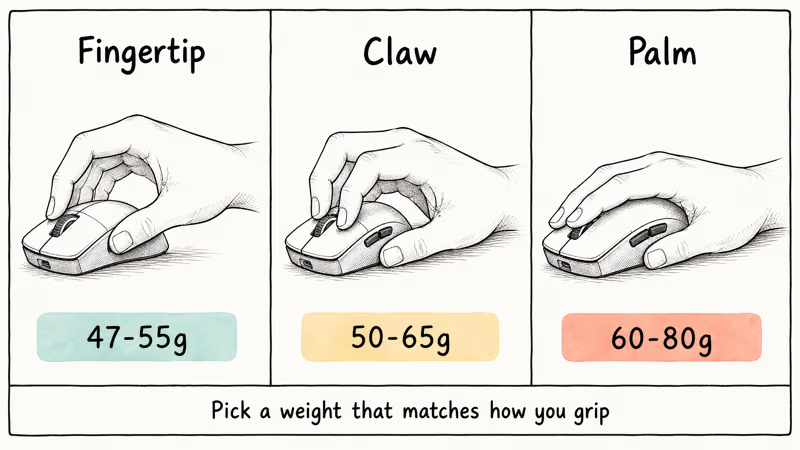
The mouse can move before you commit to a flick, which costs accuracy on slow tracking shots. That is the main downside of the Burst II Air’s 47-gram shell: it favors fingertip control and quick corrections more than planted long-range tracking.
Your grip style drives how light is too light:
- Fingertip grip: thrives on 47-55g shells, where the lighter body amplifies finger micro-movements
- Claw grip: works best with 50-65g, balancing lift speed with control
- Palm grip: usually wants 60-80g, since the larger contact patch needs mass to feel anchored
Your in-game sensitivity matters too. Low-sensitivity players (50+ cm/360) move the mouse a lot and benefit most from sub-60g mice. High-sensitivity players (under 25 cm/360) move the cursor with finger flicks and gain less from shaving 10 grams.
Your game type also shifts the math:
- Fast FPS (Valorant, CS2, Apex Legends): lighter mice help with flick shots
- Tactical shooters (Rainbow Six Siege): medium 65-75g aids precision
- MOBAs and RTS: weight matters less than button layout and side-button reach
As a practical rule, 50-60 grams is the safest range across grip styles. Mice under 50 grams can feel too light for slow tracking, and mice over 70 grams can feel sluggish for fast flicks. If your cursor drifts while you sit still, your mouse weight is fine; check our writeup on a mouse cursor moving on its own for the actual fixes.
#Wireless vs Wired Lightweight Mice
Modern flagship wireless mice advertise latency under 1ms in manufacturer lab numbers, and the wireless tax on weight is smaller than it used to be. The Viper V3 Pro at 54g comes in lighter than many older wired lightweight mice.
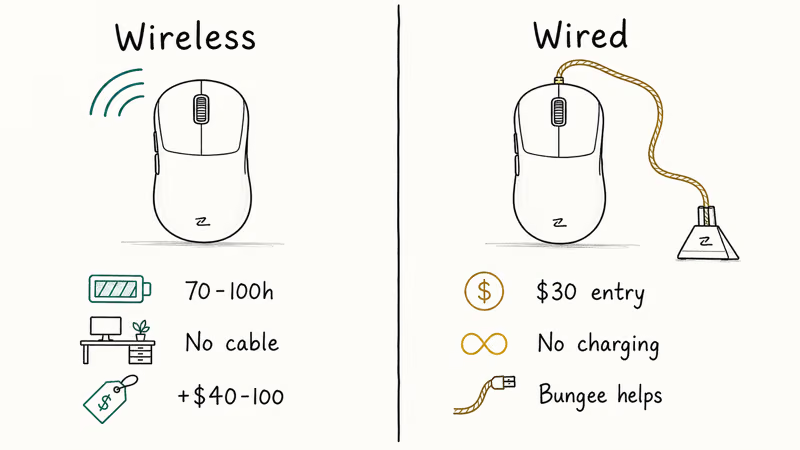
Wireless trade-offs:
- Cleaner desk, no cable bungee needed
- Charging requirement: 1-2 hours from empty for a full week of play
- $40-100 price premium versus an equivalent wired model
- 8000Hz polling can cut battery life sharply versus 1000Hz
Wired trade-offs:
- Cheapest path into a 50g class mouse (the MM710 is $30)
- Cable drag depends heavily on the bungee; a stiff cable like the Logitech G203’s adds perceived weight
- Zero charging hassle, infinite session length
If your hand sweats during long matches, sweat is a bigger comfort issue than 5 grams of battery. Pair any mouse here with grip tape or our recommended gaming gloves and the wireless versus wired choice mostly comes down to budget. For a quieter setup overall, our silent gaming keyboard roundup matches well with these wireless mice.
#Bottom Line
For the lightest possible gaming mouse, the Turtle Beach Burst II Air at 47 grams wins on the scale, but its featherweight shell suits fingertip grip and arm-aim FPS players more than slow trackers.
The Razer Viper V3 Pro at 54 grams is our overall pick. The Focus Pro 35K sensor, 8000Hz polling, and 95-hour battery hit a balance no other mouse in the 50g class matches in 2026. If you want to spend $30 instead of $160, the Cooler Master MM710 covers the basics and lets you stop second-guessing weight. Choose by grip and sensitivity, not by the smallest gram count, and most players will land happiest somewhere between 50 and 60 grams.
#Frequently Asked Questions
What is considered a lightweight gaming mouse?
Mice under 60 grams are lightweight, and mice under 50 grams are ultra-lightweight. Standard gaming mice weigh 70-90 grams. The lightest gaming mouse in 2026 is the Turtle Beach Burst II Air at 47 grams.
Do professional gamers use lightweight mice?
Most professional FPS players run mice under 65 grams. Common picks at the top level include the Logitech G Pro X Superlight 2 (60g), the Razer Viper V3 Pro (54g), and the Pulsar X2V2 (54g).
Are lightweight mice less durable?
Not on the premium side. Modern lightweight bodies use reinforced plastic and magnesium alloy, and switches like Razer’s optical Gen-3 are rated for 90 million clicks. Honeycomb-shell budget mice trade some flex tolerance for the weight cut, and dust collects in the holes faster than a closed shell. The cheaper MM710 can also creak under hard squeezes.
Can lightweight mice cause wrist pain?
Lightweight mice usually reduce wrist strain because your hand carries less weight on every micro-movement. They won’t fix bad ergonomics on their own. Choose a shape that fits your hand size, take a five-minute break each hour, and consider a wrist rest if your forearm rests on a desk edge.
Do lightweight mice work for large hands?
Yes, if you pick a body length over 120mm. The Razer Viper V3 Pro (128mm) and Pulsar X2V2 (120mm) suit medium and large hands. Smaller mice like the Keychron M3 Mini (115mm) feel cramped for palm grip players with hands above 19cm. Always check the spec sheet length before buying.
Is a 60-gram mouse too light for gaming?
No. 60 grams is a comfortable middle for most gamers. The 50-60 gram range is the safest middle, and only fingertip-grip players usually need something lower.
Does polling rate matter for casual gamers?
For casual play, 1000Hz polling is plenty and uses far less battery on wireless mice. 4000Hz and 8000Hz polling shows measurable benefit only on a 240Hz or higher monitor with a strong CPU. If your frame rate ever drops to your monitor refresh, the polling boost disappears in practice.

Best Laptop for Running LLMs in 2026: Memory Comes First
The best laptop for running LLMs is a memory purchase first. Compare MacBook unified memory against NVIDIA laptop VRAM, and see what each tier really runs.

Pixel 11 vs Pixel 10: What Changed and Who Should Upgrade
Pixel 11 vs Pixel 10: same screen and camera resolution, new Tensor G6, 25W wireless, and Gemini Intelligence. Here is who should actually upgrade.

Best Power Bank for iPad in 2026: Pro, Air, and Mini
Best power bank for iPad in 2026. Compare mAh tiers and USB-C PD wattage for iPad Pro, Air, and mini, plus airline Wh math, cables, and travel tips.

Best Power Bank With Built-In Cable: Top 2026 Picks
Best power bank with built-in cable picks for 2026. Compare single USB-C, multi-connector, and retractable laptop banks, plus airline Wh math.