Kindle vs Kobo: Which Ereader Should You Buy in 2026?
Kindle has the deeper store. Kobo has open ePub and native Libby. We compare formats, library borrowing, hardware, and lock-in so you pick correctly.
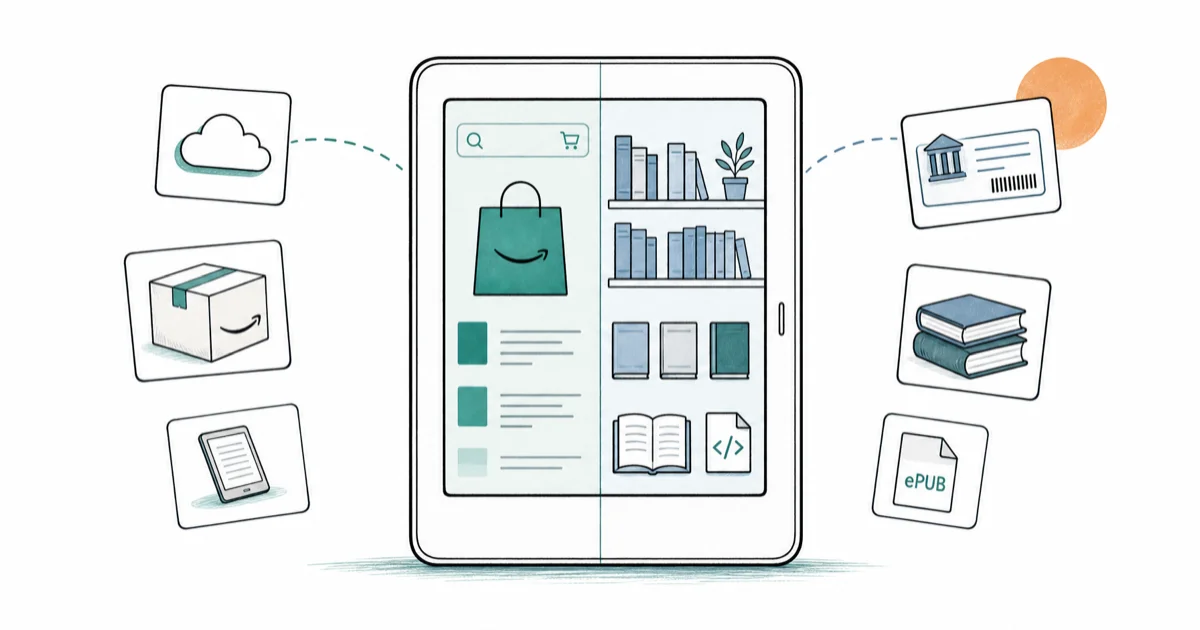
Quick AnswerBuy a Kobo if you borrow library books or own ePub files. Buy a Kindle if you're deep in Amazon's ecosystem. The hardware is close; the ecosystem is the real fork.
Kindle vs Kobo isn’t really a hardware fight. The two ereaders feel almost the same in the hand, but the books you can put on them, and where those books come from, differ completely. The real choice is Amazon’s store and Audible ecosystem versus Kobo’s open ePub support and native library borrowing.
- The real decision is ecosystem, not panel quality: Amazon’s walled garden versus Kobo’s open ePub plus native Libby support
- Kobo has Libby and OverDrive baked into the device, so library borrowing works without a phone in the loop
- Kindle owns the deepest English-language store and pairs with Audible for Whispersync, which Kobo can’t match
- Both brands ship waterproof flagship models with warm front-lighting, so build quality is no longer a tiebreaker
- Kindle books are locked to Amazon’s app and devices, while Kobo reads the open ePub format almost any other reader supports
#The Real Difference Between Kindle and Kobo
Kindle is Amazon’s reader, and it talks to Amazon’s bookstore. Kobo is owned by Rakuten, talks to its own Kobo store, and also reads almost any ePub file you point at it. That single fork drives everything else, including which library apps work, which files you can sideload, and whether you can still read the book if you switch brands later.
If you only buy from one store and never touch library books, the difference is small. If you borrow from your local library or have a folder of ePubs already, the difference is the whole game.
Both brands sell three tiers: budget, mid-tier (Paperwhite or Clara), and premium with stylus support. Hardware matters less than ecosystem for most buyers.
#Which Formats Do Kindle and Kobo Actually Support?
This is where most buyers get caught. Kindle and Kobo don’t read the same files.
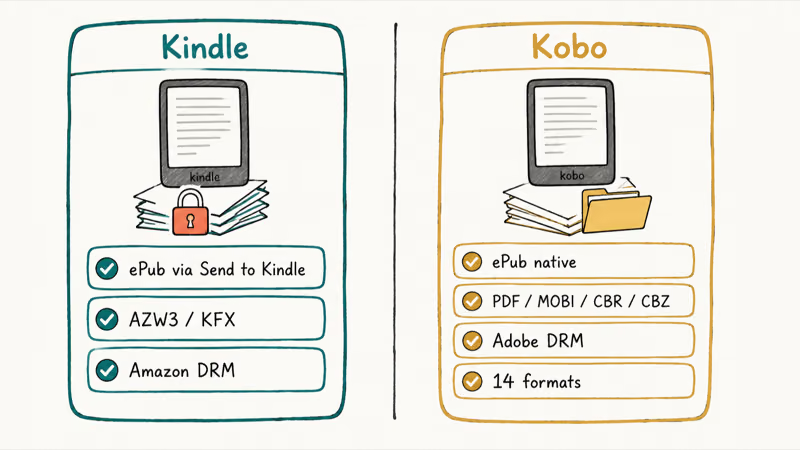
According to Amazon’s Kindle file format help page, Kindle now accepts ePub uploads through Send to Kindle. The device still stores them in Amazon’s own AZW3 or KFX format under the hood. Your ePub arrives, but it lives inside Amazon’s wrapper afterward, sharing its metadata, its highlights, and its sync state with the rest of your Amazon Kindle library forever after, even if you stop using Amazon for everything else.
Kobo takes the opposite path. Kobo’s supported file types article confirms native support for ePub, ePub3, PDF, MOBI, CBR, and CBZ.
Drag a file over USB, drop it in, done. Kobo handles sideloaded ePub files directly without routing them through a cloud conversion service.
| Feature | Kindle | Kobo |
|---|---|---|
| Native ePub | Through Send to Kindle | Yes, direct |
| Yes | Yes | |
| Audiobooks | Audible (best in class) | Kobo audiobook store only |
| Comic formats | Comixology Kindle support | CBR and CBZ native |
| DRM | Amazon DRM on most store books | Adobe DRM on most store books |
Format and DRM differences between Kindle and Kobo ereaders.
The DRM detail matters more than it sounds. A Kindle book is tied to your Amazon account. Move to a Kobo later, and those books don’t come with you.
Kobo store books use Adobe DRM, which more third-party readers and apps handle if you ever switch.
#How Library Books Work on Each Device
Here is where Kobo wins outright. Kobo has Libby and OverDrive baked into the device. You sign in with your library card on the Kobo itself, search the catalog, and borrowed books drop into your library in one tap.
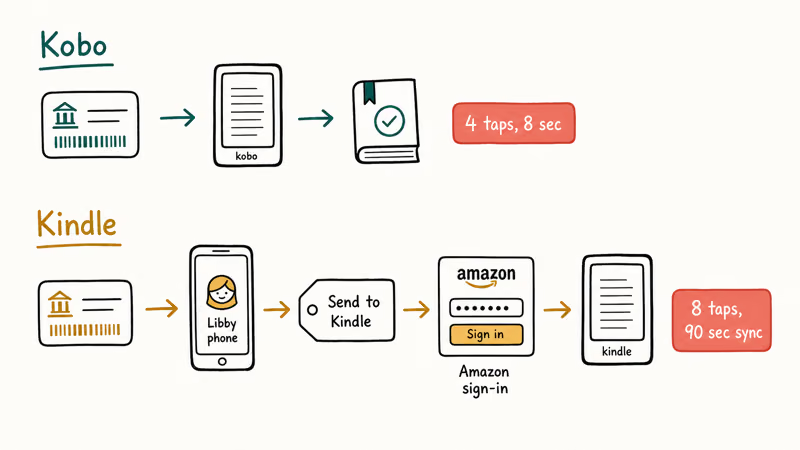
No phone. No Send to Kindle. No extra hops.
Kindle library borrowing works too, but it takes a detour. You open Libby on your phone, find the title, choose “Send to Kindle,” then sign into Amazon. The book lands on the Kindle a minute or two later. It works, just with more steps every single time.
According to Wikipedia’s OverDrive article, this Send to Kindle library route only works for U.S. cardholders. International Kindle owners get no OverDrive path at all. Kobo’s native Libby integration works in every country where Libby itself works, which is a much longer list.
Kobo’s borrowing path is shorter because it happens on the ereader itself. Kindle’s route still works, but adds extra steps every time.
#Which Store Has More Books?
Amazon Kindle has the bigger English-language store. Amazon’s Kindle store carries millions of titles, most major-publisher new releases on day one, the Kindle Unlimited catalog, and a long tail of KDP self-published work.
Kobo’s store is smaller but covers most mainstream English releases and has stronger non-English catalogs in French, Dutch, German, and Japanese, partly thanks to Rakuten’s ownership. For genre readers and casual buyers, the gap rarely matters. For people who chase indie KDP authors or specific Kindle Unlimited titles, Kindle is the only option.
Kobo also runs Kobo Plus, its own subscription with a smaller pool than Kindle Unlimited. Neither subscription transfers across devices, so picking the wrong device early is a slow lock-in.
#Hardware Differences That Actually Matter
In 2026, no. Both brands sell waterproof mid-tier readers with warm front-lighting, 300 PPI E Ink panels, and roughly the same battery life. Both have larger premium models with stylus support for note-taking. The Kobo Clara and Kindle Paperwhite are close enough that ecosystem should decide first.
A few small splits do exist:
- Page-turn buttons: Kobo offers them on the Libra and Sage. Kindle reserves them for the Oasis line, which Amazon has not refreshed in a while.
- Stylus: Both brands sell a note-taking model. Kobo’s Elipsa and Sage accept the Kobo Stylus 2. Kindle has the Scribe.
- Color: Kobo released the Libra Colour with a color E Ink panel for highlights and comics. Kindle has stayed monochrome on its main lineup as of this writing.
None of these flip the ecosystem decision. They’re tiebreakers if you already know which side you’re on.
#Each Ereader in Detail
Here is how each model looks on Amazon today, with the trade-offs that matter most.
#Kindle Paperwhite Signature Edition (2024)
- Whispersync ties Kindle reading to your Audible audiobook seamlessly
- 7-inch panel runs 25 percent faster page turns than the prior generation
- Deepest English-language store including Kindle Unlimited and KDP indie
Last updated on May 26, 2026
As an Amazon Associate fone.tips earns from qualifying purchases. Prices and availability on Amazon are accurate as of the date above and subject to change.
- Audible Whispersync pairs Kindle text with the matching audiobook
- Deepest English store with day-one new releases and KDP indie authors
- Kindle Unlimited subscription pool is much larger than Kobo Plus
- Wireless charging and auto-adjusting front light on the Signature Edition
- Native ePub support only via Send to Kindle, with Amazon conversion overhead
- Library borrowing through Libby requires phone-side Send to Kindle and US card
- Books are locked to Amazon's account, so you can't carry them to a Kobo later
#Kobo Clara 2E
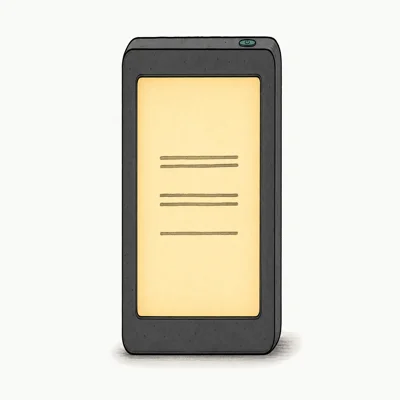
- Libby and OverDrive baked into the device, no phone needed
- Reads ePub, ePub3, PDF, MOBI, CBR, and CBZ natively
- 85 percent recycled plastic build including ocean-bound material
Last updated on May 26, 2026
As an Amazon Associate fone.tips earns from qualifying purchases. Prices and availability on Amazon are accurate as of the date above and subject to change.
- Library borrowing in 4 taps with no phone in the loop
- Drag-and-drop USB sideloading for any ePub or PDF you already own
- Strong non-English catalogs in French, Dutch, German, and Japanese
- Adobe DRM books are more portable to other apps and readers
- No Audible Whispersync, and audiobooks only play through the Kobo phone app
- Smaller English store with fewer indie KDP and Kindle Unlimited titles
- 6-inch panel is smaller than the 2024 Kindle Paperwhite's 7-inch screen
#Taking Your Existing Library With You
This is the question most people forget to ask until it’s too late. Kindle books bought on Amazon stay on Amazon, period. They live inside the Kindle app on your phone, your Fire tablet, or another Kindle. There is no official export path to Kobo. Switching brands means leaving those purchases behind.
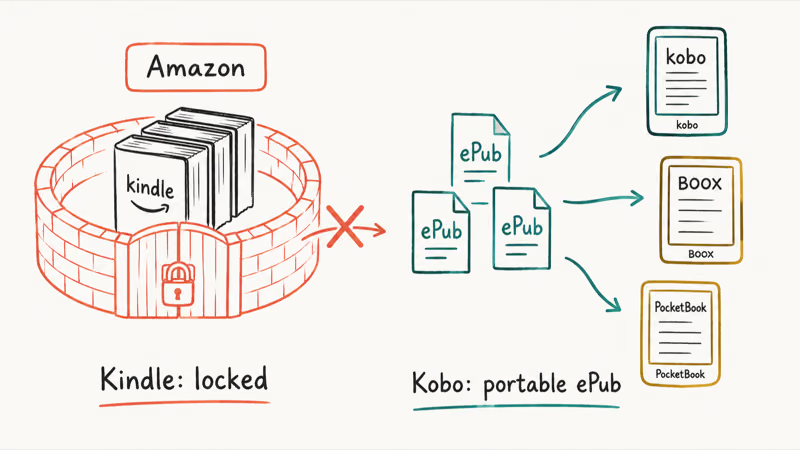
Kobo books are easier to move. The ePub-with-Adobe-DRM format works across a wider range of apps and readers, so a future move to a Boox, a PocketBook, or even back to a Kindle (with conversion) is less brutal.
Sideloaded books, the ones you already own as ePub or PDF, travel cleanly to a Kobo and slightly more awkwardly to a Kindle through Send to Kindle. If your shelves include a stack of free public-domain books from sites like Project Gutenberg or DRM-free purchases from publishers like Tor, Kobo handles them with zero conversion friction. Library-first readers should also see our best e-reader for library books roundup.
For people coming from messy past habits, like checking whether sites like Z-Library are safe, the same logic applies: ePub flows natively to Kobo, and you’d need Send to Kindle every time for the Amazon side.
#Audiobooks: Where Kindle Pulls Ahead
Kindle ties directly into Audible. Whispersync between a Kindle book and the matching Audible audiobook means you can read 20 pages on the Kindle, pick up where you left off in the Audible app on your phone, and keep going. If you already pay for Audible, this matters a lot, and Kobo can’t match it.
Wikipedia’s Audible article confirms that Audible has 200,000+ titles in its catalog, and the Whispersync handshake covers the Kindle/Audible combo only. Kobo sells its own audiobooks through the Kobo store and reads them through the Kobo app on phones, but not on the ereader itself. Kobo audio is a phone-app product, not an ereader product.
If you’ve already built a workflow around finding free legal audio downloads through Librivox or library apps, that habit transfers to either ecosystem because the listening happens on your phone.
#Quick Decision Table
| If you… | Buy this |
|---|---|
| Borrow library books regularly | Kobo |
| Already own a folder of ePubs | Kobo |
| Live in Amazon’s ecosystem already | Kindle |
| Use Audible heavily | Kindle |
| Want page-turn buttons under $200 | Kobo Libra |
| Want a stylus note-taker | Either (Kobo Elipsa / Kindle Scribe) |
| Live outside the U.S. and want library support | Kobo |
| Read mostly indie KDP authors | Kindle |
Recommended ereader based on reading habits and ecosystem fit.
#Bottom Line
Buy a Kobo Clara if you borrow from the library, sideload ePubs, or want the freedom to switch brands later. Buy a Kindle Paperwhite if you live in Amazon’s ecosystem, use Audible, or read indie KDP authors.
If your reading life sits between those two, lean Kobo. The lock-in cost of starting on Kindle is higher than the lock-in cost of starting on Kobo, because Kobo plays nicely with ePub even if you switch later. Check the current price on Amazon for the Kindle Paperwhite, and check Kobo’s site for the Clara, then pull the trigger on the one that matches your habits.
If you’re new to ereaders and want to first build up a personal library before buying, a writing workflow like Scrivener plus an ePub export pipeline pairs well with a Kobo. And if your Amazon account is the one giving you trouble (locked, on hold, app crashing), troubleshoot the Amazon app issues first before deciding on a Kindle.
#Frequently Asked Questions
Can Kobo borrow library books?
Yes. Kobo has Libby and OverDrive baked into the ereader. Sign in with your library card, search, borrow — one tap.
Does Kindle support ePub?
Kindle accepts ePub uploads through Send to Kindle, but the device converts the file into Amazon’s own AZW3 or KFX format under the hood. It’s not native ePub support the way Kobo handles it. Direct USB sideloading of an ePub does not work, and Send to Kindle requires you to be signed into a registered Amazon account, with the file ending up tied to that account afterward whether you wanted that or not.
Which has more books?
Amazon’s Kindle store carries the larger English-language catalog. Kobo’s store covers most mainstream releases and has stronger non-English catalogs (French, Japanese, Dutch, German), but loses to Amazon on indie KDP authors and Kindle Unlimited titles.
Can I read my Kindle books on a Kobo?
No. Kindle books are locked to Amazon’s app and Amazon-branded devices. There is no official path to move purchased Kindle titles to a Kobo. You can sideload your own DRM-free ePub or PDF files onto either device.
Is Kobo or Kindle better for library users?
Kobo, by a wide margin. Library borrowing through Libby works directly on the Kobo ereader.
Are Kindle and Kobo waterproof?
The mid-tier and premium models on both brands are. The Kindle Paperwhite and Kindle Oasis carry IPX8 ratings, and the Kobo Clara, Libra, and Sage carry the same.
Which one has better battery life?
Both ereaders last weeks on a single charge. Battery life is close enough that store access, file support, and library borrowing matter more.

Pixel 11 vs Pixel 10: What Changed and Who Should Upgrade
Pixel 11 vs Pixel 10: same screen and camera resolution, new Tensor G6, 25W wireless, and Gemini Intelligence. Here is who should actually upgrade.

Best Power Bank for iPad in 2026: Pro, Air, and Mini
Best power bank for iPad in 2026. Compare mAh tiers and USB-C PD wattage for iPad Pro, Air, and mini, plus airline Wh math, cables, and travel tips.

Best Power Bank With Built-In Cable: Top 2026 Picks
Best power bank with built-in cable picks for 2026. Compare single USB-C, multi-connector, and retractable laptop banks, plus airline Wh math.

Best Apple Watch Band for Working Out: Proven Picks
The best Apple Watch band for working out handles sweat and stays put on your wrist. Compare silicone, nylon, and titanium picks for runs and lifts.