Best E-Reader for Library Books in 2026: 2 Proven Picks
Best e-reader for library books in 2026. Compare Kobo Clara 2E and Kindle Paperwhite for Libby, OverDrive, formats, and Amazon borrowing routes.
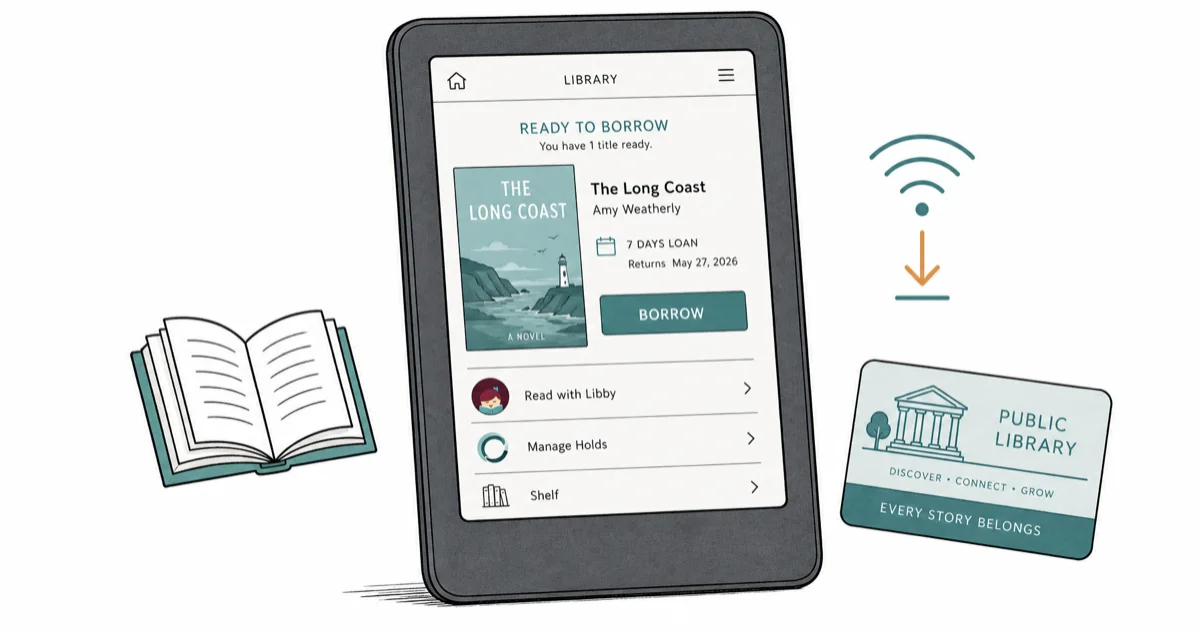
Quick AnswerKobo Clara 2E is the best e-reader for library books because Libby and OverDrive are built into the device, so library borrowing works without a phone or computer.
Library borrowing turns an e-reader into a free reading habit. Kobo Clara 2E is the cleaner library-first pick, while Kindle Paperwhite Signature Edition makes more sense if you already sit deep inside the Amazon ecosystem.
- Kobo Clara 2E is the best library-borrowing e-reader because Libby and OverDrive are native on the device with no phone needed
- Kindle Paperwhite Signature Edition still supports library borrowing through Libby, but every hold routes through a separate phone or web step
- Both readers handle Libby ebooks, but only Kobo natively opens ePub files from non-Libby library sources like Project Gutenberg
- A 300 PPI E Ink panel and adjustable warm front light cut eye strain during long bedtime reading sessions
- Library wait times for popular new releases run 6 to 12 weeks at most US public library systems, regardless of which reader you use
#Why Should You Get an E-Reader for Library Borrowing?
A dedicated e-reader pays for itself in months when you switch from buying ebooks to borrowing them. OverDrive reported that 662 million library ebook loans landed through Libby in 2023, a 19 percent jump per the annual report. E Ink reads far closer to paper than a phone LCD — see the Wikipedia entry on E Ink for the technology background.
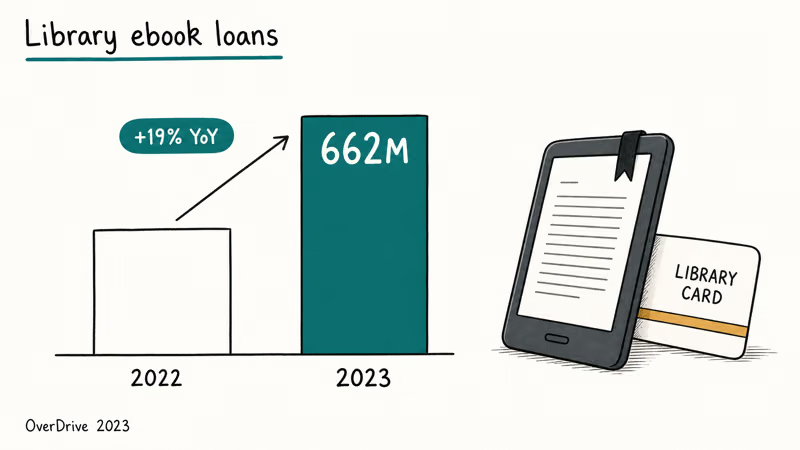
Library borrowing beats buying.
E Ink also keeps the device running for weeks on one charge, which matters when you forget to plug in your nightstand reader before a weekend trip. Our best Bluetooth tracker for luggage guide covers trip gear if you travel with the reader.
#What to Look for in a Library-Borrowing E-Reader
Three things matter: native library app support, broad file format coverage, and warm front light for night reading. The first decides whether borrowing is one tap or three. The second decides whether you can read non-Libby library sources like Project Gutenberg or your university’s reserve. The third decides whether you can read in bed without blue light keeping you awake.
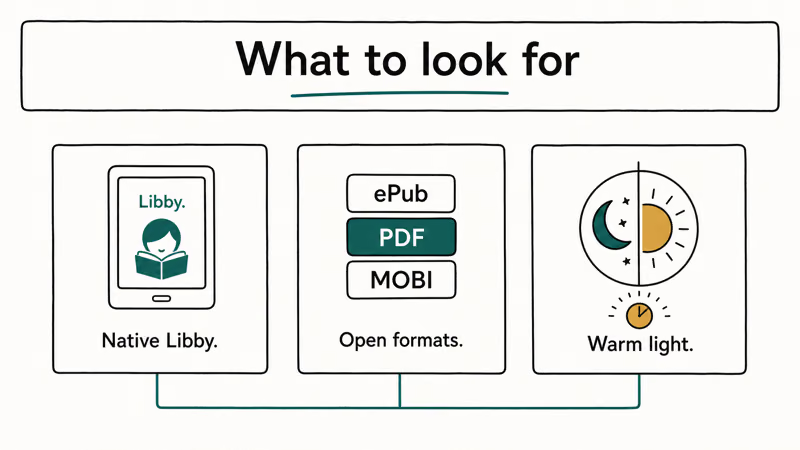
Native Libby support is the unlock.
File format coverage matters more than people realize for library use. Some smaller libraries lend ePub or PDF files directly through their own portals, bypassing Libby; our how to convert ACSM to PDF guide covers the Adobe DRM workflow for those titles.
#Best E-Reader for Library Readers: Kobo Clara 2E
Kobo Clara 2E wins for library-first readers because Libby and OverDrive run natively on the device with no phone bridge required. Borrowed ebooks can appear directly in the Kobo home library, and supported audiobook checkouts can stream over the built-in Bluetooth audio without a separate app.
- Libby and OverDrive baked into the device, no phone needed
- Reads ePub, ePub3, PDF, MOBI, CBR, and CBZ natively
- 85 percent recycled plastic build including ocean-bound material
Last updated on May 26, 2026
As an Amazon Associate fone.tips earns from qualifying purchases. Prices and availability on Amazon are accurate as of the date above and subject to change.
The 14 supported file formats include ePub, ePub3, PDF, MOBI, CBR, and CBZ, so Project Gutenberg classics and university-hosted reserves drop in by USB without conversion. Sideloading is one click.
Open format is the moat.
The 85 percent recycled plastic build leans into the brand’s sustainability angle, and the IPX8 rating lets you read in the tub without worry.
#Best E-Reader for Amazon Readers: Kindle Paperwhite Signature Edition
Kindle Paperwhite Signature Edition is the right pick if you already buy books on Amazon, listen to Audible audiobooks, or want Whispersync between reading and listening. The 7-inch panel at 300 PPI, 32GB storage, and auto-adjusting front light make it the stronger Amazon-centered reader.
- Whispersync ties Kindle reading to your Audible audiobook seamlessly
- 7-inch panel runs 25 percent faster page turns than the prior generation
- Deepest English-language store including Kindle Unlimited and KDP indie
Last updated on May 26, 2026
As an Amazon Associate fone.tips earns from qualifying purchases. Prices and availability on Amazon are accurate as of the date above and subject to change.
Library borrowing on Kindle still works through Libby, just less elegantly. You search the title in the Libby app on your phone, tap “Read with Kindle,” sign in with your Amazon account, and the book delivers wirelessly to the Kindle. According to Libby’s Kindle setup help page, this flow is supported in US libraries only and may add a few minutes of routing time.
Amazon ecosystem lock is the trade.
Whispersync between Kindle ebooks and Audible audiobooks lets you switch between reading and listening without losing your place, which the Kobo can’t match.
#Kobo Clara 2E vs Kindle Paperwhite: Library Borrowing Compared
The split is simple: Kobo handles library books natively, Kindle routes them through a US-only Libby web bridge. Our Kindle vs Kobo deep dive covers the full feature matrix, but the library-specific takeaway is that Kobo is the cleaner experience and Kindle is the bigger store.
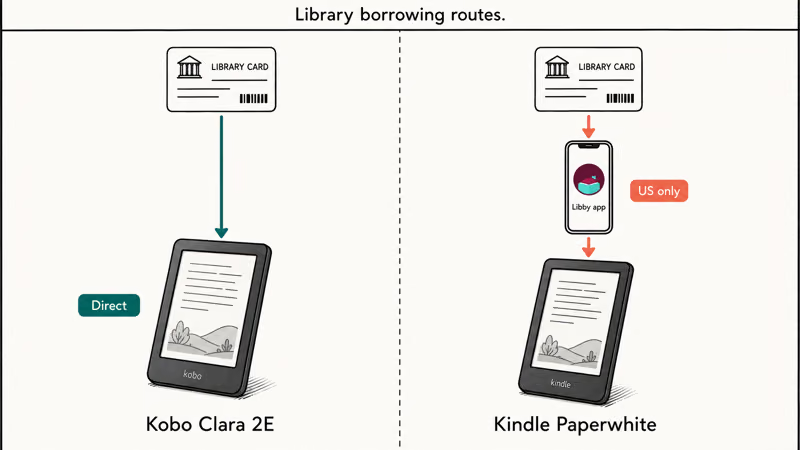
One taps direct, one routes through Libby.
For most US public library users, both readers work for borrowing English ebooks. Kobo edges ahead for non-US libraries, multiple library cards, and any non-Libby source like Project Gutenberg or Standard Ebooks.
#How Do You Borrow Library Ebooks on Each Reader?
On Kobo Clara 2E, you open the OverDrive tab in the home screen, sign in with your library card, search for a title, tap Borrow, and the book appears in your home library within seconds. The whole flow lives on the device.
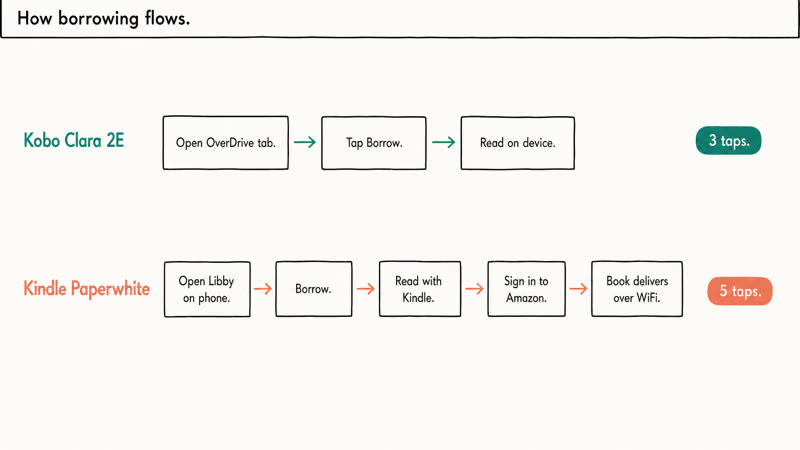
On Kindle Paperwhite, you open the Libby app on your phone (not the Kindle), borrow the title, tap “Read with Kindle,” sign in with Amazon, and the book pushes over WiFi. Our is Z-Library safe article covers the risks of pirate alternatives; stick with Libby. Amazon confirms that library Kindle delivery is supported in the 50 US states only on the Send to Kindle help page.
Native flow saves taps.
For deleting old library titles after the loan expires, our how to delete books from iBooks guide covers the broader cleanup workflow that applies across reader platforms.
#Bottom Line
For library-first readers, Kobo Clara 2E is the right pick. Native Libby and OverDrive support, open ePub plus 13 other formats, IPX8 waterproof, and the ComfortLight PRO warm light cover every library-borrowing scenario in one device. Add the 85 percent recycled plastic build and the sustainability story is real.
For readers already deep in the Amazon ecosystem, Kindle Paperwhite Signature Edition is the right pick. The 7-inch panel, 32GB storage, wireless charging, and Whispersync with Audible only make sense when you already buy from Amazon. Library borrowing works, but routes through a US-only Libby web bridge.
#Frequently Asked Questions
Can I borrow library books on a Kindle?
Yes, in the US only.
Does Kobo work with my local library?
Kobo Clara 2E works with public libraries that subscribe to OverDrive or Libby. International readers should check whether their specific library appears inside the Kobo OverDrive partner list in device settings before they buy, since OverDrive coverage varies by region.
How many library books can I borrow at once?
Most US libraries cap 5 to 10 simultaneous loans per card.
Do library ebooks have wait times?
Popular new releases at many public libraries can have hold queues, like physical copies on a hold shelf. Older backlist titles and classics are more likely to be available without a queue. Project Gutenberg classics are always free with zero hold queue and load directly on the Kobo via USB.
Can I read library ebooks on multiple devices?
Yes, the same loan syncs across all Kobo or all Kindle devices on your account.
What happens when a library loan expires?
The borrowed title disappears from the active reading shelf when the loan term ends. On Kobo, expired titles drop into a recently-returned area where you can re-borrow if available. On Kindle, the title vanishes from the home screen and you re-search Libby on your phone to place a new hold. Neither device charges any late fee, since the loan is automatic and the file becomes unreadable when the timer runs out.
Are library ebooks the same quality as Amazon purchases?
Yes, library and purchased ebooks ship identical DRM files.

Pixel 11 vs Pixel 10: What Changed and Who Should Upgrade
Pixel 11 vs Pixel 10: same screen and camera resolution, new Tensor G6, 25W wireless, and Gemini Intelligence. Here is who should actually upgrade.

Best Power Bank for iPad in 2026: Pro, Air, and Mini
Best power bank for iPad in 2026. Compare mAh tiers and USB-C PD wattage for iPad Pro, Air, and mini, plus airline Wh math, cables, and travel tips.

Best Power Bank With Built-In Cable: Top 2026 Picks
Best power bank with built-in cable picks for 2026. Compare single USB-C, multi-connector, and retractable laptop banks, plus airline Wh math.

Best Apple Watch Band for Working Out: Proven Picks
The best Apple Watch band for working out handles sweat and stays put on your wrist. Compare silicone, nylon, and titanium picks for runs and lifts.