How to Recharge Your TikTok Wallet: Coins and Pricing 2026
Learn how to recharge your TikTok wallet and buy coins on iPhone, Android, or the web. Step-by-step guide with pricing, payment methods, and tips.
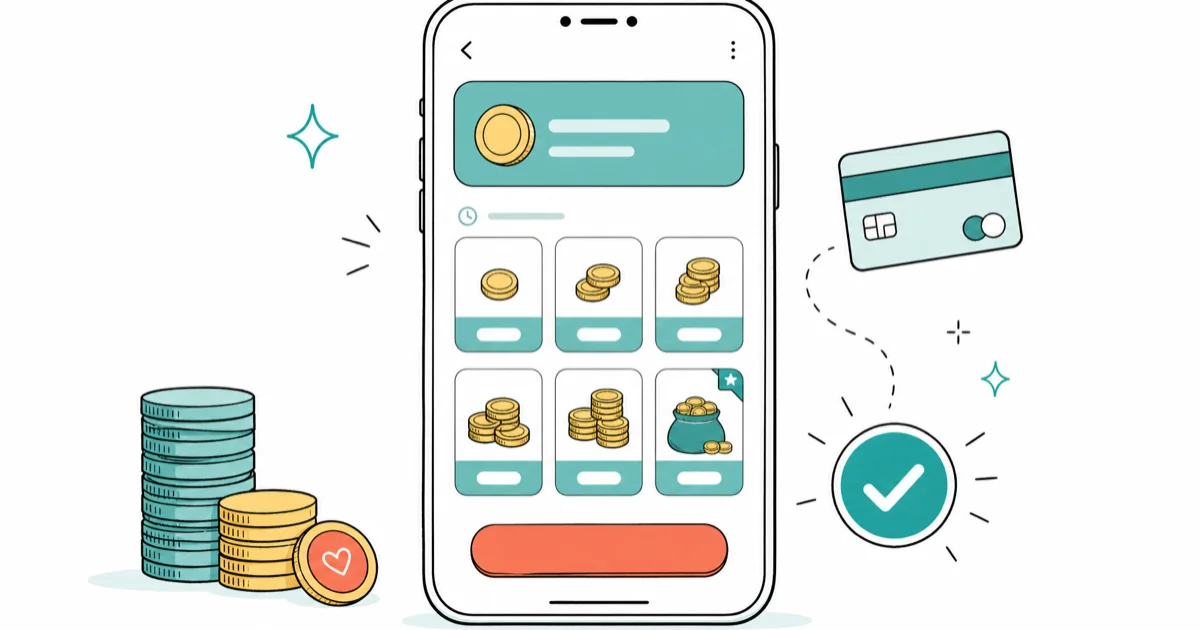
Quick AnswerTo recharge your TikTok wallet, open your profile, tap the menu icon, select Balance, then tap Get Coins. Choose a coin package ranging from $0.99 to $169.99, pick your payment method, and confirm the purchase. Coins appear in your wallet within seconds.
Recharging your TikTok wallet is how you buy TikTok coins, the virtual currency you need to send gifts during live streams and on videos. This guide covers the full recharge process on both iPhone and Android, with current pricing, payment options, and fixes for common issues.
- Buying coins through the TikTok website instead of the app saves roughly 25% because TikTok avoids the App Store or Google Play commission.
- Coin packages range from 70 coins for $0.99 to 17,500 coins for $169.99, with larger bundles offering up to 31% savings per coin.
- TikTok requires users to be 18 or older to purchase coins, and purchases are final with no refunds for unused coins.
- Coins appear in your wallet within seconds of a successful payment, and you can use them immediately during any live stream.
- Any website or app claiming to generate free TikTok coins is a scam designed to steal login credentials or install malware.
#How Do You Recharge Your TikTok Wallet?
Recharging means buying coins for your account. You’ve got three options as of 2026.
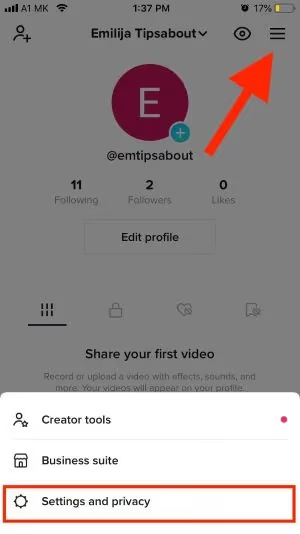
#Recharge Through the App
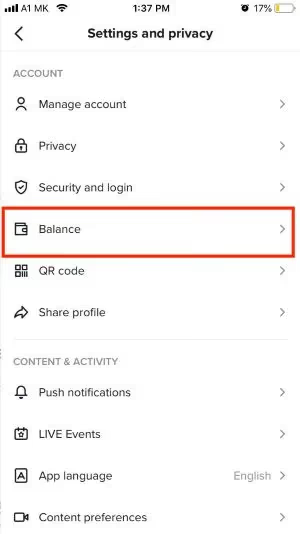
- Open TikTok and tap your Profile icon in the bottom right
- Tap the three-line menu icon (top right corner)
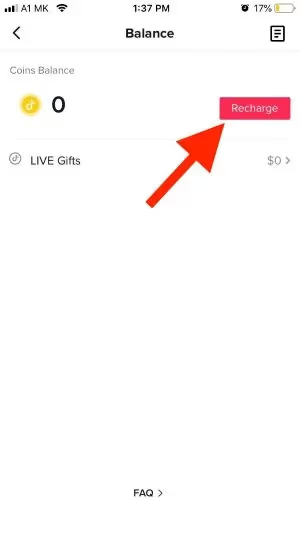
- Select Settings and Privacy, then tap Balance
- Tap Get Coins
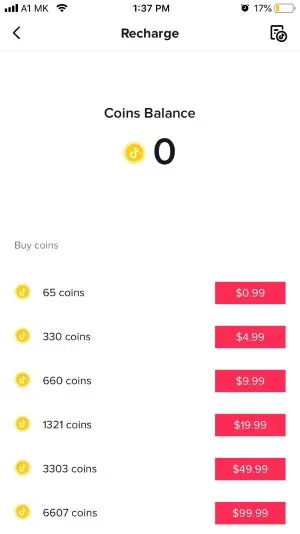
- Choose your coin package (70 to 17,500 coins)
- Select a payment method and tap Recharge
According to TikTok’s official coin page, you can also recharge directly during a live stream by tapping the gift icon and selecting Recharge at the bottom.
#Recharge Through the Website
Go to tiktok.com/coin, log in, pick a package, and complete checkout. Web purchases typically come out cheaper than in-app prices because TikTok avoids the standard app store commission. Apple’s App Store Small Business Program page states that the commission drops to 15% for qualifying small businesses, below the standard digital-purchase rate, and Google Play applies the same headline structure. The full rules sit in Apple’s App Store Review Guidelines.
#Redeem a Gift Card
Visit tiktok.com/coin/redeem and enter the PIN code from a TikTok gift card. Gift cards are available through Amazon and other retailers, though this option isn’t available in every country.
#TikTok Coin Packages and Pricing
TikTok offers several coin bundles. Prices shown are for US purchases through the app as of March 2026:
| Coin Package | Price (USD) |
|---|---|
| 70 Coins | $0.99 |
| 350 Coins | $4.99 |
| 700 Coins | $9.99 |
| 1,400 Coins | $19.99 |
| 3,500 Coins | $49.99 |
| 7,000 Coins | $99.99 |
| 17,500 Coins | $169.99 |
Buying in bulk saves money. The 17,500-coin package works out to about $0.0097 per coin, while the 70-coin pack costs $0.0141 per coin. That is a 31% savings at the top tier.
You can also purchase custom amounts up to $500 through TikTok’s website.
#What Can You Do With TikTok Coins?
Coins let you buy virtual gifts to send during TikTok live streams and on regular videos. According to TikTok’s support page for LIVE gifts, you tap the gift icon at the bottom of a live stream, browse available gifts, and confirm to send.
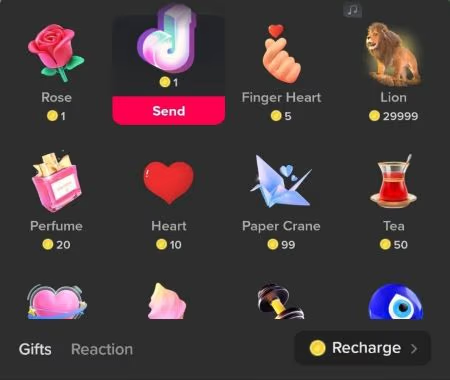
Gift prices vary widely across TikTok’s catalog:
- A Rose on TikTok costs just 1 coin, making it the most common entry-level gift.
- A Galaxy gift runs 1,000 coins for viewers who want to stand out.
- The TikTok Universe sits at the top at 34,999 coins (around $350).
Sending a gift during a live stream is nearly instant, from tapping the gift icon to delivery. The streamer sees your gift pop up on screen in real time, which is why sending likes on TikTok live and gifting are the two main ways viewers interact with creators.
Creators earn Diamonds from gifts they receive. According to TikTok’s Virtual Items Policy, Diamonds can be withdrawn as real money once a creator meets the minimum threshold, though the exact conversion rate varies by region. Wikipedia’s TikTok article tracks the broader monetization history and country-specific availability.
#Payment Methods for TikTok Recharge
TikTok accepts several payment options depending on your device and location:
- iPhone — Apple Pay, credit/debit card through the App Store, or Apple account balance
- Android — Google Pay, credit/debit card through Google Play, or carrier billing
- Web — PayPal, credit/debit card, and select regional digital wallets
PayPal is only available when purchasing through the TikTok website or as a linked payment method in your Google Play or Apple account. You won’t find a PayPal option directly inside the app.
The web payment route is worth considering. Through a desktop browser, TikTok charges a lower service fee compared to the App Store or Google Play, which typically take a 30% cut.
#TikTok Gift Card Options
Yes. You can use TikTok-branded gift cards or redeem Apple/Google Play gift cards as your payment method.
For TikTok gift cards, go to tiktok.com/coin/redeem and enter the PIN. For App Store or Play Store gift cards, add the balance to your Apple or Google account first, then use that balance when you tap Recharge inside the TikTok app.
Gift cards are a good option if you don’t want to link a credit card, or if you’re buying coins for someone under 18 who has age restrictions on their TikTok account.
#Troubleshooting a Failed TikTok Recharge
If your recharge isn’t going through, check these common causes:
Payment declined. Verify your card details and available balance. Some banks flag TikTok purchases as suspicious, so calling your bank’s fraud department can resolve it quickly.
Age restriction. Per TikTok’s policy, only verified users 18+ can buy coins.
Outdated app. Update TikTok to the latest version. On older app builds, the recharge button can stop responding until you update, so this is worth ruling out first.
Region restriction. Some countries restrict in-app purchases due to local regulations. Try recharging through the website instead.
Server issues. Wait 15-30 minutes and try again. TikTok occasionally experiences temporary outages that block purchases.
If none of these fixes work, contact TikTok Support through the app (Settings > Report a Problem) with a screenshot of the error.
#How to Get Free TikTok Coins
TikTok occasionally offers ways to earn coins without paying:
- Daily check-in rewards — Some users see a rewards section under their profile menu. Completing tasks like watching videos can earn small amounts of coins.
- Invite friends — TikTok’s referral program gives you bonus coins when someone signs up using your invite link and stays active.
- Promotional events — During holidays and special events, TikTok sometimes gives away free coins to active users.
- Treasure chests in live streams — During some live streams, treasure chests appear that let viewers claim a small number of coins.
Avoid any third-party website or app claiming to generate unlimited free coins. These are scams. TikTok coins have real monetary value (the same kind of virtual currency used in many social apps) and can’t be hacked or exploited. Never enter your TikTok password into any external tool.
If you want to check how TikTok Diamonds compare to coins, that is the creator’s side of the equation.
#Bottom Line
Start by recharging through the TikTok website if you want the best rates. Web purchases skip the 30% app store fee, which means your coins stretch further. For most people, the 700-coin or 1,400-coin package hits the sweet spot between value and spending control.
TikTok Tips & Tricks
#Frequently Asked Questions
How long does it take to receive coins after recharging?
Coins appear in your wallet within seconds of a successful payment. If they don’t show up after 5 minutes, close and reopen the app. Delays longer than that are rare.
Can you get a refund for unused TikTok coins?
No. All coin purchases are final. TikTok’s terms state that Virtual Items can’t be exchanged for cash, so only buy what you plan to use.
Do TikTok coins expire?
Coins don’t expire while your account stays active. However, if your account is permanently banned, deleted, or suspended for repeated policy violations, your coin balance is forfeited along with the account, and there’s no refund available from TikTok or the app store you bought through.
What is the cheapest TikTok coin package?
The smallest package is 70 coins for $0.99 in the app. On the website, prices may be slightly lower because TikTok doesn’t pay the app store commission on web purchases. Direct web checkout works in most regions, but you might see prices in your local currency rather than USD.
Can you transfer TikTok coins to another user?
You can’t send coins directly to another user’s wallet. The only way to share value is by sending gifts during a live stream or on a video. The recipient earns Diamonds, not coins.
How much does a TikTok Universe cost in coins?
The TikTok Universe gift costs 34,999 coins, roughly $350. It’s TikTok’s priciest gift.
Is it cheaper to buy coins on the website versus the app?
Yes. Website purchases typically save around 25% because TikTok avoids paying the App Store or Google Play commission. The savings often appear as bonus coins on larger packages rather than as a flat-rate discount. Bigger bundles get the biggest gap, so the 17,500-coin pack is where the web discount looks most noticeable.
Are TikTok coin generators real?
No. Every website or tool claiming to generate free TikTok coins is a scam designed to steal your login credentials or install malware. Only purchase coins through the official TikTok app or website.
How to Block TikTok on iPhone and Android: Parent Guide
Block or limit TikTok on your child's iPhone or Android using Screen Time, Family Link, and router settings. Step-by-step parental control guide.
TikTok Parental Controls: Setup Guide for Families
Set up TikTok parental controls using Family Pairing, Restricted Mode, and privacy settings. Step-by-step guide to protect your child on TikTok.
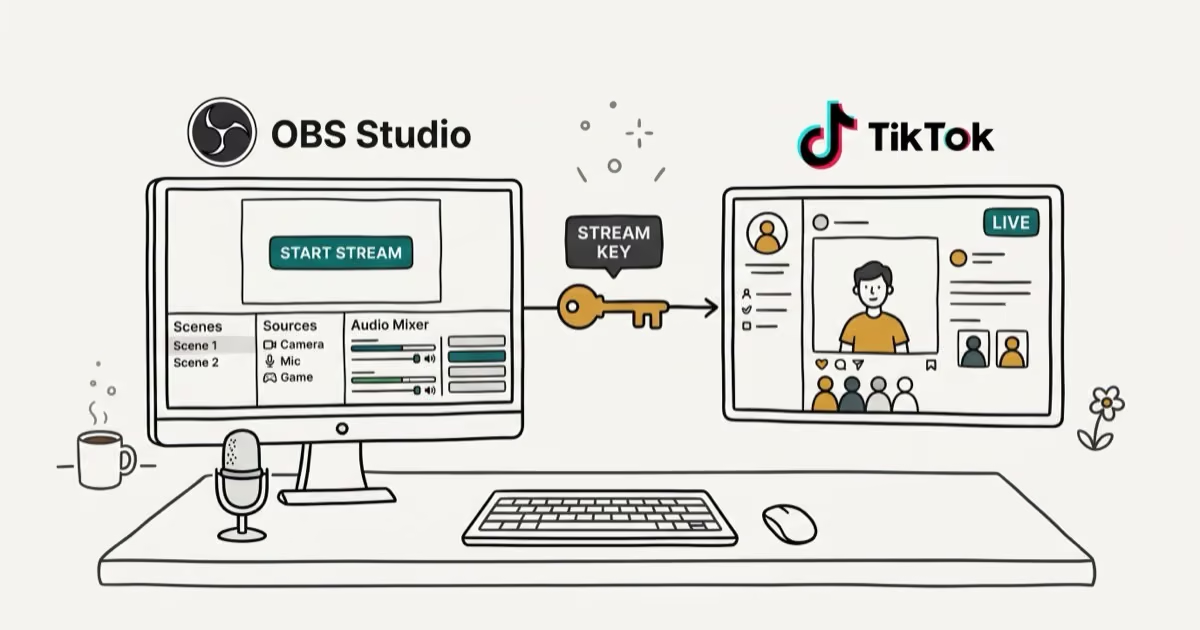
How to Get a TikTok Stream Key for OBS and Streamlabs
Get a TikTok stream key to broadcast from OBS or Streamlabs. Covers the 1,000-follower requirement, CarterPulse application, and OBS setup steps.
How to Make a Joint TikTok Account With Friends (2026)
Set up and manage a joint TikTok account with friends. Covers shared login setup, content planning, security tips, and the Collaboration Post alternative.