iPhone Configuration Utility: What to Use Instead in 2026
iPhone Configuration Utility was retired in 2013. Apple Configurator 2 replaces it for iOS devices. Here's the 2026 download path and IT alternatives.
Quick AnswerApple discontinued iPhone Configuration Utility in 2013 and no longer offers a download. Use Apple Configurator 2 on a Mac to create and deploy configuration profiles for iOS devices that your organization owns or supervises.
Apple’s iPhone Configuration Utility (iPCU) is a discontinued IT admin tool that once let you build and push configuration profiles to company-owned iPhones over USB. Apple stopped updating it after version 3.6.2 in March 2013, and the original installer no longer ships from the Apple Developer downloads page. If you landed here looking for the link, the supported path in 2026 is Apple Configurator 2 on a Mac, paired with an MDM service for fleet management.
- iPhone Configuration Utility was retired in 2013 and doesn’t support iOS 7 or later.
- Apple Configurator 2 is the official replacement and runs only on macOS 10.15.6 or later, free from the Mac App Store.
- Most IT teams pair Apple Configurator 2 with an MDM service like Jamf, Intune, or Mosyle for ongoing fleet management.
- Apple Business Manager (formerly DEP) is required to auto-enroll devices that you didn’t physically connect to a Mac.
- Configuration profiles still use the .mobileconfig format, but iOS 14 and iOS 17 tightened signing and validation rules.
#What Was iPhone Configuration Utility?
Scope note: this guide is for legitimate IT use on devices you own or that your employer authorized you to manage. Pushing profiles without consent can violate federal or state privacy law and company policy.
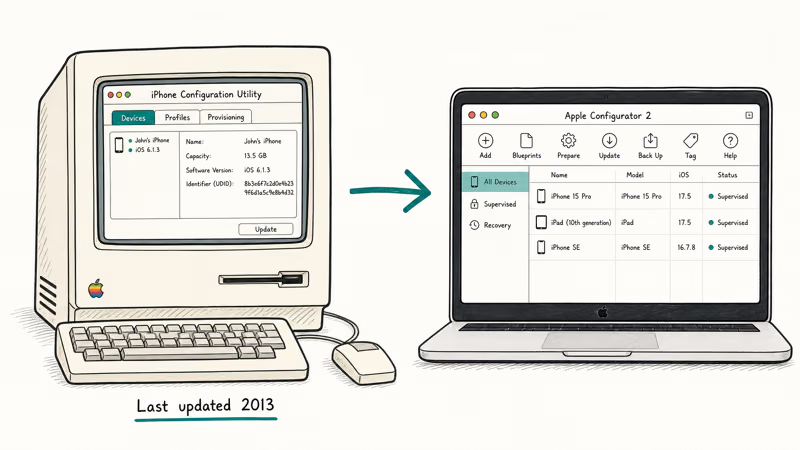
iPhone Configuration Utility was Apple’s first desktop tool for IT admins, released alongside iPhone 3G in 2008. It ran on Windows XP, Windows Vista, Windows 7, and Mac OS X 10.5 through 10.7, and it let you build XML-based configuration profiles for Wi-Fi, VPN, Exchange email, passcode rules, and restrictions.
The interface had four panes: Configuration Profiles, Provisioning Profiles, Applications, and Devices. You’d plug an iPhone in over USB, switch to the Devices pane, drag a profile across, and the iPhone would install it after the user accepted a trust prompt. Apple’s own documentation lists the final build (3.6.2, March 2013), which targeted iOS 6 and never gained iOS 7 compatibility.
#What Replaced iPhone Configuration Utility?
Apple replaced iPCU with two distinct tools and a separate fleet-management framework. Each one covers a different scenario.
| Tool | What it does | When to pick it |
|---|---|---|
| Apple Configurator 2 | Local Mac app for hands-on iPhone, iPad, Apple TV, and Vision Pro setup | One-off or small-batch device prep |
| Apple Business Manager | Web portal that links serial numbers you bought to your MDM | Devices you didn’t physically connect |
| Third-party MDM (Jamf, Mosyle, Intune, Kandji) | Cloud service that pushes profiles, apps, and policies over the air | Ongoing fleet management |
Table 1: The three tools that collectively replace iPhone Configuration Utility, grouped by use case.
Apple Configurator 2 inherits the .mobileconfig export from iPCU, so older profiles still open as long as they pass current signing rules. According to Apple’s Apple Configurator 2 user guide, you can supervise devices, restore iOS firmware, install configuration profiles, and prepare a device for Automated Device Enrollment using a Mac and a USB cable.
Apple Business Manager handles the part iPCU never could: assigning serial numbers you bought through Apple or an authorized reseller to your MDM without ever touching the device. Apple’s Platform Deployment guide confirms that Automated Device Enrollment requires both an MDM service and an Apple Business Manager (or Apple School Manager) account linked to your organization.
Third-party MDM services talk to iPhones over Apple’s MDM protocol. Apple recommends pairing Apple Configurator 2 with an MDM solution for any organization larger than a single classroom or help desk.
#How to Download Apple Configurator 2
Apple Configurator 2 is free on the Mac App Store. It runs on macOS 10.15.6 or later and weighs about 90 MB.
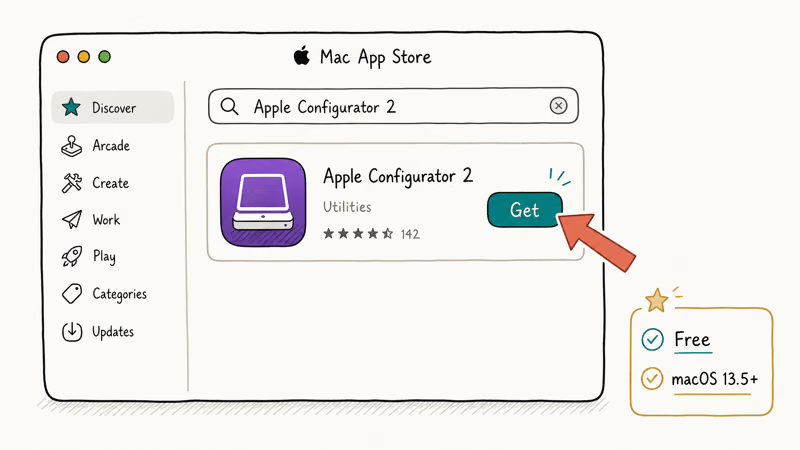
- Open the Mac App Store on a Mac running macOS Catalina or newer.
- Search for “Apple Configurator 2.”
- Click Get, then Install. You’ll sign in with your Apple ID if prompted.
- Launch the app from Applications.
- Connect an iPhone or iPad over USB.
Apple Configurator 2 version 2.18 on the Mac App Store uses the same basic trust handshake as older USB management tools. The first time you connect a device, you have to tap Trust on the iPhone and enter the passcode.
If you don’t have a Mac, there’s no Windows or Linux equivalent that Apple supports. The Windows iPCU installer is no longer available from the Apple Developer site, and the legacy .msi files you’ll find on third-party mirrors aren’t signed or maintained.
#How Apple Configurator 2 Differs From iPCU
The two tools share a name pattern and a profile format, but the day-to-day workflow has shifted hard toward fleet operations. Three changes matter most for someone migrating off iPCU: profile signing is now mandatory, device supervision became a first-class feature that unlocks restrictions iPCU never exposed, and the USB-only model turned optional because Configurator 2 can prepare a device for Automated Device Enrollment over Wi-Fi instead of a cable.
If you’re moving an old fleet across, expect to re-sign legacy profiles and recheck restrictions against current iOS payload keys. Profiles older than iOS 10 sometimes carry payload types that Configurator 2 imports as read-only, and a few (notably the original Exchange ActiveSync payload) drop on save.
#Running the Original iPCU on Modern Hardware
Technically you can still run iPCU on legacy hardware, but it falls apart in practice for any current device. Here’s what you’d hit if you tried.
The 3.6.2 Windows installer needs .NET Framework 3.5 SP1 and Apple Mobile Device Support, both of which still load on Windows 10 and Windows 11 when iTunes is present. The Mac build was last signed for OS X Lion (10.7) and won’t open on Apple Silicon Macs because it’s a 32-bit binary that Rosetta doesn’t translate.
Even if you get the program to launch, the deal-breaker is iOS compatibility. iPCU writes .mobileconfig files using a schema that iOS 7 and later won’t accept without re-signing through a Configurator-aware certificate. Unsigned or expired legacy profiles can trigger “Profile Installation Failed” errors on current iOS releases.
Some teams keep a Windows 7 VM for legacy iPhone 4 or 4S inventory. For modern options, see our guide on how to find UDID on iPhone.
#What IT Admins Should Do Instead in 2026
For most teams, the deployment chain that replaces iPCU end to end looks like this:
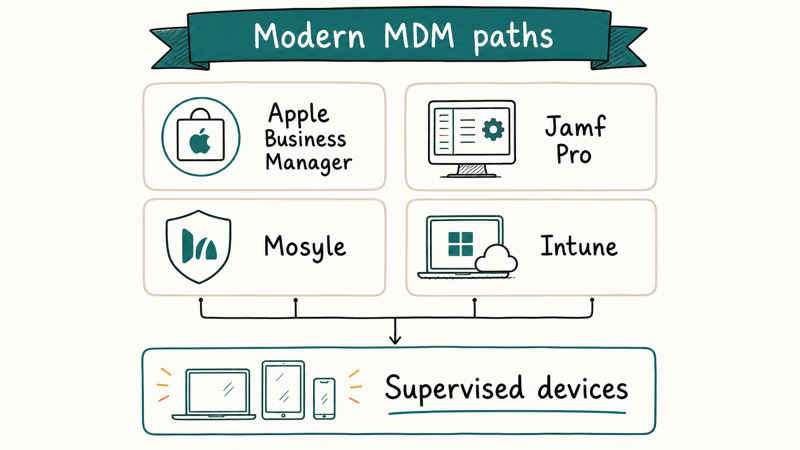
- Buy through Apple Business Manager so devices auto-enroll into your MDM the first time they hit Wi-Fi.
- Run Apple Configurator 2 on a Mac for anything you need to wipe, supervise, or restore manually.
- Use an MDM service to push profiles, apps, and security policies over the air.
Apple’s Platform Deployment guide states that Automated Device Enrollment, the modern equivalent of dragging a profile across in iPCU, requires both an MDM and an Apple Business Manager account. The MDM owns ongoing commands; Configurator 2 fills the gap when a device is offline, broken, or freshly imaged at a help desk. Skipping the MDM step is what gets teams stuck rebuilding profiles by hand the way iPCU forced them to.
When users ask why the Profiles and Device Management row is missing from their iPhone Settings, it’s because no profile is installed yet. iOS only shows that row after a configuration profile lands on the device.
If your team is cleaning up legacy deployments, you’ll also see the Untrusted Enterprise Developer prompt and the need to remove old Jamf MDM profiles when devices get reassigned. Both are certificate-trust artifacts from older enrollments, not Configurator 2 bugs.
#Bottom Line
If you came here for an iPCU download link, stop searching. The supported 2026 path is Apple Configurator 2 plus an MDM. Download Configurator 2 from the Mac App Store, sign up for Apple Business Manager if you buy iPhones in volume, and pick an MDM that fits the team size: Jamf for large enterprises, Mosyle or Kandji for SMB and education. For one-off help-desk work, a Mac mini and a USB hub handle what iPCU used to do.
If a leftover iPCU profile is stuck on a device, our walkthrough on removing a management profile from an iPhone covers the steps end users need.
#Frequently Asked Questions
Is iPhone Configuration Utility still available from Apple?
No. Apple pulled it from the developer downloads page after iOS 7 shipped, and the old support article now redirects to the Apple Configurator 2 product page. The final build is 3.6.2 from March 2013, and any link you find on a third-party mirror isn’t sanctioned by Apple. Those legacy installers also fail on current iOS because the signing rules tightened in iOS 14.
Does Apple Configurator 2 work on Windows?
No, Apple Configurator 2 is Mac-only. It’s a native macOS app distributed through the Mac App Store. Microsoft Intune is the closest equivalent for Windows-centric IT teams, though it manages devices over the air rather than over USB.
Can I open .mobileconfig files I created in iPCU?
Sometimes. Apple Configurator 2 can open older .mobileconfig profiles, but payloads that iOS no longer supports may drop silently during import or need review before saving. Re-saving the profile in Configurator 2 re-signs it for current iOS releases.
Is there a free MDM I can use instead of iPCU?
A few options exist. Apple Business Essentials starts with a basic MDM tier for small businesses, Mosyle Manager has a free tier capped for K-12 education, and Microsoft Intune is bundled with several Microsoft 365 business plans. None of them work over USB the way iPCU did, but they handle far more devices and stay current with each iOS release.
Why does my iPhone show “Profile Installation Failed”?
Most often, the profile is unsigned or expired. iOS 14 requires every configuration profile to be signed by a recognized certificate before it can install.
Do I still need iPCU for older iPhones like the 4S or 5?
Not unless those devices are stuck on iOS 6. Any iPhone running iOS 7 or later works with Apple Configurator 2 instead.
What replaced the Provisioning Profiles tab in iPCU?
That tab handled internal app distribution for enterprise developers. Today, Apple Business Manager’s Custom Apps and the Apple Developer Enterprise Program cover private app deployment. The underlying provisioning step was folded into Xcode’s signing workflow years ago, so a dedicated UI no longer exists outside Xcode itself.

Mac mini M6 vs M5 Pro: Which Model Should You Buy?
Mac mini M6 vs M5 Pro compared on price, memory, ports, displays, and real workloads. Find the better 2026 Mac mini for your desk and budget.

Apple Siri Settlement: Who Qualifies and How to Claim
Apple's $250 million Siri settlement covers iPhone 15 Pro and iPhone 16 models bought June 2024 to March 2025. See who qualifies and how claims work.

iOS 26.6.1 Security Update: What Apple Fixed and Who Gets It
Apple released iOS 26.6.1 on August 17 with 29 security fixes, including an IPSec interception bug. See what it patches, who gets it, and how to update.

iPhone Adaptive Power: How It Works and When to Use It
Learn how iPhone Adaptive Power works, which models support it, what it changes, and when Low Power Mode is still the better battery-saving choice.