Best USB Microphone for Streaming 2026: OBS-Ready Picks
Best USB microphones for streaming 2026: Wave 3, QuadCast S, Yeti, MV7+ ranked across Twitch and OBS workflows for clipping, mixing, and mute control.
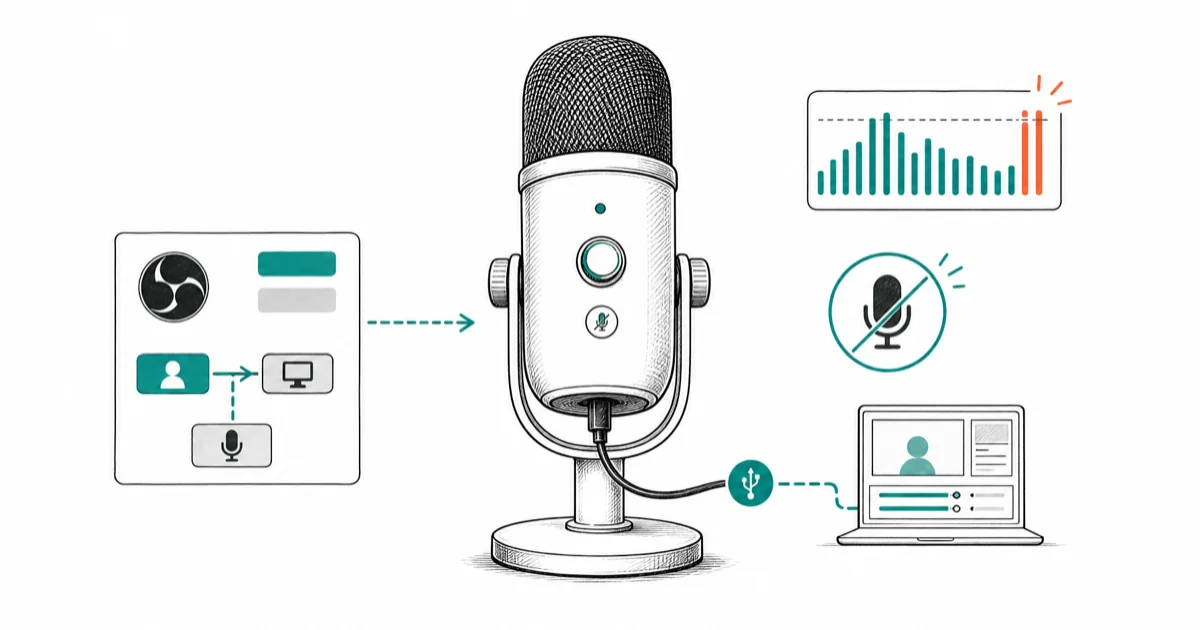
Quick AnswerFor Twitch streaming the Elgato Wave 3 is the top USB mic in 2026: Clipguard handles loud reactions, Wave Link routes a separate OBS mix, and tap-mute is silent.
Streaming USB mics live or die on three things: peak handling on loud reactions, audio routing into OBS, and silent mute control mid-sentence. Most “best streaming mic” lists ignore these jobs and rank by mic-arm aesthetics or RGB.
This guide compares four flagship USB mics by peak handling, OBS routing, room rejection, mute ergonomics, and platform support.
- The Elgato Wave 3 is the streamer’s pick because Clipguard captures parallel low-gain audio so a sudden scream or sound-effect spike never distorts the broadcast
- HyperX QuadCast S adds tap-to-mute on the top capsule, a built-in pop filter, and shock mount for the lowest total cost of ownership
- A condenser mic in an untreated room sends keyboard clatter to your viewers, so dynamic alternatives like the Shure MV7+ are worth the upgrade for streamers in noisy rooms
- Wave Link routes up to 9 audio sources into 2 separate mixes, so OBS gets a different blend than your headphones for cleaner stream audio
- The Blue Yeti remains the best entry-point mic for new streamers because plug-and-play on PS5, Mac, and Windows means no driver fights at 2am
#What Makes a USB Microphone Right for Streaming?
Streaming workloads differ from podcast workloads in four measurable ways: peak handling, mute control, mix routing, and game audio bleed. According to Wikipedia’s microphone overview, microphones convert sound into signals, so voice clarity depends on capture pattern and placement before software cleanup.
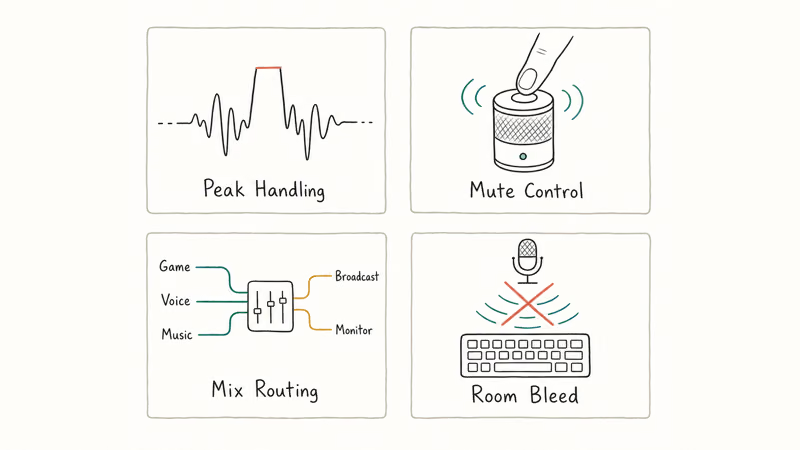
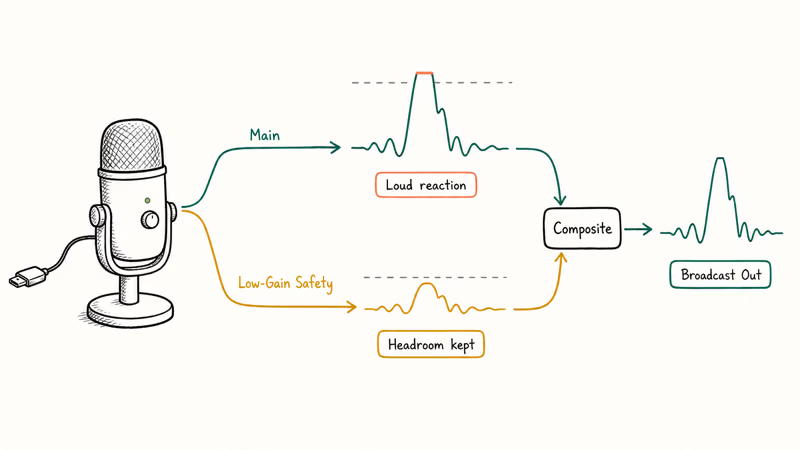
Peak handling matters because streams have unpredictable loud moments. A jump scare reaction, a sudden shout at a clutch play, or a sound-effect drop can clip a mic that handled spoken voice cleanly all stream. The Elgato Wave 3’s Clipguard system captures a parallel low-gain track and composites both signals to prevent distortion, which is the single biggest mic-side improvement for high-energy streams.
Mute control is the streamer ergonomic everyone underestimates.
Mix routing decides what your viewers hear versus what you hear in your headphones. Wave Link and VoiceMeeter both split audio sources into independent mixes, which is essential when you want game music quieter for chat but louder in your own monitors.
Game audio bleed is the silent killer of stream quality.
A condenser mic in an untreated room picks up keyboard clatter, fan whine, and Discord notifications from your speakers if you forget the headphones. Dynamic mics like the Shure MV7+ reject room sound far better, which is why they dominate professional podcast networks and increasingly show up in serious Twitch setups.
#Which USB Microphone Is the Best Twitch Pick?
The Elgato Wave 3 is the streamer’s pick.
Clipguard, Wave Link, the silent capacitive tap-mute, and a USB-C connection that just works on every modern PC make it the mic we recommend first for anyone serious about Twitch or YouTube Live.
- Clipguard prevents distortion on loud streams
- Wave Link routes up to 9 audio sources cleanly
- Tap-mute on top is convenient and silent
- Sleek desktop footprint vs Yeti
Last updated on May 27, 2026
As an Amazon Associate fone.tips earns from qualifying purchases. Prices and availability on Amazon are accurate as of the date above and subject to change.
Clipguard’s value is loud-reaction protection: it captures a parallel low-gain signal so sudden co-op shouts don’t have to redline the broadcast.
Wave Link is the second standout, and it’s the reason serious streamers stay with Elgato once they start.
It routes nine independent audio sources (game, chat, voice, browser, music, alerts, plus extras) into two separate mixes so OBS receives a different blend than your headphones do. Compared to VoiceMeeter, the Elgato app is dramatically easier to set up for non-engineers without sacrificing the routing depth that streamers actually use during live broadcasts.
The capacitive tap-mute on top is silent and instant. There’s no mechanical click when you mute, which the Yeti can’t match.
For a full streaming PC build context, see our best streaming PC guide. The best 4K webcam for streaming breakdown covers the camera side.
Voice-chat routing problems often get blamed on the mic when the real fix is in Discord settings. Our Discord screen share walkthrough handles the common offenders, and our Discord stream no sound guide tackles the next layer when audio drops entirely.
Where the Wave 3 loses ground is in untreated rooms with hard floors and bare walls, where its condenser pattern picks up more ambient noise than a dynamic alternative would. Streamers with that setup should pay up for the MV7+ further down this list, or read our broader best USB microphone 2026 roundup to compare picks across podcast, voice, and stream workloads.
#Best Value Streaming USB Microphone: HyperX QuadCast S
The HyperX QuadCast S is the best-value streaming mic for gamers who want one mic that handles streaming, Discord, and party chat. RGB lighting, built-in pop filter, anti-vibration shock mount, and a tap-to-mute capacitive sensor are all in the box.
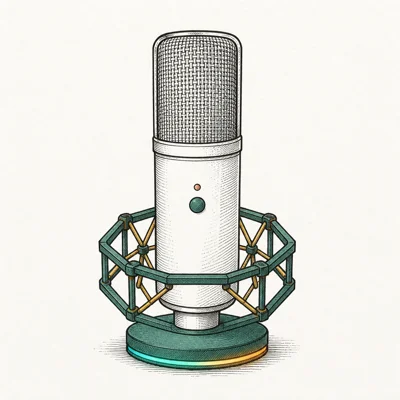
- Tap top to mute — fastest mute control on the market
- Built-in pop filter and shock mount included
- RGB syncs with HyperX NGENUITY game peripherals
- Four polar patterns for any recording need
Last updated on May 27, 2026
As an Amazon Associate fone.tips earns from qualifying purchases. Prices and availability on Amazon are accurate as of the date above and subject to change.
QuadCast S’s large top tap-to-mute pad beats smaller mute controls because you can hit it without looking mid-stream.
The four polar patterns matter for streamers who occasionally record in-person guest segments. Cardioid for solo, stereo for ambient game audio, bidirectional for face-to-face guest interviews, omni for room ambience — most streamers stay on cardioid, but the optionality keeps a guest seat plug-and-play.
NGENUITY RGB sync is the gamer-aesthetic feature that the Wave 3 deliberately skips. If your battlestation already runs HyperX or Razer Chroma peripherals, the QuadCast S blends in without breaking the lighting theme.
Build quality is the only place the QuadCast S trails the Wave 3.
The plastic body shows scuffs faster, and the included desk stand picks up keyboard vibration on a glass or hardwood desk. Both are fixable with a $30 boom arm upgrade that any serious streamer should already own.
#Blue Yeti for Streaming: The Entry Point
The Blue Yeti is the entry-point streaming mic.
It’s been the default Twitch mic for over a decade because plug-and-play on PS5, Mac, and Windows means no driver fights at 2am when you’re going live in five minutes and the stream queue’s full of viewers already waiting in chat.

- Four polar patterns cover any recording scenario
- Plug-and-play on Mac, Windows, PS4/PS5
- Solid metal build holds up for years
- Massive third-party accessory ecosystem
Last updated on May 27, 2026
As an Amazon Associate fone.tips earns from qualifying purchases. Prices and availability on Amazon are accurate as of the date above and subject to change.
The Yeti’s metal build is the reason it stays on desks long after newer mics get retired. It can handle cable tugs and daily desktop use better than many plastic USB mics.
The mechanical mute switch is the Yeti’s biggest weakness on a live stream.
You’ll hear a faint click in the broadcast every time you toggle, which is fine for podcast post-processing but obvious during a live Twitch broadcast. Streamers who hit mute hundreds of times per session over a single stream notice the cumulative noise, and the workaround is a soft-touch in OBS or a hardware mute that lives outside the mic body itself.
Where the Yeti still wins is total ecosystem cost. Wirecutter’s USB microphone guide recommends the Yeti as the gateway pick and confirms that the third-party accessory market (shock mounts, boom arms, pop filters) is the deepest in the category, often half the price of brand-matched alternatives.
#Best USB Microphone for Streaming in a Noisy Room: Shure MV7+
The Shure MV7+ is the streaming pick for noisy rooms.
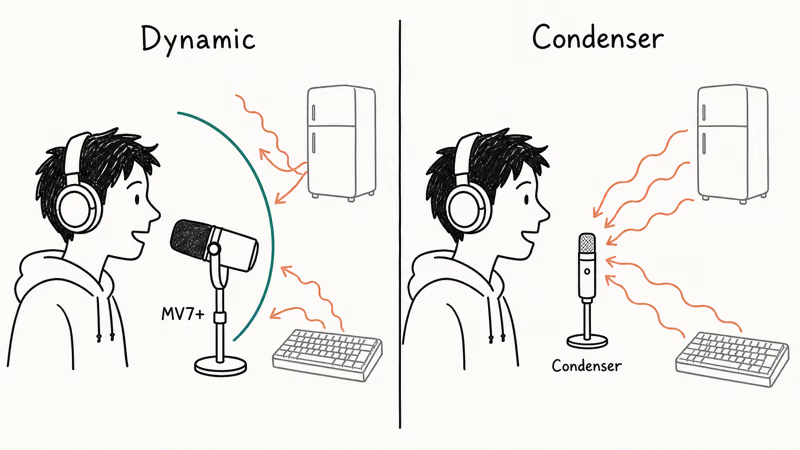
Dynamic capsules reject room sound the way condensers can’t, and the onboard DSP plus auto-level handle the parts a streamer doesn’t want to think about between matches.
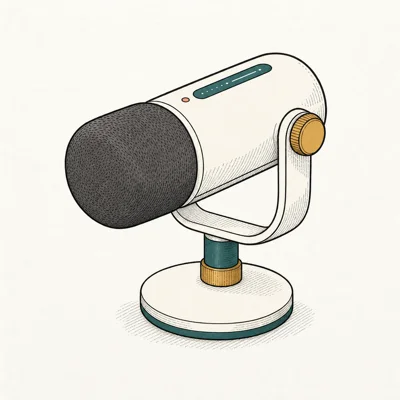
- Dual USB-C and XLR future-proofs your setup
- Built-in DSP and auto-level help non-engineers
- Voice isolation handles untreated rooms well
- Real-time denoiser via MOTIV app
Last updated on May 27, 2026
As an Amazon Associate fone.tips earns from qualifying purchases. Prices and availability on Amazon are accurate as of the date above and subject to change.
The MV7+‘s dynamic capsule and onboard DSP are built for noisy rooms, rejecting background hum more effectively than condenser mics at close speaking distance.
According to Shure’s MV7+ product page, the onboard DSP runs auto-level gain, voice isolation, and a real-time denoiser locally rather than as a software plugin. That matters for streamers because plugin-based denoisers add CPU overhead exactly when your game needs every frame you can spare for the broadcast.
The dual USB-C/XLR output is the long-term upgrade path the Wave 3 doesn’t offer.
Start on USB-C into your streaming PC. Later, when you add a Rodecaster Duo or Focusrite Scarlett, the same mic moves to XLR without buying a replacement, and the voice profile your audience already knows stays consistent across the hardware migration.
The trade-off is price. The MV7+ costs nearly twice what the QuadCast S charges, and for streamers in treated rooms or quiet apartments, the QuadCast S or Wave 3 condenser path is the better spend until room treatment becomes the bottleneck.
#How to Route Streaming Audio for Cleaner Broadcasts
Audio routing decides what your viewers hear, and most stream-mic complaints actually trace to routing problems, not the mic itself.
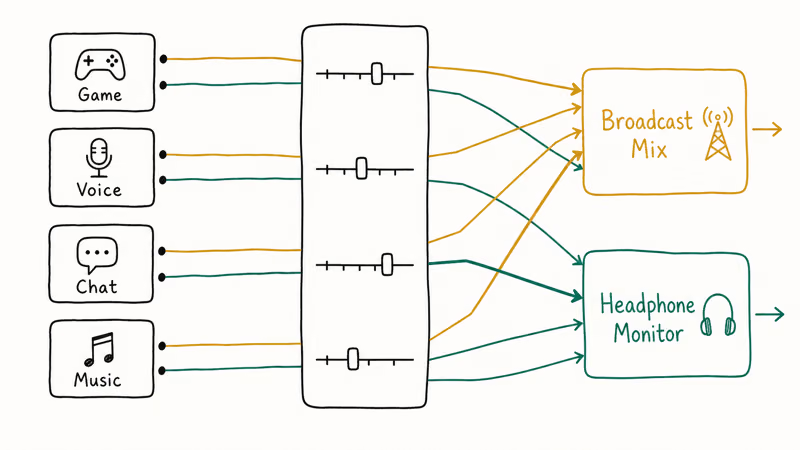
OBS Studio’s default audio settings send everything to a single bus. That means game audio, voice, browser sound, and notifications all sit at the same level, and when you turn down the game so chat can hear you, your own headphones get quiet too. Wave Link, VoiceMeeter, and Elgato Stream Deck all solve this by creating a second monitor mix that’s independent from the broadcast mix.
For Twitch specifically, Stream Deck’s audio scenes let you switch broadcast mixes per game. No more manual OBS re-balancing every time you launch a new title, and the saved scenes survive PC restarts.
Headphones matter more than streamers admit. Closed-back headphones prevent monitor audio bleed into the mic, and open-back studio headphones (popular for music production) make your stream sound echoey even on the best mic in the lineup.
#Bottom Line
Elgato Wave 3 is the streamer’s pick. Clipguard, Wave Link routing depth, the silent capacitive mute, and a USB-C connection that works on every modern streaming PC make it the mic we recommend first for serious Twitch broadcasters who want one piece of hardware to handle the audio side without compromise.
The HyperX QuadCast S is the best-value alternative if Wave Link feels like overkill.
For streamers in noisy or untreated rooms, the Shure MV7+ is the upgrade that fixes the room-sound problem condensers can never beat, with the bonus of a USB-to-XLR upgrade path baked into the same hardware.
The Blue Yeti stays in the lineup as the entry-point pick for new streamers who want a forgiving mic at the lowest plug-and-play cost.
#Frequently Asked Questions
Is the Elgato Wave 3 better than the Blue Yeti for streaming?
Yes for serious streamers.
Clipguard prevents distortion on loud stream moments that would clip the Yeti, Wave Link handles multi-source audio routing the Yeti can’t touch, and the silent capacitive mute beats the Yeti’s mechanical click on a live broadcast. The Yeti is still cheaper and plug-and-play on PS5, so it stays the right pick for new streamers who haven’t built their setup out yet.
Do I need Wave Link if I already have OBS Studio?
OBS handles the broadcast mix but doesn’t split your headphone monitor from the broadcast.
Wave Link gives you that second independent mix, which means you can turn game music down for chat without quieting it in your own headphones. For solo streamers it’s optional. For multi-source setups (game, Discord, music, alerts) it’s the workflow upgrade most viewers and streamers notice immediately.
What’s the difference between a dynamic and condenser USB mic for streaming?
Dynamic mics (Shure MV7+) reject room sound far better.
Condenser mics (Wave 3, QuadCast S, Yeti) pick up more detail but also more ambient noise. For streams in treated rooms or quiet apartments, condensers sound richer. For streams in noisy rooms with hard floors and bare walls, dynamic is the only honest pick.
Will the HyperX QuadCast S work on PS5?
Yes. The QuadCast S is plug-and-play on PS5 with no driver install. PS5 detects USB Audio Class 2.0 mics natively and routes them through the party chat system, so console streamers don’t need a capture card audio loop just to get clean voice into Twitch.
Can I use a streaming USB mic for podcast recording?
All four mics in this roundup work for podcasts, but the priority order changes.
For podcasts you’d put the MV7+ first for untreated rooms or the Yeti for treated solo work. The Wave 3 still records clean podcast audio, but you’re paying for streamer features (Clipguard, Wave Link) that you won’t use during a one-take podcast session.
What’s the best mute control for streaming?
Tap-to-mute capacitive sensors beat mechanical switches.
The HyperX QuadCast S and Elgato Wave 3 both have silent tap-to-mute that doesn’t click into the broadcast. The Blue Yeti’s mechanical switch bleeds a faint click, which adds up over hundreds of mute toggles per session.
Do streaming USB mics work with a Mac for streaming on macOS?
Yes. All four mics in this roundup work plug-and-play on macOS Sequoia and later with no driver install. Wave Link and ShurePlus MOTIV both ship Mac versions of their companion apps, so feature parity with Windows is intact for serious Mac streamers running OBS or Streamlabs Desktop natively.

Pixel 11 vs Pixel 10: What Changed and Who Should Upgrade
Pixel 11 vs Pixel 10: same screen and camera resolution, new Tensor G6, 25W wireless, and Gemini Intelligence. Here is who should actually upgrade.

Best Power Bank for iPad in 2026: Pro, Air, and Mini
Best power bank for iPad in 2026. Compare mAh tiers and USB-C PD wattage for iPad Pro, Air, and mini, plus airline Wh math, cables, and travel tips.

Best Power Bank With Built-In Cable: Top 2026 Picks
Best power bank with built-in cable picks for 2026. Compare single USB-C, multi-connector, and retractable laptop banks, plus airline Wh math.

Best Apple Watch Band for Working Out: Proven Picks
The best Apple Watch band for working out handles sweat and stays put on your wrist. Compare silicone, nylon, and titanium picks for runs and lifts.