Best USB Hub 2026: Top USB-C Hubs and Docks Picked
Best USB-C hub in 2026 by port needs. We pick top hubs and docks for HDMI, ethernet, and PD passthrough, and explain TB4 versus plain USB-C.
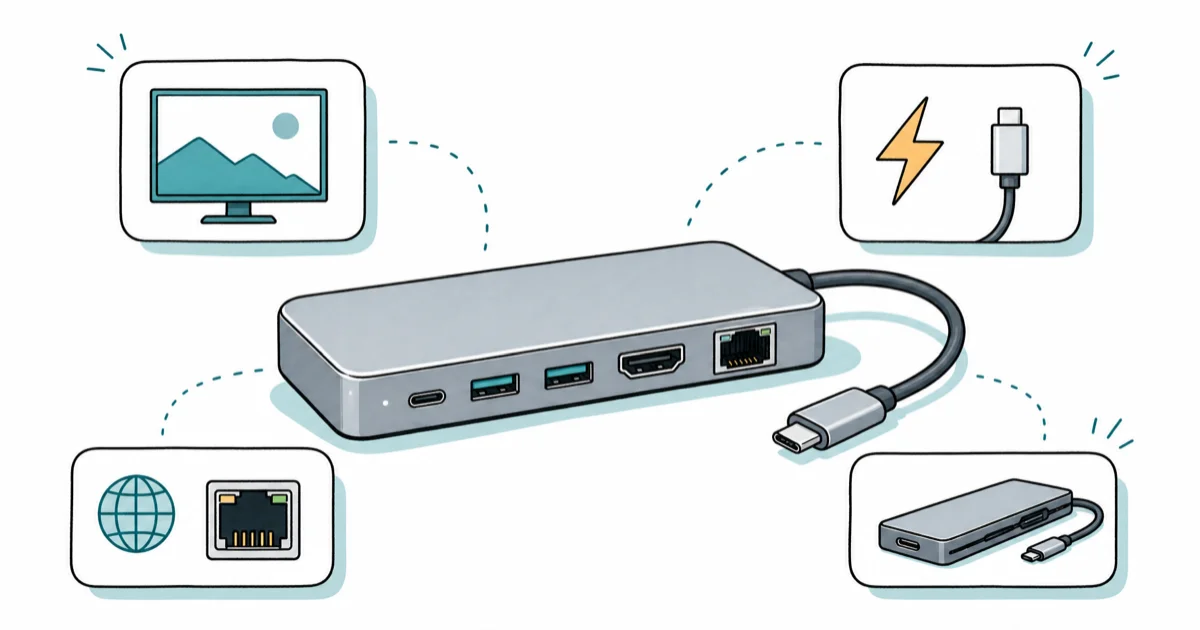
Quick AnswerThe best USB-C hub for most people in 2026 is a Thunderbolt 4 dock like the UGREEN Revodok Max 213, while a slim bus-powered hub like the Satechi USB4 adapter suits travel.
The best USB hub in 2026 depends on whether you want a slim travel adapter or a powered desk dock, and for a permanent setup that’s a Thunderbolt 4 dock like the UGREEN Revodok Max 213. Match the hub to the ports you actually need, not the longest spec list. This guide compares slim travel adapters with powered desk docks so you can match the hub to your ports and laptop.
- A bus-powered hub draws power from your laptop and suits travel, while a dock has its own power supply and charges your laptop.
- Thunderbolt 4 and USB4 carry 40Gbps and can drive dual high-resolution displays, far more than plain USB-C hubs.
- Power delivery passthrough is the feature that lets a dock charge your laptop, so check the wattage against your machine.
- Mac users should favor Thunderbolt-certified docks with firmware updates, while Windows users have cheaper hub options.
- Ethernet matters if you want a stable wired connection, since cheaper hubs often skip it entirely.
#Our Top USB-C Hub and Dock Picks for 2026
We grouped picks by how you connect. A desk-anchored workstation, a backpack traveler, and a budget single-monitor setup all want different hardware.
#UGREEN Revodok Max 213
This is the value standout for a full desk dock. The UGREEN Revodok Max 213 is a Thunderbolt 4 dock that drives dual 4K displays and even takes a 2242 NVMe drive so it doubles as fast storage.
As an Amazon Associate fone.tips earns from qualifying purchases.
Its Thunderbolt 4 layout targets a two-monitor desk over one cable. Tom’s Guide found that the Revodok Max 213 packs 13 ports, including three 40Gbps Thunderbolt 4 connectors, in its Revodok Max 213 review. It pairs well with a desk display from our best monitor guide.
#CalDigit TS4
The CalDigit TS4 is the pro pick for Mac support, 98W charging, and 2.5GbE ethernet.
Tom’s Guide states that the TS4 maxes out at 18 ports, more than any rival on our list, in its MacBook dock coverage. CalDigit’s frequent firmware updates are the reason Mac users keep buying it over cheaper hubs.
#Should You Buy a USB-C Hub or a Dock?
This is the first decision, and it changes everything else. The two look similar but solve different problems.
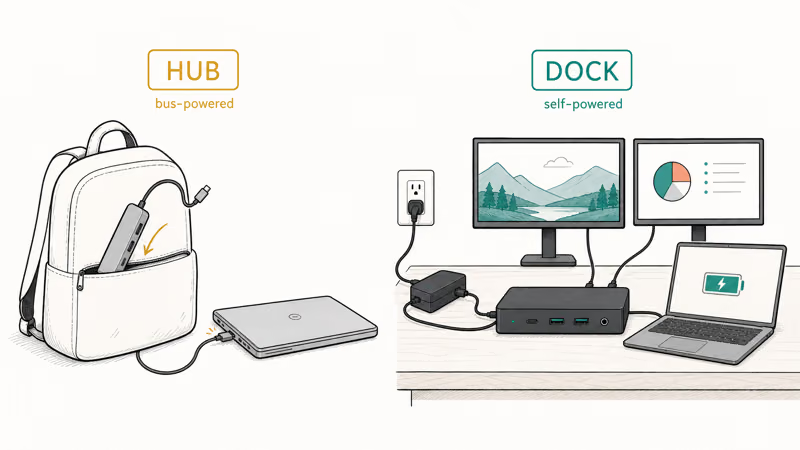
A USB-C hub is bus-powered, meaning it draws operating power through the USB-C connection from your laptop. It usually packs five to ten ports in a slim case you can drop in a bag. That portability is the whole point, so a hub is the right call for travel and hot-desking.
A docking station has its own AC power supply. That lets it charge your laptop at 60W to 100W, support more ports, and hold higher sustained bandwidth. A dock anchors a permanent desk; a hub rides in your backpack. Decide which job you need before you compare anything else.
#Thunderbolt 4 or Plain USB-C: What’s the Difference?
The connector looks identical, but the capability gap is large. This is where most buyers overspend or underbuy.
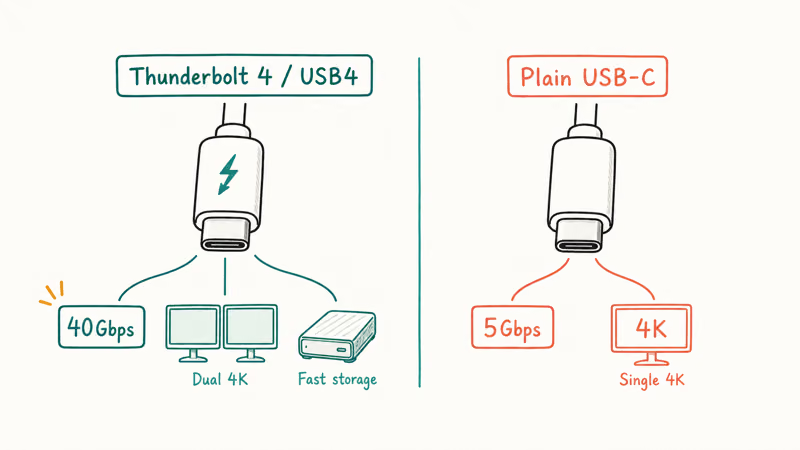
Thunderbolt 4 and USB4 carry up to 40Gbps and can drive dual high-resolution monitors or a single 8K display, plus daisy-chained Thunderbolt devices. A plain USB-C hub often tops out at a single 4K display, sometimes only at 30Hz, with slower 5Gbps USB-A ports. According to PCWorld, full Thunderbolt 4 docks from brands like UGREEN and Anker now start near $199, a drop covered in its Thunderbolt dock guide.
Here is the rule of thumb. Buy Thunderbolt 4 or USB4 if you want dual monitors, fast external storage, or high charging. Buy a plain USB-C hub if you only need to add a few ports and an occasional single screen.
#How Much Power Delivery to Look For
Charging is where cheap hubs quietly fail. A hub that lists power delivery may not sustain enough for a hungry laptop.
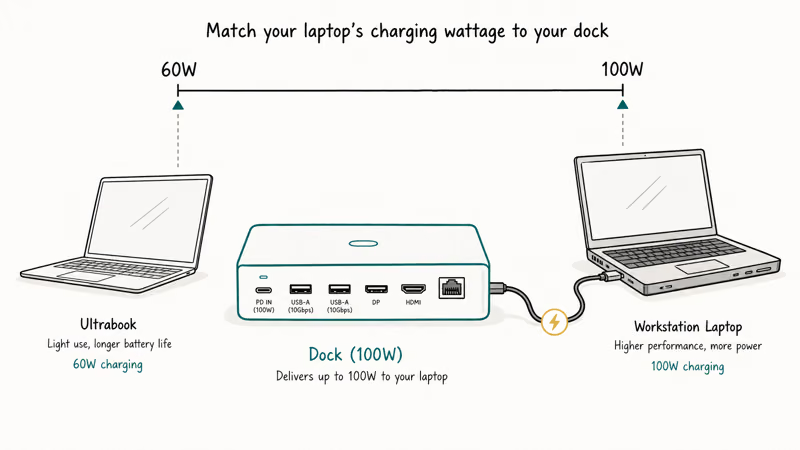
Power delivery passthrough is what lets a dock charge your laptop through the same cable that carries data. A 16-inch MacBook Pro under load wants close to 100W, so only the heaviest-hitting docks keep up. Both the CalDigit TS4 at 98W and the Anker 778 at 100W have enough rated headroom for that class of laptop, while smaller hubs can fall short under heavier workloads.
Match the dock’s wattage to your machine. A thin ultrabook is happy at 60W, but a workstation laptop needs the full 100W or it slowly drains while plugged in.
#Best USB-C Hub for Travel
Travel flips the priorities. Size and a single high-bandwidth port beat total port count when the hub lives in a bag.
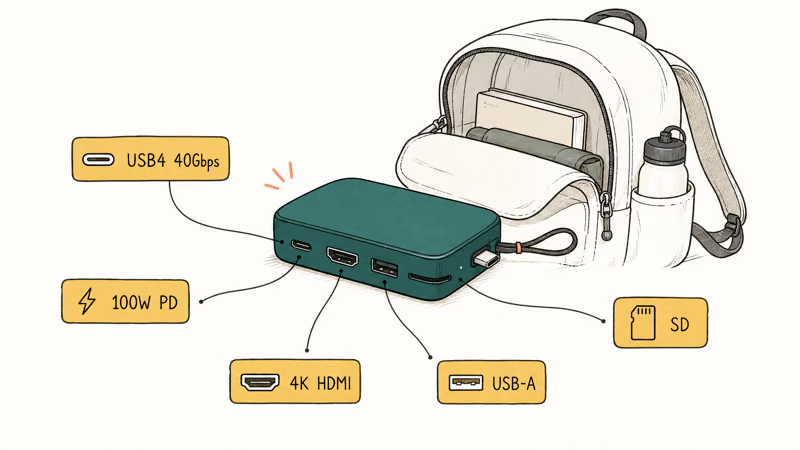
The Satechi USB4 Multiport Adapter is the travel pick. It’s roughly the size of a deck of cards and still carries USB4 at 40Gbps, 100W power delivery, 4K HDMI at 60Hz, a 10Gbps USB-A port, and SD card slots. That mix covers a photographer or a remote worker without the bulk of a desk dock.
#Ethernet on a USB-C Hub: When It Matters
Ethernet is the port people forget until a video call drops. Whether you need it comes down to your network.
Wired ethernet gives a stable, low-latency connection that Wi-Fi can’t always match in a crowded building. Many budget hubs skip it to cut cost. For a dedicated wired pick, see our best USB-C hub with ethernet guide.
#How These Hubs and Docks Compare
Compare hubs against two setups: charging monitor desks and travel bags needing reliable Windows and Mac adapters.
Mac compatibility deserves extra weight because some hubs that work fine on Windows stumble on a Mac. For Mac-specific picks, our best USB-C hub for MacBook guide and the best USB-C hub for MacBook Air M4 guide cover the models we trust.
A dock also pairs naturally with external storage. Our hard drive docking station guide covers compatible desk-bound storage options.
#Bottom Line
For a permanent desk, buy a Thunderbolt 4 dock like the UGREEN Revodok Max 213 for the best mix of price and capability, or step up to the CalDigit TS4 if you need 18 ports and the strongest Mac firmware support. For travel, the Satechi USB4 adapter packs USB4 speed into a pocket. Match the power delivery to your laptop and confirm ethernet is present if you need a wired link, and you’ll buy once instead of twice.
#Frequently Asked Questions
What is the difference between a USB hub and a docking station?
A hub is bus-powered and draws its operating power from your laptop, so it stays slim and portable with a handful of ports. A docking station has its own power supply, charges your laptop, and supports more ports at higher bandwidth. Pick a hub for travel and a dock for a permanent desk.
Do I need Thunderbolt 4 or is USB-C enough?
It depends on your displays and storage. Thunderbolt 4 and USB4 carry 40Gbps for dual monitors plus fast drives. For a few ports and one screen, a plain USB-C hub costs less.
Will a USB-C hub charge my laptop?
Only if it has power delivery passthrough. A dock with 60W to 100W passthrough feeds your laptop through the same cable that carries data. A heavy workstation laptop wants close to 100W, so check the wattage before relying on one cable for both power and data.
Can a USB-C hub run two monitors?
Usually only a Thunderbolt 4 or USB4 dock can, since those carry enough bandwidth for dual 4K displays. Most plain USB-C hubs drive a single external screen, and budget models sometimes cap HDMI at 4K and 30Hz, which feels choppy. If dual monitors are the goal, buy a Thunderbolt dock rather than a basic hub and confirm the display output in the spec sheet first.
Are UGREEN and Anker hubs reliable?
Yes, both are solid mainstream choices. UGREEN now makes fully certified Thunderbolt 4 docks, while Anker focuses on dependable USB-C hubs. For guaranteed Mac firmware support, CalDigit remains the safer bet.
Why does my hub get hot?
Hubs and docks pack a lot of high-speed circuitry into a small case, so warmth is normal under load. A well-designed dock like the Anker 778 stays merely warm rather than hot. If a hub becomes too hot to touch or drops connections, that points to an undersized power supply or a failing unit.
Does the hub brand need to match my laptop brand?
No, but certification matters more for Mac. Any Thunderbolt or USB-C hub works across brands, yet Mac users should favor docks explicitly certified for macOS with firmware updates, such as CalDigit or UGREEN models. Windows users have far more flexibility and can often use cheaper hubs without issue.

Best Laptop for Running LLMs in 2026: Memory Comes First
The best laptop for running LLMs is a memory purchase first. Compare MacBook unified memory against NVIDIA laptop VRAM, and see what each tier really runs.

Pixel 11 vs Pixel 10: What Changed and Who Should Upgrade
Pixel 11 vs Pixel 10: same screen and camera resolution, new Tensor G6, 25W wireless, and Gemini Intelligence. Here is who should actually upgrade.

Best Power Bank for iPad in 2026: Pro, Air, and Mini
Best power bank for iPad in 2026. Compare mAh tiers and USB-C PD wattage for iPad Pro, Air, and mini, plus airline Wh math, cables, and travel tips.

Best Power Bank With Built-In Cable: Top 2026 Picks
Best power bank with built-in cable picks for 2026. Compare single USB-C, multi-connector, and retractable laptop banks, plus airline Wh math.