Best Router for Starlink: Stable Wi-Fi Picks for 2026
Find the best router for Starlink in 2026. Match Wi-Fi 7, mesh, Ethernet, bypass mode, coverage, and app controls before buying third-party gear.
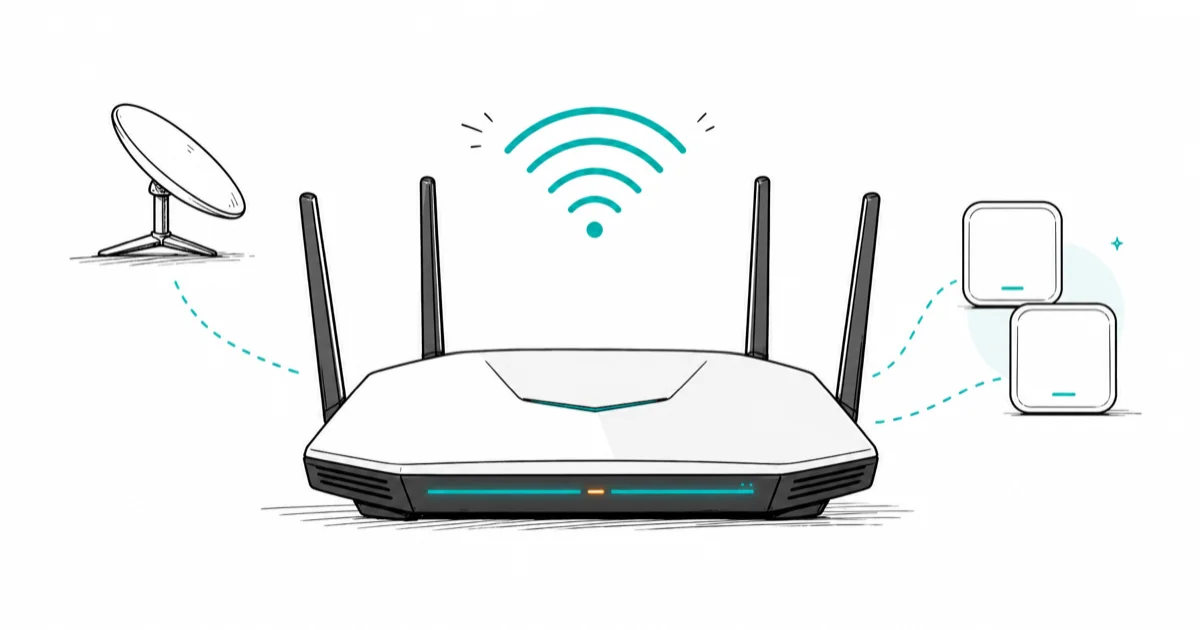
Quick AnswerThe ASUS RT-BE96U is the best router for Starlink if you want one strong Wi-Fi 7 unit. Pick mesh only for large or multi-floor homes.
The best router for Starlink starts with the same placement and band choices as any home router, then adds one Starlink-specific check: Ethernet and bypass mode.
This guide focuses on Starlink bypass requirements, WAN port needs, and home layouts; no speed claim below comes from a fone.tips lab.
- The ASUS RT-BE96U is the safest single-router pick for Starlink homes that want Wi-Fi 7 without mesh complexity.
- Starlink Standard kits with built-in Ethernet are easier to pair with a third-party router than older kits that need an adapter.
- Mesh makes sense when the Starlink cable enters at one end of a large home or the signal has to cross multiple floors.
- A 2.5 GbE WAN port is enough for current Starlink service, but multi-gig LAN ports help if you move files inside the house.
- Bypass mode disables Starlink Wi-Fi, so your new router must handle Wi-Fi, DHCP, firewall rules, and parental settings.
#What Makes a Starlink Router Different?
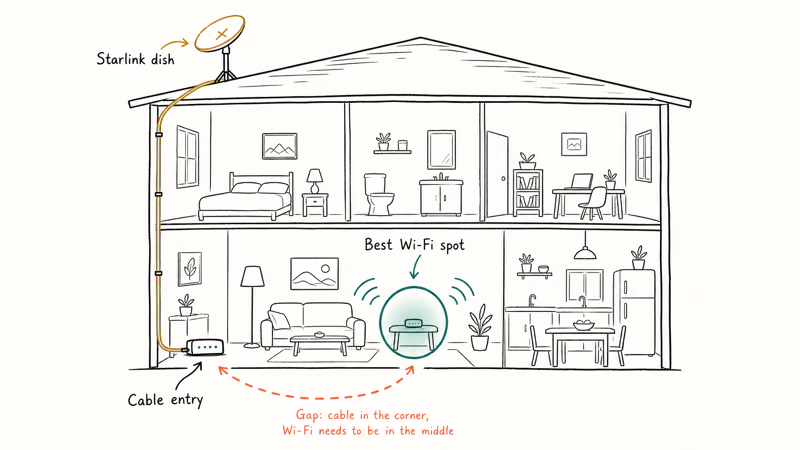
A Starlink router has to solve a placement problem before it solves a speed problem. The dish cable and power supply often decide where the network starts, and that spot isn’t always the best place for Wi-Fi.
The general placement and band guidance lives in our best Wi-Fi router 2026 guide.
According to Starlink, 8.8.8.8 or 1.1.1.1 are valid health-check targets in its third-party router guide, and Starlink DNS servers don’t respond to ping. That detail matters if you use a router with WAN failover or uptime checks, because a bad target can make a working Starlink line look down.
Most homes should buy the router for coverage, not for headline speed. Starlink speeds vary by plan, location, congestion, and sky view, so a router upgrade won’t fix a blocked dish or a saturated cell.
Indoor coverage is the win.
#Do You Need Bypass Mode for Starlink?
You need bypass mode when you want your own router to control the network instead of the Starlink router. Without it, two routers can create double NAT, which can break port forwarding, confuse remote access, and add troubleshooting noise for gaming or VPN setups.
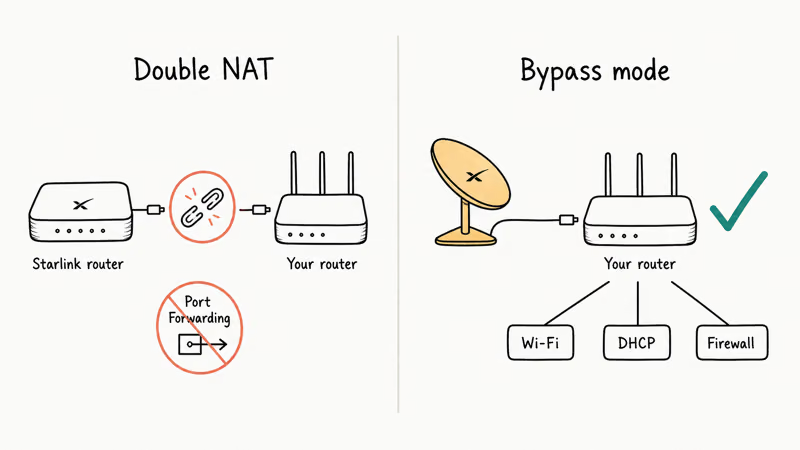
Starlink states that bypass mode is required when a Standard kit should use your router’s Wi-Fi instead of Starlink Wi-Fi in its third-party router support page. The same page says a Standard Actuated kit needs the Starlink Ethernet Adapter before a third-party router can connect by Ethernet.
Check your kit before you buy.
Standard kits with native Ethernet are cleaner. Older setups may need an adapter, and some power-supply-based kits work differently enough that bypass mode may not be needed.
#Best Overall Router for Starlink
The ASUS RT-BE96U is the best single-router match for most Starlink homes. It gives you Wi-Fi 7, strong radios, and enough wired ports to run a clean Starlink-to-router setup without paying for mesh nodes you may not need.
Ports matter too.
Tom’s Guide found that Wi-Fi 7 can reach up to 46 Gbps in theory in its Wi-Fi router guide, but your Starlink line won’t approach that ceiling. The useful part is congestion handling and the 6 GHz band for nearby devices.
The RT-BE96U makes the most sense when the router can sit central and elevated. If your Starlink Ethernet comes into a garage or far corner, a mesh system from our best mesh Wi-Fi system guide is usually the better buy.
#Best Mesh Router Setup for Starlink
Mesh is the right Starlink upgrade when the dish cable enters a bad Wi-Fi location.
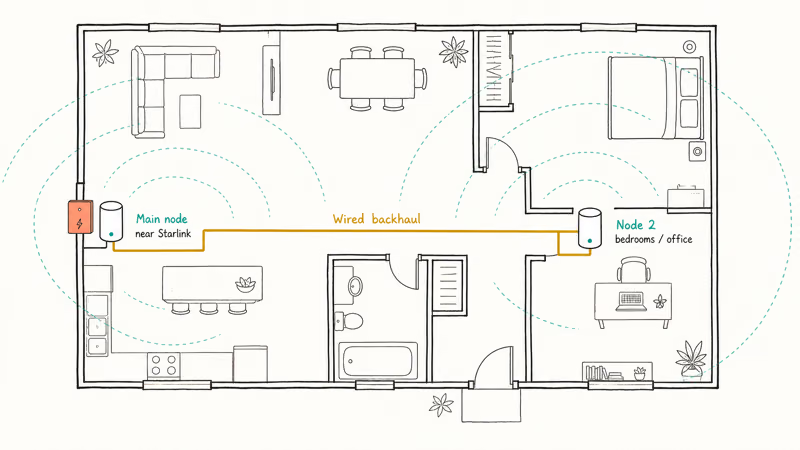
A two-node kit can put the main router near the Starlink power supply and place the second node closer to bedrooms, offices, or gaming rooms.
Tom’s Guide recommends mesh for larger homes and multi-story layouts in its mesh Wi-Fi guide, and it calls out 3,000 square feet or more as a point where a regular router may not cut it. That lines up with how Starlink homes often behave, because the service entry point isn’t always near the center of the house.
Use wired backhaul if you can. Ethernet between mesh nodes keeps Starlink traffic from sharing the same wireless link twice. If latency matters more than whole-home reach, check our best gaming router picks before buying a three-node kit.
#Best Budget Router for Starlink
A budget Wi-Fi 6 router is enough for many Starlink users.
If your home is small, your plan is the bottleneck, or your devices are older, spending more on Wi-Fi 7 won’t change the satellite side of the connection.
Pick a router with Gigabit WAN at minimum, WPA3, automatic firmware updates, and a clear app. Those basics matter more than eight antennas on the box.
Placement still wins.
Parents should weigh controls before price. If you need schedules, age filters, and device profiles, our best parental control router guide is a better starting point than buying the lowest-priced router and adding controls later.
#Starlink Router Setup Checklist
Set up Starlink first, confirm the dish is online, then connect your third-party router by Ethernet. After that, enable bypass mode only if your kit and goal call for it.
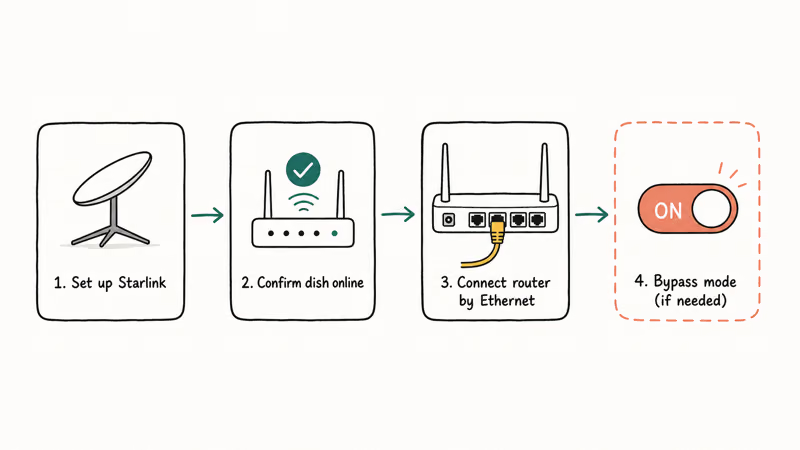
A useful setup check is a quick map: mark where Starlink enters the house, where the router can sit, and where phones actually lose Wi-Fi. If the weak area is one room, fix placement first and use our phone Wi-Fi slow checklist before you buy more hardware.
Keep the router high, open, and away from metal. Give it power protection if your area has frequent outages.
Save the reset steps.
#Starlink Router Specs That Matter Most
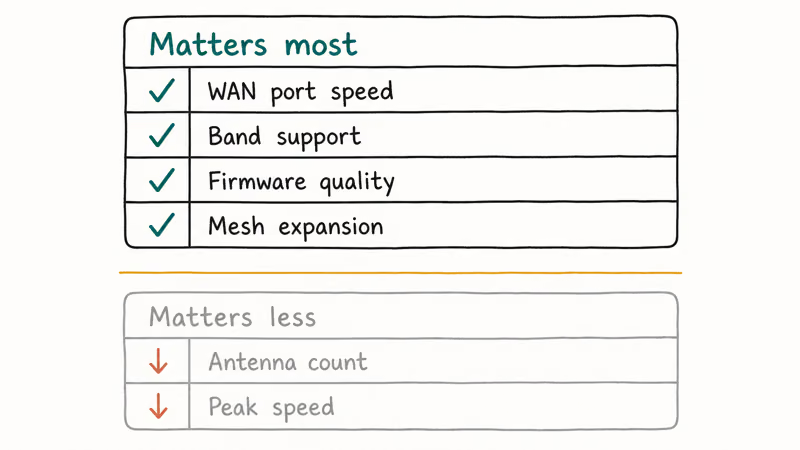
The specs that matter are WAN port speed, band support, firmware quality, and mesh expansion. Antenna count and peak wireless speed matter less than whether your layout lets the router broadcast from the right spot.
NETGEAR confirms that its Orbi 970 three-pack covers up to 10,000 sq. ft. on the official Orbi 970 page. That doesn’t mean every Starlink home needs Orbi, but it shows why large properties often need mesh instead of a single router.
Don’t overbuy for speed alone.
Starlink is the internet pipe, the router is the indoor distribution system, and the best setup balances both. If the indoor signal is already strong, a router upgrade may only give you better controls.
#Bottom Line
Buy the ASUS RT-BE96U if your Starlink Ethernet can reach a central spot. It gives most homes strong coverage and clean setup control.
Choose mesh if Starlink enters the home in the wrong place, or if you have a large, multi-floor layout. Choose a budget Wi-Fi 6 router if your home is small and your current problem is only the stock router’s controls.
Start with the layout.
#Frequently Asked Questions
Can I use any router with Starlink?
You can use most modern routers with Starlink if you can connect them by Ethernet. Your exact setup depends on the Starlink kit, because some kits have native Ethernet and others need an adapter. Set the router WAN side to DHCP unless your router vendor or Starlink setup says otherwise.
Is Wi-Fi 7 worth it for Starlink?
Wi-Fi 7 is worth it when you have newer devices or a busy home network. It won’t speed up the satellite link by itself.
Should I use mesh with Starlink?
Use mesh when one router can’t cover the house from the Starlink entry point. Large homes, thick walls, and multi-floor layouts are the usual signs. If only one room is weak, router placement or one smaller fix may solve it for less money.
Does Starlink bypass mode improve speed?
Bypass mode doesn’t raise Starlink speed. It turns off Starlink router Wi-Fi so your router handles coverage, controls, DHCP, and port forwarding.
What router port speed do I need for Starlink?
Gigabit WAN is enough for most current Starlink homes. A 2.5 GbE WAN port gives extra headroom and is common on better Wi-Fi 6E and Wi-Fi 7 routers. Multi-gig LAN ports matter most when you move files between local devices.
Can I still use the Starlink app with my own router?
Yes, but some local status access may need extra router setup. Starlink’s support page explains that the standard device page can use 192.168.100.1 with a static route on the third-party router. Most people can still check status through the Starlink app or dashboard.

Best Laptop for Running LLMs in 2026: Memory Comes First
The best laptop for running LLMs is a memory purchase first. Compare MacBook unified memory against NVIDIA laptop VRAM, and see what each tier really runs.

Pixel 11 vs Pixel 10: What Changed and Who Should Upgrade
Pixel 11 vs Pixel 10: same screen and camera resolution, new Tensor G6, 25W wireless, and Gemini Intelligence. Here is who should actually upgrade.

Best Power Bank for iPad in 2026: Pro, Air, and Mini
Best power bank for iPad in 2026. Compare mAh tiers and USB-C PD wattage for iPad Pro, Air, and mini, plus airline Wh math, cables, and travel tips.

Best Power Bank With Built-In Cable: Top 2026 Picks
Best power bank with built-in cable picks for 2026. Compare single USB-C, multi-connector, and retractable laptop banks, plus airline Wh math.