Best RAM for Ryzen 7 7800X3D: DDR5-6000 Picks for 2026
Best RAM for Ryzen 7 7800X3D in 2026. Learn why DDR5-6000 CL30 EXPO is the sweet spot, how X3D cache affects RAM needs, and which kits to consider.
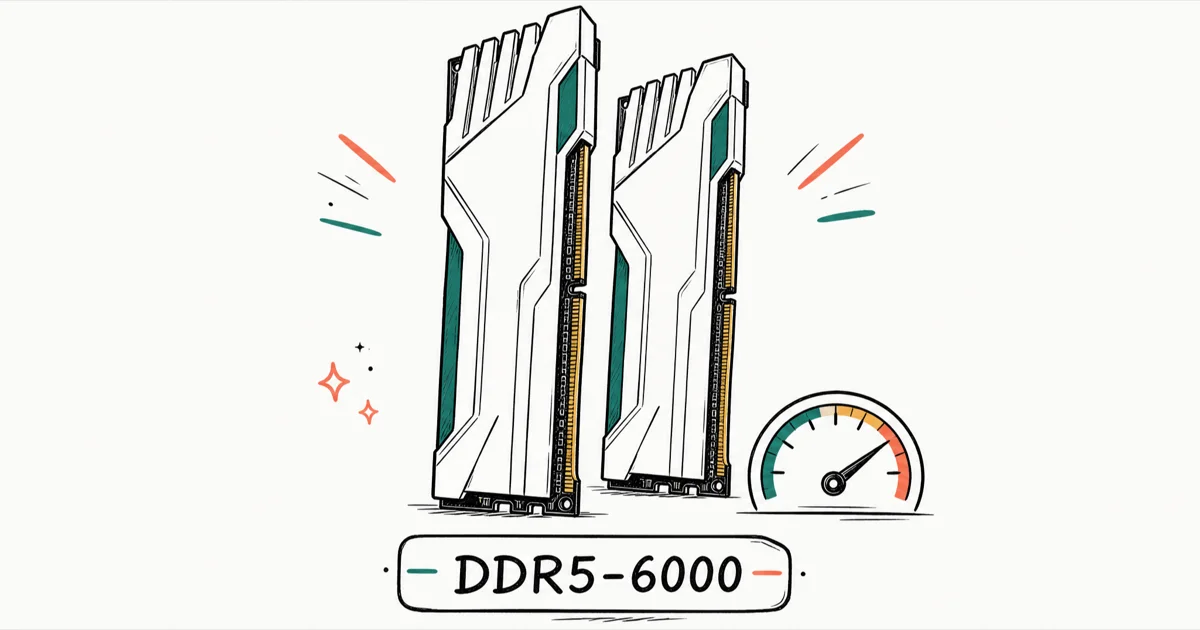
Quick AnswerThe best RAM for the Ryzen 7 7800X3D is a 32GB (2x16GB) DDR5-6000 CL30 kit with an AMD EXPO profile. That speed keeps the memory controller in 1:1 sync for low latency, and faster kits rarely help this 3D V-Cache chip.
The best RAM for the Ryzen 7 7800X3D is a 32GB (2x16GB) DDR5-6000 CL30 kit with an EXPO profile. That spec gives the chip the low-latency setup it prefers.
- DDR5-6000 CL30 with AMD EXPO is the sweet spot. It keeps the memory controller (UCLK/MCLK) in 1 mode, where latency is lowest.
- Faster kits often hurt. Above 6000MT/s the controller drops to a 1 “geared down” mode that adds latency, frequently erasing the gain from the higher clock.
- 32GB (2x16GB) is the right capacity for gaming. Four-stick and high-density 64GB setups often struggle to hold 6000MT/s on AM5.
- The 3D V-Cache makes raw memory bandwidth less important than on standard Ryzen chips, since the 96MB L3 cache absorbs most game data.
- DDR5 prices have climbed through 2026, so a 2x16GB DDR5-6000 kit costs noticeably more than it did a year ago. Check live pricing before you buy.
#Why DDR5-6000 CL30 Is the Sweet Spot
DDR5-6000 hits the best balance of speed and latency for the 7800X3D. It has nothing to do with the “1
Infinity Fabric” rule carried over from older Ryzen chips, which is exactly where a lot of build advice still goes wrong and sends people chasing the wrong numbers.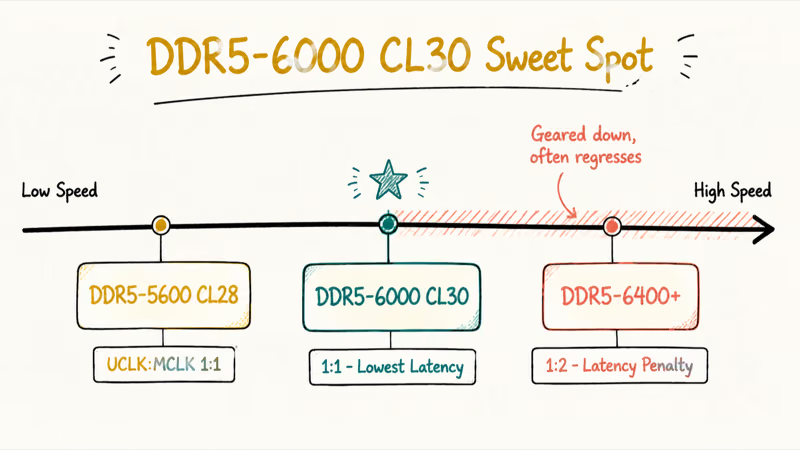
On AM5 the Infinity Fabric clock is de-linked from the memory clock. There’s no true 1:1
config like Zen 3 had. According to XDA’s Infinity Fabric explainer, the 1 ratio holds up to DDR5-6000 on AM5, and pushing past it forces a divider change that costs you performance.What stays in 1
at 6000MT/s is the memory controller (UCLK) to DRAM clock (MCLK) link. AMD’s product page lists official support at DDR5-5200, but the chip runs faster with EXPO on.Go past 6000MT/s and the controller flips to 1
mode. That adds a latency penalty which usually cancels out the extra megahertz. CL30 is the timing you want at that speed, because lower latency is exactly what this chip responds to.#Does RAM Speed Even Matter on the X3D?
Less than you’d expect. That’s the entire point of the X3D design, and it changes how you should shop.
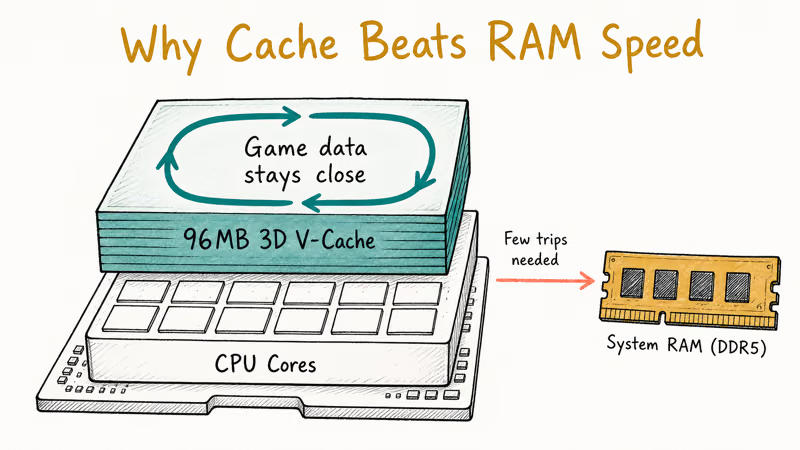
The 7800X3D stacks a large 96MB L3 cache on top of the cores. Tom’s Hardware’s Ryzen 7 7800X3D review found that this 96MB cache keeps most game data close to the cores, so the chip touches system memory far less than a standard Ryzen 7.
Don’t chase exotic kits. Manual overclocking adds risk for tiny gains, so a clean EXPO profile is enough.
Spend the money you’d save on a better GPU instead. If the jargon trips you up, our explainer on RAM versus memory clears up the terms that confuse first-time AM5 builders before they ever open a BIOS.
| Config | UCLK | Real-world result | Verdict |
|---|---|---|---|
| DDR5-5600 CL28 | 1 | Slightly behind 6000 | Fine on a budget |
| DDR5-6000 CL30 | 1 | Lowest latency | Recommended |
| DDR5-6000 CL36 | 1 | Looser timings, a touch slower | Acceptable |
| DDR5-6400+ | 1 | Latency penalty, can regress | Not worth it |
Memory configurations compared for the Ryzen 7 7800X3D
#Do You Need 32GB or 64GB?
For gaming, 32GB (2x16GB) is the answer in 2026. That’s enough for a game, Discord, a browser, and a stream overlay at once.
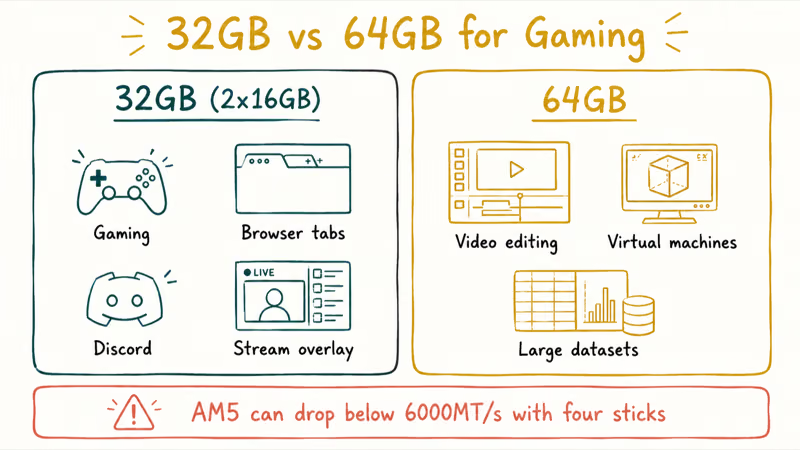
64GB makes sense only if you do heavy video editing, run virtual machines, or work with large datasets alongside gaming. There’s a catch, though. AM5 often struggles to hold the 6000MT/s sweet spot with four sticks or dense dual-stick 64GB kits, so you can trade your low-latency profile for capacity you may never touch.
Need that capacity anyway? Buy a single 2x32GB kit rated for AM5 rather than mixing four sticks, and confirm it’s on your board’s qualified vendor list first. The Tom’s Hardware best RAM guide states that the G.Skill Trident Z5 Neo DDR5-6000 C30 works flawlessly out of the box, which is the kind of plug-and-play behavior you want at higher densities.
Run two sticks in the A2 and B2 slots for dual-channel mode, and update the BIOS before installing. An old BIOS is the single most common reason a good kit won’t post at its rated speed.
#Our Top RAM Picks for the Ryzen 7 7800X3D
Every kit below is 32GB (2x16GB) DDR5-6000 CL30 with EXPO, which is the exact spec we recommend for this chip. The memory die underneath comes from the same handful of suppliers regardless of brand, so once you’ve matched the speed, latency, and capacity, there’s no hidden performance tier to chase. Pick on price, heat-spreader height, and whether you want RGB.
#1. G.Skill Flare X5 (Best Overall Value)
The G.Skill Flare X5 DDR5-6000 CL30 is built specifically for AMD EXPO, and it fits the spec most 7800X3D builds should target.
As an Amazon Associate, fone.tips earns from qualifying purchases.
The low-profile heat spreaders are the real draw. At roughly 33mm tall they clear large air coolers without a fight, which matters most in a tight Mini-ITX or MicroATX build where tall sticks would otherwise collide with the cooler fan. No RGB keeps it short and cheap, with the same 6000 CL30 EXPO timings as every kit on this list.
#2. G.Skill Trident Z5 Neo RGB (Best RGB)
Same EXPO-tuned memory, taller and lit. The G.Skill Trident Z5 Neo RGB DDR5-6000 CL30 carries a lifetime warranty and the same first-boot stability. Measure clearance first, though.
#3. Corsair Vengeance RGB (Strong Alternative)
A dependable backup. When the G.Skill kits go out of stock or get overpriced, the Corsair Vengeance RGB DDR5-6000 CL30 behaves identically at 6000 CL30, and iCUE lighting control is one of the more polished ecosystems if you already run other Corsair gear in the build.
#4. Kingston Fury Renegade (Premium Pick)
Reliable, but rarely the value pick. The Kingston Fury Renegade DDR5-6000 CL30 pairs a known-good kit with an aggressive heat spreader, but it usually costs more than the G.Skill options for identical effective performance. Step up only for the look or a real sale.
#Installing and Enabling EXPO Correctly
Getting the kit is half the job. The rest takes five minutes in BIOS.
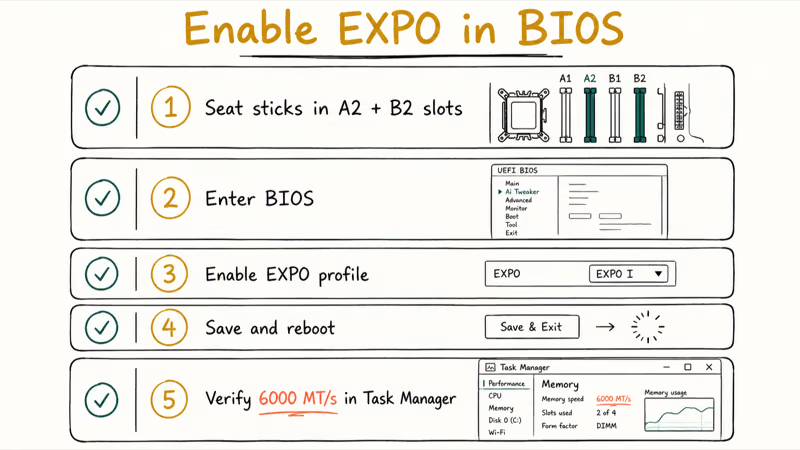
Seat both sticks in the A2 and B2 slots (the second and fourth slots from the CPU on most boards) for dual-channel mode. Boot into BIOS, flip on the EXPO profile, save, and reboot. If the system fails to post, the usual culprit is an outdated BIOS, so flash the latest stable version and try again before you assume the kit is faulty.
Verify the speed once Windows loads, because the build will boot and feel fine even if EXPO never engaged. Open Task Manager, click the Performance tab, select Memory, and confirm it reads 6000 MT/s rather than a default 4800. If it’s stuck at the slow speed, jump back into BIOS and make sure the EXPO profile is actually enabled and saved. That one habit catches the most common silent mistake on a fresh AM5 build.
#Pairing and Upgrade Notes for AM5 Builders
The 7800X3D is a top-tier gaming chip. Don’t bottleneck it with a weak GPU or skimp elsewhere, because memory is the cheapest part of the system to get right and you’ve already nailed it.
Coming from an older AMD build? The contrast is stark. Our RAM guide for the Ryzen 5 5600X covers the DDR4-3600 era, and the RAM guide for the Ryzen 5900X shows how the previous AM4 flagship handled memory. The 7800X3D trades frequency chasing for cache-driven gaming wins.
AM5 boards differ from AM4 in BIOS layout and EXPO handling. If you’re used to the older platform, our Ryzen 7 5800X motherboard guide is a useful map of how chipset tiers translate to features, even though you’ll shop B650 or X670 for the 7800X3D. Tall RGB kits and big air coolers fight for the same space, so a low-profile cooler from our Ryzen CPU cooler picks can save you a clearance headache.
#Bottom Line
Buy a 32GB (2x16GB) DDR5-6000 CL30 EXPO kit and enable the profile in BIOS. The G.Skill Flare X5 is our top pick for its low profile and value, with the Trident Z5 Neo as the RGB upgrade. Skip the faster, pricier kits, because the 3D V-Cache means you’d be paying for latency penalties, not performance.
#Frequently Asked Questions
Does the Ryzen 7 7800X3D run RAM at a 1 ratio?
Not in the Zen 3 sense. The Infinity Fabric is de-linked from memory on AM5, so there’s no true 1:1
config. What stays 1 at DDR5-6000 is the memory controller to DRAM clock (UCLK), which is what keeps latency low. Above 6000MT/s that drops to 1 and adds latency.Is DDR5-6000 CL30 better than DDR5-6400 for the 7800X3D?
Usually, yes. Above 6400MT/s the controller switches to 1
mode, and that latency penalty often cancels out the higher clock, so the cheaper 6000 CL30 kit wins.How much RAM does the Ryzen 7 7800X3D need?
For gaming, 32GB (2x16GB) is the sweet spot in 2026, and it leaves comfortable headroom for a game, a browser with dozens of tabs, Discord, and a stream overlay all running at once. Only step up to 64GB if you edit video, run virtual machines, or juggle large datasets while you play, and even then prefer a single dual-stick kit rated for AM5 over a four-stick setup that can lose the 6000MT/s sweet spot.
Do I need to enable EXPO or XMP?
Yes, always. Without it the RAM defaults to a slow JEDEC speed regardless of its rating, so enable the EXPO profile in BIOS and reboot.
Should I overclock RAM on the 7800X3D?
Not for most people. The X3D chip is sensitive to high voltage, and the gains over a clean 6000 CL30 EXPO profile are tiny.
Why is DDR5 so expensive in 2026?
Memory makers have shifted production capacity toward HBM and high-density modules for AI servers, which pulled supply away from mainstream DDR5 and pushed prices up steadily through 2026. A 2x16GB DDR5-6000 kit now costs noticeably more than it did a year ago, and pricing has been volatile week to week. Check current retail prices right before you buy rather than trusting a figure from an older review.
Will faster RAM fix a bottleneck in my games?
Probably not on this chip. The 96MB cache means your GPU is almost always the limit.

Pixel 11 vs Pixel 10: What Changed and Who Should Upgrade
Pixel 11 vs Pixel 10: same screen and camera resolution, new Tensor G6, 25W wireless, and Gemini Intelligence. Here is who should actually upgrade.

Best Power Bank for iPad in 2026: Pro, Air, and Mini
Best power bank for iPad in 2026. Compare mAh tiers and USB-C PD wattage for iPad Pro, Air, and mini, plus airline Wh math, cables, and travel tips.

Best Power Bank With Built-In Cable: Top 2026 Picks
Best power bank with built-in cable picks for 2026. Compare single USB-C, multi-connector, and retractable laptop banks, plus airline Wh math.
Best Apple Watch Band for Working Out: Proven Picks
The best Apple Watch band for working out handles sweat and stays put on your wrist. Compare silicone, nylon, and titanium picks for runs and lifts.