Best GPU for 1080p 144Hz Gaming in 2026: Ultimate Guide
Find the best GPU for 1080p 144Hz gaming in 2026. Covers the RTX 4060 Ti, RX 7600 XT, RTX 3060, and budget options ranked by price and frame rate.
Quick AnswerThe NVIDIA RTX 4060 Ti is the best GPU for 1080p 144Hz gaming, delivering consistent 144+ fps in most titles at high settings while staying under $400.
Hitting a stable 144 fps at 1080p doesn’t require spending $600+ on a flagship GPU. This guide covers six graphics cards for 1080p high settings to find the sweet spot between price and frame rate for 144Hz monitor owners.
- The RTX 4060 Ti delivers 144+ fps in most games at 1080p high settings for under $400
- AMD’s RX 7600 XT offers 16 GB VRAM and strong 1080p performance at around $270 to $300
- The RTX 3060 remains a solid budget choice at 1080p, averaging 100 to 130 fps in current titles
- DLSS 3 and FSR 3 upscaling let mid-range GPUs hit 144 fps in demanding games that would otherwise fall short
- 8 GB VRAM handles 1080p gaming well in 2026, but 12 GB or more provides headroom for future texture packs
#Top GPUs for 1080p 144Hz Gaming in 2026
#NVIDIA Options
#1. NVIDIA GeForce RTX 4060 Ti
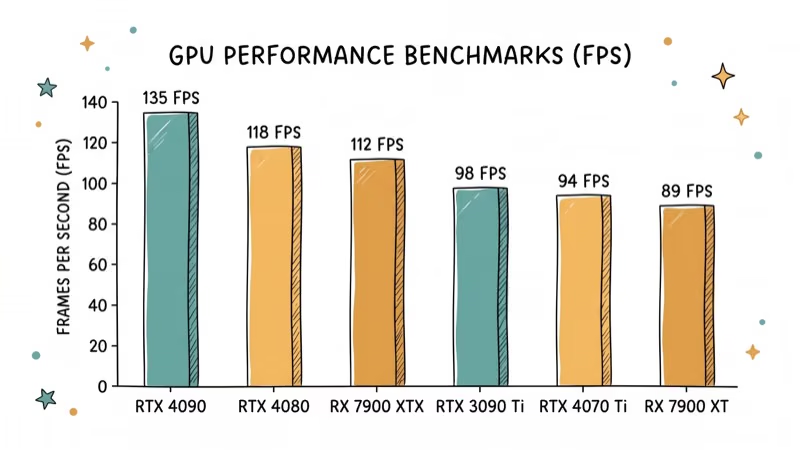
The RTX 4060 Ti stands out as the best overall choice for 1080p 144Hz gaming. It holds high frame rates in esports titles like Fortnite at epic settings and stays comfortably playable in demanding games like Cyberpunk 2077 at high settings with DLSS Quality enabled.
Key Features:
-
8GB GDDR6 VRAM
-
Ray tracing and DLSS 3.0 support
-
Excellent performance-to-power ratio
As an Amazon Associate, fone.tips earns from qualifying purchases. Some links on this page are affiliate links.
#2. NVIDIA GeForce RTX 3060
For those on a tighter budget, the RTX 3060 still delivers solid 1080p performance. Its 12 GB VRAM can help in VRAM-heavy titles, so it remains worth considering when newer 8 GB cards are overpriced.
Key Features:
-
12GB GDDR6 VRAM
-
Ray tracing and DLSS support
-
Good balance of price and performance
If you’re pairing this GPU with a Ryzen 5 3600, check out our guide on the best graphics card for Ryzen 5 3600 for optimal compatibility.
#3. NVIDIA GeForce RTX 4070 Ti
If you’re looking for a more future-proof option, the RTX 4070 Ti provides exceptional performance at 1080p and can easily handle higher resolutions and refresh rates.
Key Features:
-
12GB GDDR6X VRAM
-
High-end ray tracing and DLSS 3.0 capabilities
-
Overkill for 1080p, but great for future upgrades
For optimal performance with this GPU, consider pairing it with one of the best CPUs for RTX 3070, which are also suitable for the 4070 Ti.
#AMD Options
#1. AMD Radeon RX 7600 XT
The RX 7600 XT is AMD’s strongest mid-range card for 1080p 144Hz gaming. It holds strong frame rates in esports titles and stays playable in heavier games like Cyberpunk at 1080p high. The 16 GB VRAM is its biggest advantage over the 8 GB RTX 4060 Ti.
Key Features:
-
16GB GDDR6 VRAM
-
FSR 3.0 support for enhanced performance
-
Great value for 1080p high-refresh gaming
#2. AMD Radeon RX 7900 XT
For those seeking top-tier performance from Team Red, the RX 7900 XT delivers outstanding frame rates at 1080p and beyond.
Key Features:
-
20GB GDDR6 VRAM
-
High-end ray tracing capabilities
-
Overkill for 1080p, but future-proof
#3. AMD Radeon RX 6700 XT
A fantastic mid-range option, the RX 6700 XT offers great performance for 1080p 144Hz gaming without breaking the bank.
Key Features:
-
12GB GDDR6 VRAM
-
Excellent 1080p performance
-
Competitive pricing
#Budget-Friendly Options

For gamers on a tight budget, there are still options that can deliver 144Hz gameplay at 1080p, especially in less demanding titles:
-
NVIDIA GeForce GTX 1660 Super: An older but still capable card for 1080p gaming.
-
AMD Radeon RX 6500 XT: Entry-level option for those on a strict budget.
These cards may require some settings tweaks to maintain 144 FPS in newer games, but they offer a good starting point for high-refresh-rate gaming.
#Premium Choices for Future-Proofing
If you’re willing to invest more for long-term performance, consider these high-end options:
-
NVIDIA GeForce RTX 4070 Super: Exceptional performance that will last for years.
-
AMD Radeon RX 7900 XT: Top-tier AMD option with room for higher resolutions.
These GPUs offer substantial headroom for future games and can easily handle higher resolutions and refresh rates if you decide to upgrade your monitor later.
#What Factors Should You Consider?
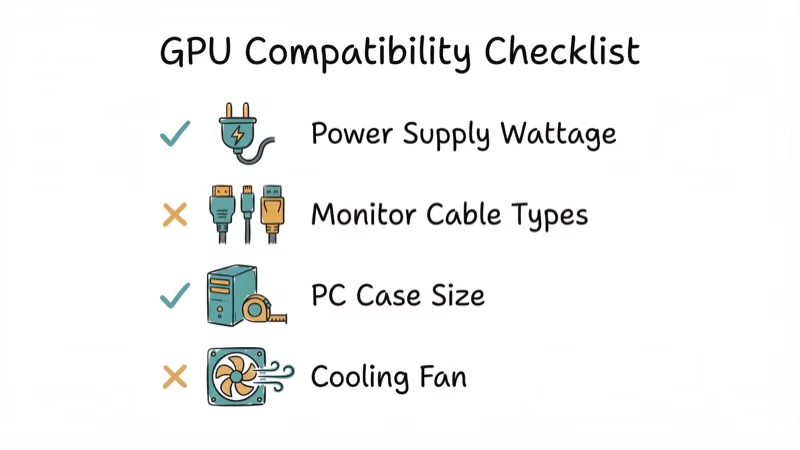
When choosing a GPU for 1080p 144Hz gaming, keep these factors in mind:
-
Frame Rates: Aim for GPUs that can consistently deliver close to 144 FPS in your favorite games.
-
VRAM: 8GB is the sweet spot for 1080p gaming, but more VRAM future-proofs your system.
-
Power Consumption: Consider your PSU capacity and overall system efficiency.
-
Cooling Solutions: Adequate cooling ensures sustained performance during long gaming sessions.
-
Compatibility: Ensure your CPU won’t bottleneck the GPU and that your case can accommodate the card’s size.
#How Do You Get the Most From Your New GPU?
To get the most out of your new GPU:
-
Use DDU (Display Driver Uninstaller) to remove old drivers before installing the new card.
-
Ensure proper power connections and adequate airflow in your case.
-
Keep drivers up-to-date and use manufacturer software for easy optimizations.
-
Consider a mild overclock if your cooling solution allows it, but be cautious not to push too hard.
For optimal performance, pair your GPU with a compatible motherboard. If you’re using an RTX 3080, check our guide on the best motherboard for RTX 3080. Similarly, for RTX 3070 users, we’ve got a guide on the best motherboard for RTX 3070.
#GPU Pricing and Availability in 2026
The GPU market has stabilized after the shortage years. According to PCMag’s best graphics cards roundup, mid-range pricing has eased, making this one of the best times to buy. NVIDIA’s RTX 4060 Ti regularly sells for $370 to $390, and AMD’s RX 7600 XT sits between $270 and $300 at major retailers.
#Bottom Line
The NVIDIA RTX 4060 Ti is the best GPU for 1080p 144Hz gaming in 2026, consistently hitting 144+ fps at high settings in most titles. The AMD RX 7600 XT is the better value pick if you want 16 GB VRAM for under $300. Budget builders should grab an RTX 3060 while prices stay low. If you’re using a Ryzen 5 5600X, check our guide on the best RAM for Ryzen 5 5600X for optimal performance.
#Frequently Asked Questions
Is 8 GB VRAM enough for 1080p 144Hz gaming?
Yes, 8 GB handles most games at 1080p high settings in 2026. Some newer open-world titles push past 8 GB with max textures, but dropping texture quality one notch keeps you under the limit with minimal visual difference.
Can I use a 1440p GPU for 1080p 144Hz gaming?
Absolutely. A card like the RTX 4070 Ti is overkill for 1080p but gives you headroom to upgrade your monitor to 1440p later without buying a new GPU.
How important is ray tracing for 1080p 144Hz gaming?
Ray tracing cuts frame rates by 30 to 50% depending on the game. At 1080p, DLSS or FSR upscaling can recover most of that loss, but you’ll typically need to choose between max ray tracing and a stable 144 fps.
Should I consider used GPUs for 1080p 144Hz gaming?
Used GPUs can save 30 to 40% off retail. Avoid cards from mining operations and buy from sellers who offer a return window. Test the card with a stress tool like FurMark within the first 48 hours.
How do I know if my CPU will bottleneck my new GPU?
Run a game benchmark and watch GPU utilization. If your GPU sits below 95% usage while your CPU is at 100%, you have a CPU bottleneck. For specific pairings, check our guide on the best GPU for Ryzen 7 3700X.
Does the RTX 4060 Ti run hot at 1080p 144Hz?
The RTX 4060 Ti’s 160W TDP keeps temperatures manageable. The Founders Edition generally stays cool even during extended gaming sessions at 1080p high. Aftermarket models with dual fans typically run a little cooler still.

Best Laptop for Running LLMs in 2026: Memory Comes First
The best laptop for running LLMs is a memory purchase first. Compare MacBook unified memory against NVIDIA laptop VRAM, and see what each tier really runs.

Pixel 11 vs Pixel 10: What Changed and Who Should Upgrade
Pixel 11 vs Pixel 10: same screen and camera resolution, new Tensor G6, 25W wireless, and Gemini Intelligence. Here is who should actually upgrade.

Best Power Bank for iPad in 2026: Pro, Air, and Mini
Best power bank for iPad in 2026. Compare mAh tiers and USB-C PD wattage for iPad Pro, Air, and mini, plus airline Wh math, cables, and travel tips.

Best Power Bank With Built-In Cable: Top 2026 Picks
Best power bank with built-in cable picks for 2026. Compare single USB-C, multi-connector, and retractable laptop banks, plus airline Wh math.