Best Smart Lamps: Budget to Premium Options Proven
Compare smart lamps for 2026: Wyze, Philips Hue, LIFX, Nanoleaf, and Govee, with hub needs, HomeKit support, voice control, and setup notes.
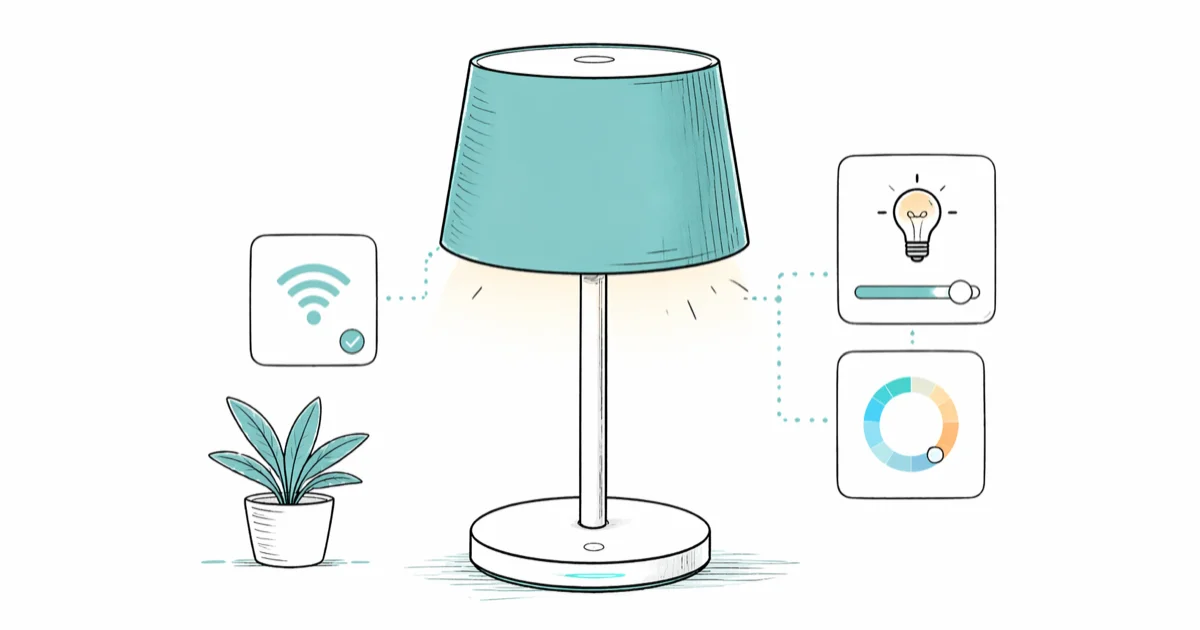
Quick AnswerThe best smart lamp depends on your priorities. Philips Hue dominates if you want premium color accuracy and ecosystem control. LIFX wins for budget buyers seeking hub-free setup. Nanoleaf is the pick if you value design and customization.
The best smart lamp for most people is the Wyze Bulb Color at $12 because it skips the hub entirely and still works with Alexa, Google Home, and IFTTT. The gap between “good enough” and “premium” comes down to two things: hub vs. no-hub, and whether you need HomeKit.
Pick your voice assistant first. Alexa and Google Home work with everything in this guide. HomeKit narrows the field to three brands: Philips Hue, Nanoleaf, and WiZ. Get that decision out of the way and the rest is mostly budget.
- Smart lamps add scheduling, geofencing, motion triggers, and voice control on top of basic dimming, which is the real reason to spend more than $5 on a bulb.
- Hub requirements split the field: Philips Hue needs a Bridge ($60), LIFX and Wyze go straight to Wi-Fi, Nanoleaf and Govee offer optional hubs.
- Hub-free setup is usually faster than hub-based setup because there’s no bridge to update or pair first.
- Response time is where price shows: hub-based systems tend to feel quicker than budget Wi-Fi bulbs on crowded networks.
- E26 screw bases fit standard US table lamps, floor lamps, and ceiling fixtures, so a smart bulb is a drop-in upgrade if your fixture already takes a regular bulb.
#What Can Smart Lamps Do That Regular Bulbs Can’t?
Smart lamps automate. A regular dimmable bulb dims when you twist a knob; a smart lamp dims on a schedule, on motion, on sunrise, or when you tell Alexa to. That’s the line between the two categories.
The features that justify the price tag are scheduling, geofencing (lights on when your phone gets within a quarter mile of home), scenes (one tap drops the living room into “Movie”), and voice control. Color is the headline feature on the box, but scheduling and voice control are the everyday features for most buyers.
Power draw is another quiet difference. The U.S. Department of Energy states that residential LED bulbs use at least 75% less energy than incandescent lighting at the same brightness. Smart bulbs are LED bulbs, so the energy benefit is the same; the smart part adds automation, not magic efficiency.
#Do You Really Need a Hub for Smart Lights?
The biggest dividing line in this category is hub versus no-hub, and it shapes everything that comes after.
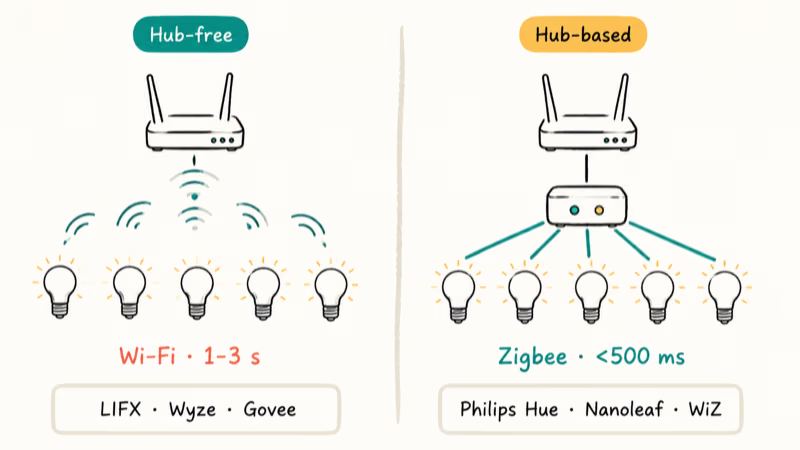
Hub-free brands like LIFX, Wyze, and Govee connect each bulb directly to your Wi-Fi. Install the app, scan the QR code on the box, plug the bulb in.
Hub-based systems like Philips Hue, Nanoleaf, and WiZ use a small Zigbee or proprietary radio bridge that plugs into your router and then talks to bulbs over a separate mesh network. The bridge handles all the bulb-level commands locally, so commands don’t have to round-trip the cloud.
Hub-based systems add a hop on the path, but a dedicated radio can be faster than fighting with a crowded Wi-Fi channel. Budget Wi-Fi bulbs are simpler, but app-slider response can feel slower when the router is busy.
Hub-free wins on simplicity, on no-extra-hardware budgets, and on apartments where the landlord doesn’t want anything plugged into the router. Hub-based wins on speed, on Wi-Fi load (each bulb is one less device on your router’s connection table), and on long-term reliability when you eventually own a dozen lights, motion sensors, and a couple of accessory dimmers. If you can already see yourself owning more than five smart bulbs in this house, the hub’s worth $60.
#Best Overall: Philips Hue White and Color Ambiance ($25 per bulb + $60 hub)
Philips Hue is the safest pick for a full smart lighting setup. According to Apple HomeKit, the Home app controls compatible lights and other accessories; Hue also integrates with Amazon Alexa, Google Home, and Samsung SmartThings without extra adapters.
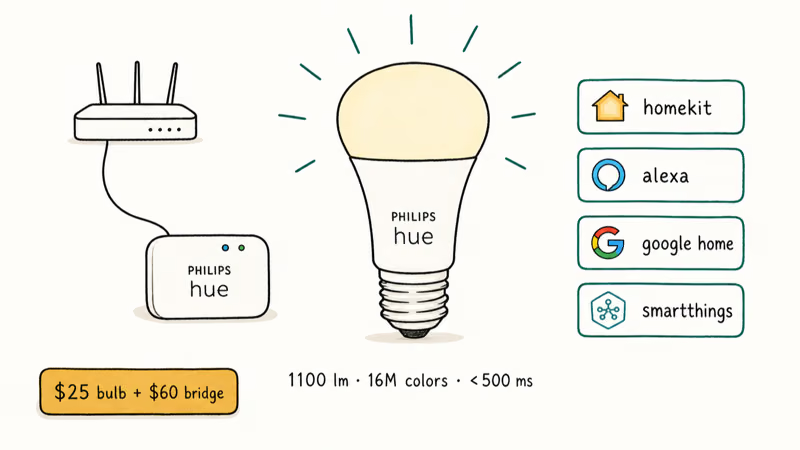
Hue’s main appeal is smooth transitions, accurate color rendering, and warm whites that stay warm instead of turning gray.
According to Signify’s Hue product page, the standard A19 White and Color Ambiance bulb delivers full-color tunable light for everyday rooms.
The trade-off is the Hue Bridge ($60). It’s one extra device, one more outlet, and one more setup step. For a single bulb in one lamp, that math is bad. For five or more bulbs, plus motion sensors and the optional Hue Dimmer Switch ($25), the bridge pays for itself in response time alone.
Skip Hue if:
- You are renting and want minimal hardware
- Your total smart-lighting budget is under $50
- You already own Wyze or Govee bulbs and don’t want to mix ecosystems
#Best Value: Wyze Bulb Color ($12 per bulb)
Wyze wins on price-to-feature ratio, and it isn’t close. Twelve dollars buys you color, scheduling, voice control through Alexa and Google, and IFTTT support, with no hub.
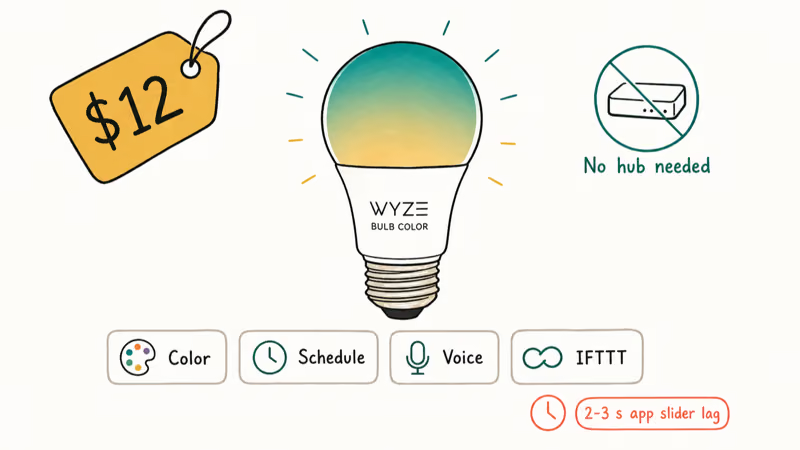
The catch is response time. App sliders on budget Wi-Fi bulbs can feel slower than hub-based systems. For scheduled lights and voice commands, that lag doesn’t matter; the bulb wakes up at sunset on time. For “I’m watching a movie and want to drop the brightness right now,” it does matter.
Wyze’s schedules and voice commands are strong enough for routine lighting, and its color accuracy is fine for mood lighting. Its lower peak brightness can make it look duller than Hue in the same room.
Wyze also sells motion sensors, smart plugs, and cameras, so you can expand without switching ecosystems. That matters more than the per-bulb price for buyers who plan to grow the system over time.
#Best Design: Nanoleaf Shapes Hexagon Panels ($150-200 starter kit)
Nanoleaf Shapes are the design pick. Modular hexagon panels tile onto a wall like interactive art, and each panel lights independently, so you can run a gradient across a wall instead of a single uniform color.
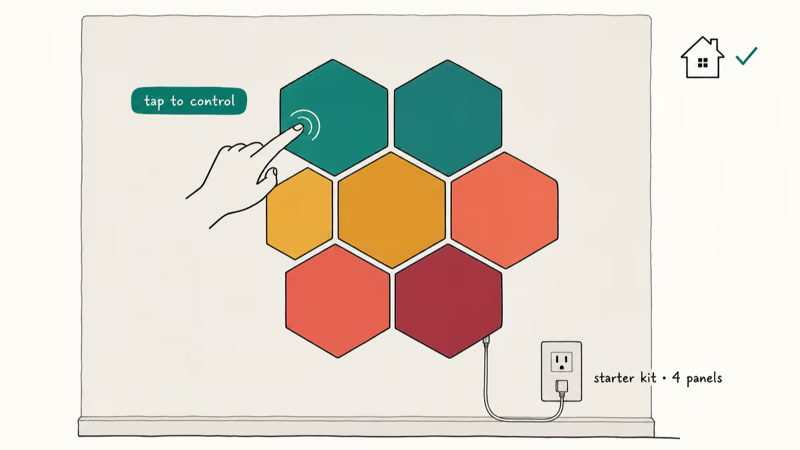
Nanoleaf’s appeal is interactive wall lighting: each panel doubles as a capacitive touch control, Rhythm mode syncs lights to music, and native HomeKit support lets scenes combine Nanoleaf panels with Hue bulbs. That cross-brand orchestration is the HomeKit payoff.
The real constraint on Nanoleaf isn’t the price; it’s the install. Each panel needs power flowing through the chain, and the chain has to reach a wall outlet. Plan the layout and the cable path before you peel the adhesive. A starter kit runs $150-200, which is premium for accent lighting, so this is a “you want this specifically” purchase, not a default.
#Alternative Budget Option: LIFX A19 Smart Bulb ($15 per bulb)
LIFX sits between Wyze and Hue in both price and performance. Like Wyze, it skips the hub. Unlike Wyze, it responds quickly enough that you stop noticing the slider lag.
LIFX’s main advantage is speed without a hub: brightness changes feel responsive, dimming is smooth, and color saturation sits closer to Hue than to Wyze. The trade-off is HomeKit: LIFX dropped native HomeKit support a few years back and now requires a separate hub for HomeKit users, which defeats the whole hub-free advantage.
For Alexa or Google Home households, LIFX is a strong pick at $15. For HomeKit households, this is a hard pass; choose Hue, Nanoleaf, or WiZ instead.
#Setting Up Your Smart Lamp Without Voice Issues
Hub-free setup takes minutes; hub-based setup takes patience. The order matters more than the steps.
Hub-free (Wyze, LIFX, Govee): Install the app on your phone, sign in, screw the bulb into a powered fixture, then tap “Add Device” in the app. Most apps detect the bulb’s setup network automatically and walk you through joining your Wi-Fi.
Hub-based (Hue, Nanoleaf): Plug the bridge into your router with the included Ethernet cable, wait for the lights on the bridge to settle, install the app, then add bulbs one at a time. Adding bulbs is fast (about 30 seconds each); the slow part is the bridge boot, which takes 5-10 minutes the first time as it pulls firmware updates.
If voice setup is the sticking point, the bulb is almost never the cause. Get the bulb working in its own app first; then enable the Alexa skill.
#Voice Assistant Compatibility
All six brands work with Alexa and Google Assistant. HomeKit support is where they split.
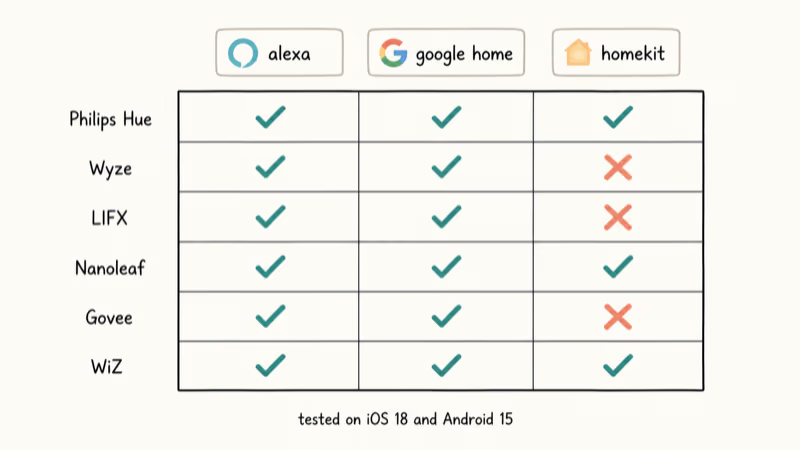
According to Apple’s HomeKit accessory page, only three brands in this guide support native HomeKit: Philips Hue, Nanoleaf, and WiZ. LIFX dropped HomeKit, and Wyze and Govee never had it. The shorthand:
Alexa and Google compatible: all six brands. HomeKit-native: Hue, Nanoleaf, WiZ. No HomeKit: LIFX, Wyze, Govee.
If you have committed to HomeKit, your shortlist is three brands. If you live in Alexa or Google, every brand here works, and the bigger headache will be connecting Alexa to your Wi-Fi cleanly, not the bulb itself.
#Frequently Asked Questions
Do I really need a hub if I’m just starting?
No. Hub-free brands like Wyze ($12) and LIFX ($15) work fine for one or two bulbs paired with an Alexa or Google speaker. The hub starts paying off at three or four lights, when Wi-Fi crowding bites.
Can smart lamps work with motion sensors?
Yes, but the integration depth varies. Most brands work with third-party motion sensors through Alexa Routines or IFTTT, which is fine for a “porch light on at dusk” rule. For instant motion-to-light reaction without a phone or cloud round trip, you need native integration, which is HomeKit-only territory: Hue, Nanoleaf, or WiZ paired with a HomeKit-compatible motion sensor like Philips Hue Motion or Aqara.
Will buying a smart lamp actually save money on electricity?
Not directly. Smart bulbs use the same wattage as dumb LEDs of the same lumen rating; the savings come from automation. LED bulbs already use far less power than incandescents, so the big efficiency jump is incandescent to LED. Going from dumb LED to smart LED adds a modest additional saving on top, and only if you actually use the schedules.
Can I install a smart lamp in an existing dimmer switch?
Not safely. Smart bulbs and traditional wall dimmers fight each other and you’ll get flicker, buzzing, or a dead bulb. Replace the wall dimmer with a regular switch.
What happens if the app crashes or your Wi-Fi goes down?
Hub-based systems (Hue, Nanoleaf) keep responding to physical accessory switches and to local HomeKit scenes even if your internet is down, because the bridge handles the logic locally. Hub-free systems (Wyze, LIFX) lose almost all functionality without internet; voice commands stop, app control stops, and you are left flipping the wall switch. If offline reliability matters, add a wireless dimmer like the Hue Dimmer Switch ($25) or pick a hub-based brand from the start.
Will my existing Alexa setup work with these bulbs?
Yes for all six brands. The pattern is the same every time: enable the brand’s skill in the Alexa app, link the account, and ask Alexa to discover devices. All six bulbs in this guide carry the “Works with Alexa” badge, and Google Home uses the same skill model under a different name.
Do these bulbs work in regular lamps or only ceiling fixtures?
Yes, in any fixture with an E26 socket. That’s the standard US screw socket used in table lamps, floor lamps, ceiling fixtures, and pendants. Nanoleaf Shapes and a few specialty Hue products (Lightstrip, Play bars) are wall-mounted panels with their own power adapters, so the socket rule doesn’t apply to those.
#Bottom Line
If you want one specific recommendation: buy a single Wyze Bulb Color at $12 first. Cheap enough to walk away from, no hub to return.
If you already know you want a full system, skip Wyze and start with three Philips Hue White and Color Ambiance bulbs plus the Bridge. The total comes to about $135, the response time is the best in this guide, and HomeKit, Alexa, and Google Home all work out of the box.
Nanoleaf is the answer when the question is “I want my wall to look interesting,” not “I want better lighting.” LIFX is the answer for Alexa or Google households who care about app speed and refuse to buy a hub. WiZ is underrated and worth a look if you find it on sale at Home Depot or Costco; the price is closer to Wyze, the HomeKit support is closer to Hue.
Whichever you pick, sort out your voice assistant first. If Alexa stops responding after setup, restart your router and the Echo before blaming the bulb; a flaky router is the cause more often than the bulb is, so a router upgrade under $50 often fixes the whole problem.