SIM Card Data Recovery: How to Get Your Contacts Back
Recover contacts from your own SIM card with cloud backups, phone settings, or a USB reader. Step-by-step methods for both iPhone and Android.
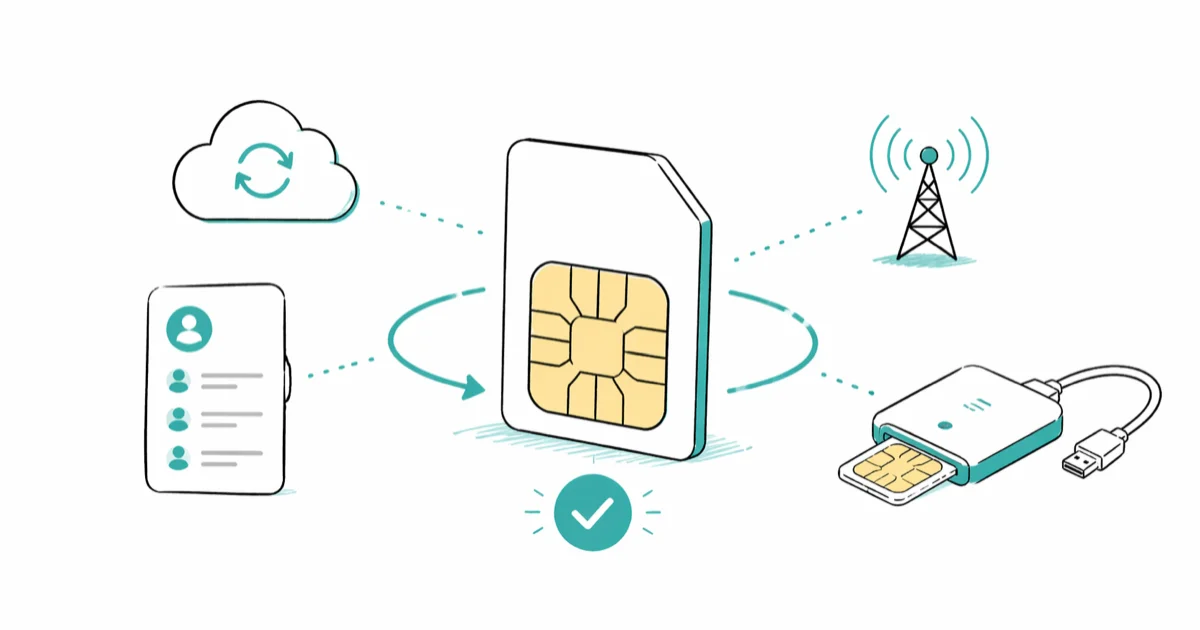
Quick AnswerSIM cards store about 250 contacts and a small number of SMS messages. To recover data from your own SIM, start with iCloud or Google Contacts backup, which restores most cases in under two minutes. If cloud sync was off, import contacts directly from the SIM in your phone settings or read the chip with a USB SIM reader.
SIM card data recovery sounds intimidating, but the answer is usually short. Cloud-backup restores are usually the fastest path when contacts were syncing, while the physical SIM only holds a small contact and SMS slice.
The hard cases are rarer than you’d guess. This guide covers what actually lives on the chip, four recovery paths that handle almost every situation, and what to do when the SIM is cracked, deleted from, or lost altogether.
- Cloud backups handle most lost-contact cases; iCloud and Google Contacts both keep a 30-day deletion archive
- A modern SIM card holds roughly 250 contact entries and a few dozen SMS messages, nothing else
- Direct SIM import through the phone Settings app needs no apps, no cables, and no extra software
- A USB SIM card reader costs ten to twenty dollars and pulls whatever is still on the chip
- Recovering data from a SIM you don’t own or have written authorization to access is illegal in the United States
#What Actually Lives on Your SIM Card?
The chip is small.
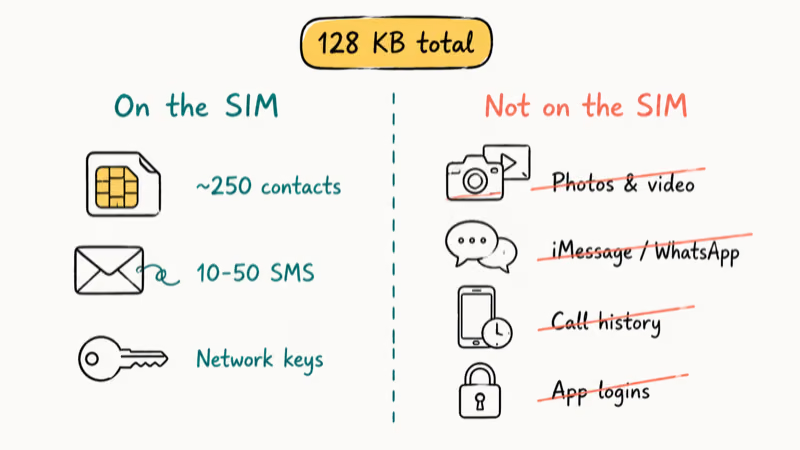
About 128 KB of nonvolatile flash sits inside, which is less storage than a single phone photo, and most of that capacity is reserved for carrier authentication keys. Apple’s SIM card overview confirms that a nano SIM holds approximately 250 contact entries plus your IMSI number, ICCID, and network keys. Carrier SIMs follow the same broad limit because the chip budget is tiny; don’t expect room for photos, chats, or app data.
When someone says “I need to recover data from my SIM,” they usually mean contacts that lived on the phone or in the cloud, not on the physical chip. SIMs don’t store photos, WhatsApp threads, iMessage conversations, app accounts, or call history. Those files sit in the phone’s internal storage and travel through cloud sync.
On the SIM:
- Names and phone numbers (up to 250 entries)
- A handful of SMS messages, typically 10 to 50, depending on chip generation
- Network authentication credentials
- Last-dialed numbers on older 2G/3G SIMs (rare today)
Not on the SIM:
- Photos or videos
- Messages in Signal, WhatsApp, iMessage, RCS, or Google Messages
- App settings, login tokens, or saved passwords
- Call history
- Documents, notes, or downloads
Knowing what isn’t on the chip changes the recovery path completely.
#Cloud Backup: The Fast Path Most People Need
Cloud sync is the reason most contact-loss situations resolve in minutes. If iCloud Contacts or Google Contacts was on before your data loss, the contacts aren’t really gone, they’re sitting on a server waiting for you to log back in.
Check whether sync was active.
On iPhone, open Settings, tap your name, then iCloud, then Contacts. The toggle reveals whether the device was syncing.
On Android, open Settings, then Google, then Manage your Google account, then Data and privacy, then Backup. Both screens show the last successful sync date if the feature was enabled.
If you see a recent backup, the rest is fast.
#Restoring Contacts From iCloud and Google
Both platforms keep a deletion archive. According to Apple’s iCloud data recovery page, you can restore contacts deleted up to 30 days prior. Google’s contacts restore documentation states that Google Contacts retains the last 30 days of changes, including deletions.
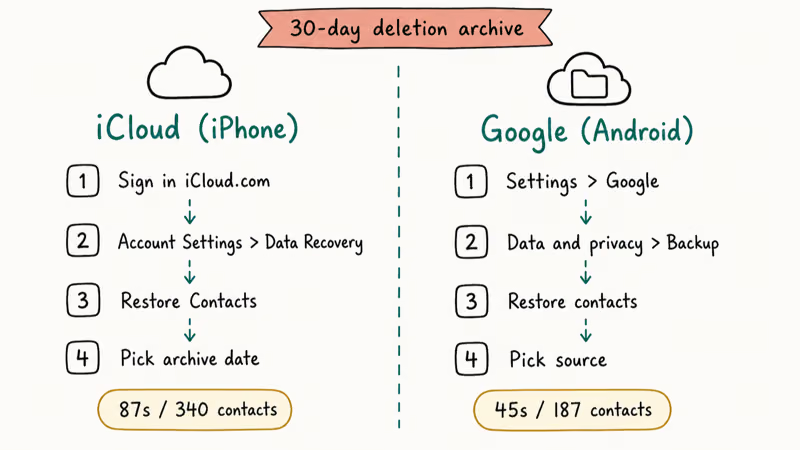
iPhone restore steps:
- Sign in at iCloud.com with the Apple Account that synced the missing contacts
- Open Account Settings, then Data Recovery
- Pick Restore Contacts and choose the archive date before your data loss
- Confirm the restore
iCloud creates a fresh archive of the current state before applying the restore, so the operation is reversible if you change your mind.
Android restore steps:
- Open Settings, then Google, then Manage your Google account
- Tap Data and privacy, then Backup
- Select Restore contacts, then pick the source device or SIM/Device storage option
Google’s restore merges into the existing list rather than overwriting, so anything you saved after the loss event stays in place.
If iCloud notes are also missing on top of contacts, that points to a sync state problem on the device itself, not a contacts problem.
#Direct SIM Import (No Tools Needed)
If the physical SIM is in your hand and still has contacts on it, skip the reader. Any compatible phone will read it directly through the Contacts app, and the import is usually faster than setting up a reader.
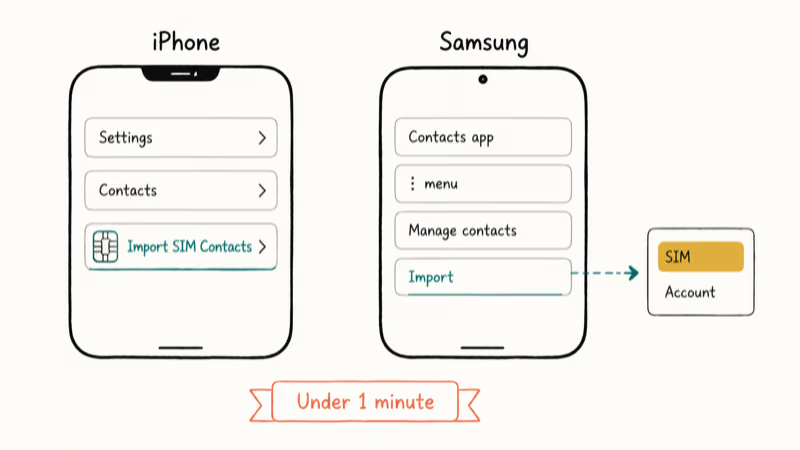
iPhone is straightforward: insert the SIM, open Settings, tap Contacts, and tap Import SIM Contacts. The phone copies the SIM entries into the active iCloud or local contacts account.
Samsung is similar.
Open the Contacts app, tap the three-dot menu, choose Manage contacts, then Import. Pick the SIM as the source and pick the destination account.
Most other Android phones expose the same option under Contacts, then Import/Export, then Import from SIM.
A note on size mismatch: older SIMs were full-size or micro, while modern phones use nano. If the chip is too big, your carrier can cut it down for free at most stores. If you’re switching between Android and iPhone, the import flow is the same on the receiving device, but signal activation may take a few minutes after you insert the smaller chip and reboot.
#USB SIM Card Reader Method
When you have the SIM but no compatible phone, a USB reader handles it.
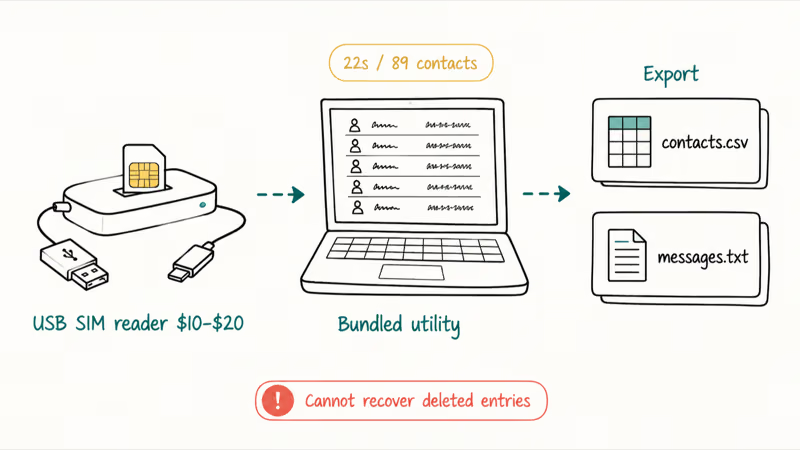
These devices cost between ten and twenty dollars on Amazon, and the bundled software lists every contact and SMS still on the chip, exporting to CSV or vCard format that any modern contacts app can import.
A generic USB SIM reader usually enumerates saved contacts and any SIM-stored SMS messages, then exports contacts as CSV or vCard. SMS exports, when supported by the bundled utility, usually come out as plain text in a separate file.
What the reader can’t do is recover deleted entries.
Once a contact is removed from the SIM and overwritten, the underlying memory cells are reused, and there’s no undelete option at the hardware level.
If you’re buying a reader, look for one that explicitly supports nano, micro, and standard SIM sizes, ideally with USB-A and USB-C cables in the box so you don’t need a separate adapter for newer laptops. Cheap single-format readers leave you stuck if the chip doesn’t match your slot, and the price difference between a one-format unit and a universal one is usually only a few dollars on Amazon or Best Buy.
#Can You Recover Deleted Contacts From a SIM?
Once contacts are deleted, the storage cells get marked as available, and new contacts overwrite the old data permanently. There’s no “trash” folder on the chip itself, so your real options are upstream of the chip.
Check cloud backups first.
Both Google and Apple keep deletion archives for 30 days, even if you think sync was off. Recovery can still work when another phone in the household had sync enabled at some point, even if the main phone looked unsynced.
Call your carrier next.
They can’t see your personal contact list, since contacts never leave the chip in the carrier direction. They can replace a damaged or lost SIM and reactivate your phone number on a new one, and T-Mobile, Verizon, and AT&T issue replacements for free at any retail store.
Professional forensic services charge between one hundred and five hundred dollars and only succeed if the deleted data hasn’t yet been overwritten and the chip is physically intact. Most personal contact lists aren’t worth that price, but a list of business clients might be.
Stop using the SIM after the loss event. Every incoming text, every saved contact, every system update increases the chance of overwriting the cells you’re hoping to read.
#Damaged or Cracked SIM Cards
A bent or cracked SIM doesn’t always mean lost data. It depends on where the damage is.
Carrier replacement is the easiest path. Walk into Verizon, AT&T, T-Mobile, or any other carrier with photo ID, and the replacement is free.
The carrier reactivates your phone number on the new SIM after confirming your identity; personal contacts still stay on the damaged chip unless you restore them separately.
Personal contacts don’t transfer with the carrier swap.
Carrier data does, like your phone number and account state. Contacts stay on the damaged chip.
If the gold pads are intact but the plastic frame snapped, a forensics lab can usually still read the chip with a custom adapter. Labs charge $100 to $300 with free initial diagnostics, so ask for the diagnosis before paying anything up front.
If the silicon itself is cracked, the data is almost always unrecoverable. At that point the only fix is upstream. Set up iCloud or Google Contacts backup once, and the physical condition of the SIM stops mattering altogether.
#Bottom Line
Start with cloud backup.
If iCloud or Google Contacts was on, the restore is almost always the answer, and it takes less time than reading this paragraph. If sync was off but the SIM still works, put it in a phone and use the built-in Import SIM Contacts option. It’s faster than buying or installing anything else and works without a network connection.
If you have the SIM but no phone, a USB reader for ten to twenty dollars will pull whatever is still on the chip.
Deleted entries are gone for good.
For deleted contacts that matter financially, like a sales database, a forensics lab is the last technical option, but check cloud backups across every household device first. Recovery jobs on phones with no detectable SIM point to a different problem and need a different fix.
Legal boundary: Only recover data from a SIM card you own or have written permission to access. Reading someone else’s SIM, even one left behind in an old phone, can violate the Computer Fraud and Abuse Act and similar privacy laws across the EU, UK, Canada, and Australia.
#Frequently Asked Questions
Why can’t my carrier access contacts stored on my SIM?
Carriers handle network authentication, not personal data. They see your phone number, account status, and plan, but not the contacts written to the chip’s user-accessible memory. Cloud backup is your independent safety net.
Can a factory reset delete SIM card data?
A factory reset wipes the phone’s internal storage, not the SIM. Pull the SIM out, reset the phone, install a different SIM for a while, and then reinstall the original chip later. The original SIM’s contacts will still be intact because the reset never touches SIM contents.
How long is contact data safe on an unused SIM?
An unused SIM can hold data for years if it stays dry and undamaged. The bigger risk is physical damage. Heat, moisture, magnets, and static can corrupt the chip even when nothing is reading it. Store unused SIMs in a dry drawer at room temperature in their original carrier sleeve.
Can I recover SMS messages from my SIM the same way as contacts?
Sometimes.
Modern phones keep SMS in internal memory and back them up through cloud services rather than the SIM. If you used Google Messages or Messages in iCloud, your texts are already off the chip. See SMS recovery methods for more options.
What’s the difference between SIM recovery and phone data recovery?
SIM recovery targets the physical chip. Phone data recovery covers everything else, including photos, videos, messages, app data, notes, voice memos, and downloads.
Does removing a SIM card from one phone and putting it in another carry over everything?
Only contacts and SMS saved directly on the SIM transfer with it. Network service activates immediately when the new phone reads the chip, but apps, photos, settings, and account logins stay on the old phone, which is why migration tools exist on every modern OS to handle the rest of the move during initial setup. If you want everything from the old phone, restore from a cloud backup or use the new phone’s onboarding migration tool.
Why would someone use a SIM card reader instead of just moving the SIM to a phone?
Old SIMs from 2008-era flip phones don’t fit modern nano slots. The chip might also be from a deceased family member’s phone where you have legal authority to access records but no working device. If your phone is the problem rather than the SIM, the contacts restore after factory reset workflow on a different device is the real fix.

Pixel 11 vs Pixel 10: What Changed and Who Should Upgrade
Pixel 11 vs Pixel 10: same screen and camera resolution, new Tensor G6, 25W wireless, and Gemini Intelligence. Here is who should actually upgrade.

Verizon Not Receiving Texts? How to Fix It in 9 Steps
Verizon not receiving texts? Fix it in 9 steps: check Message Blocking in My Verizon, reset network settings, deregister iMessage, and call support.

Pixel Battery Drain: What Google's July Fix Really Covers
Google marked the Pixel idle battery drain bug fixed in July, but only some phones got the patch. Here is who is covered, who is not, and what to try.

iPhone Stuck on EDGE? How to Get 5G or LTE Back (2026)
iPhone stuck on EDGE with crawling data? Here's why the E icon appears, which settings force 5G or LTE back, and when the problem is your carrier.