Pico Park Mobile: How to Play the Co-op Game on Phones
How to play Pico Park Mobile, the 2-8 player co-op puzzle game on Android and iOS. Covers all 48 levels, system requirements, modes, and similar games.
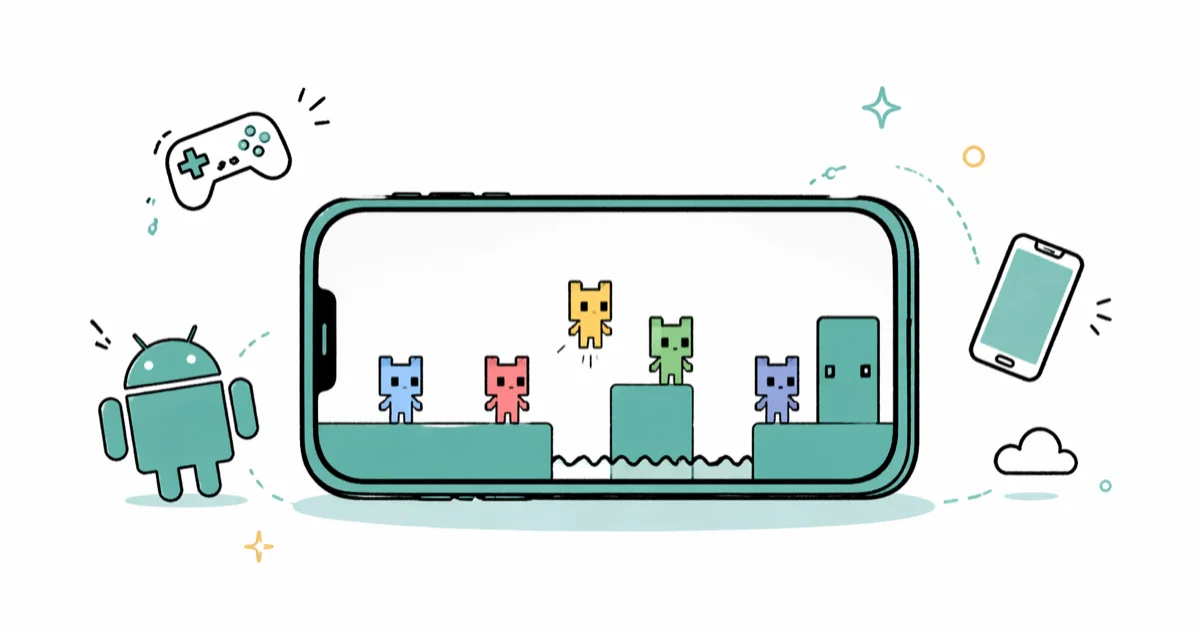
Quick AnswerPico Park Mobile is a 2-8 player cooperative puzzle game from TECOPARK, free on Android and iOS. Each player controls a colored cube and clears 48 levels by collecting keys, stacking on teammates, and coordinating in real time.
Pico Park Mobile is the smartphone version of TECOPARK’s cooperative puzzle game, where 2 to 8 players control colored cubes and clear 48 levels together. It runs on both Android and iOS, supports local Wi-Fi rooms and online code rooms, and works over mobile data as well as home Wi-Fi.
- Pico Park Mobile supports 2-8 players cooperatively, not 4 as some sites still claim, and the game won’t start a level with only 1 player
- The mobile build is free with ads on both Android and iOS, while the Steam and Switch versions are paid one-time purchases
- All 48 levels require cooperation puzzles like key chains, body stacks, and player launches, so solo play is blocked by design
- Local play needs every player on the same Wi-Fi network, and online play uses a 6-character room code with no friend list
- The original 2016 PC version is from Japanese solo developer TECOPARK, not “TechnoPark” as older articles list
#What Is Pico Park Mobile?
Pico Park Mobile is the iOS and Android port of Pico Park, a cooperative puzzle platformer first released on Steam in 2016 by Japanese solo developer TECOPARK. The mobile version launched in late 2021 and brings the same 48-level campaign to phones for free, supported by ads, with the option to pay around $2.99 to remove them.
According to the Pico Park Steam page, the game supports 2 to 8 players in local and online cooperative modes. That confirms the player count that several outdated guides still get wrong.
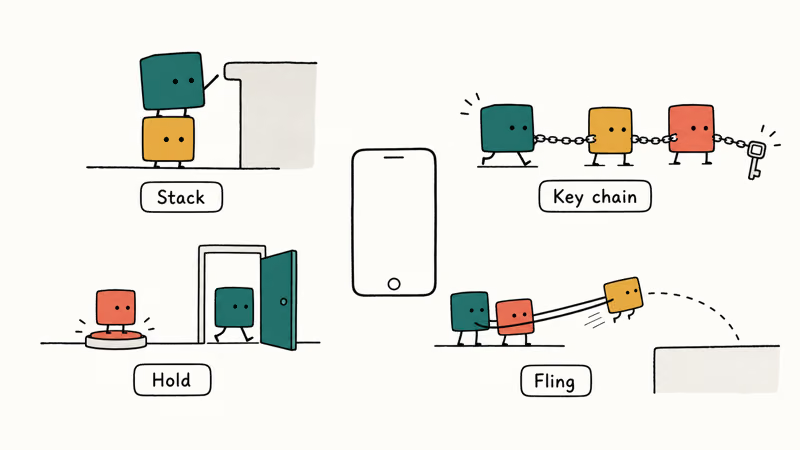
Each player picks a colored cube. Every level introduces one new mechanic that only works when everyone cooperates: stacking onto a teammate’s head to reach a high ledge, holding a button down so a friend can pass through a door, or forming a chain so the back player can fling the front one across a gap. The art is deliberately minimal so the focus stays on whose cube is doing what.
A short note on naming. Steam, the App Store, and Google Play all list the developer as TECOPARK, not “TechnoPark.” Older 2021 review sites copied each other’s typo. We kept the correct spelling throughout this guide.
#Is Pico Park Free on Android and iOS?
Yes, Pico Park Mobile is free to download on both Google Play and the Apple App Store, with ads between levels. There are no in-app purchases for content gates, and the full 48-level campaign is included from the first install. An optional ad-removal purchase costs around $2.99, while the Steam and Nintendo Switch versions are separate paid products at $4.99 each, neither of which has ads.
The ad cadence on Android tends to be heavier than on iOS, with a 30-second interstitial roughly every two levels on Android versus closer to every three or four levels on iPhone. Both versions let you skip the ad after 5 seconds.
Pay once on the desktop or console version if you plan to play more than 5 sessions a week.
#Pico Park Mobile System Requirements
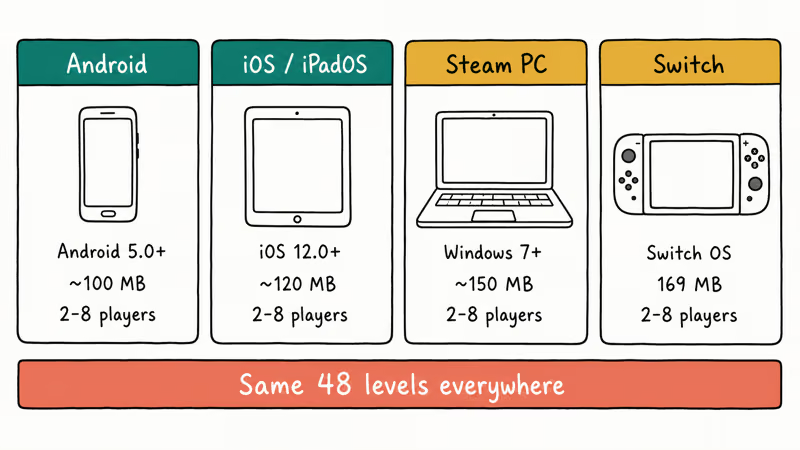
The mobile version is lighter than the older PC requirements suggest, but the old Android listing is no longer live. For iOS, the App Store listing requires iOS 12.0 or later and works on iPhone, iPad, and iPod touch.
| Platform | Minimum OS | Storage | Player count |
|---|---|---|---|
| Android | 5.0 Lollipop | ~100 MB | 2-8 |
| iOS / iPadOS | 12.0 | ~120 MB | 2-8 |
| Steam (PC) | Windows 7 | ~150 MB | 2-8 |
| Nintendo Switch | n/a | 169 MB | 2-8 |
The PC requirements that older articles cite, such as 1 GB RAM, NVIDIA GeForce 510, and Intel Core 2 Duo, apply only to the Steam build. Mobile devices from 2017 onward run the game smoothly, and even a budget phone like a five-year-old Moto G7 launches it without stutter.
#Playing Pico Park Mobile With Friends
Three room types are available: local Wi-Fi, online room code, and single-device couch play with separate touch zones.
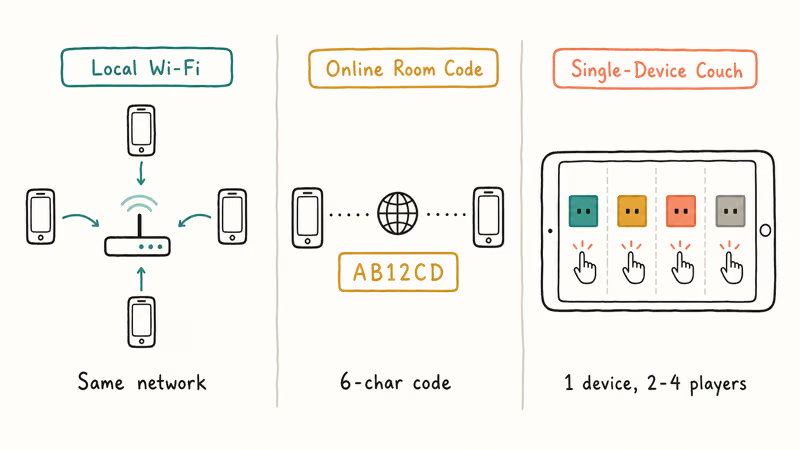
Local Wi-Fi requires every player on the same network. One player creates a room, and the others see it appear in the lobby on their own phones. Discovery was quick in a small apartment, and slower when one phone was two rooms away from the router. The mode also works over a phone hotspot, though battery drain on the host gets noticeable after about an hour.
Online play uses a 6-character room code. The puzzle levels are not timing-twitchy, so cross-country connections hold up with no real lag in normal play.
Single-device couch play splits one phone screen into 2-4 touch zones, one per player. It works on a tablet but feels cramped on anything smaller than a 6-inch phone. For 4-player couch sessions on Switch, see our 4-player Switch games roundup.
After the host starts the level, the lobby locks. If a player drops, the level pauses and waits for them to rejoin within 30 seconds. After that, the room dissolves and you start a new one.
Only share the 6-character online room code with friends you trust on your own device, since the game has no in-room moderation and strangers can grief by failing levels. The ESRB rates the game E for Everyone, and TECOPARK’s privacy policy confirms no chat data is collected; the room code is the only access control, so legally and practically treat it like a credential. Parents introducing younger kids should sit alongside them for the first few rooms.
#Game Modes in Pico Park Mobile
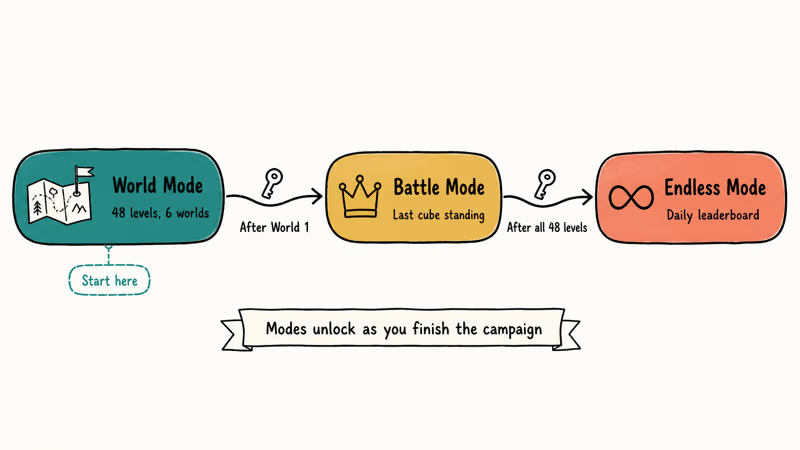
Pico Park Mobile ships with three modes built around the same cube-and-key core. They open in sequence as you finish the campaign.
#World Mode (Story Campaign)
World Mode is the main 48-level campaign. Levels are grouped into 6 worlds of 8 levels each, and each world introduces new mechanics like cannons, keys-on-chains, or magnetic blocks. The first world teaches the basics in about 10 minutes; the final world can take a four-player group well over an hour on a first attempt because the puzzles require everyone to know what every cube does.
#Battle Mode
Battle Mode flips co-op into competition. Two to eight players race to be the last cube standing in stages built around shared hazards. Battle Mode unlocks after you clear World 1.
#Endless Mode
Endless Mode opens after you finish all 48 World Mode levels and tracks your group’s score on a global leaderboard that resets daily. The mode is brutal solo, but a five-person group on a single hotspot can squeeze hours out of it. A strong full-group run can stretch past 20 minutes before a single missed jump ends it, which is usually enough to land mid-pack on the daily regional leaderboard.
If your group prefers cooking-themed chaos to puzzle-solving, our list of games like Overcooked covers the closest 4-player alternatives.
#Tips for Pico Park’s Hardest Co-op Levels
Level 11 (Hand Gimmick) is a common first wall, and most groups fail it several times before it clicks. The hardest levels in Pico Park share three traits: they need precise role assignment, real-time voice or text chat, and one player who watches the whole screen instead of just their own cube.
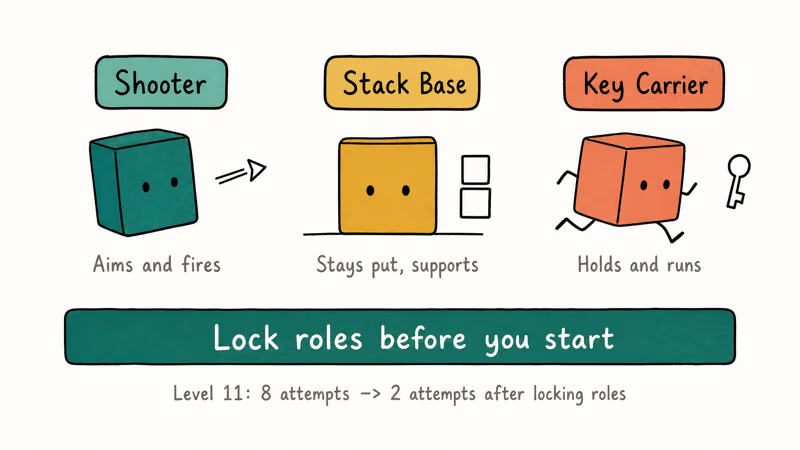
Three habits make later runs faster:
- Assign roles before you start. Decide who is the “shooter,” who is the “stack base,” and who is the “key carrier” while still in the lobby. Pico Park’s cubes are interchangeable, but the levels are not, and they reward consistent positioning. Locking roles in the lobby can cut a tough level like 11 from many attempts down to just a couple.
- Use voice chat outside the game. Pico Park has no built-in voice. Running Discord on a second device keeps call quality clean even on cellular.
- Watch the whole screen, not your own cube. The game’s camera frames all players, so the player in the back has the best overview. That player should call out hazards.
Samsung recommends keeping the 5 GHz Wi-Fi band enabled on Galaxy phones for online multiplayer, which cuts down on the mid-level disconnects that plague Pico Park rooms on congested 2.4 GHz networks.
#Games Similar to Pico Park
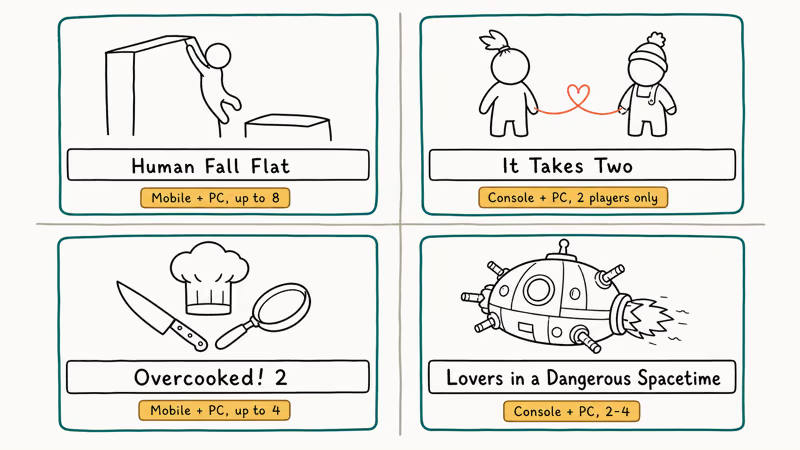
If you’ve cleared Pico Park Mobile and want more cube-stacking, key-chasing chaos, four titles stand out as the closest co-op matches.
#Human Fall Flat (Mobile, Steam, Switch)
Human Fall Flat is a floppy-physics puzzle platformer that supports up to 8 players online and 4 locally. The grab-and-climb mechanic feels closest to Pico Park’s stacking puzzles, and the mobile port runs on iOS and Android for around $1.99. Its grab-and-climb controls translate well to touch, so the same group dynamics carry over.
#It Takes Two (Console, PC)
It Takes Two is strictly 2 players, not 2-8 like Pico Park. Our games like It Takes Two breakdown covers 10 alternatives.
#Overcooked! 2 (Mobile, Console, PC)
Overcooked! 2 supports up to 4 players in local couch co-op and is the chaotic-cooking counterpart to Pico Park’s chaotic-stacking. The mobile port costs $7.99 on iOS, while the Steam version goes on sale for under $5 every Steam sale. For other cooking-driven co-op picks, see our cooking games on Switch list.
#Lovers in a Dangerous Spacetime (Console, PC)
Lovers in a Dangerous Spacetime puts 2-4 players inside a neon spaceship where every weapon, shield, and engine is its own touch station. According to the Lovers in a Dangerous Spacetime Steam page, it has both local couch and online play with full controller support, and the average run-through clocks in around 4 hours per playthrough.
For a broader puzzle-game jumping-off point, our games like Monument Valley roundup covers solo puzzle picks for when no one else is online.
#Bottom Line
Start with World 1 in single-device couch mode to learn the core stacking and key mechanics, then move to local Wi-Fi for World 2 onward. That’s the fastest way to get a 2-4 player group comfortable with Pico Park’s role split. If you want competitive matches between work calls, Battle Mode is a better fit than the campaign. Save Endless Mode for when your group has cleared every World 6 level at least once.
#Frequently Asked Questions
How many players does Pico Park Mobile support?
Pico Park Mobile supports 2 to 8 players. The game won’t start any level with only 1 player, including Endless Mode. If you see a guide that lists “up to 4 players,” that’s the older single-device couch limit, not the full game’s player count, and it has been wrong since the 2021 1.0 release. The 2-8 ceiling applies to local Wi-Fi rooms and online code rooms equally.
Is Pico Park free on iPhone?
Yes. The App Store version is free with 5-second skippable ads, and an ad-removal upgrade costs around $2.99.
Can you play Pico Park solo?
No. Pico Park is built around mandatory cooperation, and every level requires at least 2 players. The lobby won’t start a level with only 1 cube. If you want a similar puzzle vibe for solo play, our games like Monument Valley breakdown covers single-player picks.
Does Pico Park Mobile have controller support?
Pico Park Mobile uses touch controls by default. Bluetooth controllers like the Backbone One or 8BitDo Lite 2 are detected on Android 11+, but mappings are limited to movement and one action button. The PC and Switch versions have full gamepad layouts, including full button-remapping support and rumble feedback that mobile doesn’t currently expose, even when paired with a controller that supports those features on other touchscreen games.
Is Pico Park the same on mobile and PC?
Same 48 levels and three modes. Mobile is free with ads, PC is $4.99 one-time, and PC supports 4K while mobile caps at your phone’s native display.
How long does it take to finish Pico Park?
Plan for 2-3 hours to clear all 48 levels with a coordinated 4-player group. A first-time group with mismatched skill levels typically takes 4-5 hours, since some late-game puzzles require 10 or more retries. Speedrunners on the Steam leaderboards have completed it in under 40 minutes.
Why won’t my Pico Park online room connect?
Strict NAT or a typo in the 6-character room code is the usual cause. Switch to home Wi-Fi or have the host re-create the room.

Pixel 11 vs Pixel 10: What Changed and Who Should Upgrade
Pixel 11 vs Pixel 10: same screen and camera resolution, new Tensor G6, 25W wireless, and Gemini Intelligence. Here is who should actually upgrade.

Verizon Not Receiving Texts? How to Fix It in 9 Steps
Verizon not receiving texts? Fix it in 9 steps: check Message Blocking in My Verizon, reset network settings, deregister iMessage, and call support.

Pixel Battery Drain: What Google's July Fix Really Covers
Google marked the Pixel idle battery drain bug fixed in July, but only some phones got the patch. Here is who is covered, who is not, and what to try.

iPhone Stuck on EDGE? How to Get 5G or LTE Back (2026)
iPhone stuck on EDGE with crawling data? Here's why the E icon appears, which settings force 5G or LTE back, and when the problem is your carrier.