PCM vs Bitstream: Best Audio Setting for Blu-ray (2026)
PCM vs Bitstream compared on Atmos support, audio quality, latency, and AVR compatibility. Pick the right Blu-ray audio output for your home theater.
Quick AnswerPick Bitstream when your AV receiver supports the source format and you want Atmos or DTS:X. Pick PCM when your TV or older receiver only handles stereo or basic 5.1.
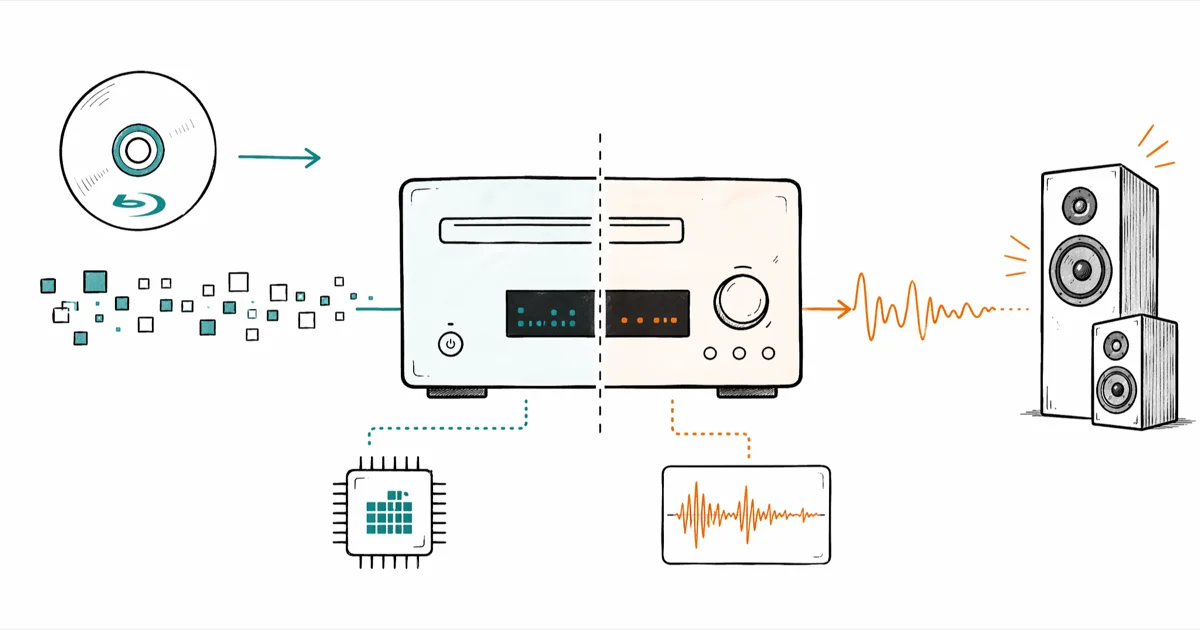
The PCM vs Bitstream toggle on a Blu-ray player decides where your surround formats get decoded, not how good they sound. The right pick depends on what sits between the disc and the speakers.
- Bitstream sends the encoded Dolby or DTS stream untouched so the AV receiver decodes Atmos, DTS, and TrueHD
- PCM tells the source player to decode first, then send uncompressed multichannel audio over HDMI
- Atmos and DTS object metadata only survives over Bitstream from a 4K UHD player to a compatible AVR
- PCM is the safer choice when your TV is the receiver, since most TVs can’t decode lossless surround formats
- Audio quality is identical for the supported formats; the choice is about which device handles the decode
#What PCM Actually Sends
PCM is short for Pulse Code Modulation, an uncompressed digital audio format that ships raw multichannel samples over HDMI. The source player reads the disc, decodes whatever sits on it (Dolby TrueHD, DTS-HD MA, Dolby Digital), then sends the result down the cable with no compression and no metadata envelope. That trip happens before the audio leaves the player chassis, so anything downstream is just a clock and an amplifier.
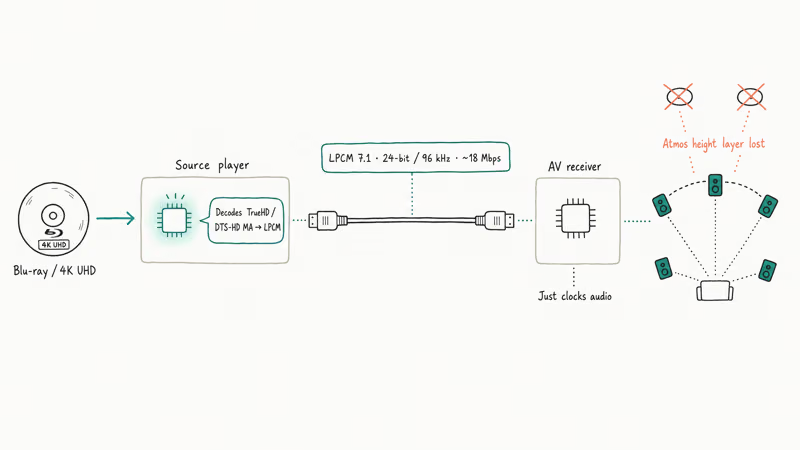
The flavor on Blu-ray and 4K UHD discs is technically LPCM (Linear PCM) — samples spaced at a uniform rate. Sony’s glossary states that LPCM has been the baseline since 1982, and Blu-ray expands it to 24-bit / 96 kHz across up to 7.1 channels (see the Sony electronics glossary).
This matters because the player has already done the heavy decoding work before the audio leaves the box. Your AV receiver or TV plays back what it gets.
There is no second decode step. When a player decodes Atmos or DTS
to PCM, the object metadata can’t survive the decode-and-resend trip. Short version: PCM is pre-decoded, lossless, and dumb on purpose.#What Bitstream Actually Sends
Bitstream sends the encoded audio across HDMI exactly as it sits on the disc. The player does no decoding.
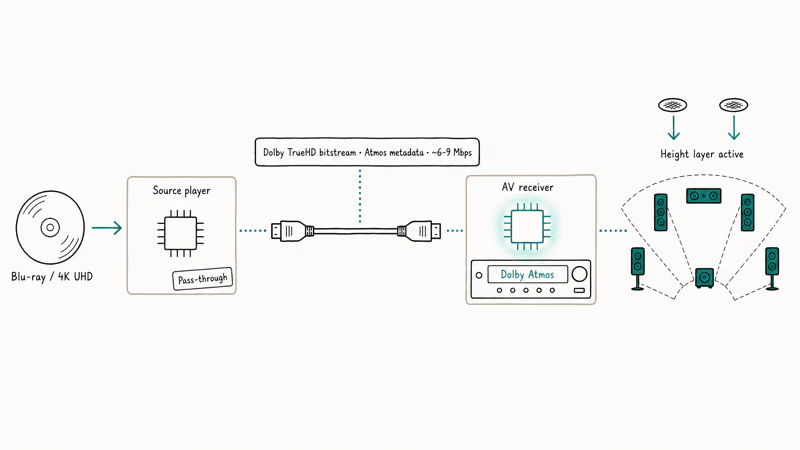
Your AV receiver gets the raw Dolby TrueHD or DTS-HD Master Audio stream, decodes it internally, and routes the resulting channels (including Atmos height objects or DTS
3D positioning) to the right speakers. This is the only setting that preserves the object-based metadata for next-gen formats.Dolby’s Atmos for home setup guide confirms that an Atmos signal needs to reach an Atmos-capable AVR or soundbar in its native bitstream form for the height layer to render correctly, and recommends a minimum 5.1.2 speaker layout to perceive the overhead channels. Once the source decodes Atmos to PCM, the object metadata is baked into static channels and the AVR has nothing left to position.
The same applies to DTS
. According to DTS’s product page, the format relies on object metadata that decoders use to map sound to up to 11.2 speakers physically connected to that room.Pre-decoding kills that flexibility. So Bitstream pushes the work downstream, where the modern receiver does it best.
#How Do PCM and Bitstream Differ for Atmos and DTS?
For Dolby Atmos and DTS
, the difference is binary. Bitstream preserves the format end-to-end. PCM strips the object metadata and delivers a flattened multichannel mix. Both can sound great, but only one of them gives you the height layer.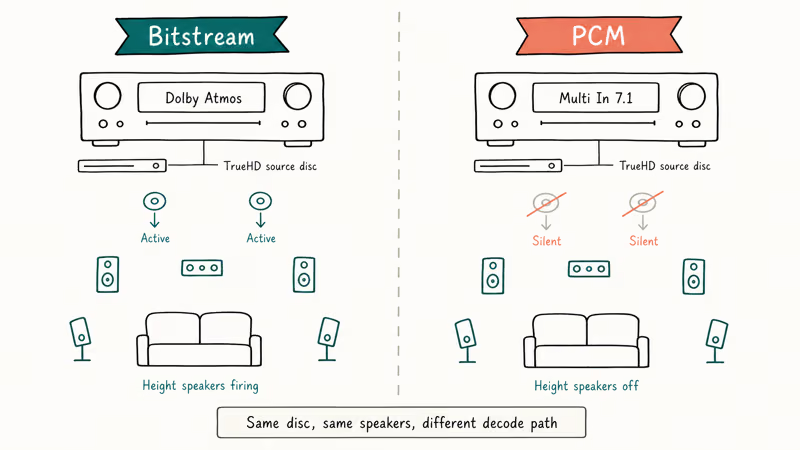
Here is the practical setup difference for object-based audio:
| Setting | Atmos source disc | What the AVR display shows | Height speakers active |
|---|---|---|---|
| Bitstream | Dolby Atmos (TrueHD) | “Dolby Atmos” | Yes |
| PCM | Dolby Atmos (TrueHD) | “Multi In 7.1” | No |
| Bitstream | DTS | “DTS” | Yes |
| PCM | DTS | “Multi In 7.1” | No |
If you don’t own an Atmos or DTS
receiver, this whole comparison collapses. Both settings will give you 5.1 or 7.1 channels of identical-sounding audio, decoded either upstream or downstream. The format that survives the cable doesn’t matter when the speakers can’t reproduce it.For older lossless formats like Dolby TrueHD or DTS-HD Master Audio without object metadata, both PCM and Bitstream produce bit-identical output. The decoder location is the only thing that changes.
#Which Setting Should I Use for My Setup?
The right answer depends on what is doing the decoding. Here is the decision tree to use when setting up a Blu-ray player.
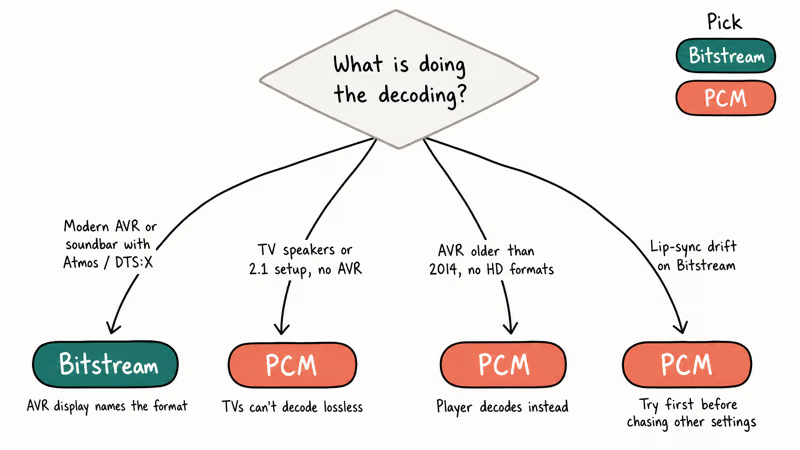
Use Bitstream if:
- You have an AV receiver or soundbar that lists Atmos, DTS, or DTS-HD MA support on its spec sheet
- Your HDMI chain runs source → AVR → TV (the AVR sees the audio first)
- You watch 4K UHD discs with object-based audio tracks
- You want the AVR display to show the format name (Atmos, DTS, TrueHD) rather than “Multi In”
Use PCM if:
- Your TV is the audio decoder (no AVR, no soundbar) and you rely on TV speakers or HDMI ARC to a 2.1 setup
- Your AVR is older than 2014 and only lists Dolby Digital and DTS support, not the HD or object-based variants
- You hit lip-sync issues that the player can fix internally before sending audio out
- You stream secondary audio (game menu sounds, picture-in-picture commentary), since some players can only mix these into PCM
On TVs or sound systems that can’t decode Dolby TrueHD or DTS-HD MA, PCM is often the safer choice because the player handles the decode before sending audio downstream.
Apple’s HDMI audio reference for Apple TV describes the same handshake: when the downstream device doesn’t advertise support for a format over HDMI EDID, the source must fall back to PCM or no audio plays. If you are deciding between disc formats first, our Blu-ray vs DVD breakdown covers what audio tracks each format actually carries.
#Connection Type Limits
Not every HDMI setup carries every format. The cable, the version, and the audio return path all gate what survives the trip.
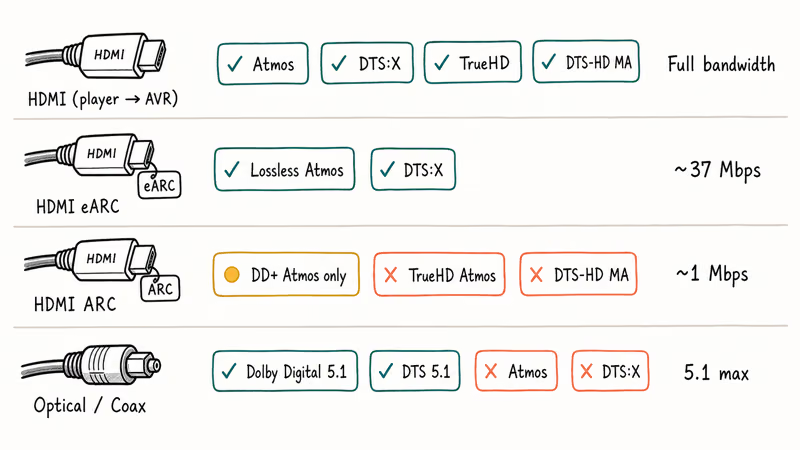
Standard HDMI from a 4K UHD player to an AVR carries every Blu-ray audio format including Atmos and DTS
. HDMI ARC (the older return channel from a TV back to a soundbar) can pass Dolby Digital Plus with Atmos at roughly 1 Mbps, but most ARC implementations cap below the bandwidth needed for full TrueHD Atmos.HDMI eARC, introduced with the HDMI 2.1 spec, lifts that cap to about 37 Mbps and passes lossless Atmos through the TV to the soundbar.
Optical (TOSLINK) and coaxial digital outputs are dead ends for object-based audio. They top out at compressed 5.1 (Dolby Digital or DTS), so any source player feeding optical will downmix Atmos to 5.1 regardless of the PCM-vs-Bitstream toggle. If your only output is optical, the toggle is moot.
For wider context on how HDMI handles long runs and signal integrity, see our guide on HDMI over Ethernet where we cover what survives an extender and what doesn’t.
#Latency and Lip-Sync Trade-offs
PCM tends to win on latency by a small margin because the source has already done the decoding when it ships the audio out. The AVR just clocks it to the speakers.
Bitstream introduces a small decode delay on the AVR side. Most modern receivers compensate with a built-in audio delay control, and many TVs let you offset audio in the picture menu. If you can’t get lips to match dialogue with Bitstream, try PCM as a quick test before chasing other settings.
Game mode is the second place this shows up. When a console outputs audio, Bitstream can add latency that surfaces as missed audio cues. Most consoles default to PCM for this reason.
Sony’s PS5 audio settings guide recommends Linear PCM as the safe default for TV speakers, and the PS4 Blu-ray output guide we wrote covers the same toggle one generation back. Console gamers running through an Atmos AVR can switch to Bitstream and accept the small decode lag for the height channels.
#PCM vs Bitstream Side-by-Side
Quick reference for the differences that actually change your setup:
| Dimension | PCM | Bitstream |
|---|---|---|
| Decoder location | Source player | AV receiver or soundbar |
| Atmos / DTS support | No (object metadata lost) | Yes (with compatible AVR) |
| Best for TVs as decoder | Yes | No (most TVs can’t decode lossless) |
| Audio quality (5.1/7.1) | Identical to Bitstream | Identical to PCM |
| Latency | Slightly lower | Slightly higher (AVR decode time) |
| Player audio mixing | Works (menus, secondary audio) | Player may not mix overlays |
| Optical/coaxial output | Capped at 2.0 LPCM | Capped at 5.1 Dolby Digital / DTS |
#Bottom Line
If you own a current Atmos or DTS
receiver, set the Blu-ray player to Bitstream. That is the only setting that gives you the height layer and the format name on the AVR display.If your TV is the audio endpoint or your AVR predates Dolby TrueHD support, set it to PCM and let the player handle the decode.
Anyone running optical or coaxial only can leave the menu alone, since the cable can’t carry Atmos either way.
If you’re chasing audio playback issues unrelated to format choice, our walkthrough on no sound on laptop covers HDMI-over-USB-C audio paths that share the same EDID handshake logic as the Blu-ray case above.
#Frequently Asked Questions
Does PCM sound worse than Bitstream?
No. For any format both settings can carry, the audio is bit-identical. The decoder runs in a different chassis, but the sample values reaching the speakers are the same.
Can my TV decode Dolby Atmos?
Most TVs can’t decode Dolby TrueHD with Atmos directly. They pass it through over HDMI eARC to a connected soundbar or AVR. Some 2022 and newer models from LG, Sony, and Samsung do decode Dolby Digital Plus Atmos for streaming apps, but disc-based Atmos still needs a separate AVR or soundbar.
Why does my AVR show “Multi In” instead of “Atmos”?
That’s the symptom of a PCM feed. Switch the player to Bitstream and the AVR display will name the format.
Does Bitstream work over optical or coaxial?
Optical and coaxial pass compressed 5.1 only (Dolby Digital or DTS). They can’t carry TrueHD, DTS-HD MA, Atmos, or DTS
. If those are your only outputs, the PCM-vs-Bitstream toggle doesn’t change what reaches your speakers.Should I use Bitstream for gaming consoles?
Most consoles default to PCM because Bitstream adds a small decode delay that can throw off competitive timing cues. If you route through an Atmos AVR for movies, switch back to PCM for fast-paced games. The PS5 and Xbox Series X both expose this in the audio settings.
What about Direct Stream Digital or DSD audio?
DSD is a separate format used on SACD discs. It isn’t handled by either PCM or Bitstream toggles for Blu-ray. SACD players output DSD over HDMI as a third path, which only specific AVRs decode natively. Most users converting SACD to PCM or DoP fall outside the scope of the standard Blu-ray menu choice.
Will PCM use more HDMI bandwidth than Bitstream?
Yes, slightly. Uncompressed 7.1 PCM at 24-bit / 96 kHz runs around 18 Mbps, while a TrueHD bitstream of the same source runs roughly 6-9 Mbps. HDMI 1.4 and later have plenty of headroom for either, so this only matters on very long passive cable runs that are already on the edge of signal integrity. If your audio device throws an EAC3 not supported error on streamed content, the same bitstream-vs-PCM logic applies on a software level.
Can I switch between PCM and Bitstream without rebooting?
Yes, on most players. The output handshake renegotiates over HDMI quickly. You may hear a brief audio dropout while the AVR locks onto the new stream.

Best Laptop for Running LLMs in 2026: Memory Comes First
The best laptop for running LLMs is a memory purchase first. Compare MacBook unified memory against NVIDIA laptop VRAM, and see what each tier really runs.

Pixel 11 vs Pixel 10: What Changed and Who Should Upgrade
Pixel 11 vs Pixel 10: same screen and camera resolution, new Tensor G6, 25W wireless, and Gemini Intelligence. Here is who should actually upgrade.

Best Power Bank for iPad in 2026: Pro, Air, and Mini
Best power bank for iPad in 2026. Compare mAh tiers and USB-C PD wattage for iPad Pro, Air, and mini, plus airline Wh math, cables, and travel tips.

Best Power Bank With Built-In Cable: Top 2026 Picks
Best power bank with built-in cable picks for 2026. Compare single USB-C, multi-connector, and retractable laptop banks, plus airline Wh math.