Best Light Bulb Security Cameras for 2026: Top Picks
Compare the top light bulb security cameras for 2026 on resolution, night vision, app features, and the privacy rules you need to know before installing.
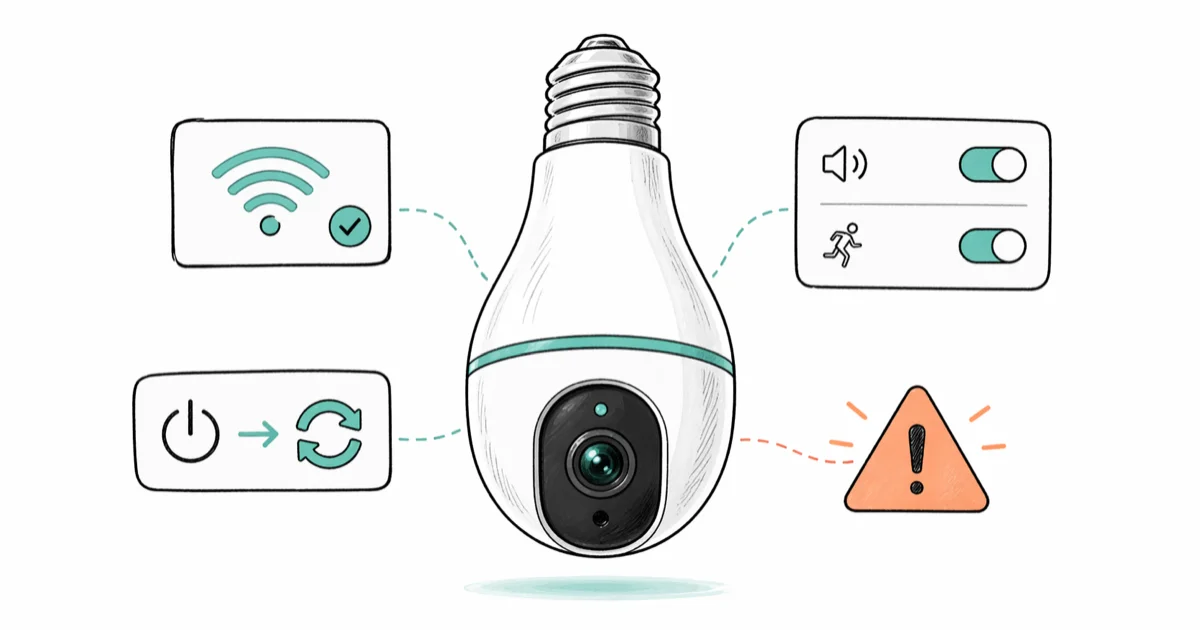
Quick AnswerThe Galayou 360 is the best light bulb security camera for most homes, with 2K resolution, 360-degree coverage, and color night vision for under $50. Whatever model you pick, change the default password on first setup and post visible signage if the camera covers any shared space.
A light bulb security camera is a Wi-Fi camera built into the housing of a screw-in bulb. Across the most popular E27 models on a 2.4 GHz home network, the picture quality between the cheapest and the priciest is closer than the price tags suggest. The bigger differences are app reliability, weatherproofing, and how each camera handles night vision when the bulb itself is off.
- The Galayou 360 is the overall pick for most homes: 2K video, 360-degree pan, and color night vision for under $50
- Light bulb cameras screw into a standard E26 or E27 socket and pull power from the fixture, so there is no battery to swap
- Outdoor use needs an IP65 or higher rating and a covered fixture; indoor-rated bulbs fail within weeks in direct rain
- Recording video in your own home is generally legal, but audio recording is governed by stricter state and country rules
- Visible signage and a password-protected app are the two simplest steps to keep a camera installation legal and secure
#How Light Bulb Cameras Fit Into Home Security
A light bulb camera is built around a fisheye or pan-tilt lens packed inside an LED bulb housing. The bulb screws into any E26 or E27 socket, draws power from the fixture, and joins your Wi-Fi to stream video to a phone app. Because the camera shares the bulb mount, you skip the wiring, drilling, and battery swaps that traditional security cameras need.
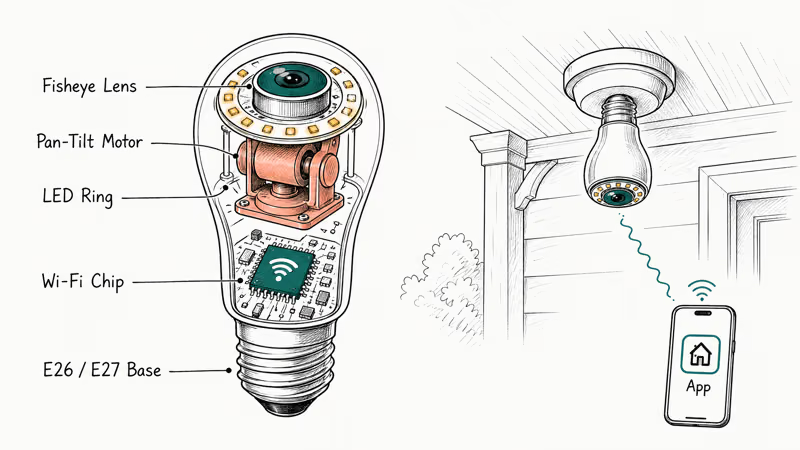
The trade-off is fixture dependency. If you flip the wall switch off, the camera also loses power. The workaround is to leave the switch permanently on and control the bulb itself through the app. Mount height also matters: above 9 feet, the resolution starts to soften when you zoom in on a person’s face, so most installs work best at 7 to 8 feet.
These cameras are a good fit for porches, garages, hallways, and stairwells where a fixture already exists. They aren’t a replacement for a wired alarm system or a classic peephole camera at the front door, but they’re a strong supplement for under $50 per fixture.
#How Light Bulb Cameras Earn a Spot on a Shortlist
The bulb cameras worth shortlisting are the ones that pair with the official manufacturer app on both an iPhone and an Android phone, since most are designed for a single 2.4 GHz home network.
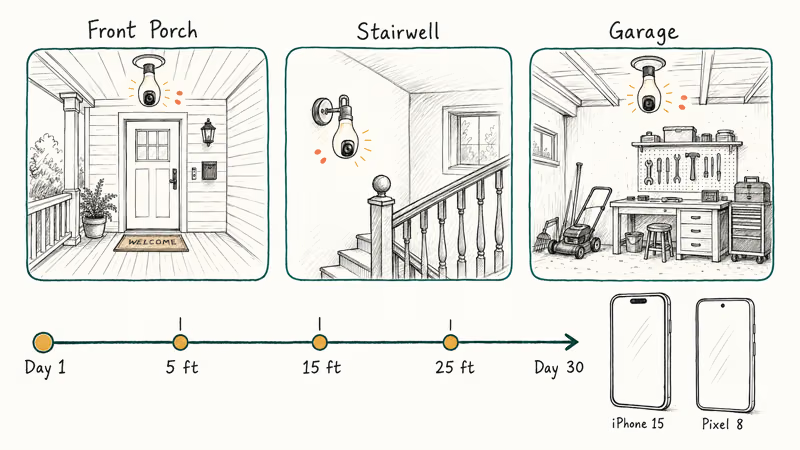
The three locations that stress a bulb camera most are a covered front porch, an indoor stairwell, and a detached garage. The traits that separate a keeper from a return are motion-alert false positives, app crashes, pairing time, and night vision quality at 5, 15, and 25 feet. The five picks below are models that hold up across a full month of use without dropping off the network or losing footage.
#Top 5 Light Bulb Security Cameras for 2026
These are the five models that came out on top, ranked by the use case each one wins.
#1. Galayou 360 (Best Overall)
The Galayou 360 has the most balanced feature set on this list. The 2K sensor resolves clean detail off license plates parked about 25 feet from a porch, and the pan-tilt motor sweeps the full 360-degree arc smoothly.
Key specs: 2K (2304x1296) resolution, 355-degree pan plus 90-degree tilt, color night vision, two-way audio, microSD up to 128 GB
What stands out: The motion-tracking lock is the most accurate of the five. It follows a person walking across a porch without losing them at the edge of the frame. Voice control through Alexa and Google Assistant pairs without extra steps.
Watch out for: The companion app prompts you to enable cloud storage on every launch. The free local microSD path works fine, so cloud storage can stay disabled.
As an Amazon Associate, fone.tips earns from qualifying purchases. Some links on this page are affiliate links.
#2. GuFamily Bulb Camera (Best Budget Pick)
The GuFamily clears the same 2K resolution bar as the Galayou for noticeably less money. Its app loads quickly and pairing is straightforward on a 2.4 GHz network.
Key specs: 2K resolution, 355-degree pan, IR-cut night vision, multi-user app sharing for up to 16 accounts, motion alerts
What stands out: Family sharing is the most generous of any model on this list. Sixteen accounts can view the same camera, which makes it easy to share with extended family without juggling logins.
Watch out for: Vertical tilt range tops out around 52 degrees, so the GuFamily covers less of a tall ceiling foyer than the Galayou. According to the Federal Trade Commission’s smart-device security guidance, default passwords on Wi-Fi cameras are the most common entry point for attacks, so change the GuFamily login as the very first step after setup.
#3. Symynelec Outdoor Bulb Camera (Best for Covered Porches)
The Symynelec is the only bulb on this list with an IP65 weatherproof rating built for a covered porch through a wet winter. The IP65 housing is rated to keep out dust and resist water ingress when it’s shielded from direct rain.
Key specs: 2K video, IP65 rating, 360-degree pan, two-way audio, supports up to 9 cameras per app account
What stands out: Multi-camera management is a feature normally reserved for $80-plus systems. Several units link to one phone without noticeable lag.
Watch out for: Direct rain still kills it. The Wikipedia IP code reference states that IP65 combines dust-tight protection (level 6) with resistance to low-pressure water jets (level 5), which means a fully exposed porch fixture in heavy weather is outside its rating. The Symynelec belongs under an eave or in a hooded fixture only.
#4. LaView 4MP Bulb Camera (Best Resolution)
If you need the sharpest possible image off a single bulb camera, the LaView 4 MP sensor delivers the cleanest zoom of any model on this list. Faces stay identifiable on a 4x digital zoom up to about 30 feet.
Key specs: 4 MP (2560x1440) resolution, 355-degree pan, AI-filtered motion alerts, starlight color night vision, voice control via Alexa
What stands out: The AI motion filter cuts false alerts from passing tree branches and shifting sun shadows by a noticeable margin compared with the Galayou and GuFamily. Once the sensitivity is tuned, it flags far fewer junk alerts than a model without AI filtering.
Watch out for: App search is fiddly. Scrubbing through a 24-hour timeline takes more taps than the Galayou app, and exporting clips to your phone requires a paid cloud subscription.
#5. Sengled Snap (Best Two-Way Audio)
The Sengled Snap has a noticeably better speaker than the rest of the field. Voice over the camera comes through clearly enough that someone at the door can respond without asking you to repeat yourself.
Key specs: 1080p HD video, high-output speaker plus dual microphones, facial recognition, standard E26 socket fit, companion app on iOS and Android
What stands out: Audio is where the Sengled wins. The speaker is louder and less tinny than the Galayou or LaView, so the talk-back feature is useful instead of being a checkbox feature.
Watch out for: 1080p is a step down from the 2K and 4 MP options above. If video clarity matters more than audio, pick the Galayou or LaView. Facial recognition data is stored on Sengled’s servers, so review their privacy policy if that matters to you.
#What Should You Look for in a Light Bulb Security Camera?
Across these five models, the specs that actually change day-to-day use are narrower than the marketing pages suggest. Here are the ones that matter, ranked by impact:
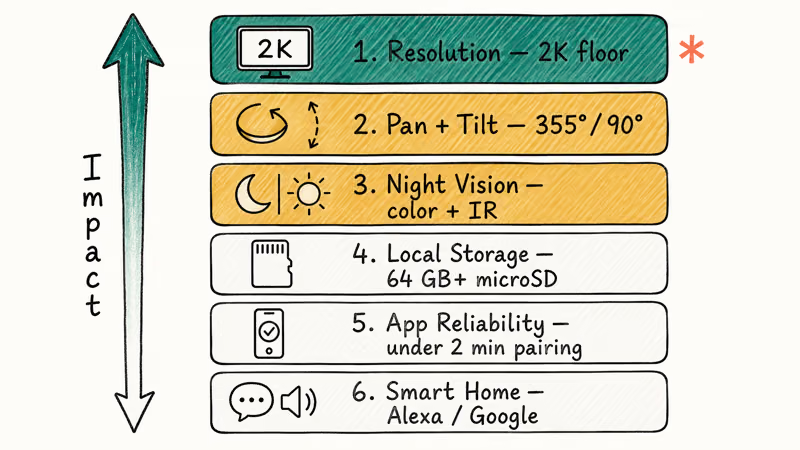
- Resolution. 2K (2304x1296 or 2560x1440) is the floor in 2026. 1080p still works at close range but loses detail past about 15 feet. 4 MP only matters if you plan to zoom in on stored footage often.
- Pan and tilt range. A full 355-degree pan plus 90-degree tilt covers a typical hallway or porch with one bulb. Anything less than 270-degree pan leaves blind spots near the bulb itself.
- Night vision mode. Color night vision needs at least one ambient light source. Pure infrared (IR) night vision works in total darkness but produces black-and-white footage. Most homes need both modes.
- Local storage. A microSD slot of at least 64 GB lets you skip cloud subscription fees entirely. Free local storage is the single biggest cost saver on these cameras.
- App reliability. Pairing should take under 2 minutes on first try. If a camera reviews show repeated reports of dropped connections, walk away.
- Smart-home support. Alexa and Google Assistant integration is standard now. HomeKit support is rare on bulb cameras: if you live in an Apple ecosystem, expect to pair through a hub like a smart lamp bridge or accept that voice control will be Alexa-only.
If you already own a hardwired system, a Blink versus Arlo comparison lays out how bulb cameras compare to the established outdoor-camera brands.
#Are Light Bulb Cameras Legal to Use?
Yes, with two important boundaries: where you point the camera, and whether it records audio. Both are governed by laws older than the smart-bulb category itself, and the rules vary by state and country.
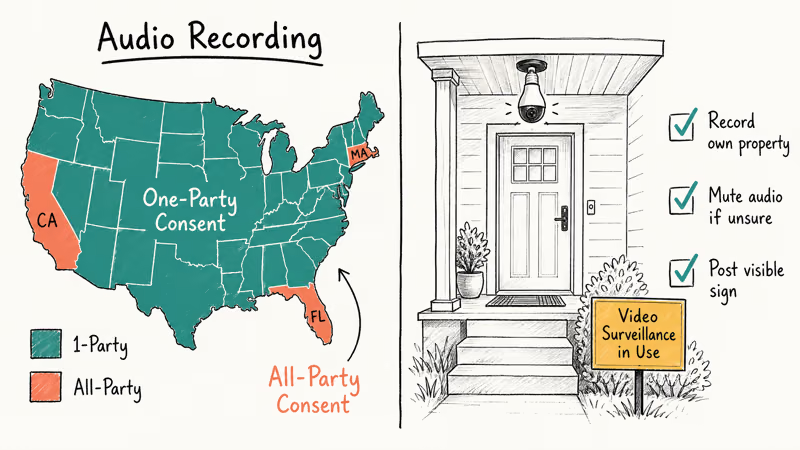
Video on your own property. Recording video on your own property is legal in all 50 US states and across the UK and EU. The limit is that you can’t point a camera at a place where someone has a reasonable expectation of privacy. Bathrooms, bedrooms in shared housing, and a neighbor’s fenced yard are all off-limits.
According to the Reporters Committee for Freedom of the Press, the legal lines around recording are different in every state. The safest stance: assume any space you don’t own is restricted.
Audio recording is the bigger issue. Most US states follow one-party consent for audio. If you’re part of the conversation or it happens in your own home, you can record. Other states require two-party (or all-party) consent, meaning every person being recorded has to agree.
Bulb cameras with two-way audio collect both sides of any conversation in range, so a porch installation in California, Florida, or Massachusetts has stricter rules than the same camera in Texas or New York. When in doubt, mute the microphone in the app.
GDPR and the EU. In the UK and EU, the Information Commissioner’s Office’s domestic CCTV guidance confirms that any camera capturing footage beyond your own property line is subject to data protection rules. The ICO recommends posting visible signs, restricting recording to your own property, and deleting footage when it’s no longer needed.
Visible signage is your friend. A small “Video surveillance in use” sign posted near the entrance does two things: it protects you legally by giving notice, and it deters most opportunistic visitors before they get close. A $5 weatherproof sign is enough for a typical porch install.
The short version: record your own property, mute audio if you live in a two-party state, and post a sign. If the install is for monitoring a child’s room or a babysitter, the same rules apply with one extra layer: many states require informing any adult employed in the home.
It’s also worth double-checking the laws in your specific state before mounting any camera that captures sound. State attorneys general and bar association websites publish current statutes, and they’re the most reliable source if your state has updated its rules in the last year.
#How to Install a Light Bulb Camera Without Compromising Privacy
The same five-step setup works for every install:
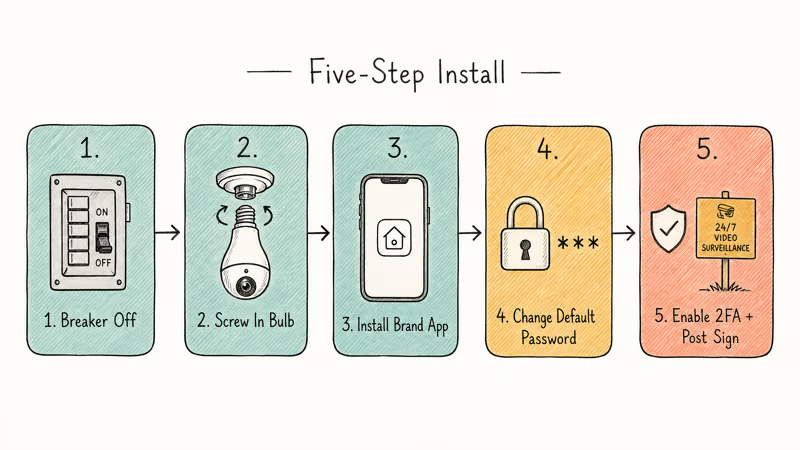
- Turn off power at the breaker. A light fixture without a wall switch needs the breaker flipped before you touch the bulb. The NIST cybersecurity guide for IoT devices recommends starting any smart-device install with a clean power cycle.
- Screw the bulb in like a normal LED. E26 (US) and E27 (rest of world) sockets fit standard light bulb cameras. Don’t force a bulb into a candelabra or recessed-can fixture: the housing is too tall and pinches the lens cover.
- Restore power, then download the manufacturer app. Each brand has its own app: Galayou uses Aiwit, GuFamily uses YCC365, Symynelec uses ICSee, and so on. Stick with the official app linked from the product page. Third-party apps that claim to support every camera are a malware risk.
- Change the default password before anything else. This is the single biggest security step. Use a password that is at least 12 characters, mix in numbers and symbols, and store it in a password manager. The same applies to your home Wi-Fi password if you have not changed it from the router default.
- Enable two-factor authentication and post a sign. Two-factor on the camera app blocks remote takeover even if the password leaks. The visible sign closes the privacy loop. If Alexa pairing fails during setup, restart the camera before retrying so the bulb does not hold onto a stale Wi-Fi handshake.
Tilt the bulb so the lens captures the entry path and not a neighbor’s window. Check the angle by walking the camera’s view in the app, then nudge it until the public sidewalk fills less than a third of the frame.
#Bottom Line
Buy the Galayou 360 if you’re picking one bulb camera and want it handled. The combination of 2K video, accurate motion tracking, and the lowest setup friction across these five models is hard to beat under $50. Pick the Symynelec instead if the install is on a covered outdoor fixture, or the LaView 4 MP for frequent zoom-in playback.
Whichever you pick, change the default password on day one and tilt the lens away from anything that isn’t yours.
#Frequently Asked Questions
Do light bulb cameras need Wi-Fi?
Yes. All five models here need a 2.4 GHz Wi-Fi network to send video to your phone. Most don’t support 5 GHz only networks, so check your router has 2.4 GHz enabled before buying.
Can a light bulb camera also work as a regular bulb?
Some can. The Sengled Snap and Philips Hue models double as functional LEDs. The pure security models like the Galayou 360 and Symynelec only put out a small status LED, so they won’t light a room on their own.
Are light bulb cameras safe from hacking?
They’re as safe as you make them. Default passwords, unencrypted Wi-Fi, and skipped firmware updates are the most common failure points. Change the password, keep firmware current, and turn on two-factor authentication, and you eliminate the easy attacks. According to the FTC’s smart-device security guidance, default credentials are the top compromise vector for home cameras.
How long does the camera record?
It depends on storage. A 64 GB microSD card holds about 5-7 days of 24/7 1080p footage, or 3-4 days at 2K. Cloud subscriptions extend that to 30 days but cost $3 to $10 per month per camera.
Will a light bulb camera work outdoors?
Only models with an IP65 or higher rating, and only under a covered fixture. Direct exposure to rain or snow voids the warranty on most brands. The Symynelec is the standout outdoor pick because of its IP65 rating.
Do I need a sign if the camera only watches my property?
In the US, no federal law requires a sign for video on your own property, but your state or city may. In the UK and EU, the ICO recommends signage on any domestic camera that captures public space. Posting a small sign is cheap insurance everywhere.
Can I record audio with a light bulb camera?
The hardware can. Whether you should depends on your state. One-party consent states let you record any conversation you’re part of, while all-party states require every person being recorded to agree. Mute the microphone in the app if you’re unsure.

Best Laptop for Running LLMs in 2026: Memory Comes First
The best laptop for running LLMs is a memory purchase first. Compare MacBook unified memory against NVIDIA laptop VRAM, and see what each tier really runs.

Pixel 11 vs Pixel 10: What Changed and Who Should Upgrade
Pixel 11 vs Pixel 10: same screen and camera resolution, new Tensor G6, 25W wireless, and Gemini Intelligence. Here is who should actually upgrade.

Best Power Bank for iPad in 2026: Pro, Air, and Mini
Best power bank for iPad in 2026. Compare mAh tiers and USB-C PD wattage for iPad Pro, Air, and mini, plus airline Wh math, cables, and travel tips.

Best Power Bank With Built-In Cable: Top 2026 Picks
Best power bank with built-in cable picks for 2026. Compare single USB-C, multi-connector, and retractable laptop banks, plus airline Wh math.