Legal Paper Size: Dimensions, Uses, and How It Compares
Legal paper is 8.5 x 14 inches (216 x 356 mm), 3 inches taller than letter. Compare it to A4 and learn how to print legal in Word and Google Docs.
Quick AnswerLegal paper size is 8.5 x 14 inches (216 x 356 mm) in the United States and Canada. It's 3 inches taller than standard letter paper and is used primarily for legal documents, contracts, and government forms.
Legal paper size measures 8.5 x 14 inches (216 x 356 mm). It’s the same width as standard letter paper but 3 inches taller. If you’ve ever printed a contract or government form and noticed it didn’t fit on regular paper, legal size is probably what you needed.
The name comes from widespread use in U.S. law firms, where longer pages mean fewer page breaks in contracts, affidavits, and court filings. The format isn’t just for lawyers, though, and most modern printers and word processors handle it without any special setup.
- Legal paper measures exactly 8.5 x 14 inches (216 x 356 mm), making it 3 inches taller than standard U.S. letter paper but the same 8.5-inch width.
- Legal paper’s extra length reduces page breaks in long contracts, which is why many law firms and state courts still prefer the format.
- The international A4 standard (210 x 297 mm) is neither the same size nor compatible with U.S. legal paper, and the two formats can’t scale between each other without reformatting.
- Many U.S. inkjet and laser printers support legal paper through the main tray or a manual feed slot; check your model’s supported media sizes first.
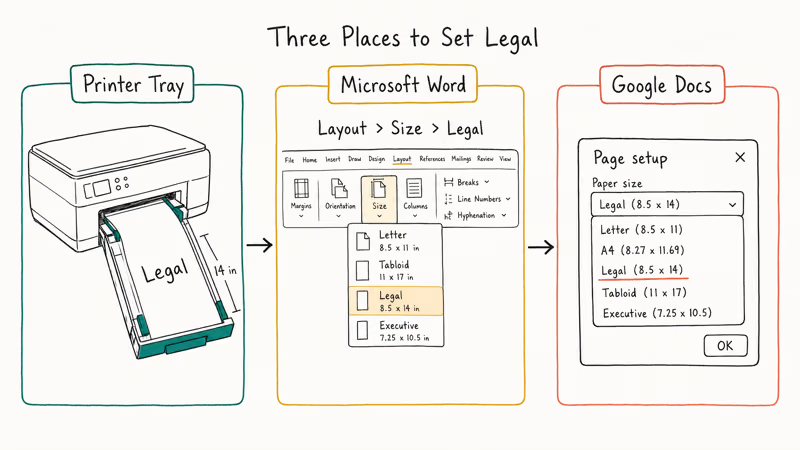
- In Microsoft Word, set the size at
Layout>Size>Legal(8.5 x 14); in Google Docs, go toFile>Pagesetup and pick Legal from the dropdown.
#Legal Paper Size vs. Letter vs. A4
The three most common paper sizes cause the most confusion. Here’s how they line up:
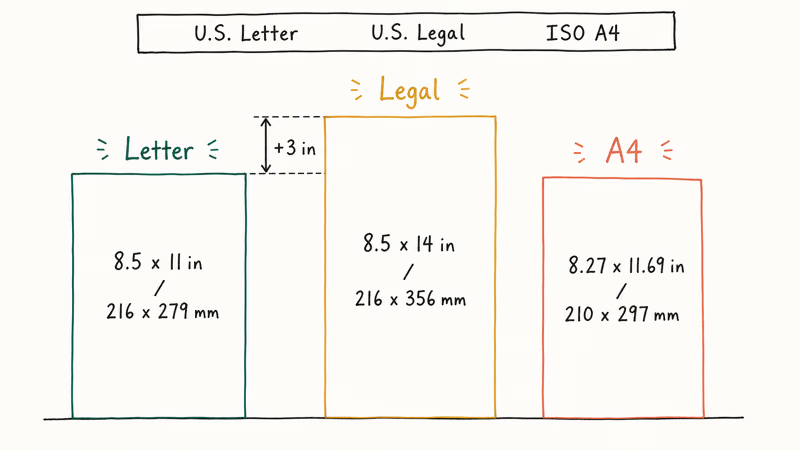
| Paper Size | Dimensions (inches) | Dimensions (mm) | Primary Use |
|---|---|---|---|
| U.S. Letter | 8.5 x 11 | 216 x 279 | General documents, everyday printing |
| U.S. Legal | 8.5 x 14 | 216 x 356 | Contracts, legal filings, government forms |
| ISO A4 | 8.27 x 11.69 | 210 x 297 | International standard for most documents |
According to the ISO 216 standard, A4 measures 210 x 297 mm and is the global default for business and personal documents. The standard defines a 1:√2 root-rectangle ratio so each A-size is exactly half the area of the next larger one. The U.S. and Canada are among the few countries that still use letter and legal as their primary paper sizes.
Legal paper gives long contracts more vertical room per sheet. Fewer page breaks mean fewer clauses split across pages, which is exactly why law firms still prefer the format.
#When to Use Legal Paper Size
Legal paper isn’t just for attorneys. These are the most common situations where you’ll reach for it:
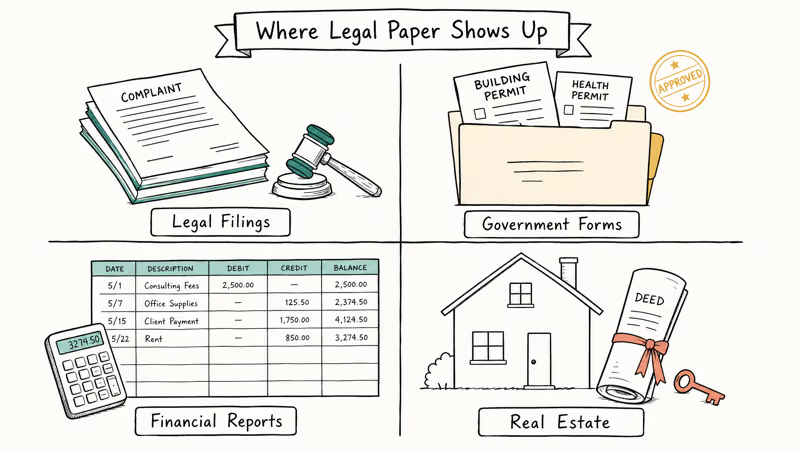
Legal documents and contracts. Court filings, depositions, affidavits, and multi-page contracts have traditionally been printed on legal paper. Many U.S. courts still accept or prefer legal-size submissions, though specific requirements vary by jurisdiction and have shifted toward letter in some federal districts.
Government forms. Some federal and state forms are designed for legal paper. Tax worksheets, permit applications, and certain IRS supplemental schedules use the 8.5 x 14 format.
Financial documents. Spreadsheets, ledgers, and financial statements with many columns benefit from the extra 3 inches of vertical space, and accountants often use legal paper for year-end reports.
Real estate. Property deeds, title documents, and closing paperwork frequently use legal size. If you’ve ever bought a house, you’ve probably signed several legal-size pages, and you may also need to export those documents to PDF for digital archiving.
Filing requirements differ by court. The U.S. Courts office publishes electronic and paper filing rules at the federal level, and individual state courts post their own paper size and margin standards. Always check your specific court’s clerk page before submitting documents on paper.
#How to Print on Legal Paper
Printing on legal paper takes two things: the right paper loaded in your printer and the correct page settings in your software.
#Setting Up Your Printer
Most home and office printers support legal paper. You’ll need to adjust the paper tray or manual feed slot to handle the longer sheets. If your printer has an adjustable tray, extend the paper guide to the legal-size mark before loading the stack.
If your printer doesn’t auto-detect, open your printer settings and manually select “Legal” or “8.5 x 14” as the paper size.
#In Microsoft Word
- Go to Layout (or Page Layout)
- Click Size
- Select Legal (8.5” x 14”)
- Adjust margins if needed (legal documents typically use 1-inch margins on all sides)
#In Google Docs
- Go to
File>Pagesetup - Under Paper size, select Legal (8.5” x 14”)
- Click OK
According to Google Workspace’s Docs help page, Docs offers Letter, Legal, Tabloid, and the full ISO A-series in the Page setup dropdown, and any change applies to the whole document, not just the page you’re on.
#In PDF Viewers
When printing a PDF document that was created in legal size, make sure “Fit to page” is unchecked in your print dialog. Otherwise, the content will shrink to fit letter paper and you’ll lose the formatting. Adobe Acrobat and most browser PDF viewers default to “Actual Size,” which is what you want for legal originals printed on legal stock.
#What Are the ISO Paper Sizes?
Outside the U.S. and Canada, most countries use the ISO 216 standard for paper sizes. The system is built on a mathematical ratio where each size is exactly half the area of the next larger size.
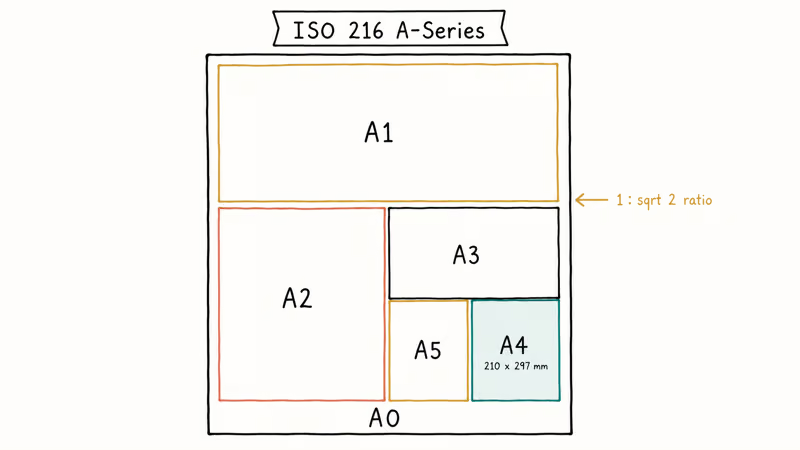
The most common ISO sizes:
| Size | Dimensions (mm) | Dimensions (inches) | Common Use |
|---|---|---|---|
| A0 | 841 x 1189 | 33.1 x 46.8 | Technical drawings, posters |
| A1 | 594 x 841 | 23.4 x 33.1 | Architectural plans |
| A2 | 420 x 594 | 16.5 x 23.4 | Diagrams, large charts |
| A3 | 297 x 420 | 11.7 x 16.5 | Tabloid printing, presentations |
| A4 | 210 x 297 | 8.27 x 11.69 | Standard documents worldwide |
| A5 | 148 x 210 | 5.83 x 8.27 | Notebooks, booklets |
The ISO 216 standard’s A-series ratio (1:√2) means you can scale any document between A-sizes without losing content or changing proportions. U.S. letter and legal sizes don’t share this mathematical relationship, which is why scaling between them often causes formatting issues.
#Legal Paper Size in Digital Documents
Digital files don’t have physical paper, but page size still matters. PDFs, Word documents, and spreadsheets all carry a page size setting that determines how content flows and where page breaks fall.
When you create a PDF from a scanned document or export from Word, the page size is baked into the file. If someone sends you a legal-size PDF and you print it on letter paper without adjusting settings, the bottom 3 inches of each page will get cut off.
Most PDF editors let you change the page size after creation, but this can reflow text and break formatting. Set the correct size before you start writing.
For printing documents that need to keep exact formatting across different printers and computers, embed your fonts and specify the exact page size in your export settings.
#Can You Use Legal Paper in Any Printer?
Legal-paper support is common, but tray depth remains the limiting factor.
According to HP’s printer support documentation, HP LaserJet and OfficeJet lines support legal paper in both the main tray and the manual feed. Canon and Brother printers offer similar coverage across their consumer and small-business lines.
If you’re buying a printer specifically for legal documents, check the supported media sizes before purchasing. Look for “Legal (8.5 x 14)” in the spec sheet. Most printers priced above $100 handle legal paper without issues, though portable and ultra-compact models often top out at letter size.
#Bottom Line
If you regularly handle multi-page contracts, deeds, or court paperwork, keep a ream of legal paper next to your everyday letter stock and save “Legal (8.5 x 14)” as a Microsoft Word template, since switching tray and software settings on the fly is where most jams happen. For one-off jobs, drop the file into Google Docs at File > Page setup > Legal and print from there. International recipients should still get A4 PDFs to avoid cropped margins.
#Frequently Asked Questions
Is legal paper the same as A4?
No. Legal paper measures 8.5 x 14 inches, while A4 is 8.27 x 11.69 inches. A4 is the international standard used in most countries outside the U.S. and Canada, so for documents going abroad, A4 is the safer choice.
Why is it called legal paper?
The name comes from its long-standing use in the American legal profession. The extra length gives lawyers more room for signatures, notations, and footnotes on contracts and court documents. The term has been in use since at least the early 1900s.
Can I use letter paper instead of legal for court filings?
It depends on your jurisdiction. Many federal courts now accept letter-size paper for filings, but several state and local courts still require or prefer legal size. Always check your specific court’s filing requirements before submitting documents on paper, since submitting the wrong size can delay your filing or even get the document rejected. When in doubt, call the clerk’s office and confirm.
What’s the difference between legal and tabloid paper?
Legal paper is 8.5 x 14 inches. Tabloid (also called ledger) is 11 x 17 inches, essentially two letter-size pages side by side. Tabloid is used for newspapers, large spreadsheets, and architectural drawings, so the two sizes serve completely different purposes.
How do I change my default paper size to legal in Windows?
Open Settings > Bluetooth & devices > Printers & scanners. Select your printer, click Printing preferences, and change the paper size to Legal. This sets legal as the default for all documents printed from that printer, though you can still override it per-document in your application’s print settings.
Does legal paper cost more than letter paper?
Slightly. A 500-sheet ream of legal paper typically costs $2 to $5 more than letter.
Can I scan legal-size documents on a regular scanner?
Most flatbed scanners have a scanning area of 8.5 x 11.7 inches, which is too short for a single legal sheet. You’ll need a scanner with an automatic document feeder (ADF) that supports legal size, or scan the document in two passes and merge the halves with a free PDF editor. Many office multifunction printers ship with ADFs that handle legal paper directly.
What paper size should I use for a resume?
Letter size (8.5 x 11 inches), not legal. Resumes on legal paper look unusual and may not fit in standard folders or filing systems.