How to Remove Your Samsung Account Without a Password
Remove your Samsung account without a password using official recovery methods. Step-by-step for password reset, Settings removal, and Samsung Support.
Quick AnswerReset your Samsung account password through the official Samsung account recovery page or the Settings app on your phone, then remove the account normally. If password recovery fails, contact Samsung Support directly to verify your identity and delete the account.
Locked out of your Samsung account and need to remove it from your phone? These methods apply only to your own device or one you have explicit legal authorization to access, since unauthorized Samsung account access violates privacy laws including the Computer Fraud and Abuse Act. There are three official recovery methods that work across current Galaxy phones running Android 14 and 15.
- Samsung’s password reset through Settings or the website takes under 5 minutes
- You need access to the recovery email or phone number linked to your Samsung account
- Samsung Support can verify your identity with a government ID and proof of purchase
- A factory reset does NOT remove the Samsung account from the device
- Back up your data before removing the account because Samsung Cloud content gets deleted permanently
#Reset Your Samsung Account Password From Your Phone
The quickest way to regain access is directly through your Samsung device. Works on Android 12 through 15.
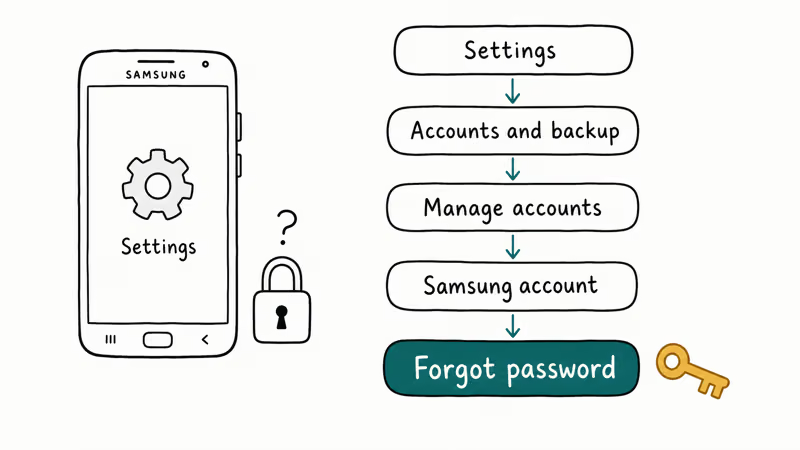
Go to Settings > Accounts and backup > Manage accounts > Samsung account. Tap your profile, then select Sign out. When prompted for your password, tap Forgot password.
Samsung redirects you to the account recovery page. Enter your email, get a verification code (usually arrives within 30 seconds), and create a new password.
Once you have the new password, go back to Settings > Accounts and backup > Manage accounts > Samsung account. Tap the three-dot menu in the top right and select Remove account. Enter your new password to confirm.
Removing your account deletes all Samsung Cloud synced data from the device. This includes Samsung Notes, Gallery backups, and Samsung Pass credentials. Download anything you need first.
If your Samsung email is no longer accessible, skip to the Samsung Support method below.
#Resetting Your Password Through Samsung’s Website
This approach works when you don’t have your Samsung phone handy. Same recovery flow, just through a browser on any computer or tablet.
According to Samsung’s account portal, you reset a forgotten password under Find ID or Reset password.
Choose Reset password and enter your Samsung account email. Samsung sends a password reset link that expires after 24 hours. Click the link, set a new password, and sign in.
After resetting the password, sign into your Samsung phone with the new credentials. Then go to Settings > Accounts and backup > Manage accounts > Samsung account > Remove account. Confirm with your password.
The reset email usually arrives within a few minutes on current Galaxy phones running One UI 6.1.
#What if You Can’t Access Your Recovery Email?
No email access means no automated recovery. You have two options left.
Option 1: Recover the email account first. If your Samsung account uses a Gmail address, go to Google’s account recovery page and try recovering that email. According to Google’s account recovery documentation, you can verify your identity through a backup phone number or security questions. Once you regain email access, use the password reset methods above.
Option 2: Contact Samsung Support directly. This is the official path when all self-service options fail. Samsung’s support team can manually verify your identity and help remove the account from their end, though it requires submitting documents.
Recovering the email first is usually faster. Samsung Support verification takes 3 to 7 business days.
#Contacting Samsung Support to Remove Your Account
Samsung’s customer support can delete your account after verifying your identity. This works even without email access.
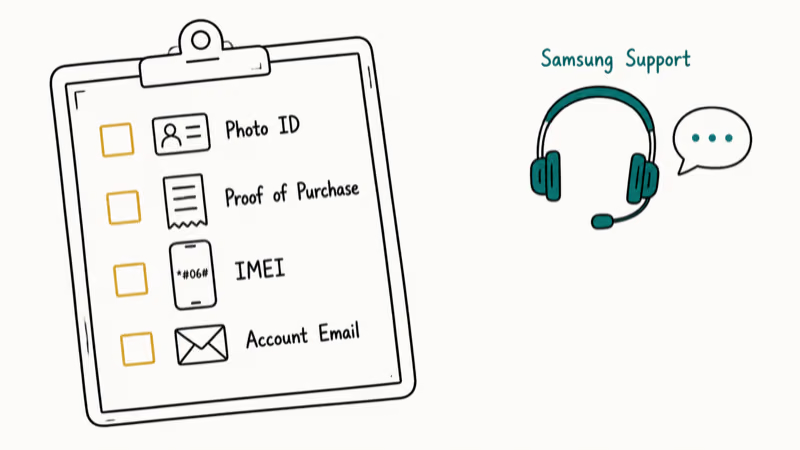
Reach Samsung Support through any of these channels:
- Phone: Call 1-800-SAMSUNG (1-800-726-7864) in the US
- Live Chat: Visit Samsung’s support website and click the chat icon
- Samsung Members app: Open the app on your Galaxy phone and tap Get help
Samsung will ask for these documents:
- Government-issued photo ID
- Proof of purchase (receipt or order confirmation)
- Your device’s IMEI number (dial *#06# to find it)
- The email linked to the Samsung account
Samsung typically processes account deletion requests within about 30 days, though some finish sooner. Have your documents ready before you call to speed things up.
Be patient with this one.
#Data You Lose After Removing a Samsung Account
Removing your Samsung account has real consequences. Here’s exactly what you lose and what stays safe.
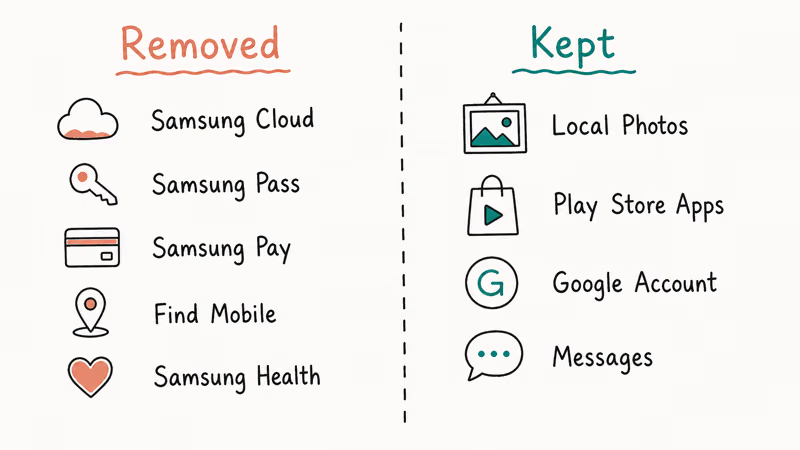
Data you lose:
- Samsung Cloud backups (photos, contacts, calendar)
- Samsung Pass saved passwords
- Samsung Pay card information
- Samsung Find Mobile tracking
- Samsung Health synced data
Data that stays on your phone:
- Locally stored photos and videos
- Downloaded apps from Google Play
- Google account data and contacts synced with Google
- Text messages and call logs
Back up WhatsApp messages on your Samsung device before removing the account.
Your Google account stays untouched.
#Common Problems and How to Fix Them
“Samsung account processing failed” error: Server overload or a dropped internet connection during the removal process. Wait a few minutes and try again. If it persists, check our guide on Samsung account processing failed.
Password reset email never arrives: Check spam and junk folders. Gmail users should also check the Promotions and Updates tabs. If nothing shows up after 10 minutes, try the reset again with the exact email address on your account and make sure you’re checking the right inbox.
Can’t remember which email you used: Check Settings > Accounts and backup > Manage accounts > Samsung account. It’s displayed right there.
Account locked after too many failed attempts: Five wrong password entries in a row triggers a 30-minute lockout. Don’t keep retrying during this window because each additional failed attempt can extend the lockout duration on newer Galaxy phones running One UI 6.0 and above.
If you’ve forgotten your Samsung Galaxy password entirely, that’s a different issue from the Samsung account password. The device lock screen and Samsung account are separate credentials. Check our guide on how to unlock Samsung phone lock password for screen lock issues.
#Does a Factory Reset Remove a Samsung Account?
No. A factory reset wipes apps, settings, and local data. It does NOT remove the Samsung account.
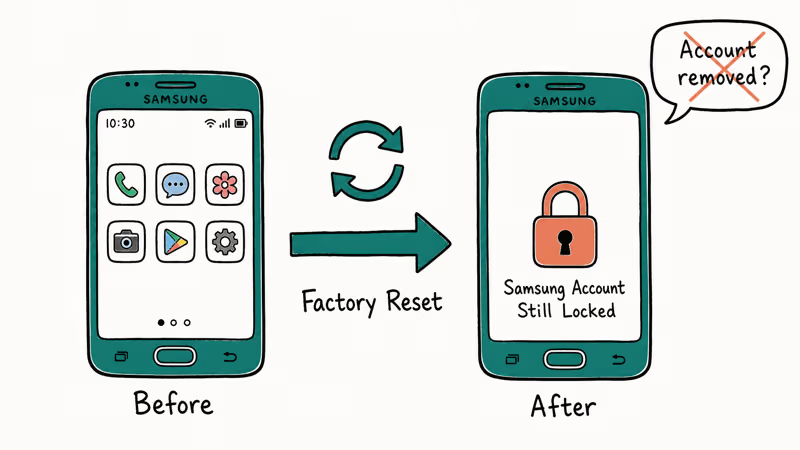
This is Samsung’s reactivation lock, similar to Apple’s Activation Lock. According to Samsung’s SmartThings Find guide, this protection prevents unauthorized use of a device after a factory reset, which is exactly why it exists as theft protection.
Always remove the Samsung account through Settings BEFORE factory resetting.
After a factory reset, you may also need to recover contacts or recover photos if you didn’t back them up to Google beforehand.
#Bottom Line
Start with the password reset through Settings > Accounts and backup > Manage accounts > Samsung account > Forgot password. That fixes it for most people in under 5 minutes. If your recovery email is inaccessible, call Samsung Support at 1-800-726-7864 with your ID and proof of purchase ready. Don’t factory reset first, since it won’t remove the Samsung account and only makes recovery harder.
Samsung Galaxy Guide
#Frequently Asked Questions
Can I remove a Samsung account without any verification?
No. Samsung requires identity verification through password entry, email recovery, or manual ID verification through support. There’s no legitimate way to skip this step.
How long does Samsung Support take to delete an account?
Samsung’s policy allows up to 30 days for account deletion requests. In practice, most requests are processed within 5 to 7 business days after you submit all required documents. Phone support tends to be faster than email or chat for initiating the process.
Will removing my Samsung account affect my Google account?
No, they’re completely independent. Removing your Samsung account doesn’t touch your Google data, Play Store purchases, Gmail, or Google Photos.
What’s the difference between signing out and removing a Samsung account?
Signing out is temporary and fully reversible. Removing is permanent: it deletes the account link and erases all Samsung Cloud data from the device, including Samsung Notes, Gallery backups, Samsung Pass credentials, and any synced health or payment data that was connected to that account.
Can I create a new Samsung account after removing the old one?
Yes. After removing your old Samsung account, you can create a brand new one using any email address. Go to Settings > Accounts and backup > Manage accounts > Add account > Samsung account > Create account. You’ll start fresh with no previous data or settings.
Does removing a Samsung account void my warranty?
No. Warranty coverage is about hardware, not software accounts.
Can I remove a Samsung account from a used phone I just bought?
Only if you can contact the previous owner to remove their account first, or if the seller already removed it before the sale. If the previous owner’s Samsung account is still on the device, you’ll need them to either sign in and remove it or contact Samsung Support to transfer ownership. This is a security feature designed to protect against stolen devices.
Is there a way to recover Samsung Cloud data after removing the account?
No. Once you remove a Samsung account and the Samsung Cloud data is deleted, it can’t be recovered. Samsung does not offer a data recovery service for deleted cloud backups. Always download your Samsung Cloud data before removing your account by going to Settings > Accounts and backup > Samsung Cloud > Download data.
Samsung Secure Folder: Setup, Hide Apps, Clone Apps
Set up Samsung Secure Folder in under 5 minutes. Hide apps and photos, clone a banking app, and hide the Secure Folder icon on any Galaxy S8 or newer.
How to Use Google Find Hub: Setup + Find Lost
Set up and use Google Find Hub to locate, ring, lock, or erase your own Android phone, including offline finding and powered-off Pixel support.
Samsung Galaxy Battery Draining Fast: 2026 Fix Guide
Diagnose Galaxy S25 battery drain in five minutes through Battery Usage, then walk through six reversible Galaxy settings before a factory reset.
Samsung Parental Controls: Full Setup Guide for Parents
Set up Samsung parental controls in three layers: Samsung Kids, Google Family Link, and Digital Wellbeing. Free step-by-step guide for Galaxy parents.