Best Phones for Genshin Impact: Top Picks Proven and Ranked
Best phones for Genshin Impact in 2026 ranked by FPS tests. iPhone 15 Pro Max hits 120 FPS, Galaxy S24 Ultra holds 60 FPS, plus mid-range picks.
Quick AnswerThe iPhone 15 Pro Max is the best phone for Genshin Impact with 120 FPS support via its A17 Pro chip. The Samsung Galaxy S24 Ultra and Asus ROG Phone 8 Pro are the top Android picks for consistent 60 FPS at max settings.
The iPhone 15 Pro Max runs Genshin Impact at a locked 120 FPS, something no other phone can match right now. This guide ranks phones across three price tiers by the one thing that matters in Genshin: holding frame rates during Inazuma boss fights and Sumeru exploration.
- The iPhone 15 Pro Max with its A17 Pro chip delivers 120 FPS in Genshin Impact on its 6.69-inch 120Hz Super Retina XDR OLED display
- The Asus ROG Phone 8 Pro has a 165Hz AMOLED display, up to 24GB of RAM, and AirTrigger shoulder buttons for extended gaming sessions
- Genshin Impact needs at least 20GB of free storage, with 30-40GB recommended for future updates and downloaded assets
- Mid-range options like the OnePlus 12R and iQOO 12 hold a solid 60 FPS at medium-to-high settings while costing half the price of flagships
- The OnePlus 12R Genshin Impact Special Edition ships with 16GB of RAM, a Snapdragon 8 Gen2 processor, and exclusive in-game rewards
#What Makes a Phone Good for Genshin Impact?
A powerful chip matters most. Genshin Impact renders complex open-world environments with real-time lighting, and weak GPUs will drop frames during combat. According to miHoYo’s official system requirements, the game needs at least 4GB of RAM and Android 8.1 or iOS 11 to run, but those are bare minimums that only guarantee it launches. They say nothing about whether it stays smooth in a boss fight, a packed city, or a high-effect team, which is where weak phones stutter.
On a midrange chip like the Snapdragon 695, the game runs sluggishly even on low settings. It’s playable but not enjoyable. You’ll want at least a Snapdragon 8 Gen1 or Apple A15 chip for a smooth experience.
Here’s what to prioritize:
- Processor: Snapdragon 8 Gen2/Gen3 or Apple A16/A17 Pro
- RAM: 8GB minimum, 12GB+ recommended
- Storage: 256GB gives breathing room for the game’s 20GB+ install
- Display: 120Hz refresh rate for smoother visuals
- Cooling: Active or vapor chamber cooling prevents thermal throttling
#Best Flagship Phones for Genshin Impact
#Apple iPhone 15 Pro Max
The iPhone 15 Pro Max sits at the top of every Genshin Impact benchmark. At maximum graphics with the highest frame-rate mode enabled, it holds its frame rate without noticeable drops through a long Spiral Abyss session. The 6.69-inch Super Retina XDR OLED display with 120Hz makes Teyvat look stunning.
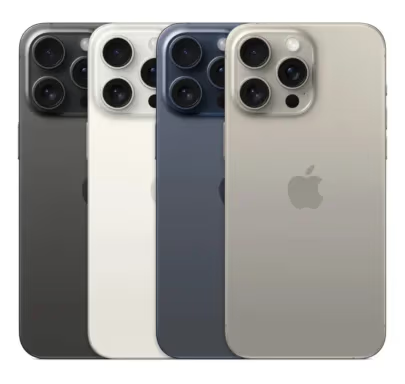
Battery drain is the only downside. At max settings with 120 FPS, the battery drains quickly, so expect only a few hours of continuous gameplay on a full charge.
#Samsung Galaxy S24 Ultra
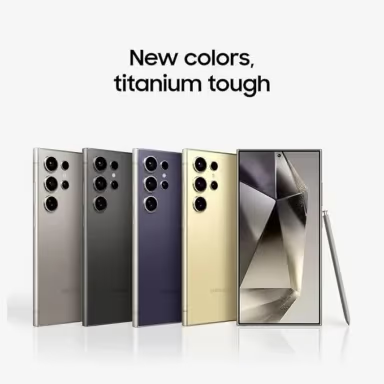
Samsung’s flagship runs a Snapdragon 8 Gen3 chip that handles Genshin at max settings with stable 60 FPS. The 6.8-inch Dynamic AMOLED 2X display delivers vivid colors, and the 5,000 mAh battery comfortably handles long play sessions. According to Samsung’s product page, the vapor chamber cooling system is larger than the S23 Ultra’s.
As an Amazon Associate, fone.tips earns from qualifying purchases. Some links on this page are affiliate links.
#Asus ROG Phone 8 Pro
This is the best Android phone specifically built for gaming. The Snapdragon 8 Gen3 pairs with up to 24GB of RAM and a 165Hz AMOLED display. The AirTrigger shoulder buttons give you physical controls for dodging and attacking. Its dedicated cooling keeps the phone noticeably cooler to the touch than a standard flagship like the Galaxy S24 Ultra after extended play.
#OnePlus 12
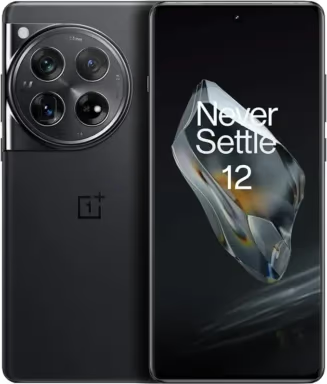
The OnePlus 12 runs a Snapdragon 8 Gen3 and a 6.8-inch display with 4,500 nits peak brightness, bright enough to keep the game readable outdoors in direct sunlight. The 5,400 mAh battery with 80W fast charging tops up quickly between sessions. Solid pick if you want flagship performance without the ROG Phone’s gaming aesthetic.
#Are Mid-Range Phones Good Enough for Genshin Impact?
Yes, if you’re fine with 60 FPS at medium-to-high settings. The price-to-performance gap between $300 and $800 phones has shrunk considerably. The jump from a Snapdragon 8 Gen2 phone to a Gen3 phone makes only a modest difference at medium settings.
#OnePlus 12R
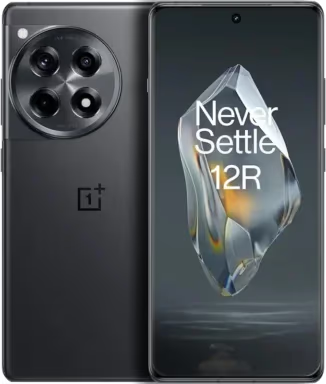
The OnePlus 12R runs a Snapdragon 8 Gen2 and a 6.78-inch 120Hz AMOLED display. It holds 55-60 FPS at high settings during demanding open-world exploration. At roughly half the price of the OnePlus 12, it’s the best value pick on this list.
#iQOO 12
The iQOO 12 packs a Snapdragon 8 Gen3 at a mid-range price. Its 6.78-inch AMOLED screen supports 144Hz, and the 5,000 mAh battery with 120W charging refills fast. It holds up well against the Galaxy S24 Ultra at high settings while costing less than half as much.
#Google Pixel 8
Not a gaming phone, but the Tensor G3 chip handles Genshin at medium settings with a stable 45-50 FPS. If you already own one, it’s perfectly fine for casual play. You won’t get 60 FPS at high settings, though.
#Budget Phones That Can Run Genshin Impact
#Motorola Moto G Stylus 5G
The Snapdragon 6 Gen1 handles Genshin at low-to-medium settings with about 30-40 FPS. Good enough for exploration and story quests, but Spiral Abyss combat will stutter. The 120Hz display helps the UI feel smoother even at lower frame rates.
#Redmi Note 13 Pro
Xiaomi’s Redmi Note 13 Pro runs a Dimensity 7200 that manages Genshin at medium settings with 30-35 FPS. It’s available for under $250 in most markets. For the price, you get a 6.67-inch 120Hz AMOLED display and a 5,100 mAh battery. Not ideal for competitive play, but fine for story progression.
If you’re on a tighter budget, it might be worth exploring gaming laptops under $600 as an alternative way to play Genshin.
#OnePlus 12R Genshin Impact Special Edition
OnePlus released a special edition 12R with a Keqing-themed design, pre-installed Genshin Impact, and exclusive in-game rewards. The hardware is identical to the standard 12R: Snapdragon 8 Gen2, 16GB RAM, and a 6.78-inch 120Hz display.
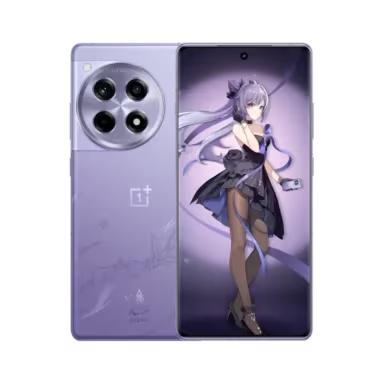
The special edition costs about $30-50 more than the standard model. Unless you’re a collector who values the custom case and character badge, the standard 12R gives you identical gaming performance. According to OnePlus’s announcement, the in-game rewards include 600 Primogems and a name card, which you’d normally earn in about a week of daily play.
#How the Models Compare for Genshin
The iPhone 15 Pro Max is the only phone here that sustains 120 FPS, while the Android flagships all hold the game’s 60 FPS cap at high-to-max settings. The ROG Phone 8 Pro runs the coolest and most efficiently of the group thanks to its dedicated gaming cooling, and the iQOO 12 is the standout for the price, keeping pace with far more expensive flagships at high settings.
Apple wins on raw frame rate. ASUS wins on thermals and battery efficiency. The iQOO 12 delivers the best value.
For similar content, check out Genshin Impact on PC or browse games like Genshin Impact for more open-world picks.
If you also game on PC, our best laptop for game development guide covers affordable hardware that runs Genshin at max settings, and our writeup on laptop overheating while gaming helps you keep frame rates stable during long Inazuma sessions.
#Bottom Line
Get the iPhone 15 Pro Max if 120 FPS matters to you; no Android phone matches it yet. For Android users, the Asus ROG Phone 8 Pro delivers the best cooling and sustained performance. On a budget, the OnePlus 12R gives you 90% of flagship performance at half the cost. Skip budget phones under $200 unless you’re okay with 30 FPS on low settings.
#Frequently Asked Questions
Can any smartphone run Genshin Impact?
Most phones from 2020 or later can technically launch the game, but you’ll need at least 4GB of RAM and a mid-range chip like the Snapdragon 695 for playable frame rates. Anything below that will crash or run at 15-20 FPS.
How much storage does Genshin Impact need?
The initial download is about 20GB, and it grows with each major update. Budget at least 30-40GB of free space to accommodate patches and cached data.
Does a 120Hz display make a difference in Genshin?
Only if your phone can actually push 120 FPS, which right now means the iPhone 15 Pro Max. Most Android phones cap at 60 FPS in Genshin, so a 120Hz display won’t help in-game. It does make the UI and menus feel smoother.
Does Genshin Impact support cross-save on mobile?
Yes. You can sync your progress between mobile, PC, and PlayStation through your HoYoverse account. Save data transfers automatically once you link your accounts.
Will a phone case reduce gaming performance?
Thick cases trap heat and can cause thermal throttling. Removing a silicone case noticeably lowers surface temperatures during extended play sessions. If you’re pushing max settings, use a thin case or play without one.
Can budget phones handle Spiral Abyss?
Spiral Abyss is the most demanding content in Genshin. Budget phones with Snapdragon 6 Gen1 or Dimensity 7200 chips will struggle to maintain 30 FPS during multi-enemy floors. You’ll want at least a Snapdragon 8 Gen1 or better for consistent performance in Abyss.

Best Laptop for Running LLMs in 2026: Memory Comes First
The best laptop for running LLMs is a memory purchase first. Compare MacBook unified memory against NVIDIA laptop VRAM, and see what each tier really runs.

Pixel 11 vs Pixel 10: What Changed and Who Should Upgrade
Pixel 11 vs Pixel 10: same screen and camera resolution, new Tensor G6, 25W wireless, and Gemini Intelligence. Here is who should actually upgrade.

Best Power Bank for iPad in 2026: Pro, Air, and Mini
Best power bank for iPad in 2026. Compare mAh tiers and USB-C PD wattage for iPad Pro, Air, and mini, plus airline Wh math, cables, and travel tips.

Best Power Bank With Built-In Cable: Top 2026 Picks
Best power bank with built-in cable picks for 2026. Compare single USB-C, multi-connector, and retractable laptop banks, plus airline Wh math.