Android Bluetooth Keeps Disconnecting? 9 Fixes (2026)
Android Bluetooth keeps disconnecting or cutting out? Re-pair, set Bluetooth to unrestricted, clear the cache, and cut interference. 9 proven fixes.
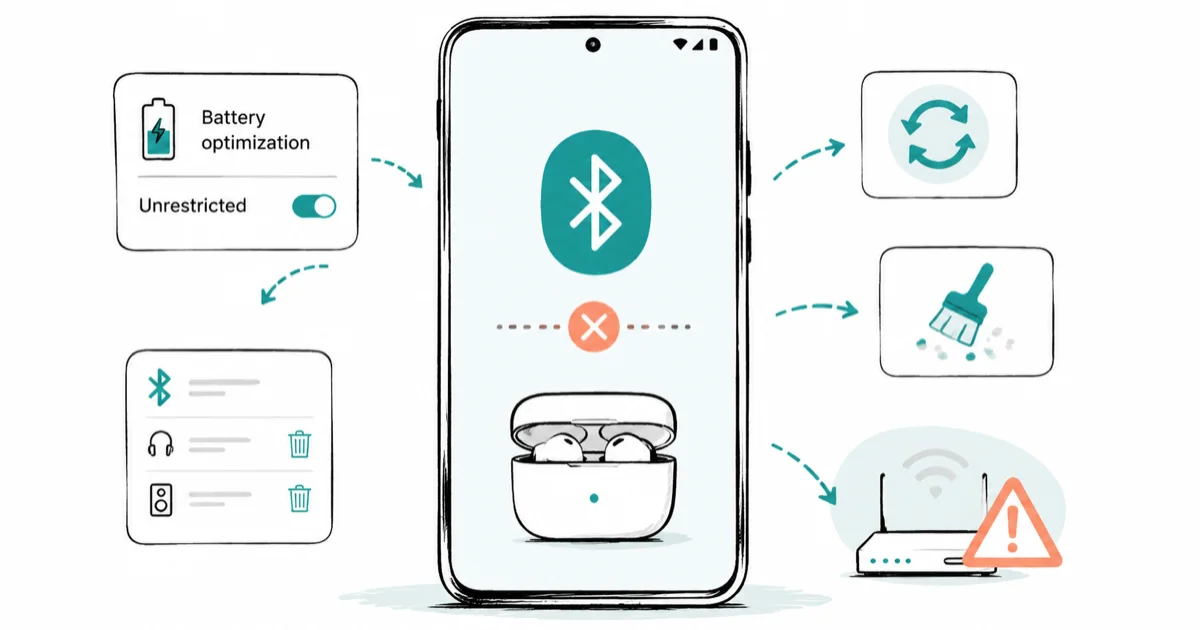
Quick AnswerOn Android 14 and newer, the top cause of Bluetooth dropping is the system killing the Bluetooth app to save battery, so set it to Unrestricted first. Then forget and re-pair the device, clear the Bluetooth cache, prune old paired devices, and move away from 2.4GHz Wi-Fi interference.
Android Bluetooth keeps disconnecting at the worst moments, dropping your earbuds mid-song or cutting your call the second the screen goes dark. On Android 14, 15, and 16, the most common modern cause isn’t a hardware fault at all. It’s the system’s own battery optimization shutting down the Bluetooth service to save power. This guide leads with that fix, then works through the cache, pairing, and interference causes behind the rest of the drops.
This guide assumes the phone and accessories are yours.
- On Android 14 and newer, battery optimization killing the Bluetooth system app is the leading cause, fixed by setting it to Unrestricted
- Bluetooth dropping right when the screen turns off is the signature of a battery-optimization problem, not a hardware one
- If only one accessory drops while the rest stay connected, the problem is that accessory or its pairing
- Clearing the Bluetooth cache doesn’t delete your paired devices, it only rebuilds temporary connection data
- 2.4GHz Wi-Fi shares the same radio band as Bluetooth, so moving your router to 5GHz or 6GHz reduces interference drops
#Why Does Android Bluetooth Keep Disconnecting?
Bluetooth drops come from a short list of causes, and identifying yours saves a lot of guessing. The biggest modern cause is software. On recent Android versions, the system aggressively suspends background apps to extend battery life, and it can suspend the Bluetooth service itself, which severs your connection. Other causes are a corrupt cache, too many paired devices fighting to auto-connect, radio interference, a low accessory battery, and outdated firmware.
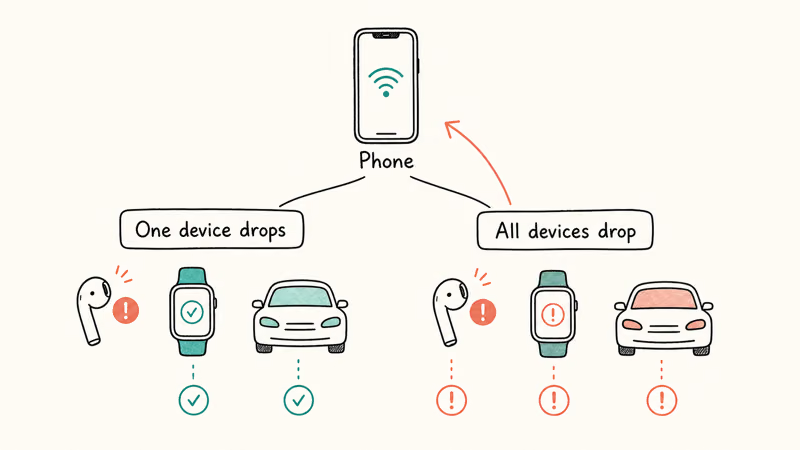
The most useful diagnostic question is whether one device drops or every device drops. If a single pair of earbuds cuts out while your car and watch stay connected, the fault is that accessory or its pairing, not the phone itself, which narrows your troubleshooting to that one device and its companion app rather than every system setting on the phone.
A pair of earbuds that drops every time the phone’s screen locks fits the classic Android-14-and-newer battery-optimization pattern. Setting the Bluetooth app to Unrestricted is the targeted fix.
#Toggle Bluetooth and Re-Pair the Device
Start with the simplest reset. Open Quick Settings, turn Bluetooth off, wait a few seconds, and turn it back on. This re-establishes the radio connection and clears a momentary glitch surprisingly often, the same way a toggle can fix a phone wrongly stuck in headphone mode.
If the drops continue, forget and re-pair the device, because a corrupt pairing profile causes repeated disconnects. Go to Settings > Connected devices, tap the gear icon next to the accessory, and choose Forget. Then put the accessory into pairing mode and connect it fresh.
According to Samsung’s Bluetooth troubleshooting page, a device can randomly disconnect because of a low battery, too much distance, or Bluetooth being switched off, so re-pairing rules out a half-broken connection.
#Disable Battery Optimization for the Bluetooth App
This is the fix that resolves the most cases on Android 14, 15, and 16. The system treats the Bluetooth service like any other app it can suspend to save power, and when it does, your connection dies, usually the moment the screen turns off.
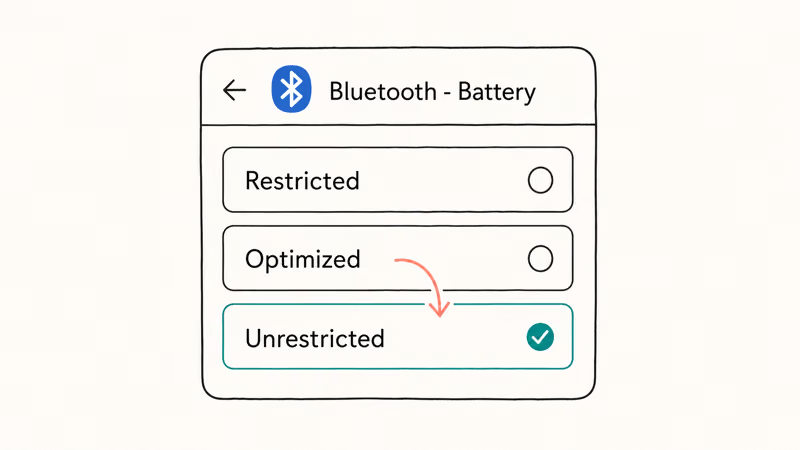
Go to Settings > Apps, tap the three-dot menu and choose Show system apps, then find Bluetooth. Open it, tap Battery, and set it to Unrestricted. On Samsung phones, also check Settings > Battery > Background usage limits and make sure Bluetooth isn’t in the sleeping apps list.
The trade-off is honest. Setting Bluetooth to Unrestricted means it stays active in the background and uses a little more battery, which is the point: you’re telling the system to keep the connection alive rather than kill it. As a quick confirmation, turn Battery Saver off and test, because Battery Saver tightens these limits across the board, and many people see drops only while it’s on.
#Clear the Bluetooth Cache and Update Firmware
Bluetooth keeps a cache of connection data that can become corrupt over time and cause repeated drops. Clearing it forces a clean rebuild. Go to Settings > Apps, show system apps, open Bluetooth, then Storage & cache, and tap Clear cache. This doesn’t delete your paired devices or any personal data, just like a routine cache and history clear on Android leaves your accounts in place.
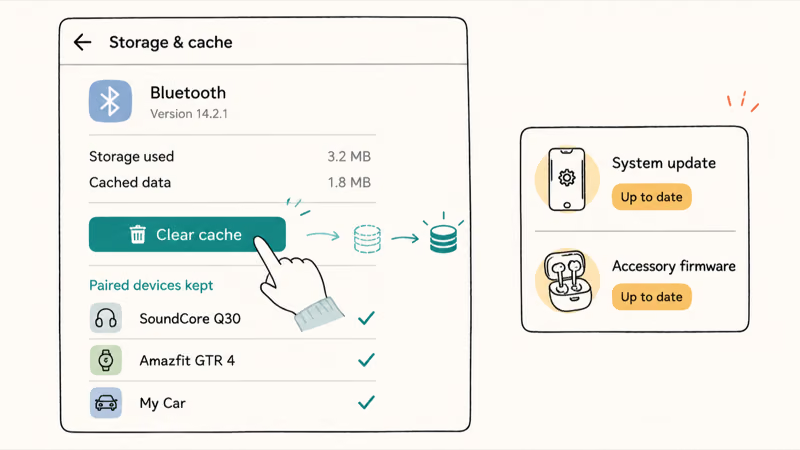
Keep both ends updated. Apply any pending system update through Settings > System > Software update, since Bluetooth stack fixes ship in OS updates. Then update the accessory’s firmware through its companion app.
According to Google’s Android Bluetooth help, keeping the device updated and re-pairing are standard steps when a connection misbehaves, and the same patching habit helps with other Samsung phone issues like overheating.
#Why Does It Drop When the Screen Turns Off?
If your Bluetooth holds steady while you’re using the phone but drops the instant the screen locks, that timing is the tell. It’s almost always battery optimization. When the screen turns off, Android enters a power-saving state and begins suspending background processes, and an over-aggressive policy suspends the Bluetooth service along with everything else.
Set Bluetooth to Unrestricted; on Samsung, remove it from sleeping apps so it keeps running during sleep.
This is also why the problem appears or worsens right after an Android version upgrade, since each new version tends to tighten background limits further. Battery Saver can re-enable the same restriction, and the drops usually stop only after Bluetooth is set back to Unrestricted.
#Prune Paired Devices and Reduce Interference
A phone paired with a long list of devices can try to auto-connect to several at once, and the resulting tug-of-war causes surprise drops. Go through Settings > Connected devices and forget any accessory you no longer use, keeping the list short.
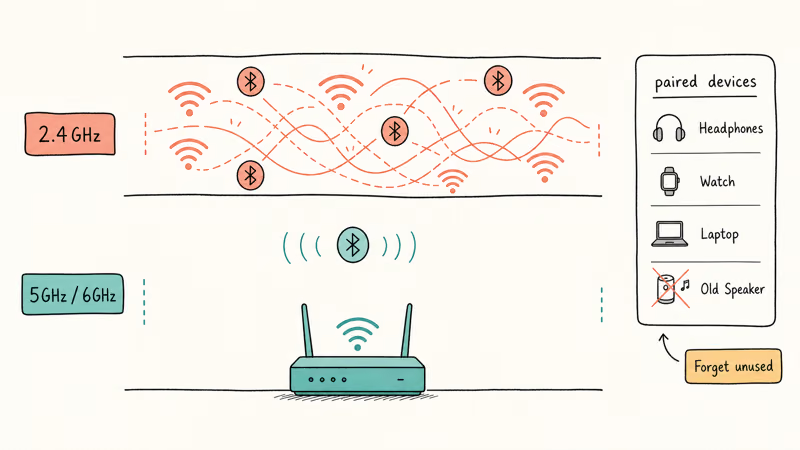
Radio interference is the other environmental cause. The Wikipedia overview of Bluetooth states that the standard operates in the 2.4 GHz band, the same crowded lane many Wi-Fi networks use, so a router broadcasting on 2.4GHz right next to you can disrupt the signal. Where possible, connect your phone and computers to your router’s 5GHz or 6GHz band to clear that lane for Bluetooth.
Finally, check the accessory’s own battery, since a low charge causes erratic disconnects. If none of this holds, Reset network settings as a last resort. It pairs well with related fixes like Android Auto wireless not connecting and a Galaxy Watch not pairing.
#Bottom Line
On Android 14 and newer, the number one cause is the system killing the Bluetooth service to save battery, so set the Bluetooth app to unrestricted before anything else, accepting that Bluetooth will then stay on. If a single accessory drops while others stay connected, the problem is that accessory or its pairing, so forget and re-pair it and update its firmware.
Clear the Bluetooth cache and prune devices you rarely use, since auto-connect conflicts cause surprise drops. If everything drops, move your router off the 2.4GHz lane your headphones share, and only reset network settings as a last resort.
#Frequently Asked Questions
Why does my Bluetooth disconnect when the screen turns off?
That timing points squarely at battery optimization. When the screen locks, Android suspends background processes, and an aggressive policy suspends the Bluetooth service itself. Set the Bluetooth app to Unrestricted to keep it running.
Does battery optimization cause Bluetooth to drop?
Yes, and on Android 14, 15, and 16 it’s the most common cause. The system can treat the Bluetooth service as a background app to suspend for power savings, which severs the connection. Setting Bluetooth to Unrestricted and turning off Battery Saver as a test usually stops the drops.
Will clearing the Bluetooth cache delete my paired devices?
No. Clearing the Bluetooth cache only removes temporary files and leaves your paired devices intact. Clearing the Bluetooth storage is the aggressive option that does remove pairings, so use Clear cache first.
Why does only one of my devices keep disconnecting?
When one accessory drops while the rest stay connected, the fault is that accessory or its pairing, not your phone. Forget the device and re-pair it fresh, then update its firmware through its companion app.
Can Wi-Fi interfere with Bluetooth?
Yes. Bluetooth and many Wi-Fi networks share the 2.4GHz radio band, so a nearby router on 2.4GHz can disrupt your Bluetooth signal and cause drops. Connecting your phone and computers to a 5GHz or 6GHz Wi-Fi band frees up the 2.4GHz lane and often steadies the connection.
Is it my phone or my headphones?
The quickest test is whether the problem follows one device or affects all of them. If only your headphones drop while your car and watch stay connected, the headphones or their pairing are the cause. If every accessory drops, the problem is the phone, a system setting, or radio interference in the room.

Pixel 11 vs Pixel 10: What Changed and Who Should Upgrade
Pixel 11 vs Pixel 10: same screen and camera resolution, new Tensor G6, 25W wireless, and Gemini Intelligence. Here is who should actually upgrade.

Verizon Not Receiving Texts? How to Fix It in 9 Steps
Verizon not receiving texts? Fix it in 9 steps: check Message Blocking in My Verizon, reset network settings, deregister iMessage, and call support.

Pixel Battery Drain: What Google's July Fix Really Covers
Google marked the Pixel idle battery drain bug fixed in July, but only some phones got the patch. Here is who is covered, who is not, and what to try.

iPhone Stuck on EDGE? How to Get 5G or LTE Back (2026)
iPhone stuck on EDGE with crawling data? Here's why the E icon appears, which settings force 5G or LTE back, and when the problem is your carrier.