How to Unlock iPhone X Without a Password (5 Methods)
Forgot the passcode on your iPhone X? Walk through 5 reliable methods, from Siri tricks and Recovery Mode to data-saving unlock tools that work today.
Quick AnswerUnlock your own iPhone X without the passcode by using iCloud Find My iPhone to erase the device remotely, then restore from backup. Recovery Mode through Finder or iTunes also resets the passcode but erases the device. Specialized tools preserve data when the official paths will not work for you.
Owning an iPhone X is rewarding until the lock screen blocks your own device. When the passcode slips your mind, you still have working paths back in — provided the iPhone belongs to you and you can sign in with the same Apple ID.
This guide walks through five methods: Siri tricks, Force Restart, Recovery Mode through Finder or iTunes, and two paid unlocker tools. Each method has a different cost in time, money, and data loss.
No spy tricks. Just the methods Apple sanctions and the paid tools that wrap them.
-
Forgetting your passcode doesn’t mean you’ve lost access to your iPhone X forever. There are ways to bypass the lock screen.
-
You can use Siri voice commands to access certain iPhone features without unlocking the device.
-
Restoring your iPhone X in Recovery Mode through iTunes will remove the passcode, but also wipe the data.
-
Specialized unlocking tools like iToolab UnlockGo provide a convenient way to bypass the lock screen without data loss.
-
After regaining access, remember to immediately set a new passcode to keep your iPhone secure.
#What Lock Screen Security Does iPhone X Use?
The iPhone X launched in November 2017 as Apple’s first phone to drop the Home button entirely, according to Apple’s iPhone X press release announcing the device. Three security layers sit between you and the home screen.
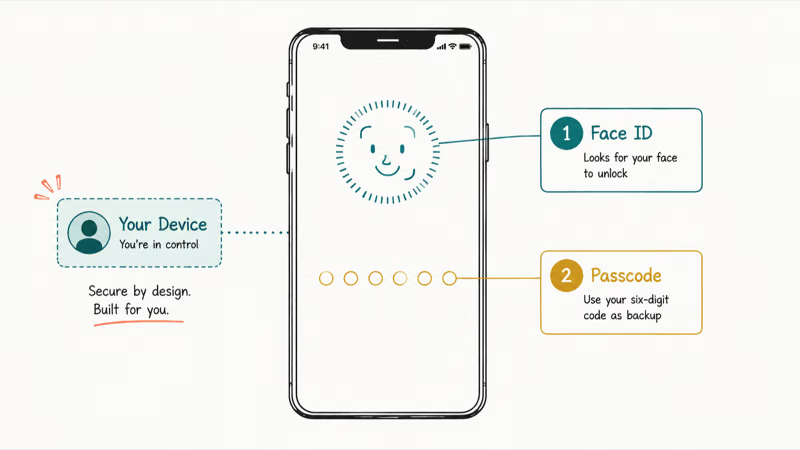
- Six-digit passcode – The default since iOS 9, replacing the older four-digit code that was easier to brute-force.
- Face ID – A 30,000-dot dot projector maps your face, with Apple stating that the false-match rate is roughly 1 in 1,000,000.
- iCloud Activation Lock – Even after a full erase, the device asks for your Apple ID before it will set up.
Apple’s guide for a forgotten or disabled iPhone confirms that 10 wrong passcode entries lock you out, after which the phone must be erased through iTunes, Finder, or a wipe from iCloud Find My. That single rule shapes every method below. There is no magic backdoor for an iPhone whose owner forgot the passcode, only different ways to wipe and start fresh while keeping whatever you backed up to iCloud or a computer earlier.
#When Do You Need to Unlock iPhone X Without the Passcode?
Common scenarios. A forgotten code after a long vacation. Ten wrong attempts that triggered the iPhone is disabled, forgot passcode lockout. A child’s iPhone that needs supervised access.
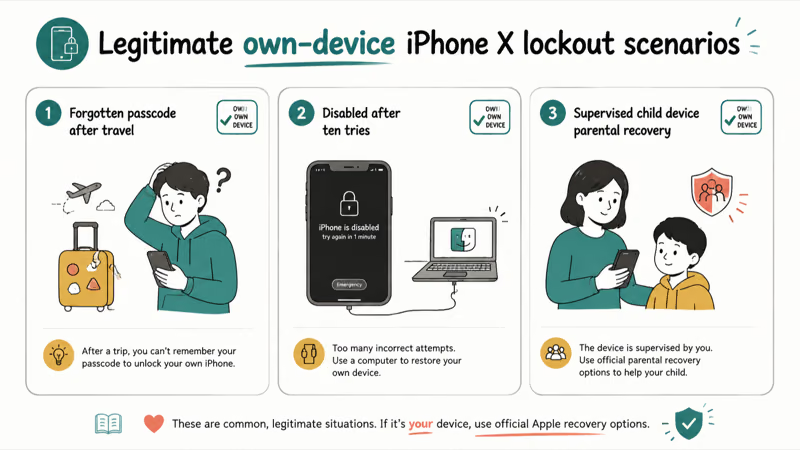
- Forgotten passcode – The most common reason, and the one all five methods below address.
- Disabled after 10 wrong attempts – The Recovery Mode path is the only fix Apple itself recommends here.
- Malfunctioning Side button or Face ID hardware – You may need Recovery Mode to bypass.
- Software stuck at lock screen – Force Restart should be the first attempt before anything destructive.
- Used iPhone with prior owner’s lock – You’ll also need the previous owner’s iCloud credentials to remove Activation Lock after a wipe.
- Parental access to a child’s iPhone – Apple’s Family Sharing handles this without unlock workarounds.
If your situation maps to any of the above, the methods below will help you regain access to your own iPhone X. Don’t attempt these on someone else’s device without explicit permission, since bypassing a passcode you’re not authorized to remove can violate the Computer Fraud and Abuse Act in the United States.
#Method 1: Using Siri Commands to Bypass Lock Screen
Apple’s Siri voice assistant provides one way to interact with certain iPhone features without unlocking the device. Here’s the general process:
-
Press and hold either volume button or the Side button to activate Siri.
-
Once Siri is listening, make commands like “Read my notifications” or “Send a text to Mom.”
-
Siri will complete these tasks through the phone’s external speaker without unlocking the screen.
While limited, this approach grants access to some iPhone capabilities without entering the passcode. And best of all, it doesn’t modify or erase any data.
#What You Can Do with Siri When iPhone Is Locked:
-
Read/send texts
-
Make phone calls
-
Create calendar events
-
Set alarms
-
Check weather, stocks
-
Play music
-
Search the web
Test it on your locked screen first. Siri lockdown rules change with every iOS release.
So before fully relying on this method, test it to confirm Siri responds on your locked screen. If not, move onto other options covered next.
#Method 2: Force Restart Your iPhone
A force restart is the safest first move when the iPhone X is frozen at the lock screen instead of asking for a passcode. It does not delete data and finishes in under a minute. A phone stuck after a botched iOS update will often boot clean and accept the correct passcode again once the restart completes.
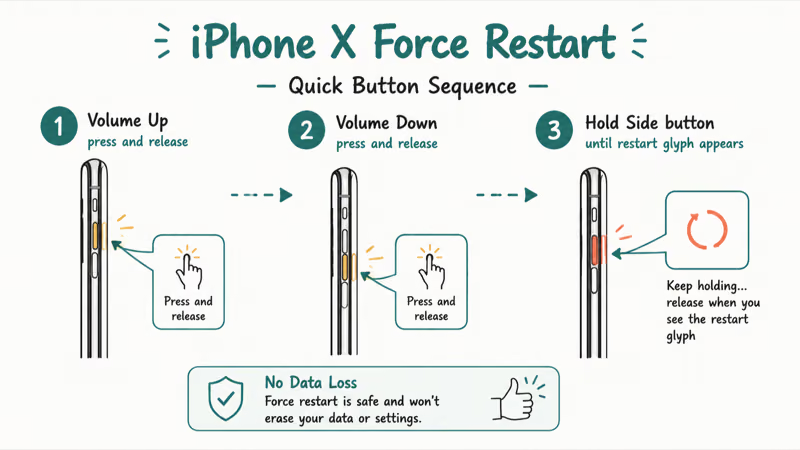
Sequence for iPhone X and newer:
- Press and quickly release Volume Up.
- Immediately press and quickly release Volume Down.
- Hold the Side button until you see the Apple logo.
For iPhone 7 and 7 Plus, hold the Side and Volume Down buttons together for at least 10 seconds. For iPhone 6s and earlier, the same combo replaces Volume Down with the Home button.
If you still see the lock screen with no input field after the restart, the issue is the passcode itself — move to Method 3 or one of the unlocker tools below.
#Method 3: Unlock with Recovery Mode in iTunes or Finder
Recovery Mode is the official Apple path for a forgotten passcode. According to Apple’s “If you forgot your iPhone passcode” support article, this is the only Apple-sanctioned method, and it erases everything on the device. macOS Catalina and newer use Finder; older macOS and Windows use iTunes.
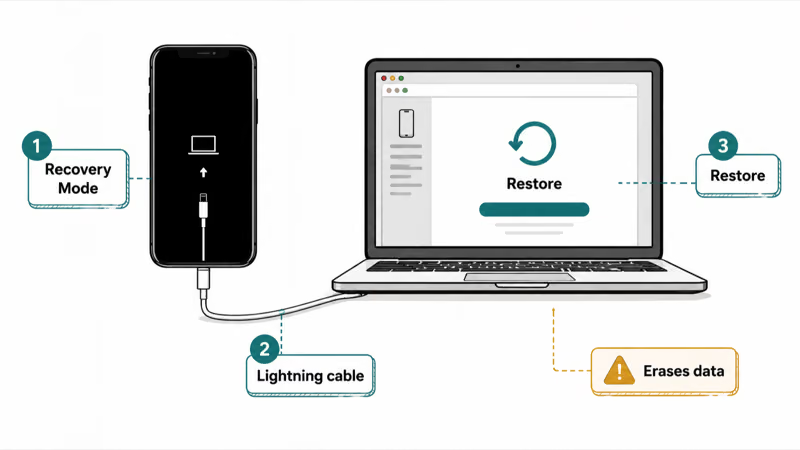
You’ll need a computer (Mac or Windows PC), a Lightning-to-USB cable, and a stable internet connection. Apple recommends not interrupting the download. If it stalls past 15 minutes, the iPhone exits Recovery Mode and you start over. A wired Ethernet connection is safer than shared hotel WiFi here, since a single dropped chunk during the firmware download can cost you another 15 minutes of waiting.
- Install or update iTunes on Windows. On macOS Catalina+, just open Finder.
- Connect the iPhone X to the computer with the cable.
- Force the iPhone into Recovery Mode: Volume Up → Volume Down → hold the Side button until the “Connect to Computer” screen appears.
- The computer alerts you with “There is a problem with the iPhone that requires it to be updated or restored.” Click Restore, not Update.
- The download usually finishes in 5 to 15 minutes on a 100 Mbps connection. When it ends, the iPhone restarts with no passcode and no data.
- Set the phone up as a new device, or restore from your last iCloud or local backup if you have one.
Trade-off: total data loss for anything not already backed up. A fresh iCloud backup made before the wipe keeps everything restorable.
#Method 4: Remove Passcode with iToolab UnlockGo
Paid unlocker tools such as iToolab UnlockGo wrap Apple’s official Recovery Mode restore in a friendlier UI and add Screen Time passcode, MDM, and Apple ID removal flows that the bundled Apple tools won’t expose. The data outcome is identical to Method 3, a clean factory device, but the workflow is one click instead of six manual steps.
Some links on this page are affiliate links, which means fone.tips may earn a commission at no extra cost to you.
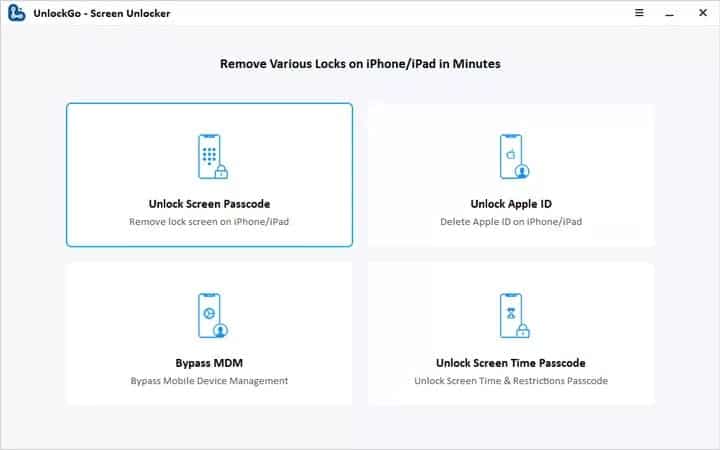
UnlockGo runs on Windows and macOS. The tool downloads the matching iOS firmware bundle, then pushes it to the device in Recovery Mode, so the total time is mostly your download speed plus a few minutes for the unlock itself.
- Download, install, and launch iToolab UnlockGo on your Mac or Windows PC.
- Connect the locked iPhone X with a Lightning cable and choose Unlock Screen Passcode.
- UnlockGo auto-detects the firmware version. Confirm and let it download.
- Click Start Unlock. The tool puts the device in Recovery Mode and pushes the firmware.
- When the iPhone restarts, set up a fresh passcode or sign back into iCloud.
Be honest about what you’re buying. UnlockGo can’t keep your data on a locked iPhone X. The secure enclave forbids it.
#Method 5: Unlock with Tenorshare 4uKey
Tenorshare 4uKey is the most-cited alternative to UnlockGo. The firm states that 4uKey works with iPhone 4 through iPhone 15 and iOS 17, so the iPhone X is well within its supported range.
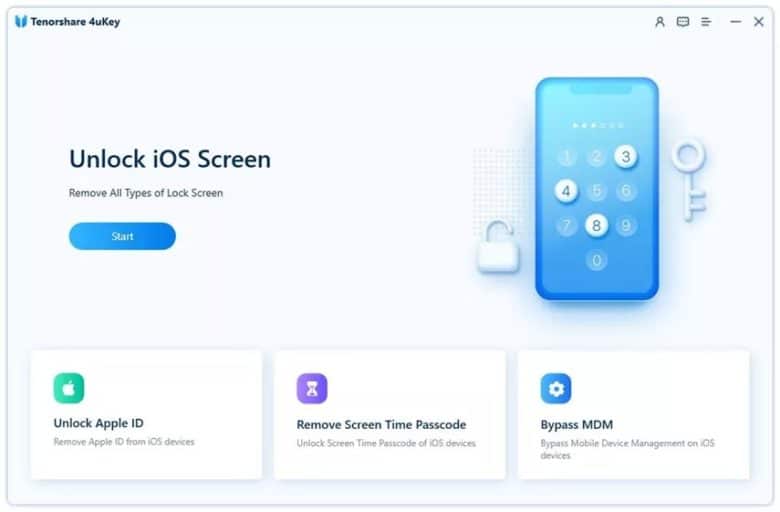
4uKey runs the same Recovery-Mode-plus-firmware flow as UnlockGo. The interface adds a Screen Time passcode reset option that Apple’s bundled tools won’t expose.
- Download and install 4uKey on your Mac or Windows PC.
- Open the app and connect the iPhone X with a USB cable.
- Let 4uKey download the firmware file for your specific iPhone model.
- Click Remove Lock Screen. The phone restarts into a clean factory state.
Same wipe caveat as Method 4. A recent iCloud backup makes the loss minimal.
#Method 6: Erase Remotely With Find My on iCloud.com
If Find My iPhone was on before the lockout, you can wipe the passcode from any browser without touching a computer cable. Sign in at iCloud.com with the Apple ID used on the locked phone, open Find My, pick the device, and choose Erase This Device. The command lands over Wi-Fi or cellular, the phone resets, and you restore from your latest iCloud backup during setup.
The one hard requirement is connectivity. A phone in airplane mode or with no signal never receives the erase command, and Recovery Mode becomes the fallback.
#Do These Steps Work on Newer iPhones?
Yes. Every Face ID iPhone from the X through the iPhone 15 uses the same button sequence for force restart and Recovery Mode: press and release Volume Up, press and release Volume Down, then hold the Side button. On Windows 11, Apple’s newer Apple Devices app replaces iTunes for the restore step; Finder handles it on macOS Catalina and later.
Released the Side button too early? The phone boots back to the lock screen; just repeat the trigger. If it wedges mid-restore, our iPhone stuck in recovery mode walkthrough covers the exit and retry sequence, including the cable and USB-port swaps that clear errors 4013 and 4014 on most machines.
One expectation to set: none of these paths preserve unsynced data. Apple’s iPhone security documentation explains that the passcode feeds the encryption key derivation, so removing it without erasing would break the security model the phone is built on.
#Bottom Line
Start with Method 3 (Recovery Mode in Finder or iTunes). It’s Apple-sanctioned, free, and produces the cleanest possible device. Use Force Restart only if the screen is frozen instead of asking for a passcode.
Pay for UnlockGo or 4uKey (linked in Methods 4 and 5) when you also need to remove an Apple ID or a Screen Time passcode that the bundled Apple tools can’t touch. They run the same Recovery Mode restore underneath, but expose more endpoints in their UI. Skip Siri tricks entirely on any iPhone running iOS 12 or newer, since the lock-screen interaction surface has been steadily trimmed in every major iOS release.
For someone else’s iPhone, stop. Hand the device back and point the owner to Apple’s iCloud “Find My” erase flow , it removes the passcode without requiring you to bypass anything.
iPhone tips & tricks
#Frequently Asked Questions
Can I unlock my iPhone X without losing data?
No. Every method wipes the device, since Apple’s secure enclave blocks third-party data reads on a locked iPhone.
How long does Recovery Mode restore take?
Plan for 15 to 30 minutes end-to-end. The firmware download is usually 5 to 15 minutes on a 100 Mbps connection. The wipe and reinstall on the device side takes another 5 to 10 minutes. Restoring a backup afterward depends on how much data you stored; a 50 GB iCloud restore can take an hour on a moderate connection.
What if I can’t remember my Apple ID password?
Start at iforgot.apple.com. With a recovery contact or recovery key, the reset finishes in minutes.
Is it legal to unlock an iPhone without the owner’s consent?
In the United States, bypassing a device passcode you are not authorized to remove can violate the Computer Fraud and Abuse Act. Parents managing a minor’s device, IT admins on company-owned phones, and legal custodians acting under court order are the typical exceptions. When in doubt, get written permission.
Why does Siri no longer bypass the lock screen on newer iOS versions?
Apple closes Siri bypasses fast. By iOS 17, the lock screen only accepts weather, alarms, and similar non-personal queries.
Will any of these methods remove iCloud Activation Lock?
No. Activation Lock is tied to your Apple ID and survives every wipe. Once the iPhone X is restored, it still asks for the original Apple ID before it lets you finish setup. If you bought a second-hand iPhone, ask the seller to remove it from their iCloud account before you accept the device.
What should I do right after I regain access to my iPhone X?
Set a fresh six-digit passcode and re-enable Face ID immediately. Turn on iCloud Backup before you do anything else with the device. The next lock-out then costs you at most one day of new texts and photos rather than years. By the way, you can also unlock LG phones using a similar process if you have an old Android device that needs reset.

How to Transfer Data to a New iPhone Without iCloud
Move everything to your new iPhone without iCloud: Quick Start device-to-device transfer, wired migration, and encrypted Finder or iTunes backups.
Best Wireless Earbuds for iPhone in 2026: USB-C Era Picks
Best wireless earbuds for iPhone in 2026, comparing AirPods Pro 3, Sony WF-1000XM6, Bose QC Ultra, and Anker Liberty 4 NC on the USB-C iPhone lineup.
iPhone Keyboard Lag? 7 Proven Fixes for iOS 26 (2026)
Fix iPhone keyboard lag with 7 proven fixes for iOS 26. Covers restart, storage, predictive text, third-party keyboards, and dictionary reset.
How to Block Porn on an iPhone: A Guide for Parents
Learn how to block porn on iPhone using Screen Time, DNS filtering, and safe browsers. Step-by-step guide for parents to protect kids' devices.