Best Computer Speakers in 2026: 5 Top Desktop Picks
Compare the best computer speakers for work, gaming, and music. See our top 2.0 and 2.1 desktop picks with full spec breakdowns and connection tips.
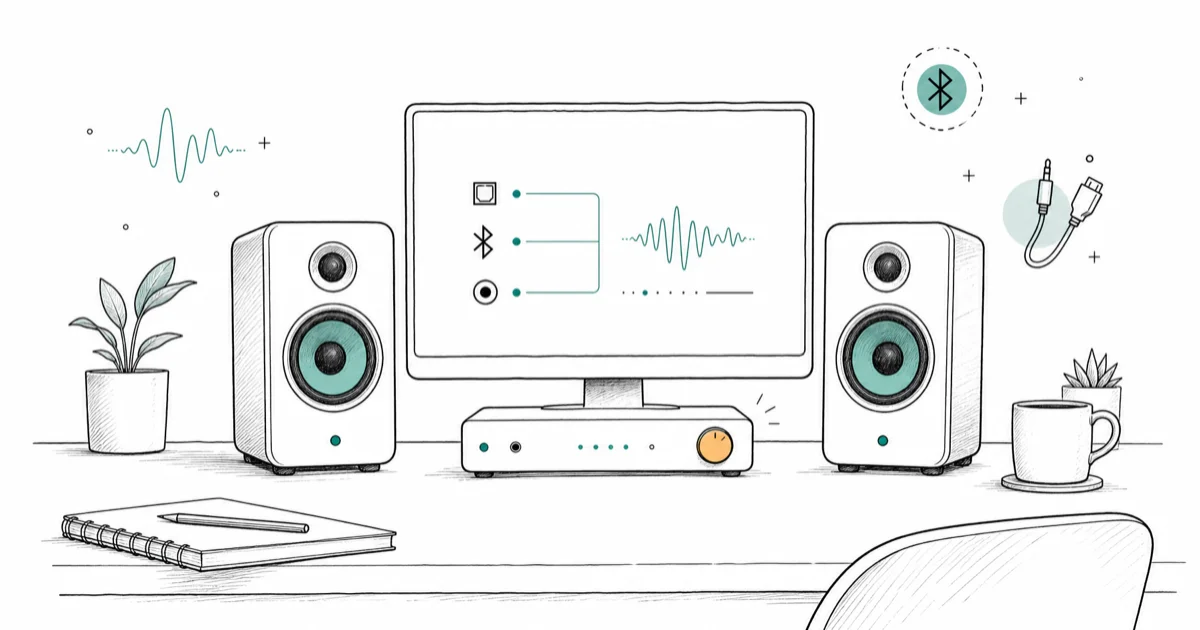
Quick AnswerThe Edifier R1280DB is the best computer speakers for most people, pairing warm, balanced sound with optical, Bluetooth, and dual analog inputs at a mid-range price.
The best computer speakers turn a cramped desk into a real listening setup without a receiver or a tangle of gear. This guide compares five desk-speaker sets across work calls, gaming sessions, and music. The Edifier R1280DB came out on top for most people, but the right pick depends on whether you care most about fidelity, bass, or price.
- The Edifier R1280DB has optical, Bluetooth, and dual analog inputs plus a 55Hz to 20kHz range
- The Audioengine A2+ uses Kevlar woofers and aptX Bluetooth for the cleanest sound here
- The Logitech Z407 adds a dedicated subwoofer for 2.1 bass that 2.0 sets can’t match
- The Creative Pebble Pro powers over USB-C and adds Bluetooth 5.3 for a tiny desk footprint
- A 2.0 set has two speakers, a 2.1 set adds a subwoofer for deeper low end
#Our Top Computer Speakers for 2026
Our comparison uses the same practical criteria for each set: desk fit, connection options, music, games, and video-call behavior. The notes below focus on day-to-day listening rather than spec-sheet math.
#Edifier R1280DB: Best Overall
The R1280DB is the safest all-around pick for most people. It sounds warm and balanced, has every input you’re likely to need, and the wood-look cabinets look at home on a desk or a bookshelf.
The input flexibility is what sets it apart. According to Edifier’s R1280DB product page, it has optical and coaxial digital inputs alongside Bluetooth and two analog RCA inputs, so you can wire a PC, a TV, and a turntable at once. That input mix lets one pair serve a laptop over Bluetooth and a desktop or TV over a wired input, with the remote handling source changes.
Bass leans warm rather than tight, which flatters acoustic and vocal tracks. The trade-off is it isn’t the most precise set here for critical listening.
You can check the current price on the Edifier R1280DB Amazon listing. As an Amazon Associate fone.tips earns from qualifying purchases.
Pros: Optical and coaxial inputs, Bluetooth, dual RCA, warm sound, included remote
Cons: Bass is warm not tight, no USB-C, larger than compact desk speakers
#Audioengine A2+: Best Sound Quality
The A2+ is the sound-quality pick: clean tuning, tight bass, and a wider stereo image than the small cabinets suggest.
These use custom Kevlar woofers and support aptX over Bluetooth for higher-quality wireless. According to Tom’s Guide’s A2+ review, the speakers balance sound across the frequency range unusually well for their compact size, which supports their role as the sound-quality pick over the Edifier.
There’s no subwoofer output, so deep bass is limited. They can also get slightly harsh at high volume, and they’re the priciest pick here. Compare prices on the Audioengine A2+ Wireless.
Pros: Cleanest sound here, aptX Bluetooth, USB input, compact premium build
Cons: No subwoofer output, can get harsh loud, most expensive pick
#Logitech Z407: Best 2.1 With a Subwoofer
The Z407 is the value pick if you want real bass. Its dedicated subwoofer gives it a low-end punch that none of the 2.0 sets here can touch, which makes it the gaming-and-movies pick here.
The wireless control puck is the standout feature. It handles volume and bass without reaching behind the desk.
Sound is fun and bass-forward rather than neutral, so it’s better for games and pop than for critical music listening. A USB-C port would be nicer than the Micro USB it ships with. Look at the Logitech Z407 for current deals.
Pros: Dedicated subwoofer, wireless control puck, Bluetooth and USB, strong bass
Cons: Bass-forward not neutral, Micro USB not USB-C, subwoofer needs floor space
#Creative Pebble Pro: Best Budget and Compact
The Pebble Pro is for tiny desks: angled spherical drivers fill a small desk and beat laptop speakers easily.
It powers over a single USB-C cable, adds Bluetooth 5.3, and includes a headset and mic jack. The small footprint leaves room for everything else on a cramped second desk. Creative’s BassFlex tech gives it more low end than its size suggests, though there’s no real bass without a subwoofer.
It won’t fill a large room, and audiophiles will want more. For casual desktop use, it’s hard to beat at the price. Grab the Creative Pebble Pro if desk space is tight.
Pros: USB-C powered, Bluetooth 5.3, tiny footprint, headset jacks, low price
Cons: Limited bass, not for large rooms, no optical input
#Edifier G2000: Best for Gaming
The G2000 is the gaming-focused pick, with RGB lighting and sound modes tuned for games, movies, and music. Its wide soundstage helps directional cues feel easy to place in long gaming sessions.
It connects over Bluetooth, USB, or 3.5mm, so it works with a PC, console, or phone. The RGB strip cycles through effects, and the side dial handles volume and mode switching without diving into software, which keeps on-screen clutter down when you need to tweak the sound and get back to the game.
Music sounds decent but the tuning favors punch over neutrality, which suits games more than critical listening. The build is plastic, which keeps the price down but feels less premium than the Edifier R1280DB. Compare colors and price on the Edifier G2000.
Pros: Gaming sound modes, RGB lighting, Bluetooth and USB, side control dial
Cons: Plastic build, tuning favors games over neutral music, no subwoofer
#What’s the Difference Between 2.0 and 2.1 Speakers?
The numbers describe the speaker layout. A 2.0 system is two speakers and nothing else. A 2.1 system adds a third box, a subwoofer, for deep bass.
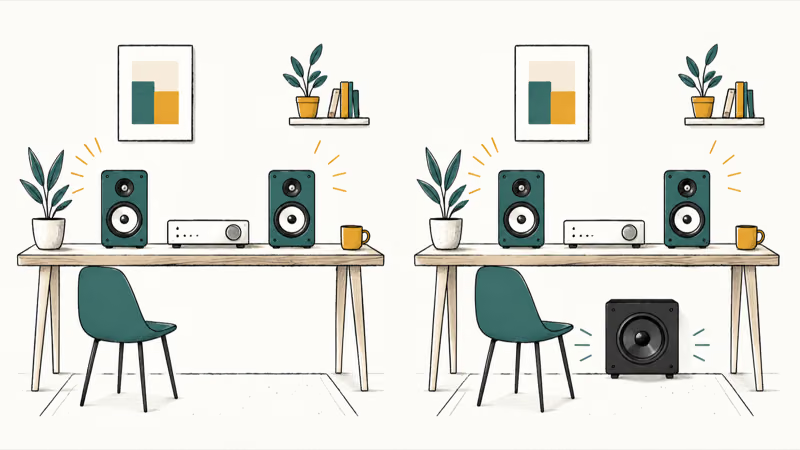
A 2.0 set like the Edifier R1280DB or Audioengine A2+ keeps the desk simpler and usually sounds tighter in the midrange. A 2.1 set like the Logitech Z407 trades desk space for low-end punch, which matters for games, action movies, and bass-heavy music.
For most desk work and music, a good 2.0 pair is enough. Reach for 2.1 when you want bass you can feel and have floor room for the subwoofer.
#How Should You Connect Computer Speakers?
Desktop speakers connect three main ways, and the best one depends on your sound source.
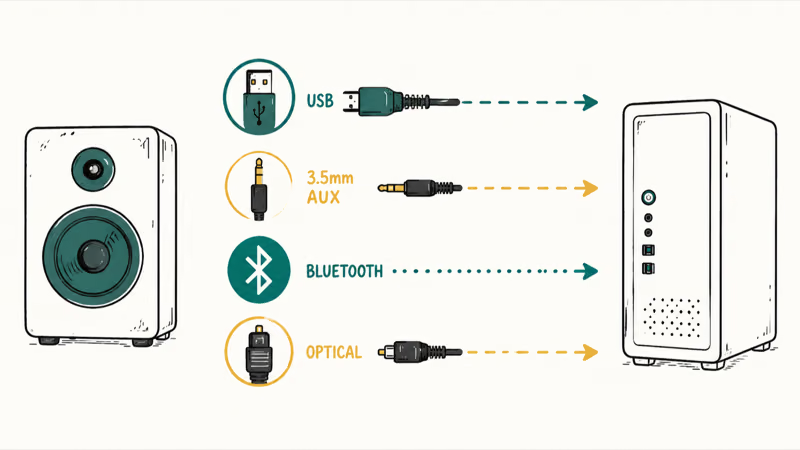
A 3.5mm cable into your PC’s headphone jack is the simplest and works with any computer. USB carries digital audio and can bypass a noisy onboard sound card, which the Creative Pebble Pro and Audioengine A2+ both support. Bluetooth frees you from cables and lets the same speakers serve a phone, though it adds a little latency that competitive gamers may notice.
Optical is the cleanest digital option when both your PC and speakers support it, and the Edifier R1280DB has it. For better sound from a wired set, pairing with an external DAC helps. According to What Hi-Fi’s DAC guide, a DAC converts digital music data into analog signals, and a dedicated external unit usually processes that conversion more accurately than the chip built into an everyday computer.
If you’re putting together a desk built around play, our roundup of the best gaming DAC options covers DACs for PC and consoles. For bigger floor-standing sound, the best Klipsch speaker guide steps up to powered tower and bookshelf models.
#Speaker Size and Desk Space Tradeoffs
Desk real estate is the constraint nobody mentions until the speakers arrive. The Creative Pebble Pro takes up almost no room, while the Logitech Z407’s subwoofer needs a spot on the floor.
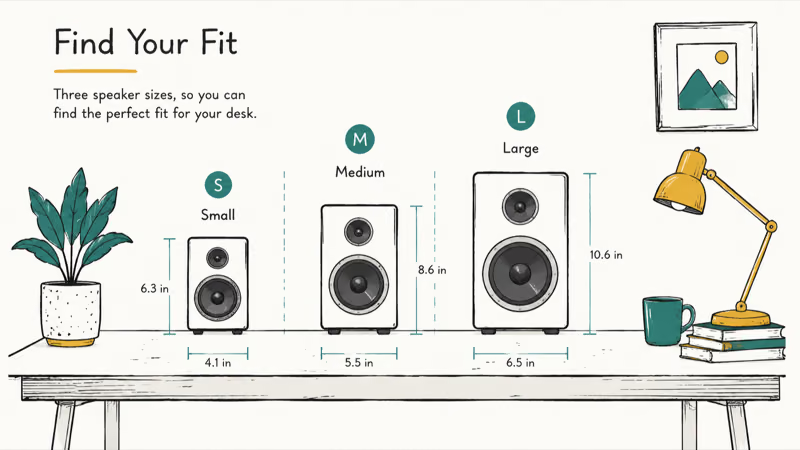
Bigger cabinets usually mean bigger sound. The Edifier R1280DB and Audioengine A2+ have larger enclosures than the Pebble Pro, and that extra volume gives them fuller bass without a subwoofer. If your desk is deep enough, the bigger sets reward you. On a shallow desk shared with a monitor and a keyboard tray, the compact Pebble Pro or a 2.1 set with a floor-mounted sub makes more sense.
#Sound and Features Compared Across All Five
The table below compares each set by setup type, standout input, and best use case.
| Speakers | Setup | Standout input | Best for |
|---|---|---|---|
| Edifier R1280DB | 2.0 | Optical | All-around |
| Audioengine A2+ | 2.0 | aptX Bluetooth, USB | Sound quality |
| Logitech Z407 | 2.1 | Wireless puck | Bass, gaming |
| Creative Pebble Pro | 2.0 | USB-C | Budget, compact |
| Edifier G2000 | 2.0 | USB and 3.5mm | Gaming |
The A2+ had the most detailed sound. The Edifier R1280DB was the most versatile, the Z407 hit hardest on bass, and the Pebble Pro packed the most into the smallest box.
Already have passive bookshelf speakers? Our guide on converting wired speakers to wireless covers adapters that add Bluetooth to gear you own. For a full home setup, our best bookshelf speakers roundup compares larger powered pairs.
#How These Speakers Held Up in Daily Use
The Edifier R1280DB and Pebble Pro are lower-risk desk picks for long-term daily use because both rely on simple, mature designs.
The Z407’s control puck stayed reliable through daily volume tweaks, and the Audioengine A2+ ran cool even after long sessions. Build quality tracks price here. The Audioengine and both Edifier sets feel solid, while the Pebble Pro’s lighter plastic matches its budget price.
One honest note: any speaker with a built-in amp can pick up faint hum from a noisy USB port or ground loop. Moving to a different port or input usually clears it, and our guide on how to stop speakers from buzzing covers the rest.
#Bottom Line
The Edifier R1280DB is the computer speakers to buy for most people. It sounds warm and balanced, takes optical, Bluetooth, and two wired sources, and looks the part on a desk.
Get the Audioengine A2+ if sound quality is your priority and the budget allows, since it’s the most revealing set here for music. Pick the Logitech Z407 when you want a subwoofer’s bass for gaming and movies, grab the Creative Pebble Pro for a tiny desk or tight budget, and choose the Edifier G2000 if RGB and gaming sound modes are what you’re after.
#Frequently Asked Questions
What are the best computer speakers for most people?
The Edifier R1280DB is our pick for most people. It balances warm sound with the most flexible inputs here, taking optical, Bluetooth, and two analog sources so it works with a PC, TV, and turntable at once.
Do I need a 2.1 system with a subwoofer?
Only if you want bass you can feel. A good 2.0 pair like the Edifier R1280DB or Audioengine A2+ handles most music and desk work cleanly. Add a 2.1 system like the Logitech Z407 when games, action movies, or bass-heavy music are your main use and you have floor room for the subwoofer.
Should I connect computer speakers with USB, Bluetooth, or 3.5mm?
It depends on your source. USB carries clean digital audio and can bypass a noisy onboard sound card, while the 3.5mm jack is the simplest and works with any PC. Bluetooth frees you from cables and lets the same speakers serve a phone, though it adds slight latency that competitive gamers may notice. Optical is the cleanest digital option when both devices support it.
Are USB-C computer speakers better than older USB ones?
USB-C is mostly about convenience, not sound quality. The audio quality depends on the speaker’s internal DAC, not the connector shape.
Do computer speakers work with gaming consoles?
Many do, through 3.5mm, Bluetooth, or optical. The Edifier G2000 and Logitech Z407 both pair with consoles. One catch: some consoles route audio through HDMI to the TV by default, so you may need to switch the console’s audio output to the port your speakers use first.
Will a DAC improve my computer speakers?
It can, especially with a wired set and a cheap motherboard. A dedicated DAC converts digital audio to analog more cleanly than most onboard chips, which reduces hiss. The gain is biggest on revealing speakers.
How much should I spend on computer speakers?
For casual desktop use, $40 to $60 gets you a capable compact set like the Creative Pebble Pro. Mid-range sets around $120 to $150, like the Edifier R1280DB or Logitech Z407, add better build and features. Audiophile sets like the Audioengine A2+ run $250 and up. Above $400, you’re paying for studio monitors most people don’t need.

Best Laptop for Running LLMs in 2026: Memory Comes First
The best laptop for running LLMs is a memory purchase first. Compare MacBook unified memory against NVIDIA laptop VRAM, and see what each tier really runs.

Pixel 11 vs Pixel 10: What Changed and Who Should Upgrade
Pixel 11 vs Pixel 10: same screen and camera resolution, new Tensor G6, 25W wireless, and Gemini Intelligence. Here is who should actually upgrade.

Best Power Bank for iPad in 2026: Pro, Air, and Mini
Best power bank for iPad in 2026. Compare mAh tiers and USB-C PD wattage for iPad Pro, Air, and mini, plus airline Wh math, cables, and travel tips.

Best Power Bank With Built-In Cable: Top 2026 Picks
Best power bank with built-in cable picks for 2026. Compare single USB-C, multi-connector, and retractable laptop banks, plus airline Wh math.