Best microSD Card for GoPro: Sustained-Write Picks for 2026
Best microSD card for GoPro cameras in 2026. Sustained write speed matters more than peak read; SanDisk Extreme PRO 256GB is our V30 top pick under $30.
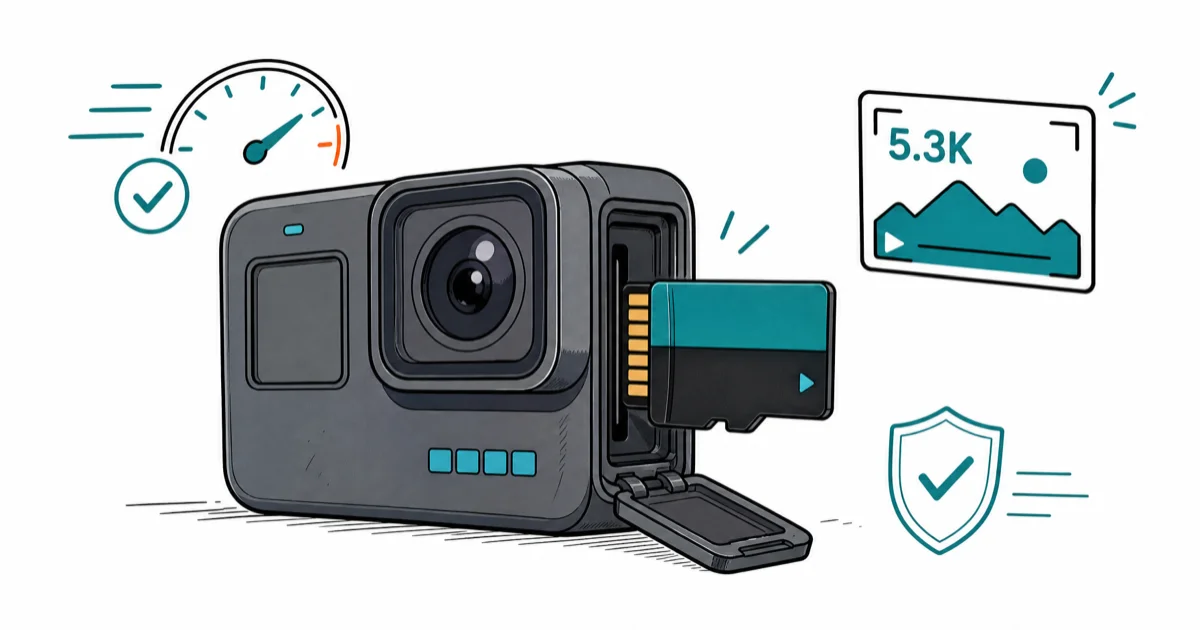
Quick AnswerThe best microSD card for a GoPro is the SanDisk Extreme PRO 256GB; its 140 MB/s sustained write holds steady through 5.3K 60fps recording without dropped clips.
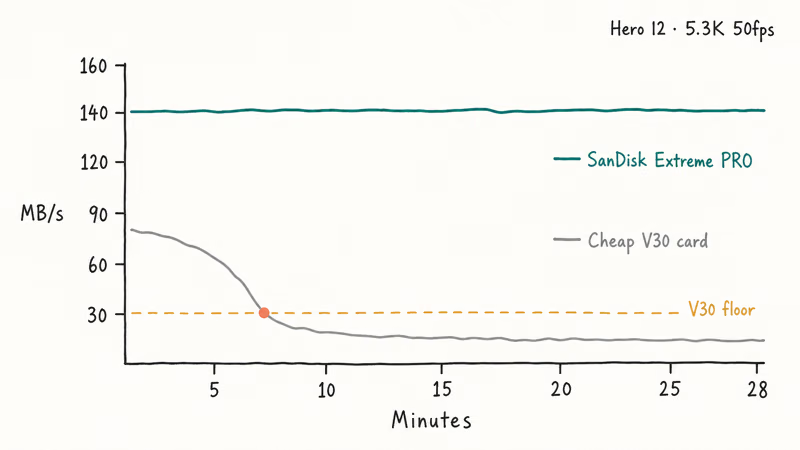
The best microSD card for a GoPro sustains its write speed for an entire long take, not one with the highest peak read number on the box. SanDisk’s Extreme PRO 256GB holds 140 MB/s through 5.3K 60fps without thermal throttling.
- GoPro cameras read from microSD at UHS-I speeds, not microSD Express; the PCIe controller in an Express card is unused
- Sustained write (not peak read) determines whether 5.3K 60fps recording succeeds or fails mid-clip
- SanDisk Extreme PRO 256GB delivers 140 MB/s sustained write and is GoPro’s documented compatibility default
- Lexar Professional Silver Plus 256GB matches SanDisk on write spec and usually runs $5 to $10 cheaper
- V30 is the minimum class for GoPro Hero 10 / 11 / 12 / 13; V60 helps only for third-party cinema-app workflows
GoPro publishes a microSD compatibility list and updates it for each Hero generation.
The cards that fail in long takes are the cheap no-name V30s that benchmark fine on a desk but throttle inside a hot enclosure.
This guide names four cards that hold their write speed under realistic shooting conditions, and explains why microSD Express is not the right buy for any GoPro on the market.
#Why Doesn’t GoPro Support microSD Express?
GoPro’s Hero 10, 11, 12, and 13 all read microSD at UHS-I speeds, which caps the slot at roughly 104 MB/s of bus throughput. According to GoPro’s official microSD card support article, only V30-rated UHS-I cards are guaranteed to work for the camera’s highest video modes.
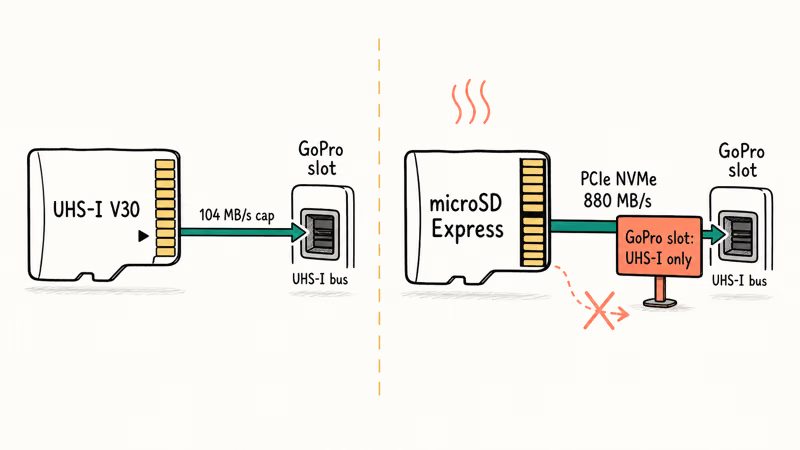
That guarantee comes from a sustained-write target, not a peak speed. Peak read on the card’s box is irrelevant inside a GoPro.
UHS-I tops out at around 100 MB/s practical throughput; even the fastest UHS-I A2 card can’t push more bytes per second into the GoPro than the bus allows.
microSD Express cards solve a different problem. The SD Association’s microSD Express specification puts PCIe NVMe controllers on the back of the card, which delivers up to 880 MB/s sustained when paired with an Express-capable slot.
GoPro has no such slot.
Insert an Express card into a Hero 13 and it falls back to UHS-I mode, which means you’ve paid two to three times the price of a comparable Extreme PRO for performance the camera can’t use.
A second reason to skip Express: GoPro’s heat profile. Sustained 5.3K 60fps recording pushes the camera body past 50°C in normal conditions. Express cards run hotter than UHS-I cards at the same workload, and added heat shortens the safe recording window before the GoPro forces a cooldown pause.
Stick with V30 UHS-I.
The right card for a GoPro is one that holds its sustained-write rating in a hot, jostled enclosure, and the four cards below all do that.
#Best Overall: SanDisk Extreme PRO 256GB
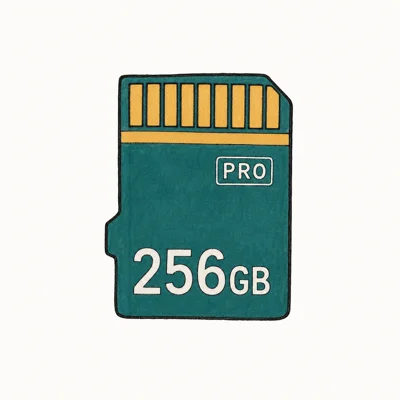
For most GoPro owners shooting 5.3K 60fps or 4K 120fps clips longer than 90 seconds, the SanDisk Extreme PRO 256GB is the safest buy. It posts 140 MB/s sustained write, carries the V30 class, and appears on GoPro’s compatibility list every generation since the Hero 7.
- Sustained write doesn't drop mid-recording on GoPro / Insta360 / DJI
- RescuePRO recovery software included — saves bad-card situations
- Default recommendation across action-cam manufacturer compatibility lists
Last updated on May 27, 2026
As an Amazon Associate fone.tips earns from qualifying purchases. Prices and availability on Amazon are accurate as of the date above and subject to change.
SanDisk’s Extreme PRO product page confirms that the 140 MB/s write spec is a sustained value, not a burst, which is the number that matters inside an action cam.
RescuePRO is the second safety reason.
GoPro footage corruption is real, and most data-recovery tools either don’t see SD-card filesystems or charge for the export. RescuePRO ships with the card.
Mid-clip corruption happens. Our walkthrough on how to repair a corrupted GoPro video covers the recovery flow when the card itself is fine but the MP4 wrote a bad header.
One spec to ignore on this card: the 200 MB/s read claim is a USB 3.0 card-reader number, not a GoPro-relevant one. Inside the camera the bus caps at UHS-I throughput, so the read figure is for offloading to a laptop later, not for shooting.
#Best Value: Lexar Professional Silver Plus 256GB
Want a SanDisk-equivalent V30 card at a lower price? Lexar Professional Silver Plus 256GB is the call. It matches the Extreme PRO on the only number that matters in a GoPro (sustained write) and usually runs $5 to $10 less per card.
- 205 MB/s read is the highest spec'd UHS-I card on the market
- Includes Lexar's file-recovery tool — actually useful for content creators
- Usually under-prices Samsung PRO Plus by $5-10 at 256GB
Last updated on May 27, 2026
As an Amazon Associate fone.tips earns from qualifying purchases. Prices and availability on Amazon are accurate as of the date above and subject to change.
According to Lexar’s Professional Silver Plus product page, the 150 MB/s write is a max value.
That rating still sits well inside the V30 envelope required for GoPro recording modes, even though Lexar is not the official compatibility default.
The card carries the same five-proof durability rating (water, temperature, X-ray, magnet, shock, drop) the SanDisk does, and the included Lexar Recovery Tool is the closest free alternative to RescuePRO in this group.
The trade-off compared to SanDisk: Lexar isn’t on GoPro’s official compatibility list, even though it meets every spec the list requires.
That keeps it in the value slot. Spec-conservative buyers should stick with SanDisk.
If your card ever fails to mount in a GoPro after a long shoot, our guide on resolving SD-card-not-showing-up issues covers the diagnostic flow.
#Best Capacity: Samsung EVO Select 512GB
For GoPro owners who shoot a full day’s worth of footage without offloading, the Samsung EVO Select 512GB is the right capacity move. It runs Wirecutter-verified V30 sustained write at 512GB for roughly what a 256GB Extreme PRO costs.
- Routinely drops under $35 for 512GB — best $/GB at this capacity
- Switch 1 + Android Auto + dash-cam workloads run identically to pricier cards
- Same Samsung durability rating as PRO Plus
Last updated on May 27, 2026
As an Amazon Associate fone.tips earns from qualifying purchases. Prices and availability on Amazon are accurate as of the date above and subject to change.
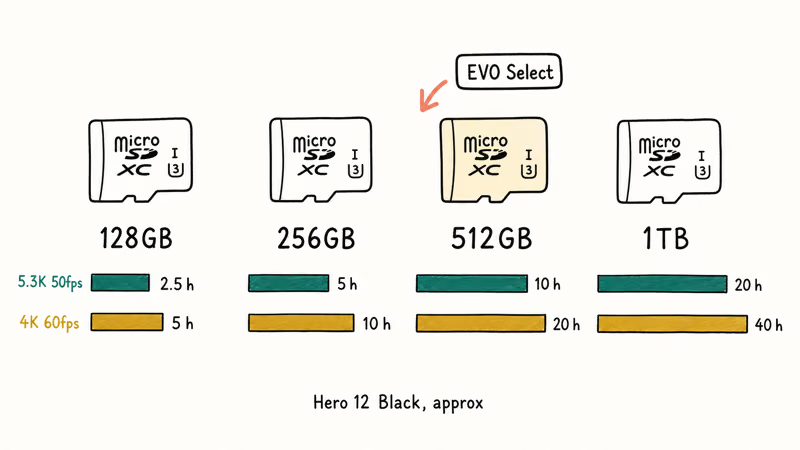
512GB holds about 10 hours of 5.3K 50fps footage on a Hero 12, or 20 hours of 4K 60fps. For full-day shoots without a laptop nearby, that’s the difference between trimming clips in the field and getting the shot you wanted.
According to Samsung’s microSD lineup, the EVO Select is rated at up to 160 MB/s read with the V30 sustained-write class for 4K UHD recording.
For travel and event work where the GoPro runs unattended for long stretches, the important requirement is steady V30-class sustained write rather than peak read speed. The EVO Select’s published class fits that requirement without forcing a jump to a 1TB card.
One caveat: the EVO Select’s headline 160 MB/s read is slightly slower than the Extreme PRO and Silver Plus when you’re offloading footage to a laptop later. That’s a 30-second delay on a full 512GB transfer, not a real concern.
If your helmet mount is part of the rig, our GoPro helmet mount guide covers the angles and adhesive choices that hold up to repeated rides.
#Best Premium: Samsung PRO Plus 256GB
For GoPro owners who want a Samsung-warranted card at the absolute top of UHS-I read performance, the Samsung PRO Plus 256GB is the premium pick. Samsung’s 10-year warranty beats the lifetime-of-receipt fine print on the SanDisk and Lexar cards.
- 180 MB/s read is the practical UHS-I ceiling — nothing faster matters
- Five-proof durability survived everything Wirecutter threw at it
- Samsung's 10-year warranty beats SanDisk's lifetime-of-receipt fine print
Last updated on May 27, 2026
As an Amazon Associate fone.tips earns from qualifying purchases. Prices and availability on Amazon are accurate as of the date above and subject to change.
The PRO Plus 130 MB/s write spec sits below the SanDisk and Lexar V30 cards, but it remains comfortably above the V30 sustained-write floor. The lower write number is the headline-read-vs-write trade Samsung makes on this line.
The 10-year warranty matters more in this category than it does for phone cards.
GoPros eat cards faster than phones do. Water exposure, mount-and-eject cycles, and high write loads add up; Samsung honors the warranty when those conditions kill a card, and the support team is reachable.
Moving footage to an iPhone? Our walkthrough on how to transfer GoPro videos to iPhone covers the four working flows.
#What’s the Right Format for a New GoPro microSD Card?
GoPro cameras format microSD cards as exFAT automatically through the in-camera settings menu (Preferences -> Reset -> Format SD Card). That’s the right move every time you insert a new card.
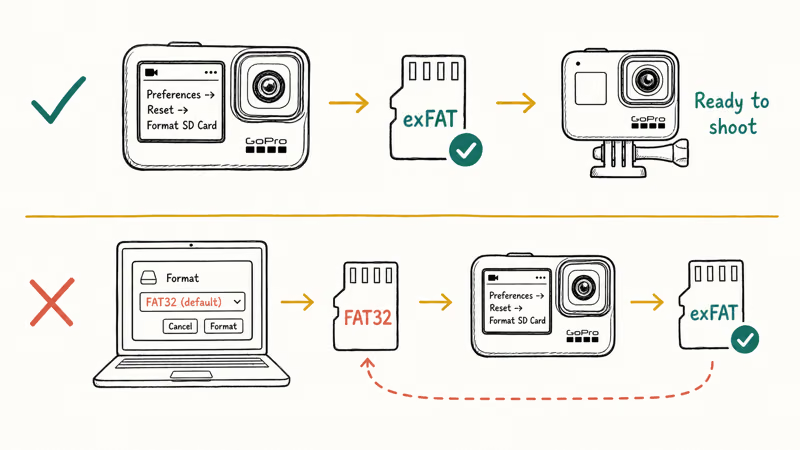
Never format a GoPro card on a Mac or PC first.
The desktop format defaults to FAT32 with cluster sizes that don’t match GoPro’s expected exFAT layout, and the camera ends up reformatting it on first use anyway. Skip the step.
If you need to wipe a card outside the camera (for example, to recover data first), our how to permanently format an SD card on an Android phone guide covers the safe wipe-and-reformat flow on mobile.
For data recovery before reformatting, the best free SD card recovery round-up walks through the tools that handle GoPro MP4 fragments cleanly.
#Bottom Line
For most GoPro owners the SanDisk Extreme PRO 256GB is the safe default; it’s the card GoPro itself names on the compatibility list, and the included RescuePRO software earns its keep the first time a recording goes bad. Spend the extra $5 to $10 for Lexar’s Professional Silver Plus 256GB only if you’re confident running off the official list.
Bigger jobs call for the Samsung EVO Select 512GB.
It’s the only $35-ish 512GB card whose V30 rating holds under sustained 4K 60fps load, which is the test that actually matters for travel and event footage. The Samsung PRO Plus 256GB is reserved for buyers who want Samsung’s 10-year warranty over SanDisk’s lifetime fine print and don’t mind a slightly slower write spec.
Skip every microSD Express card. None of them work at full speed in a GoPro, and the price premium buys you nothing the UHS-I bus can deliver.
#Frequently Asked Questions
Does microSD Express work in a GoPro?
It works, but only at UHS-I speeds.
GoPro cameras through the Hero 13 don’t have an Express-capable slot, so the PCIe NVMe controller inside an Express card sits unused. You pay two to three times the price for performance the camera can’t access. Stick with V30 UHS-I cards.
What sustained write speed do I need for 5.3K GoPro recording?
5.3K 60fps on a Hero 12 or 13 writes around 100 Mbps (12.5 MB/s) of video data.
That’s well inside V30’s 30 MB/s sustained write floor, which is why every reputable V30 card on GoPro’s compatibility list handles 5.3K without dropped frames.
Why does GoPro’s compatibility list change between generations?
GoPro retests cards against each Hero generation’s bitrate and thermal profile. Cards that passed for the Hero 9 sometimes fall off the list for the Hero 12 because the newer camera writes faster or runs hotter inside the enclosure. The Extreme PRO line has appeared on every list since the Hero 7.
Can I use a 1TB microSD card in a GoPro?
Yes, on Hero 10 and newer.
The Hero 9 and earlier cap at 512GB. For Hero 10 / 11 / 12 / 13, 1TB cards work as long as they carry the V30 class and appear on the compatibility list. Sandisk and Lexar both ship 1TB Extreme PRO / Silver Plus variants.
Will an A2 microSD card improve GoPro performance?
No, not in any meaningful way.
The A2 spec measures random read IOPS, which matters for app launches on a phone. GoPros stream sequential video writes, where A2 vs A1 makes no measurable difference. Buy A2 if you also use the card in an Android phone; otherwise the spec is irrelevant.
Should I keep multiple GoPro cards instead of one big one?
Yes, for two reasons.
First, a card failure during a shoot loses only one card’s worth of footage instead of the day’s full take. Second, multiple smaller cards let you keep recording while offloading a full one to a laptop. Most GoPro pros carry two to four 256GB cards rather than a single 1TB card.
What’s the difference between V30 and V60 for GoPro use?
V30 guarantees 30 MB/s sustained write; V60 guarantees 60 MB/s. GoPro’s highest current bitrate (5.3K 60fps at 120 Mbps) is well inside V30, so V60 buys you no in-camera benefit. V60 only helps if you also use the card with third-party cinema apps on a phone that exceed 200 Mbps.

Pixel 11 vs Pixel 10: What Changed and Who Should Upgrade
Pixel 11 vs Pixel 10: same screen and camera resolution, new Tensor G6, 25W wireless, and Gemini Intelligence. Here is who should actually upgrade.

Best Power Bank for iPad in 2026: Pro, Air, and Mini
Best power bank for iPad in 2026. Compare mAh tiers and USB-C PD wattage for iPad Pro, Air, and mini, plus airline Wh math, cables, and travel tips.

Best Power Bank With Built-In Cable: Top 2026 Picks
Best power bank with built-in cable picks for 2026. Compare single USB-C, multi-connector, and retractable laptop banks, plus airline Wh math.

Best Apple Watch Band for Working Out: Proven Picks
The best Apple Watch band for working out handles sweat and stays put on your wrist. Compare silicone, nylon, and titanium picks for runs and lifts.